
Last updated July 2026
Opticks is a traffic quality and click fraud prevention platform that helps marketers identify invalid traffic across paid, organic, referral, direct, and emerging AI-driven sources. I tested it on MarketingWithDave.com to see how useful the data and insights were in practice.
The short version: Opticks gave me more visibility into traffic quality than I expected. The biggest value was not simply seeing a fraud percentage. It was being able to break that traffic down by source, channel, and behavior so I could better understand where my website traffic was coming from and how much of it deserved a closer look.
Affiliate disclosure: If you purchase through my link, I may earn a small commission at no additional cost to you. I only share tools I have used myself.
The 30-Second Decision
Opticks is a strong fit for marketers, agencies, and business owners who want better visibility into traffic quality. If you are spending money on paid search or paid social, it can help you identify patterns that may be wasting budget. If you care about analytics accuracy, it can also help you understand how much questionable traffic may be influencing your reporting.
Opticks adds a traffic quality layer to your analytics and advertising data, helping you better understand which visits appear legitimate, suspicious, or potentially invalid.
My Scorecard

Opticks earned high marks for feature depth, value, and overall maturity. Compared to many AppSumo launches that still feel early or experimental, this felt like a substantially more developed platform with meaningful analytics and investigation capabilities already in place.
The main reason this was not a perfect score comes down to onboarding and interpretation. Some workflows, classifications, and filtering options took real effort to fully understand, and additional getting started guidance or educational resources would make the platform more approachable for new users.
Why I Wanted to Test Opticks
I have tested fraud prevention tools before, and one of the hard questions in this category is whether the ad platforms are already handling the problem. Google, for example, has its own invalid click detection and may issue credits when it identifies invalid activity. That matters.
But that still leaves a practical gap for advertisers. Even if some invalid activity is filtered or refunded later, marketers are often left with limited visibility into what happened, which channels were affected, and whether certain traffic sources deserve closer inspection.
That is what made Opticks interesting to me. I was less interested in a scary bot story and more interested in whether the tool could help me understand my own traffic better.
My Setup Experience
Setup was straightforward. Opticks can be installed manually or through Google Tag Manager, and I used Google Tag Manager because that fits how I manage most marketing and analytics tags.
Once installed, the platform began collecting traffic data quickly. I did not feel like I had to fight the setup process before getting value from the tool. That matters because traffic quality software can easily become something people buy, install halfway, and never fully use.
Note: Screenshots were captured during different stages of testing and may represent different date ranges. They are included to illustrate platform capabilities rather than compare identical datasets.

What Surprised Me Most
The first number that caught my attention was not tied to a paid campaign. It was the overall traffic quality view. In the screenshot I captured, Opticks showed 65.73% legitimate traffic and 31% invalid traffic.
That does not automatically mean 31% of my business opportunity was fake, and it does not mean every invalid visit requires immediate action. But it does change how you think about analytics. Even on a website that is not running large paid campaigns at the moment, there can still be a meaningful amount of traffic noise.
This is where Opticks became more useful than I expected. It was not just telling me that invalid traffic exists. It was helping me see where that traffic was showing up.
My Three Favorite Opticks Features
1. Traffic source visibility
The most useful part of Opticks for me was the ability to look at invalid traffic by source and channel. In one view, I could see direct traffic, organic traffic, AI-related traffic, social sources, and other providers broken out separately.

This is also where judgment matters. A channel with one or two visits can show a dramatic percentage, but that does not mean you should immediately draw a big conclusion. A small sample size can make a number look more important than it is.
That is one of the things I appreciated about using Opticks. It gave me more visibility, but it also reminded me not to get emotional about every red number. The real value is in spotting patterns, then checking whether the volume and context support action.
2. Provider and channel filtering
Opticks is not limited to one advertising platform. The provider filters include common paid media platforms, organic search, referral traffic, social networks, and newer AI-related sources like ChatGPT, Google Gemini, and Microsoft Copilot.
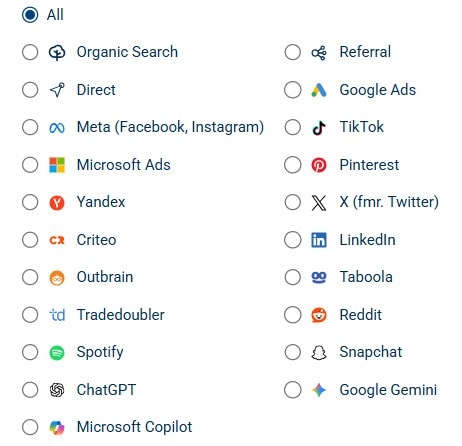
Beyond the high-level traffic summaries, Opticks also made it easy to investigate traffic patterns using a wide range of dimensions and filters. I could segment traffic by campaign, keyword, placement, traffic channel, referring source, and other variables depending on what I wanted to analyze.
That matters because traffic quality is no longer just a Google Ads problem. Marketers now get traffic from search, social, referral websites, AI tools, content platforms, and direct visits that may not be as clean as they appear in standard analytics reporting.
Seeing those sources side by side makes the platform more useful for modern traffic analysis. It helps answer a better question than “Do I have fake clicks?” The better question is, “Which sources deserve more trust, and which ones deserve a closer look?”
3. Segmentation that helps you investigate
The referral breakdown was one of the clearest examples of why Opticks is useful. I could filter into referral traffic and see sessions, invalid visits, suspicious visits, legitimate visits, and web page views in the same table.
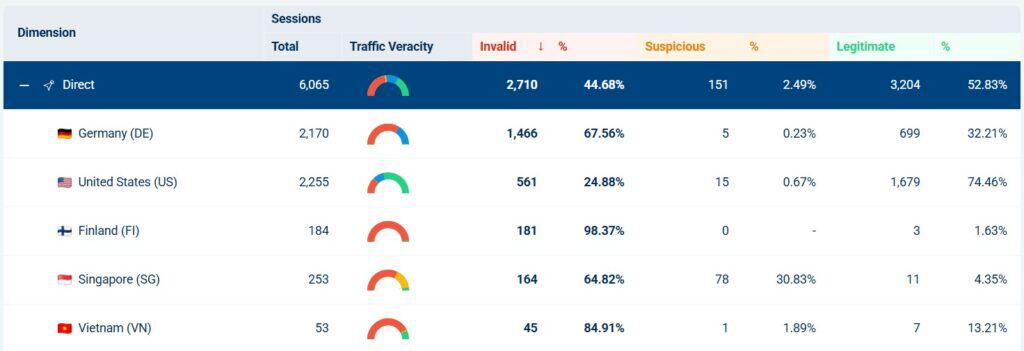
That is much more helpful than a single invalid traffic percentage. A top-level number tells you something may be happening. Segmentation helps you understand where it is happening.
For example, if a referral source consistently sends legitimate visits, that is useful to know. If another source sends mostly invalid or suspicious activity, that deserves investigation. This is where Opticks becomes practical instead of theoretical.
What Opticks Helped Me Understand Better
Opticks helped me separate traffic volume from traffic quality. Those are not the same thing.
Standard analytics tools are good at showing traffic totals, engagement, conversions, and attribution paths. But they do not always make it obvious whether part of that traffic should be trusted in the first place.
Opticks gave me another lens. Instead of only asking which channel brought traffic, I could also ask how much of that traffic appeared legitimate, suspicious, or invalid.
That may sound simple, but it changes how you evaluate marketing performance. A source that sends a lot of traffic is not automatically valuable. A source that sends less traffic but cleaner visits may be more useful than it first appears.
Where You Still Need Judgment
Opticks gives you better visibility, but it does not remove the need to interpret the data carefully.
Small sample sizes can distort percentages. A source with one or two visits can look alarming if all of them are flagged. That does not necessarily mean the channel is bad. It means you need more context before making a decision.
Bot and invalid traffic labels can also require interpretation. Some automated traffic is clearly unwanted. Other activity may come from tools, crawlers, or systems you recognize. The platform helps surface the signal, but the marketer still needs to decide what the signal means.
That is not a criticism of Opticks as much as it is a reality of this category. Traffic quality data is useful, but it should be used with context.

What Opticks Is Not
Opticks is not a Google Analytics replacement.
It is not a magic button that fixes weak campaigns.
It is not proof that every suspicious visit is costing you money.
It is not a reason to panic every time a source shows invalid traffic.
Opticks is best viewed as a traffic quality layer. It helps you identify where questionable traffic may be affecting your reporting, your paid campaigns, and your understanding of channel performance.
Who Opticks Is Best For
Opticks makes the most sense for businesses that are actively trying to understand and improve traffic quality.
It is especially relevant for advertisers running paid search, paid social, or lead generation campaigns where invalid traffic can quietly affect cost, conversion rates, and reporting confidence.
It is also useful for agencies that need a clearer way to monitor traffic quality across multiple sources. The ability to segment traffic by channel, provider, referral source, and campaign makes it easier to investigate patterns without relying only on ad platform reporting.
For a tiny website with very little traffic and no paid campaigns, Opticks may be more interesting than necessary. But for marketers spending meaningful money to acquire traffic, the visibility can be valuable quickly.
Pros and Cons
| What I Liked | What to Keep in Mind |
|---|---|
| Setup through Google Tag Manager was straightforward. | The data still needs interpretation, especially with small sample sizes. |
| The dashboard made traffic quality easy to understand quickly. | Not every invalid or suspicious signal should trigger immediate action. |
| Provider and channel filters made the tool feel broader than paid search. | Some bot or source labels may require additional context before deciding what to do. |
| Referral and source breakdowns made the data more actionable. | This should complement your analytics and ad platform reporting, not replace it. |
| The product felt mature and practical rather than experimental. | The value increases as your traffic volume and paid media spend increase. |
AppSumo Pricing
Opticks is currently available on AppSumo as a lifetime deal. Since AppSumo promotions are only available for a limited time and pricing or license tiers can change, I recommend checking the current listing before making a decision.
When evaluating the different license tiers, focus on your expected traffic volume, the number of websites you plan to monitor, and whether you’ll benefit from features such as lead protection, automated Google Ads IP exclusion, or advanced reporting. If you’re investing heavily in paid advertising or managing multiple websites, choosing the right tier upfront may save you from ne.eding to upgrade later.
Bottom Line
Opticks gave me a clearer view of traffic quality than I expected. The platform was easy to set up, and the dashboards were useful without being overwhelming, and the source-level breakdowns made the data feel practical.
The biggest takeaway from my testing was that invalid traffic is not only a paid search issue. Even direct, referral, organic, and newer AI-related sources can warrant a closer look. That does not mean every red number should cause panic. It means marketers need better visibility before making decisions.
For businesses spending meaningful money on traffic acquisition, Opticks is a strong addition to the marketing stack. It helps you ask better questions about your traffic, spot patterns you might otherwise miss, and understand which sources may deserve more trust.
This content is for educational purposes and reflects my experience, review of the product, and current publicly available deal information. Always evaluate tools based on your specific business needs, goals, and workflows before making a decision.
Looking for more marketing software reviews? See my full list of marketing tools and software I recommend.

