AI search visibility is quickly becoming another thing marketers want to reduce to a score.
How often was my brand mentioned? How many citations did I earn? What’s my AI share of voice?
Those metrics matter. But a visibility score can tell you that you showed up without telling you how you got there, what AI said about you, or whether any of it influenced a decision.
Retrieval was the piece I hadn’t been thinking about clearly enough. Retrieval happens upstream of citation, but being retrieved doesn’t mean you’ll ultimately be cited. And even after your brand makes it into a response, one question remains: did that visibility actually matter?
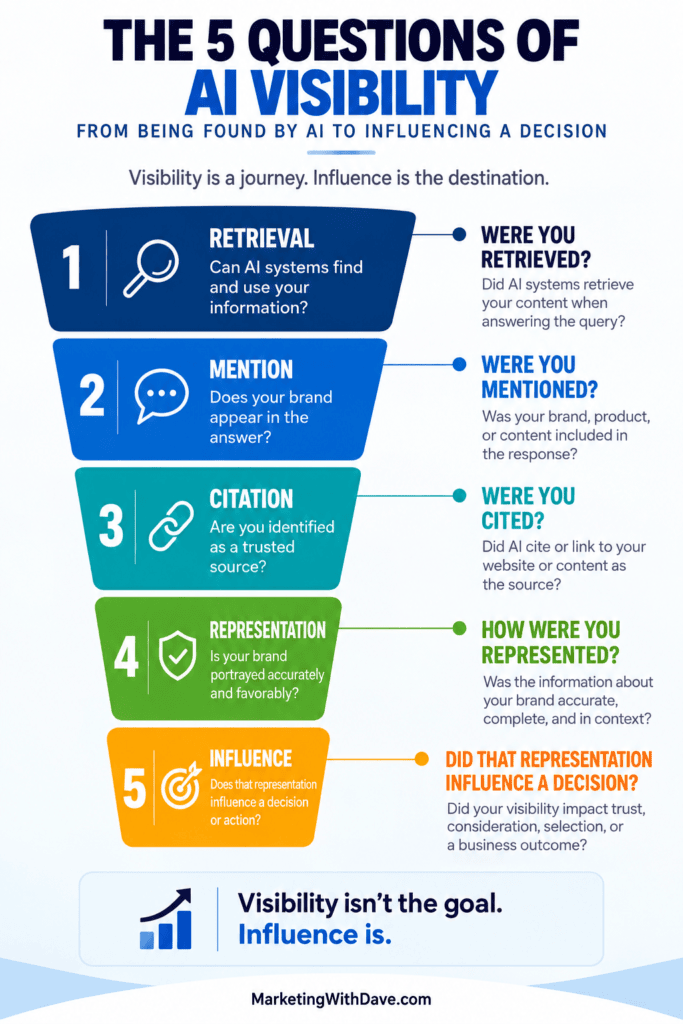
That led me to five questions I think give a more complete picture of AI visibility, from technical opportunity to business impact:
Were you retrieved?
Were you mentioned?
Were you cited?
How were you represented?
Did that representation influence a decision?
They aren’t perfectly sequential stages, and I’ll get into why that matters. But together, they expose real gaps in how we currently measure AI search visibility.
1. Were You Retrieved?
Before you can worry about being cited, there’s a more fundamental question: did the AI system retrieve your content at all?
85% of the pages ChatGPT retrieved never became citations.
Retrieval creates an opportunity to be considered. It doesn’t guarantee your content survives the selection process.
This is also where traditional SEO and AI visibility overlap more than the “SEO is dead” narrative suggests. Many of the fundamentals marketers already work on, including technical accessibility, clear content structure, internal linking, semantic clarity, and authority, can still contribute to whether information is discoverable and usable.
But retrieval introduces a measurement problem: marketers usually can’t see it. A citation is visible. A brand mention is visible. Retrieval without either often isn’t — which makes it both foundational and one of the hardest parts of AI visibility to track.
2. Were You Mentioned?
Next comes the metric most AI visibility platforms already measure well: did your brand appear in the answer?
Mentions matter because they tell you whether you’re in the conversation at all. If someone asks an AI assistant for the best software in your category and your company keeps showing up alongside your competitors, that’s useful signal.
But a mention doesn’t tell you where the information came from. An AI system can mention your brand without citing your website — pulling instead from a third-party review, a community discussion, or information it learned during training.
That’s the gap between mention and citation. A mention answers did I show up? It doesn’t answer did my content help me show up?
3. Were You Cited?
Citations give you something mentions don’t: attribution. If an AI-generated answer links to your page as a source, you have stronger evidence your content actually shaped the response.
That’s why citations have become such a prominent AI search metric — they’re visible, countable, and can drive referral traffic.
But citations have limits too. If only 15% of retrieved pages became citations in the AirOps dataset, then citation tracking alone misses most of what happens earlier in the process. And being cited doesn’t mean you were prominently mentioned or recommended — your page might support one fact in an answer while a competitor gets the actual recommendation.
Citation matters. It’s just not the finish line.
4. How Were You Represented?
This is the question I think marketers underrate most: showing up is not automatically a good outcome.
An AI system can mention your company and still:
Describe your product incorrectly
Use outdated pricing or features
Misunderstand who your product is for
Compare you with the wrong competitors
Leave out an important differentiator
Repeat inaccurate information from a third-party source
If that happens, your visibility metric can look great while your actual brand representation is poor. The better question isn’t “did AI say something favorable about us?” It’s: was the representation accurate, current, complete, and appropriate to the question asked?
This pulls AI visibility into brand management territory, and it extends beyond your own website. AI systems pull from review sites, publishers, forums, comparison pages, and databases — your site can say one thing while the rest of the information ecosystem says another.
5. Did That Representation Influence a Decision?
Eventually marketing has to answer the harder question: did any of this cause someone to do something — search for your brand, visit your site, add you to a consideration set, request more information, buy?
This is where AI visibility becomes a business measurement problem, not just an SEO or GEO one. And attribution gets messy fast: someone discovers you through ChatGPT, searches Google later, reads reviews on Reddit, visits your site directly, and buys three days later. Analytics records a branded or direct conversion. The AI interaction that started it all disappears from the trail.
That’s why I’m skeptical of judging AI search’s business value purely by referral traffic. Referral traffic matters, but influence can happen without a click.
Visibility isn’t the goal. Influence is.
This Looks Like a Funnel, but It Isn’t
It’s tempting to line these up as a funnel: retrieved → mentioned → cited → represented → influenced. It makes a clean visual, but it’s technically imperfect. You can be:
Retrieved and never cited
Mentioned without being cited
Cited without a prominent brand mention
Represented without your own website being cited
Influential without producing a measurable site visit
There’s also a deeper wrinkle: content can be cited without being the primary information that actually shaped the answer.
So these aren’t five stages every AI answer moves through in order. They’re five questions marketers should keep asking as visibility moves from technical opportunity toward business impact.
What Can AI Search Software Actually Measure?
This is where the framework earns its keep. I’ve spent a lot of time testing AI search visibility software, and most platforms are far stronger in the middle of this model than at either end.
AI visibility question
What it tells us
Measurement today
Were you retrieved?
Whether your information entered the AI’s research and selection process
Difficult
Were you mentioned?
Whether your brand appeared in the answer
Relatively measurable
Were you cited?
Whether your source received attribution
Relatively measurable
How were you represented?
What the AI actually said about your brand
Measurable, but needs interpretation
Did you influence a decision?
Whether visibility contributed to a business outcome
Very difficult
Tracking prompts, mentions, citations, sentiment, and share of voice tells you a lot about what shows up in AI-generated answers. It doesn’t tell you why you got selected, or whether being selected actually mattered. Those may be the two most valuable questions in AI search visibility right now.
The tools are improving quickly, particularly around mentions, citations, sentiment, and share of voice. The harder problem is connecting those observable signals to what happened before the answer was generated and what happened after someone saw it.
AI Visibility Is Bigger Than Citation Tracking
I don’t need another argument over whether SEO, GEO, AEO, or some other acronym wins. What interests me is the actual visibility problem: can AI systems find and use our information, do we show up when relevant questions are asked, are we earning attribution, are we described correctly, and does any of that move a decision?
That’s also the gap between measuring AI visibility and improving it — two different jobs. A dashboard can tell me I wasn’t cited. The more valuable platform tells me why, and what to do about it. It’s why I treat AI search as one piece of a broader AI Visibility Framework rather than a standalone replacement for SEO, and why I keep coming back to these five questions when evaluating AI search software:
Knowing your brand showed up in an AI answer is useful. Understanding how it got there, what was said, and whether it mattered is what actually matters.
AI Search visibility software is getting very good at measuring things. Visibility scores, mentions, citations, sentiment, competitors, prompts, rankings, and share of voice are becoming standard features.
But measurement is only useful if it answers a more practical question: what should I do next?
That question became important as I tested AI Search visibility platforms on MarketingWithDave.com. The tools use similar language such as recommendations, opportunities, audits, tasks, next steps, fixes, and agents. But once I looked closely at the actual feedback, they were solving very different problems.
One platform crawled hundreds of pages looking for technical issues. Another analyzed a single page I selected and told me exactly where the content could improve. Another studied what large language models were citing and recommended where I should participate off-site. Another could draft and publish Reddit responses.
So instead of comparing feature names, I looked at something more useful: how well does each platform help a marketer figure out what to do next?
How the Platforms Cover On-Page, Off-Page, and Technical Feedback
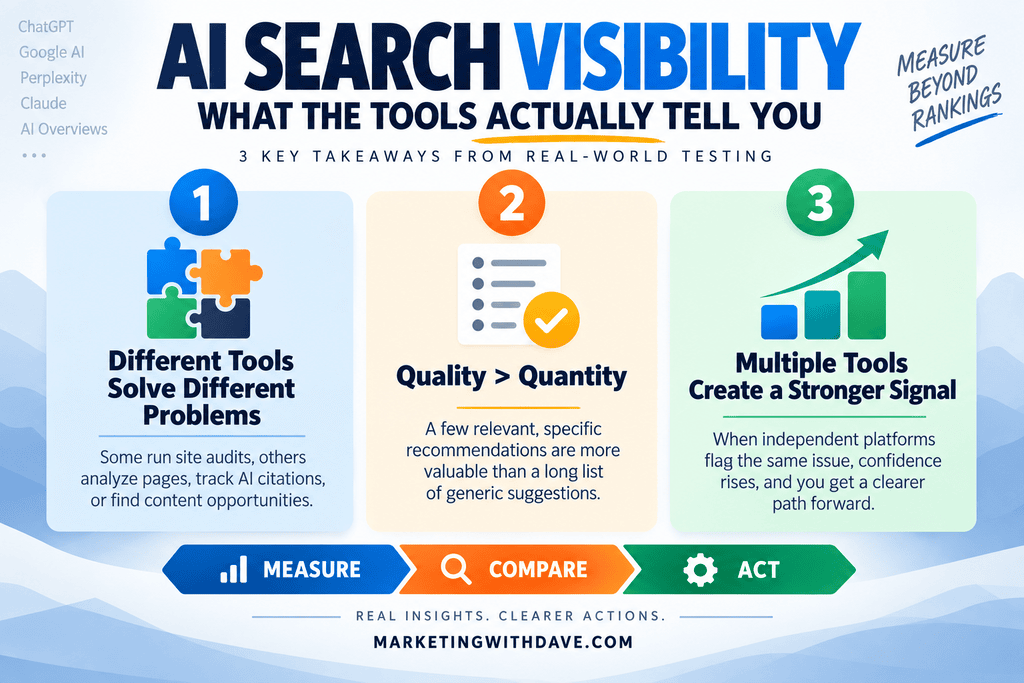
The first challenge is that these platforms do not operate at the same level. Some run broad site audits, while others focus on individual pages, AI citation ecosystems, or content opportunities.
Backlinks, social profiles, authority, reviews, and brand presence
Strong performance and technical recommendations
Create a broad strategic work backlog with detailed completion criteria
Visby is included here as a reference point, though it is not part of my primary four-platform AI Search software comparison.
On-Page SEO Feedback
On-page recommendations were a clear example of why feature lists can mislead. Several platforms can truthfully say they provide on-page recommendations, but the type and depth of feedback varies substantially.
SnowSEO: Traditional Audit Findings at Scale
SnowSEO treats on-page optimization largely as an audit problem. It crawls the site and flags issues such as titles, meta descriptions, image ALT text, headings, and thin content.
The advantage is coverage: I don’t have to decide which URLs to inspect, and SnowSEO can identify patterns across hundreds of pages. The disadvantage is familiar to anyone who has used SEO audit software before: finding an issue doesn’t mean the issue matters. A technically valid warning can still be low priority, irrelevant to the business, or not worth the effort to fix.
Nuwtonic: Narrower Scope, Deeper Page Feedback
Nuwtonic takes nearly the opposite approach. It doesn’t run a broad sitewide audit in my testing; I provide a page, and it analyzes that specific page.
For my SnowSEO review, Nuwtonic produced recommendations covering metadata, content additions, missing topics, competitor analysis, and editorial improvements. The most useful ones were highly contextual, identifying where in the article new information belonged rather than just saying it needed more content. It also flagged potential duplication between sections, which was accurate: that older review format did contain more repetition than the format I use today.
SnowSEO is better positioned to tell me which pages may have problems. Nuwtonic is better positioned to go deeper on a page I already decided deserves attention.
ZeroRank: On-Page Recommendations Driven by AI Citation Patterns
ZeroRank’s on-page recommendations don’t feel like a traditional SEO audit at all. It looks at the types of pages and content that large language models are citing and recommends formats that may improve visibility.
For MarketingWithDave, its recommendation categories included product pages, category pages, articles, listicles, discussions, and profiles. For each type, it showed examples of domains being cited, common phrases and themes, and a small number of prioritized recommendations.
This feels less like “fix this page” and more like “based on what AI engines are citing, here are the assets worth creating.” That makes ZeroRank’s on-page feedback more strategic than diagnostic.
Visby: A Broad Backlog of Site Improvements
Visby generated 52 tasks in my account, including reviewing meta titles and descriptions, improving heading hierarchy, adding descriptive ALT text, improving internal linking, adding semantic HTML, improving home page authority and clarity, adding testimonials and case studies, and strengthening brand differentiation.
What I initially missed was how detailed each task actually is. Its ALT text recommendation, for example, included a priority level, the affected page, a task objective, an example image with an empty ALT attribute, an explanation of why it matters, specific steps to take, acceptance criteria, and a post-completion validation step. That’s materially better than simply adding “missing ALT text” to a dashboard.
Off-Page SEO and AI Visibility Feedback
Off-page recommendations produced the largest difference between the platforms. Traditional SEO often reduces off-page work to backlinks, citations, digital PR, reviews, and brand mentions. AI Search makes this more interesting because external conversations can directly shape what answer engines retrieve and cite.
ZeroRank Is the Standout for Off-Page Recommendations
ZeroRank’s off-page recommendations cover a surprisingly broad set of external platforms, including Reddit, YouTube, Trustpilot, Capterra, G2, Product Hunt, LinkedIn, Quora, TrustRadius, and other review and community sites.
More importantly, it doesn’t just say “you should have a Reddit presence.” It identifies specific communities, existing discussions, topics, and opportunities where MarketingWithDave could participate. That difference is enormous:
Generic: Build your Reddit presence. Specific: Participate in a relevant subreddit or existing conversation that is already influencing AI answers in your category.
Both can technically be called recommendations. Only one gives the marketer a clear next action.
SnowSEO: Broader Coverage, Lower Specificity
SnowSEO’s GEO audit also recommended external presence on sites such as Reddit, YouTube, G2, Capterra, Trustpilot, and Crunchbase, but the recommendations were generally much broader than ZeroRank’s. Identifying that Reddit matters is different from identifying the specific subreddits, threads, or topics that appear to influence AI answers.
Visby: Authority, Backlinks, and Brand Presence
Visby’s off-page tasks focused on improving the backlink profile, building backlinks with branded anchor text, maintaining consistent social profiles, expanding YouTube and Google visibility, monitoring brand confusion on social channels, and strengthening external evidence for testimonials and authority claims. These are broader than ZeroRank’s opportunity-level guidance, but they show Visby treating off-site authority as part of a larger brand and entity strategy rather than backlinks alone.
iGEO: Narrower Discovery, More Execution
Its workflow identifies high-intent Reddit discussions where buyers may be deciding what to use, then drafts a response, lets the user regenerate or edit it, runs safety checks, and moves toward approval and publishing.
That creates an interesting contrast: ZeroRank provides much broader off-page intelligence and opportunity discovery, while iGEO goes further toward execution once a Reddit opportunity has been identified. The better product depends partly on which problem you need solved.
Technical SEO and AI Readiness Feedback
Technical recommendations were another area where similar labels hid very different capabilities.
SnowSEO: The Closest Thing to a Traditional Technical SEO Audit
SnowSEO’s crawl covers broken links, HTTPS and HSTS, redirects, unused JavaScript and CSS, render-blocking resources, page weight, accessibility, robots.txt, image sizing, heading issues, and deprecated HTML.
It also has an Auto Fix capability for some technical and metadata problems. One good example: it proposed replacing an old HTML <center> tag with modern markup, which is genuine remediation rather than just reporting the issue. But automatic execution shouldn’t be mistaken for successful execution. I also tried Auto Fix on a missing H1 on my /posts page, and it returned an error.
The real distinction isn’t whether a product has an Auto Fix button. It’s what it can fix, how meaningful those fixes are, and whether they actually work.
SnowSEO’s GEO Audit Is Separate From Its Traditional Audit
SnowSEO also runs a separate GEO audit covering Organization, Person, and Article schema, machine-readable content, markdown representations, AI crawler access, content signals, external answer-engine presence, agent and API discovery standards, and emerging agentic commerce protocols.
This audit is unusually broad, but that breadth creates noise. Some findings were useful; others were irrelevant to MarketingWithDave today, and some appeared inaccurate. It recommended hreflang tags despite the site being English-only with no alternate language versions, and reported a missing blog page despite the site being built heavily around blog content. Several recommendations involving APIs, MCP, agent discovery, and machine payment protocols may be technically interesting without being meaningful priorities today.
The clearest lesson from this: a failed audit check is not necessarily a problem worth fixing.
ZeroRank: AI Readiness Rather Than Traditional Technical SEO
ZeroRank’s technical checks are better described as an AI Readiness audit: llms.txt, robots.txt, sitemap.xml, HTTPS, JSON-LD, Organization/Article/Product/FAQ/HowTo schema, Open Graph, Twitter Card, canonical URLs, author signals, breadcrumbs, PageSpeed, and agent readiness signals.
ZeroRank scored MarketingWithDave 75 for AI Readiness in one test. One of the more important findings was a mobile PageSpeed score of 35, which matters because Visby independently produced multiple recommendations around performance, Core Web Vitals, unused JavaScript, render-blocking CSS, caching, and image delivery. Agreement between independent tools is far more interesting to me than a single vendor’s warning.
Visby: Strong Technical Task Detail
Visby’s technical recommendations covered lazy loading, modern image formats, responsive image sizing, unused and third-party JavaScript, render-blocking CSS, cache lifetimes, font display behavior, and Core Web Vitals. Its strength is less about surfacing a completely unique issue and more about converting issues into structured, actionable work.
The Number of Recommendations May Be the Wrong Metric
At one point I had dozens of SnowSEO audit findings, 18 Nuwtonic recommendations for a single page, 52 Visby tasks, and a small number of highly curated ZeroRank opportunities.
Those numbers are nearly meaningless compared directly. Visby’s 52 tasks don’t make it three times more useful than Nuwtonic’s 18. ZeroRank showing three opportunities doesn’t mean it provides less value than a tool producing 50 warnings. The better question is: how good is the feedback?
How I Think Recommendation Quality Should Be Evaluated
I’m still refining this framework, but testing suggests several dimensions matter more than raw recommendation count.
1. Relevance
Does the recommendation actually apply to the website, business, and strategy? SnowSEO’s hreflang recommendation is a useful example: missing hreflang could matter greatly for a multilingual site, but it’s meaningless for a site with only one language version.
2. Accuracy
Is the problem or opportunity actually real? This matters even more now that recommendations are increasingly AI-generated. One striking example: while analyzing my SnowSEO review, Nuwtonic inserted “Nuwtonic Agent” twice among its suggested topic entities. A tool analyzing a competitor’s review shouldn’t contaminate the recommendation with its own product terminology, which is exactly why AI-generated SEO recommendations still require human review.
3. Importance
Does the platform distinguish meaningful opportunities from technical trivia? A website can have hundreds of technically imperfect elements without fixing every one being a productive use of time.
4. Specificity
Does the tool tell you exactly where the issue or opportunity is? “Improve backlinks” is a recommendation. “Participate in this specific community because it’s influencing AI answers for your category” is a much better one.
5. Prioritization
Does the platform help determine what should happen first? SnowSEO’s Next Steps view consolidates technical, search, and AI visibility findings into a ranked task board rather than forcing the user to interpret every audit independently.
6. Actionability
After reading the recommendation, do I understand what to do? Visby’s ALT text task is a strong example because it moves beyond detection into instructions and completion criteria.
7. Assistance
Does the platform help complete the work, through suggested replacement text, AI fix prompts, drafted content, step-by-step instructions, or examples from competing or cited sites?
8. Execution
Can the platform actually make the change? SnowSEO can automatically address certain technical and metadata issues. Nuwtonic’s agents can assist with and implement some SEO/GEO changes. iGEO can take certain Reddit opportunities through drafting and approval toward publishing. Execution should be judged by what the platform can actually do successfully, not by whether an Auto Fix feature exists.
9. Validation
Can the tool verify afterward that the task was completed? Visby’s workflow explicitly includes acceptance criteria and validation, an unusually useful final step.
From Finding a Problem to Knowing It Was Fixed
The recommendation systems I tested fall somewhere along this progression: Detect → Explain → Prioritize → Prescribe → Assist → Execute → Validate.
Not every tool needs to reach the final stage to be valuable. A strategic recommendation, such as ZeroRank identifying an important external conversation, may never be something software should automatically execute. But this progression is useful because it exposes the difference between a tool that just creates another list of problems and one that actually reduces the marketer’s workload.
Signal vs Noise: What Multiple Tools Are Telling Me
The most valuable byproduct of this experiment may have nothing to do with comparing software. When independent tools repeatedly flag the same issue, confidence in that issue rises, and I can use agreement across platforms to build a much better improvement backlog instead of blindly working through one vendor’s list.
Mobile performance and Core Web Vitals (strong signal): ZeroRank’s mobile PageSpeed score of 35 and Visby’s independent performance, JavaScript, CSS, caching, and image-delivery recommendations both point the same direction, worth independent investigation.
Structured data and schema (strong signal): SnowSEO, ZeroRank, and Visby all flagged structured-data opportunities. The right response isn’t to install every schema type they recommend, but to audit major page types and confirm the right schema is present where it genuinely belongs.
Images and ALT text (moderate to strong signal): Both SnowSEO and Visby flagged image issues, with Visby providing especially concrete evidence of empty ALT attributes, making this a reasonable workstream to validate.
Off-page authority (strong signal): SnowSEO, Visby, ZeroRank, and iGEO all point toward the importance of external presence, with ZeroRank currently offering the most useful guidance on where to spend that effort.
Brand and entity clarity (interesting, mostly Visby-driven): Visby produced a coordinated group of recommendations on brand differentiation, author authority, external evidence, social consistency, and distinguishing MarketingWithDave from similarly named entities. Because these are unusually contextual, I don’t want to dismiss them just because fewer tools surfaced them.
Technical cleanup (valid, needs prioritization): SnowSEO identified broken links, an obsolete HTML tag, heading problems, and metadata issues. Some are clearly worth fixing; others may be minor enough to stay behind larger strategic opportunities.
Where the Tools Currently Stand
Tool
Strongest Recommendation Capability
Biggest Limitation Seen So Far
SnowSEO
Broad sitewide auditing, prioritization, fix guidance, and limited automated remediation
Broad audits can produce irrelevant or low-value noise
Nuwtonic
Specific recommendations for improving a page you choose
No comparable sitewide technical audit; AI-generated recommendations still require scrutiny
ZeroRank
Turning AI citation intelligence into highly specific off-page opportunities
Not designed to replace a comprehensive traditional SEO audit
iGEO
Helping turn identified opportunities into content or Reddit responses
Recommendation discovery has been less compelling than its monitoring and content features
Visby
Detailed strategic task backlog spanning technical SEO, brand authority, content, and off-page work
Task volume includes overlap and recommendations that still require strategic filtering
My Current Takeaway
Before this comparison, I treated recommendations as a binary feature: a platform either had them or it didn’t. That’s no longer a useful distinction. One tool can generate 100 warnings and leave me with more work than I started with; another can surface three opportunities actually worth pursuing.
The better measure is how far a recommendation advances you from “something could be better” to “I know what to do next.” Automated fixes don’t change the underlying requirements. A platform still has to identify the right problem, help determine whether it matters, recommend the right response, and execute it reliably.
No single winner emerged because the tools solve different problems. SnowSEO excels at broad auditing. Nuwtonic goes deeper on a page already selected for improvement. ZeroRank converts AI citation intelligence into specific off-page opportunities. iGEO moves further toward execution once an opportunity is clear. Visby builds the broadest strategic work queue across technical SEO, content, brand authority, and entity clarity.
That specialization helps explain why marketers use multiple SEO tools. Traditional SEO already spans rankings, keywords, backlinks, content, and technical health. AI Search visibility has expanded the job again, adding prompts, citations, answer-engine presence, external conversations, entity signals, and AI readiness. Finding one platform that does everything well may be less practical than building a stack where each tool earns its place.
The comparison also revealed another useful signal: agreement across independent tools. When several platforms flag the same issue, it’s worth investigating. When only one does, verification comes first.
The practical lesson is simple: treat AI-assisted marketing intelligence as input worth investigating, not a substitute for judgment. The best tool isn’t the one that generates the most recommendations. It’s the one that helps you make a better decision about what to do next.
AI Search visibility tools give marketers wonderfully precise-looking numbers: 67% visibility, 90% visibility, position #1, 100% share of voice.
How much confidence should you put in those numbers?
I had an unusual opportunity to find out. I currently have access to several AI Search visibility platforms, so I tracked the exact same prompt for the exact same brand across six tools. All the results below were collected within less than one week.
The tools often agreed that Marketing With Dave was visible. They did not agree on how visible it was, where it ranked, or even whether it appeared at all on a given AI platform. One tool gave me a 90% visibility score while the underlying AI response got my name wrong.
How I Ran the Test
I used one of the 10 prompts I benchmark AI Search visibility platforms with:
Who is Marketing With Dave?
This is intentionally a branded prompt. It isn’t a difficult query for Marketing With Dave to appear for, which is exactly what makes it useful for comparing how different tools measure the same basic outcome.
I pulled results from Nuwtonic, SnowSEO, Subsig, Visby, ZeroRank, and iGEO. iGEO is included because it was part of the test, although it never returned any results during the testing period.
This isn’t a scientific study. The tools may query different model versions, run prompts at different times, and use different sampling methods, locations, or scoring formulas. AI responses themselves are also non-deterministic. That’s not a weakness in the experiment. Those differences are part of the measurement problem. I also didn’t repeatedly rerun every tool to determine how much these results would change from one run to the next. That’s an important limitation, but also part of the larger problem: a single visibility measurement may not be particularly repeatable.
That uncertainty isn’t theoretical. SparkToro and Gumshoe recently ran nearly 3,000 AI responses and found substantial inconsistency in brand recommendations even when prompts were repeated. Their research tested the stability of the AI responses themselves. My test looks at another layer of the problem: whether the commercial tools measuring those responses agree on what the measurement means.
The Same Prompt, Four Different Scores
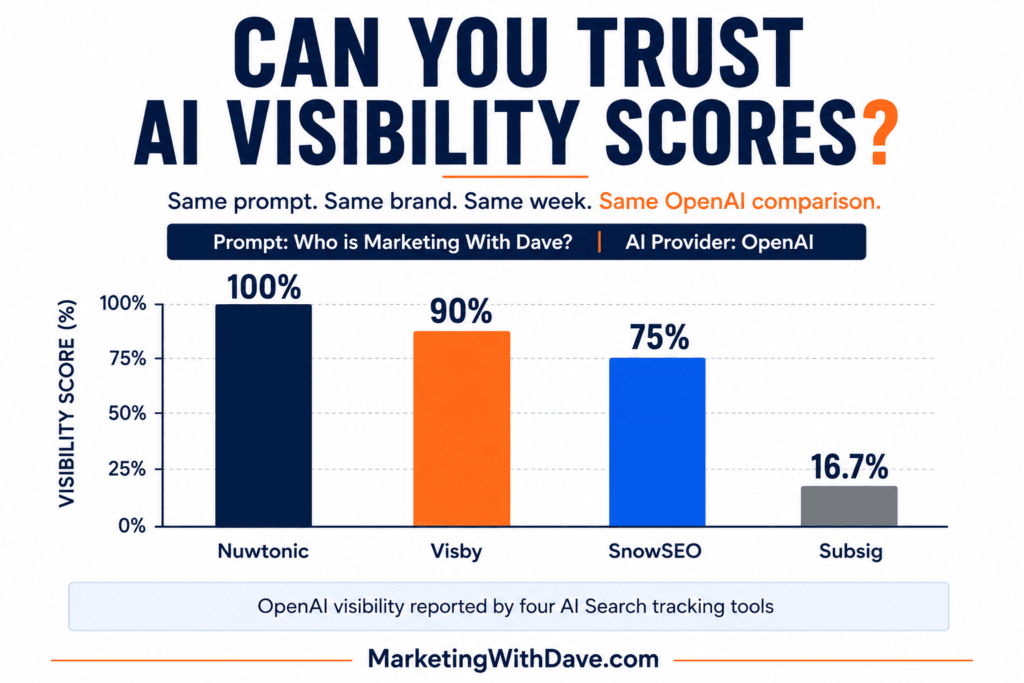
Here’s what the tools reported for the same prompt on OpenAI alone:
One platform, one prompt, one week. Four visibility numbers: 100%, 90%, 75%, 16.7%. That doesn’t mean three of the four tools are wrong. It means a number labeled “Visibility” isn’t automatically measuring the same thing from one product to another.
Semrush, one of the largest companies in the SEO space, defines AI Visibility in its Visibility Overview as a 0-100 benchmark comparing how often a brand appears against competitors, but defines visibility differently inside Prompt Tracking, where it reflects a site’s standing within the top citations for specific tracked prompts. Related concepts, not identical measurements. Semrush also warns that AI responses are fast-changing and personalized, so no platform can produce exact visibility numbers, only directional signals. Semrush explains where its AI visibility data comes from here.
That’s also why I question the precision implied by some of these dashboards. A visibility score reported as 16.7% looks remarkably exact for a measurement built on AI responses that may change the next time the prompt runs.
That context matters when a dashboard hands you a 96% or a 67% without making its methodology equally visible.
100% Visible in Gemini. Or 0%. Or, Actually, It Depends What You Mean By Gemini.
The most dramatic disagreement in the data isn’t about scoring formulas. It’s about whether Marketing With Dave appeared at all, and it gets stranger the closer you look.
Nuwtonic reported the Gemini result as mentioned, position #1, visibility 100. Visby reported the same prompt on Gemini less than a day later as not mentioned, visibility 0%.
That’s not a rounding error.
But Visby’s own dashboard adds a wrinkle worth sitting with: alongside that 0% Gemini score, Visby separately tracks Google’s AI Overview, and there it reports Marketing With Dave at 100% visibility with 7 citations. Same brand, same week, same company (Google), two different surfaces, opposite results, from a single tool that at least has the honesty to report them separately.
Gemini the chatbot and AI Overview the search feature are genuinely different products built on related but distinct retrieval behavior. A visibility score that doesn’t specify which one it’s measuring, or that quietly folds both into “Google,” isn’t just imprecise. It’s answering a different question than the one you think you’re asking.
A 90% Visibility Score Can Still Be Wrong
Visby gave Marketing With Dave a 90% OpenAI visibility score. The answer cited MarketingWithDave.com and correctly connected the site to digital marketing, A/B testing, martech, measurement, and SiteSqueeze.
It also said Marketing With Dave was run by Dave Harrell.
It isn’t.
So I could check off every box that usually signals success: brand mentioned, high visibility score, website cited, relevant topics identified. And the answer still contained a material entity error. What good is a visibility score if the AI doesn’t accurately understand the entity it’s making visible?
Marketing With Dave probably makes this problem easier to spot than most brands would. Dave is a common name, “marketing” is a common word, and there’s no shortage of marketers and agencies using similar language. A highly distinctive SaaS brand may resolve more cleanly. But that’s exactly why the ambiguity doesn’t invalidate the test: real companies share names, terminology, and categories constantly. Entity resolution is part of AI visibility, and a high score can hide a wrong answer.
Even One Tool Isn’t Internally Consistent
You don’t need to compare across vendors to find volatility. Nuwtonic’s own results for this single prompt run remarkably tight across five platforms: 95 to 100 visibility and position #1 on Perplexity, OpenAI, Gemini, Grok, and Meta. Then Anthropic drops to 80 and position #5.
Same tool, same prompt, same week, same methodology. The one variable that changed is the model being queried. If a single vendor’s own numbers can swing that much platform to platform, treating any one visibility score as a stable fact about your brand, rather than a snapshot of one model on one day, is asking more of the number than it can deliver.
The Tools Don’t Even Report the Same Things
The differences go beyond how visibility gets calculated. The six products vary considerably in what they expose to the user at all:
Tool
Visibility
Position
Share of Voice
Sentiment
Citation Count
Cited Pages
Nuwtonic
✓
✓
–
–
✓
✓
SnowSEO
✓
✓
✓
✓
✓
⚠
Subsig
✓
✓
✓
✓
✓
✓
Visby
✓
–
–
–
✓
✓
ZeroRank
✓
✓
–
✓
✓
✓
iGEO
–
–
–
–
–
–
✓ Available
– Not available in testing
⚠ Unknown / not verified
More metrics isn’t automatically better; it can just mean more numbers to misread. But the gaps matter once you start comparing products or trying to build a repeatable process.
Mentions, Citations, Accuracy: Three Different Questions
A brand can appear in an AI answer without its website being used as a source, and a page can get cited without the brand being prominently recommended. Semrush draws the same line: mentions are appearances of the brand in AI answers, citations are linked references to the content behind them. Semrush’s AI Share of Voice guide explains that distinction.
I’d add a third category: accuracy. Did the AI get the brand, the person, and the positioning right? That may matter more than whether your visibility score moved from 67 to 72, and Visby’s citation counts for this one prompt ranged from 0 (Gemini) to 7 (AI Overview) without any change in whether the brand was “visible” by the tool’s own definition. Citation volume and visibility score aren’t the same thing either.
Platform-Level Data Beats a Blended Score, and I Have Proof
ZeroRank reports an “Overall, 3 models” figure alongside its per-platform numbers: 67% visibility, position #1.5. It’s a real, sensible-looking average. It also sits neatly between the individual platform numbers and, in doing so, erases the exact volatility this entire test was built to surface: a #1 on Perplexity, a #2 on OpenAI, and no mention at all on Google/Gemini, blended into one tidy 67.
Semrush reaches a similar conclusion in its own methodology, reporting AI platforms separately for cross-platform comparisons rather than combining them into a single weighted score, because aggregation can hide insights. See Semrush’s AI Visibility Index methodology. After watching one tool’s blended score paper over a #1-to-absent spread within its own data, that conclusion doesn’t need much convincing.
What I Actually Trust
Not any single visibility score. Before I’d act on one, especially a low one, I want to know:
Do I already have a page that genuinely answers this prompt, or is this a content gap rather than a visibility problem?
Does the result hold up if I check again next week?
Does the brand show up on more than one platform, or is this one model’s quirk?
Do multiple tools tell a broadly similar story?
Which specific pages are actually getting cited?
Are competitors consistently showing up where I’m absent?
Is the AI’s description of my brand actually correct?
I’d apply a similar standard when choosing the software itself. If a platform won’t let me see the underlying AI response, platform-level results, and citations behind its score, I’m much less interested in the score. I want enough raw evidence to question the metric, not just a dashboard asking me to trust it.
That first question turned out to be the most useful one in this whole exercise. Some of the prompts I want Marketing With Dave to appear for don’t yet have an obvious page on the site that deserves to be cited. That’s not an AI visibility problem. That’s a content gap, and it calls for a different response than chasing a better score.
Bottom Line
AI Search visibility measurement is useful, and I’m going to keep using it. But the problem isn’t that these tools are wrong. It’s that their precise-looking scores can imply a level of standardization and certainty the underlying measurements don’t support yet, whether that’s one vendor’s 0% sitting next to another vendor’s 100% for the same platform, or one vendor’s own results shifting from position #1 to #5 depending on the model.
The question isn’t simply “What’s my AI visibility score?” It’s “What decisions does this measurement actually justify?”
Treat AI visibility scores as directional evidence, not ground truth. The real work isn’t chasing a perfect number. It’s using repeated measurements, actual AI responses, citations, competitor patterns, and content gaps together to figure out where your brand is genuinely becoming part of the answer, and right now the industry is much better at producing these scores than at explaining how much confidence you should put in them.
AI search visibility software is evolving fast. New platforms keep showing up promising to monitor your brand in ChatGPT, Gemini, Perplexity, Google AI experiences, and other AI-powered search environments.
Comparing them by feature list is a trap. Two tools can both claim AI visibility monitoring, competitor tracking, citation analysis, and content recommendations while delivering wildly different levels of useful intelligence.
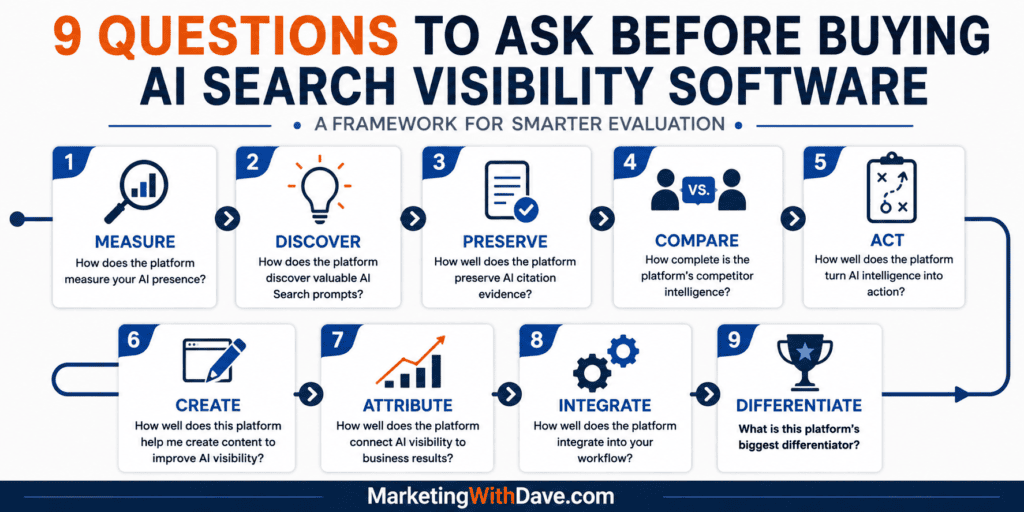
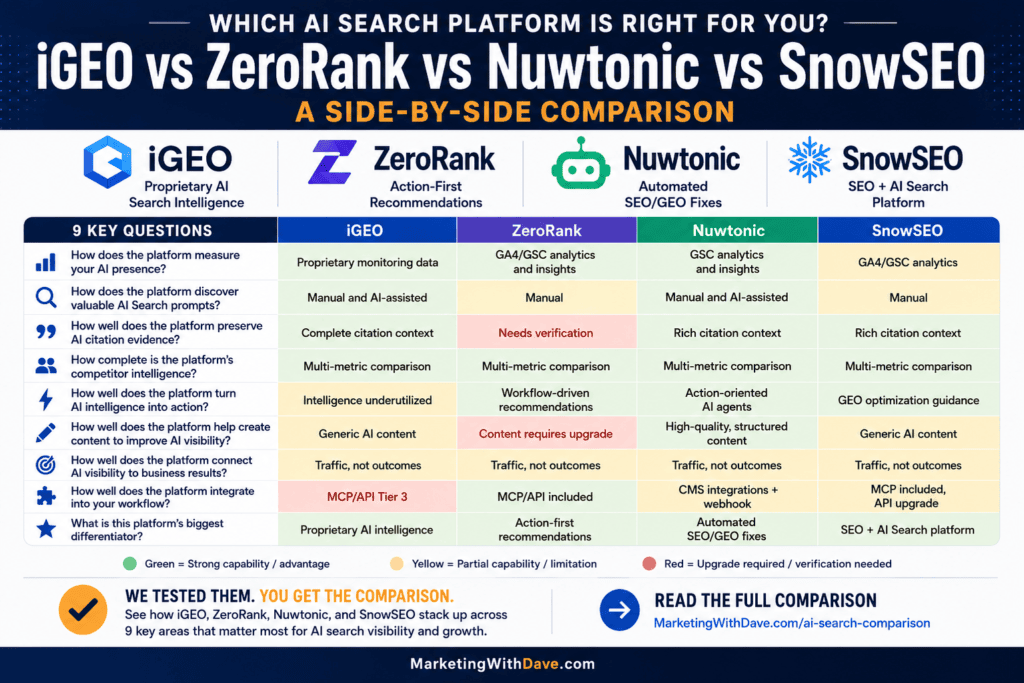
That is why I run every platform through the same nine questions.
These are not just a checklist of features I expect to see today. Several of them describe where I think this category needs to go before AI search software becomes genuinely useful to marketers.
The goal is not just telling me whether my brand showed up in an AI response. I want software that helps me answer a bigger sequence of questions:
Where am I visible?
Why am I being mentioned or cited?
Why are competitors appearing instead of me?
What should I do about it?
Can the platform help me take that action?
Did the work actually move a business result?
I apply these same nine questions in my Best AI Search Software Compared guide, testing them against the AI search platforms I have purchased and used myself.
1. How Does the Platform Measure Your AI Presence?
This sounds basic, but it is the easiest place to misjudge what you are buying.
“AI visibility” can mean several different things: a brand mention, a site citation, relative visibility against competitors, the sentiment around a mention, or some blend of all of it. Knowing your brand appeared in three out of ten prompts is a starting point, not an answer.
I want to know exactly what the platform is measuring, how often, which AI models are included, how geography affects the results, and whether I can inspect the underlying responses myself.
Why it matters
AI search has no universal equivalent of a Google ranking position. A brand can be mentioned prominently without being cited, cited without being recommended, and present in one response but gone from the same question the next time it is asked.
That makes methodology everything. A polished dashboard can create a sense of precision the underlying data does not support, so understand what built the score before you trust it.
Where the category needs to go
The best platforms should eventually break AI presence into layers: retrieval, mentions, citations, representation, competitive position, and influence. Visibility should be the start of the analysis, not the final answer.
2. How Does the Platform Discover Valuable AI Search Prompts?
AI search monitoring is only as good as the questions you choose to track. Perfectly tracking ten prompts nobody actually asks tells you nothing about the real market.
That is prompt discovery, and it is one of the biggest gaps in this category. Some platforms make you supply your own prompts. Others suggest prompts with AI. Ideally, prompt discovery should eventually incorporate things like search data, site content, competitor activity, customer questions, and real demand.
Why it matters
Traditional SEO has decades of keyword data behind it: search volume, related searches, Search Console queries, established research tools. AI search has no equivalent source of prompt-volume data yet.
So a platform can monitor beautifully and still leave you with the real problem unanswered: are we even watching the right questions?
Where the category needs to go
Marketers should not have to guess indefinitely. I want these platforms to get better at surfacing commercially meaningful questions based on a company’s products, customers, search behavior, competitors, existing content, and real demand. The opportunity is not prompt monitoring. It is prompt intelligence.
3. How Well Does the Platform Preserve AI Citation Evidence?
A visibility score tells me something happened. Evidence tells me what happened.
If an AI platform cited my site, I want to know which page, what question triggered it, where the citation sat in the answer, what surrounded it, and what other sources appeared alongside it. Same when a competitor gets the citation instead of me.
Why it matters
AI answers change. If a platform tells me I got a citation but does not preserve enough of the original response to show the context, most of the intelligence is gone. Counting citations is not the point. Investigating them is.
Where the category needs to go
These platforms should function like an evidence archive: what question was asked, what answer came back, which brands were mentioned, which sources were cited, what was said about each brand, and how the answer shifted over time. Without that, citation counts become another vanity metric.
4. How Complete Is the Platform’s Competitor Intelligence?
Knowing your AI visibility climbed from 20% to 25% is useful. Knowing why a competitor keeps showing up where you do not is worth far more.
Why it matters
AI search optimization is inherently comparative. If an AI system recommends three products and yours is not one of them, the real opportunity is understanding what the chosen brands have that you do not: stronger third-party references, deeper content coverage, clearer product information, better entity signals, or something else entirely. A leaderboard names the problem. It does not explain it.
Where the category needs to go
Platforms should stop saying “Competitor X has greater AI visibility than you” and start saying something closer to: “Competitor X is consistently recommended for these questions, these sources back those recommendations, these topics separate its coverage from yours, and here are the most actionable gaps.” That is the gap between monitoring a competitor and actually understanding one.
5. How Well Does the Platform Turn AI Intelligence Into Action?
This is the question I care about most.
Marketers do not need another dashboard confirming they have a problem. If a platform finds that competitors are getting cited, my brand is missing from key conversations, or AI systems are describing my product inaccurately, the very next question has to be: what do I do about it?
Why it matters
Monitoring produces information. Optimization requires decisions. “Your competitor is cited more often for this topic” leaves you nowhere to start. “Your competitor covers these three questions your site does not, and adding them may close the gap” gives you a next step.
Where the category needs to go
The strongest platforms should build a closed loop: Monitor → Diagnose → Recommend → Execute → Measure. Most products today are stronger at some parts of that loop than others, which makes sense in a young market. But I judge these tools on how far they move a marketer from observation to action.
6. How Well Does This Platform Help Me Create Content to Improve AI Visibility?
Most AI search products now include some form of AI content generation. That does not make the content useful. Another generic 1,500-word article is not valuable just because it was written inside a visibility platform.
Why it matters
The real advantage these platforms could offer is context. They may already know which questions you are missing, which competitors are winning them, which sources get cited, what your existing pages cover, and where the gaps sit. That should make their content recommendations far sharper than asking a general-purpose writing tool to “write a blog post about this topic.”
Where the category needs to go
Content creation should be tied directly to the evidence behind the recommendation. Not “create an article about AI search optimization,” but “you are absent from these five high-priority questions, competitors cited for them consistently cover these concepts, your existing article addresses two of the three, here are the sections worth adding.” That turns content generation into part of an optimization workflow instead of just another writing feature.
7. How Well Does the Platform Connect AI Visibility to Business Results?
Getting mentioned by ChatGPT feels good. It is not automatically a business result.
Marketers eventually need to know whether AI visibility is driving traffic, leads, sales, subscriptions, or demand, not just showing up more often.
Why it matters
AI visibility metrics can easily become the next round of vanity metrics. Mentions, citations, and share of voice are useful leading indicators, but they are not proof of impact. A brand can grow its AI mentions substantially and generate little value from it, while another gets fewer AI referrals but converts them extremely well.
Where the category needs to go
The goal is connecting the full chain: AI visibility to AI referral or influence, to website behavior, to conversion, to business result. Some of that attribution will always be imperfect. Someone can see a brand in an AI answer, then visit through Google, type the URL directly, or convert days later through a different channel entirely. That does not make the question less worth asking vendors.
8. How Well Does the Platform Integrate Into Your Workflow?
A powerful tool that lives on an island becomes another dashboard you stop checking. That is why integrations matter: Google Search Console, Google Analytics, WordPress or other CMS platforms, APIs, MCP connections, project management tools, reporting platforms, automation.
Why it matters
Intelligence loses value the moment acting on it requires several disconnected manual steps. If the platform flags a content gap, does it reach the system where content actually gets managed? If it finds a technical issue, can someone act on it directly? If AI referral traffic rises, does that data connect back to analytics? If dozens of recommendations pile up, do they become prioritized tasks or just more noise in another dashboard?
Where the category needs to go
The line between AI search monitoring and AI search optimization increasingly comes down to workflow. Monitoring tells you what happened. Optimization changes what happens next. The closer a platform sits to where marketers actually work, the more its intelligence is worth.
9. What Is This Platform’s Biggest Differentiator?
This last question works differently than the other eight. I do not expect every AI search visibility platform to solve the problem the same way, and I hope they do not.
Why it matters
Feature tables make competing products look interchangeable: AI monitoring, check. Competitors, check. Citations, check. Content recommendations, check. But after actually using the products, real differences show up fast. One platform goes unusually deep on citation intelligence. Another is best at turning monitoring into recommendations. Another leans into agents that implement changes directly. Another blends traditional SEO and AI search visibility into a single system. Those differences matter more than which product has the longest feature list.
What to ask instead
Skip “which platform has the most features?” Ask instead: “What does this platform do meaningfully better than the alternatives, and is that the thing I actually need?” There isn’t one agreed upon best AI search visibility platform. Different platforms may be better suited to deeper intelligence, turning data into action, execution, or combining traditional SEO with AI search optimization.
The Real Test
The more of these platforms I test, the less interested I am in counting features. The question I keep coming back to is simple:
Does this software just tell me what happened, or does it help me understand it, decide what to do next, and confirm whether it worked?
No platform needs to nail every part of that loop today. But it is a far more useful way to judge the category than checking whether a product has a dashboard, a content writer, and a competitor report.
See the Nine Questions Applied to AI Search Platforms
I use this same framework when I purchase and test AI search visibility software myself.
In my Best AI Search Software Compared guide, I apply these nine questions across the platforms I have tested. The comparison is not built to crown one universal winner. It is designed to show where the products actually differ so you can choose the approach that best matches what you are trying to accomplish.
This review covers Nuwtonic in isolation. If you’re deciding between AI Search platforms, see my Best AI Search Software Compared guide. It compares the leading AppSumo options, explains how plan limits and credit systems work in practice, and evaluates each platform using the same nine questions I believe matter most when choosing AI Search software.
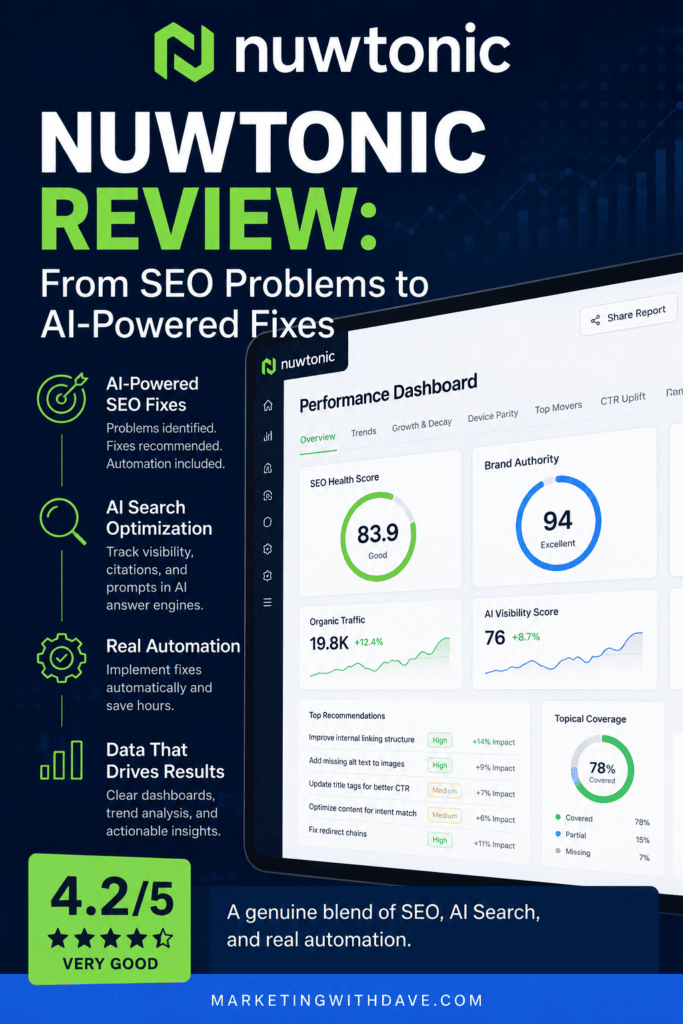
Nuwtonic combines traditional SEO performance data, AI Search visibility monitoring, content generation, competitor and keyword intelligence, topical maps, WordPress integration, and AI-powered optimization into one platform. That feature list is impressive. It is not what stood out to me.
The more time I spent inside Nuwtonic, the clearer its philosophy became. Most SEO software stalls at good: a list of everything wrong with your site. The better tools go one step further and prioritize that list so you know what to tackle first. Almost none of them reach best: actually taking the work off your plate. Nuwtonic is clearly trying to build for that third tier.
It is not particularly interested in crawling every forgotten page on an old website. It assumes you know your website better than anyone else. You decide which pages matter, Nuwtonic analyzes those pages in depth, recommends specific improvements, and in some cases implements the fixes for you.
Worth knowing going in: Nuwtonic is a young, bootstrapped platform founded in 2025 out of Bengaluru, India. That context helps explain both the ambition on display here and a few of the rough edges I ran into.
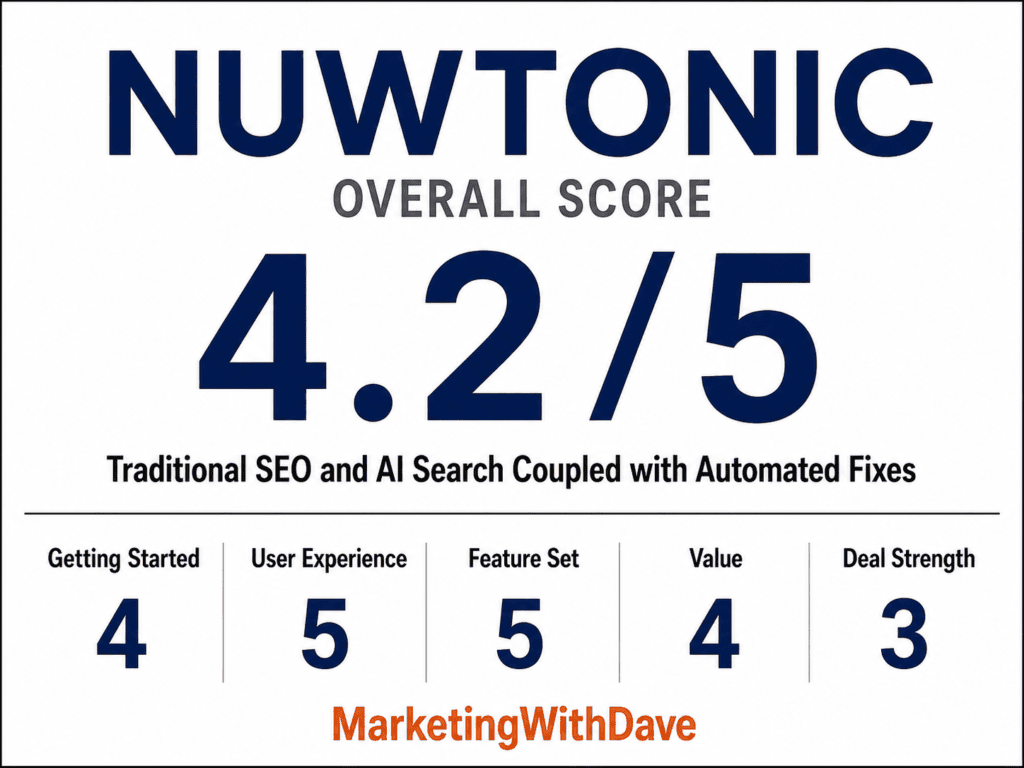
Nuwtonic Overall Score
Why 4.2/5: A genuine blend of traditional SEO, AI Search, and real automation, held back by Tier 1’s 15-keyword SERP limit, no WordPress scan yet, and recommendations that sometimes remain too generic to act on.
Affiliate disclosure: If you purchase through my link, I may earn a small commission at no additional cost to you. I only share tools I have used myself.
The 30-Second Decision
Buy Nuwtonic if: You want SEO and AI Search visibility in one platform, with recommendations specific enough to act on, page-level optimization, content generation, and the ability to automate some fixes instead of just building another task list.
Skip it if: You need to crawl thousands of URLs, track hundreds of SERPs, or replace a dedicated enterprise SEO research platform.
The biggest reason to consider Nuwtonic is not any single report. It is the workflow connecting the reports together: find the opportunity, analyze the page, identify the gaps, generate the improvement, apply the fix, check whether it worked, then keep monitoring. That is where SEO software needs to go.
Why SEO and AI Search Need to Come Together
Traditional SEO and AI Search optimization are getting harder to separate. A page that is hard for Google to understand is unlikely to suddenly become easy for ChatGPT, Gemini, Claude, or Perplexity to understand. Strong topical coverage, clear entities, trustworthy sources, useful internal linking, current information, and well-structured content matter in both environments.
Nuwtonic reflects that overlap throughout the platform. Google Search Console provides the traditional SEO performance foundation. Nuwtonic layers on AI Search monitoring, citation analysis, GEO audits, topical analysis, content generation, and optimization workflows built to improve both search visibility and the odds that AI systems can retrieve and accurately represent your content.
What I Liked
1. Nuwtonic Can Actually Implement Some SEO Fixes
This is the most important feature in Nuwtonic. Most SEO tools stop at Detect → Report → Export → You fix it. Nuwtonic is trying to move toward Detect → Prioritize → Fix → Verify.
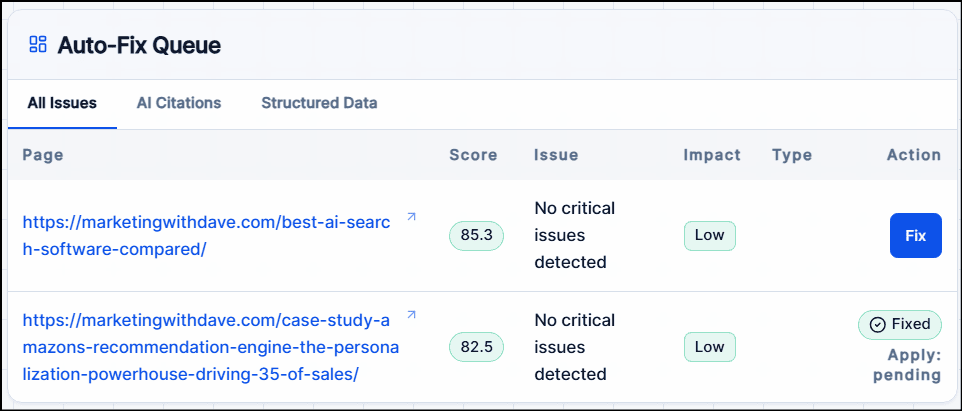
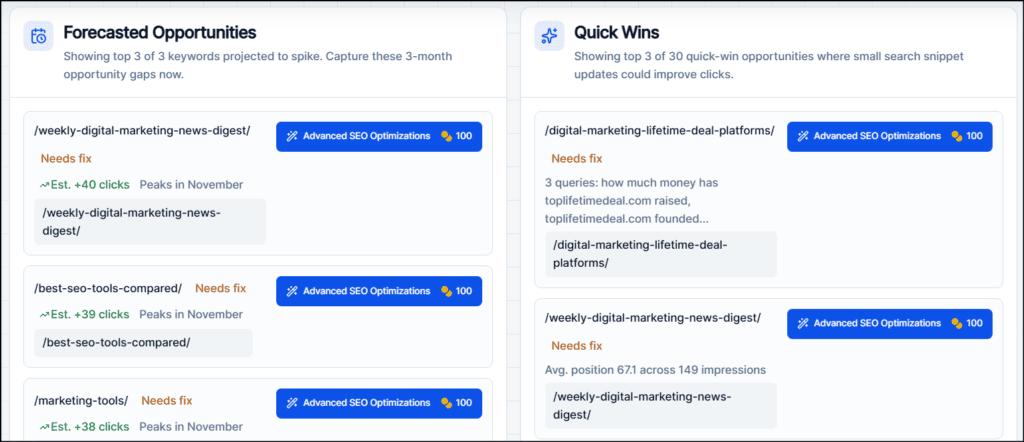
Not every recommendation should be automated, and Nuwtonic knows it. During one optimization test, it flagged adding authoritative Philip Kotler source material, reviewing time-sensitive examples for accuracy, and confirming a comparison table stayed usable on mobile, all correctly routed to me instead of auto-published. For other changes, Nuwtonic pushes optimized content, metadata, FAQs, and alt text through its WordPress integration, then lets you re-check completed optimizations later through its Check the Fix workflow.
Finding another problem for me is helpful. Solving some of them is considerably more valuable.
2. Advanced SEO and GEO Optimizations Were Surprisingly Specific
I tested Nuwtonic’s SEO optimization workflow on an article about Philip Kotler’s eight demand states. Instead of generic advice like “add more keywords,” it identified real gaps: connecting each demand state to its corresponding marketing-management task, adding a comparison table, strengthening the diagnostic guidance, expanding demarketing versus countermarketing, and citing original Kotler and Kotler and Keller source material.
Not every suggestion was necessary, but enough were specific enough that I would genuinely consider implementing them. The Advanced GEO Optimization side follows the same philosophy, looking beyond missing keywords toward broader topical and authority gaps that make it harder for AI systems to understand a site’s depth. This is where Nuwtonic feels more strategic than a checklist-style audit.
3. Content Generation Was Much Better Than I Expected
AI-generated SEO content is usually easy to spot: generic, repetitive, and full of statements that say very little. Nuwtonic did noticeably better.
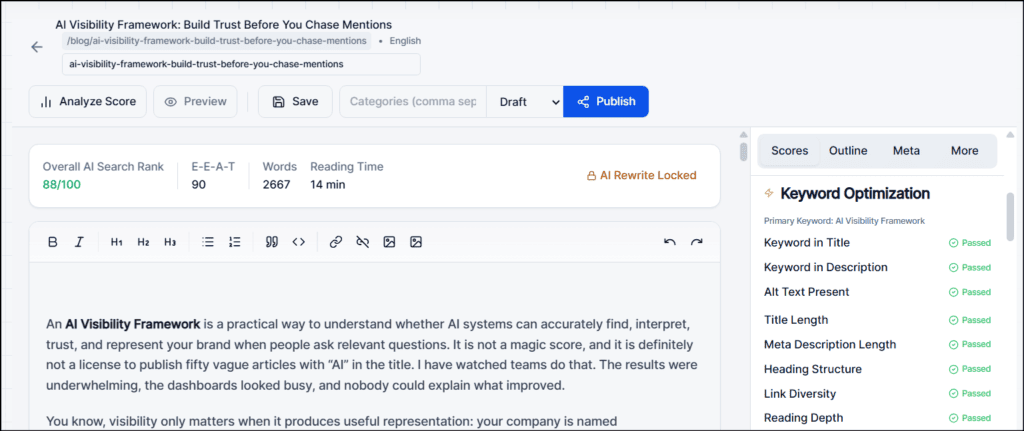
I tested its GEO Content Writer on the keyword AI Visibility Framework, a topic I have already developed extensively on MarketingWithDave.com. It produced a 2,600+ word article with a title and meta description, key takeaways, a table of contents, useful tables, internal links, external references, an FAQ, logical H2 and H3 structure, and two generated images. I would not have published it unchanged, but I would not have deleted it and started over either. That is a meaningful compliment for AI-generated SEO content.
The weakness: Nuwtonic created an AI Visibility Framework instead of extending my AI Visibility Framework. Its Brand Analysis understood what Marketing With Dave covers but not my proprietary frameworks, terminology, or point of view. It also invented first-person lines like “I have watched teams…” that need to be caught before anything publishes under your name.
AppSumo’s own listing promises content “built on your GSC data and existing topical authority” instead of guesswork. In practice, that promise landed only partially. The generated article captured my site’s general themes but had no idea what my existing authority on this specific topic actually said.
4. The Platform Connects Its Tools Instead of Isolating Them
Keyword research feeds keyword clusters. Clusters feed content planning. Content gets generated, scored, optimized, published, monitored, and improved. Google Search Console data feeds performance campaigns that surface pages with low CTR despite strong rankings, growing impressions, declining traffic, page-two rankings, lost visibility, or possible algorithm-update impact. AI Search monitoring adds prompts, citations, competitor visibility, brand authority, and GEO recommendations on top.
Individual feature quality varies, but the workflow is cohesive, and it keeps pointing at the same question: what should I work on next? That beats a platform that hands you twenty reports and leaves you to decide.
5. Nuwtonic Assumes You Know Which Pages Matter
Tier 1 caps you at 200 SEO audits and fixes per month, which felt restrictive at first for a site with hundreds of URLs. Then I realized that is the point. Nuwtonic is not built to crawl every forgotten category page and legacy URL. It assumes you are the expert on your own website: you know which pages make money, earn links, or carry authority.
Most sites have plenty of legacy content that does not deserve equal attention. Choose the pages that matter, and let Nuwtonic help make them better.
Want to see what using Nuwtonic actually looks like? I’ve shared my dashboard so you can explore the same dashboards, analyses, trends, and recommendations I used while evaluating the platform.
1. Fifteen SERP-Tracked Keywords on Tier 1 Is Not Enough
Nuwtonic splits keyword monitoring into two systems. Keyword Ranking mostly reflects Google Search Console data, and Tier 1 supports 150 tracked keywords. SERP Ranking actively tracks selected keywords in Google’s results with history and competitor data, but Tier 1 allows only 15 SERP-tracked keywords. A content-heavy site can burn through that fast. The tracker itself is clean and easy to use, but fifteen keywords is better suited to evaluating the feature than relying on it as an ongoing rank-tracking solution.
2. There Are Too Many Reports
The SEO Performance dashboard covers growth and decay, top movers, CTR uplift, zero CTR queries, high CTR queries, device parity, keyword tail analysis, brand versus non-brand performance, cannibalization, topical clusters, authority analysis, and more. Some are excellent. I especially liked the Zero CTR Queries and High Impression / Low CTR reports because they point straight at work worth doing. Others just re-visualize data already available in Google Search Console. I could cut 40% to 50% of these reports without losing much value. I would rather have fewer reports that each end with a strong recommendation or AI-assisted action.
3. Recommendations Are Not Always as Specific as the Best Ones
The Kotler analysis was a great example of Nuwtonic at its best. Other recommendations were generic: get listed on software review sites, expand topic coverage, improve authority, create more comparison content. None of that is wrong, it just does not carry the same value as advice tied to something Nuwtonic actually found in your data. Every AI SEO platform I have tested struggles with this line. Nuwtonic gets on base more often than it strikes out, but I still reviewed every recommendation before acting on it.
4. Nuwtonic Scores Almost Everything, Without Explaining Why
SEO Health, AI Search Rank, Citation Readiness, Authority, Optimization Scores, Projected Scores, Opportunity Scores. During testing, multiple generated alt-text recommendations all landed on the same score of 90 despite noticeable quality differences elsewhere, and I could not find a clear methodology behind the precision. I stopped caring about most of the numbers. If a page’s SEO Health score is 83.9, that does not tell me what to do Monday morning. If a high-impression page has 0% CTR and a title that does not match search intent, now I have something actionable. Your manager cares about traffic, leads, visibility, citations, and revenue, not a score moving from 83.9 to 87.2. I would like to see Nuwtonic lean less on proprietary scores and more on explaining the evidence behind each recommendation.
This isn’t just a Nuwtonic problem. I tested the same prompt across six AI Search tools and found surprisingly large differences in how they measure and report AI visibility. The experiment reinforced why I care more about the evidence behind a score than the score itself.
5. Brand Intelligence Needs More User Control
Nuwtonic’s Brand Analysis correctly identified my audience, tone, content themes, and general positioning straight from the website. What it could not do was let me correct, expand, or teach it what it missed. That showed up clearly during content generation: it understood I write about AI visibility but had no idea about the specific seven-stage AI Visibility Framework I had already built, so it invented its own. A true brand knowledge base, one where I could feed in proprietary frameworks, preferred terminology, writing examples, positioning, products, topics to avoid, and editorial principles, would turn Brand Analysis from a starting point into something that actually understands my thinking.
Pricing and Tiers
At the time of writing, Tier 1 runs $59 for lifetime access. Tier 1 is designed for selective use, not large-scale monitoring. It includes:
1 managed domain
1 user
1,200 monthly AI credits
Up to 8 full AI content generations
Up to 12 SEO and GEO boosts
Up to 240 GEO / AI Search audits
200 SEO audits and fixes per month
150 keywords tracked
15 SERP-tracked keywords
2 topical maps / extensions
20 AI prompts
The 1,200 monthly credits covered most of what I explored, though keyword research and competitor-gap analysis can each burn hundreds of credits fast. Tier 1 makes sense if you are managing one site and can stay focused on a limited set of important pages, prompts, and tracked keywords. The real reason to move beyond Tier 1 is not content generation, it is monitoring capacity. 15 SERP keywords and 20 AI prompts get restrictive fast once Nuwtonic earns a permanent spot in your workflow.
If Tier 1’s limits become a bottleneck, here is how the higher tiers scale:
Tier 2, $149: 5 domains, 5 users, 3,000 monthly AI credits, 50 SERP-tracked keywords, 500 SEO audits and fixes per month
Tier 3, $249: 10 domains, 15 users, 5,000 monthly AI credits, 100 SERP-tracked keywords, 750 SEO audits and fixes per month
Tier 4, $349: 20 domains, unlimited users, 7,500 monthly AI credits, 200 SERP-tracked keywords, 1,500 SEO audits and fixes per month
For a single-site marketer testing the waters, Tier 1 is the right call. For an agency managing multiple client properties, Tier 3 is the more realistic starting point given how quickly Tier 1’s SERP tracking and domain limits run out. All tiers are lifetime deals covered by AppSumo’s standard 60-day money-back guarantee.
WordPress Integration
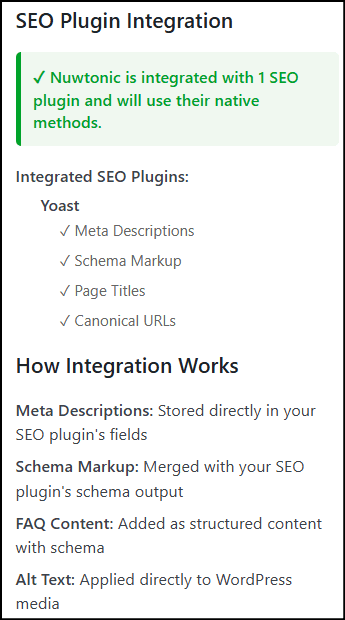
Nuwtonic’s WordPress plugin connects the platform directly to your site. I was concerned it would conflict with Yoast SEO since Nuwtonic can create metadata, schema, and FAQs, but the plugin detected Yoast and used its native fields instead of building a competing layer: meta descriptions store in Yoast’s fields, and schema merges with Yoast’s existing output. That is the architecture I want to see.
The plugin’s individual agents varied in quality. The Alt Text Agent was generally strong. The Meta Agent produced usable output that still needed editing. The FAQ Agent improved substantially once I switched the audience setting to Expert, but still produced questions I would not publish unchanged. The Schema Agent showed why human review still matters: it correctly built detailed Product and Review schema for a software review, but also generated FAQ schema for questions that were not actually presented as FAQs on the page. Technically valid schema is not necessarily appropriate schema.
One feature I could not fully test was the free SEO scan, which repeatedly returned “Scan failed: Could not complete scan request.” Nuwtonic support responded quickly and confirmed the free scan runs locally against WordPress data rather than calling their servers, while publishing and optimization actions do communicate with their servers. I will update this review once the scan issue is resolved.
Bottom Line
Nuwtonic understands where this industry needs to go next.
Most SEO software still lives at good, or if you’re lucky, better. Nuwtonic is one of the few tools I’ve tested that is genuinely reaching for best, and it gets there often enough to notice. It won’t automate its way out of every problem yet. Plenty of what it surfaces still needs your judgment before it ships. But the direction is right, and direction is what separates software worth watching from software worth ignoring.
That selectivity is also why fit matters here. A solo marketer or small team who already knows which pages carry the business can get real value out of Tier 1. Someone trying to blanket-audit a sprawling enterprise site with no clear priorities will find Nuwtonic too narrow no matter which tier they buy.
There is still work to do. The 15-keyword SERP limit on Tier 1 is too restrictive. The platform could lose a significant number of reports without losing much value. Some recommendations remain generic, the proprietary scores need more transparency, and Brand Analysis needs a way for users to teach it their expertise and frameworks.
But the pieces that matter most are already there: strong page-level analysis, surprisingly good content generation, useful SEO and GEO recommendations, integrated WordPress publishing, and the ability to automate some of the work.
The future of SEO software is not another dashboard telling us what is wrong. It is software capable of helping us fix it. Nuwtonic is one of the platforms that appears to understand that.
This content is for educational purposes and reflects my hands-on experience using the product and the information publicly available at the time of writing. Always evaluate tools based on your specific business needs, goals, and workflows before making a decision.
AI search is changing how customers discover products, services, and brands. Platforms like iGEO, ZeroRank, Nuwtonic, and SnowSEO all promise to improve your visibility in ChatGPT, Google AI Overviews, Perplexity, Gemini, and other AI-powered search experiences—but they solve the problem in different ways.
Rather than comparing feature lists, I purchased and tested each platform myself. This guide compares the Tier 1 AppSumo plans first, then evaluates each product using the same nine-question framework I use throughout my reviews. The goal isn’t to declare one overall winner. It’s to help you choose the platform that best matches your marketing priorities.
Best AI Search Software Compared
I purchased and tested iGEO, ZeroRank, Nuwtonic, and SnowSEO myself, comparing their Tier 1 AppSumo plans and evaluating each platform using the same nine-question framework.
Important: This comparison reflects the Tier 1 AppSumo plans available during my testing. Limits and included features may change.
Tier 1 Plan Comparison
Platform Comparison
iGEO
ZeroRank
Nuwtonic
SnowSEO
AppSumo Plan
Tier 1
Tier 1
Tier 1
Tier 1
Prompts Tracked
10 monthly
Unlimited*
20
Unlimited*
Seats
1
Unlimited
1
1
AI Platforms and Models
ChatGPT Upgrade for more
17
6
ChatGPT Upgrade for more
AI Content Creation
2 monthly
Upgrade required
8
Unlimited*
Geography
3 regions
Unlimited*
Unlimited
Unlimited
*ZeroRank usage is controlled by 180 monthly answer credits. *SnowSEO usage is controlled by 500 monthly answer credits, so “unlimited” does not mean unlimited consumption. *Nuwtonic Tier 1 includes 20 tracking slots. Monthly tracking uses 1 slot per prompt, 15-day tracking uses 2, and weekly tracking uses 4, allowing 20, 10, or 5 prompts respectively. Each prompt run checks all six supported AI models.
“Unlimited” prompts do not mean unlimited monitoring. ZeroRank and SnowSEO both use monthly credit allowances, so practical capacity depends on how many AI models you track and how often each prompt runs. The estimates below assume weekly monitoring, or approximately 4.3 refreshes per month.
How Many Prompts Can You Actually Monitor?
Estimated Tier 1 prompt capacity at each platform’s weekly or closest available monitoring frequency.
Platform
1 AI model
2 AI models
3 AI models
iGEO
10 prompts
Upgrade required
Upgrade required
ZeroRank
41 prompts
20 prompts
13 prompts
Nuwtonic
5 prompts
5 prompts
5 prompts
SnowSEO
16 prompts*
Upgrade required
Upgrade required
ZeroRank estimates use 180 monthly answer credits, one credit per standard AI model response, and approximately 4.3 weekly runs per month. SnowSEO estimates use 500 monthly AI credits, approximately 15 credits per response, and the platform’s 15-day monitoring interval. Tier 1 supports ChatGPT only. Nuwtonic Tier 1 includes 20 tracking slots. Weekly monitoring uses 4 slots per prompt, allowing 5 prompts to be tracked weekly. Each run checks all six supported AI models, so adding models does not reduce prompt capacity. At 15-day or monthly frequency, capacity increases to 10 or 20 prompts respectively.
The Nine Questions I Use to Evaluate AI Search Software
Feature lists don’t tell you which platform you’ll actually enjoy using. These questions focus on how well each platform collects useful intelligence, turns it into action, and fits into a real marketing workflow. I explain why each of these criteria matters in my 9 Questions to Ask Before Buying AI Search Visibility Software guide.
Question
iGEO
ZeroRank
Nuwtonic
SnowSEO
How does the platform measure your AI presence?
Proprietary monitor data
Multi-model visibility tracking
Six-model monitoring
AI visibility + SEO data
How does the platform discover valuable AI Search prompts?
Manual + AI-assisted
Strong manual control + AI suggestions
Limited prompt discovery
Topic clusters + suggested prompts
How well does the platform preserve AI citation evidence?
Complete citation context
Full response + citation evidence
Useful but less complete
Citation/source reporting
How complete is the platform’s competitor intelligence?
Multi-metric comparison
Extensive automatic benchmarking
Basic competitor comparison
SEO + AI competitor visibility
How well does the platform turn AI intelligence into action?
Intelligence underutilized
Prioritized recommendations
AI agents implement fixes
Actionable audit + AI fix prompts
How well does this platform help me create content to improve AI visibility?
Generic AI content
Upgrade / paid credits required
Strong agent-assisted creation
Integrated content generation
How well does the platform connect AI visibility to business results?
Traffic, not outcomes
Visibility, not attribution
Limited business attribution
Traffic + visibility, limited outcomes
How well does the platform integrate into your workflow?
MCP/API Tier 3
Workflows enterprise-only
Direct CMS execution
CMS publishing + SEO workflow
What is this platform’s biggest differentiator?
Proprietary AI intelligence
Actionable recommendations
AI agents + automated execution
SEO + AI visibility in one platform
Color guide: Green highlights stronger capabilities, yellow identifies limitations or partial capabilities, and red marks features that require an upgrade or still need verification.
Bottom Line
Which Platform Should You Choose?
Choose iGEO if…
You want the deepest AI search intelligence and citation monitoring.
Choose ZeroRank if…
You prefer actionable recommendations and flexible prompt tracking.
Choose Nuwtonic if… You want AI Search monitoring combined with agents that can help create content and implement SEO/GEO fixes directly in your CMS.
Choose SnowSEO if…
You want one platform that combines traditional SEO with AI visibility optimization.
No product wins every category, which is exactly why this comparison exists. The right choice depends on whether you value deeper intelligence, actionable recommendations, automated execution, or a broader SEO platform.