TidyCal vs Calendly: Which Scheduling Tool Is Better for Your Business
Calendly and TidyCal are appointment scheduling and calendar booking tools designed to eliminate the back-and-forth of finding meeting times. Both allow you to share booking links, manage availability, connect calendars, and schedule meetings online, but they target very different audiences.
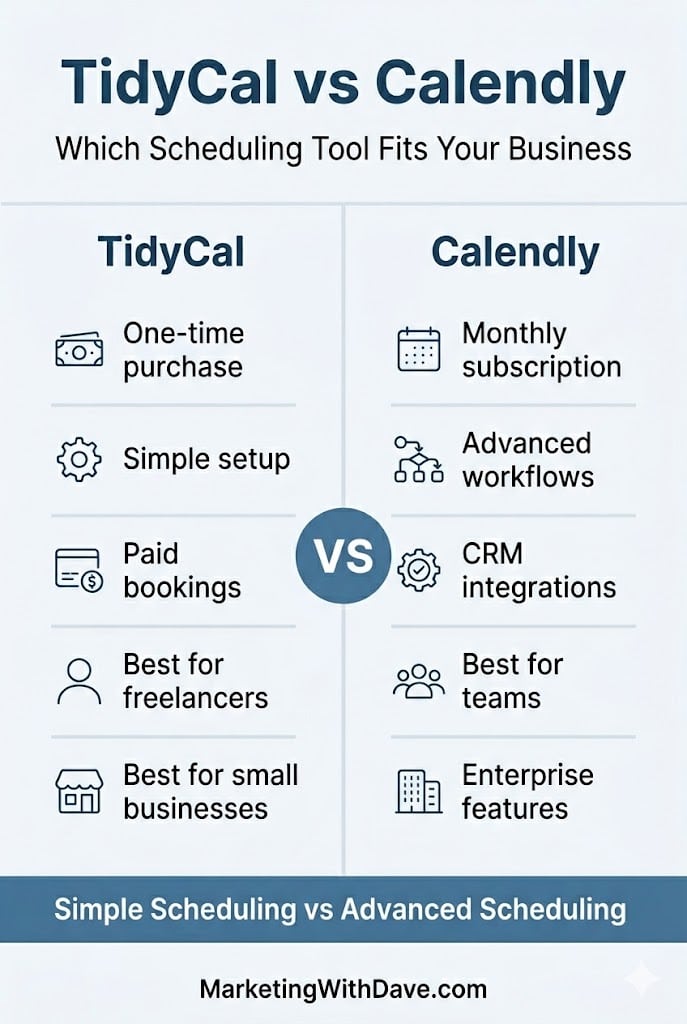
Calendly has evolved into a scheduling platform built for teams, CRM workflows, and enterprise-scale operations. TidyCal takes a different approach: simpler setup, fewer moving parts, and a one-time purchase instead of an ongoing subscription.
The question is not which tool is better. It is which tool fits your workflow.
| If you are… | Choose |
|---|---|
| Freelancer or solo business owner | TidyCal |
| Coach accepting paid bookings | TidyCal |
| Small agency managing client scheduling | TidyCal Agency ($79 one-time) |
| Sales team using Salesforce or HubSpot | Calendly |
| Recruiting team tracking candidates | Calendly |
| Enterprise organization with compliance requirements | Calendly |
Why I Personally Chose TidyCal
- I did not want another monthly subscription.
- Paid bookings and reliable calendar scheduling mostly covered what I wanted. I didn’t need CRM integration and other enterprise functionality.
- My workflow is using my desktop. If you live in your phone and need to edit bookings on the go, TidyCal does not have a mobile app. That matters and you should know it before you buy.
- At $29 one-time with a 60-day refund window, the risk was low enough to test against my real workflow first.
What Each Tool Actually Does
TidyCal is built around a simple premise: set your availability, create booking types, connect your calendar, share a link, and get paid. It handles one-on-one, group, and recurring bookings, accepts payments through Stripe or PayPal, and integrates with Google Calendar, Apple iCal, Zoom, Google Meet, and Zapier. Setup is fast. The interface stays out of your way. It has processed over 3.7 million bookings since launching in 2021.
Calendly has grown well beyond booking links. It connects up to six calendars simultaneously, supports round-robin and collective scheduling, includes a native meeting notetaker, offers a contacts and relationship management layer, and connects to 100+ tools including Salesforce, HubSpot, and LinkedIn. Its pricing reflects that scope.
TidyCal gets you booked and paid. Calendly orchestrates scheduling across teams, workflows, and CRM systems.
Pricing and Plan Differences
For most buyers, this is where the decision starts. TidyCal’s biggest advantage is its one-time pricing model, while Calendly relies on recurring subscriptions. If you are a solo operator or small business owner trying to keep software costs under control, the differences here may matter more than any individual feature.
| Feature | TidyCal | Calendly |
|---|---|---|
| Pricing model | Lifetime deal $29–$79 (AppSumo) | Free tier; $10–$16/seat/mo (paid plans) |
| Free tier | 🔴 60-day refund window | 🟢 Permanently free basic plan |
| Team members | 0 (Individual) / Unlimited (Agency) | Unlimited (seat-based) |
| Custom branding / booking page | 🟢 Reduced TidyCal branding | 🟢 Paid plans |
| Custom domain | 🔴 LTD plans | 🟢 Paid plans |
Core Scheduling Features
Both tools handle the fundamentals well. You can create booking pages, connect calendars, schedule meetings, and automate reminders. The differences are less about capability and more about depth, integrations, and flexibility.
| Feature | TidyCal | Calendly |
|---|---|---|
| Booking types (1:1, group, recurring) | 🟢 Unlimited | 🟢 Unlimited |
| Date polls | 🟢 | 🟢 Meeting polls |
| Calendar integrations | Up to 10 (Individual) / 25 (Agency) | Up to 6 calendars |
| Google Calendar | 🟢 | 🟢 |
| Microsoft 365 / Outlook | 🟢 Intermittent sync delays reported | 🟢 |
| Apple iCal | 🟢 | 🟢 |
| Invite questions / intake forms | 🟢 | 🟢 |
| Automated reminders | 🟢 | 🟢 |
| SMS reminders | 🟢 U.S. & Canada | 🟢 Paid plans |
| Import existing bookings from Calendly | 🟢 | N/A |
Team Scheduling and Meeting Management
This is where Calendly begins to separate itself. TidyCal works well for individuals and small teams, but Calendly was built with larger organizations, routing workflows, and multi-user scheduling in mind.
| Feature | TidyCal | Calendly |
|---|---|---|
| Zoom / Google Meet | 🟢 | 🟢 |
| Microsoft Teams | Agency plan only | 🟢 |
| Round-robin scheduling | Agency plan only | 🟢 |
| Collective (multi-host) meetings | Agency plan only | 🟢 |
| Routing & conditional logic | 🔴 | 🟢 Teams and above |
| Mobile app | 🔴 Mobile website only | 🟢 iOS and Android |
| Browser extension | 🔴 | 🟢 Chrome, Edge, Firefox |
Integrations, Analytics, and Enterprise Features
If your scheduling tool needs to connect with CRM systems, support compliance requirements, or provide deeper reporting and automation, Calendly has a clear advantage. These features are often unnecessary for freelancers and small businesses but become increasingly important as organizations grow.
| Feature | TidyCal | Calendly |
|---|---|---|
| Accept payments (Stripe & PayPal) | 🟢 | 🟢 Stripe on paid plans |
| Salesforce / HubSpot / CRM | 🔴 | 🟢 Paid plans |
| Meeting notetaker | 🔴 | 🟢 Native feature |
| Contacts / relationship management | 🔴 | 🟢 |
| Zapier integration | 🟢 | 🟢 |
| REST API access | 🟢 | 🟢 |
| Analytics / reporting | Basic (CSV export) | 🟢 Dedicated analytics |
| Translation / locales | 30+ locales | 🟢 |
| SOC 2 / GDPR / enterprise compliance | 🔴 | 🟢 |
Looking across all four categories, the pattern is clear. TidyCal focuses on affordability and core scheduling functionality, while Calendly adds team management, CRM integration, analytics, mobile apps, and enterprise capabilities. The best choice depends less on features and more on whether you will actually use those advanced capabilities.
See the current AppSumo deal for TidyCal
Affiliate disclosure: If you purchase through my link, I may earn a small commission at no additional cost to you. I only share tools I have used myself.
Where the Meaningful Differences Live
No mobile app. This is TidyCal’s biggest practical limitation. Calendly has iOS and Android apps. TidyCal has a mobile-responsive website. If you edit availability, respond to reschedule requests, or check upcoming bookings from your phone throughout the day, TidyCal creates real friction. The team is working on mobile improvements, but there is no app today. Know that going in.
Microsoft 365 sync. Google Calendar sync works well. Microsoft 365 and Outlook integration is supported, but intermittent sync delays have been a recurring issue. If your operation runs on Microsoft infrastructure, test this carefully during the 60-day refund window before committing. Calendly’s Microsoft integrations are more mature.
Pricing. TidyCal is $29 once. Calendly’s paid plans start at $10/seat/month. For solo operators, that gap compounds quickly.
| Scenario | Year 1 | Year 3 |
|---|---|---|
| TidyCal Individual (one-time) | $29 | $29 |
| Calendly Standard ($10/mo) | $120 | $360 |
| Calendly Teams ($16/mo) | $192 | $576 |
See the current AppSumo deal for TidyCal
Frequently Asked Questions
Is TidyCal better than Calendly?
For freelancers, coaches, consultants, and small businesses that need scheduling and payment collection without a monthly subscription, TidyCal is the stronger value. Calendly is better suited for teams, CRM workflows, advanced routing, and enterprise requirements.
Does TidyCal have a free plan?
No. TidyCal is a one-time purchase starting at $29 with a 60-day money-back guarantee. Calendly offers a permanently free plan limited to one event type and basic scheduling.
Does TidyCal integrate with Google Calendar?
Yes, and it is TidyCal’s most reliable integration. Google Calendar sync works consistently and is the setup the majority of users run without issues.
Does TidyCal work with Outlook and Microsoft 365?
Yes, but Microsoft 365 sync has produced intermittent delays for some users. If your workflow depends heavily on Microsoft tools, test it carefully during the 60-day refund window before committing.
Can TidyCal replace Calendly?
For most solo operators and small businesses, yes. TidyCal handles scheduling, payment collection, reminders, calendar sync, and intake forms. It is not the right replacement for teams that need CRM integrations, routing logic, or enterprise compliance.
Is TidyCal worth it?
At $29 one-time, the 60-day refund window lets you test it against your actual workflow before the decision is final. The only reasons to choose Calendly instead are a mobile app requirement, Microsoft 365 dependency, or team and CRM features TidyCal does not have.
Bottom Line
TidyCal is the right tool for solo operators and small service businesses that need booking pages, paid appointments, and no monthly bill. Calendly earns its pricing when team coordination, CRM integration, or enterprise compliance are real requirements. At $29 lifetime with a 60-day refund window, TidyCal is low-risk enough to test before you commit.
See the current AppSumo deal for TidyCal
Disclosure: This post may contain affiliate links. If you purchase through these links, I may earn a small commission at no additional cost to you.
Looking for more marketing software reviews? See my full list of marketing tools and software I recommend.
TidyCal vs Calendly: Which Scheduling Tool Is Better for Your Business Read More »