Pinterest automation sounds great in theory. Create the image, generate the description, schedule the pin, move on with your life.
But while working with Pinterest automation tools, I noticed something that doesn’t get talked about nearly enough: automating a Pin can mean giving up functionality available when you publish directly through Pinterest.
And sometimes the limitation isn’t the tool. It’s Pinterest’s API.
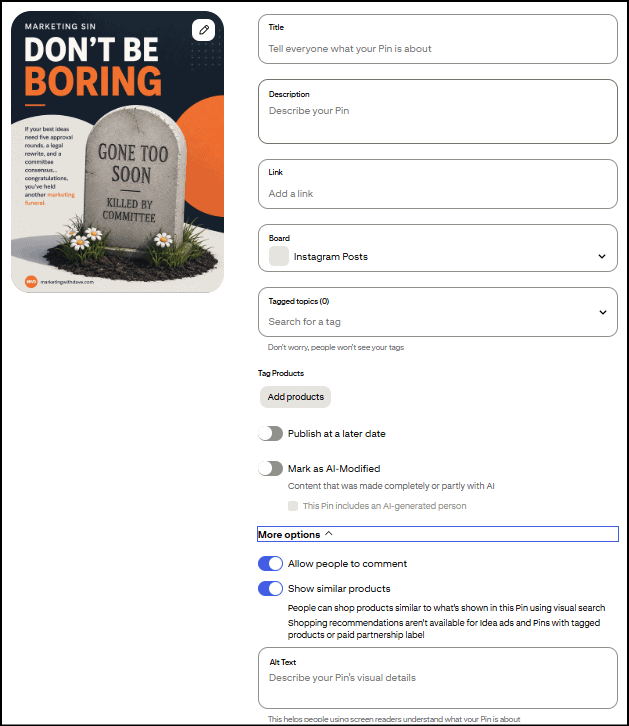
The two AI disclosure checkboxes are new
Two fields in that screen are recent additions: “Mark as AI-Modified” and “This Pin includes an AI-generated person.” Pinterest’s AI labeling system launched globally on April 30, 2025. I’ve used Pinterest daily long enough to know these two checkboxes didn’t show up together though. They rolled out separately, just days apart.
This fits a broader pattern. Meta started applying “Made with AI” labels to Facebook and Instagram content in May 2024. More recently, New York became the first state to legally require AI disclosure in ads: its synthetic performer law took effect in June 2026, mandating a clear label any time an ad uses an AI-generated person. Whether it’s platform policy or now state law, the direction is the same. Flagging AI involvement is becoming standard, not optional.
And that’s where automation becomes more complicated: as Pinterest adds new native publishing controls, third-party tools may not immediately, or ever, have access to them.
What’s missing when you’re not using Pinterest directly
Tagged Topics. Pinterest’s native pin creation flow lets you attach up to 10 predefined categories to help classify your pin. This field isn’t part of Pinterest’s documented API for creating pins, and multiple users have reported in Pinterest’s own community forums that tagged topics only work through Pinterest’s native scheduler, not third-party tools. I couldn’t find an official Pinterest statement confirming this outright, but I’ve never been able to set it through anything but Pinterest’s own interface either. My most-used categories tend to be Marketing, Business Marketing, Small Business Marketing, and Marketing Tools and while I don’t have proof that choosing topics helps your pin perform better, I feel better doing it.
Allow comments and Show similar products toggles. Same story. These two switches don’t appear anywhere in Pinterest’s documented API fields, so there’s no way for a third-party tool to set them on your behalf.
Product tagging. If you’re an Amazon affiliate or run any kind of shopping content, this one can matter. Pinterest’s Create Pin API doesn’t expose a field for attaching product tags to a standard pin. That functionality seems to live inside Pinterest’s Shopping/Catalog features rather than the basic pin creation endpoint.
Alt text is a different story. I want to correct something I initially assumed: alt text actually is part of Pinterest’s official API. Whether a specific tool lets you set it comes down to whether that tool’s developers built the field into their product, not a Pinterest restriction. So don’t assume every third-party tool is missing this. Check the specific tool.
Why this matters for your workflow
With over 500 billion Pins already on the platform, you need every edge you can get. Depending on your business, these gaps range from trivial to a genuine roadblock. If you rely on Amazon affiliate links, losing product tagging in your automated workflow is a real problem. If you don’t run comments on purpose anyway, that toggle won’t bother you.
There’s also a scale question worth knowing before you build your workflow around automation. Pinterest’s API caps you at 1,000 write operations per day and 300 requests per minute per account, there’s no bulk endpoint so every pin is its own API call, and you can’t schedule more than 30 days out. If you’re pinning at a normal pace, none of that touches you. If you’re trying to batch-schedule a season’s worth of content in one sitting, it will.
There are constant trade-offs among speed, quality, and effectiveness, and figuring out what’s worth automating on Pinterest is no different. I use a product called Pin Generator, and here’s specifically where it’s helped:
Saves time on pin creation by handling a chunk of the repetitive design work for me
Fills in alt text with AI wherever it’s missing, closing a gap most people never notice until it’s pointed out
Audits my Pinterest account so I can track whether I’m actually making progress cleaning it up month over month
Flagged that board categories need a description, something I had no idea about and that Pinterest doesn’t even show you when you’re first creating a board
These are just a few of the most actionable benefits I have enjoyed using this platform. If interested, you can read my full Pin Generator review.
The takeaway isn’t that you shouldn’t automate Pinterest. I do. It’s that automation isn’t a perfect substitute for publishing natively. Know which features matter to your workflow, know which ones your tool supports, and decide where the time savings are worth the trade-off.
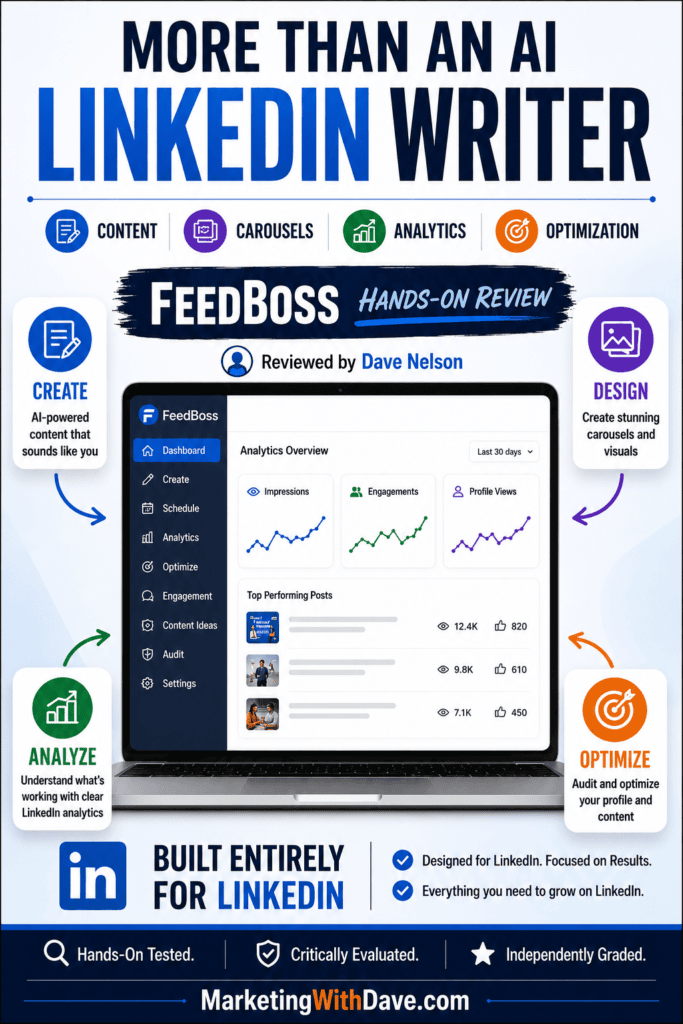
AI tools that write LinkedIn posts are everywhere, so I went into FeedBoss skeptical. The usual pattern: you give it a topic, it spits out something vaguely post-shaped, and you spend the rest of your time making it sound like you.
FeedBoss broke that pattern. Its best features barely involve generating content at all. It analyzes your LinkedIn history, builds a detailed writer profile, refines drafts conversationally, creates images and editable slide decks, audits your profile, and delivers analytics that beat what LinkedIn gives you natively.
It also has real gaps. Some AI editing functions failed outright, navigation buries key features, and Tier 1 skips functionality teams will want. I also encountered an error with Trending Topics, but the support team corrected it within minutes of my reporting it.
Net result: more interesting than I expected, with rough edges that need fixing. I also put FeedBoss through my six-question framework for evaluating social media software, adapted for one important distinction: FeedBoss is built entirely for LinkedIn.
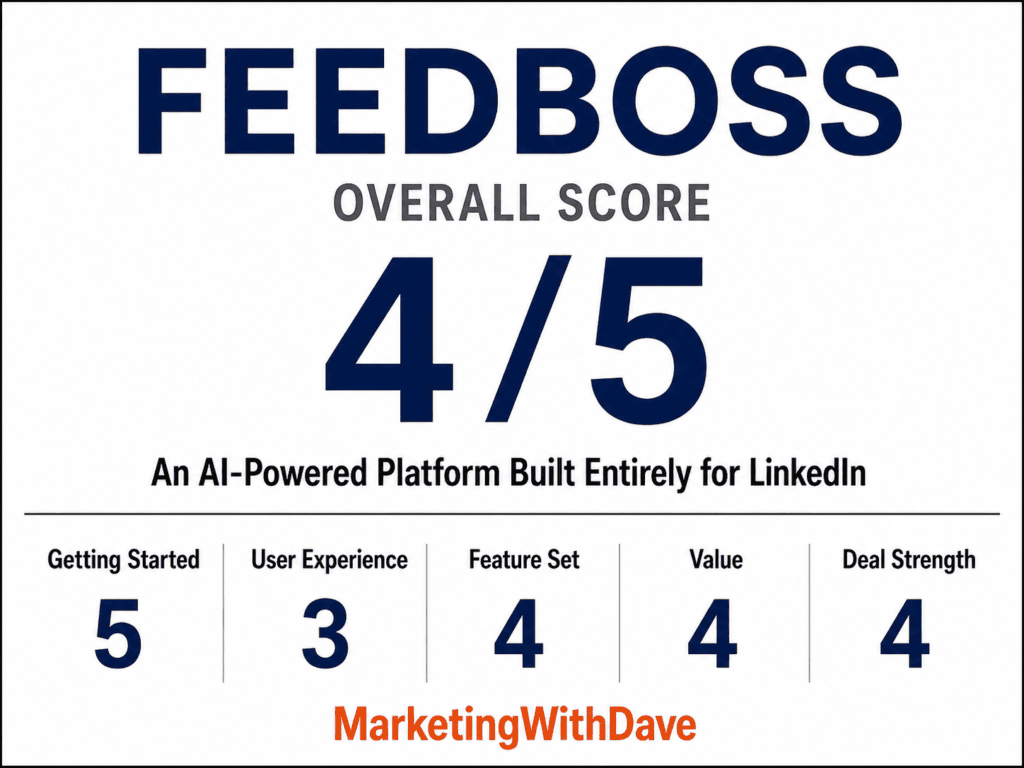
FeedBoss Overall Score
Why 4/5? Inconsistent AI editing, frustrating navigation, launch-day bugs, and Tier 1 limitations keep an otherwise impressive LinkedIn platform from feeling fully polished.
Affiliate disclosure: If you purchase through my link, I may earn a small commission at no additional cost to you. I only share tools I have used myself.
The 30-Second Decision
Buy FeedBoss if: You want an AI-powered content and optimization platform built specifically for LinkedIn. It combines writing assistance, scheduling, carousels and images, LinkedIn analytics, profile auditing, engagement tools, and content research in one workspace, with surprisingly strong personalization to your brand and writing style.
Skip it if: You need a multi-channel social media management platform, or LinkedIn is only one small part of your social strategy. FeedBoss is not trying to manage Facebook, Instagram, X, TikTok, or your other social channels. It is a LinkedIn tool.
The biggest reason to consider FeedBoss is how much of the LinkedIn workflow it brings together. It can learn how you write, help develop and refine content, create supporting visuals and carousels, schedule posts, analyze what is working, audit your LinkedIn presence, and surface ideas for what to do next. Some features still have rough edges, but FeedBoss is much more than another AI LinkedIn post generator.
The Onboarding Analysis Nailed Who I Am
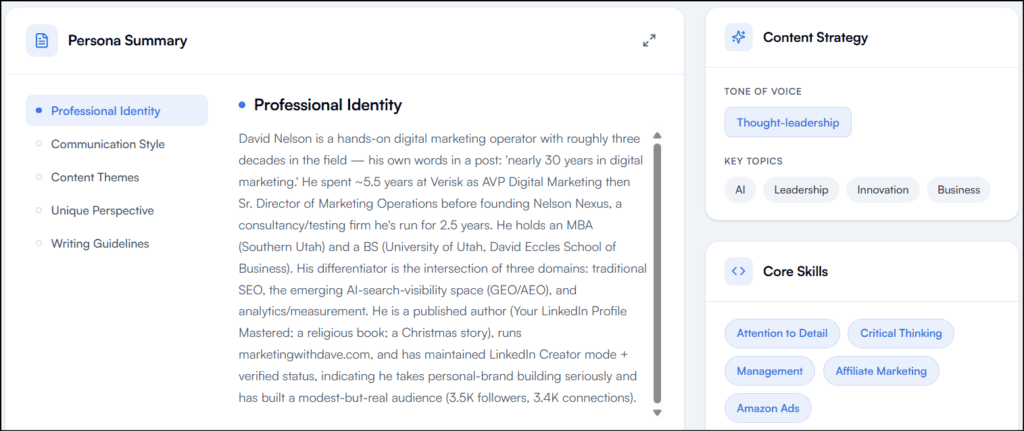
FeedBoss spent real time analyzing my LinkedIn history before generating anything, and the output showed it. It labeled me “The AI-Search Auditor” and correctly identified my recurring strengths: original frameworks, first-hand testing, consistent publishing.
It pulled my actual background (nearly 30 years in digital marketing, Verisk, Nelson Nexus, my MBA, MarketingWithDave.com, my book) and correctly mapped the intersection of SEO, AI-search visibility, and analytics that drives my recent content.
The writing-style analysis was the strongest part. It recognized that I open with tension or a contrarian claim, then back it with my own testing data. It cited real examples and flagged specific patterns: short declarative hooks, functional over decorative formatting, minimal emoji, named frameworks, a preference for evidence over vendor claims.
Best of all: it described me as an “anti-hype analyst of AI-search marketing” and correctly picked up on my documented/observed/inferred/unknown distinction, plus my recurring warning against chasing AI visibility while ignoring the traffic that still comes from everywhere else.
The broad topic tags (“AI,” “Leadership,” “Innovation”) felt generic next to that detailed persona work, but overall this is the best onboarding analysis I’ve seen from an AI content platform.
The Writing Workflow Asks Instead of Inventing
I tested it with a real idea: before asking a customer to fill in a field, ask whether you’re requesting information they already gave you or information your company should already know.
The first draft was polished but leaned into data-governance and enterprise CRM language, more consultant than me. Then FeedBoss did something I liked: instead of calling the draft done, it told me the post stayed general because it needed a specific example only I had, and it wouldn’t invent one. It asked me for a real customer story.
I gave it a rant involving Audible, Netflix, Costco prescriptions, the IRS, and my HOA. FeedBoss worked those into the piece. The result sounded substantially more like something I would publish.
Most AI writing tools work like this: prompt, generate, here’s your post, good luck. FeedBoss works like this: understand the writer, draft, identify what’s missing, ask for it, revise, keep refining. That difference matters.
One Gap: No Easy Way to Trim for LinkedIn’s Limit
The revised post landed at 3,762 characters. LinkedIn caps posts at 3,000. FeedBoss flagged the overage correctly but gave me no one-click way to send it back through and say “cut this to 3,000 without losing the point.” If FeedBoss knows the destination is LinkedIn, it should either respect the limit automatically or surface a prominent “Trim to 3,000” option.
Slide Decks: Enough to Finally Get Me Publishing a Carousel
I’ve never published a LinkedIn carousel because the production work never felt worth it. FeedBoss got me closer than any tool has.
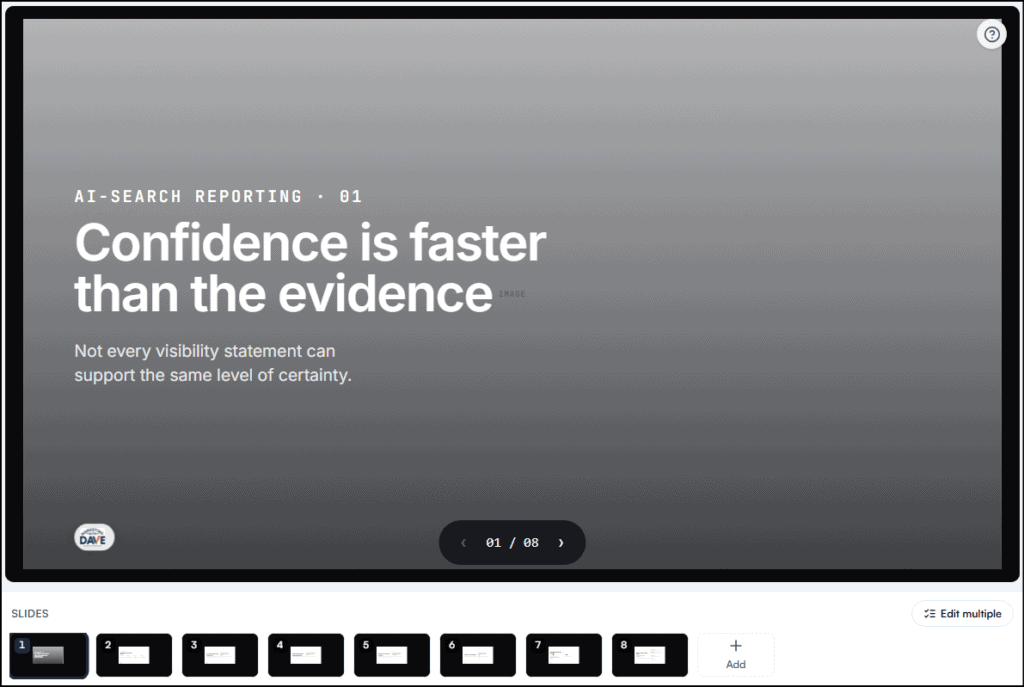
I prompted it to build a myth-busting carousel separating documented, observed, inferred, and unknown claims in AI-search visibility reporting, and to explain why confusing those categories leads to bad decisions. It returned an eight-slide deck that got the framework right: each category defined correctly, a slide on how reporting breaks down when observation becomes fact and inference becomes certainty, and a closing slide that turned the framework into a four-step process.
That’s a strong first draft from a short prompt.
The Slide Editor Struggles With Images
The slide deck itself was a strong starting point, but the AI editing tools were much less capable than I expected. My logo rendered at roughly 50×36 pixels on every slide, far too small to read. I asked FeedBoss to enlarge it across all eight slides, then tried again with a specific instruction to triple its size. Neither request changed the logo. I saw the same limitation when asking the AI to remove image elements.
Text edits worked much better. FeedBoss could resize, rewrite, and replace text, so the editor is useful for copy and typography. Visual-element editing is where it currently falls short. If I have to manually resize the same logo across eight slides and then verify that every slide matches, some of the time savings disappear.
I still see real potential here. FeedBoss can import an existing PDF or slide deck, so once I create a polished MarketingWithDave carousel template with the right logo size, typography, and spacing, I should be able to reuse that structure instead of fixing the same design issues every time.
One smaller UX issue: finished decks appear in a Your decks section below the creation interface. Because that section is off-screen, a newly created deck can briefly feel like it disappeared until you know to scroll down.
Image Studio: Good Output, One Credit Bug
I asked FeedBoss to build an infographic around another idea I’m writing about: AI search visibility has a sampling problem, where checking too few prompts across too few models produces misleading scores. It generated a clean, on-brand infographic using my blue/navy/white kit, correctly incorporating prompts tested, models tested, test frequency, and response variation, with a solid closing line about sample size.
Output: a 1024×1024 PNG, about 1.38 MB, text rendering cleanly. Good first-generation quality, though some text ran small for mobile.
One problem: the infographic illustrated the sampling issue with invented numbers (72% visibility from 10 prompts and 2 models, 38% from 100+ prompts and 6+ models). Those weren’t my real numbers. For a graphic specifically about evidence quality, fabricated stats are the wrong move. I’d strip the percentages or label them illustrative before publishing.
I also hit a credit error trying to remove an element from the image, despite having 2,355 credits available. Likely a bug or an undocumented Tier 1 limit, but it shouldn’t happen with that much headroom.
LinkedIn Analytics Is Probably the Best Feature
This nearly stayed hidden. Analytics, Engagement, Popular Posts, Authority Map, and LinkedIn Audit all sit under an “Optimize” section buried deep in the left nav. I almost finished testing without finding it.
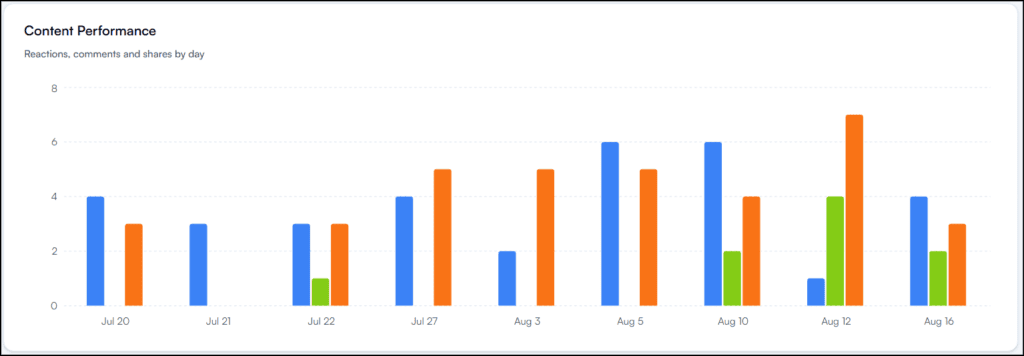
Once I did, it became my favorite part of the product. Native LinkedIn analytics are thin. FeedBoss turns your posting history into an actual dashboard: total engagement, reactions, comments, shares, engagement-rate trends, follower growth, performance by date, and it goes further by turning that data into decisions.
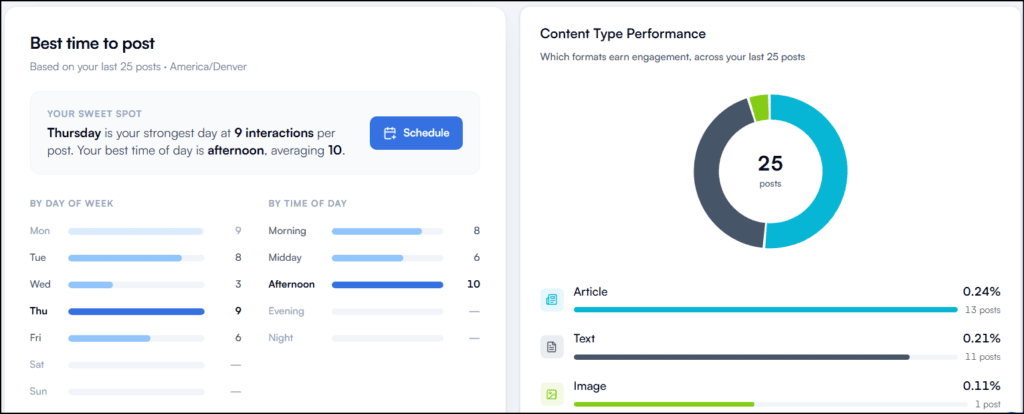
It identified Thursday afternoon as my strongest posting window and faded out results where it didn’t have enough data yet, rather than presenting a thin sample with the same confidence as a strong one. Good instinct.
It also broke down engagement rate by format across my last 25 posts: articles at 0.24% (13 posts), text at 0.21% (11 posts), image at 0.11% (1 post). I wouldn’t act on that last number, and neither should you, since one post isn’t a sample. Showing the post count next to the rate is exactly the right call.
It also analyzes posts you published outside FeedBoss, checking for new activity every 24 hours. You get useful analytics immediately instead of waiting weeks for FeedBoss to build its own history.
The LinkedIn Profile Audit Delivers Real Substance
The audit generated a four-page PDF, gave me a Personal Brand Score (73/100), and broke that down across Core Health, SEO/Discoverability, Content/Engagement, and Authority/Leadership. It then produced specific recommendations for my headline, About section, experience, skills, and profile image, correctly referencing real accomplishments from my history like eCommerce results and Google Ads ROAS.
I don’t agree with every call. It flagged zero skill endorsements as a major red flag and tied that to a lack of recommendations, but endorsements and recommendations aren’t the same thing. Treat the audit as input for judgment, not a checklist to follow blindly. Even so, it’s one of the strongest features in the product.
Two annoyances: the audit asked me to re-enter my LinkedIn URL, even though FeedBoss already has my connected profile, imported posts, and follower count. And there’s no obvious place to find your most recent audit or track score changes over time. Both should be easy fixes.
Navigation buries Analytics, Audit, and Engagement below the fold with no clear signal there’s more to scroll to.
Slide Deck editor can resize and rewrite text but can’t reliably resize or remove images and logos.
Generated posts can exceed LinkedIn’s 3,000-character limit with no one-click way to trim them.
Image Studio invents illustrative data without labeling it as such.
Image editing hit a credit error despite a large available balance.
Emoji picker is missing basic bullet characters, a real gap for a LinkedIn-focused tool.
Tier 1 excludes Video Studio, Lead Magnets, Authority Map, API access, and post-approval workflows, the last of which matters most for agencies and teams.
Most of these are fixable UX and QA issues, not fundamental design problems. In fact, I initially encountered an error that prevented Trending Topics research from working at all. I reported it, the support team responded, and the issue was corrected within minutes. That’s exactly the kind of responsiveness I want to see when testing a newly launched product. The remaining issues are worth knowing before you buy, but they’re not reasons I’d write the product off.
Tier 1 and Credits
Tier 1 ($59) includes 400 monthly AI credits, 2,000 lifetime credits, 5 profile audits per month, 1 LinkedIn connection, 1 workspace, 1 member, 10 tracked engagement profiles, 25 GB storage, 2K image resolution, voice/text Knowledge Base, Bring Your Own AI Key, and profile voice matching.
Credits by action: a post costs 5, an image costs 25, a slide deck costs 20 regardless of slide count, an image carousel costs 50 regardless of slide count, and video costs 100 regardless of length. Editing individual slides is free. Charging decks and carousels as a flat fee instead of per-slide is the right model.
FeedBoss draws from monthly credits before touching your lifetime balance, and the dashboard shows the split clearly (355/400 monthly, 2,000 lifetime, 2,355 total after my test). That transparency is well done.
Brand Kit and Content Styles
The Brand Kit (handle, tagline, logo, fonts, colors) applies consistently to generated images but inconsistently to slide decks, where my logo rendered too small despite the same settings. One central brand config is the right idea; the execution needs to actually honor it everywhere.
FeedBoss also auto-generated writing styles from my LinkedIn history (My LinkedIn Voice, Lesson Learned, Build in Public, Observational, Reflection, Milestone, Tactical, Story, Contrarian). Starting from a predefined style beats re-explaining tone in every prompt. I didn’t test each style deeply enough to say how distinct the outputs really are.
Bottom Line
I expected another AI LinkedIn writer. That undersells it. The strongest parts of FeedBoss are where it works with information that already exists: my LinkedIn history becomes a real persona, my published posts become analytics, my profile becomes an audit, my writing patterns become reusable styles, and one real example turns a generic article into something I’d actually publish.
The product still has launch-stage bugs, and several Tier 1 gaps will matter more to teams than solo creators. But between the analytics, the profile audit, and a writing workflow that asks for missing information instead of fabricating it, there’s enough real value here to keep using it and watch where it goes.
This content is for educational purposes and reflects my hands-on experience using the product and the information publicly available at the time of writing. Always evaluate tools based on your specific business needs, goals, and workflows before making a decision.
Most social media management tools promise the same thing: schedule posts, manage multiple accounts, analyze performance, save time.
SocialBu checks those boxes. It publishes to 12+ platforms and bundles scheduling, custom queues, evergreen recycling, social listening, analytics, AI assistance, and automation.
But feature count isn’t what sold me. What sold me is how closely SocialBu matches what I need a social media platform to do.
I’ve bought other social media tools and stopped using them. Not because they were bad, but because the extra steps and clutter made it easier to just publish directly on the platforms. No matter what a tool can do, if you don’t like using it, you likely won’t.
SocialBu is the first one that’s changed that math for me.
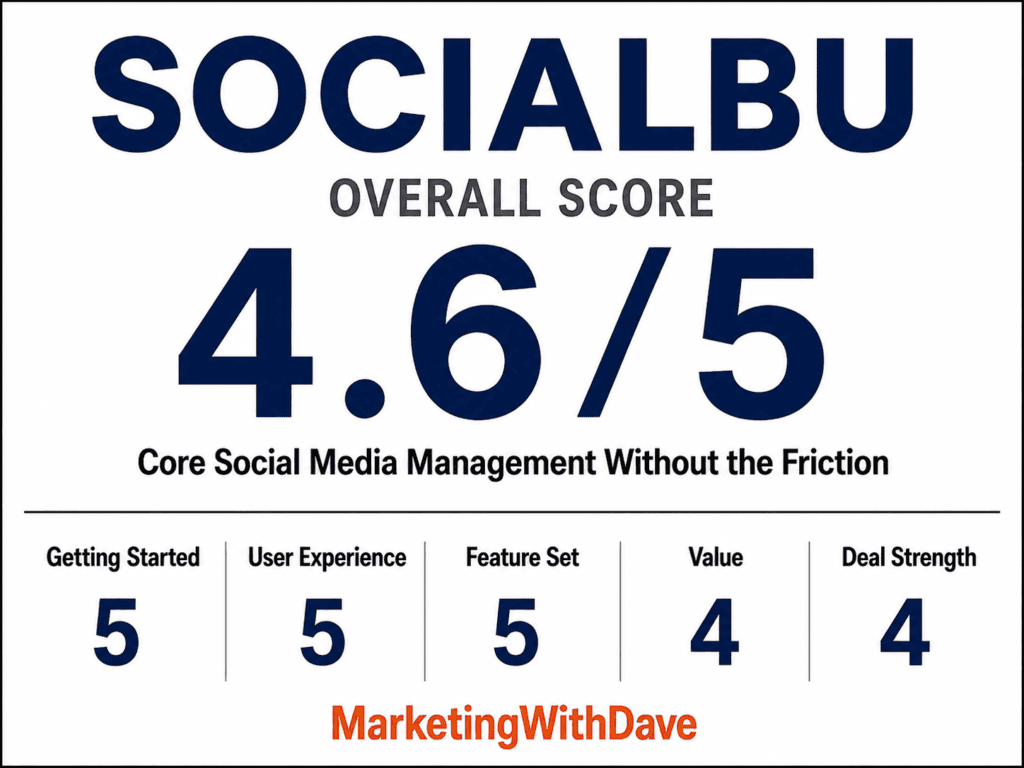
SocialBu Overall Score
Why 4.6/5: SocialBu nails the core social media management experience, but some of its most valuable features require Tier 2.
Affiliate disclosure: If you purchase through my link, I may earn a small commission at no additional cost to you. I only share tools I have used myself.
The 30-Second Decision
Buy SocialBu if: You want one clean place to publish and schedule across multiple networks, plus solid social listening, custom queues, evergreen recycling, analytics, and automation. Especially strong if X matters to you and you need links in your posts.
Skip it if: You need contests and sweepstakes, advanced campaign management, native eCommerce product automation, or built-in AI that auto-repurposes posts across platforms.
SocialBu isn’t interesting because it schedules posts. Plenty of software does that. It’s interesting because it handles the real workflow without making the basic job harder.
What SocialBu Does
SocialBu is an all-in-one platform built around publishing, scheduling, monitoring, engagement, analytics, and automation.
Scheduling across 12+ social networks
Drag-and-drop social calendar
Bulk post importing via CSV
Evergreen content recycling
Custom publishing queues
Multiple brand and workspace management
Built-in analytics
Social listening
AI-assisted content creation
Automations
Google Drive integration
Chrome browser extension
Supported networks include LinkedIn, Instagram, TikTok, Facebook, YouTube, Pinterest, and X.
That’s a wide feature set. But the features that stood out to me weren’t the flashy ones.
What I Liked
1. You Can Actually Include Links in X Posts
Oddly specific place to start, but if you know, you know it matters.
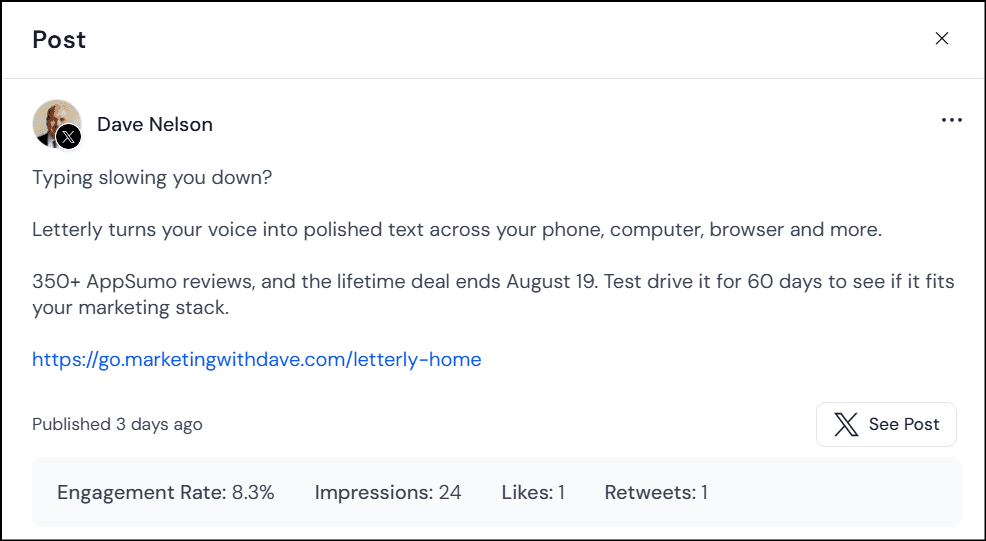
SocialBu allows links directly in X posts. I published an X post with one of my own links, no workaround needed.
That’s a bigger deal than it sounds. I use social media to push out articles and software reviews, so a scheduler that fights me on linking back to my own content isn’t worth much.
Competing tools stumble here. RobinReach strips URLs from X posts entirely because of API costs. Sociamonials blocks direct X links on lower plans, though it offers a workaround via the first comment.
SocialBu just let me post the link where I wanted it. That should be table stakes. Right now, it isn’t.
2. Social Listening Goes Deeper Than Expected
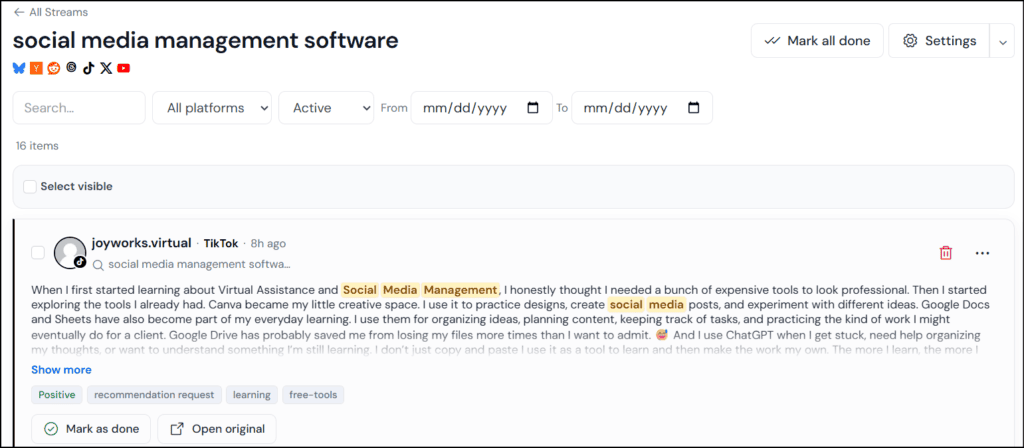
SocialBu calls this feature Listen. You create streams around keywords or phrases, and it surfaces matching conversations across:
Bluesky
Hacker News
Reddit
Threads
TikTok
X
YouTube
Track your company name, competitors, industry topics, or buying-intent phrases like “looking for a social media management tool” or “alternatives to [competitor].” That turns Listen into a lead and engagement discovery tool, not just brand monitoring.
SocialBu adds AI filtering, sentiment analysis, and AI-generated tags to cut through the noise. Streams filter by platform, status, text, and date range. You can jump to the original conversation, engage on the source platform, and mark items done. Daily email digests summarize new activity so you’re not babysitting the dashboard.
I especially like that individual streams can expose an RSS feed, which opens up options beyond the SocialBu dashboard itself.
Social listening is usually gated behind premium or enterprise pricing. Getting this much of it inside a lifetime deal makes Listen one of SocialBu’s standout features.
3. Automations Go Beyond Scheduling
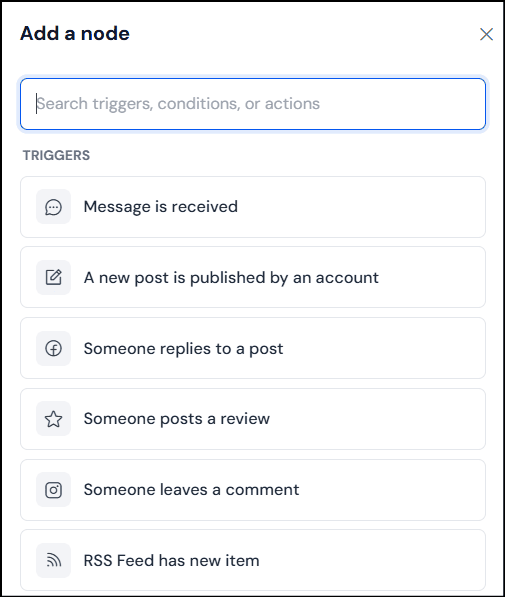
The workflow is simple: Trigger → Conditions → Actions. What’s interesting is the range.
Triggers include a new message, a new post from a connected account, a Facebook reply or review, an Instagram comment, a new RSS item, or a webhook.
Actions include sending a reply or email, publishing a post, adding a post to a queue, or firing an HTTP request to another app.
Add conditions, and you can automatically drop new blog posts from an RSS feed into a publishing queue, or get emailed when a specific interaction happens. The HTTP request action is the real unlock, it opens the door to connecting SocialBu with tools outside the platform.
I haven’t stress-tested every automation combination, so I won’t vouch for rock-solid reliability yet. But the ceiling here goes well past basic RSS-to-social posting.
4. The Chrome Extension Fits My Actual Workflow
Not a flashy feature, but a useful one. When I find something worth sharing while browsing, I start the post right there instead of copying the URL, opening SocialBu, and starting over.
It’s a small friction reduction. But social media management is hundreds of small repeated actions, and cutting a few steps out of each one adds up.
5. Clean Interface, Not a Stripped-Down One
I’ve used tools with impressive feature lists that I hated opening. That’s a real problem in a category you might live in daily.
SocialBu’s interface is clean. Publishing doesn’t feel cluttered, navigation makes sense, and it doesn’t dump every feature onto one screen just to prove it has them.
Even small details are handled well, like an emoji library in the post composer that actually includes things I use, numbered icons and bullet-style symbols included. Not a selling point on its own, but a sign someone thought about the daily experience.
A time-saving tool has no value if you don’t want to use it.
SocialBu is different. Clean interface, straightforward publishing, working X links, a Chrome extension that fits how I actually find content, and listening and automation that add real function without complicating the basics.
It’s not doing everything competing tools do. It’s doing a better job of staying out of my way while I do what I need to do.
Where SocialBu Fits Against Other AppSumo Social Media Tools
I’ve also tested RobinReach and Sociamonials, and both take different approaches.
RobinReach leans into AI content repurposing. It can adapt a post written for one network into a version for another. SocialBu doesn’t do this automatically. I tested it by selecting LinkedIn and X for the same post; the LinkedIn draft blew past X’s character limit, and SocialBu told me exactly how many characters over I was but left the trimming to me.
Some will call that a missing feature. I don’t mind. I already have AI tools I prefer for writing and shortening copy, same goes for images. RobinReach also has stronger native eCommerce workflows for turning Shopify, WooCommerce, and Etsy activity into social content.
Sociamonials goes a different direction: contests, sweepstakes, giveaways, Social CRM, campaign funnels, approval workflows, and deeper campaign reporting. Legitimate advantages, but specialized ones.
If you run contests, manage promotional campaigns, need advanced eCommerce automation, or want your tool handling AI repurposing, SocialBu isn’t the strongest pick. Those aren’t the things that kept me from using social media software, though. Friction was. That’s why SocialBu works for me, it feels like a focused platform, not a pile of adjacent marketing features.
SocialBu offers a repost option for previously published content. I tested it on X, and instead of reposting, it threw a duplicate-content error.
To be fair, plenty of tools label “publish the same content again” as a repost, which isn’t the real thing either. But if SocialBu shows a Repost button, I expect it to repost. It didn’t in my test. I’ll revisit this as the feature gets updated.
2. Some Best Features Are Locked to Tier 2
Tier 1 is generous for publishing, but Automations and the Social Inbox don’t start until Tier 2.
If you just want centralized publishing and scheduling, Tier 1 covers it. If Automations or the Social Inbox are part of the appeal, Tier 2 is worth the jump.
SocialBu Pricing and AppSumo Tiers
SocialBu is currently on AppSumo with three lifetime tiers.
Feature
Tier 1
Tier 2
Tier 3
Lifetime Price
$49
$109
$279
Social Accounts
10
25
75
Posts Per Month
600
1,200
3,600
Custom Queues
8
18
60
AI Writer Credits / Month
500
1,000
2,000
Teams
1
3
10
Automations
0
30
150
Social Inbox
No
Yes
Yes
All three tiers include core publishing, Google Drive integration, the social calendar, bulk importing, and multi-brand management.
Tier 1 at $49 is unusually generous for pure publishing and scheduling. Ten accounts and 600 posts a month covers most solo marketers and small businesses.
But Tier 2 is the smarter long-term buy. For $60 more, you get 15 additional accounts, double the post allowance, more queues and AI credits, and, most importantly, 30 automations and the Social Inbox.
Think of SocialBu as a scheduler, and Tier 1 works fine. Think of it as the center of your social workflow, and Tier 2 is worth it.
AppSumo’s 60-day money-back guarantee gives you time to connect real accounts and confirm SocialBu fits your workflow before committing.
Bottom Line
SocialBu isn’t the most feature-packed social media tool I’ve tested, and that’s part of the appeal.
RobinReach has stronger content repurposing and eCommerce automation. Sociamonials has contests, Social CRM, and deeper campaign tools. Those matter for some use cases. But what I want from a core social media platform is simpler: make publishing easy, let me organize content, help me monitor conversations, give me useful analytics, automate the repetitive stuff, and stay out of my way.
SocialBu gets remarkably close. When a LinkedIn post runs too long for X, it tells me instead of rewriting it for me, and that’s fine, I have AI tools I prefer for that job. And it lets me publish links directly in X posts, which is rarer than it should be.
The best compliment I can give SocialBu: it’s a social media tool I actually open. Not because it does everything, but because it does what I care about without getting in the way.
This content is for educational purposes and reflects my hands-on experience using the product and the information publicly available at the time of writing. Always evaluate tools based on your specific business needs, goals, and workflows before making a decision.
X (Twitter) is still large enough to matter, but it’s no longer built to give free, low-friction organic marketers a clean experience. Post there when the workflow is easy, the audience fit is real, or the content is naturally conversational.
Just know three things going in:
basic analytics are gated or degraded
third-party publishing is more constrained because X’s API is expensive
advertiser trust in the platform is historically weak.
This isn’t “X is useless.” It’s “X is now a buyer-beware channel.”
The audience is still there
DataReportal reported 586 million global users reachable by ads in January 2025, and its U.S. Digital 2026 report puts X’s U.S. ad reach at 99 million in late 2025. Pew’s latest fact sheet shows 21% of U.S. adults say they use X, skewing toward younger adults, men, urban users, and higher-income households.
So the audience question is clear: it’s still there, especially for real-time news, commentary, politics, sports, finance, tech, and founder-led conversations. What’s in question is whether the free, basic-marketer experience is still good enough to justify the operational effort.
Two data points complicate the picture. DataReportal also reported shrinking potential ad reach year over year, so the scale isn’t obviously growing. And on the revenue side, EMARKETER and Reuters both project X returning to ad revenue growth in 2025 for the first time since Musk’s takeover (roughly $1.31 billion in U.S. ad revenue and $2.26 billion globally), but both note revenue still sits well below pre-acquisition levels. The platform isn’t disappearing. It just hasn’t earned back confidence.
What changed for organic marketers
Analytics went behind a paywall. Multiple current guides describe native X analytics as a paid feature tied to Premium, matching what most free users now see in-product. That leaves marketers without the simple post-level visibility (impressions, engagement) they used to take for granted.
The API got expensive. X’s official pricing now runs pay-per-use: a standard content creation request costs $0.015, but one that includes a URL costs $0.200. Analytics reads are billable too, with “owned reads” of a user’s own content priced at $0.001 per resource. That gap between plain posts and link posts explains a lot of what’s showing up in social scheduling tools.
The policy layer adds risk. X’s authenticity policy holds users responsible for any third-party app they authorize, and it prohibits automation that doesn’t comply with the Developer Policy. Normal scheduling isn’t banned, but the ecosystem has gotten less forgiving and more dependent on paid API access than most marketers realize.
Native posting and scheduling still work fine on the web. The moment you want sustainable analytics, multi-account tooling, or richer automation, costs and constraints show up fast.
Why marketers are frustrated
Trust and brand safety. Kantar’s 2024 Media Reactions research found trust in ads on X fell from 22% in 2022 to 12% in 2024, with only 4% of marketers believing X ads are brand safe. A net 26% of marketers told Kantar they planned to cut X spending in 2025, the largest pullback among major global ad platforms.
Weak organic economics for free accounts. Buffer analyzed 18.8 million posts from 71,000 accounts and found Premium accounts got roughly 10x the median reach of regular accounts, while regular accounts had a median engagement rate of 0% by 2025. Link posts were the weakest format, essentially flatlining for non-Premium accounts after March 2025. It’s one company’s dataset, not a controlled study, but it matches what marketers are reporting: if you’re not paying and you’re posting links, distribution is a tough game.
Third-party integration friction. Because links and analytics now cost real money at the API level, vendors can’t treat X the way they treat LinkedIn, Pinterest, or Facebook. Restrictions that would have sounded absurd a few years ago now make straightforward economic sense.
Constant ambiguity. Even when a feature technically still works, marketers now have to ask a second question: does this work natively only, or in the paid tools too? That ambiguity is expensive for small teams because it turns into ongoing testing and troubleshooting.
Case study: what RobinReach and Sociamonials reveal
While reviewing RobinReach and Sociamonials for my comparison of the two social media management platforms, I noticed something interesting. These aren’t isolated gripes. They’re a clean window into the broader X ecosystem.
RobinReach’s founder has stated publicly that the tool doesn’t support posts with URLs, because X’s API pricing makes them significantly more expensive than plain text, image, or video posts. RobinReach also documents daily posting limits, confirms X moved to pay-per-use API pricing in 2026, and has disabled X analytics across all its plans because read costs are too high.
Sociamonials has said the same thing in different words. Asked directly on AppSumo, its founder confirmed that X’s developer pricing made it impossible to offer link posting except on an Enterprise tier with an extra monthly charge, and that repost intervals under a day aren’t supported either.
There are exceptions. In my subsequent testing of SocialBu, I found that it does support publishing X posts containing links. My current plan allows at least two link posts per day, although I haven’t yet confirmed whether that is the maximum. That doesn’t invalidate what RobinReach and Sociamonials have said about X’s API costs. It shows that different social media platforms are making different decisions about how much of that cost and functionality they’re willing to absorb or pass along to customers.
Line those statements up against X’s own pricing ($0.200 for a post with a URL versus $0.015 without) and the broader pattern becomes clear: vendors aren’t arbitrarily limiting their X features. They’re making different product and pricing decisions around an API model that makes links and analytics considerably more expensive. Some restrict those features, while others, like SocialBu, have found ways to continue offering at least some of that functionality.
What Premium solves, and what it doesn’t
X currently bundles edit post, longer posts, longer video uploads, reply prioritization, and, at higher tiers, verification, reduced ads, monetization eligibility, and Media Studio. Pricing on the web runs roughly $3/month for Basic, $8/month for Premium, and $40/month for Premium+. (Longer posts still can’t be scheduled, a small detail that says a lot about how cleanly the feature set maps onto an actual marketing workflow.)
If your goal is on-platform reach, editing, long-form posts, or monetization, Premium helps. Buffer’s data suggests it meaningfully improves visibility. But if your goal is simple, trustworthy website attribution for ordinary organic posts, Premium doesn’t get you there. It’s not the old free-Twitter measurement experience coming back.
Worth separating from all of this: X’s Ads API is a genuinely rich environment for paid campaigns, with campaign management, scheduled creatives, click objectives, and real conversion tracking. That machinery still works well. It’s just that an ordinary organic marketer isn’t operating in that stack unless they’re paying for ads or a separate toolchain.
X in 2026 is increasingly built for paying participants or lightweight casual use. The middle ground, marketers who want decent free analytics, routine scheduling, and cheap tracking, is exactly where the experience has broken down.
A realistic playbook
Keep it lightweight. Post natively when it’s easy. Use a tool when it makes X convenient without workarounds. Don’t build elaborate tracking for a channel that isn’t already sending real traffic, especially if your Google Analytics (GA4) or referral data rarely shows meaningful x.com, t.co, or twitter.com contribution.
Favor text over links. Buffer’s data says text posts perform best, video and images are workable, and links are the weakest format for non-Premium accounts. If a link matters, consider leading with a strong native post and moving the URL to a reply.
Measure down-funnel. With on-platform analytics degraded or paywalled, ask “did this drive sessions, signups, demos, or sales?” instead of “how many impressions did this get?” Lean on GA4, Search Console, and landing-page behavior rather than X’s own dashboards.
The takeaway
None of this means marketers should abandon X. If your audience is active there, the platform can still generate meaningful conversations and referrals. The question isn’t whether X works. It’s whether the free marketing experience still justifies the operational overhead.
X is now a convenience channel, not a marketing trust channel.
X is no longer a platform I optimize for. It’s a platform I syndicate to.
If it takes two minutes to syndicate a strong thought there, do it.
If it takes paid upgrades, link workarounds, or tracking hacks just to measure basic performance, that effort is usually better spent on a channel with better attribution, better tooling, and more confidence behind it.
If you’ve compared two social media management tools lately, you’ve probably noticed something frustrating. Every feature list looks almost identical. Publish. Schedule. AI. Analytics. Calendar. After the fifth comparison page, everything starts blending together.
That’s because most tools aren’t really competing on whether they can publish to Facebook or LinkedIn anymore. Most platforms are boxed in by the same network APIs, so the core publishing layer looks nearly the same everywhere you look. They’re competing on how well they fit your workflow, how much time they save you, and whether they’ll still work for you a year from now.
The market has moved in that direction too. HubSpot’s 2026 social media research found that brand awareness is now the top goal for 59% of social teams, that 94% of marketers already use AI somewhere in their workflow, and that 77% say authenticity matters more than production value. Nearly half expect their social tool stack to grow. Nobody is shopping for “a scheduler” anymore. They’re shopping for a system that helps them publish, learn, respond, and prove value, and that still holds up as the business changes.
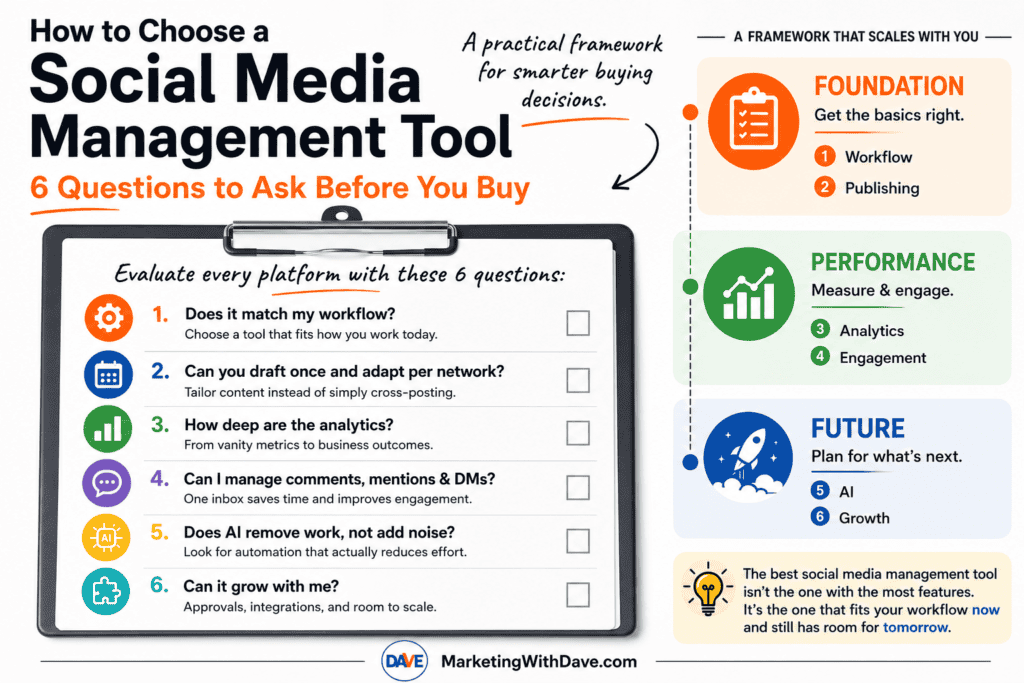
After testing dozens of marketing tools over the years, I’ve found that feature count is usually a poor predictor of how much I’ll actually enjoy using a product. Some of my favorite tools aren’t the ones with the longest list of checkboxes. They’re the ones that remove friction from the work I do every day. That’s the lens behind the six questions below. I’ll run the framework against three tools I’ve tested hands-on: RobinReach, Sociamonials, and FeedBoss. They make an especially useful comparison because the first two compete as broader social media management platforms, while FeedBoss is built entirely around LinkedIn.
Question 1: Does it match my workflow?
What to look for: The most-featured tool isn’t automatically the right one. Look for a platform whose default workflow matches how you actually work today, not the workflow of a team three times your size.
Why it matters: Enterprise-style platforms show up repeatedly in the research with governance, audit trails, role-based permissions, and multi-team approvals built in. Those are real advantages for a large team, but they’re overhead for a solo marketer or small business.
Warning sign: If you find yourself hunting through settings and navigation for the two or three things you actually use every day, the tool was built for a level of complexity you haven’t reached yet. A solo marketer who picks a simpler tool often ends up publishing more consistently, simply because the workflow doesn’t get in the way.
Question 2: Can you draft once and adapt per network?
What to look for: A platform should let you write a post, tailor it for each network’s format and audience, schedule it ahead, and see the whole calendar at a glance. If you publish a lot of blog or CMS content, auto-sharing new posts to social is worth real weight here too.
Why it matters: This is the baseline job of the category. If a tool can’t do this cleanly, everything else it offers is secondary.
Warning sign: Repurposing content across platforms, adapting one platform’s post for another, is a meaningfully different capability than simple cross-posting. Not every tool that claims to “save you time” actually does the adapting for you.
Question 3: How deep are the analytics?
What to look for: Social analytics generally show up in layers, and it’s worth knowing which layer a tool stops at before you buy.
Level 1: Vanity metrics. Follower growth, reach, likes. Every tool has this.
Level 2: Post-level performance. Which individual posts actually worked.
Level 3: Campaign attribution. UTM tracking, Google Analytics integration, performance by campaign or tag.
Level 4: Business outcomes. Revenue, CRM data, lead generation, paid-performance reporting tied back to results.
Why it matters: This is exactly how the larger enterprise platforms differentiate themselves, and it’s also where solo marketers most often get surprised after buying. A tool that only reports at Level 1 or 2 will eventually push you into a spreadsheet for anything resembling attribution.
Warning sign: Marketing copy that says “advanced analytics” without specifying whether that means post-level, campaign-level, or revenue-level reporting. Ask which level you’re actually getting.
Question 4: Can I manage comments, mentions & DMs?
What to look for: One place to see and respond to comments, mentions, and messages across networks, without switching out to each platform individually.
Why it matters: Once a brand gets any traction, social stops being a one-way broadcast channel. A real inbox is the difference between managing social media and constantly firefighting it.
Warning sign: A tool that is entirely focused on outbound publishing with no engagement layer at all is optimized for content broadcasting, not relationship-building or customer service.
Question 5: Does AI remove work, not add noise?
What to look for: AI that’s built into the core workflow (drafting, repurposing, alt text, image generation) rather than bolted on as a marketing feature.
Why it matters: Almost every tool in this category now has AI somewhere. The useful question isn’t whether AI is present, it’s whether it removes real repetitive work without flattening your brand voice.
Warning sign: AI is the headline feature propping up a thin workflow underneath. If the AI capabilities are the main selling point and everything else feels like an afterthought, that’s worth noticing.
Question 6: Can it grow with me?
What to look for: Approval workflows, campaign or contest tooling, CRM and marketing-stack integrations, and multi-client or team permissions, even if you don’t need them yet.
Why it matters: Future you will appreciate this. Even if you’re the only person creating content today, approval workflows become valuable the moment a freelancer, employee, or client joins the process. If a vendor has no path toward that, or toward deeper campaign tooling and integrations, assume you may need to replace the tool rather than grow with it.
Warning sign: No stated roadmap when you ask about a missing feature. A vague “it’s coming” from support is different from a founder who can point to something concrete in progress.
The factor no feature list will show you: reliability
Nobody talks about reliability until it burns them. Does publishing fail silently? Can you trust a scheduled post to actually go out? How does the vendor respond when something breaks? None of that shows up on a pricing page, and it’s worth digging into reviews specifically for how a company handles friction, not just what features it lists. In the RobinReach vs Sociamonials research, for example, one Sociamonials reviewer described unresolved bugs and no response from support, and the founder’s public reply flatly asserted a “zero known bugs” policy rather than addressing the specific issue. That kind of exchange tells you more about what ownership will feel like than any feature comparison does.
Running the Framework: RobinReach vs Sociamonials vs FeedBoss
Here’s how the six questions play out across three platforms I’ve tested hands-on.
RobinReach and Sociamonials are the more direct comparison because both are built to manage multiple social networks. FeedBoss is different by design: it focuses entirely on LinkedIn. That makes it a useful test of the framework itself. A platform can lose badly on feature breadth and still be the better choice if its narrower workflow matches what you actually need.
Question
RobinReach
Sociamonials
FeedBoss
1. Does it match my workflow?
Fast onboarding and one of the cleaner interfaces I’ve tested. Best fit when creating, repurposing, and publishing across multiple networks is the core job.
More powerful but more complex. The additional campaign, CRM, analytics, approval, and agency features create a steeper learning curve.
Excellent fit if LinkedIn is the workflow. Its onboarding built a surprisingly accurate profile of who I am, what I write about, and how I write. It makes far less sense if you need to manage several social networks.
2. Can you draft once and adapt per network?
Strongest of the three for multi-network repurposing. It can take content and adapt it across platforms rather than simply posting the same copy everywhere.
Strong core scheduling with a visual calendar, bulk upload, and RSS automation, but less emphasis on automatically repurposing one piece of content for different networks.
This question works differently because there is only one network. FeedBoss instead goes deeper on developing, refining, scheduling, and supporting LinkedIn content with images and carousels.
3. How deep are the analytics?
Still the weakest area in my testing. Analytics were largely profile-level, closer to Levels 1 and 2 of the framework.
The strongest traditional social analytics of the three, reaching into post and campaign performance plus Google Analytics campaign tracking.
The biggest surprise. FeedBoss turned my existing LinkedIn history into useful analysis of engagement trends, content-format performance, follower growth, and best day and time to post. It also showed the number of posts behind its conclusions so I could see when a sample was too small to trust.
4. Can I manage comments, mentions & DMs?
Lets you reply to comments from inside the platform, giving it a useful day-to-day engagement layer.
Approaches engagement more through Social CRM and workflow tools than a simple consolidated inbox.
LinkedIn engagement is built into the platform, including tracking posts and contacts and helping draft comments, but this is not a multi-network social inbox and it should not be evaluated as one.
5. Does AI remove work, not add noise?
One of RobinReach’s strengths. AI supports content creation, repurposing, image generation, and its MCP connection lets tools such as ChatGPT, Claude, and Codex work directly with the social workflow.
AI exists, but it is less central to the workflow. Sociamonials’ differentiation comes more from campaigns, analytics, automation, and marketing integrations.
This is where FeedBoss impressed me most. It did more than generate a LinkedIn post and walk away. It analyzed my writing history, built a detailed persona, recognized when a draft lacked the kind of first-hand example I normally use, asked me for one rather than inventing it, and continued refining the post after I responded.
6. Can it grow with me?
Growth comes through additional brands, members, integrations, automation, API access, and MCP workflows. Some of the more advanced capabilities require higher tiers.
Strongest traditional growth path for agencies and larger teams, with approvals, Social CRM, campaign tools, agency management, client workspaces, and a broad integration ecosystem.
There is room to grow, but Tier 1 exposes an important limitation. Video Studio, Lead Magnets, Authority Map, API access, and post-approval workflows require higher tiers. That matters much more once multiple people are involved in the LinkedIn workflow.
If you want the deeper feature-by-feature comparison of the two multi-network platforms, see my RobinReach vs Sociamonials comparison. I also published a separate hands-on FeedBoss review covering its LinkedIn analytics, profile audit, writing workflow, carousel generation, Tier 1 limits, and the issues I encountered while testing it.
The Factor No Feature List Will Show You: Reliability
Nobody talks about reliability until it burns them. Does publishing fail silently? Can you trust a scheduled post to actually go out? What happens when something breaks? And perhaps just as important, how does the company respond after you tell them?
This is why I pay attention to support interactions as much as feature lists.
During my RobinReach vs Sociamonials research, one Sociamonials reviewer described unresolved bugs and no response from support. The founder’s public reply asserted a “zero known bugs” policy instead of addressing the specific experience. Whatever the underlying facts, that exchange gave me information I could never get from the pricing page.
My FeedBoss experience went the other direction. Trending Topics research failed outright while I was testing it. I reported the problem, the team responded, and the feature was working within minutes. A launch-day bug is still a bug, but that is exactly how I want a young software company to respond when something breaks.
Reliability is not just uptime. It is also how quickly a vendor acknowledges problems, communicates what happened, and fixes what customers find.
How Priorities Shift as You Grow
The six questions stay the same, but their importance changes as your organization gets larger.
Capability
Solo Marketer
Growing Business
Agency
Publishing
Essential
Essential
Essential
Analytics
Basic
Advanced
Advanced / Multi-client
Inbox & Engagement
Nice to have
Important
Essential
AI
Helpful
Important
Important
Approvals
Usually unnecessary
Important
Essential
Integrations
Nice to have
Important
Essential
This is also why I would not automatically penalize a focused product for lacking features designed for an agency.
A solo marketer may get more value from a platform that makes the work fast and obvious than from one with client approvals, governance, CRM integrations, and campaign workflows they never touch. An agency evaluating the same products could reach the exact opposite conclusion.
FeedBoss makes that tradeoff especially obvious. If LinkedIn is where you are building your personal brand or generating business, its narrow focus can be an advantage. If you need one system for Facebook, Instagram, TikTok, X, Pinterest, LinkedIn, and everything else, that same focus immediately eliminates it.
The Takeaway
The best social media management tool is not the one with the longest feature list. It is the one that removes the most friction from the work you actually need to do.
RobinReach, Sociamonials, and FeedBoss make that point unusually clear because each optimizes for something different.
RobinReach is strongest when efficient multi-network content creation, repurposing, publishing, and AI-assisted workflows are the priority.
Sociamonials makes more sense when deeper analytics, promotional campaigns, approvals, CRM capabilities, and agency workflows matter more than simplicity.
FeedBoss gives up multi-network breadth entirely and concentrates on LinkedIn content, analytics, profile optimization, engagement, and personal-brand workflows.
None is objectively the best social media platform because “best” changes with the job you are hiring the software to do.
That is why I keep coming back to these six questions. Features change. Interfaces improve. AI capabilities may look completely different six months from now. Your workflow is the more durable filter.
Before buying another social media tool, ask whether it fits how you work today, helps you publish without creating more work, gives you enough measurement to make better decisions, supports the engagement you actually need, uses AI to remove work instead of adding noise, and has somewhere for you to grow.
If you are currently comparing broader social media platforms, see my complete RobinReach vs Sociamonials comparison. If LinkedIn is your primary focus, my FeedBoss review includes the screenshots, analytics, profile audit, carousel test, credit details, and launch-day issues from my hands-on evaluation.
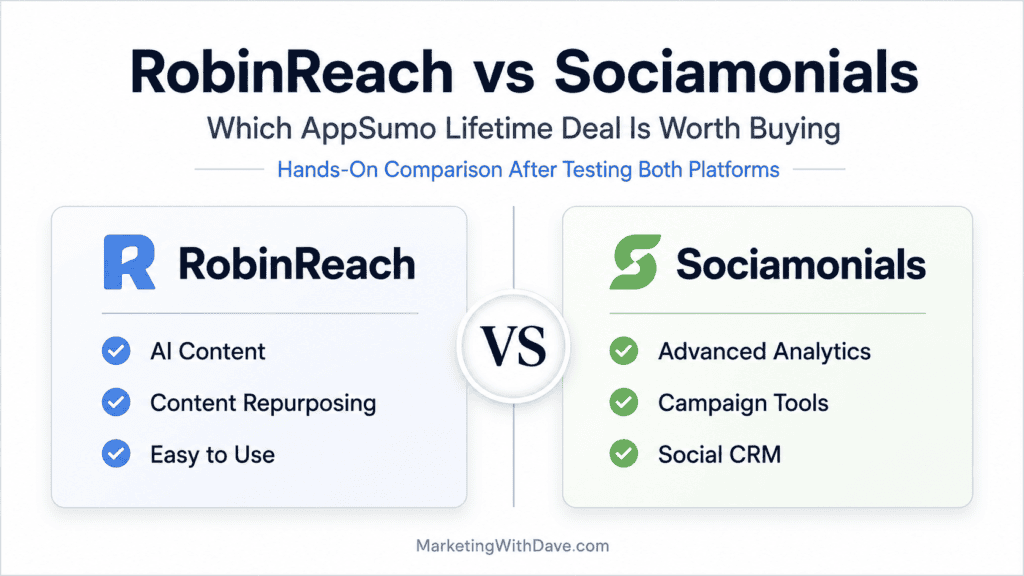
Unless otherwise noted, feature comparisons below come from my own hands-on evaluation of both platforms, backed up by the public AppSumo listings, founder Q&A, and customer reviews for pricing and context. Both tools promise to take social media off your plate. Both schedule posts, both cover most of the major platforms, and both use AI somewhere in the product. Here’s where they actually differ.
I also evaluated both platforms using the same six-question framework I use to look beyond feature lists and assess workflow fit, publishing, analytics, engagement, AI, and how well a tool can grow with you.
RobinReach offers the cleaner, more intuitive experience, while Sociamonials provides the broader feature set.
RobinReach shines in AI-assisted publishing and content repurposing, while Sociamonials stands out with campaigns, analytics, and workflow flexibility.
RobinReach makes getting started incredibly easy, while Sociamonials rewards users who need more advanced capabilities.
RobinReach focuses on profile-level reporting, while Sociamonials provides much deeper post and campaign analytics.
If X (Twitter) is an important channel, Sociamonials has a real workflow advantage with its automatic first-comment option.
One caution before the details: Sociamonials looks broader mainly because it plugs into a long list of marketing integrations (Mailchimp, ActiveCampaign, Salesforce, Zapier, and many others) rather than because its social publishing itself is dramatically more capable. That’s genuinely useful if you already use those tools, but it’s a different kind of advantage than a stronger scheduler. On the features that are actually about running social media day to day, the gap is narrower, and Sociamonials pulls ahead mainly on analytics and campaign tooling rather than on breadth alone.
The biggest takeaway from my testing is that neither platform is objectively better. They simply optimize for different parts of the social media workflow. RobinReach prioritizes creating and publishing content efficiently, while Sociamonials prioritizes measuring, managing, and optimizing marketing performance.
Category by Category: Which Tool Wins Where
Category
Winner
Why
AI content creation
RobinReach
Both have it. RobinReach also generates AI images; Sociamonials leans on a 1 million+ stock photo library instead.
Content repurposing
RobinReach
A standout feature for adapting one platform’s content to others. Sociamonials doesn’t have an equivalent.
AI agent / MCP integration
RobinReach
Native MCP connection to Claude, ChatGPT, or Codex. A Sociamonials founder reply says AI/API improvements are coming but not yet delivered.
Analytics depth
Sociamonials
RobinReach’s analytics are mostly profile-level; Sociamonials goes deeper into post and campaign performance, including Google Analytics tracking.
Contests, giveaways, and UGC campaigns
Sociamonials
Sweepstakes, contests, a Social CRM, and an approval queue. RobinReach doesn’t touch this category.
Agency and multi-client management
Sociamonials
A dedicated Agency Dashboard with single sign-in across workspaces. RobinReach organizes by brands and members instead, scaling by tier.
eCommerce and content automation
RobinReach
Shopify, WooCommerce, Etsy, and WordPress integrations, plus RSS-to-post automation. Not present on Sociamonials.
User experience and learning curve
RobinReach
Cleaner, faster to learn, particularly around connecting profiles. A qualitative impression from initial testing, not a full usability study.
Company track record
Sociamonials
Founded 2012, 250 reviews, 14 years in market, versus RobinReach’s November 2023 founding and roughly 46 reviews.
Platform breadth
RobinReach, narrowly
Both support the same 10 core networks. RobinReach adds Telegram on top.
Entry-level pricing
RobinReach
$69 at Tier 1 versus $79 for one Sociamonials code, though the two use different licensing models (see Pricing below).
Handling of X restrictions
Sociamonials
Its “move link to first comment” option gives it a real workflow edge. See below.
Platform Support Compared
Platform
RobinReach
Sociamonials
Bluesky
✅
✅
Facebook
✅
✅
Google Business
✅
✅
Instagram
✅
✅
LinkedIn
✅
✅
Pinterest
✅
✅
Telegram
✅
❌
Threads
✅
✅
TikTok
✅
✅
WordPress CMS
✅
❌
X (Twitter)
✅
✅
YouTube
✅
✅
Platform coverage is effectively tied at 10 shared networks, with Telegram as RobinReach’s one extra. Both listings market higher platform counts in places that don’t quite match what’s actually there; treat those marketed numbers as directional.
Social Profile Limits by Plan
Plan
RobinReach
Sociamonials
Entry level
Tier 1, $69: 5 social profiles
1 Code, $79: 30 social profiles
Second level
Tier 2, $159: 15 social profiles, X accounts unlocked
2 Codes, $158: 60 social profiles
Third level
Tier 3, $359: 40 social profiles
3 Codes, $237: 90 social profiles
Fourth level
Tier 4, $699: 200 social profiles
4 Codes, $316: 120 social profiles
Maximum available
200 social profiles at Tier 4
Up to 10 codes, 300 social profiles at $790
The scaling logic differs in a way that matters. RobinReach jumps in large, uneven steps and bundles other features (brands, members, AI credits, analytics depth) into the same tier decision, so you can’t buy more profiles without also paying for capacity you may not need. Sociamonials scales in flat increments of 30 profiles per code, with the full feature set already included at every level.
What Each Tool Is Actually Built For
RobinReach: An AI-First Workflow
What struck me first was the onboarding: connecting profiles was fast and didn’t require any guesswork, which isn’t always true of tools at this price point. From there, RobinReach pairs a clean scheduler with AI built into the core workflow rather than bolted on. Content repurposing, adapting one platform’s post for others, works well and is genuinely a step ahead of what Sociamonials offers. Connecting Claude, ChatGPT, or Codex through its native MCP integration lets an AI assistant handle scheduling and management through 40+ actions, which is a real differentiator if you actually want an AI agent running your accounts, though it’s worth weighing against how much you’d actually use that versus a normal dashboard.
Being able to reply to comments from inside the dashboard, rather than switching out to each platform, was one of the small things I appreciated most day to day. On the automation side, it auto-posts new products from Shopify, WooCommerce, and Etsy, turns WordPress content and RSS feeds into scheduled posts, and supports bulk CSV upload with Bitly and Switchy short links.
What frustrated me: there’s no contest, giveaway, or UGC campaign functionality at all, and the analytics stay at the profile level rather than breaking things down by post or campaign the way Sociamonials does. If either matters to your strategy, look elsewhere or plan to pair RobinReach with something else.
Sociamonials covers the same scheduling ground (a visual calendar, bulk delete, evergreen re-queuing, an “optimal post time” feature) but its real strength is everything built around running a promotion and measuring what happened afterward. Contest and sweepstakes templates, campaign funnels that chain one promotion into the next, an approval queue, and a built-in Social CRM all held up well in testing. Analytics are the standout: noticeably deeper than RobinReach’s, including Google Analytics campaign tracking, which I didn’t expect to find at this price.
For agencies, the Agency Dashboard is a genuine differentiator: one login, multiple client workspaces, a combined entry pool, and a free mobile app under the generic “Campaign Share” brand so agencies can hand it to clients without revealing the platform underneath. Its X workflow also includes a “move link to first comment” option, which quietly solves a problem RobinReach leaves entirely manual.
What it doesn’t do: AI content or image generation at RobinReach’s level, and no AI-agent or MCP connection yet, though the founder has confirmed that’s in progress. I also found myself hunting for things more than I expected to on RobinReach’s cleaner interface; Sociamonials packs in more, and it shows in the navigation.
Post and campaign-level, plus Google Analytics tracking
API Access & MCP
Tier 2 and above (BYOK required)
No
Who Should Buy What
If you are…
Choose
A solopreneur who wants a clean, fast-to-learn tool with strong AI content creation and repurposing
RobinReach
Someone who wants an AI assistant running posting through Claude, ChatGPT, or Codex directly
RobinReach
A marketer who runs regular giveaways, sweepstakes, or referral campaigns
Sociamonials
Someone who wants deep analytics and Google Analytics campaign tracking
Sociamonials
An agency managing several client accounts and wanting one login across workspaces
Sociamonials
A content creator with a Shopify, WooCommerce, or WordPress site who wants new products or posts to auto-publish
RobinReach
Someone whose marketing stack already runs through Mailchimp, ActiveCampaign, Salesforce, or Zapier
Sociamonials
Someone who posts to X frequently and wants links handled with less manual effort
Sociamonials
Someone who wants both AI-driven content operations and interactive campaign tools
RobinReach / Sociamonials
X (Twitter) Limitations
X’s API pricing changes have made third-party link posting expensive, and both tools are affected. RobinReach’s support team confirmed it has removed URLs from X posts, replies, and threads entirely because of those costs, with no stated way to restore them. Sociamonials handles it better: links are restricted below its Enterprise tier ($10 to $20 per month extra), but a “move link to first comment” option, confirmed in testing, gets around the restriction for free by posting the link as a follow-up comment automatically rather than leaving it to you.
Neither platform offers a “repost after X hours” option; the shortest built-in recurrence on both is the next day, so a same-day repost still means manually duplicating the post with an adjusted time. That’s a minor gap everywhere else, but noticeable if X is an active distribution channel for you. Outside of X, both platforms handle link sharing and scheduling normally.
Honest Limitations: What to Know Before You Buy
RobinReach
RobinReach is currently in an AppSumo early access window at $69 for Tier 1. Content generation and API/MCP access are both gated behind Tier 2 and above.
Sociamonials
Reviews are mixed on bug handling. One customer described unresolved bugs and no response from support; the founder’s public reply flatly asserted a “zero known bugs” policy and disputed the account rather than addressing the specific issue, which is worth knowing if you care how a vendor handles friction. The mobile app ships under separate “Campaign Share” branding, easy to miss if you’re specifically looking for Sociamonials. Fully restoring link posting on X requires the Enterprise tier, though the first-comment workaround covers most of that gap for free.
Pricing
RobinReach, AppSumo Lifetime Deal:
Tier 1: $69, 2 brands, 1 member, 5 social profiles, 5 GB media library, 200 AI text posts and 20 AI images per month, 1 RSS integration, basic analytics, no community inbox or API/MCP access.
Tier 2: $159, 5 brands, 5 members, 15 social profiles, 15 GB media library, 500 AI text posts and 50 AI images per month, community inbox and API/MCP access unlocked.
Tier 3: $359, 15 brands, 15 members, 40 social profiles, 50 GB media library, unlimited AI text posts, advanced analytics plus PDF report.
Tier 4: $699, unlimited brands and members, 200 social profiles, 100 GB media library, 500 AI images per month.
Sociamonials, AppSumo Lifetime Deal:
1 Code: $79, 1 workspace, 30 social profiles, 5,000 campaign entries per month, premium integrations, 1 million+ stock photos, and advanced analytics included from the entry code.
Additional codes stack rather than gate features: each code adds a workspace, 30 more social profiles, and 5,000 more monthly entries, up to 10 codes at $790 total. Every code includes the same feature set (branding removal, publishing approval workflow, detailed permissions, mobile app, unlimited pages and widgets, contests, video reviews).
The two products use fundamentally different licensing models: RobinReach gates features behind higher tiers, while Sociamonials includes its full feature set at every code level and simply scales workspace and volume limits.
Bottom Line
The two products are built around different jobs. RobinReach is built for efficient, AI-assisted publishing: draft it, repurpose it, automate it, and optionally hand the whole thing to an AI agent through MCP. Sociamonials is built for measuring and optimizing marketing performance: campaigns, contests, deeper analytics, and agency workflows. Both are actively developed, modern products; the difference is philosophy, not polish.
If you want the cleaner tool with stronger AI content creation and repurposing, get RobinReach. If you want deeper analytics, real campaign tooling, and a platform with 14 years behind it, get Sociamonials. If your work genuinely spans both AI-assisted content operations and promotional campaigns, there’s a fair case for running both.
Affiliate disclosure: If you purchase through my links, I may earn a small commission at no additional cost to you. I only share tools I have personally used or thoroughly researched. This content reflects my experience, review of the products, and current publicly available deal information as of June 2026. Always evaluate tools based on your specific business needs, goals, and workflows before making a decision.