Last updated August 2026
Pinterest automation sounds great in theory. Create the image, generate the description, schedule the pin, move on with your life.
But while working with Pinterest automation tools, I noticed something that doesn’t get talked about nearly enough: automating a Pin can mean giving up functionality available when you publish directly through Pinterest.
And sometimes the limitation isn’t the tool. It’s Pinterest’s API.
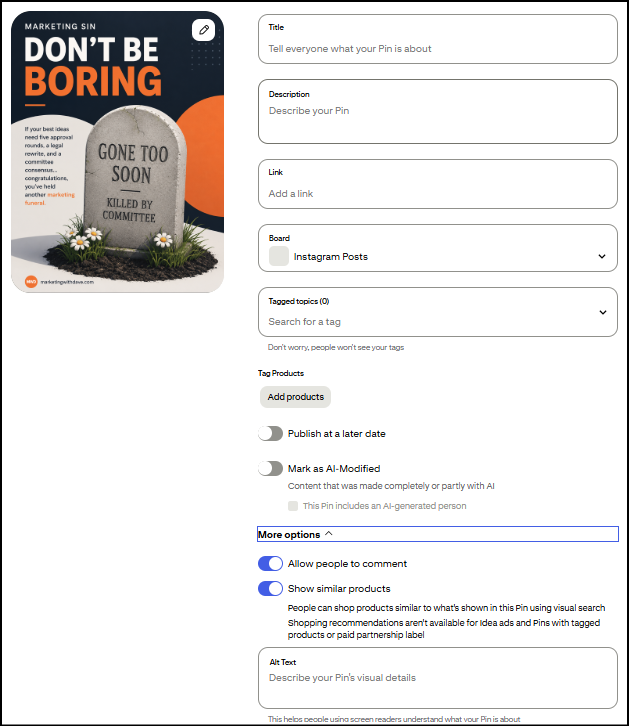
The two AI disclosure checkboxes are new
Two fields in that screen are recent additions: “Mark as AI-Modified” and “This Pin includes an AI-generated person.” Pinterest’s AI labeling system launched globally on April 30, 2025. I’ve used Pinterest daily long enough to know these two checkboxes didn’t show up together though. They rolled out separately, just days apart.
This fits a broader pattern. Meta started applying “Made with AI” labels to Facebook and Instagram content in May 2024. More recently, New York became the first state to legally require AI disclosure in ads: its synthetic performer law took effect in June 2026, mandating a clear label any time an ad uses an AI-generated person. Whether it’s platform policy or now state law, the direction is the same. Flagging AI involvement is becoming standard, not optional.
And that’s where automation becomes more complicated: as Pinterest adds new native publishing controls, third-party tools may not immediately, or ever, have access to them.
What’s missing when you’re not using Pinterest directly
Tagged Topics. Pinterest’s native pin creation flow lets you attach up to 10 predefined categories to help classify your pin. This field isn’t part of Pinterest’s documented API for creating pins, and multiple users have reported in Pinterest’s own community forums that tagged topics only work through Pinterest’s native scheduler, not third-party tools. I couldn’t find an official Pinterest statement confirming this outright, but I’ve never been able to set it through anything but Pinterest’s own interface either. My most-used categories tend to be Marketing, Business Marketing, Small Business Marketing, and Marketing Tools and while I don’t have proof that choosing topics helps your pin perform better, I feel better doing it.
Allow comments and Show similar products toggles. Same story. These two switches don’t appear anywhere in Pinterest’s documented API fields, so there’s no way for a third-party tool to set them on your behalf.
Product tagging. If you’re an Amazon affiliate or run any kind of shopping content, this one can matter. Pinterest’s Create Pin API doesn’t expose a field for attaching product tags to a standard pin. That functionality seems to live inside Pinterest’s Shopping/Catalog features rather than the basic pin creation endpoint.
Alt text is a different story. I want to correct something I initially assumed: alt text actually is part of Pinterest’s official API. Whether a specific tool lets you set it comes down to whether that tool’s developers built the field into their product, not a Pinterest restriction. So don’t assume every third-party tool is missing this. Check the specific tool.
Why this matters for your workflow
With over 500 billion Pins already on the platform, you need every edge you can get. Depending on your business, these gaps range from trivial to a genuine roadblock. If you rely on Amazon affiliate links, losing product tagging in your automated workflow is a real problem. If you don’t run comments on purpose anyway, that toggle won’t bother you.
There’s also a scale question worth knowing before you build your workflow around automation. Pinterest’s API caps you at 1,000 write operations per day and 300 requests per minute per account, there’s no bulk endpoint so every pin is its own API call, and you can’t schedule more than 30 days out. If you’re pinning at a normal pace, none of that touches you. If you’re trying to batch-schedule a season’s worth of content in one sitting, it will.
There are constant trade-offs among speed, quality, and effectiveness, and figuring out what’s worth automating on Pinterest is no different. I use a product called Pin Generator, and here’s specifically where it’s helped:
- Saves time on pin creation by handling a chunk of the repetitive design work for me
- Fills in alt text with AI wherever it’s missing, closing a gap most people never notice until it’s pointed out
- Audits my Pinterest account so I can track whether I’m actually making progress cleaning it up month over month
- Flagged that board categories need a description, something I had no idea about and that Pinterest doesn’t even show you when you’re first creating a board
These are just a few of the most actionable benefits I have enjoyed using this platform. If interested, you can read my full Pin Generator review.
The takeaway isn’t that you shouldn’t automate Pinterest. I do. It’s that automation isn’t a perfect substitute for publishing natively. Know which features matter to your workflow, know which ones your tool supports, and decide where the time savings are worth the trade-off.