Last updated July 2026
Creating Pinterest pins at scale sounds amazing in theory. In reality, most Pinterest workflows still involve too much manual design work, too much tedious scheduling, and too much time spent trying to turn one blog post, product, or idea into enough fresh pins to matter.
That is why Pin Generator caught my attention.
I reviewed this tool nearly a dozen times before finally buying it. My biggest hesitation was simple: would it really create quality enough pins to automate my Pinterest workflow in a meaningful way?
The honest answer is no, not fully. At least not yet.
But that does not mean Pin Generator is not worth it. In fact, that is exactly why I think this review matters. If you go in expecting true set-it-and-forget-it Pinterest automation, you may be disappointed. If you go in expecting a tool that dramatically speeds up pin ideation, creation, duplication, and scheduling while still requiring human review, this can be a very strong deal.

See how this score is calculated
Here’s how to interpret this score:
The overall score reflects both product quality and how compelling the current deal is.
A score in the low-to-mid 4 range reflects a tool that offers real value, especially for Pinterest users, but still has enough workflow limitations and rough edges to keep it from being a 5 out of 5.
Affiliate disclosure: If you buy through my affiliate link, I may earn a small commission at no additional cost to you. I only share tools I believe are worth your time and consideration.
Real Results From My Implementation
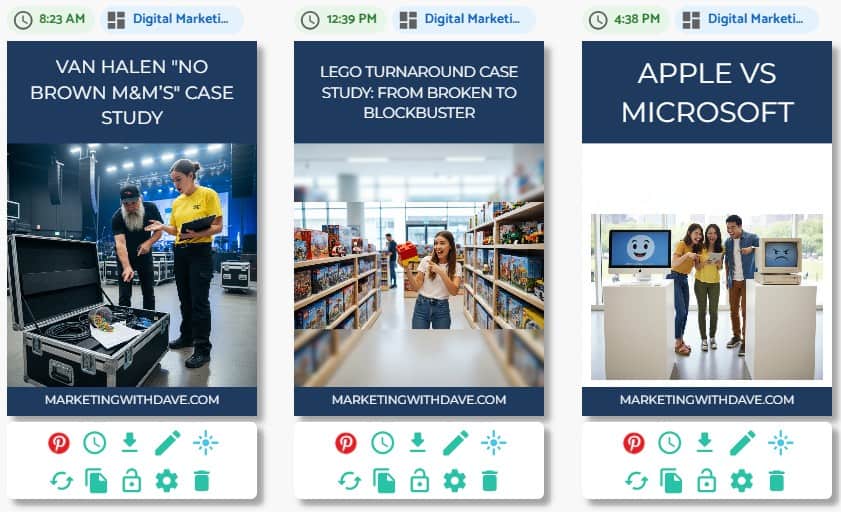
I am actively using Pin Generator for my own Pinterest workflow.
What changed for me is not that it magically replaced creative judgment. It did not. What changed is that it made it much faster to produce, test, duplicate, tweak, and publish pins at a scale that would have taken far more manual effort otherwise.
I still review what gets created. I still reject a meaningful percentage of automated outputs. But I also create and publish more pins because of this tool than I would without it.
That matters.
The 30-Second Decision
Best for: people who use Pinterest or want to use Pinterest more seriously
Not ideal for: people who do not plan to use Pinterest consistently or who expect fully polished, publish-ready pins without review
My take: Pin Generator does not eliminate the need for judgment, but it absolutely reduces the time and friction involved in Pinterest marketing. If Pinterest is part of your strategy, this is worth a serious look.
What Pin Generator Actually Does
Pin Generator is built to speed up Pinterest pin creation and scheduling. Highlights include bulk pin generation, bulk editing, bulk scheduling, smart scheduling, custom templates, Canva template imports, AI-assisted title and description remixing, and integrations with tools like Pinterest, WordPress, Shopify, Amazon, and OpenAI.
In simple terms, it helps you go from one URL, product set, or content idea to a much larger batch of possible pins faster than doing everything manually.
That does not mean every generated pin is good. It means you get more starting points, more volume, and more opportunities to refine what is worth publishing.

This Product Is for You If You Use Pinterest or Want to Use Pinterest
If Pinterest is not part of your strategy and you do not want it to be, this is probably an easy pass.
If Pinterest could drive traffic, awareness, affiliate clicks, blog visits, or product discovery for you, Pin Generator becomes much more interesting.
Yes, Pinterest is often talked about as a more female-heavy platform, but I would not want marketers to dismiss it too quickly. There is still real opportunity there, and this tool is built specifically around helping you move faster inside that channel.
What I Like Most About Pin Generator
1. You can build your own templates and control the process
This is probably the biggest reason I like the tool.
You are not stuck with whatever the AI creates. You can create your own templates, import your own images, and control the creative direction. Once you land on a design you like, it becomes much easier to duplicate, tweak, and publish variations.

2. The keyword research is useful
One of the better surprises is the keyword research functionality. Seeing suggested terms, related terms, and trending keywords can help shape what pins you create and how you title them.
This is one of the features that helps show the product is not only about design speed. It also helps with topic direction.

3. Trend alerts can drive content creation
Getting notified when a keyword or topic is trending is a legitimately useful feature. This has already influenced some of the pins I have created.
Anything that helps connect timing, search interest, and content creation is valuable.

4. eCommerce support will matter for some users
Pin Generator integrates with platforms like Shopify, Amazon, WordPress, and more, allowing you to pull in your products, images, and data to generate Pinterest pins at scale.
If you are running an eCommerce business, this means you can quickly turn your product catalog into a consistent stream of Pinterest content without creating every pin manually.
It also supports Pinterest catalogs, which allow your pins to include additional product details like pricing and availability, making them more useful for shopping-focused users.
If your goal is to drive traffic or sales from Pinterest using your product catalog, this is one of the more compelling use cases for the tool.
5. The profile audit is genuinely impressive
I love the profile audit.
It gives you a detailed look at your Pinterest account and surfaces ideas for improving reach, engagement, and traffic. There is real value here because this is not the kind of account-level feedback most Pinterest users are getting elsewhere.
This is one of the features that makes the product feel more strategic and less like a simple graphic generator.
6. Removing poor-performing pins is interesting, but use caution
The beta feature that removes poorly performing pins is one of those ideas that sounds smart but should be used carefully.
The ability to automatically scan and remove older pins with low impressions could be useful, but I would not treat it casually. Some pins take time, and low visibility does not always mean low long-term value.
Where Pin Generator Still Falls Short
1. This is not true autopilot pinning
This is the biggest thing to understand before buying.
If your goal is to tell the tool to make 21 pins for the next 7 days, quickly approve them, and trust that they are all publish-ready, that is probably not what you are getting.
In my experience, a batch like that may only produce a smaller number of pins worth using right away. That is still useful. It is just not the same thing as full automation.
2. Pinterest API limitations appear to affect the workflow
The most frustrating limitation for me may not even be Pin Generator’s fault. It appears tied to what the Pinterest API allows.
When publishing directly inside Pinterest, you can select categories. With Pin Generator, that does not appear to be available, and I do not know how much that impacts results, but it is one of the biggest reasons I still hesitate to post more directly through the tool.
3. Some automation settings are less flexible than I would like
There are a few workflow details that feel less polished than they should be.
For example, there are settings buried inside the pin creation flow that some users may want more control over, including shopping-related options such as showing similar products.
I also currently have an issue where board and section selection does not always behave the way I expect, even when I intentionally do not want AI making those choices. I am hopeful that gets resolved quickly.
4. You still need a human eye
Even with strong prompts and outside AI help, you will likely reject some outputs, revise others, and only publish a portion of what gets created. That does not make the tool a failure. It just means the role of the tool is acceleration, not replacement.
What Works Well
- Template flexibility and duplication
- Faster pin creation once your design direction is dialed in
- Keyword research and trending topic support
- Useful profile audit insights
- Bulk creation and scheduling workflows
- Good fit for people who want to do more on Pinterest without manually building every pin from scratch
Watch Out For
- Do not expect every generated pin to be publish-ready
- Manual review is still part of the process
- Some workflow friction remains
- Pinterest API limitations may affect publishing options
- Automation is helpful, but not fully hands-off
Bottom Line
Pin Generator is not a miracle Pinterest automation machine.
It is a practical Pinterest acceleration tool.
That is the more accurate and more useful way to think about it.
If you want software that helps you generate more pin ideas, create more pin variations, move faster once you have a template you like, and publish more consistently, Pin Generator can absolutely help.
If you want software that eliminates creative review and fully automates quality Pinterest marketing for you, this is probably not there yet.
Still, if you use Pinterest or want to use Pinterest seriously, I think this deal is worth a look.
Disclaimer: This review reflects my experience using the product and my interpretation of the current Pin Generator offer. Always review the latest terms, pricing, and feature details before purchasing.
Looking for more marketing software reviews? See my full list of marketing tools and software I recommend.