Last updated August 2026
AI tools that write LinkedIn posts are everywhere, so I went into FeedBoss skeptical. The usual pattern: you give it a topic, it spits out something vaguely post-shaped, and you spend the rest of your time making it sound like you.
FeedBoss broke that pattern. Its best features barely involve generating content at all. It analyzes your LinkedIn history, builds a detailed writer profile, refines drafts conversationally, creates images and editable slide decks, audits your profile, and delivers analytics that beat what LinkedIn gives you natively.
It also has real gaps. Some AI editing functions failed outright, navigation buries key features, and Tier 1 skips functionality teams will want. I also encountered an error with Trending Topics, but the support team corrected it within minutes of my reporting it.
Net result: more interesting than I expected, with rough edges that need fixing. I also put FeedBoss through my six-question framework for evaluating social media software, adapted for one important distinction: FeedBoss is built entirely for LinkedIn.
FeedBoss Overall Score
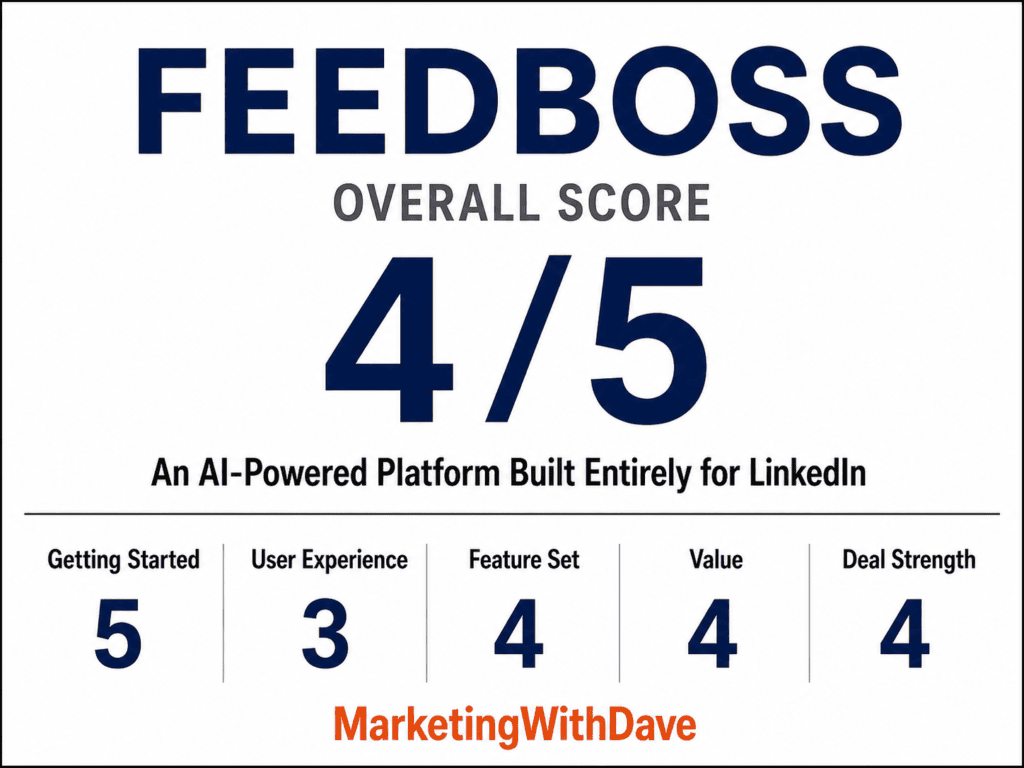
Why 4/5? Inconsistent AI editing, frustrating navigation, launch-day bugs, and Tier 1 limitations keep an otherwise impressive LinkedIn platform from feeling fully polished.
See the current AppSumo deal for FeedBoss
Affiliate disclosure: If you purchase through my link, I may earn a small commission at no additional cost to you. I only share tools I have used myself.
The 30-Second Decision
Buy FeedBoss if: You want an AI-powered content and optimization platform built specifically for LinkedIn. It combines writing assistance, scheduling, carousels and images, LinkedIn analytics, profile auditing, engagement tools, and content research in one workspace, with surprisingly strong personalization to your brand and writing style.
Skip it if: You need a multi-channel social media management platform, or LinkedIn is only one small part of your social strategy. FeedBoss is not trying to manage Facebook, Instagram, X, TikTok, or your other social channels. It is a LinkedIn tool.
The biggest reason to consider FeedBoss is how much of the LinkedIn workflow it brings together. It can learn how you write, help develop and refine content, create supporting visuals and carousels, schedule posts, analyze what is working, audit your LinkedIn presence, and surface ideas for what to do next. Some features still have rough edges, but FeedBoss is much more than another AI LinkedIn post generator.
The Onboarding Analysis Nailed Who I Am
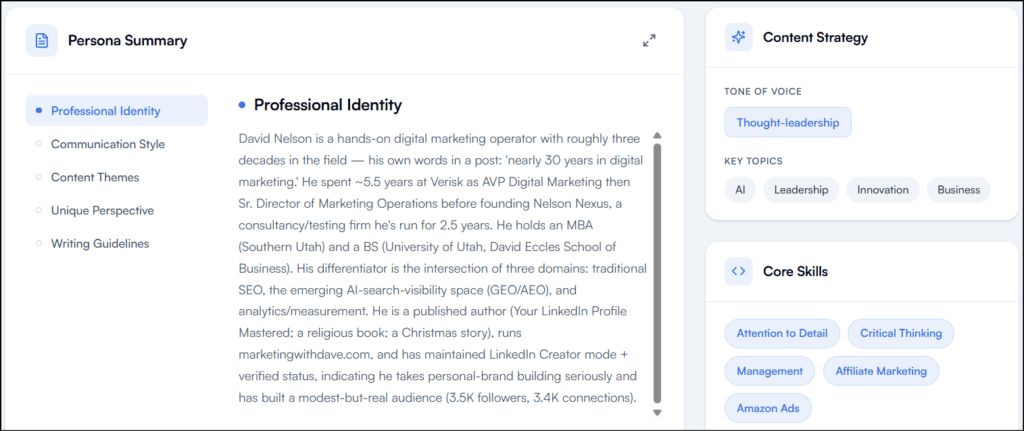
FeedBoss spent real time analyzing my LinkedIn history before generating anything, and the output showed it. It labeled me “The AI-Search Auditor” and correctly identified my recurring strengths: original frameworks, first-hand testing, consistent publishing.
It pulled my actual background (nearly 30 years in digital marketing, Verisk, Nelson Nexus, my MBA, MarketingWithDave.com, my book) and correctly mapped the intersection of SEO, AI-search visibility, and analytics that drives my recent content.
The writing-style analysis was the strongest part. It recognized that I open with tension or a contrarian claim, then back it with my own testing data. It cited real examples and flagged specific patterns: short declarative hooks, functional over decorative formatting, minimal emoji, named frameworks, a preference for evidence over vendor claims.
Best of all: it described me as an “anti-hype analyst of AI-search marketing” and correctly picked up on my documented/observed/inferred/unknown distinction, plus my recurring warning against chasing AI visibility while ignoring the traffic that still comes from everywhere else.
The broad topic tags (“AI,” “Leadership,” “Innovation”) felt generic next to that detailed persona work, but overall this is the best onboarding analysis I’ve seen from an AI content platform.
The Writing Workflow Asks Instead of Inventing
I tested it with a real idea: before asking a customer to fill in a field, ask whether you’re requesting information they already gave you or information your company should already know.
The first draft was polished but leaned into data-governance and enterprise CRM language, more consultant than me. Then FeedBoss did something I liked: instead of calling the draft done, it told me the post stayed general because it needed a specific example only I had, and it wouldn’t invent one. It asked me for a real customer story.
I gave it a rant involving Audible, Netflix, Costco prescriptions, the IRS, and my HOA. FeedBoss worked those into the piece. The result sounded substantially more like something I would publish.
Most AI writing tools work like this: prompt, generate, here’s your post, good luck. FeedBoss works like this: understand the writer, draft, identify what’s missing, ask for it, revise, keep refining. That difference matters.
One Gap: No Easy Way to Trim for LinkedIn’s Limit
The revised post landed at 3,762 characters. LinkedIn caps posts at 3,000. FeedBoss flagged the overage correctly but gave me no one-click way to send it back through and say “cut this to 3,000 without losing the point.” If FeedBoss knows the destination is LinkedIn, it should either respect the limit automatically or surface a prominent “Trim to 3,000” option.
Slide Decks: Enough to Finally Get Me Publishing a Carousel
I’ve never published a LinkedIn carousel because the production work never felt worth it. FeedBoss got me closer than any tool has.
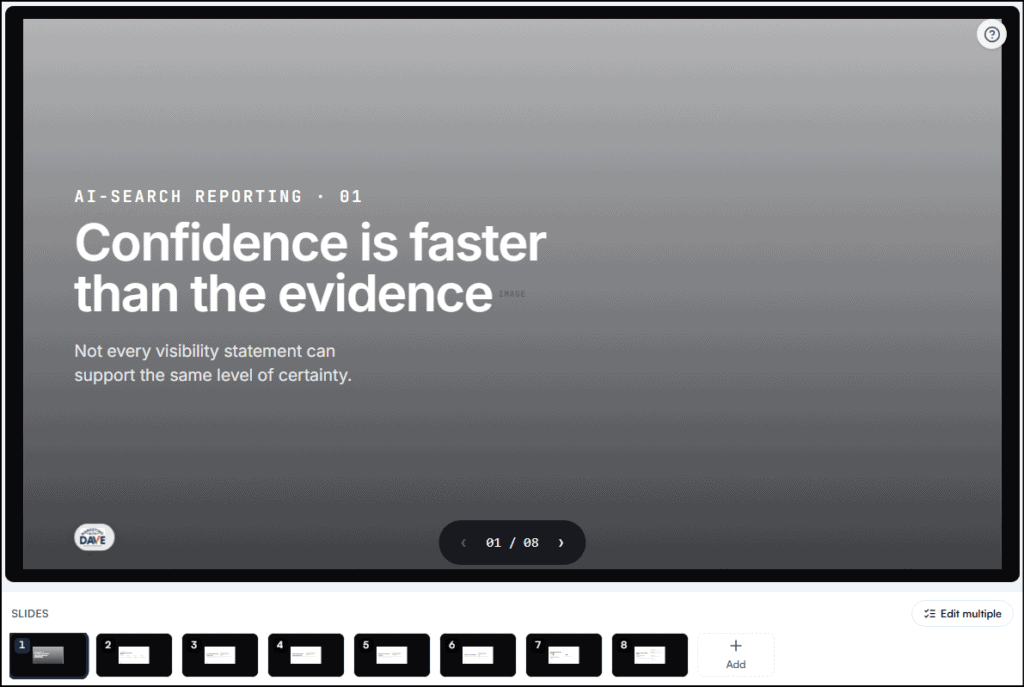
I prompted it to build a myth-busting carousel separating documented, observed, inferred, and unknown claims in AI-search visibility reporting, and to explain why confusing those categories leads to bad decisions. It returned an eight-slide deck that got the framework right: each category defined correctly, a slide on how reporting breaks down when observation becomes fact and inference becomes certainty, and a closing slide that turned the framework into a four-step process.
That’s a strong first draft from a short prompt.
The Slide Editor Struggles With Images
The slide deck itself was a strong starting point, but the AI editing tools were much less capable than I expected. My logo rendered at roughly 50×36 pixels on every slide, far too small to read. I asked FeedBoss to enlarge it across all eight slides, then tried again with a specific instruction to triple its size. Neither request changed the logo. I saw the same limitation when asking the AI to remove image elements.
Text edits worked much better. FeedBoss could resize, rewrite, and replace text, so the editor is useful for copy and typography. Visual-element editing is where it currently falls short. If I have to manually resize the same logo across eight slides and then verify that every slide matches, some of the time savings disappear.
I still see real potential here. FeedBoss can import an existing PDF or slide deck, so once I create a polished MarketingWithDave carousel template with the right logo size, typography, and spacing, I should be able to reuse that structure instead of fixing the same design issues every time.
One smaller UX issue: finished decks appear in a Your decks section below the creation interface. Because that section is off-screen, a newly created deck can briefly feel like it disappeared until you know to scroll down.
Image Studio: Good Output, One Credit Bug
I asked FeedBoss to build an infographic around another idea I’m writing about: AI search visibility has a sampling problem, where checking too few prompts across too few models produces misleading scores. It generated a clean, on-brand infographic using my blue/navy/white kit, correctly incorporating prompts tested, models tested, test frequency, and response variation, with a solid closing line about sample size.
Output: a 1024×1024 PNG, about 1.38 MB, text rendering cleanly. Good first-generation quality, though some text ran small for mobile.
One problem: the infographic illustrated the sampling issue with invented numbers (72% visibility from 10 prompts and 2 models, 38% from 100+ prompts and 6+ models). Those weren’t my real numbers. For a graphic specifically about evidence quality, fabricated stats are the wrong move. I’d strip the percentages or label them illustrative before publishing.
I also hit a credit error trying to remove an element from the image, despite having 2,355 credits available. Likely a bug or an undocumented Tier 1 limit, but it shouldn’t happen with that much headroom.
LinkedIn Analytics Is Probably the Best Feature
This nearly stayed hidden. Analytics, Engagement, Popular Posts, Authority Map, and LinkedIn Audit all sit under an “Optimize” section buried deep in the left nav. I almost finished testing without finding it.
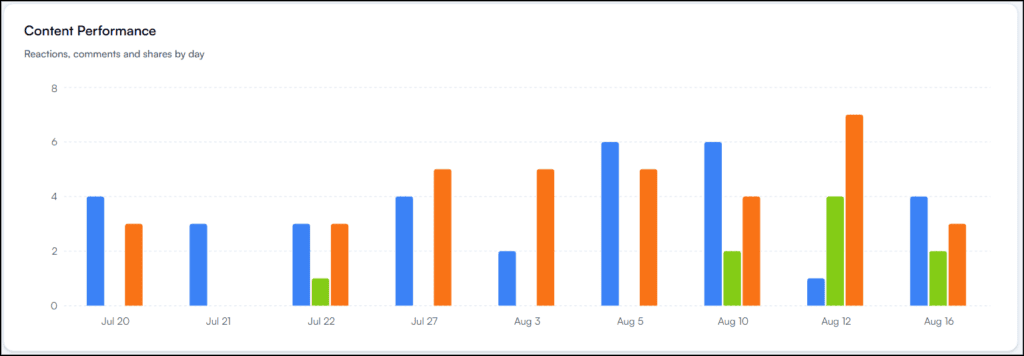
Once I did, it became my favorite part of the product. Native LinkedIn analytics are thin. FeedBoss turns your posting history into an actual dashboard: total engagement, reactions, comments, shares, engagement-rate trends, follower growth, performance by date, and it goes further by turning that data into decisions.
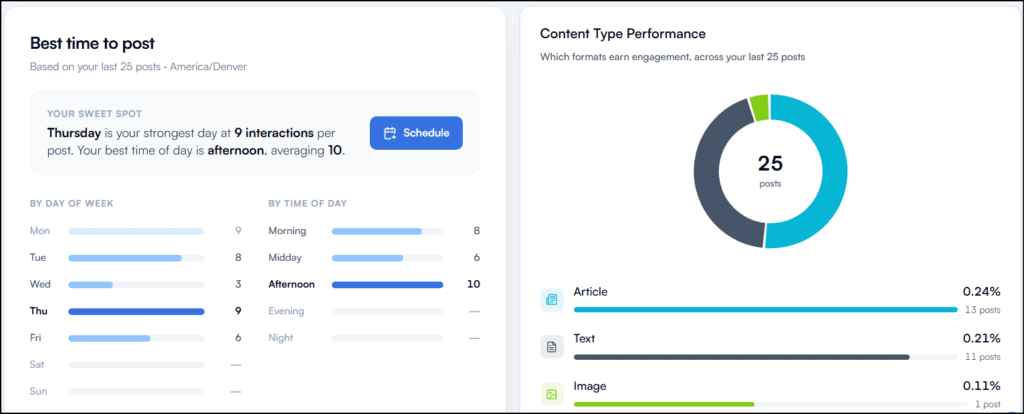
It identified Thursday afternoon as my strongest posting window and faded out results where it didn’t have enough data yet, rather than presenting a thin sample with the same confidence as a strong one. Good instinct.
It also broke down engagement rate by format across my last 25 posts: articles at 0.24% (13 posts), text at 0.21% (11 posts), image at 0.11% (1 post). I wouldn’t act on that last number, and neither should you, since one post isn’t a sample. Showing the post count next to the rate is exactly the right call.
It also analyzes posts you published outside FeedBoss, checking for new activity every 24 hours. You get useful analytics immediately instead of waiting weeks for FeedBoss to build its own history.
The LinkedIn Profile Audit Delivers Real Substance
The audit generated a four-page PDF, gave me a Personal Brand Score (73/100), and broke that down across Core Health, SEO/Discoverability, Content/Engagement, and Authority/Leadership. It then produced specific recommendations for my headline, About section, experience, skills, and profile image, correctly referencing real accomplishments from my history like eCommerce results and Google Ads ROAS.
I don’t agree with every call. It flagged zero skill endorsements as a major red flag and tied that to a lack of recommendations, but endorsements and recommendations aren’t the same thing. Treat the audit as input for judgment, not a checklist to follow blindly. Even so, it’s one of the strongest features in the product.
Two annoyances: the audit asked me to re-enter my LinkedIn URL, even though FeedBoss already has my connected profile, imported posts, and follower count. And there’s no obvious place to find your most recent audit or track score changes over time. Both should be easy fixes.
See the current AppSumo deal for FeedBoss
What Still Needs Fixing
- Navigation buries Analytics, Audit, and Engagement below the fold with no clear signal there’s more to scroll to.
- Slide Deck editor can resize and rewrite text but can’t reliably resize or remove images and logos.
- Generated posts can exceed LinkedIn’s 3,000-character limit with no one-click way to trim them.
- Image Studio invents illustrative data without labeling it as such.
- Image editing hit a credit error despite a large available balance.
- Emoji picker is missing basic bullet characters, a real gap for a LinkedIn-focused tool.
- Tier 1 excludes Video Studio, Lead Magnets, Authority Map, API access, and post-approval workflows, the last of which matters most for agencies and teams.
Most of these are fixable UX and QA issues, not fundamental design problems. In fact, I initially encountered an error that prevented Trending Topics research from working at all. I reported it, the support team responded, and the issue was corrected within minutes. That’s exactly the kind of responsiveness I want to see when testing a newly launched product. The remaining issues are worth knowing before you buy, but they’re not reasons I’d write the product off.
Tier 1 and Credits
Tier 1 ($59) includes 400 monthly AI credits, 2,000 lifetime credits, 5 profile audits per month, 1 LinkedIn connection, 1 workspace, 1 member, 10 tracked engagement profiles, 25 GB storage, 2K image resolution, voice/text Knowledge Base, Bring Your Own AI Key, and profile voice matching.
Credits by action: a post costs 5, an image costs 25, a slide deck costs 20 regardless of slide count, an image carousel costs 50 regardless of slide count, and video costs 100 regardless of length. Editing individual slides is free. Charging decks and carousels as a flat fee instead of per-slide is the right model.
FeedBoss draws from monthly credits before touching your lifetime balance, and the dashboard shows the split clearly (355/400 monthly, 2,000 lifetime, 2,355 total after my test). That transparency is well done.
Brand Kit and Content Styles
The Brand Kit (handle, tagline, logo, fonts, colors) applies consistently to generated images but inconsistently to slide decks, where my logo rendered too small despite the same settings. One central brand config is the right idea; the execution needs to actually honor it everywhere.
FeedBoss also auto-generated writing styles from my LinkedIn history (My LinkedIn Voice, Lesson Learned, Build in Public, Observational, Reflection, Milestone, Tactical, Story, Contrarian). Starting from a predefined style beats re-explaining tone in every prompt. I didn’t test each style deeply enough to say how distinct the outputs really are.
Bottom Line
I expected another AI LinkedIn writer. That undersells it. The strongest parts of FeedBoss are where it works with information that already exists: my LinkedIn history becomes a real persona, my published posts become analytics, my profile becomes an audit, my writing patterns become reusable styles, and one real example turns a generic article into something I’d actually publish.
The product still has launch-stage bugs, and several Tier 1 gaps will matter more to teams than solo creators. But between the analytics, the profile audit, and a writing workflow that asks for missing information instead of fabricating it, there’s enough real value here to keep using it and watch where it goes.
See the current AppSumo deal for FeedBoss
This content is for educational purposes and reflects my hands-on experience using the product and the information publicly available at the time of writing. Always evaluate tools based on your specific business needs, goals, and workflows before making a decision.
Looking for more marketing software reviews? See my full list of marketing tools and software I recommend.