Last updated June 2026
Most websites are running more trackers than their owners realize.
I scanned my own website and found 279 cookies across 262 pages, including 148 unclassified.
If you do not know what is running on your website, you are not actually managing it.
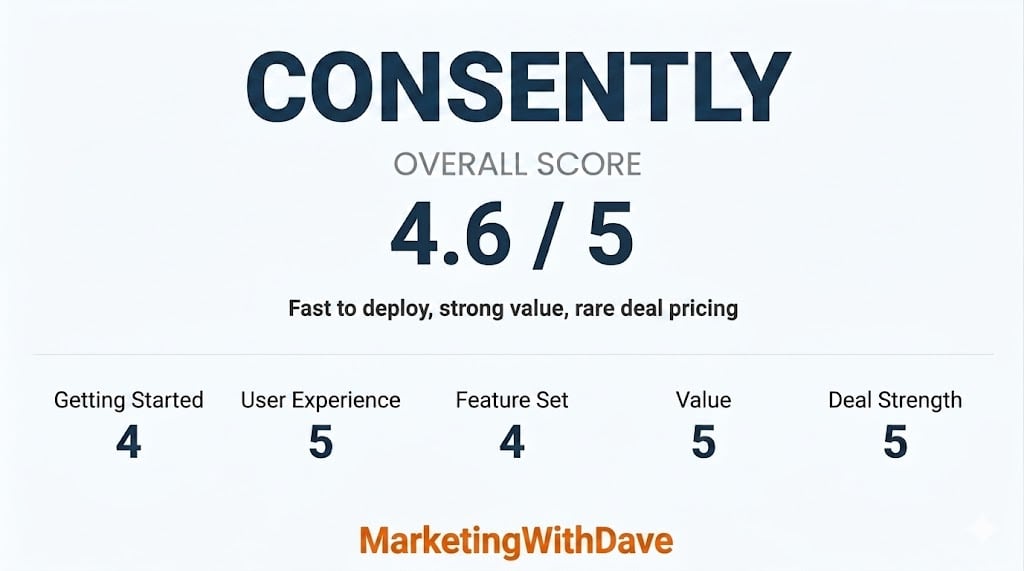
See how this score is calculated
Here’s how to interpret this score:
The overall score reflects both product quality and how compelling the current deal is.
A score in the high 4 range reflects a strong product with clear value and only minor limitations.
Affiliate disclosure: If you buy through my AppSumo link, I may earn a small commission at no additional cost to you. I only share tools I believe are worth your time and consideration.
Real Results From My Implementation
These are the results from my own website after implementing Consently, not a demo or sample environment.


The 30-Second Decision
Best for: websites that want full consent coverage without turning compliance into a project
Not ideal for: enterprise teams with complex, multi-region compliance requirements at scale
Entry price: $39 lifetime for 1 domain and 100,000 monthly page views
Risk window: 60-day refund through AppSumo, versus a 14-day trial on Consently’s own website
My take: a practical “get compliant fast” tool for most websites and lean teams. Not an enterprise privacy platform, and that is exactly why it fits.
What I Found When I Scanned My Website
Here’s what Consently surfaced on my own website, and it was more than I expected.
The 148 unclassified cookies meant there was real work ahead to properly categorize them.


Consently helps close that gap with scanning, consent control, consent logging, and policy generation in one place.
This is exactly the kind of visibility most websites are missing.
See the AppSumo Deal Before It Ends
What Consently Actually Does
Consently takes you from “I do not know what is running on my website” to visibility and control.
It scans your website for cookies and third-party scripts, blocks non-essential cookies until visitors give consent, logs consent decisions in an audit-ready dashboard, and generates privacy, cookie, and terms policy pages.
It also connects with Google Analytics 4 and ad platforms so opt-outs are actually respected.
Most consent tools stop at displaying a banner. Consently lets you define which cookies are essential and which require consent, including analytics, advertising, performance, and social. That is a governance decision, not a design choice.
Consently is not just a banner tool. It is visibility into what is actually happening on your website.
Doesn’t Google Analytics 4 Already Handle This?
Not really.
Google Analytics 4 and Google Tag Manager can help configure how Google tags behave after consent is given through Consent Mode. That is useful, but it is not a consent management system.
| Google Analytics 4 and Google Tag Manager | Consently |
|---|---|
| Consent Mode configuration only | Full consent management system |
| No automatic cookie scanning | Automatic cookie scanning |
| No cookie categorization dashboard | Category-level cookie classification and control |
| No built-in policy generator | Built-in policy generation |
| No centralized consent log dashboard | Audit-ready consent logs |
| Manual configuration across tools | Scanning, blocking, logging, and policy generation in one dashboard |
Google Analytics measures what happened. Consently controls what is allowed to happen.
Setup in Minutes
Add your website name and URL, customize your banner and preference center, then drop a single script into your website header. I deployed mine through Google Tag Manager. After that, Consently scans, logs, and generates your policy pages automatically.
Why I Would Recommend This
- Compliance is based on data collection, not traffic size. If you collect data, you are responsible for it. At a lifetime price, this is inexpensive risk reduction.
- Tracking drift is real. Expired tags linger. Short-term tests become permanent. Third-party tools introduce cookies you did not explicitly plan for. On my own website, Consently surfaced 148 unclassified cookies. That is exactly the kind of thing that accumulates without you realizing it. Regular scanning restores visibility and control.
- It compresses complexity for lean teams. You could try to manage consent through multiple tools and manual processes. Most teams do not. Consently centralizes scanning, consent control, logging, and policy generation into one operational layer.
What Works Well
- Live in under 30 minutes with minimal setup
- Automatically scans your entire website for cookies across all pages
- Control exactly which cookies are allowed and when
- Audit-ready consent log dashboard
- Built-in policy page generation
- Google Analytics 4 and ad platform compatibility
- 60-day AppSumo refund window
Watch Out For
No CSV export for your cookie list. This is the one thing I would change and have recommended to the team. With 148 unclassified cookies, being able to export, sort, and bulk classify in a spreadsheet would save real time. Right now you are doing it one by one inside the dashboard, which becomes tedious fast at scale. That is the gap between a 4-star and 5-star tool for me.
Validate PageSpeed and overall performance impact if your website is performance-sensitive.
Some manual review is still required as your tech stack evolves.
Not built for complex, multi-region enterprise compliance.
Plans and Pricing
Tier 1 starts at $39 lifetime for 1 domain and 100,000 monthly page views. Higher tiers add more domains and more page view capacity for teams managing multiple websites.
The AppSumo 60-day refund window gives you more runway than Consently’s standard 14-day trial to test it on your own website before committing.
Check Current Pricing and Tiers
Bottom Line
Privacy compliance is rarely urgent until it is.
For a $39 lifetime starting tier, Consently is a fast, centralized way to get cookie banners, scanning, consent logs, and policy pages in place without turning it into a legal or engineering project.
The one gap, no CSV export for bulk cookie classification, is a real friction point if your website has a lot of unclassified cookies. But at this price point, and with the core functionality it delivers, it is still the right tool for most websites and small teams.
If you want full visibility and control over what’s running on your website without turning compliance into a project, this is one of the easier decisions you’ll make.
Disclaimer: I am not a lawyer. This content is for educational purposes and reflects my experience and research. Always validate privacy and compliance requirements based on your specific business and jurisdictions.
Looking for more marketing software reviews? See my full list of marketing tools and software I recommend.