Last updated September 2026
I spend a lot of time in Google Analytics, looking at traffic sources, landing pages, and increasingly, how AI platforms are sending visitors my way. But the way most of us use GA4 has a blind spot: it doesn’t show us everything that’s actually requesting files from our server.
That’s the gap HoneyLog is built to fill. It analyzes server and CDN logs to identify AI crawlers, search bots, malicious bots, spoofed traffic, and real human visitors.
Want a better feel for what HoneyLog actually shows you? I’ve also shared a PDF of my HoneyLog dashboard using real MarketingWithDave.com data.
HoneyLog Overall Score

Why 3.6/5: Powerful insights and strong value, held back by a rough onboarding experience and limited guidance on what to do with the data.
See the current AppSumo deal for HoneyLog
What HoneyLog actually does
The easiest way to explain HoneyLog is to say what it isn’t. It’s not a replacement for Google Analytics or Search Console, and it’s not an SEO crawler like Screaming Frog. It isn’t another AI-visibility platform guessing whether ChatGPT mentions your brand for a set of prompts, either. HoneyLog sits underneath all of that, looking directly at requests hitting your server: Googlebot crawling a page, ChatGPT-User pulling a file, a bot hitting robots.txt, a request generating a 404. When I want all of that noise stripped away, I can pull a report for human visitors only.
AppSumo’s listing describes HoneyLog as connecting bot crawling with the human visits that come from the platforms behind those bots. After using it, I’d call that a fairer description than treating it as a GA4 or Screaming Frog “alternative.” They’re not competing tools. They’re different lenses on the same website.
Watching Google actually find my content
This turned into my favorite use case, and it corrected something about my own habits. I don’t routinely submit new content to Search Console. I publish frequently and have basically trusted that my sitemap updates and Google visits often enough to find new pages on its own. I’d never had an easy way to verify that assumption, so I never did.
HoneyLog gave me one. I publish frequently and have trusted that my sitemap updates and Google visits often enough to discover new content. With HoneyLog, I can actually see when Googlebot and other crawlers find my pages, turning something I’d assumed was happening into something I can observe.
The bots showed up faster than I expected
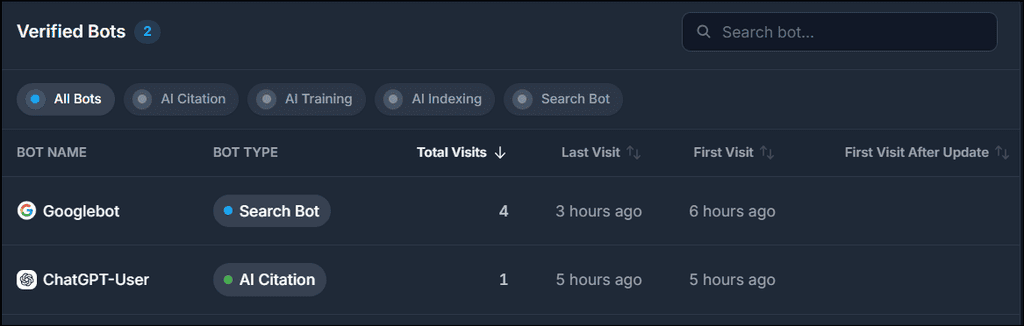
It didn’t take long for HoneyLog to start finding traffic: ChatGPT-User, OAI-SearchBot, PerplexityBot, DuckAssistBot, and Claude-User all showed up in my early data. But HoneyLog goes deeper than “OpenAI visited.” I isolated OAI-SearchBot and found four requests, then added URL and status-code dimensions. All four were for robots.txt. Three returned 200, one returned 301.
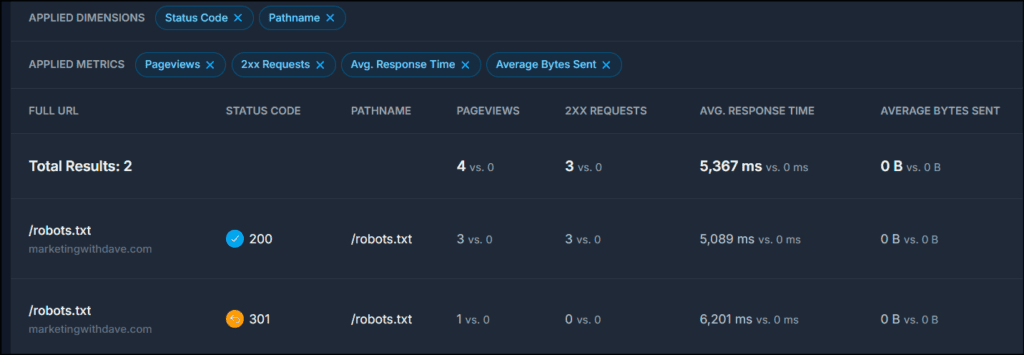
That distinction matters. Seeing “OAI-SearchBot: 4 requests” could easily lead me to assume OpenAI was crawling my content. It wasn’t, at least not in that window. HoneyLog gave me enough data to disprove the conclusion I was about to draw from HoneyLog’s own headline number, which is one of the things I like most about it.
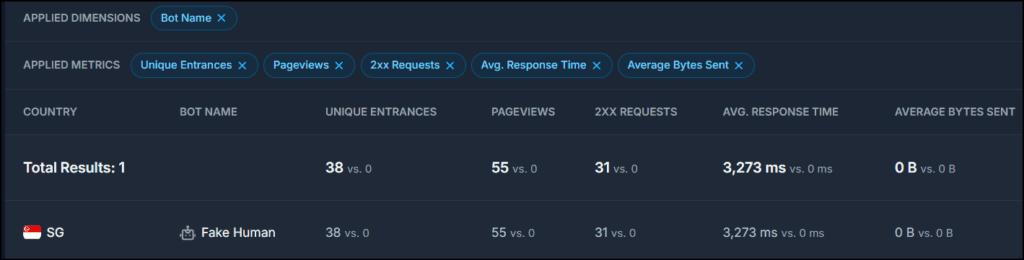
A stranger case came from Singapore. GA4 had been showing a surge of Singapore traffic, and HoneyLog showed substantial Singapore activity too. When I filtered HoneyLog’s data to Singapore, every page view in the selected period was classified as Fake Human. That doesn’t prove my GA4 Singapore sessions were bots; the two tools aren’t measuring identical populations, and I don’t want to overstate the connection. But it gave me another angle on something that already looked suspicious, and some of those requests were presenting completely normal-looking browser user agents before HoneyLog flagged them.
That raises the obvious question: how does HoneyLog know? And that’s where my biggest criticism of the product starts.
Good at showing suspicious. Not great at explaining why
HoneyLog’s classifications include Fake Human, Malicious Bot, Suspicious Bot, Generic Bot, Unknown Bot, AI Citation, AI Indexing, and more. That’s a lot of useful categorization, and it’s also a lot to ask an average marketer to understand without help. I looked through HoneyLog’s documentation for an explanation of what triggers a Fake Human classification and couldn’t find one.
If a tool tells me a request came from Googlebot, I understand exactly what that means. If it tells me traffic presenting itself as a normal Chrome browser is actually malicious, I need to understand what signals produced that conclusion before deciding what to do about it. That gap between the sophistication of the data and how well the product teaches you to use it is the biggest weakness I found.
My favorite report might be the simplest one
This is a strange thing to say about a product I bought to investigate bots, but after spending time in Googlebot, ChatGPT-User, Fake Human, Generic Bot, and everything else, the report I keep coming back to is Human Visitors. Just show me the people. In a web full of crawlers, agents, and automated requests, there’s something clarifying about a report built to strip all of that away. GA4 is still more useful for understanding what those visitors actually do once they land, but HoneyLog gives me another way to separate likely human activity from everything else hitting the server, but there’s an important caveat. HoneyLog confirmed that Human Visitors can still include bots sophisticated enough to mimic human behavior, so I wouldn’t treat this report as a definitive count of actual people.

A world of 404s I normally never see
The Status Codes report produced its own surprise: within roughly my first day of data, I saw more 404 activity than I’m used to seeing in GA4 over much longer stretches. That’s not a knock on GA4, just the difference between client-side analytics and raw server requests. A bot can hit a URL that hasn’t existed in years, guess at a WordPress path that never existed, or follow an outdated link from elsewhere on the web, and none of it becomes a meaningful analytics session.

The harder question is which 404s are worth caring about. HoneyLog’s Raw Logs feature is built for exactly that kind of investigation, letting me narrow a traffic spike by IP, country, bot, and status code. I can already picture building a standing report for 404s from verified crawlers and checking it periodically, which is far more useful than scrolling a giant list of broken requests.
The report builder is the best feature I almost missed
This didn’t jump out at first. It did once I started asking sharper questions. Instead of “Googlebot visited nine times,” I can ask which URLs it requested, what status codes came back, and how long each request took. Instead of “this article got 12 bot requests,” I can ask which bot made them. I ran into that exact case: a URL showed 12 requests that looked interesting until I filtered it and found all 12 were Fake Human. That one filter completely changed what the number meant.
HoneyLog also exports report data to CSV in parts of the app, which made it much easier to dig into Googlebot’s individual requests outside the interface. For anyone willing to dig, there’s a lot here, and that qualifier is doing real work in that sentence.
See the current AppSumo deal for HoneyLog
The average marketer will stall out on “now what?”
This is HoneyLog’s biggest challenge. It hands me information I haven’t had easy access to before, and then leaves me staring at it: my AI bots averaged slower response times than some other crawlers, but is that a problem? I found a Googlebot 404. Should I fix it? HoneyLog flagged something as Fake Human. Should I block it? Googlebot hasn’t crawled today’s article yet. How long is normal before that becomes a concern?
Those are the questions that turn data into action, and right now HoneyLog is much better at supplying the data than answering them. For a technical SEO or developer comfortable digging through logs, that’s probably enough. For the average marketer, HoneyLog needs more interpretation, education, and guidance before the product lives up to what it’s collecting.
After speaking with the HoneyLog team, I have a better starting point. Check error status codes, identify which bots and URLs are responsible, watch how crawlers interact with the sitemap, and create alerts for unusual traffic or error spikes. That’s exactly the kind of workflow I’d like HoneyLog to teach inside the product.
Do you even need this if you already have Cloudflare or an MCP?
Some of what HoneyLog shows may already exist in server logs, CDN platforms like Cloudflare, or other technical tools. But that’s not really the point for me. I wasn’t looking at that data before HoneyLog, and I certainly wasn’t using it to answer questions about Googlebot, AI crawlers, suspicious traffic, or 404s. HoneyLog organizes that information in a way that has already helped me find insights and potential actions I wasn’t getting from the rest of my marketing stack.
Bot Conversions is fascinating. I’d rename one metric
HoneyLog attempts to connect crawler activity to actual human referrals, attributing visits by UTM parameters first and referrer data when UTM isn’t available. The idea is compelling: if OpenAI crawls my site 14 times and ChatGPT later sends me a visitor, I want to see both halves of that story.
One thing bothers me, though. HoneyLog calls one metric Conversion Rate. In my data, Microsoft showed two bot requests and five referred human visits, for a 250% conversion rate. The math works. The label doesn’t. Those five people weren’t “converted” from two crawls; it’s a ratio between two different measurements, and I’d rather see it called something like Referral Ratio or Human Visits per Bot Request. The underlying signal is interesting. I just wouldn’t read that number as a conventional conversion rate.
Onboarding needs work
My first night with HoneyLog wasn’t impressive. After connecting it, I could see that HoneyLog was capturing data in Raw Logs, but the rest of the app still wasn’t ready. About half an hour later, I was still seeing: “Hang tight! Waiting for first aggregation, check raw logs for real-time data! This is necessary to see your aggregated insights.” The message told me what was happening, but not how long I should expect to wait. As a new user, I wasn’t sure whether I needed to wait another five minutes, another five hours, or whether something had gone wrong. I eventually contacted support and called it a night.
The next day felt like a different product. Once enough data had accumulated, HoneyLog became dramatically more interesting. That rocky start matters some context: HoneyLog was founded in June 2026, according to its AppSumo profile. This is a young product, and the onboarding experience shows it. I’d like to see a guided first-run flow that explains what’s happening, how long initial processing normally takes, and three or four useful questions a new customer can answer once the data arrives.
What I’d like to see improved
Documentation tops the list. I want a searchable data dictionary that explains every bot classification and metric, Fake Human included, and then goes a step further to suggest what to actually do about what I’m seeing. If Googlebot keeps hitting 404s, tell me why that’s worth investigating. If an AI crawler’s response times look unusually high, give me context for that. If HoneyLog flags malicious fake-human traffic, point me toward next steps, including where a CDN or security service like Cloudflare fits in.
I’d also like more consistent CSV exporting, clearer empty-result states, better sitemap discovery, and more polished field descriptions. Report templates would help a lot here too: New Content Discovery, AI Crawler Errors, Most-Crawled Content, Verified Bot 404s, AI Crawler Response Time. Don’t just hand marketers a report builder. Teach them which reports are worth building. HoneyLog told me they’re already working on better documentation, including explanations of its traffic classifications, introductory videos, and links from the dashboard to relevant help content, so this is an area I expect to improve as the product matures.
Tier 1 offers plenty of value for $49
AppSumo’s Tier 1 gives you one website, 150,000 monthly events, six months of data retention, Sitemap Intelligence, and Bot Conversions Analysis for $49. That’s enough capacity for a decent amount of traffic on a single website, while still giving you the features that made HoneyLog valuable during my testing.
For me, there’s plenty of value at that price. I’m already getting insights and identifying potential actions I wasn’t getting from the rest of my marketing stack. If you manage larger or multiple websites and HoneyLog proves equally useful for you, the higher tiers provide more events, sites, users, and retention. But Tier 1 doesn’t feel like a stripped-down entry plan. It gives you enough of HoneyLog to find out whether this kind of server-level visibility is genuinely useful for your website.
So what is HoneyLog actually good for?
I bought HoneyLog expecting to learn more about AI crawlers, and I did. The bigger discovery was realizing how much activity on my own website I normally never see at all. That’s why I’m keeping it: when I have a specific question, I now have somewhere to look. Did Google find yesterday’s article? Is ChatGPT actually crawling my content, or just checking robots.txt? Why did my 404s spike this week? Was that strange traffic real?
Those are questions I’d either struggled to answer before or never thought to ask. HoneyLog makes them observable. The next challenge for the product is making them actionable, and it’s not quite there yet.
I’m already comfortable saying I’m keeping Tier 1. HoneyLog is producing insights, and pointing me toward potential actions, that I’m not getting anywhere else in my current stack. That’s exactly the kind of product AppSumo’s 60-day return window was made for. You can’t fully judge HoneyLog on day one, because its value comes from watching your own traffic accumulate over time. Install it, let it collect real data, start asking questions of that data, and see whether it tells you something you can act on. In my case, it already has.
See the current AppSumo deal for HoneyLog
This content is for educational purposes and reflects my hands-on experience using the product and the information publicly available at the time of writing. Always evaluate tools based on your specific business needs, goals, and workflows before making a decision.
Looking for more marketing software reviews? See my full list of marketing tools and software I recommend.