
Last updated June 2026
Most software reviews are written after a few hours of testing. This isn’t one of those reviews.
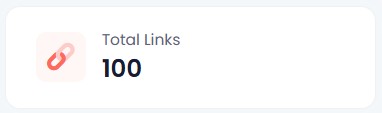
Since publishing my original Linko review that was followed up with a Linko vs. Switchy comparison, I’ve created more than 100 links, submitted nearly 20 support tickets, migrated to a branded domain, and accumulated enough data to see which features matter in real-world use.
Here is what I’ve learned.
I Submitted 20 Support Tickets. Most Were Implemented.
I submitted nearly 20 support tickets between bugs and feature requests. Most were implemented, and most of those within a day or two. Some took longer, which is expected when something needs to get worked into a development schedule. But more was implemented quickly than I expected, and that matters.
There is a practical side to this beyond just getting fixes. When you see your feedback turned into product changes, the relationship shifts. You feel like a participant in where the tool is going rather than a customer waiting on the sidelines. That strengthens loyalty and, honestly, it motivates me to keep sharing feedback and wanting the product to succeed.
Why Campaign and Channel Data Gets More Useful the Longer You Use It
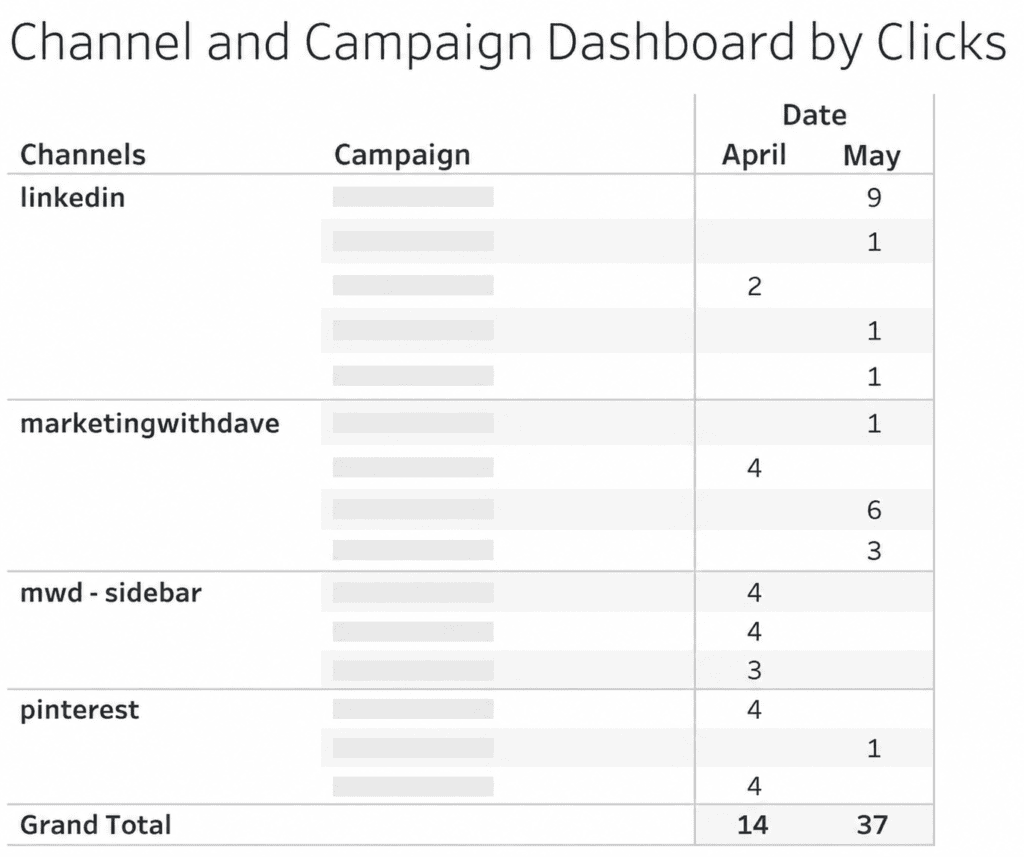
Campaigns and Channels are Linko’s primary ways to categorize your links. They are fully customizable, and I thought they were useful features from the start. What I did not anticipate was how much more useful they would become once real data started accumulating.
I export data from platforms and use Tableau to control my own visualization, so having clean, categorized data coming out of Linko makes that workflow significantly more useful. The chart I built from Linko’s exported campaign and channel data showed me things I would not have seen otherwise. These are not novelty features. Once you have data behind them, they become the reason you are glad you set them up properly from the beginning.
The Domain Change I Resisted and Don’t Regret
When I first started using Linko, I used their pg.is domain. It was short, which I liked. Linko eventually retired that domain, which frustrated me initially.
Looking back, I am glad it happened. I am now on my own branded subdomain (go.marketingwithdave.com), and the setup was not nearly as much work as I expected. The Linko process for getting a custom subdomain configured was smooth. The links now reinforce my brand with every click, which the shared domain never did. The short-link convenience of pg.is was real, but it was not worth trading brand consistency for.
My Two Favorite Features Are Still My Two Favorite Features
When I was first evaluating Linko, two features stood out: the ability to filter out your own internal traffic and broken link detection.
Both are still at the top of my list.
Filtering internal traffic matters more than it sounds. If I do not want to collect test data every time I click my own links, I need to know those clicks are excluded. Without that, you are either introducing noise into your data or you are avoiding testing your links to keep the data clean. Linko removes that tradeoff.
Broken link detection is a feature I was excited about and still appreciate, though it took me a while to understand how it actually works. Linko runs automatic checks every five minutes, but with a priority system based on click volume. Links with fewer than 100 clicks are checked once every seven days. Links with more than 1,000 clicks are checked every 24 hours. The frequency scales with traffic in between.
Beyond Link Management
Most of my focus has been on link creation, which is the core function. But Linko includes bio pages, QR codes, and file hosting, and I have not done much with any of those yet.
For me, link tracking is the priority. The additional capabilities are there if I need them, and they are part of what makes this a broader platform than a pure link shortener. Whether that breadth justifies the price compared to something more narrowly focused is something I covered in the Linko vs. Switchy comparison. The short version: if link management plus bio pages, QR codes, and file hosting under one roof sounds useful, Linko is the stronger fit. If you mainly want retargeting pixels and you want to keep costs lower, that is where the tradeoffs start to show.
Bottom Line
After 100+ links, Linko has moved from “interesting AppSumo purchase” to part of my marketing stack. The link management is solid, the campaign tracking becomes more valuable as data accumulates, and the team has been unusually responsive to feedback. Not every feature is perfect, but very few lifetime deals earn a permanent place in my workflow. Linko has.
The team is responsive in a way that is rare. The campaign and channel data proved more valuable once real usage built up behind it. A couple of features have limits worth knowing before you buy, but neither is a deal-breaker.
Disclaimer
This content is for educational purposes and reflects my experience, review of the product, and current publicly available deal information. Always evaluate tools based on your specific business needs, goals, and workflows before making a decision.
Looking for more marketing software reviews? See my full list of marketing tools and software I recommend.

