the ultimate question 2.0

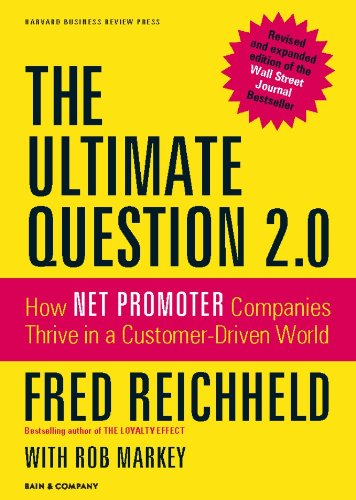
The Ultimate Question 2.0 by Fred Reichheld Book Summary

Reading Time: 2 minutes

Top 3 Quotes

Version 1.0.0
  • “Loyalty is the willingness of someone—a customer, an employee, a friend—to make an investment or personal sacrifice to strengthen a relationship.”
  • “The primary purpose of a business should be to enrich lives. When you do that, profits follow.”
  • “Feedback is only valuable when it leads to action that improves experiences and builds trust.”

Book Theme

The Ultimate Question 2.0 explores how organizations can achieve sustainable growth and customer loyalty by focusing on customer feedback, specifically through the Net Promoter System (NPS). It emphasizes the power of customer-centric strategies to drive business success.

Why You Should Read This Book

This book is essential for business leaders, marketers, and customer experience professionals looking to:

  • Build a loyal customer base.
  • Learn practical ways to implement the Net Promoter System (NPS).
  • Understand the direct connection between customer feedback and business growth.
  • Shift from a transactional to a relationship-focused business model.

Key Ideas and Arguments Presented

  • The Power of NPS
  • Enriching Lives Drives Success
  • Customer-Centric Culture
  • Actionable Feedback
  • Promoters vs. Detractors
  • The Economic Impact of Loyalty
  • Employee Engagement and Loyalty
  • Case Studies and Examples
  • Criticisms and Misuse of NPS
  • The Virtuous Cycle of Loyalty

Book Outline

  1. The Ultimate Question
  2. The Net Promoter System
  3. Building a Customer-Centric Culture
  4. Case Studies of Success
  5. Overcoming Challenges with NPS
  6. The Future of Customer Loyalty

Key Takeaways

  • The Net Promoter System is more than a metric; it’s a philosophy for business success.
  • Loyalty is the foundation of sustainable growth.
  • Companies must integrate customer feedback into their culture to thrive.

Key Techniques

  • Net Promoter System (NPS): A methodology to measure and act on customer loyalty.
  • Closed-Loop Feedback: A process to follow up with customers and address their concerns.
  • Promoter Activation: Strategies to encourage promoters to refer others.

Author’s Qualifications

Fred Reichheld is a renowned business strategist and author, best known for his work on customer loyalty and the development of the Net Promoter System. He is a Fellow at Bain & Company, where he has spent decades advising companies on growth and customer experience.

Comparison to Similar Books

Compared to other books on customer loyalty, such as Customer Loyalty: How to Earn It, How to Keep It by Jill Griffin, The Ultimate Question 2.0 stands out for its practical framework and emphasis on measurable outcomes.

Target Audience

  • Business leaders and executives.
  • Customer experience professionals.
  • Marketers and brand strategists.
  • Entrepreneurs and small business owners.
  • HR professionals focused on employee engagement.
  • Consultants specializing in customer success.
  • Students of business and management.

Critical Response to the Book

The book has been praised for its actionable insights and real-world examples. Critics have highlighted its simplicity and effectiveness but have noted that NPS is not a one-size-fits-all solution.

One Sentence Takeaway

The Net Promoter System is a transformative approach to achieving customer loyalty and sustainable growth by focusing on enriching lives and acting on feedback.

The Ultimate Question 2.0 by Fred Reichheld Book Summary Read More »

boost your seo with person schema markup an easy tutorial

Boost Your SEO with Person Schema Markup: An Easy Tutorial

Reading Time: < 1 minute

What is Schema Markup?

Schema Markup is a type of structured data that helps search engines understand the content of your website more effectively. It provides additional context to your content, making it easier for search engines to display relevant information in search results.

Why is Person Schema Markup Important?

Person Schema Markup is a specific type of structured data that helps search engines identify and display information about a person, such as their name, job title, and contact details. It can enhance the visibility of your website in search results and improve click-through rates.

How to Implement Person Schema Markup

Follow these steps to add Person Schema Markup to your website:

  1. Use the Schema.org Person type.
  2. Include key properties such as name, jobTitle, and url.
  3. Generate the JSON-LD code (recommended format) or Microdata for the markup.
  4. Embed the code in the <head> or <body> section of your HTML.
  5. Test your markup using Google’s Structured Data Testing Tool to ensure it’s implemented correctly.

Example of Person Schema Markup

Here’s an example of how Person Schema Markup might look in JSON-LD format:

<script type="application/ld+json">
{
"@context": "https://schema.org",
"@type": "Person",
"name": "David Nelson",
"url": "https://www.marketingwithdave.com/about",
"image": "https://www.marketingwithdave.com/wp-content/uploads/2022/10/dave-nelson-profile-1.jpeg",
"jobTitle": "Digital Marketing Expert",
"worksFor": {
"@type": "Organization",
"name": "Nelson Nexus"
},
"sameAs": [
"https://www.linkedin.com/in/davidbrycenelson/",
"https://x.com/davebrycenelson/",
"https://www.facebook.com/profile.php?id=61557881596160/"
]
}
</script>

Final Steps

Once you have added the schema markup, test it using the Google Rich Results Test. If any errors appear, adjust your markup accordingly.

Boost Your SEO with Person Schema Markup: An Easy Tutorial Read More »

page session tracking by month 2024

Website Analytics Simplified: The Power of Page Session Tracking

Reading Time: 3 minutes

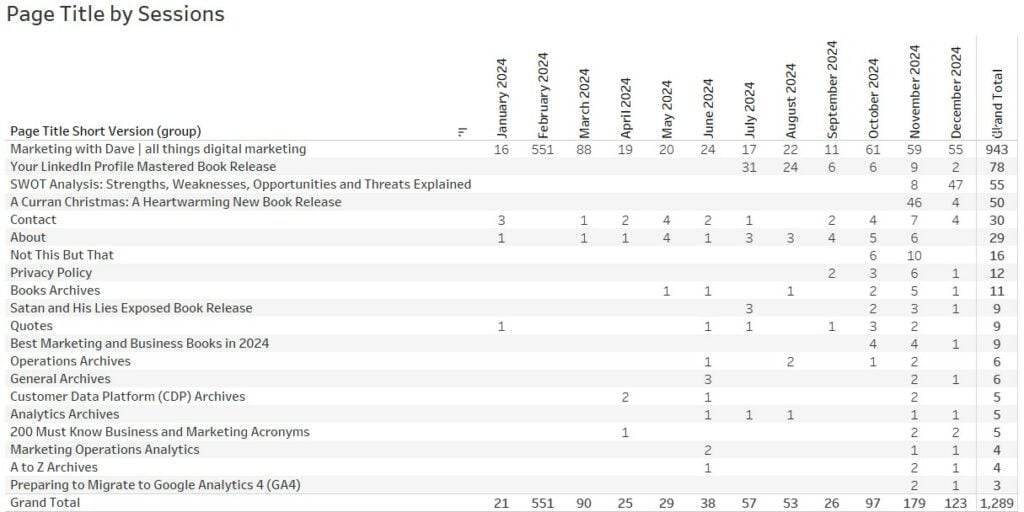
Remember the classic question: “What’s the one thing you’d bring with you if stranded on a desert island?” Let’s apply a similar thought experiment to website analytics. If you could only have one report to manage your website, what would it be? For me, it’s a trending report that shows page session tracking by month—as illustrated in the table below.

Why Sessions Is the Right Metric

In this scenario, we’re not dealing with an eCommerce website, so metrics like revenue, orders, or units don’t apply. I also wouldn’t choose user or visitor metrics because frequent cookie deletions make unique or returning user tracking unreliable.

The sessions metric stands out as the most reliable option. It aligns closely with a “jobs-to-be-done” analysis, helping us understand how visitors are using the site. A single visitor may have multiple reasons (or “jobs”) for visiting your website in a day, and sessions capture this behavior effectively.

Why Page Title Is the Right Dimension

Understanding how your content performs is critical, and the Page Title dimension offers two distinct advantages:

  • It helps you evaluate the SEO naming of your pages alongside performance metrics.
  • It’s more concise than using the full Page URL, making reports cleaner and easier to read.

For instance, in my reports, I’ve removed the “| Marketing with Dave” suffix from all non-homepage titles for clarity.

Insights from Page Sessions Data

While data tables may not be as visually appealing as charts or graphs, they often provide deeper insights. Below are five key takeaways from the data on my website, which I’ve recently started driving more traffic to:

  1. Unusual Traffic Spikes
    The anomaly of 551 sessions on the homepage in February—and a smaller spike in March—caught my attention. After investigation, I discovered it was caused by unwanted referral traffic from Poland, which affected many websites. While I’ve filtered this traffic out in my reports, I’m showing the raw data here for transparency.
  2. Steady Growth in Monthly Traffic
    The data reveals a slow but steady increase in monthly sessions, with notable growth starting in October. A closer look shows that in November, traffic was driven by my Christmas book promotion, and in December, a blog post on SWOT analysis gained traction. This suggests that I should build out more suporting content covering SWOT
  3. Home Page Dominance
    Approximately 73% of my website traffic lands on the homepage. However, this is somewhat misleading because my homepage features a pinned blog post. Recognizing this, I’ve decided to implement a dedicated home page (coming soon).
  4. Tracking New Page Performance
    My LinkedIn book page is a great example. The data shows when the page went live, how it performed in its first month, and how it has fared since. Promotions and marketing efforts have influenced traffic spikes, but this report helps identify when a page’s performance starts to decline, prompting decisions like optimizing existing content instead of creating new pages.
  5. SEO and Visitor Interest Opportunities
    Reviewing page titles alongside session data naturally leads me to consider whether page titles could be improved for SEO or to better capture visitor interest.

Why This Report Matters
By consistently monitoring page-level session data, you can make informed decisions about content creation, optimization, and overall website strategy. This single report combines quantity (total traffic) with quality (specific page performance), making it an invaluable tool for managing your website effectively. Another way to enhance this report is by including the Page Type dimension, which categorizes pages into types like blog posts, navigation pages, or the homepage. This addition provides deeper insights into which types of content are driving the most traffic and informs where to focus optimization efforts.

Website Analytics Simplified: The Power of Page Session Tracking Read More »

baby names popularity david

The Rise and Fall of David: A Baby Name Analysis

Reading Time: 2 minutes

Reader Beware: Any blog post tagged as “Data Driven David” may not be as related to marketing as most of my content. I truly love data and love it even more when it is well visualized and wrapped in a great story — now, that’s good marketing.

Recently, I stumbled upon an intriguing tool by Jetpack AI Baby Names. This tool allows you to enter your first name and instantly see its historical popularity. Naturally, I had to check my own name: David.

I was born in 1975, and throughout my life, it’s been rare to find myself in a room without another David. In fact, for most of my career, I had another colleague named David Nelson. During a recent conversation with a relative — yes, another David — we speculated that the name might be losing its luster among newer generations. As it turns out, our hunch was spot-on.

The Data Speaks

Using the Jetpack AI tool, I discovered that the name David peaked in popularity in the mid-20th century. Since then, it has been on a steady decline. This aligns with broader trends in baby naming, where traditional names often give way to more unique or culturally diverse options over time. For parents in the 2020s, names like Liam, Noah, and Olivia dominate the charts, while classics like David, Susan, and Karen are becoming rarer.

Why the Decline?

Several factors could explain the waning popularity of the name David:

  1. Cultural Shifts: Parents today often seek names that stand out or carry a unique flair. Traditional names may feel too common or outdated.
  2. Pop Culture Influence: The names of popular celebrities, characters, or influencers can dramatically shape naming trends.
  3. Generational Cycles: Names often fall out of favor only to be rediscovered by future generations. Perhaps David will make a comeback in a few decades.

A Personal Reflection

For me, being a David has always felt like belonging to an unofficial club. It’s a name that’s timeless, strong, and versatile. While I’m intrigued by its decline, I also see it as a reminder of how names — much like brands — evolve with time and cultural shifts. Names carry stories, histories, and identities, and their popularity trends often mirror societal changes.

Look Up Your Name

Curious about your own name’s trajectory? I encourage you to explore the Jetpack AI tool and see what the data reveals. Are you surprised by the results? Let me know in the comments!

Whether you’re a fellow David or have a name with its own unique story, understanding these trends offers a fascinating glimpse into how we’re shaped by the times we live in.

What does your name say about your generation?

The Rise and Fall of David: A Baby Name Analysis Read More »

a marketers mount rushmore the greatest minds in marketing history

A Marketer’s Mount Rushmore: The Greatest Minds in Marketing History

Reading Time: 3 minutes

Reader Beware: Any blog post tagged as “Data Driven David” may not be as related to marketing as most of my content. I truly love data and love it even more when it is well visualized and wrapped in a great story — now, that’s good marketing.

Mount Rushmore, a monumental human creation carved into the Black Hills of South Dakota, stands as a powerful symbol of American history. Few would argue against the four U.S. Presidents who grace its face.

1. George Washington

George Washington was the first President of the United States who led the American Revolution to victory.

2. Thomas Jefferson

Thomas Jefferson was the third President of the United States and author of the Declaration of Independence.

3. Theodore Roosevelt

Theodore Roosevelt was the 26th President of the United States and known for his role in negotiating the construction of the Panama Canal.

4. Abraham Lincoln

Abraham Lincoln was the 16th President of the United States who led the country through the Civil War and abolished slavery.

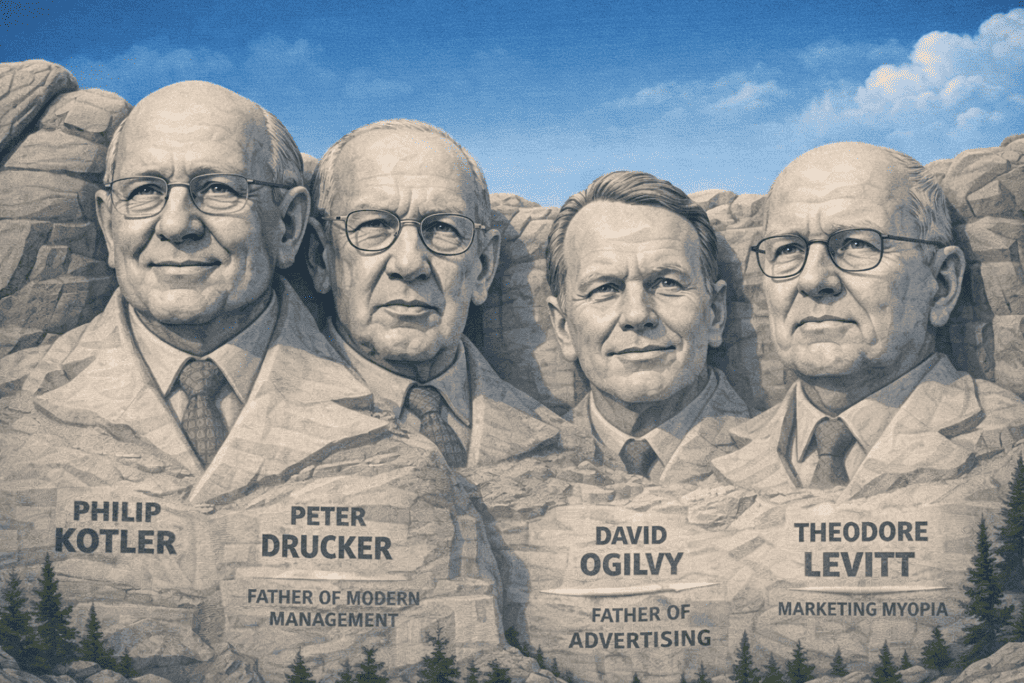
Now, what if there was a Mount Rushmore of the greatest marketing minds, those heroes that have made marketing what it is today? Well, I have gone and done just that, at least digitally. My Proposal:

1. Philip Kotler

Born May 27, 1931, in Chicago, Illinois, USA, and still with us, which I hope we can say for many years to come. Often referred to as the “father of modern marketing,” Kotler’s work has been instrumental in shaping the academic and practical approaches to marketing worldwide.

  • Developed the concept of social marketing, extending marketing beyond just selling products to influencing social change.
  • Authored the landmark textbook Marketing Management, used by universities and businesses globally.
  • Pioneered the idea of marketing as a strategic function rather than just a tactical one.
  • Advocated for customer-centric marketing, influencing how businesses engage with consumers.
  • His 4 Ps of marketing (Product, Price, Place, Promotion) became a foundational framework for marketing practice.

2. Peter Drucker

Born November 19, 1909, in Vienna, Austria, and died November 11, 2005, in Claremont, California, USA. Known as the “father of modern management,” Drucker’s work has had a profound influence on both marketing and business management, shaping corporate strategies for decades.

  • Introduced the concept of management by objectives (MBO), influencing how businesses set and achieve goals.
  • Emphasized the importance of customer orientation in business, shifting focus from products to the needs and wants of customers.
  • Defined marketing as a key business function that drives business growth, not just a support role.
  • Advocated for the concept of innovation and entrepreneurship within organizations.
  • His writings, including The Practice of Management, have become essential reading for leaders in all industries.

3. David Ogilvy

Born June 23, 1911, in West Horsley, Surrey, England, and died July 21, 1999, in Paris, France. Known as the “father of advertising,” Ogilvy’s innovative ad campaigns and focus on research-based marketing revolutionized the advertising industry.

  • Founded Ogilvy & Mather, one of the most successful advertising agencies in the world.
  • Created iconic campaigns for brands like Hathaway Shirts and Schweppes, which are still studied for their effectiveness.
  • Advocated for research-driven advertising, emphasizing the importance of understanding consumer behavior.
  • Wrote Ogilvy on Advertising, a timeless guide that continues to influence marketers today.
  • Pioneered the idea that “the consumer isn’t a moron, she’s your wife,” emphasizing the importance of treating customers with respect and intelligence.

4. Theodore Levitt

Born March 1, 1925, in Hartford, Connecticut, USA, and died June 28, 2006, in Boston, Massachusetts, USA. Levitt’s work in redefining marketing and business strategy, particularly his famous “Marketing Myopia” article, has become foundational to modern marketing thought.

  • Authored the groundbreaking article Marketing Myopia, which challenged businesses to focus on customer needs rather than just their products.
  • Introduced the concept of global marketing, arguing that businesses should see the world as a single market.
  • Emphasized the importance of innovation and customer-driven strategy in business success.
  • Developed the idea of product life cycle management, helping businesses plan for the long-term sustainability of their products.
  • His work on brand differentiation influenced how companies position themselves in competitive markets.

With any short list, there will always be those “runner-ups” who perhaps in certain ways are more deserving or that you wish the list was extended to include a few more. If possible, a few other names quickly come to mind:

  • Seth Godin (permission marketing and reshaped how we think about customer relationships)
  • Gary Vaynerchuk (personal branding and content marketing)
  • Jay Conrad Levinson (father of Guerrilla Marketing, unconventional marketing tactics)

All worthy inclusions. These figures represent the evolution of marketing from traditional to digital, emphasizing new approaches to consumer engagement, branding, and content in the modern world. Their influence on current marketing practices is substantial, particularly in the age of social media and digital marketing.

A Marketer’s Mount Rushmore: The Greatest Minds in Marketing History Read More »

free and easy ways to export google analytics 4 data to excel or google sheets

Free and Easy Ways to Export Google Analytics 4 Data to Excel or Google Sheets

Reading Time: 2 minutes

Rarely do I want to keep my data inside the source where it originates. This is absolutely the case with my Google Analytics data. I needed a solution that met the following criteria:

  • No cost: Premium tools like Coupler were not an option.
  • Simplicity: I wanted to avoid working directly inside the Google Analytics platform and Looker Studio lacked the needed flexibility.
  • Automation: Each report needed to auto-refresh on the first day of every month.

After exploring multiple options, I discovered that Google Sheets, combined with the SyncWith extension, met my needs perfectly. SyncWith offers 35 monthly refreshes for free, which is more than sufficient for my requirements. Setting this up was fairly straightforward taking minutes, not hours. Here are the steps I took to get this implemented using the Google Analytics add-on in Google Sheets.

Why Export Data from Google Analytics 4?

Google Analytics 4 (GA4) is a powerful platform, but its interface can be overwhelming for non-technical users. Exporting your data to a familiar tool like Excel or Google Sheets offers several advantages:

  • Customization: Analyze and visualize data in a way that suits your needs.
  • Ease of Use: Simplify complex data for stakeholders.
  • Offline Access: Work with your data without relying on internet connectivity.

Step-by-Step Guide to Installing the Google Analytics Add-on in Google Sheets

Step 1: Open Google Sheets

Go to Google Sheets and open a new or existing spreadsheet.

Step 2: Access the Add-ons Menu

In the top menu, click on “Extensions”. Select “Add-ons” and then click “Get add-ons”.

Step 3: Search for the Google Analytics Add-on

In the Google Workspace Marketplace, type “Google Analytics” in the search bar.

Step 4: Install the Add-on

Click on the Google Analytics add-on in the search results. Click the “Install” button. I chose the SyncWith extension which has a higher rating and usage than the one from Google.

Step 5: Grant Permissions

You will be prompted to grant permissions for the add-on to access your Google Analytics account. Click “Continue”, sign in with your Google account, and allow the required permissions.

Step 6: Access Google Analytics in Google Sheets

Return to your Google Sheet. Click on “Extensions” and select “Google Analytics”. Choose “Create New Report” to start pulling data.

Step 7: Create a Report

Follow the prompts to set up a report by selecting your Google Analytics account, property, and view. Choose the metrics and dimensions you want to include. Click “Create Report” to generate the data in your Google Sheet.

Step 8: Export to Excel

Once the data is in Google Sheets, go to File > Download and choose Microsoft Excel (.xlsx) to export the data.

Final Thoughts

Finding the right solution for exporting GA4 data can take some trial and error. Whether you choose the Google Analytics add-on or SyncWith, both options are cost-effective and efficient. By sharing my experience, I hope to save you time and help you unlock the full potential of your Google Analytics data.

Free and Easy Ways to Export Google Analytics 4 Data to Excel or Google Sheets Read More »