Last updated July 2026
If you work with AI tools regularly, you know the drill. You write a prompt, paste it into your favorite AI tool, tweak it, wonder why it is not landing, open three more tabs, lose track of what version actually worked, and start over tomorrow. The problem is not always the prompt. It is that most people do not have a good place to do prompt work properly.

Prompt Builder is built to solve that problem. It gives you one workspace for creating, refining, optimizing, testing, and reusing AI prompts across major models including GPT, Claude, Gemini, Grok, and more.
The pitch is not just that Prompt Builder helps you write better prompts. The bigger value is that it helps you stop losing the good ones.
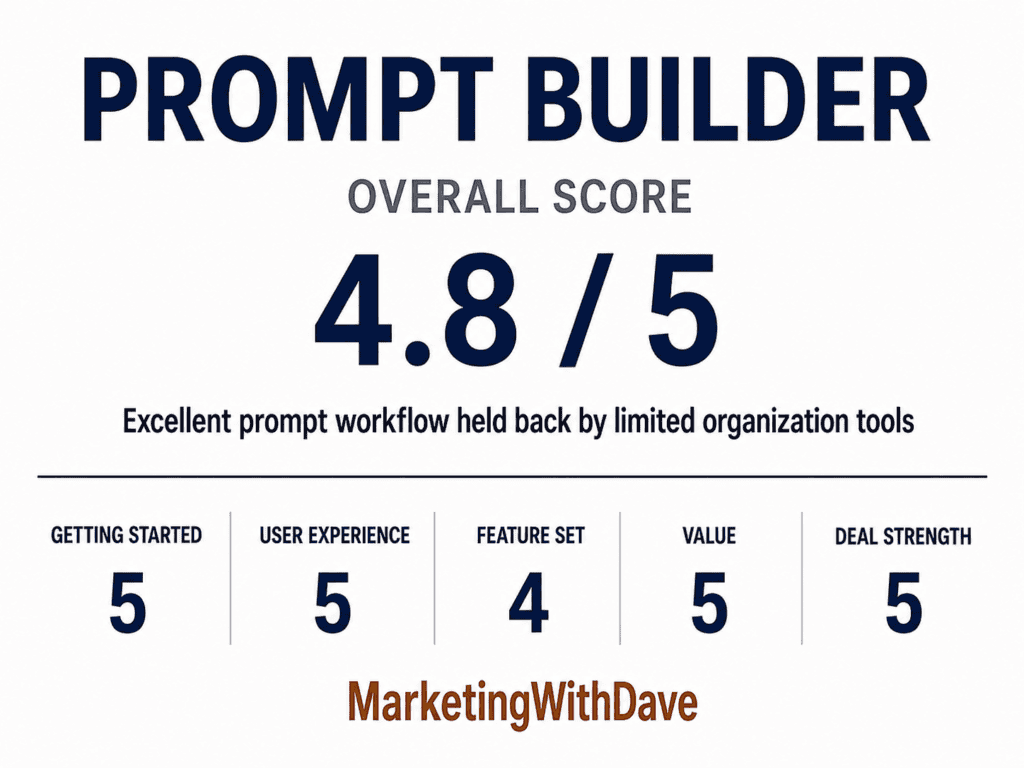
See the current AppSumo deal for Prompt Builder
Affiliate disclosure: If you purchase through my link, I may earn a small commission at no additional cost to you. I only share tools I have used myself.
The 30-Second Decision
Buy Prompt Builder if: You regularly work with AI tools and keep rebuilding, rewriting, or losing prompts that worked before. The core value is having one place to generate, optimize, test, save, and reuse prompts across multiple models.
Skip it if: You only use AI casually, already have a prompt management system that works, or need advanced team collaboration and deep library organization today.
AppSumo pricing at time of review: Lifetime deal starting at $39.
Pros and Cons
| Pros | Cons |
|---|---|
| Generates model-optimized prompts for GPT, Claude, Gemini, Grok, and more | Community prompt titles often fail to communicate what a prompt actually does |
| Prompt Optimizer turns messy prompts into cleaner, more structured versions | |
| Built-in assistant lets you run and iterate on prompts without leaving the tool | The Save to Library link after optimization is small and easy to miss |
| Optimization history helps preserve refinements | Keyboard behavior is inconsistent between Generator, Optimizer, and Prompt Tester |
| Community prompt library provides inspiration and reusable starting points | No community upvotes, usage counts, or quality signals to surface the best prompts |
| Reusable AI Instructions help keep outputs consistent without rewriting the same rules | Community prompt count is not displayed, making library depth hard to assess |
Why I Bought Prompt Builder
The problem is familiar if you use AI tools regularly. You find a prompt structure that works well, get a clean output, and then close the tab. The next time you need something similar, you start from scratch because you have no record of what you did, how you framed it, or which version produced the best output.
The bigger issue is model variation. A prompt structure that gets strong output from one model does not always translate cleanly to another. Each model responds differently to tone, structure, constraint framing, examples, and output format instructions. Managing that across multiple tools becomes tedious when you have no central place to track what works.
Prompt Builder positioned itself as a solution to both problems: generate prompts tuned to each model, and keep a library of the ones worth reusing.
Why Use a Dedicated Prompt Workspace Instead of Your Favorite AI Tool?
This is the biggest buying question for Prompt Builder.
Why pay for a prompt builder when you can open your favorite AI tool, ask it to improve a prompt, and store the result in Notion, Google Docs, Obsidian, Apple Notes, or wherever else you already keep your work?
That is a fair objection. If you only use AI occasionally, a notes app may be enough.
But the more you use AI, the more prompts become reusable assets instead of one-time instructions. You start developing prompts for sales outreach, blog briefs, research workflows, product reviews, image generation, social posts, SEO audits, data analysis, and repeatable client work. Those prompts improve over time. They also become easy to lose.
A general AI tool is where you execute a prompt. Prompt Builder is where you manage the prompt workflow around it: creating the prompt, optimizing it, testing it, saving it, organizing it, and reusing it later.
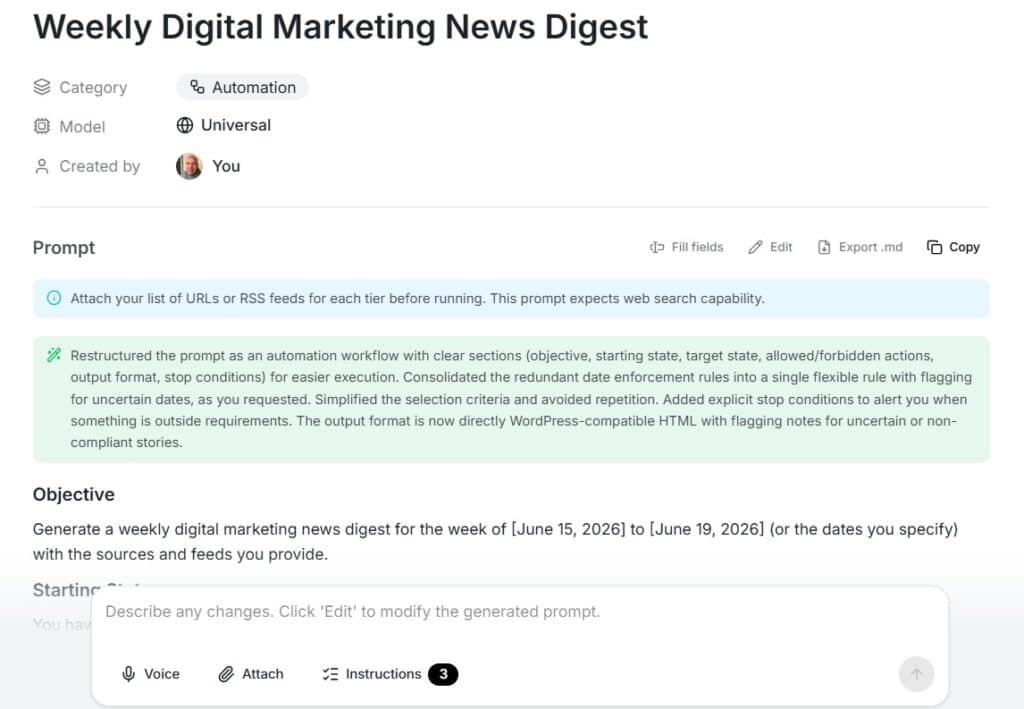
The value is not that Prompt Builder does something impossible to recreate manually. The value is that it puts the whole workflow in one place. You do not have to bounce between an AI chat window, a prompt document, a spreadsheet of versions, a notes app, and a browser full of half-finished experiments.
The community prompt library also gives you starting points that you would not have if you were only working from your own prompt archive. The reusable AI Instructions layer makes it easier to apply consistent preferences without rewriting the same rules every time. Version history and prompt testing add another layer of structure.
That is the real case for Prompt Builder. It is not replacing your favorite AI model. It is solving the messy layer around how prompts are built, improved, stored, and reused.
Most people still treat prompts as disposable. They write one, get an answer, and move on.
But strong prompts become assets over time. The outreach prompt that consistently produces better first drafts. The content brief that creates stronger article structures. The research workflow that saves an hour every time you use it.
Prompt Builder makes the most sense when you view prompts that way. It is less compelling if you see prompts as one-off messages and much more compelling if you see them as reusable workflow assets.
Those are not throwaway instructions. They are reusable workflow assets.
At some point during my testing, I noticed a change in my own workflow. If I needed to create, edit, optimize, or reuse a prompt, I naturally opened Prompt Builder first. It quietly became the home for my prompt workflow, while ChatGPT, Claude, Gemini, and other AI tools remained the places where I executed those prompts.
Prompt Builder makes the most sense when you stop thinking of prompts as one-off messages and start thinking of them as reusable assets that deserve a permanent home.
What Prompt Builder Actually Does
Prompt Builder is organized around several core sections: Generator, Optimizer, Library, Prompt Tester, and AI Instructions. Each handles a different part of the prompt workflow.
Generator
You describe what you want to accomplish in plain language, select the target model, and Prompt Builder produces a structured prompt. The model selector includes GPT, Claude, Gemini, Grok, and others. The goal is to adjust the prompt structure, constraints, and output format based on the model you plan to use.
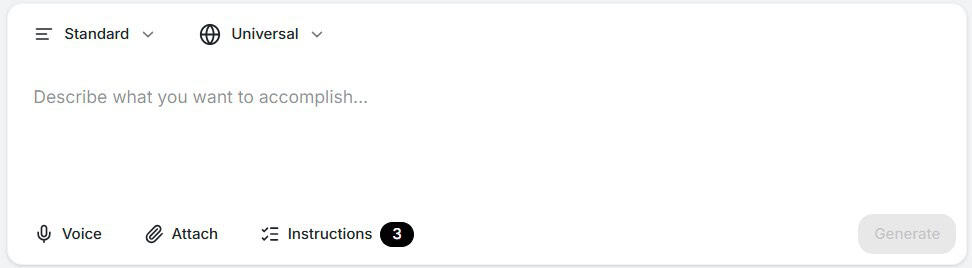
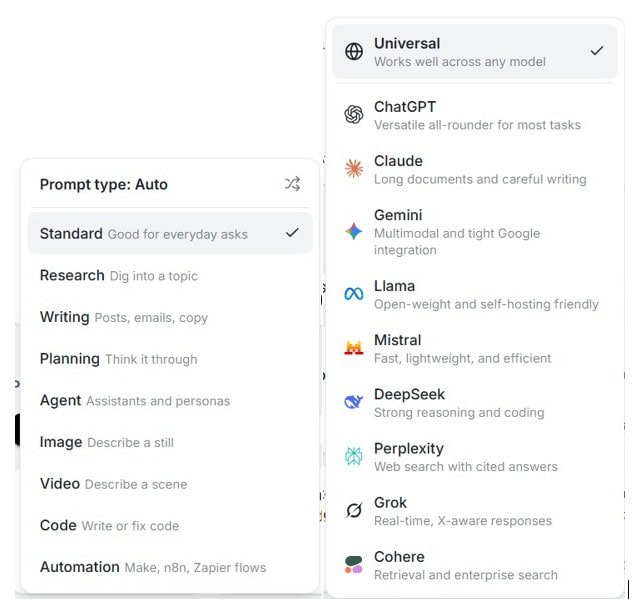
That model-specific angle is important because what works well in one AI model does not always perform the same way in another. Prompt Builder gives you a more structured starting point than a blank chat window.
From there, you can refine through chat. You can ask it to change tone, add constraints, request JSON output, make the prompt more concise, or create follow-up prompts that go deeper into the topic.
One minor note on keyboard behavior: pressing Enter in the Generator submits the request. In the Optimizer and Prompt Tester, Enter creates a new line and Ctrl+Enter submits. It is not a major issue, but the inconsistency is noticeable.
Optimizer
The Optimizer is one of the most satisfying parts of the product. Paste in a prompt that is vague, disorganized, or not performing well, and Prompt Builder rewrites it into a cleaner structure with a clearer role, better context, stronger constraints, and a defined output format.
This is especially useful if you have accumulated prompts from old AI sessions, swipe files, webinars, courses, or social posts. A lot of prompts people save are more like rough notes than polished assets. The Optimizer turns those messy prompts into something easier to use, maintain, and improve going forward.
This was also the feature where the product clicked for me. Watching a rough prompt turn into something clean, structured, and easier to reuse is genuinely useful.
The primary workflow issue is that saving optimized prompts to the library should be more obvious. Since the library is central to the product’s value, the Save to Library action deserves more visual weight than a small text link at the bottom of the screen.
Library
The Library has two main tabs: My Prompts and Community Prompts.

My Prompts is where your saved prompts live. You can pin favorites, edit prompts, and run prompts directly from the library. This is the part of the product that turns prompt work from scattered experiments into something reusable.
Community Prompts is a browsable library of prompts from other users. You can filter by category or model and add prompts directly to your own collection. There appears to be a healthy collection of community prompts available, which is promising.
The challenge is discovery. Many community prompt titles do not make it clear what the prompt actually does, who it is for, or why you would use it. The library would be more useful with upvotes, usage counts, popularity filters, editor picks, or some other signal showing which prompts have been battle-tested by the community.
I would also like to see a visible count of how many community prompts are available. If part of the value proposition is the community library, showing the size of that library would make the feature easier to evaluate.
For personal prompt organization, the current system is workable but not ideal. If you only save a handful of prompts, this is not a major issue. If you build a serious library over time, custom categories or custom tags become much more important.
The challenge is not creating prompts. Prompt Builder does that well. The challenge is managing them once your library starts growing. As your collection expands, custom categories, tags, collections, folders, or other organizational tools become increasingly valuable. The stronger Prompt Builder becomes at managing large prompt libraries, the more difficult it becomes to replace.
AI Instructions
AI Instructions may be one of the more underrated parts of Prompt Builder.
Instead of rewriting the same instructions into every prompt, you can create reusable rules and turn them on or off as needed. In my own testing, I created instructions such as “Say Thank You instead of Thanks,” “Prefer and instead of &,” and standardizing how eCommerce is written. These are small preferences individually, but they become tedious to repeat in every prompt. Instructions provide a simple way to apply those preferences consistently.
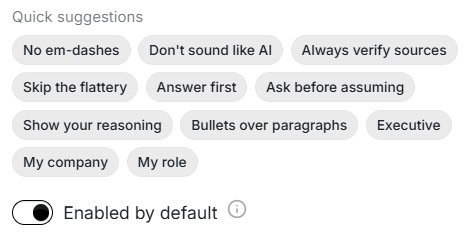
This matters because many prompt failures come from missing preference instructions rather than a bad core prompt. You may want the same prompt to follow your writing style, avoid certain phrasing, ask clarifying questions, use a specific tone, or produce output in a predictable structure. Reusable instructions give you a way to manage those preferences separately from the prompt itself.
In practical terms, this creates a lightweight brand voice and workflow layer. For marketers, writers, consultants, and content creators, that could be just as valuable as the prompt generator.
Prompt Assistant / Prompt Tester
The built-in assistant lets you run prompts without switching tools. You can execute a saved prompt, review the output, continue iterating, and save anything useful back to your library.
One feature I ended up using more than expected is the browser extension. It gives me quick access to Prompt Builder from any browser tab through a right-side panel, so I can create a new prompt, optimize an existing one, or pull something from my library without interrupting what I’m already working on. It sounds like a small convenience, but it removes a surprising amount of friction from the entire prompt workflow.
This is not meant to replace your full AI workflow in every situation. The benefit is removing the constant copy-paste loop between your prompt library and a separate AI chat interface.
See the current AppSumo deal for Prompt Builder
My Experience With Prompt Builder
Getting Started
Getting started is straightforward. Nothing needs to be integrated, installed, or connected in order to use the product. The interface is clean, the sections are easy to understand, and you can create or optimize a prompt within a few minutes.
That simplicity matters because this is not a product that should require a heavy onboarding curve. The value is speed and organization. Prompt Builder largely gets that right.
What I Liked and What Needs Work
| What I Liked | What Needs Work |
|---|---|
| Model-specific prompt generation across GPT, Claude, Gemini, Grok, and more | Save to Library link in the Optimizer is too easy to miss |
| Optimizer transforms messy prompts into clean, structured versions quickly | Community prompts lack quality signals like upvotes, saves, or usage counts |
| Built-in assistant keeps prompt testing inside the same workspace | No custom categories or custom tags for personal prompt organization |
| Reusable AI Instructions help maintain consistent output preferences | Keyboard shortcut behavior is inconsistent across sections |
| Community Prompts can provide inspiration and reusable starting points | Community prompt count is not visible |
What Prompt Builder Is Not
Prompt Builder is not a replacement for your favorite AI model. It is not trying to be the place where every AI task begins and ends.
It is also not a full team knowledge base, enterprise prompt governance platform, or advanced collaboration suite. The higher tiers include additional team members, but the product currently feels most natural for individual practitioners or small teams rather than large organizations with complex approval workflows.
What Prompt Builder is: a focused prompt workspace for people who want a better way to build, improve, test, save, and reuse prompts across multiple AI tools.
Pricing and Plans
Prompt Builder is available as a lifetime deal on AppSumo across four tiers. All tiers include the Prompt Generator, Prompt Assistant, Prompt Optimizer, Prompt Library, and all prompt templates.
| Feature | Tier 1 $39 | Tier 2 $79 | Tier 3 $199 | Tier 4 $349 |
|---|---|---|---|---|
| Credits per month | 1,000 | 3,000 | 12,000 | 30,000 |
| Team members | 1 | 4 | 10 | 20 |
| Prompt Generator | Yes | Yes | Yes | Yes |
| Prompt Assistant | Yes | Yes | Yes | Yes |
| Prompt Optimizer | Yes | Yes | Yes | Yes |
| Prompt Library | Yes | Yes | Yes | Yes |
| All prompt templates | Yes | Yes | Yes | Yes |
For a solo practitioner, Tier 1 is the obvious starting point. You get the full feature set with 1,000 credits per month and one team member for $39 lifetime.
The higher tiers are mainly about scale: more credits and more team members. Tier 2 increases the monthly credits to 3,000 and team members to four. Tier 3 moves to 12,000 monthly credits and 10 team members. Tier 4 provides 30,000 monthly credits and 20 team members.
Unless you are planning to use this heavily across a team, Tier 1 is enough to evaluate the product properly.
Try It Risk-Free: AppSumo’s 60-Day Refund Policy
Prompt Builder is a practical tool to evaluate quickly. You do not need months of data to know whether it fits your workflow.
Run the Generator across a few real tasks. Put the Optimizer to work on prompts you already use. Save your best versions to the library. Try the AI Instructions layer. Browse Community Prompts. Test a few saved prompts in the assistant.
That should be enough to know whether Prompt Builder solves a real problem for you.
AppSumo’s 60-day refund policy gives you plenty of time to make that call. For a $39 lifetime deal, the risk is low and the upside is meaningful if you use AI tools regularly.
Bottom Line
Prompt Builder solves a real problem that every regular AI user eventually runs into: prompt chaos.
You write prompts in one tool, improve them in another, save a few in a notes app, forget which version worked, and then rebuild the same thing later. Prompt Builder gives that workflow a dedicated home.
The Generator and Optimizer are the strongest parts of the platform. The Generator provides a structured starting point, while the Optimizer transforms rough prompts into cleaner, more reusable assets. The Library and Instructions features become increasingly valuable as your prompt collection grows.
The biggest opportunity for improvement is organization. Community Prompts need better curation, and larger prompt libraries would benefit from custom categories, tags, or collections. Fortunately, these are refinement opportunities rather than core product flaws.
Prompt Builder is not trying to replace your favorite AI model. It solves the layer above it: creating prompts, improving prompts, organizing prompts, testing prompts, and reusing prompts.
If you regularly work across multiple AI tools and find yourself rebuilding the same prompts repeatedly, Prompt Builder offers a focused and surprisingly useful workflow for a very modest one-time price. At $39 lifetime for Tier 1, it is easy to recommend for serious AI users, marketers, content creators, and anyone who sees prompts as reusable work assets rather than disposable chat messages.
See the current AppSumo deal for Prompt Builder
This content is for educational purposes and reflects my experience, review of the product, and current publicly available deal information. Always evaluate tools based on your specific business needs, goals, and workflows before making a decision.
Looking for more marketing software reviews? See my full list of marketing tools and software I recommend.