
Last updated September 2026
A/B testing in SiteSqueeze puts two promotions head to head so you can see which one actually earns more clicks. Pick two Standard Promotions, set a threshold for what counts as a real improvement, assign a Placement, and start the test. SiteSqueeze splits your traffic roughly 50/50 and tracks the results.
Before You Start
You need two existing Standard Promotions before you can run a test. Haven’t made them yet? Start with How to Create a Standard Promotion in SiteSqueeze.
A typical setup:
- Control A: your current promotion, headline and image as-is
- Variation B: an alternative version with something you want to test
If you want to understand why one version performs better, change one major variable at a time. Changing the headline, image, and call to action together can tell you which overall promotion performs better, but not which change made the difference. If your goal is simply to compare two different creative approaches, changing multiple elements can make sense.
Set Up the Test
A/B testing is a SiteSqueeze Pro feature.
From Promotions, select Run an A/B Test, then Create A/B Test.
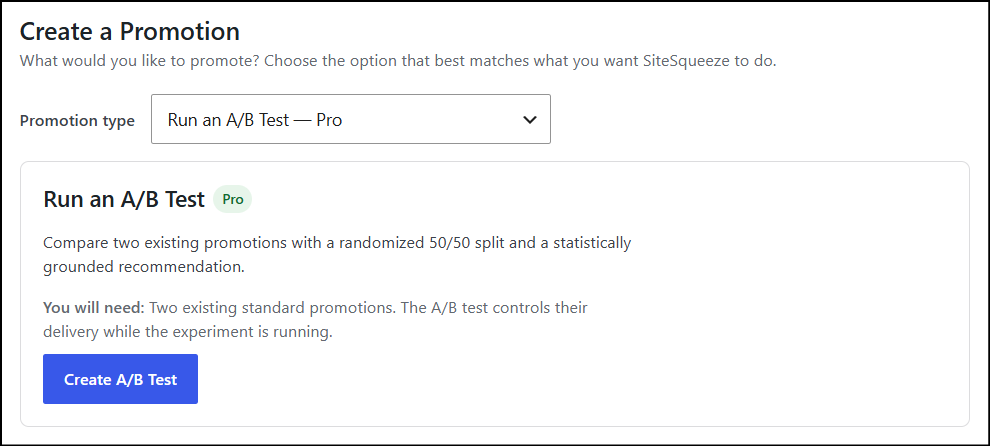
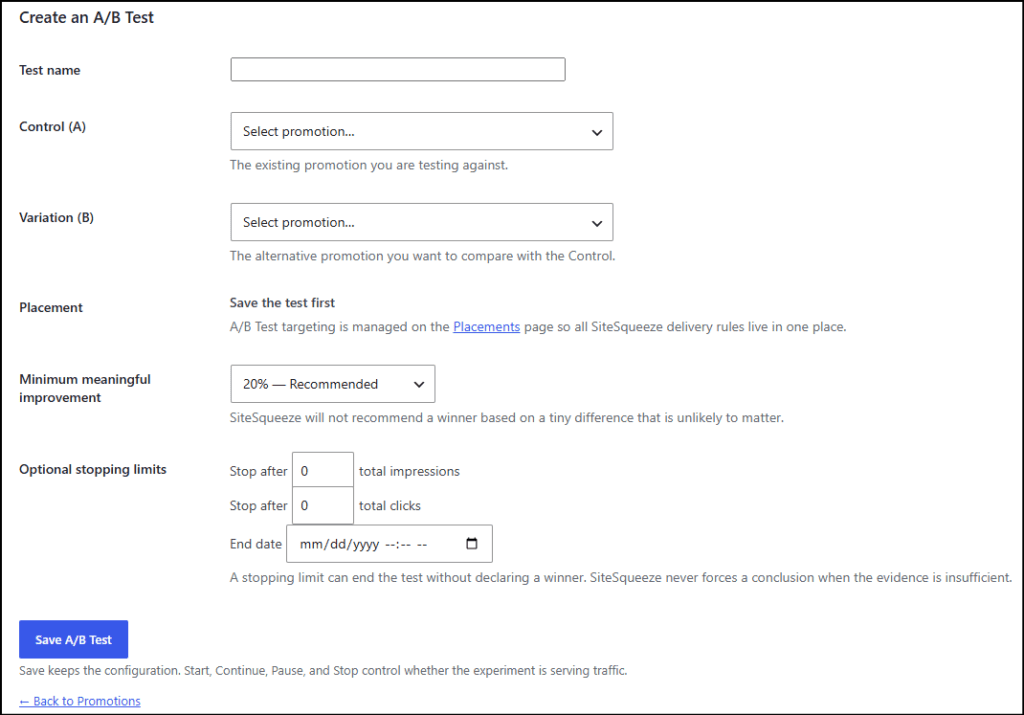
Name the test something you’ll recognize later. “SiteSqueeze Headline Test – September” beats “Test 1” every time.
Then choose:
- Control (A): the promotion you’re testing against
- Variation (B): the challenger
These have to be two different promotions.
Set Your Minimum Meaningful Improvement
This threshold decides how much better one promotion needs to perform before SiteSqueeze considers the difference meaningful:
| Threshold | Meaning |
|---|---|
| 10% | Small improvement |
| 20% | Recommended (default) |
| 30% | Strong improvement |
| 50% | Major improvement |
A 2% lift might be real, but if it’s not big enough to change what you do next, it’s not worth treating as a winner. Set this threshold before the test starts, not after you’ve seen which version is ahead.
Want the full mechanics, including the seven-day minimum test window and how SiteSqueeze weighs the evidence? See SiteSqueeze A/B Testing: How Winner Recommendations Work.
Set a Stopping Limit (Optional)
Choose how the test ends, if you want a hard stop:
- Total impressions
- Total clicks
- End date
Leave these blank for no limit.
A stopping limit ends collection. It doesn’t force a winner. If a test hits 5,000 impressions without strong enough evidence, SiteSqueeze marks it Inconclusive rather than declare a winner it can’t back up. That’s by design.
Save, Then Assign a Placement
Click Save A/B Test. The test now exists, but it isn’t live yet.
SiteSqueeze routes A/B tests through Placements, the same system that controls every other promotion type, so all your targeting rules live in one place.
Go to Placements, create or edit the one you want, and select your A/B test. Target it by category, tag, or All Other Content.
One rule: while the test runs, Control A and Variation B can’t have their own separate Placements. The test needs full control of delivery.
See SiteSqueeze Placements: Control Where Your Promotions Appear for a full walkthrough.
Start the Test
Back in your A/B test, click Start Test.
SiteSqueeze now handles delivery: visitors are split roughly 50/50 between Control A and Variation B, and returning visitors see the same variation each time browser storage allows it.
You can Pause Test anytime and resume later without losing collected data. Stopping the test entirely preserves whatever statistics it already gathered.
What to Expect
Let it run. SiteSqueeze needs at least seven full active days of data before it will recommend a winner, and even then, seven days alone isn’t a guarantee the evidence is strong enough.
You’ll see Keep Testing, a recommendation for Control A or Variation B, No Meaningful Difference, or Inconclusive. Full breakdown here: SiteSqueeze A/B Testing: How Winner Recommendations Work.
Test With a Question in Mind
Setting up a test is the easy part. Deciding what’s worth testing is what actually matters.
Skip “which one wins” and ask something you want an answer to:
- Does a benefit-focused headline beat a feature-focused one?
- Does a product shot outperform a conceptual image?
- Does “Download the Guide” out-click “Learn More”?
Flint McGlaughlin of MECLABS has a line I’ve always liked: “The goal of a test is to get a learning, not a lift.”
That’s the mindset to bring to SiteSqueeze. A winning variation is useful. Learning why it won gives you something you can carry into the next promotion, the next test, and the marketing decisions that follow.
SiteSqueeze is coming soon.
I’m building a WordPress plugin designed to help marketers promote their own content, measure what works, and run practical A/B tests without pretending every website has enterprise-level traffic.
Join the list to know when SiteSqueeze launches.

