Last updated June 2026
Web accessibility compliance is one of those topics most small business website owners know they should be dealing with, but it is easy to push down the list.

The legal risk is real. The standards can feel technical. And most solutions either require ongoing monthly fees, developer support, or a level of accessibility expertise many website owners do not have.
WebAbility.io is an AppSumo lifetime deal that positions itself as AI-powered accessibility software for website compliance. It includes an accessibility widget, website scanning, audit reports, accessibility profiles, transcription tools, and an automatically generated accessibility statement.
I purchased WebAbility for MarketingWithDave.com because I believe accessibility is becoming similar to SEO. There are too many potential issues for most website owners to manage manually, and automation will likely become an increasingly important part of keeping websites usable, inclusive, and lower risk.
I do not have the budget to hire an accessibility team, and I do not have the time to manually review accessibility issues across hundreds of web pages. A tool that can identify issues, explain them, and potentially help with safe one-click fixes has obvious appeal.
After using WebAbility, I still believe the product has real potential. I am keeping it. But I am also not ready to pretend it is perfect or that I have fully validated every fix it recommends.
See the current AppSumo deal for WebAbility
Affiliate disclosure: If you purchase through my link, I may earn a small commission at no additional cost to you. I only share tools I have used myself.
The 30-Second Decision
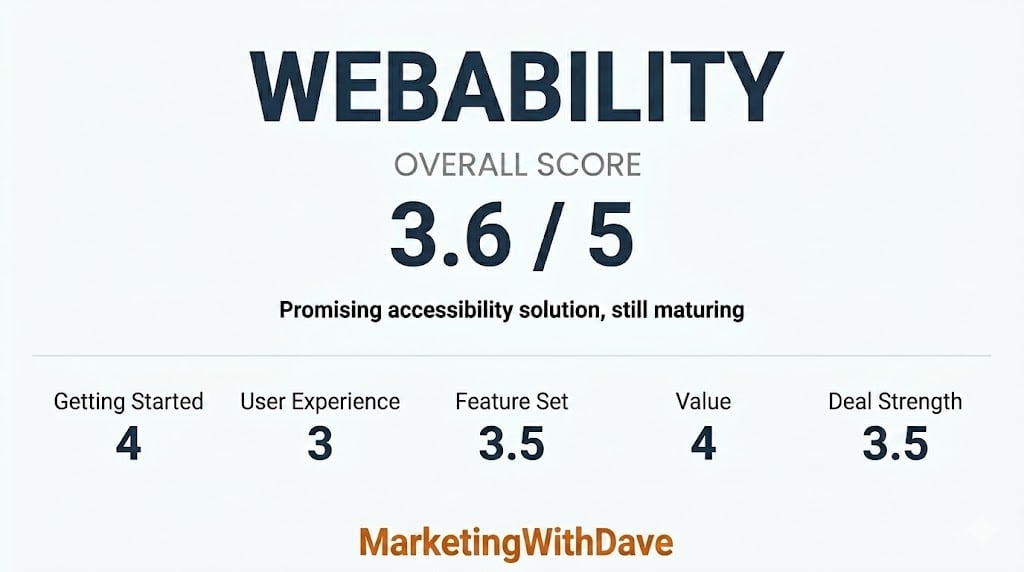
WebAbility is a promising accessibility solution for website owners who want a practical way to identify accessibility issues, add an accessibility widget, generate an accessibility statement, and begin working toward a more accessible website.
The platform has identified more than 1,000 potential accessibility-related fixes, but those changes still need review. Since the workflow is handled web page by web page and there is no easy bulk export, I do not yet have the confidence to approve changes in bulk.
My current read: WebAbility is useful today, but it is still maturing. I am willing to grow with the product because accessibility matters, the technology should continue improving, and one-click accessibility improvements could become extremely valuable for website owners like me.
Is WebAbility Right for You?
WebAbility is most relevant for solopreneurs, bloggers, small business owners, affiliate marketers, and website owners who know accessibility matters but do not have the budget or expertise to manage everything manually.
It is also relevant for people who want an accessibility widget, a compliance statement, website scans, audit reports, and a more structured way to understand accessibility issues across their website.
It may be less ideal for agencies managing many client websites, at least through the standard AppSumo tiers. The public deal structure is based entirely on website count, which works well for small portfolios but becomes limiting quickly for larger client rosters.
| Best Fit | Use Caution If |
|---|---|
| Small business websites | You manage dozens of client websites. |
| Bloggers and affiliate marketers | You need enterprise accessibility governance. |
| WordPress website owners | You need bulk export and developer handoff workflows. |
| Solopreneurs with limited technical support | You expect every issue to be fixed automatically without review. |
| Website owners who want to improve accessibility over time | You need a formal manual audit or VPAT right now. |
Why I Bought WebAbility
I originally purchased WebAbility because accessibility is becoming too important to ignore.
In some ways, it reminds me of SEO. Years ago, many website owners treated SEO as optional. Over time, it became a normal part of maintaining a healthy website. Accessibility feels like it is moving in a similar direction.
The challenge is that accessibility can become overwhelming quickly. One website can have hundreds of web pages, repeated templates, navigation elements, images, forms, buttons, color contrast issues, keyboard navigation concerns, and screen reader considerations.
There is no realistic way I can manually manage all of that on my own. There is also no realistic way I can hire an accessibility team to audit and fix everything right now.
That is why WebAbility interested me. Even if the product is not as mature as I wish today, a tool that helps identify accessibility issues, documents them, and gives me a path toward safer one-click improvements is worth watching.
What WebAbility Actually Does
| Feature | What It Does |
|---|---|
| Accessibility widget | Adds user-facing accessibility controls to your website. |
| Website scanning | Identifies accessibility issues across your website. |
| Accessibility statement | Generates a publishable statement for your domain. |
| Audit reports | Provides issue details, categories, and recommended fixes. |
| WordPress integration | Allows setup through a WordPress plugin instead of manually adding code. |
| Audio and video transcription | Creates plain text transcripts from uploaded media files. |
| Accessibility profiles | Gives visitors tools to adjust the experience based on their needs. |
My Experience With WebAbility
The setup process was straightforward. I used the WordPress integration, which made it easy to connect the tool to MarketingWithDave.com without manually editing code.
Once connected, WebAbility began identifying accessibility-related issues and showing reports inside the platform. It also generated an accessibility statement for my website, which is a useful document to have in place.
WebAbility accessibility statement generated for MarketingWithDave.com
I want to be careful about attribution. WebAbility shows scores, issue counts, and auto-fix information inside its own platform. I have not independently verified those fixes through a separate accessibility audit, and I have not approved changes at scale.
Because of that, I am not giving the tool full credit for making my website accessible. I am giving it credit for helping me understand accessibility issues and giving me a path to improve them.

The Biggest Limitation: Approving Fixes
The current workflow makes that harder than it should be. Fixes need to be reviewed web page by web page. I have more than 300 web pages on my website, and many of the issues likely come from templates or repeatable website patterns. In that situation, I do not want to review the same type of issue hundreds of times.
What I would really like is an export option. A CSV, Excel file, or structured export would let me review issues outside the platform, send them to a developer, or run them through an LLM for a second opinion before approving changes.
Without that, WebAbility is much stronger for discovery than it currently is for confident large-scale remediation.
See the current AppSumo deal for WebAbility
The Monthly Audit Reports
One feature I wasn’t expecting was the AI Readiness Analysis. Think of it as a lightweight technical website audit focused on areas that may influence AI crawlers, search engines, and accessibility tools.
The analysis reviewed elements such as llms.txt, robots.txt, metadata quality, semantic HTML, sitemap availability, heading structure, and accessibility signals. While I wouldn’t replace a dedicated SEO crawler with it, I appreciated having these checks surfaced inside the same platform.
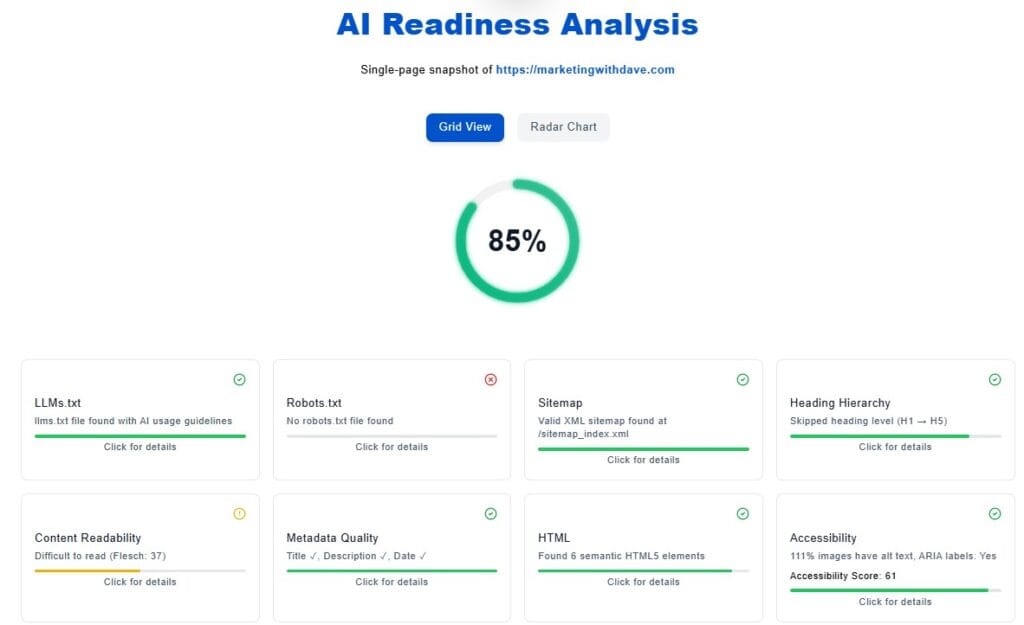
This is useful information. It helps translate accessibility from a vague concern into specific items that can be reviewed and addressed.
The report is not something I would send directly to management without cleanup. The formatting is functional, but it feels more like a raw technical export than a polished stakeholder report. For internal review or developer investigation, it is helpful. For executive reporting, it needs presentation improvements.
View the sample WebAbility monthly audit report for MarketingWithDave.com.
The monthly audit report includes issue details, categories, severity levels, and recommended fixes.
The Audio and Video Transcription Tool Was Surprisingly Useful
WebAbility lets you upload an audio or video file and generate a plain text transcript. At first, that felt like an odd feature to include inside an accessibility platform. After using it, I actually found it handy. The output was easier to work with than some of the free transcription tools I typically use.
There are two workflow limitations. First, you need to stay on the web page while the transcription runs. Second, the transcript is not saved for later when you come back, so you need to download what you need before leaving.
Accessibility Visualizer Chrome Extension
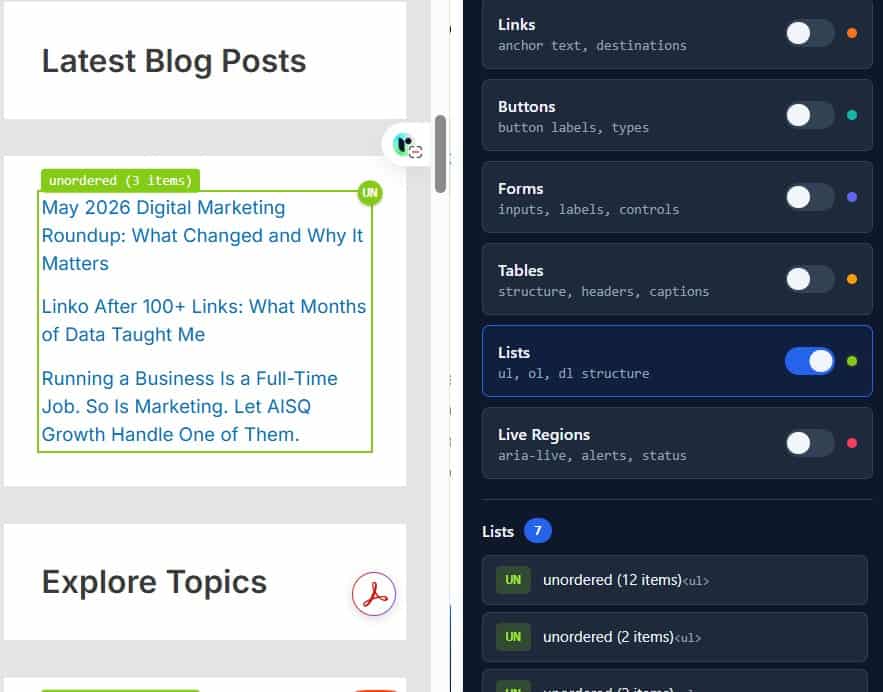
WebAbility also includes an Accessibility Visualizer Chrome extension. In theory, it allows you to highlight headings, forms, links, landmarks, tables, and other accessibility elements directly on a web page.
What I Liked and What Needs Work
| What I Liked | What Needs Work |
|---|---|
| Easy WordPress setup. | Fix review is handled web page by web page. |
| Useful accessibility scans and issue visibility. | No easy bulk export for developer review or LLM analysis. |
| Automatically generated accessibility statement. | Website selection is not consistently remembered between screens. |
| Helpful audit report with issue details and HTML context. | Audit report formatting needs polish before sharing with management. |
| Transcript tool was more useful than expected. | Transcripts are not saved after leaving the web page. |
| Strong lifetime deal value for small website owners. | Pricing tier limitations don’t support agency needs. |
| I can see how one-click fixes could become very valuable over time. | Product still feels like it is maturing. |
Overlay vs. Enhancer: A Fair Framing
The accessibility overlay category has a mixed reputation, with some tools like AccessiBe facing regulatory scrutiny and criticism from the disability community for interfering with screen readers. WebAbility distinguishes its approach by calling the product an enhancer rather than an overlay, and the founder explains the distinction in detail in the AppSumo Q&A.
The key differences as described: every fix is visible in the dashboard with an explanation, fixes can be disabled individually, the widget can be set to hidden mode while fixes continue running, and it is designed to detect when a visitor is already using a screen reader and step back rather than compete. The widget runs inside an isolated Shadow DOM so it cannot break the site’s existing styles or scripts. Whether this fully addresses the concerns raised about overlay tools is worth users researching for themselves, but the product approach is meaningfully more transparent than what critics describe about other tools in this space.
Pricing and Plans
| Plan | Price | Websites Covered |
|---|---|---|
| Tier 1 | $59 | 1 website |
| Tier 2 | $106 | 2 websites |
| Tier 3 | $159 | 3 websites |
I purchased Tier 2 for $106 because I wanted coverage for two websites. For my use case, that was an easy decision. Even if I only use WebAbility for scanning, reporting, the accessibility statement, the widget, and gradual improvements over time, the product does not need to do much to justify that cost.
Where the pricing is less compelling is for agencies. If you manage a large portfolio of client websites, the public AppSumo tiers may not scale well. WebAbility has discussed agency options and white-label functionality in AppSumo responses, but that appears to be a separate conversation with the team rather than a simple self-serve upgrade inside the deal.
Compliance Coverage
The WebAbility product page references ADA, WCAG 2.1, WCAG 2.2, Section 508, AODA, EN 301 549, and IS 5568. For most small businesses, that covers the accessibility standards they are most likely to encounter.
One area worth calling out separately is the EU Accessibility Act (EAA), which took effect in June 2025. If you serve customers in the European Union, accessibility requirements may extend beyond what any widget alone can provide. To the founder’s credit, WebAbility does not market itself as a complete EAA compliance solution. In the AppSumo Q&A, he has been clear that full compliance may also require accessible underlying code, manual audits, documentation, and in some cases a VPAT (Voluntary Product Accessibility Template).
In other words, WebAbility helps automate part of the accessibility process, but it should not be viewed as a substitute for broader accessibility efforts when stricter compliance requirements apply.
If you operate internationally or work with government, education, healthcare, or enterprise organizations, here are some additional accessibility frameworks that may be relevant:
| Standard | Jurisdiction / Context |
|---|---|
| EU Accessibility Act (EAA) | European Union. Effective June 2025. Applies to many digital products and services sold in the EU. The WebAbility founder is explicit that a widget alone does not constitute full EAA compliance. |
| CVAA (Communications and Video Accessibility Act) | United States. Applies specifically to advanced communications services and video programming. |
| ADA Title III | United States. Increasingly applied to websites through litigation even without explicit statutory language. WCAG 2.1 AA is commonly treated as the compliance benchmark. |
| BITV 2.0 | Germany. Based on WCAG and applied specifically to German public sector websites. |
| RGAA | France. French government accessibility framework aligned with EN 301 549. |
| Australian DDA / WCAG | Australia. The Disability Discrimination Act effectively makes WCAG the expected accessibility standard for many public-facing websites. |
| Ontario AODA | Canada (Ontario). Already covered by WebAbility. Federal accessibility requirements under the Accessible Canada Act extend similar obligations to federal entities. |
The important caveat is that no widget alone should be treated as a guarantee of full legal compliance. Accessibility is more than a toolbar or automated scanner. A stronger compliance stack may include accessible underlying code, manual review, developer fixes, documentation, and in some cases a formal VPAT or accessibility conformance report.
That is one reason I appreciated the founder’s AppSumo responses. The product is not being framed as magic. The more realistic promise is that WebAbility can automate the parts that are safe to automate, flag issues that need review, and help website owners move in the right direction.
Bottom Line
I bought WebAbility, and I am keeping it.
The compliance infrastructure it puts in place, the auto-fixes running silently in the background, the published accessibility statement, the monthly audit report, and the AI Readiness Analysis all add up to a meaningful package.
The limitations that surfaced are real but not deal-killers for most buyers. The page-by-page review workflow is the most significant friction point for anyone managing a content-heavy site. If that is your situation, test it carefully before committing to heavy use.
Use AppSumo’s 60-day refund window as your safety net. Install it, run the scan, review what it finds, and judge for yourself whether the auto-fix quality and compliance output meet your standards.
If WebAbility eventually adds template-level remediation, bulk exports, and a more scalable review workflow, I could easily see this becoming a 4.5-star product.
See the current WebAbility deal on AppSumo
This content is for educational purposes and reflects my experience, review of the product, and current publicly available deal information. Always evaluate tools based on your specific business needs, goals, and workflows before making a decision.
Looking for more marketing software reviews? See my full list of marketing tools and software I recommend.