Last updated April 2026
I installed WP Security Ninja, ran a scan on my own WordPress website, and fixed several real issues in under an hour. No developer needed.
That is the pitch. Here is the honest version.
WP Security Ninja is a fast WordPress security scanner that helps identify issues and apply practical fixes with firewall protection, malware scanning, login protection, event logging, and guided fixes. It is not a complete security solution, and no single piece of software should be treated that way. But it helped me find issues worth fixing, apply several of them in one click, and think more clearly about what I was actually leaving exposed.
The bigger lesson from using it: not every failed check deserves the same response. The tool gives you visibility. Your job is to use judgment.
See the current AppSumo deal for WP Security Ninja
Affiliate disclosure: If you purchase through my link, I may earn a small commission at no additional cost to you. I only share tools I have used myself.
Is WP Security Ninja Right for You?
Good fit: WordPress website owners who want to scan their website, find common security gaps, and apply safe fixes without hiring a developer. Especially useful for bloggers, website owners, consultants, and solo operators managing their own WordPress setup.
Not the right fit: anyone expecting one plugin to handle their entire security posture. It also may feel basic for advanced users who already manage server rules, security headers, firewall configuration, login protection, malware scanning, backups, and hardening manually.
Pricing: WP Security Ninja was available on AppSumo with lifetime access at the time of this review. Check the current deal page for tiers and availability, as AppSumo pricing can change.
My Scorecard

See how this score is calculated
Here’s how to interpret this score:
The overall score reflects both product quality and how compelling the current deal is.
The 4.1 reflects strong immediate value as a WordPress security audit tool with helpful explanations and practical one-click fixes, balanced by the need for judgment when applying recommendations and a feature set that works best as part of a broader security setup.
My Actual Scan Results
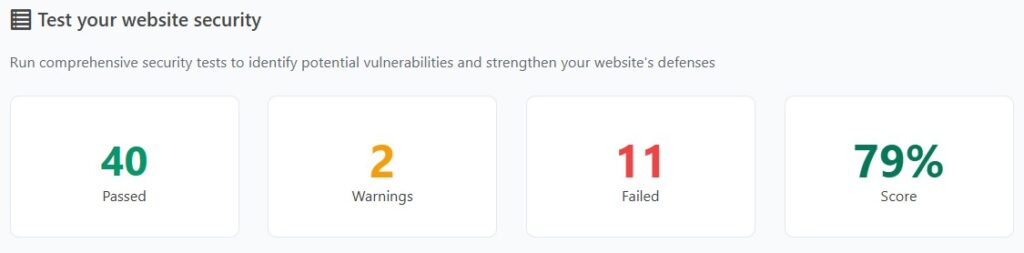
These results are from my own WordPress website.

After running the initial scan, WP Security Ninja returned a mix of passed checks, warnings, and failures. Some were obvious fixes. Some required judgment. A few were the kind of recommendations I would not apply without thinking carefully first.
What I Fixed and Why
| Issue | Why It Matters | What I Did |
|---|---|---|
| XML-RPC exposed | Can be abused by bots and brute force attempts if you do not need it. | Used the built-in fix to reduce exposure. |
| Plugin and theme file editor enabled | If an attacker gets admin access, the file editor makes damage easier. | Disabled it in one click. |
| wp-config.php permissions too open | This file contains database credentials and other sensitive configuration details. | Changed permissions from 644 to 440. |
| Unused theme installed | Inactive themes can still carry security risk if outdated. | Deleted it manually. |
| Weekly backups only | A weekly backup can leave too much recovery gap if something breaks midweek. | Switched to daily backups using my existing backup plugin. |
What I Skipped and Why
This is where the tool requires judgment, not blind trust.
| Issue | Why I Did Not Rush to Fix It | My Call |
|---|---|---|
| Moving wp-config.php | Restructuring folder paths on a live website can break things you did not expect. | Skipped it. |
| Changing the database table prefix | Low practical security benefit. Higher risk of breaking something on an existing website. | Skipped it. |
| Content Security Policy header | Valuable when configured correctly, but easy to break analytics, embeds, ads, or scripts if handled poorly. | Left it for later. |
| REST API enabled | Normal WordPress behavior. Not an automatic problem. | Not treated as urgent. |
| WordPress version visible | Bots targeting WordPress already assume it is WordPress. This is low priority. | Did not chase it. |
Want the full breakdown?
See my complete WordPress security checklist with every item I reviewed and what I chose to fix or skip.
The Strongest Part: Useful One-Click Fixes
I know enough about WordPress security to know it matters. I also know I am not a developer and if it wasn’t for vibe coding, I still wouldn’t be coding. That gap is exactly where WP Security Ninja is useful.
Disabling the file editor, tightening wp-config.php permissions, and reducing XML-RPC exposure were clear wins. They were fast, explained well enough to understand the risk, and did not require manually editing configuration files.
This is where the product delivers on the AppSumo positioning. You install the plugin, run the wizard, scan your website, review the failed checks, and apply some fixes directly from the dashboard.
One feature to note: the Security Advisor AI requires WordPress version 7 that is not currently available. I focused this review on what the product delivers today.
Check current WP Security Ninja pricing on AppSumo
Beyond the Scan: Firewall, Malware, Login Protection, and Logs
The security test is only one part of the product. WP Security Ninja also includes firewall protection, malware scanning, login form protection, event logging, and blocking features for suspicious activity.
The login protection is especially relevant because brute force attempts are one of the most common issues WordPress website owners have to think about. Features like failed-login blocking, login error hiding, and login URL changes are practical additions if you are trying to reduce obvious attack paths.
While the scan helps identify issues, these features are what continue working in the background. The firewall and login protection are designed to reduce common attack attempts, even if you do not actively monitor them day to day.
The Part That Requires Caution
The tool presents failed checks in a way that can make every item feel equally urgent. They are not.
Changing a database prefix on a live website is a good example. It sounds like a meaningful security improvement. In practice, the benefit is minimal and the risk of breaking something is real. A failed check on that item does not mean you should rush to fix it.
The scanner is useful. The score is a helpful starting point. But you still need to think about which fixes make sense for your specific setup before applying them.
What WP Security Ninja Does Not Replace
WP Security Ninja does not replace strong passwords, regular plugin updates, off-website backups, quality hosting with server-level protection, or a broader security layer like Cloudflare.
It works best as a fast audit and hardening tool alongside those basics, not instead of them.
Bottom Line
WP Security Ninja helped me find real issues on my own WordPress website and fix several of them in under an hour. The one-click fixes for file editor access, wp-config.php permissions, and XML-RPC exposure alone made it worth the install.
The score is not the goal. The goal is understanding which issues on your specific website are worth fixing, which ones are safe to apply quickly, and which ones look scarier than they are.
If you own a WordPress website and want a practical way to audit and harden your setup without it becoming a development project, WP Security Ninja is worth a look.
Just do not confuse a cleaner scan with complete security.
See the WP Security Ninja AppSumo deal
This content is for educational purposes and reflects my experience, review of the product, and current publicly available deal information. Always evaluate tools based on your specific business needs, goals, and workflows before making a decision.
Looking for more marketing software reviews? See my full list of marketing tools and software I recommend.