Maximize your marketing strategy with AISQ Growth's proven methods, including SEO, social media, and content marketing, to boost business success and online presence.

Running a Business Is a Full-Time Job. So Is Marketing. Let AISQ Growth Handle One of Them.

Reading Time: 5 minutes

Disclosure: This is an affiliate review. If you sign up through my link, I may earn a small commission at no additional cost to you. I also use AISQ’s software directly, which is part of why I’m writing about this.


You already know what the list looks like.

Blog posts that never got written. A social media presence that went quiet sometime around last quarter. An email list sitting there, untouched, while you told yourself you’d get to it next week. SEO work that’s been “next month” for six months running.

This is not a productivity problem. It’s not a motivation problem. It’s a capacity problem. You are running a business. The marketing is important, but it is not the only important thing, and there are only so many hours.

The gap between knowing your marketing matters and actually getting it done is where most small businesses lose ground, quietly, consistently, over time.

Meanwhile, search keeps changing. AI-powered discovery is reshaping how people find businesses. Competitors who figured out a system months ago are compounding that advantage every week. The gap is not static. It widens.

That’s the problem AISQ Growth is designed to solve. Not with another dashboard. Not with another set of tools that require onboarding, credits, integrations, and a learning curve you don’t have time for. With a team that runs your marketing for you — strategically, consistently, every month.
Maximize your marketing strategy with AISQ Growth's proven methods, including SEO, social media, and content marketing, to boost business success and online presence.

You’ve probably already tried “just do more marketing”

Most small business owners have been down this road before. You carve out time, publish a few posts, maybe run some social content for a few weeks. Things pick up at work and the marketing goes quiet again. Then you start over.

The problem with that cycle isn’t effort. It’s that sporadic activity doesn’t compound. Publishing eight blog posts over eight months in no particular order around no particular strategy produces a fraction of the result that eight well-researched, strategically sequenced posts published in a single month can produce — properly indexed, distributed across social, and followed up with email.

That’s the distinction worth understanding before we get into what AISQ Growth actually delivers. Volume alone doesn’t move the needle. Volume built on a strategy, where keyword research drives topic selection, topics are sequenced for authority building, content is distributed across the channels where your audience actually is, and the whole system is indexed the day it goes live — that’s what compounds.

Most small businesses can execute pieces of this occasionally. Very few can execute all of it, consistently, without a dedicated team or significant time investment. That’s exactly the gap AISQ Growth is built to close.

Marketing is changing faster than most businesses can keep up

Even if you had the time, staying current on all of it has become its own full-time job. SEO is shifting. AI-powered search tools — ChatGPT, Perplexity, Google’s AI Overviews — are changing how people find answers and which businesses get recommended. Social algorithms reward consistency and punish gaps. Email deliverability has its own set of moving targets.

Your highest-value work is not chasing every one of those updates. Your highest-value work is running the business you built.

AISQ Growth fits directly into that tension. You focus on the business. Their team focuses on the marketing and on staying current so you don’t have to.

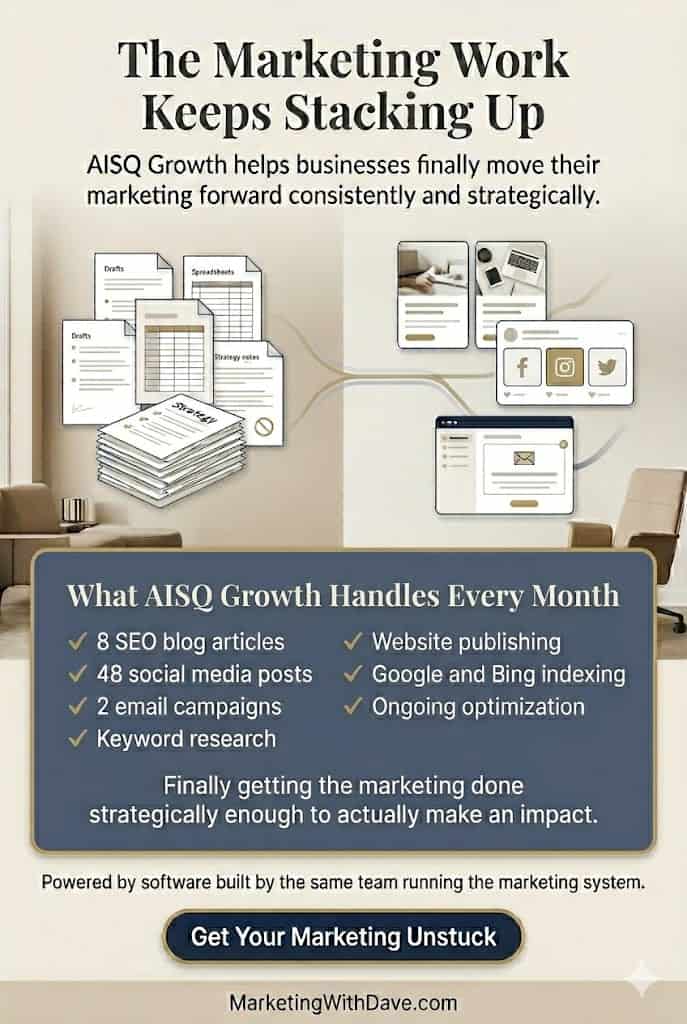
What AISQ Growth actually handles every month

This is a fully managed marketing service, not a software subscription. Before any content gets created, the AISQ team does the strategic groundwork: keyword and topic research to find what your audience is actually searching for, and how to build authority in those areas over time. From there, they handle the full execution stack every month:

  • 8 SEO-optimized blog articles, researched and written to a strategy
  • 48 social media posts, distributed across your channels
  • 2 email campaigns to your subscriber list
  • Same-day Google and Bing indexing when content goes live
  • AI search visibility activation for ChatGPT and Google AI Overviews
  • Website publishing and social distribution, handled entirely by their team
  • Ongoing optimization and system monitoring

That’s not a feature list to admire. That’s a full content and distribution engine running every month, built on a deliberate strategy, whether you have bandwidth for it or not.

For a small business that has been producing little or nothing consistently, that combination of strategic direction and sustained execution creates real momentum — more search entry points, more social touchpoints, more opportunities for AI search tools to understand and recommend your business. And because the work is grounded in research rather than guesswork, each month builds on the last.

See What Delegated Marketing Looks Like →

Why AISQ Growth is more credible than a generic agency promise

The team behind AISQ Growth also built Squirrly SEO, one of the more established SEO tools in the WordPress ecosystem, with over 25,000 paying business clients. That history matters here for a specific reason: they are not reselling another agency’s process or assembling a system from the same public tools you could access yourself.

They built the software. They built the workflows. And they operate the system for clients using both. The people running your marketing are the same people who architected it and who have been building and refining it since 2012.

That is a meaningfully different position than the typical “AI marketing agency” promise. It doesn’t guarantee results, but it does make the offer more credible than most of what’s in this space right now.

Who this makes sense for

AISQ Growth is a strong fit if you’re a small business owner, consultant, local service business, or founder who has accepted that marketing matters but doesn’t have the time, team, or inclination to manage it yourself. If that to-do list has been growing longer for months rather than shorter, this is a direct answer to that problem.

It’s also worth considering if you’ve tried DIY marketing tools before and found that the operational overhead, the learning curve, or the inconsistency made them more burden than benefit. AISQ Growth is a monthly managed service, not a software price point — it’s priced accordingly, and it’s designed for businesses that are ready to treat marketing as an ongoing system rather than an occasional project.

Worth being direct about the fit: this is not the right choice if you want full creative control over every piece of content, every headline, every campaign decision. AISQ Growth is a managed execution system. You hand off the execution. If you want the control, you take on the work that comes with it.

My take

I use AISQ’s software directly. It’s part of why I pay attention to what they’re building. The managed growth service is a different product, but it comes from the same team, and that matters.

What I find genuinely compelling here is the combination of strategy and execution under one roof. Most marketing services sell you one or the other: a strategist who hands you a plan you don’t have time to implement, or a content service that produces volume without a clear rationale for what it’s building toward. AISQ Growth does both — research-driven strategy that informs every piece of content, executed consistently every month.

As with any managed service, the setup conversation matters. No one knows your business like you do, and making sure you and their team are aligned on voice, topics, and goals before work begins is what sets the engagement up to deliver real results.

For a small business owner who has watched their marketing to-do list grow month after month while competitors keep showing up in search results and social feeds, that’s a different kind of offer. The win isn’t immediate magic. The win is that marketing stops being the thing you feel behind on and starts being the thing that’s quietly building momentum while you focus on the work only you can do.
See What Delegated Marketing Looks Like →

Running a Business Is a Full-Time Job. So Is Marketing. Let AISQ Growth Handle One of Them. Read More »

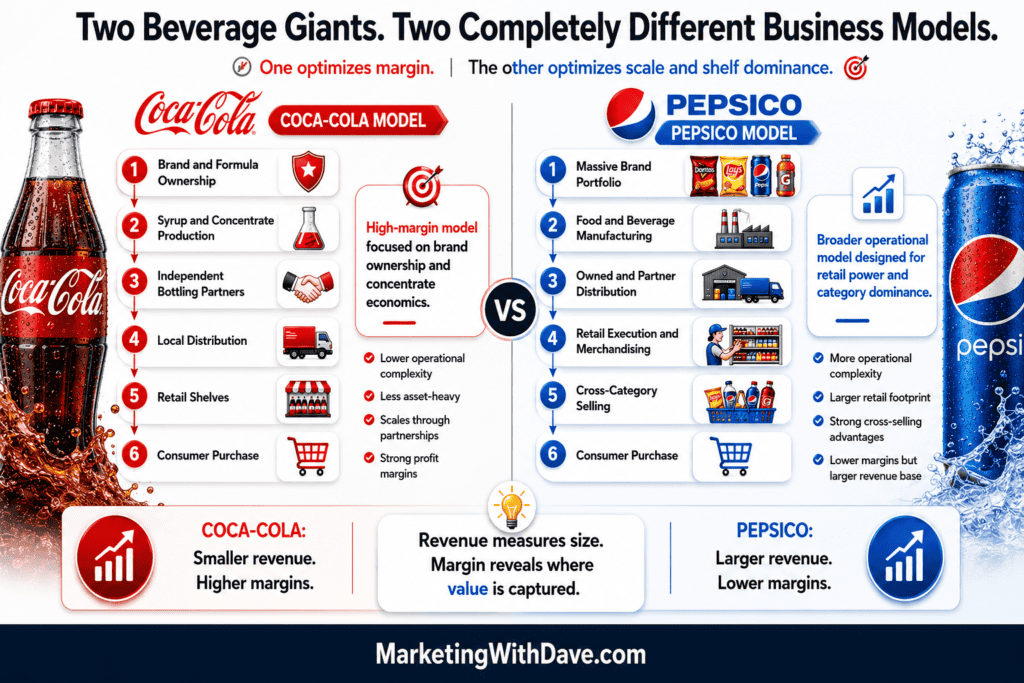
Coca-Cola and Pepsi business models comparison infographic highlighting brand ownership, distribution, revenue, margins, and operational differences for marketing insights.

Case Study: Coke vs Pepsi and the Strategy Behind Revenue, Margin and Market Control

Reading Time: 4 minutes

Brief Summary

Coca-Cola and PepsiCo are often compared as beverage rivals, but their business models are not the same. Coca-Cola has built a high-margin system around brand ownership, concentrate sales and bottling partnerships.

PepsiCo has built a broader food and beverage empire with more manufacturing, distribution and retail execution built into the business. For marketers, the lesson is not that one model is automatically better. The lesson is that strategy determines where profit is captured, where complexity lives and how growth scales.

Company Involved

This case study focuses on The Coca-Cola Company and PepsiCo.

Marketing Topic

  • Strategy
  • Brand positioning
  • Distribution

The Core Difference

Coca-Cola is primarily a brand and concentrate business. It creates the formula, owns the trademarks, manages the brand and sells concentrate or syrup to bottling partners. Those partners handle much of the physical work, including bottling, packaging, delivery and shelf execution.

PepsiCo operates differently. It owns a much broader portfolio that includes Pepsi, Mountain Dew, Gatorade, Lay’s, Doritos, Cheetos, Quaker and other food and beverage brands. That gives PepsiCo more revenue streams, more retail presence and more consumer occasions, but it also creates more operational complexity.

Simple Business Model Diagram

Coca-Cola and Pepsi business models comparison infographic highlighting brand ownership, distribution, revenue, margins, and operational differences for marketing insights.

Strengths of Coca-Cola

Coca-Cola’s biggest strength is focus. The company has built one of the most valuable beverage systems in the world by staying centered on brands, formulas, partnerships and global consistency.

That focus helps Coca-Cola protect margin. It does not need to own every truck, warehouse or shelf-level activity to benefit from global demand. Instead, it captures value through the part of the chain where its advantage is strongest: the brand, the formula and the system.

Weaknesses of Coca-Cola

The same focus that makes Coca-Cola powerful also creates concentration risk. It is still heavily tied to beverages, consumer taste shifts, sugar concerns, packaging regulation, water usage and bottling partner performance.

Coca-Cola also gives up some direct control by relying on partners. That can be a smart trade-off, but it means execution depends on whether the full system performs well locally.

Strengths of PepsiCo

PepsiCo’s biggest strength is portfolio breadth. It is not only competing for what people drink. It competes across snacks, meals, hydration, convenience, sports, breakfast and impulse purchases.

That gives PepsiCo more ways to win a shopping trip. A retailer may care about Pepsi, but they also care about Lay’s, Doritos, Gatorade and Quaker. That portfolio gives PepsiCo more shelf relevance and more leverage in retail relationships.

Weaknesses of PepsiCo

PepsiCo’s broader model is more expensive to operate. Manufacturing, distribution, logistics, merchandising and portfolio complexity all create costs. More revenue does not automatically mean a better business if more of that revenue is consumed by operating expenses.

The company also has to manage more categories, more brands, more supply chains and more consumer expectations. Breadth creates power, but it also creates drag.

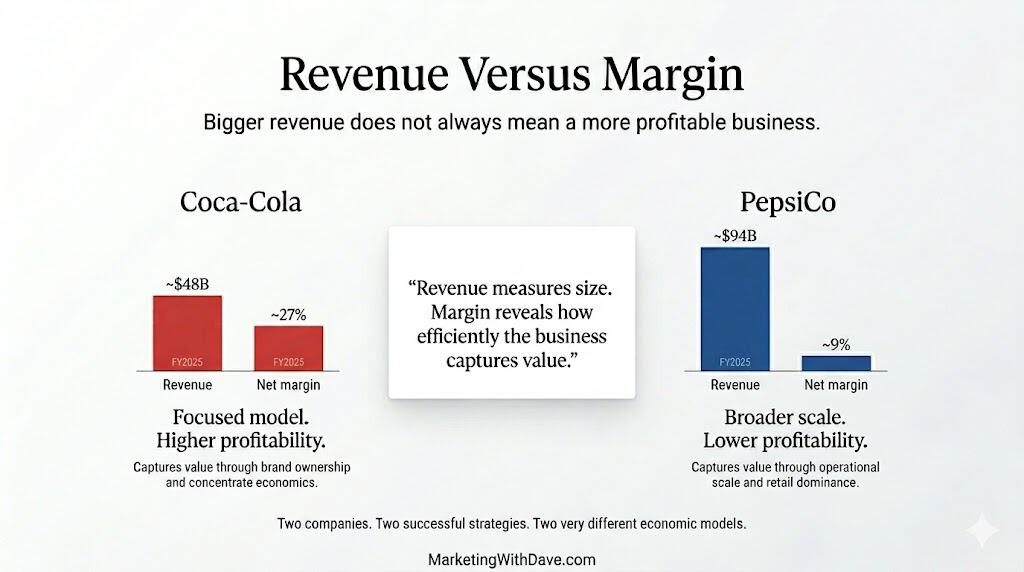
Revenue Versus Margin Diagram

Bigger revenue does not always mean a more profitable business, illustrated with Coca-Cola and PepsiCo revenue versus net margin comparison.

Why It Matters Today

This case matters because modern marketers often obsess over reach, traffic, impressions and revenue growth without asking where value is actually captured. Coke and Pepsi show that distribution strategy, product scope and operating model are not back-office decisions. They shape the entire marketing engine.

A brand that owns the right part of the value chain can grow with less operational weight. A brand that owns more of the physical experience may gain control, data and shelf power, but it has to earn that control through execution.

3 Takeaways

  1. Revenue and profit are not the same strategy. PepsiCo proves that scale can be enormous, but Coca-Cola proves that margin can be more powerful than size alone.
  2. Distribution is part of the brand. Coke uses partners to scale the system. PepsiCo uses more direct execution to win visibility and availability. Both are marketing decisions, not just operations decisions.
  3. Focus and breadth create different advantages. Coca-Cola wins through concentrated brand power. PepsiCo wins through portfolio reach. Marketers need to know which game they are playing.

Full Case Narrative

Coca-Cola and Pepsi are often treated as simple rivals in the same category, but that framing misses the deeper business lesson. The real contrast is not only Coke versus Pepsi. It is focus versus breadth, margin versus scale and brand ownership versus operational control.

Coca-Cola’s model is built around one of the most famous brand systems in the world. The company owns the trademarks, protects the formulas, manages the global brand and works through bottling partners to manufacture and distribute products in local markets. This allows Coca-Cola to benefit from global demand without carrying the same level of physical distribution burden across every market.

PepsiCo built a different kind of machine. Through food and beverage brands, it owns more consumer occasions. A shopper might buy Pepsi with lunch, Gatorade after a workout, Doritos for a party and Quaker for breakfast. That gives PepsiCo a powerful role with retailers because it is not dependent on one beverage brand or one drinking occasion.

But the trade-off is complexity. PepsiCo’s empire requires more operational coordination, more logistics, more manufacturing and more merchandising. It can dominate more of the shelf, but it also has to pay for the machinery that makes that dominance possible.

Coca-Cola’s advantage is that it can remain closer to the highest-margin parts of the value chain. PepsiCo’s advantage is that it can influence more of the store, more of the basket and more of the consumer’s day. Both strategies are strong. They simply optimize for different outcomes.

What Marketers Can Learn

Marketers should not copy Coca-Cola or PepsiCo blindly. The right lesson is to identify where your business creates the most value. If your advantage is brand, intellectual property, audience trust or product uniqueness, a partner-powered model may help you scale without unnecessary weight.

If your advantage is availability, speed, service, shelf control or customer experience, owning more of the execution may be worth the cost. But marketers need to be honest about the trade-off. Control is expensive. Scale is not always efficient. Revenue can hide weakness. Margin can reveal strength.

One Sentence Takeaway

Coca-Cola and PepsiCo prove that the best marketing strategy is not just about selling more, it is about knowing where your business captures value.

Sources and Citations

The Coca-Cola Company.

PepsiCo.

Coca-Cola SEC filings.

PepsiCo SEC filings.

Case Study: Coke vs Pepsi and the Strategy Behind Revenue, Margin and Market Control Read More »

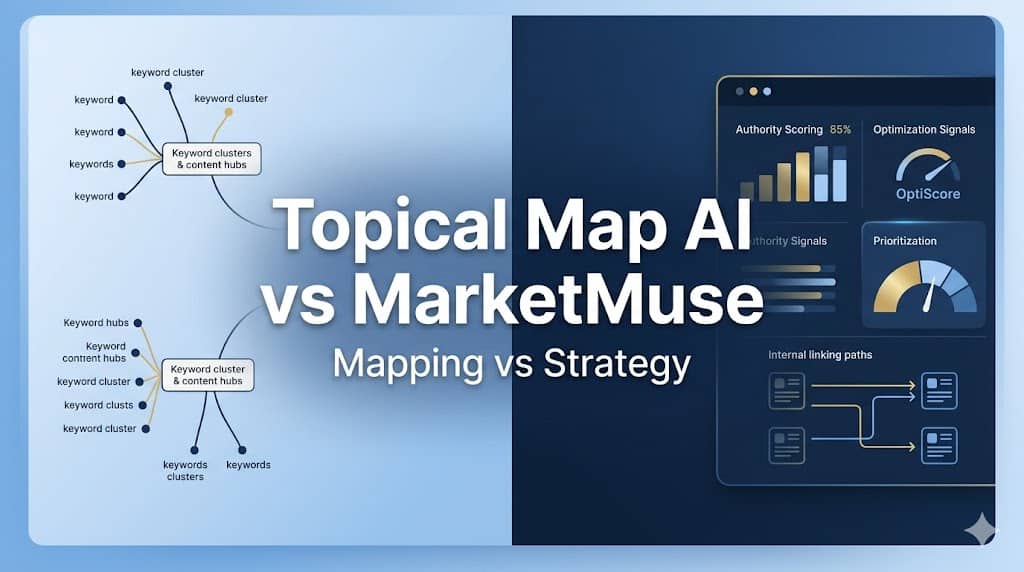
Optimize your SEO with this image showing a comparison between Topical Map AI and MarketMuse for content strategy and keyword clustering analysis.

Topical Map AI vs MarketMuse: Which Content Strategy Tool Fits Your Workflow?

Reading Time: 6 minutes

These two tools share a category label, topical authority and content planning, but they serve fundamentally different buyers. The real question: are you building a content map, or running a content intelligence operation?

What Each Tool Actually Does

Topical Map AI generates up to 1,200 clustered keywords organized into topic hierarchies with real search volume and difficulty scores. You enter a niche, optionally connect Google Search Console and provide your XML sitemap to shape the output around your existing website, and get a structured map with content briefs attached. The output is then something your writers can act on. The briefs are structured outlines, subtopics, word count, and content type, not finished drafts.

MarketMuse starts by crawling your existing website. It calculates your domain’s topic authority, identifies gaps relative to competitors, and generates cluster-level content plans based on your specific competitive position. It also includes an Optimize editor that scores drafts in real time against a topic model, an internal linking tool (Connect), and SERP X-Ray analysis. Like Topical Map AI, it produces briefs rather than finished content, but its Optimize editor stays with you through the writing phase, scoring your coverage against competing pages as you draft.

The clearest summary: Topical Map AI shows you what a topic space looks like. MarketMuse shows you what your specific site should do next, then helps you execute.

Feature Comparison

FeatureTopical Map AIMarketMuse
20+ languages / 25+ countriesYesNo (primarily English)
Automated content inventory of your websiteNoYes
Buyer keyword categorizationYes (in-tool view)No
BYOK (bring your own API key)YesNo
Content briefsYesYes (more comprehensive, SERP-grounded)
Content calendarYesNo
Content Optimize editor (real-time scoring while drafting)NoYes
Competitor gap analysisYes (in-tool + standalone tool)Yes
Competitor sitemap importYesNo
Export optionsCSV, PDF, Google Docs, Claude ProjectsGoogle Docs, Word, Excel
Free tier3 maps, no card required10 queries/month, no inventory
Google Search Console integrationYesYes (Connect feature)
Internal linking recommendationsNoYes (Connect tool)
Launch sequence / publishing order suggestionsYes (in-tool view)No
Live search volume & difficulty dataYesYes
Personalized difficulty (your website vs. generic)NoYes, unique to MarketMuse
PricingLifetime deal $69-$449 (AppSumo)$99-$499+/month
Quick Wins filteringYesNo
REST API accessTier 3+No
SERP X-Ray / competitor page analysisNoYes
Topic Authority scoring per page/topicNoYes
Topical/cluster map generationYes (up to 1,200 keywords)Yes (cluster-level content plans)
White-label PDF exportYesNo
XML sitemap importYesNo

See the current AppSumo deal for Topical Map AI

The Real Gap: What Happens After You Get the Data

Most reviews of Topical Map AI fail to discuss this important limitation.

Here is a real export from the tool, a “digital marketing” niche map covering 26 keyword targets across 4 parent clusters:

  • Digital Marketing Fundamentals (6 topics), definitional and overview content
  • Getting Started with Digital Marketing (6 topics), beginner how-to and roadmap content
  • Digital Marketing Strategies and Channels (7 topics), SEO, social, email, paid, video, influencer, content marketing
  • Digital Marketing Agencies (7 topics), agency selection, reviews, comparisons, pricing

Content types: 18 blog posts, 3 comparisons, 2 listicles, 2 tutorials, 1 guide. Word counts: 1,200 to 2,500. The cluster structure is logical and would take far longer to build manually.

But every single item in the CSV export is marked “Medium” priority, and that is where an important caveat applies.

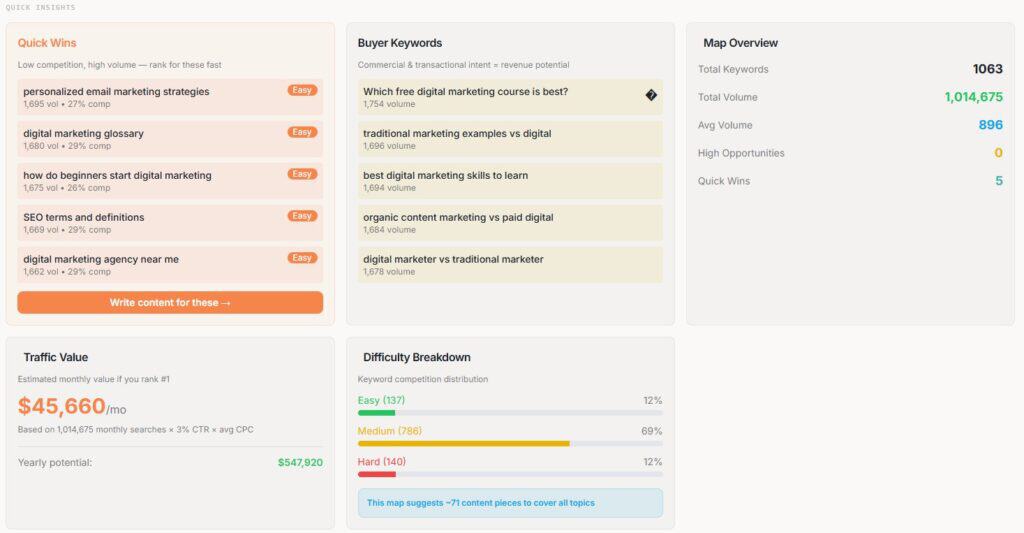
The CSV is a flattened snapshot. Inside the actual tool, the picture is more useful. The map view surfaces difficulty-based filtering including an “Easy” category and a “Quick Wins” designation for topics with high traffic potential and low competition, giving you a starting point for sequencing without leaving the platform. There is also a Buyer Keywords panel that separates commercial-intent topics from informational ones, and a Launch Sequence view that suggests a publishing order. A Competitor Gap Analysis runs inside the map and is also available as a standalone tool, identifying topics competitors cover that you do not.

None of this is visible in the CSV export. If your workflow takes the export straight into a spreadsheet, you lose those signals. The in-tool experience is more decision-ready than the export alone suggests.

A vibrant digital marketing dashboard displaying key metrics, buyer keywords, and traffic value analysis for "Marketing with Dave," emphasizing SEO, digital marketing strategies, and data-driven insig.
Quick Insights dashboard showing Quick Wins, Buyer Keywords, Difficulty Breakdown, and Traffic Value — none of which appears in the CSV export.

That said, there are still questions the tool cannot answer from its own data:

  • Which clusters do you already have partial authority in vs. starting from zero?
  • Where is your website’s current coverage strongest relative to competitors?
  • Which pages are losing ground and need refreshing before you add new content?

Those answers require either your own research or a tool that maintains an ongoing model of your specific domain, which is precisely what MarketMuse’s website inventory does. The gap between these tools is narrower than the raw CSV implies, but it is still real.

Where the Meaningful Differences Live

Personalized Difficulty. Topical Map AI shows generic keyword difficulty, the same score any keyword tool provides. MarketMuse shows how hard a topic is for your specific domain based on existing authority. A topic at generic difficulty 60 might be a 30 for your website if you already have adjacent coverage. That signal changes prioritization decisions significantly and is unique to MarketMuse.

Website Inventory. Topical Map AI uses your GSC data or sitemap to inform map generation, but it does not maintain an ongoing inventory of your website’s performance. MarketMuse crawls your entire content library continuously, surfaces pages losing ground, identifies clusters where you already have partial authority, and flags subject areas with no coverage. According to MarketMuse’s own documentation, there are no minimum site size requirements, though independent reviewers consistently note that the authority scoring becomes more actionable as your published content grows.

Optimize Editor. Once a map is generated in Topical Map AI, you leave to write elsewhere. MarketMuse’s Optimize editor scores content in real time as you draft, flags missing subtopics, and benchmarks your coverage against competing pages. Surfer SEO and Clearscope focus specifically on this phase, MarketMuse includes it alongside the planning layer.

Internal Linking (Connect). MarketMuse identifies orphaned pages and recommends specific anchor text and link targets between related content. Topical Map AI has no equivalent. For sites managing 100+ posts, internal linking is how topical authority actually flows, Connect addresses a real gap.

International SEO. Topical Map AI supports 25+ countries and 20+ languages. MarketMuse is primarily English-focused. For non-English or multi-market campaigns, Topical Map AI has a clear advantage.

Agency Deliverables. Topical Map AI includes white-label PDF export for client-facing work. MarketMuse is built for internal team use only.

See the current AppSumo deal for Topical Map AI

Pricing Reality

Topical Map AI is on AppSumo as a lifetime deal: $69 (15 maps/month) to $449 (150 maps/month, batch generation, REST API). BYOK lets you generate maps at token cost after the one-time purchase, which matters for high-volume users. The company was founded in February 2024 and has 1-10 employees, worth factoring in if long-term product support is a consideration for you.

MarketMuse starts at ~$99/month (5 briefs, 100 queries, 1 website inventory) and scales to $499+/month for the Strategy tier. It was acquired by Siteimprove in October 2024 and is moving toward broader enterprise platform integration. The free plan (10 queries/month, no inventory) is effectively a trial.

At $149-$499/month, MarketMuse needs to deliver measurable impact to justify the spend. At $69-$449 one-time, Topical Map AI is not in the same risk category.

Who Should Use Each Tool

Topical Map AI if you are a blogger, solo operator, or small agency; starting a new site or niche; building client deliverables that need white-label output; working in non-English markets; or prefer controlling ongoing costs with a one-time purchase. The GSC integration and sitemap import give it more website-awareness than a pure niche-input tool, but you will still need to bring your own prioritization logic to turn the map into an ordered execution plan.

MarketMuse if you have a substantial published content library and need to know where your authority sits and where the gaps are; your team writes and edits inside the platform using the Optimize editor; internal linking across a large library is a priority; and your budget supports $149-$499/month for the intelligence layer. It is a team tool, solo operators will pay for features they cannot fully use.

One More Option Worth Knowing

Floyi sits between these two tools in scope and price. It uses SERP-based clustering (not just semantic similarity, which reduces keyword cannibalization risk), includes four-level map building, content briefs, internal link recommendations, and real-time tracking, all in a single credit-based workflow. It addresses the “what do I do after the map” problem more directly than Topical Map AI without MarketMuse’s price or complexity. Worth evaluating if neither tool above is quite the right fit.

Above both tools, Conductor and BrightEdge cover real-time SERP tracking, content decay monitoring, and GEO signals at enterprise contract pricing ($1,000+/month). Relevant context, not a realistic option for most readers here.

Bottom Line

Topical Map AI does more than most reviews give it credit for. The in-tool experience, Quick Wins filtering, Buyer Keywords, Launch Sequence, Competitor Gap Analysis, provides more prioritization support than the CSV export reveals. The gap versus MarketMuse is real but narrower than it first appears: Topical Map AI still lacks an ongoing model of your specific site’s authority, which is where MarketMuse’s inventory and Personalized Difficulty earn their place. That deeper site intelligence requires the content library, team, and budget to justify it. Using MarketMuse as a solo operator at $149/month means paying for an enterprise planning layer when what you need is a faster research workflow.

Founder Response from Topical Map AI

After publishing this comparison, Megan from Topical Map AI responded directly:

“Topical Map AI is not trying to be MarketMuse, different price point, different scope, different buyer. It’s built for individual creators, agencies, and content teams who need structured topic discovery and clustering without enterprise-level investment.”

That is the clearest framing of who this tool is for, and it comes from the founder. If that description fits where you are, the lifetime deal is low-risk, especially with AppSumo’s 60-day test drive. Just go in knowing the map is the starting point, not the finish line.

See the current AppSumo deal for Topical Map AI

Disclosure: This post may contain affiliate links. If you purchase through these links, I may earn a small commission at no additional cost to you.

Topical Map AI vs MarketMuse: Which Content Strategy Tool Fits Your Workflow? Read More »

Boost your marketing strategy with expert tips, tools, and insights from Marketing with Dave to grow your business online effectively.

Sigma Media Manager Review: WordPress Media Cleanup and Organization Tool

Reading Time: 7 minutes

I bought Sigma Media Manager for two reasons.

First, I wanted to see if it could help solve one of the most annoying WordPress media workflow problems I keep running into: creating useful image metadata without turning every upload into manual cleanup work. After running into limitations with another tool, I was hoping Sigma Media Manager might handle missing alt text in a more useful way.

Second, I wanted to see if it could identify unused media files inside my WordPress library. I knew my website had old screenshots, replaced graphics, and unused visuals sitting around. I did not know how bad the problem was or how to fix it with minimal manual effort.

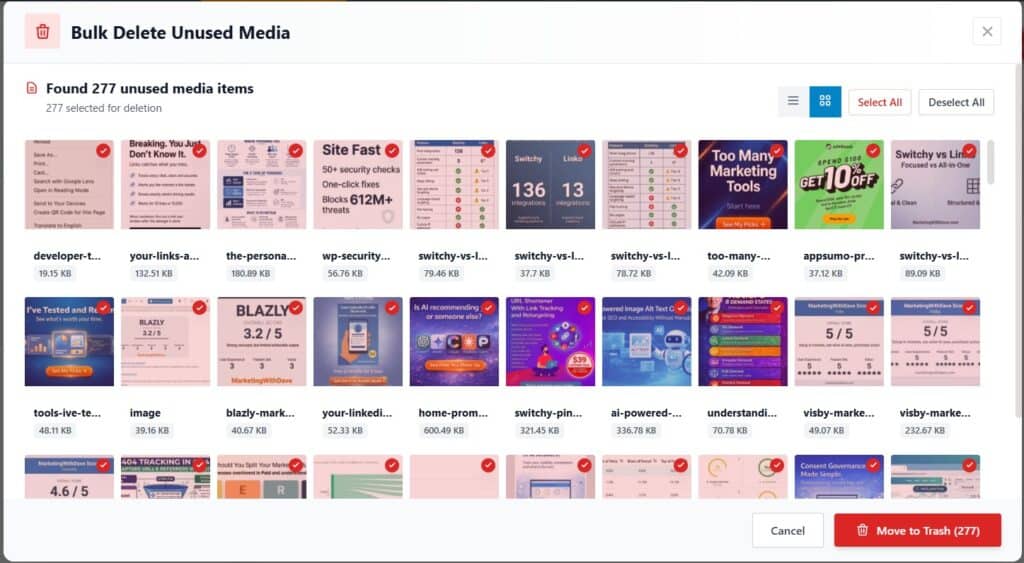
That is what made this review interesting. Sigma Media Manager immediately found 277 unused media items in my library, which was 38% of my total media library. That one feature delivered real value. But the AI metadata workflow, onboarding, and overall stability were much less convincing.

So this review is not simply about one cleanup feature. It is about whether Sigma Media Manager is ready to be a broader WordPress media management tool.

Boost your marketing strategy with expert tips, tools, and insights from Marketing with Dave to grow your business online effectively.
277 unused media files identified in one scan.

The rest of my experience was more complicated.

Sigma Media Manager has a strong concept, a broad feature set, and at least one feature that may justify the purchase by itself. But it was buggy, sluggish, and unfinished in several important areas. The result is a product I want to like more than I currently trust.

See the current AppSumo deal for Sigma Media Manager

Affiliate disclosure: If you purchase through my link, I may earn a small commission at no additional cost to you. I only share tools I have used myself.

The 30-Second Decision

Sigma Media Manager is a WordPress media library management plugin designed to help you organize, clean up, protect, optimize, and manage media files from one place.

The best parts of the product worked quickly and gave me immediate value. Bulk unused media detection and Smart Organize were genuinely useful. The broader feature set is also impressive, especially if you want one plugin that can potentially replace several smaller WordPress media tools.

The caution is execution. During testing, I ran into errors, slow loading, license issues, failed AI generation, and unclear workflow feedback. This is not a product I would blindly run across an entire media library without testing carefully first.

My current read: Sigma Media Manager has real potential, but the experience needs to become more stable before I would call it a polished WordPress media management solution.

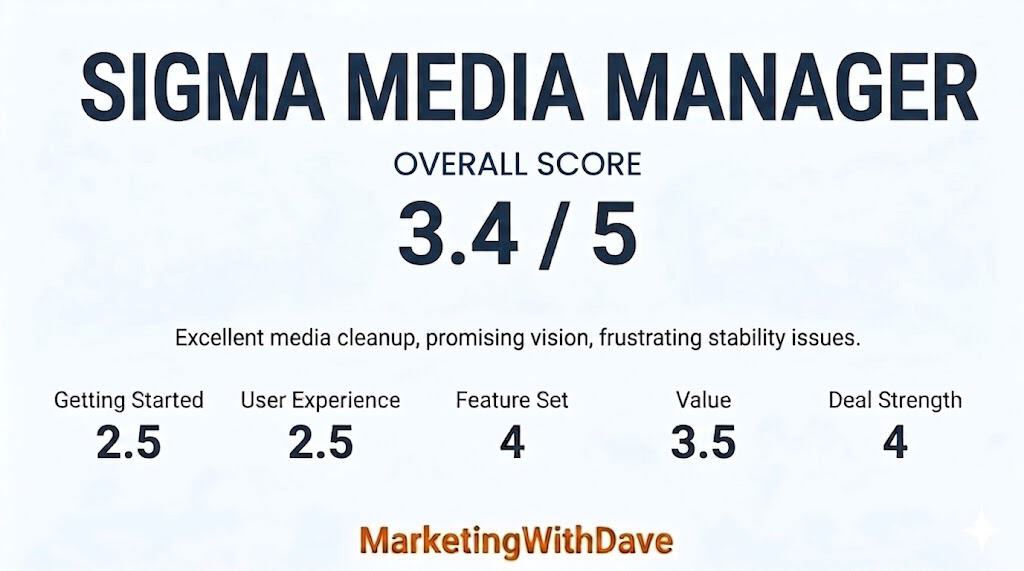
My Scorecard

Optimize your WordPress media library with Sigma Media Manager review, highlighting media cleanup, organization, and overall score for improved website performance.

See how I rate software tools

Is Sigma Media Manager Right for You?

Sigma Media Manager is most relevant if you have a WordPress website with a messy or aging media library. That includes bloggers, affiliate marketers, publishers, agencies, course creators, membership websites, and anyone regularly uploading screenshots, graphics, PDFs, videos, or downloadable assets.

It is probably less urgent if your website is new, your media library is small, or you already have a clean media workflow in place.

The product is trying to solve several WordPress media problems at once: organization, unused file cleanup, AI metadata, media protection, cloud storage, and file management. That ambition is part of what makes it interesting. It is also why reliability matters so much.

What Sigma Media Manager Actually Helps You Do

Sigma Media Manager is not just a folder plugin. It is positioned as a broader WordPress media management tool that can potentially replace several smaller plugins.

Based on the product page and feature comparison, Sigma Media Manager can help with:

  • Organizing WordPress media into folders.
  • Sorting media by file type.
  • Finding and deleting unused media files.
  • Generating AI-powered media titles, captions, and descriptions.
  • Managing access to protected media.
  • Supporting cloud storage workflows.
  • Reducing media library clutter.

The feature set is one of the stronger parts of the product. Their comparison page shows how ambitious the plugin is, especially compared with more narrowly focused media library tools.

View the Sigma Media Manager feature comparison chart

This is why I scored the feature set higher than the user experience. Sigma Media Manager has a lot of useful ideas. My concern is not the product vision. My concern is how consistently those features worked during testing.

The Features That Worked Best for Me

The strongest feature I tested was Bulk Delete Unused Media.

In seconds, Sigma Media Manager scanned my WordPress media library and identified 277 unused media items. Since my library had 723 total items, that meant 38% of my media library was not being used anywhere on the website.

This was the clearest win in my testing. I already knew my media library was bloated, but I did not have an easy way to measure the problem or clean it up confidently.

The other feature I liked was Smart Organize. With one click, Sigma Media Manager organized my media into basic folders by file type, including images, videos, and documents.

That may sound simple, but it was useful. It made the library easier to understand without requiring me to manually build a folder structure or move files one by one.

These two features gave me the best version of Sigma Media Manager: fast, practical, and immediately useful.

The Bigger Vision Behind the Product

The reason Sigma Media Manager is hard to dismiss is that the product vision is much bigger than the two features I liked most.

In a polished version of this product, Sigma Media Manager could become a central workflow for managing WordPress media. That matters because media libraries can become chaotic over time, especially on content-heavy websites.

Instead of using separate plugins for folders, unused media cleanup, media protection, AI metadata, and cloud storage, Sigma is trying to bring those workflows into one place.

When a plugin touches your media library, trust matters. When it offers bulk actions, trust matters even more. That is where my experience became more mixed.

Where the Experience Broke Down

After the initial cleanup and organization wins, I ran into enough issues that I became more cautious.

The plugin felt sluggish at times, especially when moving between the Media Manager area and the settings area. I also ran into errors while creating or loading folders, occasional license status issues, and server-related errors during normal use.

I do not need to list every technical error for the point to be clear. The product did not feel as stable as I would expect from a WordPress plugin that handles media organization, metadata, and bulk actions.

That matters because this is not a cosmetic plugin. If a tool is changing media records, organizing files, or deleting unused assets, the workflow needs to feel predictable and trustworthy.

AI Metadata Was Promising but Not Reliable

The AI metadata feature was one of the main reasons I bought Sigma Media Manager.

I was hoping it could help with the ongoing task of creating useful image titles, captions, descriptions, or alt text as new images are added to my website. That would be valuable because image metadata is easy to neglect, especially when publishing frequently.

In my test, I selected 30 images and used Sigma Media Manager’s free credits to generate titles. It successfully added titles to only 9 of the 30 images. The rest failed with API-related or JSON-related errors.

I also wanted more clarity after the AI process ran. Were the changes live immediately? Did I need to review or approve them? Where could I quickly confirm what changed? Could I skip files that already had existing metadata?

That last point is important. A media metadata tool should let users avoid overwriting existing metadata. Without that control, bulk AI generation becomes risky.

What I Skipped and Why

I did not test every Sigma Media Manager feature deeply.

Some features did not apply to my website, and some were not worth testing further after I ran into stability issues. That does not mean those features have no value. It means this review is based on my actual use case, not a complete lab test of every feature.

FeatureWhy I Skipped It
Advanced cloud storageThis could be valuable for larger or media-heavy websites, but I do not currently need to offload my media to third-party storage.
Password protectionThis may be useful for membership websites, private downloads, or client portals, but it does not apply to my public content workflow.
Image compressionI already have an image optimization workflow that supports modern formats like WebP and AVIF while preserving image quality. I was not convinced Sigma Media Manager improved enough on that process to justify replacing it.
Full AI metadata workflowI tested AI title generation, but the success rate was too inconsistent for me to trust it across a larger media set.

What I Wish Was Better

Sigma Media Manager would be much stronger with better onboarding, clearer workflow feedback, and more reliable performance.

The biggest improvements I would like to see are:

  • A clearer getting started guide.
  • More reliable navigation between plugin areas.
  • Better handling of folder creation and loading.
  • Clear confirmation after AI operations run.
  • An option to skip media items that already have metadata.
  • More stable free credits API performance.
  • Visible roadmap details.
  • Clearer explanations before and after bulk actions.

I also found the setup experience less smooth than expected. I eventually found the download and installed the plugin, but the path was not as obvious as it should have been. For an experienced WordPress user, that was annoying but manageable. For someone new to WordPress plugins, this could create unnecessary friction.

Can One Feature Be Enough?

This is the most interesting question with Sigma Media Manager.

Can one feature justify buying a product?

Sometimes, yes.

For me, finding 277 unused media files in seconds was real value. That was not a theoretical benefit or a marketing claim. It solved a real problem on my website and gave me visibility I did not have before.

But that does not erase the issues. The best version of Sigma Media Manager would make the rest of the product feel as clear and useful as that cleanup feature did.

Right now, I see a product with strong potential, a useful feature set, and at least one excellent workflow, but also meaningful reliability concerns.

Bottom Line

Sigma Media Manager is useful, ambitious, and frustrating.

The best parts of the product are genuinely helpful. Bulk unused media detection gave me immediate value, and Smart Organize made my media library easier to understand with almost no effort.

The broader product vision is also strong. If Sigma Media Manager becomes more stable, it could replace several separate WordPress media tools and become a central part of a cleaner media workflow.

But my current experience does not justify a stronger recommendation. The AI metadata feature was unreliable in my testing, the plugin felt sluggish at times, and I ran into enough errors to limit my confidence.

My current score is 3.4 out of 5. I hopeful improvements and a higher rating are in the near future.

That score reflects a product with meaningful upside, a strong feature set, and a useful AppSumo offer, but also enough execution issues that I would test carefully before relying on it heavily.

If your WordPress media library is bloated, Sigma Media Manager may be worth trying for the cleanup and organization features alone. Just use AppSumo’s 60 day refund window wisely, test with a small batch first, and do not assume every feature is ready for heavy production use yet.

See the current AppSumo deal for Sigma Media Manager

This content is for educational purposes and reflects my experience, review of the product, and current publicly available deal information. Always evaluate tools based on your specific business needs, goals, and workflows before making a decision.

Looking for more marketing software reviews? See my full list of marketing tools and software I recommend.

Sigma Media Manager Review: WordPress Media Cleanup and Organization Tool Read More »

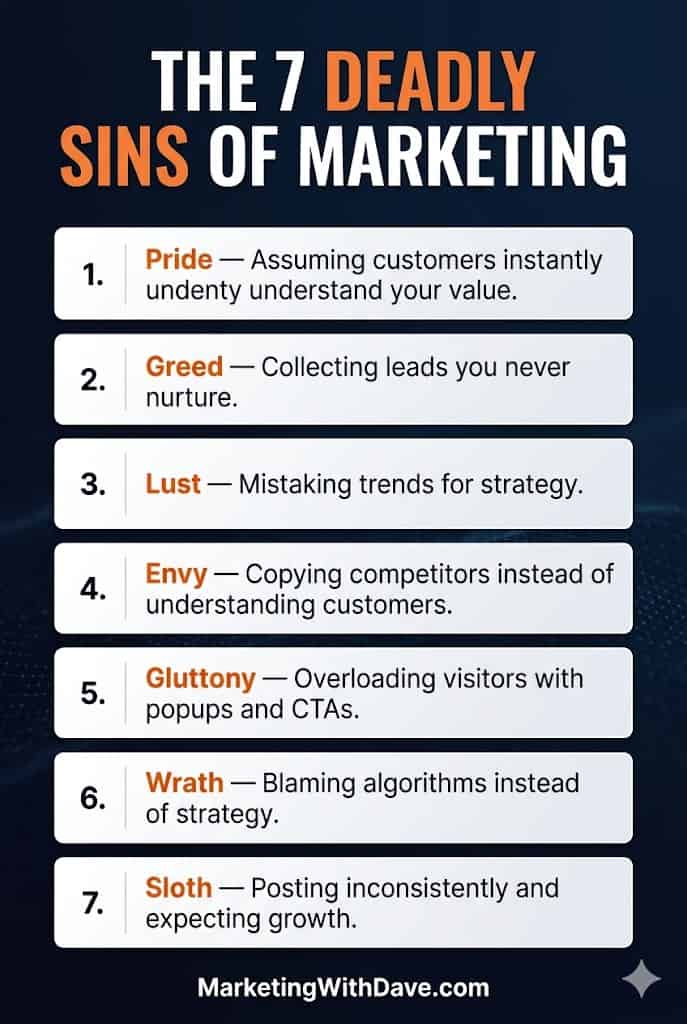
Avoid marketing mistakes with the 7 deadly sins: pride, greed, lust, envy, gluttony, wrath, and sloth, to improve your marketing strategy and customer engagement.

The 7 Deadly Sins of Marketing

Reading Time: 3 minutes

Most marketing failure looks like marketing success right up until it does not.

More impressions. More leads. More tools. More posts. More activity.

That is what makes it dangerous. The scoreboard can look busy while the fundamentals are quietly breaking underneath.

The 7 deadly sins of marketing are not moral failures. They are strategic traps.

The 7 deadly sins of marketing

Avoid marketing mistakes with the 7 deadly sins: pride, greed, lust, envy, gluttony, wrath, and sloth, to improve your marketing strategy and customer engagement.
The 7 Deadly Sins of Marketing infographic showing seven common marketing mistakes including pride, greed, lust, envy, gluttony, wrath, and sloth.

1. Pride

Pride: Assuming customers instantly understand your value.

Internal clarity can be dangerous. The more your team understands the product, the harder it becomes to see the customer’s confusion.

That is how brands end up with messaging that makes perfect sense in meetings and very little sense in the market.

2. Greed

Greed: Collecting leads you never nurture.

A lead without follow-up is just an unfinished conversation.

The deeper problem is that lead volume often gets treated like a proxy for pipeline health. It lets the team feel productive while momentum quietly stalls.

3. Lust

Lust: Mistaking trends for strategy.

A trend can create attention. Strategy creates direction.

This is the brand jumping into short-form video with no point of view, testing every new AI tool without a workflow, or copying a format because everyone else seems to be using it.

That is not innovation. It is motion without a compass.

4. Envy

Envy: Copying competitors instead of understanding customers.

Competitor imitation is tempting because it feels like research. It has social proof. It carries less risk of being visibly wrong.

But copying competitors often means inheriting their assumptions without knowing if those assumptions fit your audience.

Your competitors can show you the market. Your customers show you the truth.

5. Gluttony

Gluttony: Overloading visitors with popups and CTAs.

Every extra CTA (call to action) is a vote of no confidence in your primary offer.

If a web page needs five competing prompts, the problem may not be the visitor’s attention span. It may be that the web page never made the next step obvious enough.

6. Wrath

Wrath: Blaming algorithms instead of strategy.

Algorithms change. Reach fluctuates. Platforms shift incentives.

Those things matter, but they shoulder the blame more often than they should.

Sometimes the offer is unclear. Sometimes the content is forgettable. Sometimes the audience is wrong. Sometimes the measurement is weak.

Blaming the algorithm puts the solution out of reach.

7. Sloth

Sloth: Posting inconsistently and expecting growth.

Inconsistency is not always laziness. More often, it is a symptom of not having a clear enough point of view.

When you know what you stand for, showing up gets easier because you are not reinventing the brief every time you open a blank document.

Growth rewards sustained relevance, not random bursts of activity.

The vanity metrics problem

Vanity metrics make these sins harder to see.

Ten million impressions and three conversions may look impressive in a report, but attention that never turns into trust, action, or revenue is not telling the full story.

The better question is simple: did the marketing move the right people closer to the right action?

Fixing the fundamentals still wins

The point of naming these sins is to catch the patterns before they become expensive.

Marketing does not need more noise. It needs sharper thinking.

The 7 Deadly Sins of Marketing Read More »

A detailed analysis of the image content is not possible, but based on the context provided, here are SEO-optimized texts:.

10 Things Marketers Need to Know About Chrome DevTools

Reading Time: 7 minutes

Chrome DevTools can look like developer territory, but marketers do not need to be developers to use it. If you have ever wondered whether a pixel fired, why attribution dropped, or why a form behaves differently for different visitors, DevTools gives you browser-level evidence.

If you have worked in Google Tag Manager, Google Analytics 4, paid media platforms, or website analytics tools before, you already have enough context to use most of what is covered here.

That is the important shift. You are not guessing from a dashboard. You are looking at what the browser actually requested, received, stored, blocked, or warned about.

How to Open Chrome DevTools

The friendliest way to start is the one many marketers already use.

Option 1: Right-click and Inspect.

Right-click anywhere on the web page and choose Inspect. This opens DevTools directly inside Chrome.

Option 2: Use a keyboard shortcut

Windows: Ctrl + Shift + I or F12.

Mac: Cmd + Option + I.

The Simple Mental Model

Think of DevTools as four lenses. Each one answers a different marketing question.

Network

Did the tag, pixel, form, script, or redirect actually happen.

Console and Issues

Did Chrome detect an error, warning, blocked script, cookie issue, or mixed content problem.

Application

Were cookies, local storage, consent settings, or other browser storage values created correctly.

Performance

Is the web page slow, unstable, or overloaded by scripts that hurt the visitor experience.

Two Rules Before You Start

First, open DevTools before you reproduce the problem. If you open it after the form submit, checkout step, or redirect, the evidence may already be gone.

Second, turn on Preserve log in the Network panel. Many marketing flows move from one web page to another. Preserve log keeps the request history from disappearing during that navigation.

10 Practical DevTools Checks for Marketers

These are the DevTools checks I would prioritize first. You do not need to learn every panel. You need to know which panel answers which marketing question.

1. Verify that a pixel or event actually fired

Start in Network.

Dashboards can lag, sample, or hide details. The Network panel shows whether the browser sent the request at all.

  1. Open DevTools and choose the Network panel.
  2. Turn on Preserve log.
  3. Reload the web page or perform the action, such as a form submit or purchase.
  4. Filter by a vendor domain or keyword such as collect, gtm, pixel, or doubleclick.
  5. Click the matching row and confirm it fired at the right time.

You may find that the event never fired, fired too early, fired too late, or fired more than once.

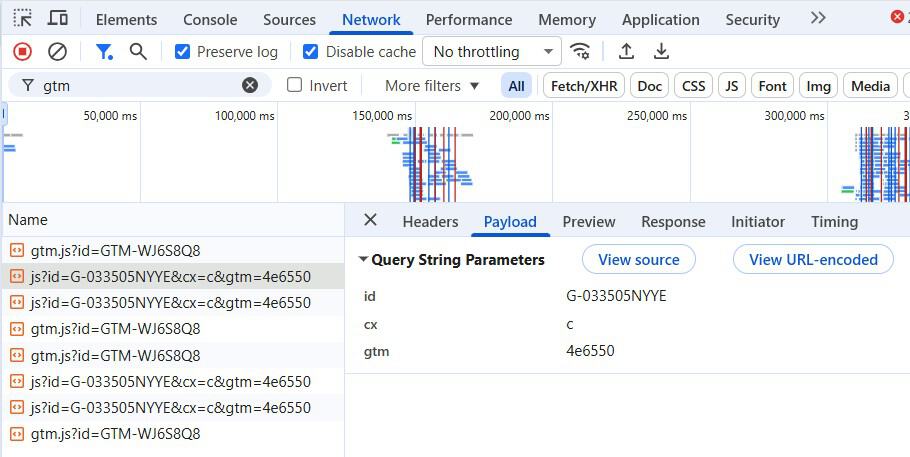
2. Confirm that the request payload has the right values

Start in Network, then check Headers and Payload.

Many tracking problems are not missing-hit problems. They are bad-data problems. The event may fire, but it may send the wrong value.

  1. Click the request that looks like your analytics or ad platform hit.
  2. Check the status code in Headers.
  3. Open Payload and review fields like event name, revenue, currency, product IDs, lead ID, or deduplication ID.
  4. Use the search box if you need to find one parameter quickly.

You may find that a purchase event fired, but revenue is missing or the wrong currency was sent.

A detailed analysis of the image content is not possible, but based on the context provided, here are SEO-optimized texts:.
Example of inspecting a request payload in Chrome DevTools. Many real analytics and conversion requests contain much richer data than this simple example, including event names, revenue values, IDs, and attribution parameters.

3. Identify what triggered a request

Start in the Network Initiator column.

This helps you route the issue. Is it a tag manager problem, a developer problem, a vendor script problem, or a consent problem.

  1. Find the request in Network.
  2. Look for the Initiator column.
  3. Open the request details if you need more context.
  4. Right-click the request and choose Copy as fetch or Copy as cURL if a developer asks for more detail.

You may discover that GTM loaded correctly, but a JavaScript error stopped the custom event from being pushed.

4. Debug redirects that strip UTMs or click IDs

Start in Network with Preserve log turned on.

Redirects can silently remove UTMs, gclid, msclkid, or referrer information. That can make attribution look broken even when the campaign was tagged correctly.

  1. Open Network and turn on Preserve log.
  2. Paste the full campaign URL into the address bar.
  3. Watch each redirect step in the request list.
  4. Confirm the final landing URL still includes the needed parameters.
  5. Repeat once with Disable cache checked.

You may find that the first redirect preserves UTMs, but a second redirect drops them.

5. Test like a first-time visitor

Start in Network and Application.

Your browser has history. It may have cached scripts, accepted cookies, or saved consent choices that a new visitor does not have.

  1. In Network, check Disable cache.
  2. Reload the web page while DevTools is open.
  3. For a cleaner test, go to Application and use Clear site data.
  4. Run the flow again and compare the result.

You may find that tracking works for returning visitors but fails before a new visitor accepts consent.

6. Find where a tag is installed or duplicated

Start in Search and Elements.

Tags may be injected by GTM, a consent platform, a plugin, a theme, or an old hardcoded snippet. Duplicate installs can inflate reporting.

  1. Use Global Search with Ctrl + Shift + F on Windows or Cmd + Option + F on Mac.
  2. Search for a container ID, pixel ID, vendor domain, or script name.
  3. Click a match to see where it appears.
  4. Use the Elements panel to see what is actually rendered in the browser.

You may find an old pixel snippet loading alongside the GTM-managed version.

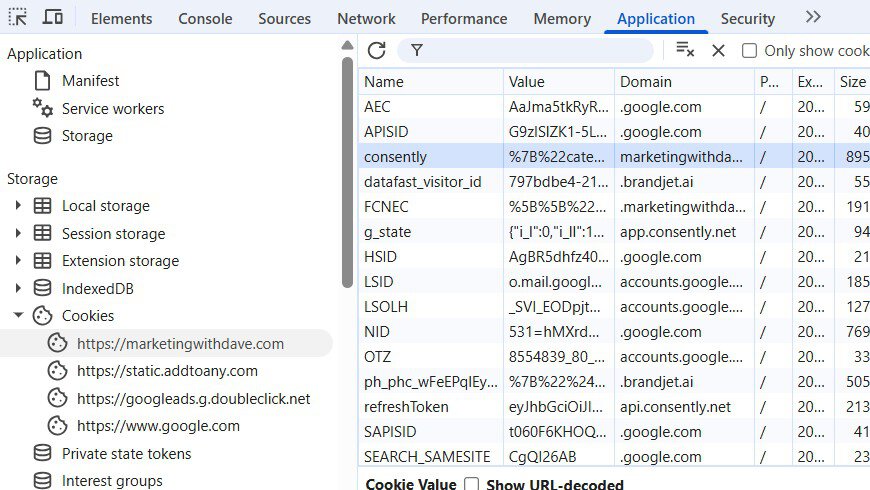
7. Audit cookies, storage, and consent state

Start in Application and Issues.

Measurement often depends on cookies, consent state, local storage, and browser rules. If storage is wrong, attribution can break even when the event fires.

  1. Open Application.
  2. Check Cookies for the domain you are testing.
  3. Check Local Storage for consent-related keys.
  4. Review the Issues panel for cookie warnings.

You may see that the conversion request fired, but the identifying cookie was missing or blocked.

Screenshot of Chrome DevTools interface showing network activity and performance metrics for "Marketing with Dave" website, related to marketing and SEO insights.
The Application panel helps marketers inspect cookies, browser storage, consent settings, and other tracking-related data stored in the browser.

8. Catch JavaScript errors and browser warnings

Start in Console, Issues, and Security.

A single JavaScript error can stop a form, block an event, or prevent a tag from firing.

  1. Open the Console panel.
  2. Reload the web page and watch for red errors.
  3. Use Preserve log in Console if the flow navigates to another web page.
  4. Check Issues and Security for cookie problems, mixed content, or blocked resources.

You may find that a form submit fails because an unrelated script error stops the event from completing.

9. Simulate mobile and slower real-world conditions

Start in Device Mode, Network throttling, and Performance.

Your desktop connection is not your customer’s phone. Slower conditions expose problems that clean office testing misses.

  1. Toggle Device Mode with Ctrl + Shift + M on Windows or Cmd + Shift + M on Mac.
  2. Choose a mobile viewport.
  3. Throttle the network from the Network panel.
  4. Test landing, scrolling, CTA clicks, form submits, and checkout steps.

You may find that a widget or third-party script makes the web page feel fine on desktop but painful on mobile.

10. Find what is slowing the web page down

Start in Performance, Coverage, and Lighthouse.

Slow landing web pages are often caused by heavy scripts, layout shifts, blocking resources, or unused code.

  1. Open the Performance panel.
  2. Record a trace around the part of the experience that feels slow.
  3. Use Coverage to spot unused JavaScript and CSS.
  4. Use Lighthouse if you need a score that is easier to share with stakeholders.

You may find a layout shift pushing the CTA down, or a marketing library shipping unused code to every visitor.

Cheat Sheet: Problem to Panel

Marketing problem. Start here. What to look for.
Pixel or event not firing. Network. Request exists, timing, status code, and payload.
Wrong parameters or missing revenue. Network. Payload fields, event name, revenue, IDs, and request details.
Attribution drop after consent or privacy changes. Application and Issues. Cookie presence, consent state, storage values, and cookie warnings.
UTMs or click IDs missing on the final landing URL. Network. Redirect chain with Preserve log enabled.
Tag blocked or script errors. Console, Issues, and Security. JavaScript errors, blocked resources, mixed content, and browser warnings.
Landing web page feels slow on mobile. Device Mode and Performance. Mobile layout, throttling, heavy scripts, unused code, and Core Web Vitals signals.

What Is a HAR File and Why Developers Ask for One

A HAR file is an export from the browser’s Network panel. HAR stands for HTTP Archive. In plain English, it is a record of the requests and responses that happened while you tested a web page.

A HAR file can show redirects, request timing, status codes, headers, and other details that help a developer understand what happened in the browser. That is why it can be useful when a pixel does not fire, a redirect strips UTMs, a form fails, or a request returns an error.

Important: HAR files can contain sensitive information, including cookies, tokens, account IDs, email addresses, private URLs, and other data. A sanitized HAR means you review the file and remove sensitive information before sharing it with anyone else.

What to Send a Developer

Developers usually want the same thing you want: a faster fix. DevTools helps you give them evidence instead of a vague “it is broken” report.

  • Exact URL and whether it is production, staging, or a test environment.
  • Short numbered steps to reproduce.
  • Expected behavior versus actual behavior.
  • Timestamp, time zone, and whether you tested in an incognito window.
  • Chrome version, operating system, login state, and consent choice.
  • Sanitized HAR file from the Network panel, when appropriate.
  • Specific request row details, status code, and Copy as fetch or Copy as cURL if requested.
  • Console or Issues screenshots with Preserve log enabled if navigation is involved.

Image Checklist for Your DevTools Screenshots

For the most useful Network screenshot, capture the screen after a real action such as a form submit or purchase. Try to show Preserve log, Disable cache if relevant, the filter term, one highlighted request row, status code, type, size, time, and the Headers or Payload tab.

Before publishing, blur or crop anything sensitive such as email addresses, cookies, tokens, order IDs, account IDs, or private URLs.

Where to Start

Do not try to learn every panel at once. Start with one critical flow and build confidence from there.

  1. Pick one flow, such as a lead form, checkout, newsletter signup, or ad landing web page.
  2. Open DevTools before the test and turn on Preserve log.
  3. Run the flow once and look for the key analytics or ad request in Network.
  4. Check the Payload to confirm the important values are present.
  5. Save a sanitized HAR or screenshot so you have baseline evidence for future troubleshooting.

10 Things Marketers Need to Know About Chrome DevTools Read More »