Optimize your digital visibility with search, AI answers, and AI tools for better marketing results.

What Actually Drives Digital Visibility in 2026

Reading Time: 8 minutes

SEO, GEO, AIO.

If you spend any time in marketing right now, it can feel like a new acronym shows up every week. Some of these ideas are useful. Some are just repackaged concepts. And some create more confusion than clarity.

The real issue is not the acronyms themselves. It is losing sight of what actually drives visibility. This post is not about adding another term to the mix. It is about simplifying what matters and giving you specific actions you can take today.

Because the goal has not changed. You still need to get found, get mentioned, and continuously improve how you execute. The difference is that those outcomes now happen across more than one system, and the mechanics of each system have shifted significantly since 2024.
The shift from SEO alone to broader digital visibility

For years, SEO was the strategy. If your content ranked, you won visibility. That model still matters, but it is no longer complete.

People still search, but they are increasingly asking AI tools direct questions as part of the same journey. This shift is no longer theoretical. AI-generated answers are showing up more often, especially for longer and more complex queries, and when they do, they can reduce how often users click through to traditional search results.

At the same time, the relationship between search rankings and AI citations is weakening. Ranking highly still helps, but it does not guarantee that your content will be included in an AI-generated answer. In practice, search visibility and AI visibility are becoming related but distinct outcomes that require slightly different approaches.

At the same time, marketers are using AI internally to move faster and make better decisions.

Visibility is no longer tied to a single channel. It exists across search engines, AI-generated answers, and the systems you use to execute your work.

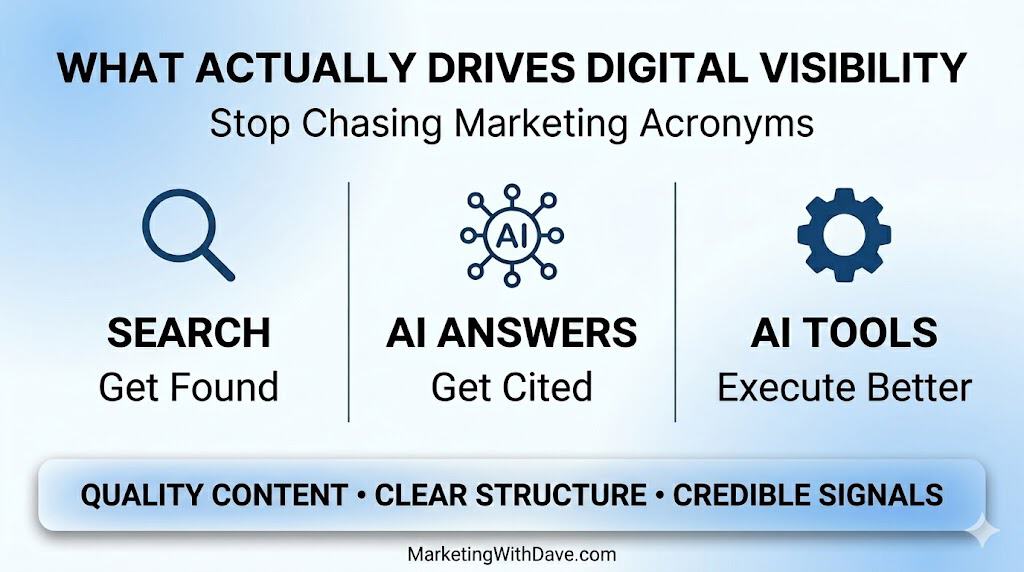
This is why it is more helpful to think in terms of three connected areas: SEO drives discovery, AI visibility influences whether your brand shows up in answers, and AI tools improve how you execute your marketing.

What the “SEO alphabet soup” gets wrong

Terms like GEO (Generative Engine Optimization) and AIO (AI Optimization) are starting to show up more often — along with AEO, LLMO, GSO, and half a dozen others. The challenge is that most marketers do not actually think in acronyms. They think in outcomes.

When you translate these terms into what they represent, things become much clearer. SEO is about being found in search engines. GEO is about being included in AI-generated answers. AIO is about using AI to improve execution.

The ideas themselves are not new. What is new is the environment they operate in. The risk is that the terminology can make simple concepts feel more complex than they need to be. Clarity is more valuable than clever naming.

SEO still drives discovery

SEO remains the foundation of digital visibility. It is still how people find your website when they are actively looking for answers — and Google still accounts for roughly 80% of global search query volume.

That foundation is built on things that are not new, but are still often overlooked:

  • Your website needs to be technically sound, easy to crawl, and easy to navigate.
  • Your internal linking should support discovery and context.
  • Your content should match search intent, not just target keywords.
  • Your authority should be reinforced through credible backlinks.

This is what drives qualified traffic. If this layer is weak, everything else becomes harder.

One nuance worth noting: the relationship between Google rankings and AI citations is decoupling. Ranking highly in traditional search still improves your chances of being cited — pages at position 1 have roughly a 58% chance of being cited by ChatGPT, dropping to 14% by position 10. A meaningful portion of frequently cited pages in AI answers have little or no traditional search visibility.

AI visibility shapes how your brand is mentioned

AI visibility is different from SEO, even though they are closely related. In search, you are competing for rankings. In AI systems, you are influencing whether your content is included in an answer.

When someone asks a question in an AI tool, they may never see a list of results. Instead, they see a summary, a recommendation, or a synthesized response. Your content can still play a role in that answer, but the mechanism is different — and several specific factors influence whether you get included.

Make sure AI crawlers can actually access your site

This sounds obvious, but it is the most commonly overlooked step. Check your robots.txt file for blocks on GPTBot, PerplexityBot, ClaudeBot, or Google-Extended. If you use Cloudflare, check its bot management settings — Cloudflare changed its defaults and may be blocking AI crawlers without you knowing. Also check that important content is server-side rendered and not hidden behind JavaScript or login walls.

Structure your content for extraction, not just browsing

AI systems pull short passages from pages and synthesize them. Content that presents clear ideas, well-organized sections, and credible information is easier to interpret and more likely to be referenced. Practically, this means:

  • Lead each section with a direct answer before providing context
  • Use clear heading hierarchies (H2, H3) with one topic per section
  • Include a well-structured FAQ section that mirrors how people actually ask questions
  • Add an explicit definitional sentence near the top of each page (AI systems weight the first 150–200 words heavily)

Add citations and data — they increase your chances of being cited

Princeton’s GEO research (published at KDD 2024) found that adding citations and statistics to content can boost AI visibility by up to 40%. This is among the highest-impact tactics identified. Link to authoritative external sources at the claim location, not just in a references section. Include specific data points where you have them.

Build external mentions and presence beyond your website

AI systems pull heavily from Reddit, LinkedIn, and YouTube — not just your own domain. Platforms like Reddit and YouTube are disproportionately represented in AI citations compared to most brand-owned websites. Brand mentions, thought leadership posts, and community participation on these platforms contribute to how AI systems perceive your authority. Unlinked brand mentions also appear to carry meaningful weight.

Consider an llms.txt file

Some sites are now adding an llms.txt file (similar in concept to robots.txt) to help AI systems understand their site structure and which pages are most authoritative. It is an emerging convention, not a universal standard yet, but worth considering for sites with a large content archive.

Keep content fresh

Freshness matters more for AI visibility than it did for traditional SEO, particularly on Perplexity and Google AI Mode. Content that has not been updated loses citation priority faster. A simple version note (“Last updated May 2026”) and periodic substantive updates to key pages can help maintain your visibility in AI answers.

What is important to understand about all of this is that it is influence, not control. You are not optimizing a ranking position in the same way. You are increasing the likelihood that your content is trusted and included.

AI tools improve execution

The third piece of this framework is internal. AI tools are changing how marketing work gets done.

They can support content workflows, speed up production, automate repetitive tasks, and help surface insights more quickly. Used well, they can make teams more efficient and more effective.

But AI tools are not a visibility channel by themselves. Using AI does not automatically lead to more traffic or more mentions. It simply improves how you execute.

That distinction matters, because it is easy to overestimate the impact of tools while under-investing in strategy.

The alignment core: what works across everything

At the center of all of this are three consistent factors: quality content, clear structure, and credible signals.

AI systems are not just evaluating pages. They are evaluating entities.
Consistent brand mentions, author identity, and presence across multiple platforms help reinforce credibility beyond a single web page.

These are the elements that support SEO performance. They are also the elements that increase the likelihood of being cited or summarized by AI systems. And they are what make AI tools more effective when you use them.

No matter how the landscape evolves, these fundamentals continue to show up. If your content is shallow, unclear, or difficult to interpret, it will struggle in every environment.

Before you jump to GEO, get the fundamentals right

One of the biggest risks right now is jumping straight into AI visibility tactics without a strong foundation.

If your content is not clear, not structured well, and not providing real value, focusing on GEO will not fix that. AI visibility builds on what is already there. It does not replace it.

Before you prioritize AI visibility, make sure:

  • Your content is clear and understandable to a reader who has no context
  • Your pages are well organized with logical heading structures
  • Your internal linking supports discovery across related topics
  • Your content includes real insight, original perspective, or first-hand data — not surface-level summaries
  • AI crawlers are not accidentally blocked on your site

Those are the things that carry across both search and AI systems.

Why you should be careful with industry data

You may have seen recent charts showing how small AI-driven traffic is compared to Google organic. Across most industries, AI referral traffic sits around 1% of total website traffic versus organic search’s roughly 48% share.

But “industry average” does not equal “your reality.”

Your website is not the average. Your audience is not the average. Your content strategy is not the average.

That matters because I see more traffic from AI-driven sources than from Google on my own website. That does not invalidate industry data. It highlights its limitations.

There is also a measurement problem. An estimated 70% of AI-sourced traffic arrives without referrer headers, making it invisible in standard analytics dashboards. If you are only reading your GA4 referral report, you are very likely undercounting how much AI is influencing your visitors. A good way to check: look at direct traffic trends alongside any AI visibility changes, and consider adding “How did you hear about us?” options that include AI tools to your contact or inquiry forms.

The better approach is to use industry data as context, while letting your own analytics guide your decisions.

How to measure AI visibility

Traditional SEO metrics — rankings, organic sessions, click-through rates — do not capture AI visibility. If you want to know whether your content is being cited, you need to track it separately.

Practical starting points:

  • Manual testing: Define 10–20 queries that are central to your content and test them regularly in ChatGPT, Perplexity, Google AI Mode, and Gemini. Note whether your brand is mentioned and where it appears in the answer.
  • Brand search trends: Monitor branded search volume in Google Search Console. Increases following AI mentions suggest influence even without direct referral clicks.
  • Direct traffic analysis: Users who encounter your brand in an AI answer often type it directly rather than clicking a link. Watch for unexplained direct traffic increases alongside any improvements in AI presence.
  • Dedicated tools: Platforms like BrandMentions, Semrush’s AI visibility features, and purpose-built tools like LLMrefs track citation rates across AI engines if you want more systematic monitoring.

A simple way to evaluate your content

Instead of focusing on acronyms, focus on outcomes. When you look at a piece of content, ask three questions:

  1. Can it be found? Is it technically accessible, well-structured, and targeting the right intent?
  2. Can it be understood and cited? Is it clear, well-organized, factually grounded, and does it include original insight or data?
  3. Can it be created and improved efficiently? Are you using your tools and workflows well enough to keep this content current?

If any of those answers are no, there is an opportunity to improve.

Final takeaway

You do not need to chase every new acronym that appears.

You need to understand what actually drives visibility.

SEO drives discovery. AI visibility shapes how your brand is included in answers. AI tools improve execution.

The advantage comes from aligning all three — and making sure the basics are solid before you layer on AI-specific tactics.

And before you follow any industry trend, make sure you understand what is actually happening on your own website.

What Actually Drives Digital Visibility in 2026 Read More »

AI-powered digital marketing roundup for April 2026, highlighting key trends, changes, and insights in online marketing strategies and technology advancements.

April 2026 Digital Marketing Roundup: What Changed and Why It Matters

Reading Time: 4 minutes

What changed across platforms, AI, ads, measurement, and regulation and why it matters.

1. Google March core update impact extended into April

What happened: Google’s March 2026 core update completed April 8, but additional volatility appeared again in late April, suggesting continued recalibration beyond the named rollout.

Why it matters: SEO is no longer operating in clean update cycles. Recovery windows are shrinking, and performance is being repriced continuously rather than episodically.

Second order effects: Sites hit by multiple updates face compounding impact, not isolated drops. Low-differentiation content continues to lose ground while depth and original insight gain share.

What to do next: Compare pre-March 27 to post-April 8 performance. Focus on pages that lost visibility and strengthen depth, internal linking, and intent alignment immediately.

Source: Search Engine Journal • April 8, 2026

2. Google AI Mode moved into default search surfaces

What happened: Google expanded AI Mode across Chrome, Windows, and Android, embedding it directly into the primary search entry point.

Why it matters: This shifts search from query to synthesis. One user intent now generates multiple parallel queries, changing how content is surfaced and credited.

Second order effects: Impression to click ratios compress further. Brand queries and comparisons are increasingly resolved without a visit to your web page.

What to do next: Track impression versus click gaps weekly. Structure content for extraction with clear answers and sections. Ensure paid search coverage for branded queries.

Source: TechCrunch • April 16, 2026

3. Meta Andromeda changed ad delivery and attribution

What happened: Meta completed global rollout of Andromeda, shifting ad retrieval logic, while redefining click-through attribution to count only link clicks.

Why it matters: Creative now determines whether an ad is considered at all. At the same time, reported conversions drop due to attribution changes, not necessarily performance.

Second order effects: Targeting inputs carry less control. Creative diversity becomes a structural requirement. Reporting confusion increases across teams.

What to do next: Build campaigns around distinct creative concepts. Rebaseline performance metrics using both click-through and engage-through views before making changes.

Source: Marketing Brew • April 7, 2026

4. Agentic programmatic buying moved into live campaigns

What happened: The Trade Desk and PubMatic advanced agent-based buying, while the Ad Context Protocol launched to standardize AI agent communication across platforms.

Why it matters: Programmatic is shifting from manual optimization to autonomous execution. The infrastructure for AI-to-AI media buying is forming now.

Second order effects: Media buying roles shift toward oversight and guardrails. Supply paths compress as agents optimize directly across inventory.

What to do next: Pilot one agent-driven workflow. Define performance thresholds and override rules before allowing autonomous budget decisions.

Source: Marketing Dive • April 8, 2026

5. EU escalated enforcement across DMA and DSA

What happened: The EU published its first DMA review and issued DSA findings targeting Meta’s handling of minors, while advancing compliance action against Google.

Why it matters: Regulation is no longer background pressure. It is actively shaping targeting, measurement, and platform behavior.

Second order effects: Advertisers face overlapping compliance frameworks across consent, data use, and audience eligibility. Regional strategy becomes more complex.

What to do next: Audit EU campaign setup for consent and age controls. Align marketing and legal teams ahead of expected enforcement changes in Q3.

Source: European Parliament • April 28, 2026

6. Google antitrust remedies moved closer to default disruption

What happened: Google’s search antitrust case advanced toward implementation of a ban on exclusive default agreements starting June 2026.

Why it matters: Default placement has been Google’s distribution advantage. Removing it introduces real competition for search entry points.

Second order effects: Even small shifts in search share create meaningful new inventory across alternative engines and AI platforms.

What to do next: Establish campaigns on Bing and at least one AI-native search platform now. Build baseline performance data before disruption occurs.

Source: Search Engine Land • April 2026

7. Social advertising surpassed search in total revenue

What happened: IAB reported 2025 digital ad revenue reached $294.6 billion, with social media overtaking search in total dollars for the first time.

Why it matters: Budget allocation is already shifting toward platforms that combine targeting, creative automation, and measurable outcomes.

Second order effects: Search remains critical but is no longer the default growth channel. Creator and commerce media continue to scale faster.

What to do next: Benchmark your channel mix against growth rates. Reevaluate allocation to social video, creators, and commerce media.

Source: IAB • April 16, 2026

8. Meta removed barriers to Conversions API adoption

What happened: Meta launched one-click Conversions API setup and an AI-enhanced pixel to improve first-party signal quality.

Why it matters: Signal quality is now the core driver of performance. Easier CAPI adoption raises the baseline across advertisers.

Second order effects: Data advantages compress as more advertisers access high-quality signals. Auction efficiency increases, potentially affecting CPMs.

What to do next: Implement one-click CAPI if not already active. Check event match quality before and after. Audit tracking completeness.

Source: Swipe Insight • April 2026

9. LinkedIn engagement data contradicted video push

What happened: Benchmark data showed document posts outperforming video on LinkedIn, with higher engagement despite platform investment in video.

Why it matters: Platform priorities and actual performance are diverging. Content strategy decisions based on platform messaging may misallocate effort.

Second order effects: Formats that encourage depth and slower consumption may outperform short-form video in B2B contexts.

What to do next: Audit performance by format. Increase investment in document-style content if engagement data supports it.

Source: More In Media • April 2, 2026

10. Structural shift: decision layers replacing discovery

What happened: Across search, social, and commerce platforms, discovery is increasingly happening inside AI systems and platform-controlled environments.

Why it matters: Traffic acquisition is no longer the primary gate. Inclusion in decision systems determines visibility earlier in the journey.

Second order effects: Platforms gain more control over distribution and monetization. Independent web pages lose direct influence over discovery.

What to do next: Optimize content for inclusion in AI summaries, comparisons, and recommendation systems. Track visibility beyond traditional rankings.

Source: TechCrunch • April 2026

April 2026 Digital Marketing Roundup: What Changed and Why It Matters Read More »

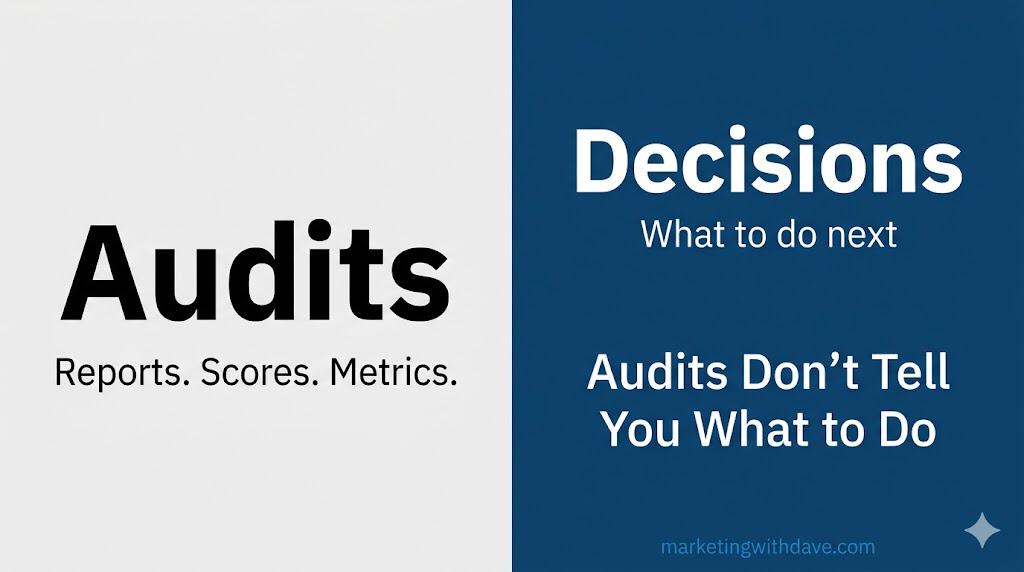
Graphic for 'Audits' with the subtitle 'Reports, Scores, Metrics' and a blue section titled 'Decisions: What to do next' emphasizing that audits don't tell you what to do.

Internal Linking Tools Audit Your Website. They Don’t Tell You What to Do.

Reading Time: 5 minutes

Internal linking is one of those search engine optimization (SEO) topics that sounds simple until you actually try to improve it.

I have over 200 blog posts on this website. I know internal linking matters. And I still cannot find a tool that tells me what I actually need to know: which specific web page should link to which other web page, where the link belongs, and why it makes sense.

So I tried to build one myself.

That experience made the gap in existing tools much clearer.

What most internal linking tools do well

Many tools are good at the auditing side of internal linking.

They can usually tell you things like:

  1. How many internal links exist on a web page or across a website.
  2. Whether a web page appears to be orphaned.
  3. Whether anchor text is repetitive, vague, or overly generic.
  4. Whether navigation and contextual linking appear healthy at a high level.
  5. Whether there are broad internal linking patterns worth reviewing.

That kind of reporting has value. It gives a quick snapshot, helps identify obvious problems, and creates a starting point for discussion.

But that is also where many tools stop.

Where many internal linking tools fall short

Most website owners do not need another dashboard telling them they have a score of 82 out of 100 or that they should improve their navigation structure. They need help making decisions.

That means answering questions such as:

  1. Which specific web page should link to which other web page?
  2. Why is that link relevant?
  3. Where on the web page should the link be placed?
  4. What anchor text would make sense in context?
  5. Which suggested links matter most if time is limited?

This is where many tools start to break down. They are good at summarizing the condition of a website. They are much weaker at bridging the gap between diagnosis and action.

Why I tried to build this myself

After running into the same wall with existing tools, I started exploring whether I could build a solution using AI-assisted development. The idea was straightforward: take my blog post data, generate embeddings to represent topical relationships between posts, and surface specific web page-to-web page linking recommendations based on semantic similarity.

In practice, it turned out to be significantly harder than it sounds. Getting the data organized was one challenge. Building the logic to translate similarity scores into actionable recommendations, with context about where on the web page a link belongs and what anchor text would fit, was another level entirely.

The technical pieces exist. Connecting them into something genuinely useful for a working website owner is where things break down fast.

That experience gave me a clearer picture of why existing tools stop where they do. The auditing side is relatively tractable. The decision-support side requires understanding content at a level that is much harder to automate well.

The problem with surface-level internal linking metrics

Some internal linking metrics are directionally useful. They can point to potential issues. But many become less helpful when they are presented as definitive measures of quality.

Take link counts, for example. A high number of internal links on a web page does not automatically mean the web page is well linked. Those links might be mostly navigation, footer, archive, or template links. They may not help a user discover the next best piece of content or help search engines understand topical relationships in any meaningful way.

Orphan web page detection can be genuinely useful. But even here, the insight is limited unless the tool helps answer the next question: which existing web page should link to that orphaned web page, and why?

Anchor text scoring has similar limitations. It is easy to say anchor text should be descriptive. That is true. But a real tool should go further and help identify what descriptive anchor text makes sense inside the actual sentence and context of the referring web page.

Even navigation-related recommendations can drift into generic advice. Suggestions like “improve website structure,” “add breadcrumbs,” or “add a search bar” may sound strategic, but they often do little to solve the specific editorial linking decisions that content-heavy websites struggle with most.

Why website owners need more than an audit

A website owner usually is not asking, “How many internal links do I have?”

The real questions are closer to these:

  1. Which web pages on my website are under-supported?
  2. Which existing web pages are the best candidates to support them?
  3. How do I add links in a way that feels natural and helpful?
  4. Which opportunities are worth acting on first?

That is a different problem than auditing. It is a recommendation problem. It is a prioritization problem. It is also a context problem.

Without context, internal linking advice stays abstract. With context, it becomes usable.

What a truly helpful internal linking system should do

If internal linking tools are going to become genuinely useful for website owners, they need to move beyond scoring and into decision support.

A more helpful internal linking system would do at least five things well.

  1. Identify the right source and destination web pages. It should not just say a web page needs more links. It should show which existing web pages are the strongest candidates to link to it.
  2. Explain why the recommendation exists. There should be a clear rationale, such as shared topic coverage, overlapping keyword intent, supporting subtopic relationships, or complementary user journeys.
  3. Suggest where the link belongs. A recommendation is far more useful when it points to a specific paragraph, heading, or section where the link would fit naturally.
  4. Offer anchor text guidance grounded in the web page content. Not generic anchor text rules. Actual suggestions that fit the language already on the web page.
  5. Prioritize recommendations based on likely impact. Not every link opportunity matters equally. A good system should help website owners understand which fixes are high value, which are nice to have, and which can wait.

The difference between auditing and decision-making

This is the core distinction that many tools miss.

Auditing tells you what exists. Decision-making tells you what to do next.

Auditing can tell you that a website has strong internal link density, no orphaned web pages, and descriptive anchor text across most web pages.

Decision-making tells you that a post about misleading data visualizations should probably link to a related post about poor chart design, and that the best placement is in the paragraph that introduces the risks of decontextualized reporting.

One is a score. The other is useful.

This is not just an SEO problem

Internal linking is not only about search performance.

Good internal linking improves website usability, increases content discovery, supports stronger journeys across a website, and helps people move from awareness to trust to action. It can keep visitors engaged longer, connect isolated insights, and surface relevant resources they would not otherwise find.

That is why surface-level scoring is not enough. Internal linking is part SEO, part information architecture, and part editorial judgment. Any tool that ignores those realities will only solve part of the problem.

What to look for in an internal linking tool

If you are evaluating internal linking tools, it helps to ask better questions than whether the dashboard looks polished or the score seems high.

Questions worth asking include:

  1. Does this tool help me make web page-to-web page linking decisions?
  2. Does it explain why a recommendation makes sense?
  3. Does it help me place the link in context?
  4. Does it distinguish between template links and meaningful contextual links?
  5. Does it save me real time, or just give me another report to interpret?

A tool that cannot answer those questions well may still be useful for orientation, but it is probably not solving the real internal linking problem.

The bigger opportunity

The future of internal linking tools should not be more colorful scorecards or more generic advice. It should be better judgment support.

I have not found a tool that does this well yet. I am still looking, and still experimenting with building something myself, though that has proven harder than expected. What I do know is that the gap is real and the need is not complicated to describe: website owners need help moving from “I know I should improve internal linking” to “here is exactly what to change and why.”

Until more tools bridge that gap, internal linking will remain one of those areas where the theory is easy, the dashboards look impressive, and the real work still falls back on the website owner.

I am still waiting for the tool that changes that. If you have found one, I would genuinely like to know.

Internal Linking Tools Audit Your Website. They Don’t Tell You What to Do. Read More »

WordPress Security Checklist image showing a shield icon and text about fixing security issues based on a website scan.

WordPress Security Checklist: What to Fix and What to Skip

Reading Time: 5 minutes

This WordPress security checklist is based on a real scan of my own website using WP Security Ninja. I reviewed each item, fixed the issues that made sense, skipped the ones with low practical value or higher break risk, and noted where more caution was needed.

If you are using WP Security Ninja or a similar tool, this will help you quickly decide what is worth fixing and what is not.

Want to see the tool I used for this scan? Read my full WP Security Ninja review.

Security CheckWhat It Is and Why It MattersAction I Took
WordPress core versionChecks whether WordPress is up to date. Running an outdated version can leave known vulnerabilities exposed.Passed. No action needed.
Automatic WordPress core updatesChecks whether automatic core updates are enabled. This helps important security updates apply faster.Passed. No action needed.
Plugin updatesChecks whether plugins are out of date. Outdated plugins are one of the most common WordPress risk areas.Review and update carefully. This was worth addressing, but updates should be checked for compatibility first.
Deactivated pluginsChecks whether inactive plugins are still installed. Inactive plugins can still create risk if vulnerable.Passed. No deactivated plugins were installed.
Old plugin updatesChecks whether active plugins have not been updated recently. This can indicate abandoned or poorly maintained plugins.Review manually. Not an automatic fix, but worth checking plugin quality and alternatives.
Plugin compatibility with WordPress versionChecks whether plugins are compatible with the current WordPress version. Compatibility issues can create stability or security problems.Review manually. Useful warning, but not something to fix blindly.
Theme updatesChecks whether installed themes are up to date. Outdated themes can expose vulnerabilities.Passed. No action needed.
Unnecessary themesChecks whether unused themes are installed. Unused themes can still carry risk if outdated or vulnerable.Fixed manually. I deleted the unused Builder Theme and kept Astra active.
WordPress version in meta dataChecks whether the WordPress version is shown in page meta data. This can reveal version information to scanners.Passed. No action needed.
Windows Live Writer linkChecks whether the Windows Live Writer link is present in header data. This is usually unnecessary for modern websites.Passed. No action needed.
PHP versionChecks whether the website is using a current PHP version. Older PHP versions can create performance and security risks.Passed. No action needed.
MySQL versionChecks whether the MySQL or MariaDB version is current enough for stable performance and security.Passed. No action needed.
Database table prefixChecks whether the database uses the default wp_ prefix. Changing it can reduce predictability, but the practical security benefit is usually small on an existing website.Skipped. Low practical benefit and higher break risk on a live website.
Server PHP version exposedChecks whether server response headers reveal the PHP version. Revealing version details can give attackers extra information.Left for later. Worth fixing eventually, but not urgent compared with higher-impact items.
Expose PHP directiveChecks whether expose_php is enabled. This can reveal PHP information in server headers.Left for later. Useful cleanup, but not a top priority.
Admin usernameChecks whether a user with the username admin exists. This can make brute force attempts easier.Passed. No admin username was found.
Anyone can registerChecks whether open registration is enabled. Open registration can create spam or account abuse risk if not needed.Passed. Registration is not open.
User ID 1Checks whether a user with ID 1 exists. This is a minor predictability signal, not usually a major standalone risk.Passed. No issue found.
Failed login informationChecks whether failed login attempts reveal unnecessary information. Specific login errors can help attackers validate usernames.Passed. No detailed failed login information was shown.
wp-config.php permissionsChecks whether wp-config.php has strict file permissions. This file contains sensitive configuration details.Fixed. Changed permissions from 644 to 440.
wp-config.php default locationChecks whether wp-config.php is in the default location. Moving it can add obscurity, but can also break things if done incorrectly.Skipped. Not worth the risk for this website.
Database password strengthChecks whether the WordPress database password is strong. Weak database credentials increase risk if another layer is compromised.Passed. No action needed.
Security keys and saltsChecks whether WordPress security keys and salts are set correctly. These help secure cookies and authentication.Passed. No action needed.
Age of security keys and saltsChecks whether security keys and salts are reasonably current. Rotating them can invalidate sessions if needed.Passed. No action needed.
WP_DEBUG enabledChecks whether WordPress debug mode is enabled. Debug mode can expose sensitive information if active on a live website.Skipped for now or review manually. This should normally be disabled on a live website.
Debug log fileChecks whether the WordPress debug log exists. A public or exposed debug log can leak sensitive information.Passed. No unexpected debug log file was found.
Database debug modeChecks whether database debugging is enabled. This can expose database information and create risk.Skipped for now or review manually. This should normally be disabled on a live website.
JavaScript debug modeChecks whether script debug mode is enabled. This is not recommended for production websites.Passed. No action needed.
PHP display errorsChecks whether PHP errors are displayed publicly. Public errors can reveal file paths and configuration details.Passed. No action needed.
WordPress installation addressChecks whether the WordPress address and website address match. Mismatch issues can cause configuration or redirect problems.Passed. No action needed.
register_globals PHP directiveChecks whether register_globals is disabled. This is an old PHP security setting that should not be enabled.Passed. No action needed.
PHP safe modeChecks whether PHP safe mode is disabled. Safe mode is obsolete and not part of modern recommended PHP setup.Passed. No action needed.
allow_url_includeChecks whether remote file includes are allowed. Enabling this can create serious security risk.Passed. No action needed.
Plugin and theme file editorChecks whether the WordPress plugin and theme file editor is enabled. If an attacker gets admin access, the editor can make damage easier.Fixed. Disabled the file editor.
Uploads folder browsingChecks whether the uploads folder can be browsed directly. Directory browsing can expose file structure.Passed. No action needed.
Application passwordsChecks whether application passwords are enabled. Application passwords can be useful, but should be managed carefully.Passed. No action needed.
MySQL server external accessChecks whether the MySQL user can connect from outside the server. Broad external database access can increase risk.Review with host. This is usually a hosting-level setting, not something I would change casually in WordPress.
EditURI XML-RPC linkChecks whether the EditURI XML-RPC link is exposed in header data. This advertises an endpoint most websites do not need.Fixed. Removed or reduced exposure using the built-in fix.
TimThumb scriptChecks whether TimThumb exists in the active theme. Older TimThumb scripts have a history of security issues.Passed. No TimThumb script was found.
Shellshock 6271Checks whether the server appears vulnerable to a known Shellshock test. Shellshock is a serious server-level vulnerability.Passed. No vulnerability detected.
Shellshock 7169Checks another Shellshock vulnerability pattern. This is a server-level security check.Passed. No vulnerability detected.
Admin interface SSLChecks whether the admin area is delivered over SSL. Admin login and dashboard traffic should be encrypted.Passed. Admin pages are secured by SSL.
Database account permissionsChecks whether the MySQL account used by WordPress has excessive permissions. Overly broad database permissions can increase damage if compromised.Passed. No action needed.
User ID enumerationChecks whether usernames can be fetched by looping through user IDs. User enumeration can help attackers identify login targets.Passed. Usernames were not exposed through this method.
REST API links in codeChecks whether REST API links are visible in source code. This can expose API endpoints, but REST API use is normal for WordPress.Skipped. Normal WordPress behavior and not automatically a problem.
X-Content-Type-Options headerChecks whether the X-Content-Type-Options header is set. This helps prevent MIME-type sniffing.Passed. Header was present.
X-Frame-Options headerChecks whether X-Frame-Options is set. This helps reduce clickjacking risk.Passed. Header was present.
Strict-Transport-Security headerChecks whether HSTS is set. This helps browsers enforce HTTPS connections.Passed. Header was present.
Referrer-Policy headerChecks whether a Referrer-Policy header is set. This controls how much referrer information is shared.Passed. Header was present.
Permissions-Policy headerChecks whether Permissions-Policy is set. This can limit access to browser features like camera, microphone, and geolocation.Passed. Header was present.
Content Security Policy headerChecks whether a CSP header is set. CSP can reduce cross-site scripting risk, but poor configuration can break scripts, analytics, ads, or embeds.Left for later. Valuable, but not something I would rush without testing.
REST API enabledChecks whether the REST API is enabled. The REST API is normal WordPress functionality and is not automatically a security issue.Skipped. Not treated as urgent.
Unwanted files in root folderChecks whether unnecessary files are present in the root folder. Unneeded files can expose information or create clutter.Passed. No unwanted files were found.

This is not a universal security prescription. It is a practical decision log from one WordPress website. Use it as a starting point and validate changes against your own setup.

WordPress Security Checklist: What to Fix and What to Skip Read More »

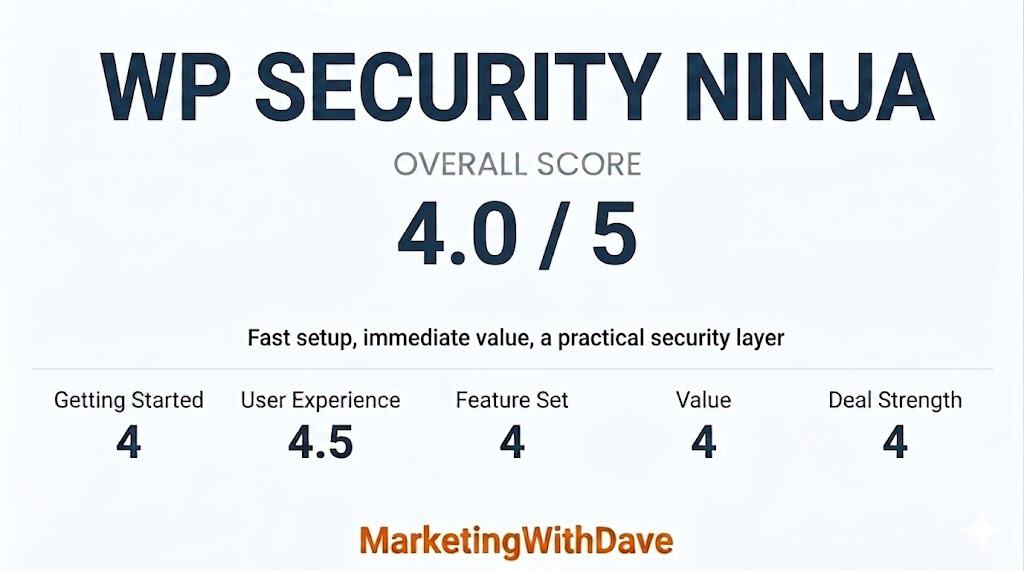
WP Security Ninja review scorecard showing overall score of 4.0 out of 5 with categories like Getting Started, User Experience, Feature Set, Value, and Deal Strength, related to WordPress security.

WP Security Ninja Review: WordPress Security Scanner With One-Click Fixes

Reading Time: 5 minutes

I installed WP Security Ninja, ran a scan on my own WordPress website, and fixed several real issues in under an hour. No developer needed.

That is the pitch. Here is the honest version.

WP Security Ninja is a fast WordPress security scanner that helps identify issues and apply practical fixes with firewall protection, malware scanning, login protection, event logging, and guided fixes. It is not a complete security solution, and no single piece of software should be treated that way. But it helped me find issues worth fixing, apply several of them in one click, and think more clearly about what I was actually leaving exposed.

The bigger lesson from using it: not every failed check deserves the same response. The tool gives you visibility. Your job is to use judgment.

See the current AppSumo deal for WP Security Ninja

Affiliate disclosure: If you purchase through my link, I may earn a small commission at no additional cost to you. I only share tools I have used myself.

Is WP Security Ninja Right for You?

Good fit: WordPress website owners who want to scan their website, find common security gaps, and apply safe fixes without hiring a developer. Especially useful for bloggers, website owners, consultants, and solo operators managing their own WordPress setup.

Not the right fit: anyone expecting one plugin to handle their entire security posture. It also may feel basic for advanced users who already manage server rules, security headers, firewall configuration, login protection, malware scanning, backups, and hardening manually.

Pricing: WP Security Ninja was available on AppSumo with lifetime access at the time of this review. Check the current deal page for tiers and availability, as AppSumo pricing can change.

My Scorecard

WP Security Ninja review scorecard showing overall score of 4.0 out of 5 with categories like Getting Started, User Experience, Feature Set, Value, and Deal Strength, related to WordPress security.

See how this score is calculated

Here’s how to interpret this score:

The overall score reflects both product quality and how compelling the current deal is.

The 4.1 reflects strong immediate value as a WordPress security audit tool with helpful explanations and practical one-click fixes, balanced by the need for judgment when applying recommendations and a feature set that works best as part of a broader security setup.

My Actual Scan Results

These results are from my own WordPress website.

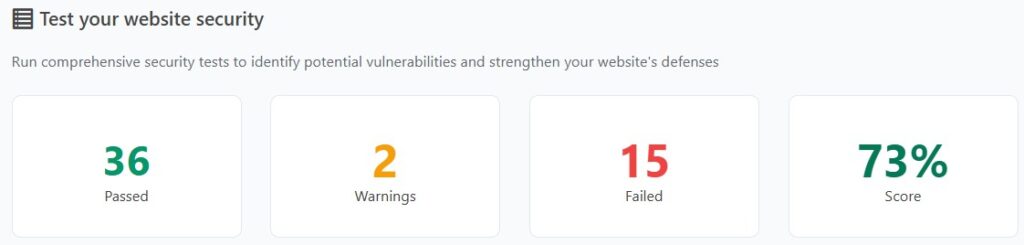
Test your website security with WP Security Ninja to identify vulnerabilities, fix issues, and improve your WordPress site's protection and performance.
Results from initial scan

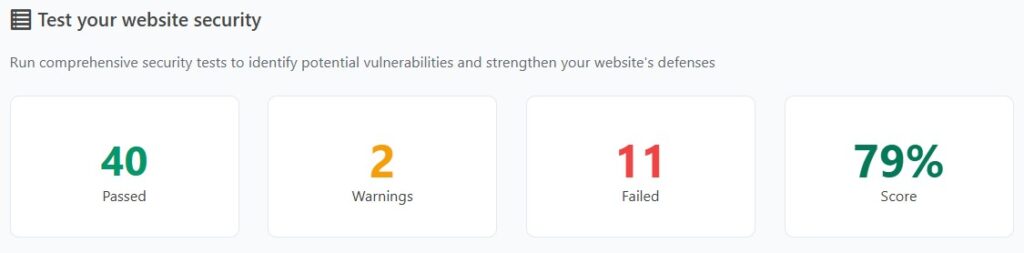
After running the initial scan, WP Security Ninja returned a mix of passed checks, warnings, and failures. Some were obvious fixes. Some required judgment. A few were the kind of recommendations I would not apply without thinking carefully first.

Website security test results showing 40 passed, 2 warnings, 11 failed, and a 79% security score for WP Security Ninja review.
My WP Security Ninja scan results after applying the fixes that made sense for my setup.

What I Fixed and Why

IssueWhy It MattersWhat I Did
XML-RPC exposedCan be abused by bots and brute force attempts if you do not need it.Used the built-in fix to reduce exposure.
Plugin and theme file editor enabledIf an attacker gets admin access, the file editor makes damage easier.Disabled it in one click.
wp-config.php permissions too openThis file contains database credentials and other sensitive configuration details.Changed permissions from 644 to 440.
Unused theme installedInactive themes can still carry security risk if outdated.Deleted it manually.
Weekly backups onlyA weekly backup can leave too much recovery gap if something breaks midweek.Switched to daily backups using my existing backup plugin.

What I Skipped and Why

This is where the tool requires judgment, not blind trust.

IssueWhy I Did Not Rush to Fix ItMy Call
Moving wp-config.phpRestructuring folder paths on a live website can break things you did not expect.Skipped it.
Changing the database table prefixLow practical security benefit. Higher risk of breaking something on an existing website.Skipped it.
Content Security Policy headerValuable when configured correctly, but easy to break analytics, embeds, ads, or scripts if handled poorly.Left it for later.
REST API enabledNormal WordPress behavior. Not an automatic problem.Not treated as urgent.
WordPress version visibleBots targeting WordPress already assume it is WordPress. This is low priority.Did not chase it.

Want the full breakdown?
See my complete WordPress security checklist with every item I reviewed and what I chose to fix or skip.

The Strongest Part: Useful One-Click Fixes

I know enough about WordPress security to know it matters. I also know I am not a developer and if it wasn’t for vibe coding, I still wouldn’t be coding. That gap is exactly where WP Security Ninja is useful.

Disabling the file editor, tightening wp-config.php permissions, and reducing XML-RPC exposure were clear wins. They were fast, explained well enough to understand the risk, and did not require manually editing configuration files.

This is where the product delivers on the AppSumo positioning. You install the plugin, run the wizard, scan your website, review the failed checks, and apply some fixes directly from the dashboard.

One feature to note: the Security Advisor AI requires WordPress version 7 that is not currently available. I focused this review on what the product delivers today.

Check current WP Security Ninja pricing on AppSumo

Beyond the Scan: Firewall, Malware, Login Protection, and Logs

The security test is only one part of the product. WP Security Ninja also includes firewall protection, malware scanning, login form protection, event logging, and blocking features for suspicious activity.

The login protection is especially relevant because brute force attempts are one of the most common issues WordPress website owners have to think about. Features like failed-login blocking, login error hiding, and login URL changes are practical additions if you are trying to reduce obvious attack paths.

While the scan helps identify issues, these features are what continue working in the background. The firewall and login protection are designed to reduce common attack attempts, even if you do not actively monitor them day to day.

The Part That Requires Caution

The tool presents failed checks in a way that can make every item feel equally urgent. They are not.

Changing a database prefix on a live website is a good example. It sounds like a meaningful security improvement. In practice, the benefit is minimal and the risk of breaking something is real. A failed check on that item does not mean you should rush to fix it.

The scanner is useful. The score is a helpful starting point. But you still need to think about which fixes make sense for your specific setup before applying them.

What WP Security Ninja Does Not Replace

WP Security Ninja does not replace strong passwords, regular plugin updates, off-website backups, quality hosting with server-level protection, or a broader security layer like Cloudflare.

It works best as a fast audit and hardening tool alongside those basics, not instead of them.

Bottom Line

WP Security Ninja helped me find real issues on my own WordPress website and fix several of them in under an hour. The one-click fixes for file editor access, wp-config.php permissions, and XML-RPC exposure alone made it worth the install.

The score is not the goal. The goal is understanding which issues on your specific website are worth fixing, which ones are safe to apply quickly, and which ones look scarier than they are.

If you own a WordPress website and want a practical way to audit and harden your setup without it becoming a development project, WP Security Ninja is worth a look.

Just do not confuse a cleaner scan with complete security.

See the WP Security Ninja AppSumo deal

This content is for educational purposes and reflects my experience, review of the product, and current publicly available deal information. Always evaluate tools based on your specific business needs, goals, and workflows before making a decision.

Looking for more marketing software reviews? See my full list of marketing tools and software I recommend.

WP Security Ninja Review: WordPress Security Scanner With One-Click Fixes Read More »

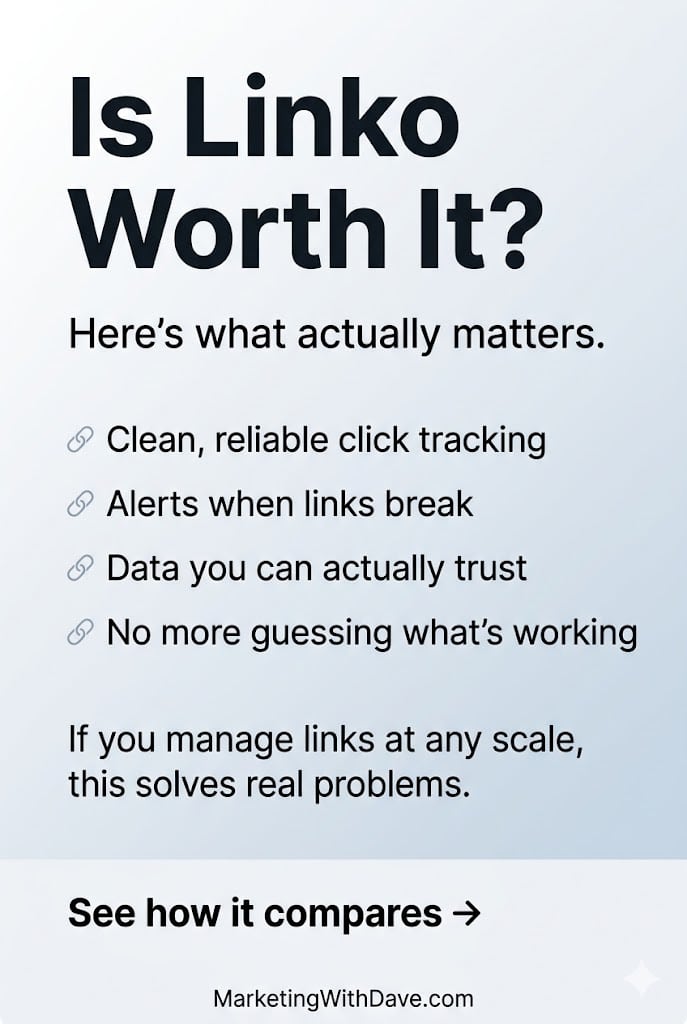
Marketing with Dave review of Linko, highlighting features like click tracking, link alerts, data trust, and problem-solving for link management.

Linko Review: All-in-One Link Management Software with Bio Pages, QR Codes, and Tracking

Reading Time: 5 minutes

If you are comparing tools, see my Switchy vs Linko comparison for a side-by-side breakdown. If you want to know how Linko held up over time, I also shared my experience after creating 100+ links.

Short links are easy to underestimate until you need more than a URL cleaner. Once you start managing links across campaigns, channels, and use cases, the problem shifts from shortening to control, tracking, and flexibility.

Linko is built for that second layer. It combines link management, bio pages, QR codes, file hosting, redirect options, and custom tracking into a single platform.

If you want a link management platform with deeper functionality in bio pages, QR codes, file hosting, and redirect behavior, this marketing tool is worth a look. If your priority is low-cost entry, pixel integrations, and core link performance without paying for broader feature depth, that is where the trade-off starts to show.

See how this score is calculated

Here’s how to interpret this score:

The overall score reflects both product quality and how compelling the current deal is.

Linko delivers a polished, feature-rich experience with strong usability and broad functionality. This is not a minimum viable product. The platform feels complete, stable, and ready to use across multiple use cases.

The final rating reflects a balance between that strong product experience and a few tradeoffs that matter before buying, including a higher price point, core features unlocked across tiers, and more limited third-party pixel integrations for advanced tracking.

Try Linko for Free

Affiliate disclosure: If you buy through my affiliate link, I may earn a commission at no additional cost to you. I only share tools I believe are worth your time and consideration.

The 30-Second Decision

Best for: managing short links that need to be updated later, tracked across campaigns, or extended into bio pages, QR codes, and hosted assets.

Not ideal for: buyers who mainly want the lower-cost entry point, heavy third-party pixel integration support, or full feature depth without moving into higher tiers.

My take: Linko is one of the more complete link management platforms available. It prioritizes flexibility and breadth over low entry cost, which makes it a better fit for users who plan to use more than just basic link shortening.

Try Linko for Free

What Linko Actually Helps You Do

At its core, Linko helps you create, manage, and extend short links across multiple use cases.

That includes bio pages, QR codes, hosted files, redirect controls, campaign organization, and custom tracking parameters, all within a single platform.

This is not a minimum viable tool trying to find its footing. It is a complete platform with multiple working use cases from day one.

This is not just about shortening links. It is about managing and extending them across campaigns, channels, and use cases in one place, instead of relying on multiple tools.

What Stands Out

The biggest strength of Linko is how much it brings together in one place.

Beyond basic link shortening, it extends into bio pages, QR codes, hosted files, redirect behavior, campaign organization, and custom tracking.

That range makes Linko a true link management system, not just a shortener with added features.

The platform does not feel like an early-stage product. It feels complete and usable across its core workflows.

Where It Has Real Marketing Value

If you are managing links across multiple channels, Linko can centralize workflows that are often spread across separate tools.

Instead of using one tool for shortening, another for bio pages, another for QR codes, and another for hosting assets, Linko combines those functions into one system.

This matters most when links are used across multiple channels and need to stay consistent, trackable, and easy to manage over time.

Custom Tracking Parameters Are More Flexible Than Standard UTMs

Linko supports the standard UTM structure most marketers already use, but it also goes further depending on the tier.

At Tier 1, you get six core tracking parameters:

utm_source, utm_medium, utm_campaign, utm_term, utm_content, and utm_id.

That sixth parameter, utm_id, is not always included by default in other tools and can be useful for more structured campaign tracking, especially when working across platforms or reporting systems that expect a unique identifier.

At higher tiers, Linko expands this further. Tier 2 allows you to create up to 10 custom UTM templates, and Tier 3 increases that to 20. This gives you the ability to standardize naming conventions, add additional parameters, and build more tailored tracking frameworks beyond the traditional five-field setup.

For basic campaign tracking, the default fields are more than enough. For more advanced workflows, especially those that rely on consistent naming structures or additional segmentation, the added flexibility becomes more valuable.

Bio Pages, QR Codes, and Hosted Assets Are Bigger Parts of the Story

Its bio page functionality is more central to the product, QR code support is more developed, and built-in file hosting adds a use case Switchy does not really try to serve. That makes Linko easier to understand as a broader utility platform.

This is one of the clearest reasons someone might choose Linko even at a higher price. If you want one platform that does more than branded redirects and pixel-based tracking, Linko makes a stronger case.

Redirect Controls and Link Behavior Are More Configurable

Another area where Linko stands out is redirect handling.

Linko supports multiple redirect types (301, 302, and 307), splash pages, direct links, cloaked links, and additional behavior controls that make the redirect layer feel quite flexible.

Pixel Integrations Are More Limited Today

Linko supports retargeting pixels, but its third-party integration coverage is still developing.

For most use cases, the current support will be enough. If your workflows depend heavily on a wide range of ad platforms or advanced retargeting setups, this is an area where Linko is not as strong today.

This reflects a newer platform that already delivers broad functionality, with deeper integrations likely to expand over time.

Analytics and Reporting

The analytics side of Linko looks useful, but I would frame it as practical rather than especially advanced.

As with much of Linko, the value is less about replacing a best-in-class specialist and more about combining enough functionality in one place.

Setup and Ease of Use

Linko feels approachable, especially for a product that spans multiple use cases.

The interface is one of its strengths. That is part of why it scored well in Getting Started and User Experience. Even when the product does a lot, it does not feel especially difficult to understand.

If you only need basic short links, some of this may feel like more platform than you need. If you want wider functionality in one place, the broader approach is a plus.

Try Linko for Free

Why I Would Recommend It

  1. It combines multiple link-related use cases in one platform, including bio pages, QR codes, hosted files, and redirects.
  2. The product feels polished and approachable despite covering a lot of ground.
  3. Custom tracking flexibility is stronger than the classic UTM-only setup found in some competing tools.
  4. It is easier to justify if you want one broader platform rather than several narrower tools.

What To Watch Out For

  1. Third-party pixel integration depth is limited compared to a more performance-focused alternative.
  2. The product is broad, but that does not mean every individual feature is best-in-class.
  3. Buyers who mainly want branded links and core campaign tracking may find the broader platform unnecessary.

Bottom Line

Linko is not trying to be the cheapest or most focused tool in this category. It is trying to replace multiple tools with one platform.

If you only need basic link shortening and tracking, this will feel like more than you need.

If you want one system to manage links, bio pages, QR codes, hosted assets, and redirect behavior in a cohesive way, Linko makes a strong case.

The value comes from how much of that platform you actually use.

If you are already thinking beyond basic link tracking, Linko is easier to grow into than out of.

Try Linko for Free

Disclaimer

This content is for educational purposes and reflects my experience, review of the product, and current publicly available information. Always evaluate tools based on your specific business needs, goals, and workflows before making a decision.

Looking for more marketing software reviews? See my full list of marketing tools and software I recommend.

Linko Review: All-in-One Link Management Software with Bio Pages, QR Codes, and Tracking Read More »