
Last updated June 2026
Most SEO tools answer the wrong question.

They tell me my title tag is too long, my meta description is missing, or my page speed needs work. All true. None of it explains why a thinner page with weaker writing is sitting above mine in the search results, or what I would need to change to close that gap.
Textfocus has a different approach. Rather than running down a technical checklist, it analyzes a page through three lenses that most on-page tools ignore entirely: semantic relevance (how well your word choices match what ranking competitors are actually using), EEAT signals (the Experience, Expertise, Authoritativeness, and Trustworthiness factors Google uses to evaluate content quality), and GEO readiness (how well AI search engines and LLMs can parse and cite your page). That combination provides a perspective on content quality and AI visibility that traditional crawl reports simply cannot offer.
To find out whether the reports were genuinely useful or just impressive-looking dashboards, I put my 5 marketing awareness stages blog post through every major tool in the platform. Some of what came back confirmed things I already suspected. A few findings stopped me cold, including one about my table of contents that I will get to shortly.
Here is an honest account of what I found.
Affiliate disclosure: If you purchase through my link, I may earn a small commission at no additional cost to you. I only share tools I have used myself.
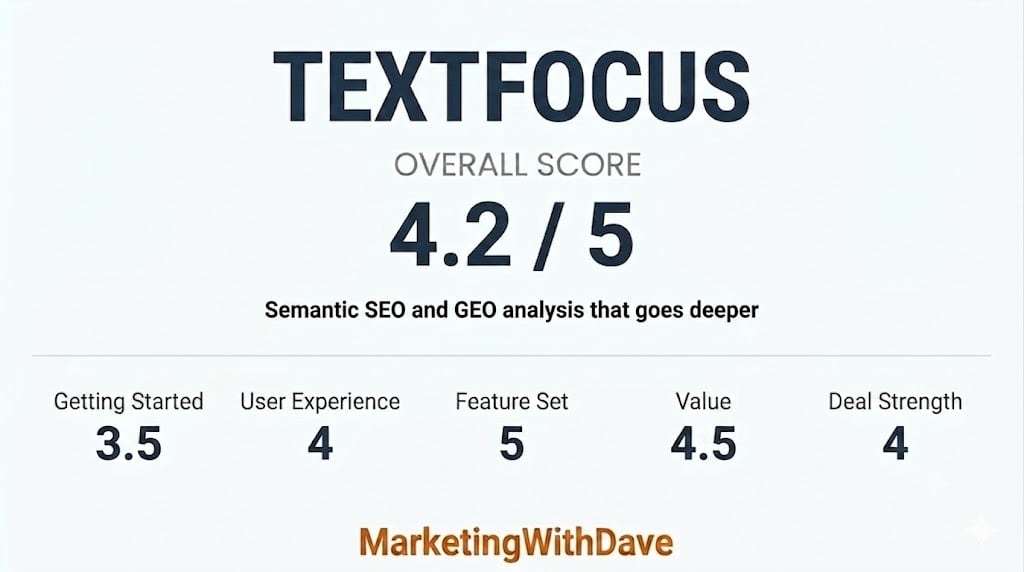
The 30-Second Decision
If you create content for SEO and want a tool that does more than tell you to “add your keyword to the title,” Textfocus is worth your attention. It runs a full semantic analysis of any individual published page against real competitors in Google, scores your content for EEAT and GEO/AI readiness, and gives you specific word-level gaps to close. It is genuinely more thorough than most on-page tools I have used at any price.
The catch is that the interface takes some getting used to and the onboarding experience is thin. Once you are past that learning curve, though, the reports are dense with signal that you can act on right away.
What impressed me most: Semantic Analysis
Biggest weakness: Workflow and navigation
Is Textfocus Right for You?
| You will likely love it if… | You might struggle if… |
|---|---|
| You publish long-form SEO content and want to close semantic gaps vs. ranking competitors | You are looking for a simple set-and-forget grading tool with a clean checklist |
| You care about GEO / AI search optimization and want a score you can track over time | You need project folders, team workflows, or whole-site crawling out of the box |
| You want EEAT diagnostics broken into Experience, Expertise, Authority, and Trustworthiness | You are a non-technical user who finds report-heavy tools overwhelming |
| You need fully localized English labels and date formatting out of the box |
Why I Bought Textfocus
I have been writing about content marketing and SEO at MarketingWithDave.com for years, and I am always looking for tools that help me diagnose what is actually wrong with a page rather than just confirming what I already know. Most on-page SEO tools tell you to optimize your title tag and add your keyword to the first paragraph. Textfocus promises to go deeper: semantic coverage analysis using TF-IDF and competitive benchmarking, EEAT scoring, and a separate GEO/AI readiness score that matters more every month as AI search grows.
I recognize a tool with genuine diagnostic depth when I see one. Textfocus looked like the real thing, so I picked it up.
What Textfocus Actually Does
Textfocus is a page-level SEO and GEO analysis tool built by Christophe Hilmoine, a solo bootstrapped developer based in France who has been refining this product since 2016. You submit a single URL with a target keyword and it returns a layered set of reports. You can also load a CSV file to submit multiple URLs in a batch, though this still produces individual per-page analyses rather than a site-wide crawl. The tool is built around depth on one page at a time, not breadth across an entire domain.
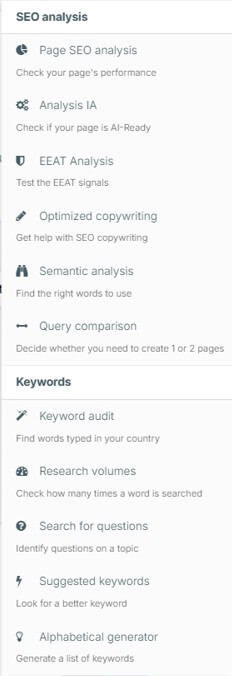
The main tools available from the navigation menu are:
- Page SEO Analysis — the core on-page audit covering technical and content factors
- Analysis IA — the GEO/AI Readiness report that evaluates how well AI crawlers and LLMs can parse your page
- EEAT Analysis — a dedicated report scoring Experience, Expertise, Authoritativeness, and Trustworthiness
- Optimized Copywriting — a writing assistant that generates content direction based on your target keyword
- Semantic Analysis — finds the right words to use based on competitor benchmarking
- Query Comparison — helps you decide whether a topic warrants one page or two, useful for avoiding keyword cannibalization
- Keyword Audit, Research Volumes, Search for Questions, Suggested Keywords, Alphabetical Generator — a set of keyword research utilities
The analysis engine is the star of the show. The keyword research utilities are useful supplements.
My Experience With Textfocus
To put this review on solid ground, I ran a single page through every major Textfocus tool. The target keyword was “five awareness stages.” It is a 4,153-word post with 32 unique internal links (most of those are in the header and footer), a well-organized heading hierarchy, and valid JSON-LD structured data. A solid page to stress-test a diagnostic tool against.
Here is what the reports actually surfaced.
The Page SEO Analysis: Thorough and Mostly Right
The SEO Page Analysis report came in at 53%, which sounds low until you look at what is being measured. The tool flagged my meta title at 99 characters and correctly called it too long, with an AI-suggested alternative of “5 Awareness Stages Explained – Marketing Guide” that I may actually use. It flagged my meta description at 171 characters and suggested trimming it under 170. It noted that 13 H2 tags is more than the recommended maximum of 10, and flagged that my page has too few first-person pronouns for content claiming hands-on experience.

What makes the SEO report more useful than most is the competitive context it provides alongside the score. My page scored 53/100 against a competitor average of 42/100 for the same keyword. My relevant word count was 2,604 against a competitor average of 746. In other words, 53% is not a disaster — it reflects that I am competing against thinner content and my main gaps are fixable technical items, not content depth.
The Semantic Analysis: Where Textfocus Earns Its Price
The Semantic analysis report that genuinely separates Textfocus from most on-page tools. Rather than checking keyword density, it benchmarks every significant term on your page against the range of occurrences across competitors who are actually ranking.
For my page, it found that the word “journey” appeared only once but competitors use it 3 to 38 times in the ideal range. “Potential” appeared zero times against a benchmark of 4 to 15. “Content” appeared 72 times, which is nearly double the maximum competitor occurrence of 38. These are specific, actionable gaps and excesses that I can address in a content refresh without guessing at what to change.

The semantic score came in at 67% with an interest score of 89/100 in the competitive benchmarking. That combination tells me the content signals are strong overall — the remaining gaps are specific terms to weave in, not a wholesale rewrite.
The EEAT Analysis: Honest and a Little Uncomfortable
The EEAT analysis report broke down as follows: Experience 70%, Expertise 79%, Authoritativeness 40%, Trustworthiness 90%. The authoritativeness score is the weak point, and the tool is specific about why: no direct quotes or blockquotes detected, no statistics or expert citations found, and no structured data linking to an author profile page.

Those are real gaps for any content site trying to build topical authority, and that level of specificity is useful. The trustworthiness score of 90% reflects HTTPS, no keyword stuffing, clean sentence length averaging 16 words, and legal pages in place — the baseline trust signals Google looks for.
The Analysis IA (GEO / AI Readiness): The Report I Did Not Expect to Find This Useful
In the AI readiness analysis, the overall GEO score was 76.1%, with strong marks across valid JSON-LD (96%), descriptive image alt text (95%), page segmentation (93%), page structure (89%), and robot accessibility (100%). The two major problem areas were page load performance (2% — slow server response time and blocking JavaScript) and the table of contents (0%).
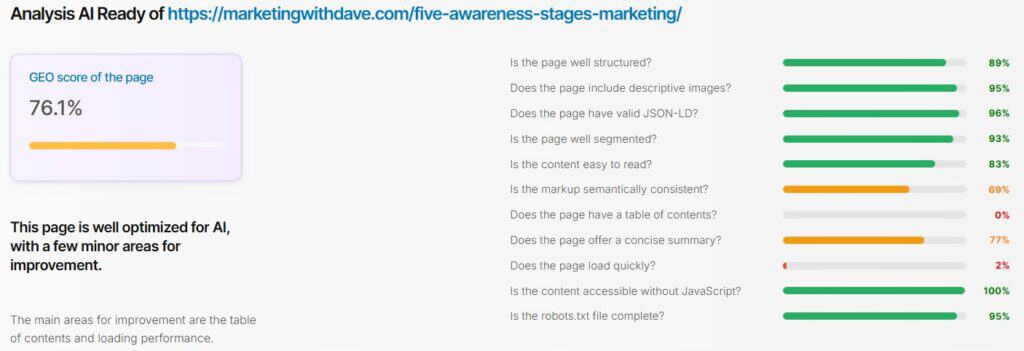
That table of contents finding is the single most valuable thing Textfocus surfaced for me. My TOC is generated by a JavaScript plugin, which means it is invisible in the raw HTML. AI crawlers and LLMs parse the static source, not the rendered output. They cannot see my TOC at all. The fix is either switching to a server-side rendered TOC or tagging the existing one with a recognizable aria-label or id attribute that bots can identify.
That is the kind of insight I would not have found in any traditional SEO tool, and it has a direct bearing on how AI search engines like Perplexity and ChatGPT Search choose to cite and structure answers from pages like mine.
What Needs Work
Textfocus has real rough edges that are worth knowing about before you buy.
The navigation is the biggest friction point. The Tools menu and the Account / My Analysis area both show your saved analyses, which is confusing initially. Running a new analysis requires going through the Tools menu, not the account area — and this is not obvious at first. Once you are inside a specific tool, the navigation bar is no longer anchored to the top of the page, so getting to another tool requires scrolling back up or clicking away. At standard laptop resolution, the last two items in the Tools menu — Suggested Keywords and Alphabetical Generator — are cut off.
There are occasional untranslated French labels and non-localized date formats scattered through the reports and interface. Given that this is a bootstrapped solo product built in France, it is understandable context rather than a red flag, but English-speaking users will notice it.
The keyword input has some quirks. Pasting a list of keywords from an external tool can import invisible characters that register as separate entries, requiring manual cleanup. The field behavior is also inconsistent — sometimes tabbing confirms your entry, sometimes it drops it, and you need to press Enter. Small things individually, but they add up when you are trying to build a repeatable workflow.
There is no project or campaign layer. Each report lives in its own area and you re-find past analyses through separate tabs for each tool. Running a full diagnostic on one page means opening each tool to run the analyses, and tracking the results yourself. A project wrapper that could kick off all reports for a given URL at once and present the results together would make this feel like a significantly more complete platform.
Two additional polish issues: the Performance score box in the main dashboard took several times before it finally loaded during my testing, and PDF exports are given generic file names that become difficult to tell apart once you have exported two or three reports. Neither is a deal-breaker, but both are the kind of thing you notice in day-to-day use.
The Optimized Copywriting tool accepts only your target keyword, a word count target, and a language selection. It generates a content direction or brief rather than actually drafting the article. That is useful but more limited than the tool name implies.
Textfocus Inside Your AI Assistant
One capability worth calling out separately: Textfocus now supports MCP (Model Context Protocol), which means you can connect it directly to Claude, ChatGPT, or other AI assistants that support MCP integrations. In practice this means you can ask your AI assistant to run a Textfocus page analysis, look up related keywords, or check an SEO score without leaving the chat interface. For anyone building AI-assisted content workflows, that is a meaningful time saver. Plan 1 includes 30 MCP API calls per day, with higher tiers adding more.
Bottom Line
Textfocus does something most SEO tools do not: it treats a published page as a system with multiple diagnostic layers and benchmarks each one against what is actually ranking for your keyword. The semantic gap analysis is specific enough to act on immediately. The EEAT breakdown tells you exactly which signals are missing and why. The GEO/AI Readiness report surfaces problems — like a JavaScript-rendered table of contents being invisible to AI crawlers — that traditional SEO tools do not even look for. And the MCP integration means you can pull these insights directly into an AI assistant workflow without switching tabs.
The interface friction and lack of a project layer will slow down anyone trying to build a systematic audit workflow. These feel like the natural constraints of a bootstrapped product that has prioritized analytical depth over UX polish — a trade-off I can live with at this price point.
If you write content for search and want diagnostic depth that goes well beyond keyword density checks and title tag advice.
This content is for educational purposes and reflects my experience, review of the product, and current publicly available product information. Always evaluate tools based on your specific business needs, goals, and workflows before making a decision.
Looking for more marketing software reviews? See my full list of marketing tools and software I recommend.

