Last updated July 2026
Two web accessibility tools are live on AppSumo right now, and if you have been looking for a way to get your website closer to WCAG and ADA compliance without paying enterprise-level monthly fees, both deserve a look. But they are very different products at very different stages of development.
WebAbility.io is a tool I have already purchased and tested on this site. You can read my full WebAbility review. Accessify is a less mature entrant offering similar territory but with a noticeably narrower feature set and an AI credit model that limits how much automated work you can do per month.
This comparison is for website owners who are weighing these two tools side by side and want a practical, practitioner-level read on where they differ.
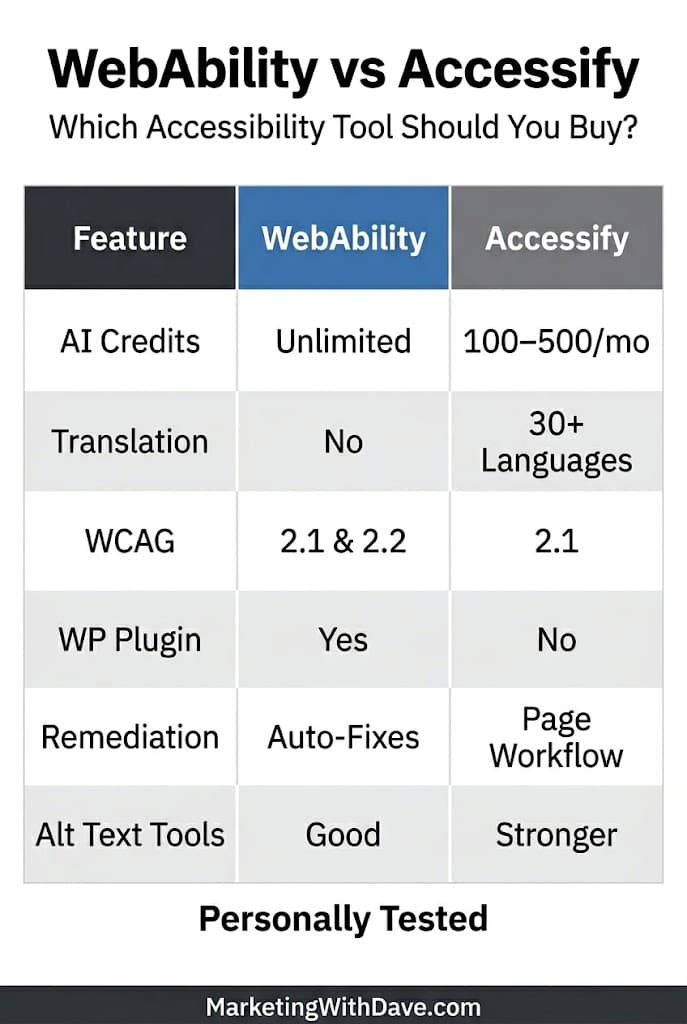
WebAbility offers broader accessibility coverage, automatic remediation, and fewer usage restrictions, while Accessify’s strengths are alt text management and built-in translation.
| If you are… | Choose |
|---|---|
| A solo site owner wanting a full-featured accessibility stack | WebAbility |
| A WordPress, Shopify, or Wix user on a tight budget | WebAbility |
| A developer wanting source-level fix guidance | WebAbility |
| An eCommerce site owner wanting better image alt text management | Consider Accessify |
| Running multiple sites and need more domains per dollar | Compare tiers carefully |
| An agency wanting white-label reports | WebAbility |
The Quick Version
WebAbility is the more mature, feature-rich product. Its biggest practical advantage is automatic remediation of certain accessibility issues, allowing some problems to be addressed without manual intervention.
Accessify is newer with no AppSumo reviews yet after being out for a week. Its standout feature is AI-powered image alt text generation and management, which it handles well. But most functions run on a monthly AI credit allowance, and the platform is more limited overall. The audit report it generates is functional but sparse compared to what WebAbility produces.
What Each Tool Actually Does
WebAbility.io is built around a scanning and enhancement engine that detects accessibility barriers across content, navigation, forms, and media. It auto-fixes issues that are safely automatable, including alt text, ARIA labels, contrast, and focus order, then flags everything else for human review rather than silently claiming to fix it. The widget runs in a Shadow DOM so it does not conflict with your site’s existing scripts or styles. Fixes persist even if the widget is hidden.
The platform also includes an MCP chatbot that connects directly to Cursor, Claude Code, or your IDE to walk through source-level fixes. That is not something most small-site accessibility tools offer at any price.
Accessify positions itself around WCAG 2.1 scanning and AI-assisted remediation. Its strongest feature is image alt text: you can manage, generate, and bulk-apply AI-written alt text for site images directly from the dashboard. It also includes a no-code widget, real-time page scanning, accessibility profiles for visitors with different needs, and translation into 30+ languages. However, almost every AI-powered action consumes monthly credits, which resets each month within the limits of your tier.
Setup Experience
One area where the difference between these tools became obvious was installation.
WebAbility offers a native WordPress plugin. I had it installed, connected, and scanning in just a few minutes.
Accessify does not currently offer a WordPress plugin. During my testing, I initially attempted to deploy it through Google Tag Manager, but verification failed because the platform could not detect the installation correctly. I ultimately got it working by adding the code directly through the WPCode plugin.
This is not a deal-breaker, but it does create more friction for non-technical site owners. If ease of implementation matters to you, WebAbility currently has the advantage.
Accessibility Report Comparison
Both tools generate accessibility reports. The quality difference is meaningful.
WebAbility’s audit report identifies issues by page, categorize them by severity, show what has been auto-fixed versus what needs human attention, and include a compliance score. The reports are designed to be actionable and shareable.
I ran Accessify’s audit report against the MarketingWithDave.com posts index page. The report found 213 total issues: 104 critical, 2 medium, 66 low, and 41 informational. The issue breakdown is essentially one long table with truncated descriptions. Nearly all 104 critical issues were color contrast failures (both standard and enhanced), along with link contrast and one missing link name. The report format is clean enough but does not provide fix-level guidance or distinguish between what is automatable and what requires human judgment.
For a first-pass audit, Accessify’s report is useful. For understanding what to do next, WebAbility’s reporting is more actionable.
One workflow difference I noticed during testing is that Accessify encourages a more page-centric approach. While it supports bulk operations, remediation actions are generally performed against specific pages, and bulk processing is limited to batches of up to 20 pages at a time. Given the platform’s monthly AI credit limits, this approach may be intentional to help users manage credit consumption.
WebAbility is not entirely different in that many accessibility issues still require page-level review. However, its site-wide scanning, broader reporting, and automatic remediation capabilities create a workflow that feels less dependent on manually working through pages one by one.
Pricing Comparison
This is where the structural differences become most visible. WebAbility’s AppSumo deal scales by number of websites. Accessify’s deal scales by websites, AI credits, and monthly widget impressions, which creates meaningful limitations at lower tiers.
| Feature | WebAbility (Plan 1) | WebAbility (Plan 2) | Accessify (Tier 1) | Accessify (Tier 2) | Accessify (Tier 3) |
|---|---|---|---|---|---|
| AppSumo price | $59 | $118 | $49 | $139 | $239 |
| Websites included | 2 | 4 | 1 | 3 | 6 |
| AI credits per month | Unlimited | Unlimited | 100 | 250 | 500 |
| Monthly widget impressions per site | Unlimited | Unlimited | 25,000 | 75,000 | 200,000 |
| Compliance standards covered | ADA, WCAG 2.1 & 2.2, Section 508, AODA, EN 301 549, IS 5568 | Same | WCAG 2.1 | Same | Same |
| Accessibility statement | Included | Included | Included | Included | Included |
| AI-generated alt text | Included | Included | Included (uses credits) | Same | Same |
| Advanced dashboard analytics | Included | Included | Tier 2 and above | Included | Included |
| Full customization | Included | Included | Tier 3 only | Not included | Included |
| Stacking codes | Up to 5 | Up to 5 | N/A (tier-based) | N/A | N/A |
The credit model in Accessify is worth pausing on. At Tier 1, 100 AI credits per month limits how many AI-assisted fixes or alt text generations you can run in a billing cycle. WebAbility does not have this constraint. For websites with a lot of images or frequent content updates, that matters.
The impression cap is also a real consideration. At 25,000 monthly widget impressions per site on the Tier 1 plan, a modest blog with consistent traffic could bump against that ceiling. WebAbility places no impression limits on its widget.
Feature-by-Feature Comparison
| Feature | WebAbility | Accessify |
|---|---|---|
| Real-time WCAG scanning | Yes | Yes (WCAG 2.1) |
| WCAG 2.2 coverage | Yes | No |
| Automatic remediation of qualifying issues | Yes | No |
| AI-generated accessibility fixes | Yes | Yes (uses credits) |
| AI-generated image alt text | Yes | Yes (primary feature, uses credits) |
| Bulk alt text management dashboard | Yes | Yes |
| Accessibility widget | Yes | Yes |
| Widget can be hidden (fixes still active) | Yes | No |
| Accessibility profiles (low vision, ADHD, etc.) | Yes | Yes |
| Voice navigation | Yes | Yes |
| 30+ language translation | No | Yes |
| Accessibility statement generator | Yes | Yes |
| Audit report | Yes (detailed, actionable) | Yes (summary-level) |
| Fix/advisory/needs-review triage | Yes | No |
| Monthly impression limits | None | Yes (tier-based) |
| Monthly AI credit limits | None | Yes (100/250/500 per tier) |
| Browser extension | Yes | No |
| Developer MCP chatbot (IDE integration) | Yes | No |
| WordPress plugin (native) | Yes | Yes |
| Shopify, Webflow, Wix support | Yes | Yes |
| GoHighLevel integration | No | Yes |
| Squarespace, WooCommerce, Magento | Yes | Yes |
| White-label PDF reports | Yes (agency add-on) | Branded PDF included |
| Advanced dashboard analytics | Yes | Tier 2 and above |
| Full customization | Yes | Tier 3 only |
| GDPR compliant / DPA available | Yes | Not confirmed |
| No AI training on your data | Confirmed | Not confirmed |
| Source code access | No | No |
| Real AppSumo reviews | 24 | 0 (new listing) |
| Compliance: ADA, WCAG, Section 508, AODA | Yes | WCAG 2.1 only listed |
Where Accessify Has an Edge
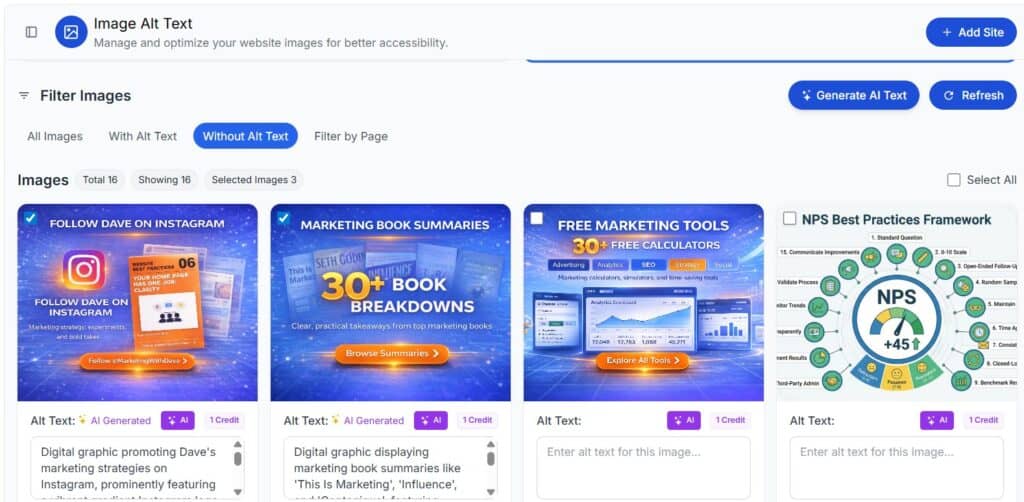
Image alt text workflow. Accessify built a dedicated dashboard for managing alt text across your entire site. You can view all images, filter by status, generate AI alt text in bulk, and apply it from one place. This is genuinely well-implemented and slightly more refined than WebAbility’s alt text approach.
Translation. Accessify translates your site into 30+ languages through the widget. WebAbility does not currently offer built-in translation.
Tier 3 pricing for multi-site. At $239 for six domains, Accessify’s Tier 3 offers a competitive per-site cost if you manage multiple properties and can work within the credit and impression limits.
Where WebAbility Has a Clear Advantage
No usage caps. WebAbility does not throttle your AI credits or cap monthly widget impressions. Run as many scans, generate as many fixes, and serve as many visitors as your site attracts.
More compliance standards. WebAbility covers ADA, WCAG 2.1 and 2.2, Section 508, AODA, EN 301 549, and IS 5568. Accessify lists WCAG 2.1 as its standard.
Fix triage. WebAbility distinguishes what it has auto-patched from what is advisory and what still needs human review. Every issue is bucketed so you know exactly where you stand. Accessify does not offer this level of transparency in its reporting.
Developer tools. The MCP chatbot that integrates with Cursor and Claude Code is a meaningful differentiator for anyone who wants to fix issues in source rather than just overlaying them.
Browser extension. WebAbility includes a browser extension. Accessify does not.
Proven user base. WebAbility has been on AppSumo long enough to collect 24 reviews and respond publicly to detailed technical questions about GDPR, screen reader compatibility, widget architecture, and overlay concerns. That Q&A thread is genuinely useful reading before you buy either tool.
Widget architecture. WebAbility’s widget runs in a Shadow DOM, preventing it from conflicting with your site’s existing styles, scripts, or extensions. If a visitor is already using JAWS, NVDA, or VoiceOver, WebAbility detects it and backs off rather than interfering.
GDPR clarity. WebAbility has published detailed answers on data handling, subprocessors, server locations, and AI training policies. All core data is stored on servers in Germany, IP addresses are discarded on arrival, and AI processing runs through zero-data-retention endpoints. Accessify has not addressed these questions publicly.
The Honest Take on Overlays
Both tools use a widget-based approach, which puts them in the same category that has drawn scrutiny from accessibility advocates pointing to products like AccessiBe and UserWay. This is worth understanding before you buy either one.
WebAbility has addressed this directly and at length in their AppSumo Q&A. They are transparent about what their tool fixes automatically versus what it flags for human review. They explicitly state that no widget alone equals EAA or ADA compliance. The honest framing is: accessible underlying code, plus automated fixes for what is safely automatable, plus manual audit for what is not, plus a VPAT when needed. Their tool is designed to be a foundation and a bridge, not a magic compliance badge.
Neither tool replaces a manual accessibility audit for sites that face real compliance risk. Both are useful starting points for small business website owners who want to improve accessibility without hiring specialists.
The biggest difference I noticed was not compliance coverage or reporting. It was how much manual work each platform expects from the site owner after issues are identified.
My Recommendation
If you are choosing between these two tools today, WebAbility is the clearer recommendation for most website owners. It is more mature, more transparent, covers more compliance standards, imposes no usage caps, includes developer tools, and has a real track record on AppSumo.
Accessify has genuine promise, especially around image alt text management and multi-language translation. If those features are your top priority and you are comfortable buying a tool with no user reviews yet, Tier 3 could make sense for a multi-site portfolio.
For my website, I currently use WebAbility. I wrote a full hands-on WebAbility review if you want more depth on what the real-world experience looks like before you buy.
See the current AppSumo deal for WebAbility
See the current AppSumo deal for Accessify
Affiliate disclosure: If you purchase through my links, I may earn a small commission at no additional cost to you. I only share tools I have personally used or thoroughly researched.
This content is for educational purposes and reflects my experience, review of the product, and current publicly available deal information. Always evaluate tools based on your specific business needs, goals, and workflows before making a decision.
Looking for more marketing software reviews? See my full list of marketing tools and software I recommend.