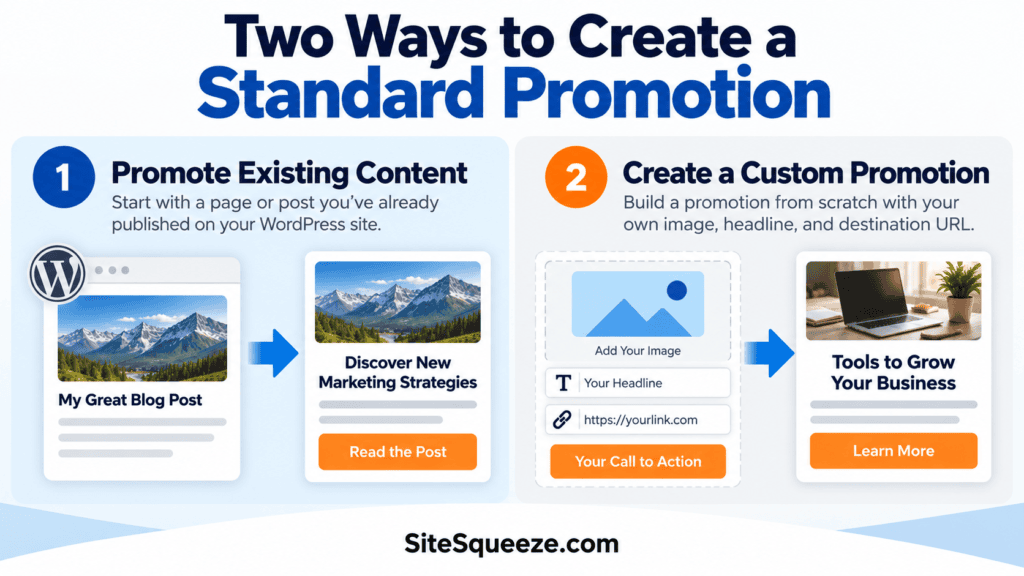
Infographic showing two methods to create a standard promotion: promote existing content or build a custom promotion with tools and strategies for marketing success.

How to Create a Standard Promotion in SiteSqueeze

Reading Time: 3 minutes

Standard Promotions put your content, offers, and affiliate links in front of visitors across your WordPress site, without you touching a page builder or writing a line of code.

You’ve got two ways to build one:

  • Promote Existing Content — turn a page or post you’ve already published into a promotion.
  • Create a Custom Promotion — build one from scratch with your own image and destination URL.

Same result either way: a Standard Promotion. The only difference is how much of the setup SiteSqueeze handles for you.

Infographic showing two methods to create a standard promotion: promote existing content or build a custom promotion with tools and strategies for marketing success.

Promote Existing Content

If what you want to promote already lives on your site, this is the fast path.

Go to Promotion type, select Promote Existing Content, then click Promote Existing Content again to open the chooser.

IMAGE: Promote Existing Content chooser

Search by page title, URL, or slug. The moment you pick your content, SiteSqueeze pulls in:

  • Page or post title
  • Featured image
  • Destination URL

None of that is locked in. A great article headline is often a terrible promotion headline, so shorten it. Swap the image. Rewrite the button text. Even swap the destination URL entirely, if you’d rather send clicks to a tracked link (a Linko URL, for example) instead of the raw page permalink.

Customize It

Name your promotion first. This is an internal label so you can find it later in SiteSqueeze. Visitors never see it.

From there, you control:

  • Headline
  • Image
  • Image alt text
  • Button text
  • Image display
  • Destination URL
  • Link behavior

A live desktop preview gives you an approximate look at how the headline, image, and button will appear together before you save.

Headline rule of thumb: aim for 60 characters or fewer. The field supports up to 80, but shorter headlines are easier to scan and generally fit promotion layouts better.

Create a Custom Promotion

No existing page to work from? Want full control from the ground up? This is your option.

It’s built for offers, affiliate links, announcements, and anything pointing off-site, anywhere there’s no WordPress page for SiteSqueeze to pull from.

Go to Promotion type, select Create a Custom Promotion, then click Create Custom Promotion.

IMAGE: Create a Custom Promotion chooser

Name it, then add your image and destination. For images, SiteSqueeze recommends 1080 × 1080 or 1080 × 1350, optimized for web. Add alt text, drop in your destination URL, and decide whether it opens in a new tab.

Here, nothing is pre-filled. You’re building it from zero.

Schedule It

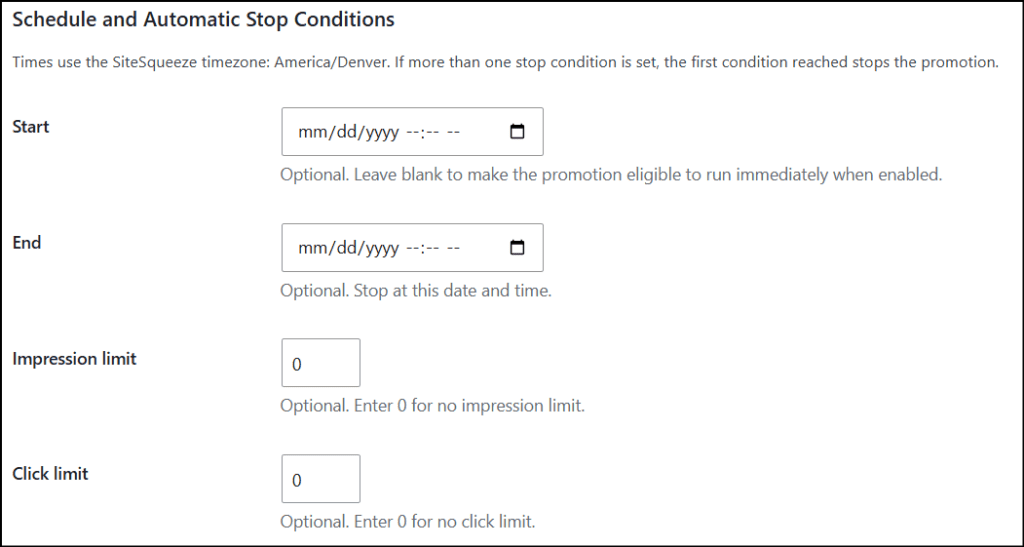
Both creation methods share the same scheduling controls. Set any combination of:

  • Start date/time — leave blank to go live the moment it’s enabled.
  • End date/time — auto-stop at a set time.
  • Impression limit — auto-stop after a set number of views.
  • Click limit — auto-stop after a set number of tracked clicks.

Set more than one? SiteSqueeze stops the promotion the instant any single condition hits. All times run on your site’s configured SiteSqueeze timezone.

Enabled Isn’t the Same as Visible

Flipping a promotion to enabled only makes it eligible to run. It won’t show up anywhere until it has a Placement.

A Placement tells SiteSqueeze where to run the promotion: specific categories, tags, or All Other Content.

The promotion is what visitors see. The Placement is where they see it. Skip the Placement and your promotion goes nowhere.

Haven’t set one up yet? See [Understanding SiteSqueeze Placements] for how targeting works.

Save It

Click Save Promotion.

It now sits alongside your other promotions in SiteSqueeze, ready to edit, enable, disable, or check on anytime.

Once it’s enabled, placed, and within any schedule or limits you’ve set, the promotion becomes eligible to display to visitors.

Track What It’s Doing

Building the promotion is step one. SiteSqueeze Performance shows you impressions, tracked CTA clicks, click-through rate, and everything else you need to know which promotions are actually earning their spot on your site.

See Understanding Standard Promotions Performance for the full breakdown.

How to Create a Standard Promotion in SiteSqueeze Read More »

Marketing with Dave logo displayed on a website, emphasizing digital marketing strategies and SEO optimization for business growth.

SiteSqueeze Standard Promotions: Understand What’s Driving Performance

Reading Time: 3 minutes

The Standard Promotions tab in SiteSqueeze Performance shows how your regular promotions are performing across your WordPress site.

It focuses on the essentials: impressions, clicks, click-through rate, daily performance, and the pages where each promotion appeared.

Standard Promotions reporting covers two types of promotions:

  • Promote Existing Content promotions, created from an existing WordPress post or page.
  • Custom Promotions, created with your own image, message, call to action, and destination URL.
Marketing with Dave logo displayed on a website, emphasizing digital marketing strategies and SEO optimization for business growth.

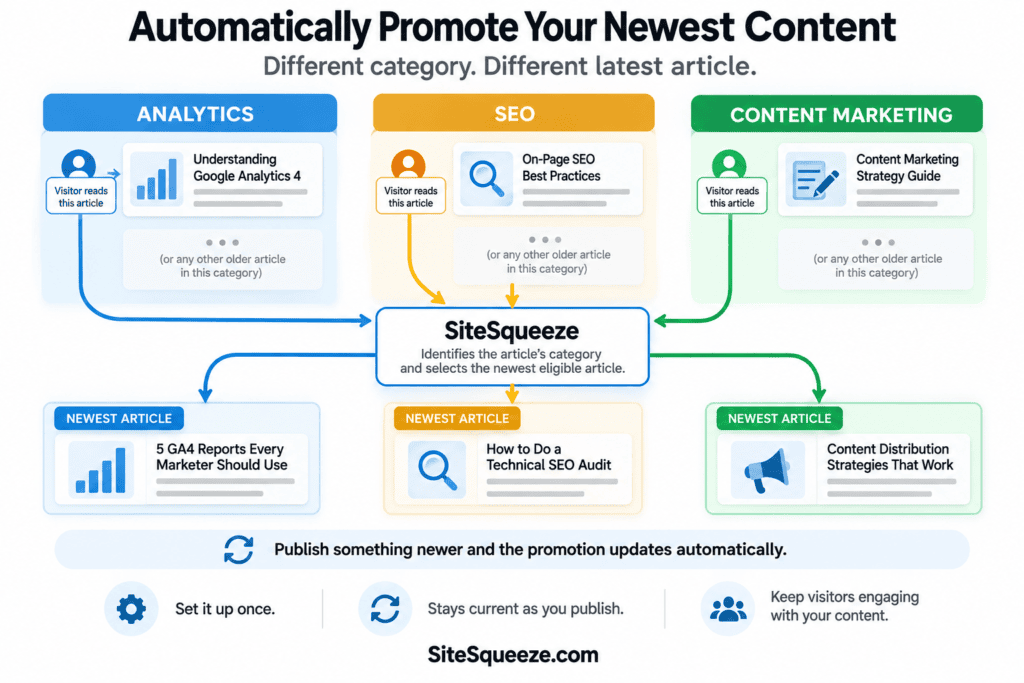
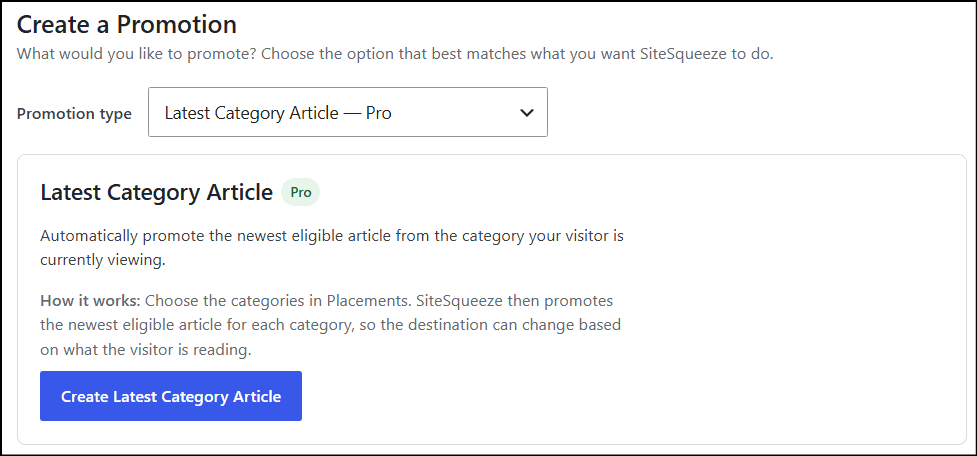
Other SiteSqueeze promotion types have their own reporting. A/B Tests, Latest Category Article, and Ad Reach each get a separate Performance tab so they can report on what’s specific to how that feature works.

Understanding Standard Promotion performance

Each promotion includes a summary for the date range currently selected in Performance.

The primary metrics are:

  • Impressions: the number of times SiteSqueeze recorded the promotion as displayed.
  • Clicks: the number of displayed clicks, meaning tracked clicks plus any manual adjustment (more on that below).
  • CTR: click-through rate, calculated by dividing clicks by impressions.

You can change the reporting period using the date selector at the top of Performance, with options including Today, Yesterday, This Month, Last Month, Last 30 Days, Custom, and Lifetime. The selected date range applies to the performance figures shown in the report.

Review performance by day

Expand a promotion to see its results broken down by day. Daily reporting separates three figures:

  • Tracked Clicks: clicks recorded directly by SiteSqueeze.
  • Adjustments: any manual correction you’ve added.
  • Displayed Clicks: tracked clicks plus adjustments. This is the same figure used as “Clicks” in the summary above, and it’s what the CTR calculation uses.

If you have a reason to correct a click total, SiteSqueeze preserves the original tracked figure rather than overwriting it and records your correction as a separate adjustment. For example, if SiteSqueeze tracked 10 clicks and you added an adjustment of 2, the report would show 12 Displayed Clicks while still keeping the original 10 tracked clicks visible in the breakdown.

See where a promotion performed

The Performance by Page section shows the WordPress pages where a promotion generated impressions and clicks.

This is useful alongside the overall CTR, not instead of it. It can help answer questions like:

  • Which pages are generating the most exposure for this promotion?
  • Where are visitors actually clicking it?
  • Does the promotion perform differently depending on the surrounding content?

What to look for

Start with impressions, clicks, and CTR.

A promotion getting plenty of impressions but few clicks may be worth revisiting. The image, message, offer, or call to action may be worth testing or revisiting.

A promotion getting very few impressions is a different problem, and not necessarily a sign the promotion itself is underperforming. Placement, eligibility rules, frequency limits, and visitor behavior can all affect how often visitors even have a chance to see it. That’s a question for the Ad Reach tab, which reports on what happens before a promotion is displayed rather than how it performs once it is.

Standard Promotions and Ad Reach answer different questions: Standard Promotions tells you how a promotion performed when it was shown. Ad Reach helps show how much of your traffic progressed far enough for a promotion to have an opportunity to display and where that opportunity was lost.

Exporting your data

SiteSqueeze includes a CSV export of Performance data for analysis outside WordPress, scoped to whatever date range you currently have selected.


SiteSqueeze is coming soon. I’m building a WordPress plugin to help marketers promote their own content, offers, and important pages more effectively, with clearer visibility into what visitors actually have the opportunity to see.

SiteSqueeze Standard Promotions: Understand What’s Driving Performance Read More »

Screenshot of SiteSqueeze placements settings showing options for controlling where promotions appear on a website.

SiteSqueeze Placements: Control Where Your Promotions Appear

Reading Time: 4 minutes

Creating a promotion is only half the job. SiteSqueeze also needs to know where that promotion is allowed to run.

That’s what Placements control.

A Placement connects three things: where a promotion can appear, which promotion or A/B Test runs there, and how SiteSqueeze matches your WordPress content to it. Create a Placement named “AI Articles,” target your Artificial Intelligence category, assign an AI-related promotion, and any eligible post in that category can now use it.

Your Placements page gives you a compact overview of everything you’ve set up. Expand a Placement to change its targeting or promotion.

Naming Your Placements

Name Placements for where they apply, not for what they promote:

  • AI Articles
  • Marketing Categories
  • SEO Content
  • Sitewide Fallback

This matters more as you add Placements or swap which promotion one uses.

Two Targeting Types

Custom Targeting matches specific Categories, Tags, or both. Use it whenever different parts of your site should promote different things: one Placement for AI content, another for Martech, another for a specific Tag.

All Other Content (Fallback) is your safety net. It serves a promotion when no Custom Targeting Placement matches, including for Pages or other content that doesn’t fit your Category and Tag structure.

How Matching Works

Custom Targeting uses OR logic. A post doesn’t need to match every selected Category and Tag, just one. So a Placement targeting the AI category, the Martech category, and the “AI” tag will match a post that hits any single one of those, not all three. Adding terms broadens what a Placement can match; it doesn’t narrow it.

Because a post can carry multiple Categories and Tags, more than one Placement can match the same content. When that happens, SiteSqueeze resolves it deterministically: the alphabetically first matching term gets priority. If no Custom Targeting Placement matches, or a matching Placement cannot supply an eligible promotion, SiteSqueeze can use All Other Content as the fallback when you’ve configured one.

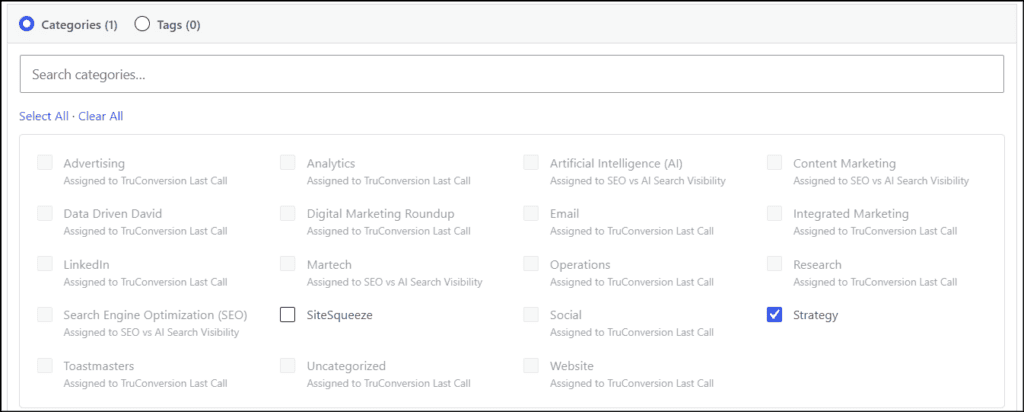
When creating or editing a Custom Targeting Placement, SiteSqueeze shows all available Categories and Tags in the targeting selector. Terms already used by another Placement remain visible but cannot be selected. SiteSqueeze also shows which Placement is currently using them.

Screenshot of SiteSqueeze placements settings showing options for controlling where promotions appear on a website.

This makes it easy to see what is still available, identify targeting gaps, and avoid accidentally assigning the same Category or Tag to multiple Placements.

Use the search field to quickly find a Category or Tag on sites with larger taxonomies. Selected terms remain easy to identify, while terms assigned elsewhere are clearly shown as unavailable.

Active Campaign Coverage

This section shows how much of your taxonomy has specific targeting from an active campaign, e.g., “20 of 20 categories and 0 of 4 tags.” Expand it to see exactly which Categories and Tags don’t currently have specific targeting, which is useful for spotting gaps as your site grows.

A Category or Tag without specific targeting doesn’t mean visitors there get nothing. It simply means there isn’t a dedicated targeting rule for it. Your All Other Content fallback can still serve a promotion there.

Assigning a Promotion

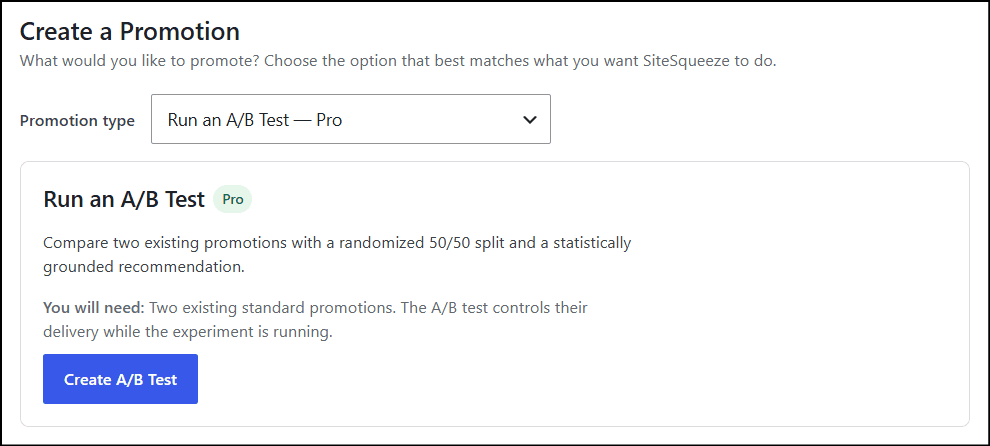
Each Placement needs an experience to display. The Promotion selector organizes available options into Standard Promotions, A/B Tests, and Latest Category Article, following the same order used on the Promotions screen.

Screenshot of a digital marketing platform showing promotion options, including Standard Promotions, A/B Tests, and Latest Category articles for SEO and visibility.

The selector focuses on experiences currently available for assignment rather than your entire historical list. For an A/B Test, assign the test itself to the Placement and SiteSqueeze handles serving its variations.

Creating and Managing a Placement

  1. Click Add Placement.
  2. Enter a Placement name.
  3. Choose Custom Targeting or All Other Content (Fallback).
  4. Choose a Standard Promotion, A/B Test, or Latest Category Article.
  5. For Custom Targeting, search or browse the available Categories and Tags and select the terms you want to target.
  6. Save the Placement.

Saved Placements appear as compact single-row summaries showing the Placement name, targeting, ad, and assigned promotion. Click Edit when you need to change the configuration.

New Placements open in edit mode. Once saved, they collapse into a compact summary so the Placements page stays easy to scan. Use Edit to change a Placement, the arrows to reorder it, or Remove to delete it.

Free supports one Placement. Pro supports unlimited (shown on the Placements page, e.g., “Pro edition · Placements: 3 of Unlimited”).

A Simple Placement Strategy

You don’t need an elaborate setup to get value:

  • AI Articles — targets Artificial Intelligence — promotes an AI-related resource
  • Marketing Content — targets Content Marketing, Martech, Email — promotes a marketing resource
  • Sitewide Fallback — targets All Other Content — promotes something broadly relevant

That gives your priority content specific targeting while still covering everything else. As you grow, use Active campaign coverage to spot Categories or Tags worth their own Placement.

Promotions decide what you’re promoting. Placements decide where it’s eligible to appear. Keeping those separate means you can swap a promotion without rebuilding your targeting, or change where something runs without touching the promotion itself.


SiteSqueeze is coming soon.

I’m building a WordPress plugin designed to help marketers promote their own content, measure what works, and run practical A/B tests without pretending every website has enterprise-level traffic.

Join the list to know when SiteSqueeze launches.

SiteSqueeze Placements: Control Where Your Promotions Appear Read More »

Infographic on AI search visibility tools highlighting three key takeaways: solving different problems, focusing on quality over quantity, and using multiple tools for stronger signals.

What AI Search Visibility Tools Actually Tell You to Do Next

Reading Time: 10 minutes

AI Search visibility software is getting very good at measuring things. Visibility scores, mentions, citations, sentiment, competitors, prompts, rankings, and share of voice are becoming standard features.

But measurement is only useful if it answers a more practical question: what should I do next?

That question became important as I tested AI Search visibility platforms on MarketingWithDave.com. The tools use similar language such as recommendations, opportunities, audits, tasks, next steps, fixes, and agents. But once I looked closely at the actual feedback, they were solving very different problems.

One platform crawled hundreds of pages looking for technical issues. Another analyzed a single page I selected and told me exactly where the content could improve. Another studied what large language models were citing and recommended where I should participate off-site. Another could draft and publish Reddit responses.

So instead of comparing feature names, I looked at something more useful: how well does each platform help a marketer figure out what to do next?

Infographic on AI search visibility tools highlighting three key takeaways: solving different problems, focusing on quality over quantity, and using multiple tools for stronger signals.

How the Platforms Cover On-Page, Off-Page, and Technical Feedback

The first challenge is that these platforms do not operate at the same level. Some run broad site audits, while others focus on individual pages, AI citation ecosystems, or content opportunities.

Platform On-Page Feedback Off-Page Feedback Technical Feedback General Approach
SnowSEO Strong traditional audit coverage Limited and relatively generic Strong sitewide technical audit plus GEO readiness checks Find problems, prioritize them, explain them, and assist with some fixes
Nuwtonic Strong page-level recommendations when you provide a URL Not meaningfully demonstrated in my testing Limited; not a traditional sitewide technical audit Analyze a page you choose and suggest specific improvements
ZeroRank AI-informed content type and content opportunity recommendations Excellent and unusually specific Focused more on AI readiness than traditional technical SEO Study what AI systems cite and turn that intelligence into opportunities
iGEO More oriented toward content creation than auditing Reddit opportunity discovery with drafting and publishing workflow Limited evidence of traditional technical recommendations Identify an opportunity and help create content or responses
Visby Broad sitewide recommendations Backlinks, social profiles, authority, reviews, and brand presence Strong performance and technical recommendations Create a broad strategic work backlog with detailed completion criteria

Visby is included here as a reference point, though it is not part of my primary four-platform AI Search software comparison.

On-Page SEO Feedback

On-page recommendations were a clear example of why feature lists can mislead. Several platforms can truthfully say they provide on-page recommendations, but the type and depth of feedback varies substantially.

SnowSEO: Traditional Audit Findings at Scale

SnowSEO treats on-page optimization largely as an audit problem. It crawls the site and flags issues such as titles, meta descriptions, image ALT text, headings, and thin content.

The advantage is coverage: I don’t have to decide which URLs to inspect, and SnowSEO can identify patterns across hundreds of pages. The disadvantage is familiar to anyone who has used SEO audit software before: finding an issue doesn’t mean the issue matters. A technically valid warning can still be low priority, irrelevant to the business, or not worth the effort to fix.

Nuwtonic: Narrower Scope, Deeper Page Feedback

Nuwtonic takes nearly the opposite approach. It doesn’t run a broad sitewide audit in my testing; I provide a page, and it analyzes that specific page.

For my SnowSEO review, Nuwtonic produced recommendations covering metadata, content additions, missing topics, competitor analysis, and editorial improvements. The most useful ones were highly contextual, identifying where in the article new information belonged rather than just saying it needed more content. It also flagged potential duplication between sections, which was accurate: that older review format did contain more repetition than the format I use today.

SnowSEO is better positioned to tell me which pages may have problems. Nuwtonic is better positioned to go deeper on a page I already decided deserves attention.

ZeroRank: On-Page Recommendations Driven by AI Citation Patterns

ZeroRank’s on-page recommendations don’t feel like a traditional SEO audit at all. It looks at the types of pages and content that large language models are citing and recommends formats that may improve visibility.

For MarketingWithDave, its recommendation categories included product pages, category pages, articles, listicles, discussions, and profiles. For each type, it showed examples of domains being cited, common phrases and themes, and a small number of prioritized recommendations.

This feels less like “fix this page” and more like “based on what AI engines are citing, here are the assets worth creating.” That makes ZeroRank’s on-page feedback more strategic than diagnostic.

Visby: A Broad Backlog of Site Improvements

Visby generated 52 tasks in my account, including reviewing meta titles and descriptions, improving heading hierarchy, adding descriptive ALT text, improving internal linking, adding semantic HTML, improving home page authority and clarity, adding testimonials and case studies, and strengthening brand differentiation.

What I initially missed was how detailed each task actually is. Its ALT text recommendation, for example, included a priority level, the affected page, a task objective, an example image with an empty ALT attribute, an explanation of why it matters, specific steps to take, acceptance criteria, and a post-completion validation step. That’s materially better than simply adding “missing ALT text” to a dashboard.

Off-Page SEO and AI Visibility Feedback

Off-page recommendations produced the largest difference between the platforms. Traditional SEO often reduces off-page work to backlinks, citations, digital PR, reviews, and brand mentions. AI Search makes this more interesting because external conversations can directly shape what answer engines retrieve and cite.

ZeroRank Is the Standout for Off-Page Recommendations

ZeroRank’s off-page recommendations cover a surprisingly broad set of external platforms, including Reddit, YouTube, Trustpilot, Capterra, G2, Product Hunt, LinkedIn, Quora, TrustRadius, and other review and community sites.

More importantly, it doesn’t just say “you should have a Reddit presence.” It identifies specific communities, existing discussions, topics, and opportunities where MarketingWithDave could participate. That difference is enormous:

Generic: Build your Reddit presence.
Specific: Participate in a relevant subreddit or existing conversation that is already influencing AI answers in your category.

Both can technically be called recommendations. Only one gives the marketer a clear next action.

SnowSEO: Broader Coverage, Lower Specificity

SnowSEO’s GEO audit also recommended external presence on sites such as Reddit, YouTube, G2, Capterra, Trustpilot, and Crunchbase, but the recommendations were generally much broader than ZeroRank’s. Identifying that Reddit matters is different from identifying the specific subreddits, threads, or topics that appear to influence AI answers.

Visby: Authority, Backlinks, and Brand Presence

Visby’s off-page tasks focused on improving the backlink profile, building backlinks with branded anchor text, maintaining consistent social profiles, expanding YouTube and Google visibility, monitoring brand confusion on social channels, and strengthening external evidence for testimonials and authority claims. These are broader than ZeroRank’s opportunity-level guidance, but they show Visby treating off-site authority as part of a larger brand and entity strategy rather than backlinks alone.

iGEO: Narrower Discovery, More Execution

Its workflow identifies high-intent Reddit discussions where buyers may be deciding what to use, then drafts a response, lets the user regenerate or edit it, runs safety checks, and moves toward approval and publishing.

That creates an interesting contrast: ZeroRank provides much broader off-page intelligence and opportunity discovery, while iGEO goes further toward execution once a Reddit opportunity has been identified. The better product depends partly on which problem you need solved.

Technical SEO and AI Readiness Feedback

Technical recommendations were another area where similar labels hid very different capabilities.

SnowSEO: The Closest Thing to a Traditional Technical SEO Audit

SnowSEO’s crawl covers broken links, HTTPS and HSTS, redirects, unused JavaScript and CSS, render-blocking resources, page weight, accessibility, robots.txt, image sizing, heading issues, and deprecated HTML.

It also has an Auto Fix capability for some technical and metadata problems. One good example: it proposed replacing an old HTML <center> tag with modern markup, which is genuine remediation rather than just reporting the issue. But automatic execution shouldn’t be mistaken for successful execution. I also tried Auto Fix on a missing H1 on my /posts page, and it returned an error.

The real distinction isn’t whether a product has an Auto Fix button. It’s what it can fix, how meaningful those fixes are, and whether they actually work.

SnowSEO’s GEO Audit Is Separate From Its Traditional Audit

SnowSEO also runs a separate GEO audit covering Organization, Person, and Article schema, machine-readable content, markdown representations, AI crawler access, content signals, external answer-engine presence, agent and API discovery standards, and emerging agentic commerce protocols.

This audit is unusually broad, but that breadth creates noise. Some findings were useful; others were irrelevant to MarketingWithDave today, and some appeared inaccurate. It recommended hreflang tags despite the site being English-only with no alternate language versions, and reported a missing blog page despite the site being built heavily around blog content. Several recommendations involving APIs, MCP, agent discovery, and machine payment protocols may be technically interesting without being meaningful priorities today.

The clearest lesson from this: a failed audit check is not necessarily a problem worth fixing.

ZeroRank: AI Readiness Rather Than Traditional Technical SEO

ZeroRank’s technical checks are better described as an AI Readiness audit: llms.txt, robots.txt, sitemap.xml, HTTPS, JSON-LD, Organization/Article/Product/FAQ/HowTo schema, Open Graph, Twitter Card, canonical URLs, author signals, breadcrumbs, PageSpeed, and agent readiness signals.

ZeroRank scored MarketingWithDave 75 for AI Readiness in one test. One of the more important findings was a mobile PageSpeed score of 35, which matters because Visby independently produced multiple recommendations around performance, Core Web Vitals, unused JavaScript, render-blocking CSS, caching, and image delivery. Agreement between independent tools is far more interesting to me than a single vendor’s warning.

Visby: Strong Technical Task Detail

Visby’s technical recommendations covered lazy loading, modern image formats, responsive image sizing, unused and third-party JavaScript, render-blocking CSS, cache lifetimes, font display behavior, and Core Web Vitals. Its strength is less about surfacing a completely unique issue and more about converting issues into structured, actionable work.

The Number of Recommendations May Be the Wrong Metric

At one point I had dozens of SnowSEO audit findings, 18 Nuwtonic recommendations for a single page, 52 Visby tasks, and a small number of highly curated ZeroRank opportunities.

Those numbers are nearly meaningless compared directly. Visby’s 52 tasks don’t make it three times more useful than Nuwtonic’s 18. ZeroRank showing three opportunities doesn’t mean it provides less value than a tool producing 50 warnings. The better question is: how good is the feedback?

How I Think Recommendation Quality Should Be Evaluated

I’m still refining this framework, but testing suggests several dimensions matter more than raw recommendation count.

1. Relevance

Does the recommendation actually apply to the website, business, and strategy? SnowSEO’s hreflang recommendation is a useful example: missing hreflang could matter greatly for a multilingual site, but it’s meaningless for a site with only one language version.

2. Accuracy

Is the problem or opportunity actually real? This matters even more now that recommendations are increasingly AI-generated. One striking example: while analyzing my SnowSEO review, Nuwtonic inserted “Nuwtonic Agent” twice among its suggested topic entities. A tool analyzing a competitor’s review shouldn’t contaminate the recommendation with its own product terminology, which is exactly why AI-generated SEO recommendations still require human review.

3. Importance

Does the platform distinguish meaningful opportunities from technical trivia? A website can have hundreds of technically imperfect elements without fixing every one being a productive use of time.

4. Specificity

Does the tool tell you exactly where the issue or opportunity is? “Improve backlinks” is a recommendation. “Participate in this specific community because it’s influencing AI answers for your category” is a much better one.

5. Prioritization

Does the platform help determine what should happen first? SnowSEO’s Next Steps view consolidates technical, search, and AI visibility findings into a ranked task board rather than forcing the user to interpret every audit independently.

6. Actionability

After reading the recommendation, do I understand what to do? Visby’s ALT text task is a strong example because it moves beyond detection into instructions and completion criteria.

7. Assistance

Does the platform help complete the work, through suggested replacement text, AI fix prompts, drafted content, step-by-step instructions, or examples from competing or cited sites?

8. Execution

Can the platform actually make the change? SnowSEO can automatically address certain technical and metadata issues. Nuwtonic’s agents can assist with and implement some SEO/GEO changes. iGEO can take certain Reddit opportunities through drafting and approval toward publishing. Execution should be judged by what the platform can actually do successfully, not by whether an Auto Fix feature exists.

9. Validation

Can the tool verify afterward that the task was completed? Visby’s workflow explicitly includes acceptance criteria and validation, an unusually useful final step.

From Finding a Problem to Knowing It Was Fixed

The recommendation systems I tested fall somewhere along this progression: Detect → Explain → Prioritize → Prescribe → Assist → Execute → Validate.

Not every tool needs to reach the final stage to be valuable. A strategic recommendation, such as ZeroRank identifying an important external conversation, may never be something software should automatically execute. But this progression is useful because it exposes the difference between a tool that just creates another list of problems and one that actually reduces the marketer’s workload.

Signal vs Noise: What Multiple Tools Are Telling Me

The most valuable byproduct of this experiment may have nothing to do with comparing software. When independent tools repeatedly flag the same issue, confidence in that issue rises, and I can use agreement across platforms to build a much better improvement backlog instead of blindly working through one vendor’s list.

Mobile performance and Core Web Vitals (strong signal): ZeroRank’s mobile PageSpeed score of 35 and Visby’s independent performance, JavaScript, CSS, caching, and image-delivery recommendations both point the same direction, worth independent investigation.

Structured data and schema (strong signal): SnowSEO, ZeroRank, and Visby all flagged structured-data opportunities. The right response isn’t to install every schema type they recommend, but to audit major page types and confirm the right schema is present where it genuinely belongs.

Images and ALT text (moderate to strong signal): Both SnowSEO and Visby flagged image issues, with Visby providing especially concrete evidence of empty ALT attributes, making this a reasonable workstream to validate.

Off-page authority (strong signal): SnowSEO, Visby, ZeroRank, and iGEO all point toward the importance of external presence, with ZeroRank currently offering the most useful guidance on where to spend that effort.

Brand and entity clarity (interesting, mostly Visby-driven): Visby produced a coordinated group of recommendations on brand differentiation, author authority, external evidence, social consistency, and distinguishing MarketingWithDave from similarly named entities. Because these are unusually contextual, I don’t want to dismiss them just because fewer tools surfaced them.

Technical cleanup (valid, needs prioritization): SnowSEO identified broken links, an obsolete HTML tag, heading problems, and metadata issues. Some are clearly worth fixing; others may be minor enough to stay behind larger strategic opportunities.

Where the Tools Currently Stand

ToolStrongest Recommendation CapabilityBiggest Limitation Seen So Far
SnowSEOBroad sitewide auditing, prioritization, fix guidance, and limited automated remediationBroad audits can produce irrelevant or low-value noise
NuwtonicSpecific recommendations for improving a page you chooseNo comparable sitewide technical audit; AI-generated recommendations still require scrutiny
ZeroRankTurning AI citation intelligence into highly specific off-page opportunitiesNot designed to replace a comprehensive traditional SEO audit
iGEOHelping turn identified opportunities into content or Reddit responsesRecommendation discovery has been less compelling than its monitoring and content features
VisbyDetailed strategic task backlog spanning technical SEO, brand authority, content, and off-page workTask volume includes overlap and recommendations that still require strategic filtering

My Current Takeaway

Before this comparison, I treated recommendations as a binary feature: a platform either had them or it didn’t. That’s no longer a useful distinction. One tool can generate 100 warnings and leave me with more work than I started with; another can surface three opportunities actually worth pursuing.

The better measure is how far a recommendation advances you from “something could be better” to “I know what to do next.” Automated fixes don’t change the underlying requirements. A platform still has to identify the right problem, help determine whether it matters, recommend the right response, and execute it reliably.

No single winner emerged because the tools solve different problems. SnowSEO excels at broad auditing. Nuwtonic goes deeper on a page already selected for improvement. ZeroRank converts AI citation intelligence into specific off-page opportunities. iGEO moves further toward execution once an opportunity is clear. Visby builds the broadest strategic work queue across technical SEO, content, brand authority, and entity clarity.

That specialization helps explain why marketers use multiple SEO tools. Traditional SEO already spans rankings, keywords, backlinks, content, and technical health. AI Search visibility has expanded the job again, adding prompts, citations, answer-engine presence, external conversations, entity signals, and AI readiness. Finding one platform that does everything well may be less practical than building a stack where each tool earns its place.

The comparison also revealed another useful signal: agreement across independent tools. When several platforms flag the same issue, it’s worth investigating. When only one does, verification comes first.

The practical lesson is simple: treat AI-assisted marketing intelligence as input worth investigating, not a substitute for judgment. The best tool isn’t the one that generates the most recommendations. It’s the one that helps you make a better decision about what to do next.

What AI Search Visibility Tools Actually Tell You to Do Next Read More »

Screenshot of SiteSqueeze connection passing with technical details including status, version, restApi, clickTracking, and generatedAt timestamp.

SiteSqueeze Settings: Configure Performance, Licensing, and Diagnostics

Reading Time: 5 minutes

Settings has three tabs:

  • General — site-wide promotion behavior and Performance defaults
  • License — site-wide promotion behavior, branding, data preferences, and Performance defaults
  • Diagnostics — tools for testing SiteSqueeze, previewing promotions, and understanding why a promotion does or does not display

General Settings

Marketing with Dave website homepage featuring digital marketing services, SEO strategies, and online advertising solutions for businesses.

Time zone

SiteSqueeze uses this time zone to assign activity to a day and calculate Performance date ranges. If your site runs on America/Denver, a late-night impression gets assigned to Mountain Time, not UTC. Start typing a time zone, city, or region to find yours.

Default Performance date range

Sets the range SiteSqueeze shows when you first open Performance. It’s a starting point only: pick a different range while viewing Performance and that choice follows you across the reporting tabs until you leave or change it again.

Minimum time on page

How long a visitor stays before a promotion becomes eligible to display. Set it to 15 seconds, for example, and SiteSqueeze won’t show anything the instant someone lands on the page. A longer delay makes promotions less intrusive, but it also shrinks the pool of visitors who stick around long enough to see one. Ad Reach reporting shows you that tradeoff in practice.

Show at most

Caps how often the same visitor sees SiteSqueeze promotions. “Once every 24 hours” stops an eligible visitor from getting hit repeatedly as they move around your site. This limit applies across the whole promotion experience, so it can suppress displays on visits that would otherwise qualify.

Internal traffic

Enable “Do not count or display promotions to logged-in administrators” to prevent logged-in administrator activity from inflating Performance data or triggering promotions. This is especially useful for site owners and teams who regularly work in WordPress while logged in. When you need to deliberately test a promotion, use Settings → Diagnostics.

SiteSqueeze branding

SiteSqueeze branding is displayed on promotions by default. On the Free plan, branding remains enabled and cannot be turned off. Pro customers can uncheck “Display ‘Powered by SiteSqueeze’ on promotions” if they prefer to remove it. If you upgrade to Pro, branding stays on until you choose to disable it.

Data retention

SiteSqueeze keeps its data by default through deactivation, updates, and removal. Turn on “Delete all SiteSqueeze data when the plugin is uninstalled” only if you want WordPress to wipe promotions, placements, settings, and statistics when SiteSqueeze is deleted from the Plugins screen. Deactivating or updating alone never triggers this. Leave it off if there’s any chance you’ll reinstall or want to keep your history.

Browser-console logging

Browser-console logging provides technical troubleshooting information through browser Developer Tools; it never appears on the page itself. You can limit logging to the current administrator or make it available to everyone. The Everyone option can expose technical information in visitors’ browser consoles, so it should only be enabled when that’s intentional.

Data Management

Actions here permanently affect stored data.

Reset Performance Data permanently deletes SiteSqueeze Performance history: Standard Promotion, A/B Test, Latest Category Article, page-level, and Ad Reach statistics. It cannot be undone, and SiteSqueeze makes you type DELETE to confirm. This is for starting over on purpose, not a troubleshooting step. If something looks wrong, that’s what Diagnostics is for (more below).

Screenshot of data management and performance reset options on a website, showing delete and reset buttons for performance data.

License

Screenshot of license status for 'Marketing with Dave' website showing active, lifetime license, and no expiration date.

The License tab shows your current status and edition, license type, licensed website, expiration, active promotion allowance, and when it was last validated.

Refresh Status rechecks your license, useful after a change, upgrade, or renewal, or when the status looks wrong.

Deactivate License frees the current website from that license without touching your promotions, placements, settings, or Performance history.

System Information lists your SiteSqueeze version, WordPress version, PHP version, and console-logging status. These details can be useful when troubleshooting or contacting support because they provide basic information about the WordPress environment where SiteSqueeze is running.

System information display showing SiteSqueeze version 0.12.15, WordPress 7.1, PHP 8.4.25, and current admin console log.

Diagnostics

Diagnostics answers one question: is SiteSqueeze working the way you expect? These tools help you test SiteSqueeze, preview promotions, and understand promotion-selection behavior without changing your normal site configuration.

Quick System Tests

  • Check SiteSqueeze Connection — confirms SiteSqueeze can talk to your WordPress site. Start here if nothing seems to be responding.
Screenshot of SiteSqueeze connection passing with technical details including status, version, restApi, clickTracking, and generatedAt timestamp.
  • Test Promotion Display — checks whether the browser can create and show an overlay, isolating a basic display problem from targeting or placement issues. No impression is recorded.
  • Test Exit Intent — checks desktop exit-intent detection. Exit intent is a desktop behavior; for touch devices, use a test link with the live trigger instead.

Test a Promotion on Your Site

Creates a secure test link so you can see a real promotion on a real page without changing your live configuration.

  • Page or post URL — enter the destination without https://; SiteSqueeze adds it for you. Use the actual page or post you want to test because placement rules, page type, and categories affect promotion eligibility.
  • Promotion type — Standard Promotion, A/B Test, or Latest Category Article, depending on your setup. SiteSqueeze narrows the remaining options to match.
  • Promotion to test — for a Standard Promotion, select the specific promotion you want to force onto the test page.
  • Test mode — “Preview now, no impression” checks appearance and function without touching Performance data. To test real trigger behavior, use the live-trigger option instead.

Select Create Test Link, then open it on the browser or device you actually want to test, phone included.

Explain Why a Promotion Displays

A page can match one placement and not another, several promotions can be eligible at once, or none at all. Instead of guessing, Analyze Page shows which placements match, which promotions qualify, and which promotion SiteSqueeze selects. Use Copy Report to save the results or hand them to support.

Screenshot of SiteSqueeze Browser Test showing device, browser, mode, viewport, and other technical details for SEO and accessibility analysis.

When to reach for Diagnostics

  • A promotion isn’t showing where you expected
  • You want to preview without recording an impression
  • You want to test real trigger behavior, including mobile
  • You’re not sure which placement applies to a page
  • Multiple promotions could be eligible and you want to know why one won
  • Support asks for a diagnostic report

Performance history survives normal updates, deactivation, and configuration changes; it’s built to. If something looks off, run Diagnostics before you touch Reset Performance Data. Resetting is for a deliberate clean slate, not a repair tool.

SiteSqueeze is coming soon.

I’m building a WordPress plugin designed to help marketers promote their own content, measure what works, and run practical A/B tests without pretending every website has enterprise-level traffic.

Join the list to know when SiteSqueeze launches.

SiteSqueeze Settings: Configure Performance, Licensing, and Diagnostics Read More »

A/B testing process with icons for 'Keep Testing', 'Winner', 'No Meaningful Difference', and 'Inconclusive' on a website, emphasizing evidence-based decision making.

SiteSqueeze A/B Testing: How Winner Recommendations Work

Reading Time: 7 minutes

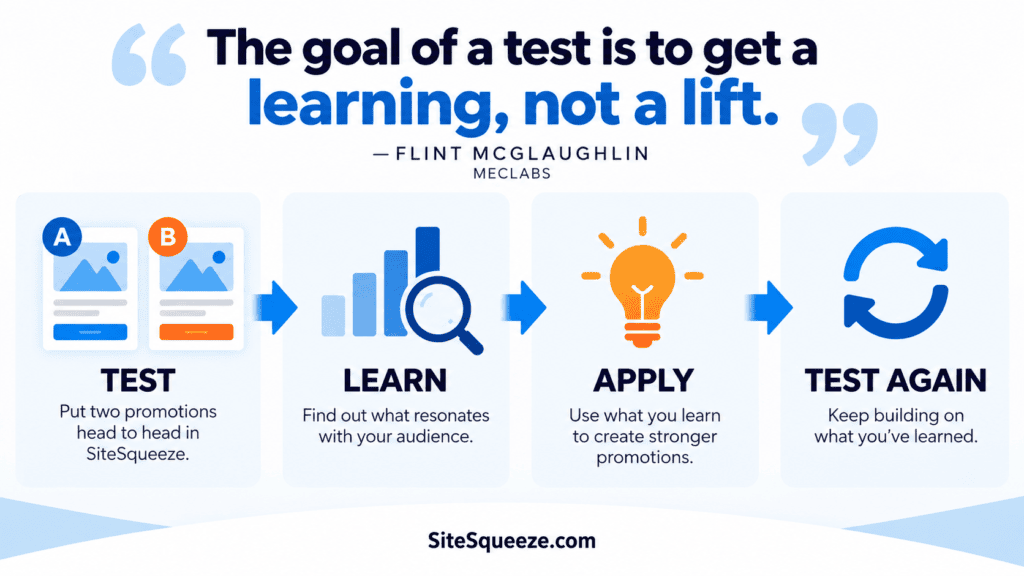
A/B testing has a deceptively simple premise: show some visitors Variation A, others Variation B, see which performs better.

Want to estimate this for your own experiment? Use my A/B Test Traffic and Sample Size Calculator to estimate the required sample size and testing time based on your baseline CTR, Minimum Detectable Effect, confidence level, statistical power, and eligible traffic.

The hard part isn’t running the test. It’s deciding when the evidence is strong enough to believe the result, especially on a site that doesn’t generate enormous traffic. Even high-traffic sites run into this, because total website traffic isn’t what determines whether a test is viable. What matters is the traffic that can actually participate in that specific experiment.

SiteSqueeze’s A/B testing combines Bayesian probability, a user-defined Minimum Meaningful Improvement, a seven-day minimum testing period, and explicit uncertainty states. The goal isn’t to produce a winner as fast as possible. It’s to recommend one only when the evidence actually supports it. Here’s how that works.

A/B testing process with icons for 'Keep Testing', 'Winner', 'No Meaningful Difference', and 'Inconclusive' on a website, emphasizing evidence-based decision making.

Traditional Sample Sizes Add Up Fast

Suppose a promotion has a 2% baseline CTR. Using a conventional fixed-horizon calculation (95% confidence, 80% power, equal allocation), distinguishing a 10% relative lift (2.0% vs. 2.2%) takes roughly 80,600 impressions per variation, about 161,200 total. Distinguishing a 50% lift (2.0% vs. 3.0%) takes about 3,800 per variation. These are illustrative estimates, not universal requirements, but the pattern holds: the smaller the difference you want to detect, the more evidence it takes, often dramatically more.

And remember, those are eligible impressions for the experiment, not total website page views.

For most sites, waiting to accumulate hundreds of thousands of eligible impressions on a single promotion isn’t realistic. That doesn’t mean the math is broken. It means there genuinely isn’t enough evidence yet to confidently tell two similar outcomes apart. SiteSqueeze doesn’t try to make that uncertainty disappear. It tries to make it useful.

Why Bayesian Probability

SiteSqueeze evaluates each test with a Bayesian model instead of a simple significance check. The marketer-facing question is straightforward: given what we’ve observed so far, how probable is it that one variation meaningfully outperforms the other?

Each variation starts with a weak, neutral prior, no assumption that A or B is better going in. As impressions and clicks accumulate, the model updates. If A gets 100 impressions and 3 clicks, SiteSqueeze isn’t just recording “3% CTR,” it’s also tracking how much uncertainty a sample that size still carries. More evidence narrows that uncertainty; a small sample leaves plenty of it.

Consider Control A at 70 impressions/2 clicks (2.86% CTR) versus Variation B at 70 impressions/3 clicks (4.29% CTR), a roughly 50% relative difference. The entire gap is one click. With that little data, the Bayesian distributions stay wide, and SiteSqueeze won’t call B a winner. That’s the model doing its job: describing the strength of the evidence, not manufacturing evidence that isn’t there. Bayesian statistics don’t turn 100 impressions into 10,000; they just let SiteSqueeze be honest about what 100 impressions can and can’t tell you.

Being Better Isn’t Enough: Minimum Meaningful Improvement

Suppose enough traffic eventually accumulates to be confident that B converts at 2.10% against A’s 2.00%, a real, 5% relative improvement. Is it worth acting on? That depends on what changing promotions costs you. For one business 5% might be substantial; for another, not worth the redesign.

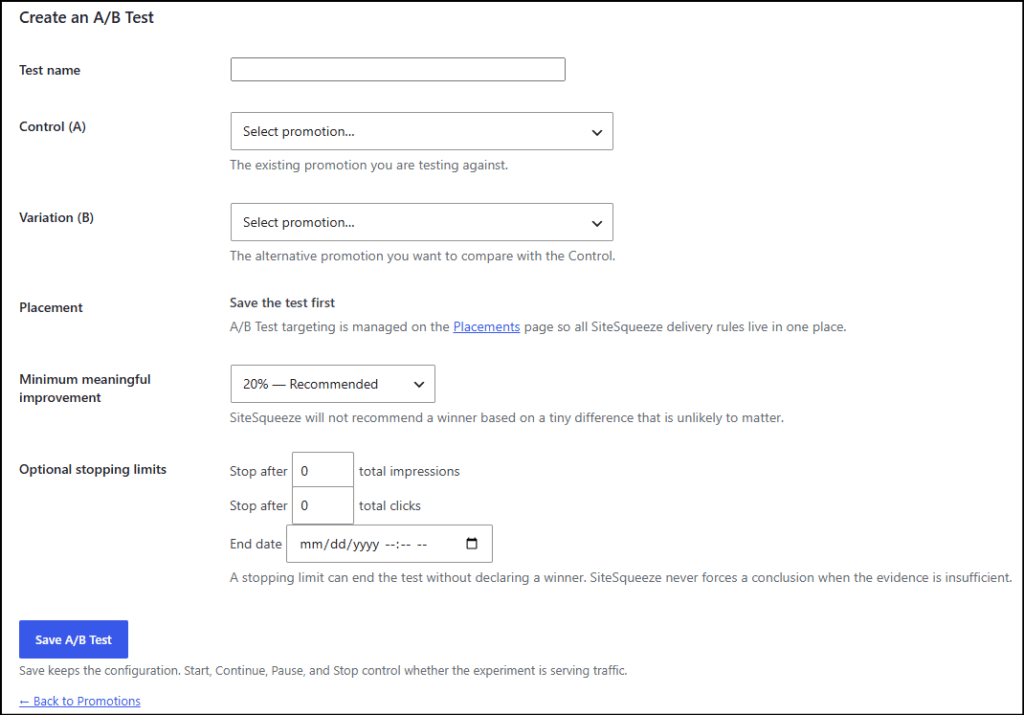
That’s why every SiteSqueeze test includes a Minimum Meaningful Improvement setting: 10%, 20%, 30%, or 50%, default 20%. It changes the question from “is B better than A?” to “is B better than A by at least the margin I’ve said actually matters?” It also keeps a test from burning traffic chasing a difference you wouldn’t act on anyway.

None of the four options is a statistical constant, they’re a product default you can adjust. Ten percent lets smaller gains count but needs more evidence to confirm. Fifty percent demands a much bigger, easier-to-detect gap but can miss smaller wins that still matter. Twenty percent is a reasonable middle ground. The right setting depends on your situation: high-volume sites where small lifts move real revenue might set it lower; lower-traffic content sites that wouldn’t switch promotions without a dramatic difference might set it at 30-50%. Decide before you see results, or it’s easy to move the goalposts once you know which variation is ahead.

Minimum Meaningful Improvement isn’t the same thing as Minimum Detectable Effect (MDE), a term you may know from traditional test planning. MDE is a planning input, the effect size an experiment is designed to have a given chance of detecting (that’s what my A/B Test Traffic and Sample Size Calculator uses to estimate required traffic). Minimum Meaningful Improvement is a decision input: how large a difference has to be before you’d actually act on it. One tells you how much evidence to collect. The other tells you what you’re trying to learn.

Why Seven Full Days

SiteSqueeze won’t recommend a winner before a test has run seven full active days. That’s not a statistical threshold, it’s a guardrail against weekly traffic patterns: newsletter spikes, weekend drop-off, a business audience that behaves differently Saturday morning than Monday afternoon. Seven days gives both variations a shot at one full weekly cycle. Paused time doesn’t count toward it. Seven days opens the door to a recommendation. It doesn’t guarantee one.

What It Actually Takes to Recommend a Winner

Higher current CTR, more clicks, more impressions, none of it decides a winner on its own. A recommendation requires the test to have run seven full active days and the Bayesian evidence to show at least a 95% probability that the favored variation beats the other by your selected Minimum Meaningful Improvement. If you’ve set that threshold to 20%, SiteSqueeze isn’t asking whether B is probably a little better. It’s asking whether there’s at least a 95% posterior probability that B beats A by 20% or more.

Worth being precise about what that 95% means: it’s not a guarantee B keeps winning forever. It’s the model’s confidence, given the evidence collected in this experiment, that the current gap is real and meaningful. Future traffic sources, seasonality, or a promotion going stale can all change outcomes going forward. The number describes the evidence you have, not a warranty on what happens next.

A 50/50 Split Won’t Show Identical Impressions

Allocation runs approximately 50/50, but random assignment alone won’t produce matching totals, the same way flipping a fair coin 100 times won’t guarantee exactly 50/50. SiteSqueeze also uses best-effort sticky assignment: once a browser is assigned to A, it tries to keep showing that browser A on return visits rather than switching it, which is better for the visitor and the experiment but can widen the gap between observed totals over time. SiteSqueeze tracks new assignments separately from cumulative impressions so you can check whether initial allocation looks balanced. Either way, impression counts never determine the winner; clicks relative to impressions do.

SiteSqueeze Is Allowed to Say “I Don’t Know”

A testing tool shouldn’t be rewarded for always producing a winner. SiteSqueeze can return four outcomes:

  • Keep Testing – not enough evidence yet for a responsible recommendation. One variation may be ahead; that’s not the same as knowing it’ll stay ahead.
  • Control A Recommended / Variation B Recommended – seven days, 95% probability, and your Minimum Meaningful Improvement are all satisfied.
  • No Meaningful Difference – the evidence shows neither variation clears your chosen threshold. Not “identical,” just not different enough to justify a change. If B took hours of extra design work for no real gain, keeping A is the better call.
  • Inconclusive – the test hit a stopping condition (end date, impression or click cap) before the uncertainty resolved.

“The test is over” and “we know which version is better” aren’t the same statement. SiteSqueeze would rather return Inconclusive than manufacture certainty the evidence doesn’t support.

Put together, the logic runs roughly like this: has the test hit seven full active days? If not, Keep Testing. If yes, does the evidence show 95%+ probability of a meaningful winner? If yes, recommend it. If not, does the evidence support No Meaningful Difference? If yes, that’s the result. If neither and the test is still running, Keep Testing continues. If a stopping condition ends the experiment first, Inconclusive.

Reading Results, and Why the Date Filter Doesn’t Rewrite Them

The A/B Tests section of Performance shows impressions, clicks, and CTR per variation, plus relative lift so you can judge the size of the gap rather than raw CTR alone. The Bayesian statistics show the probability that one variation meaningfully outperforms the other, and the recommendation status translates that into Keep Testing, No Meaningful Difference, or a named winner. You can also break results down by page, since aggregate numbers can mask real differences across content.

You can filter Performance reporting by date for analysis (Today, Last 30 Days, before/after some site change), but the official recommendation always uses the full experiment history. If B has accumulated enough evidence to be recommended over the whole test, switching the filter to “Today” won’t make SiteSqueeze forget what it learned before midnight. The filter changes the data you’re exploring. It doesn’t rewrite the experiment.

What SiteSqueeze A/B Testing Can’t Do

  • It can’t manufacture certainty from traffic that isn’t there.
  • Best-effort sticky assignment can’t perfectly identify the same person across every browser, device, and privacy setting.
  • CTR is the outcome being optimized right now; a click doesn’t tell you whether that visitor later purchased or subscribed.
  • Seven days doesn’t guarantee sufficient evidence, and a 95% Bayesian probability isn’t a 95% guarantee about tomorrow.

If Your Test Isn’t Producing an Answer

If Keep Testing or Inconclusive keeps showing up, the fix usually isn’t SiteSqueeze, it’s the question being asked. A few options: test a bigger difference (a 30% lift needs far less traffic than a 10% one), raise the Minimum Meaningful Improvement if you wouldn’t act on a small gain anyway, widen the placement to more eligible pages, or accept that “the evidence doesn’t support a change yet” is itself a useful, honest answer. The A/B Test Traffic and Sample Size Calculator can estimate roughly how much traffic and time a given comparison would realistically need.

The A/B Test Traffic and Sample Size Calculator can estimate roughly how much traffic and time a traditional comparison would require. If limited traffic is the bigger challenge, I’ve also written about how to A/B test a low-traffic website when traditional statistical significance may be impractical.

Better Decisions, Not Manufactured Certainty

SiteSqueeze isn’t built to guarantee every test ends with a winner. It’s built to call one only when seven days, a meaningful threshold, and 95% Bayesian confidence all agree, and to say Keep Testing, No Meaningful Difference, or Inconclusive when they don’t. Sometimes the most useful thing a testing tool can tell you isn’t which variation won. It’s that the evidence hasn’t earned a winner yet.

SiteSqueeze is coming soon: a WordPress plugin for promoting your own content and running practical A/B tests without pretending every site has enterprise-level traffic. Join the list to know when it launches.

SiteSqueeze is coming soon.

I’m building a WordPress plugin designed to help marketers promote their own content, measure what works, and run practical A/B tests without pretending every website has enterprise-level traffic.

Join the list to know when SiteSqueeze launches.

SiteSqueeze A/B Testing: How Winner Recommendations Work Read More »