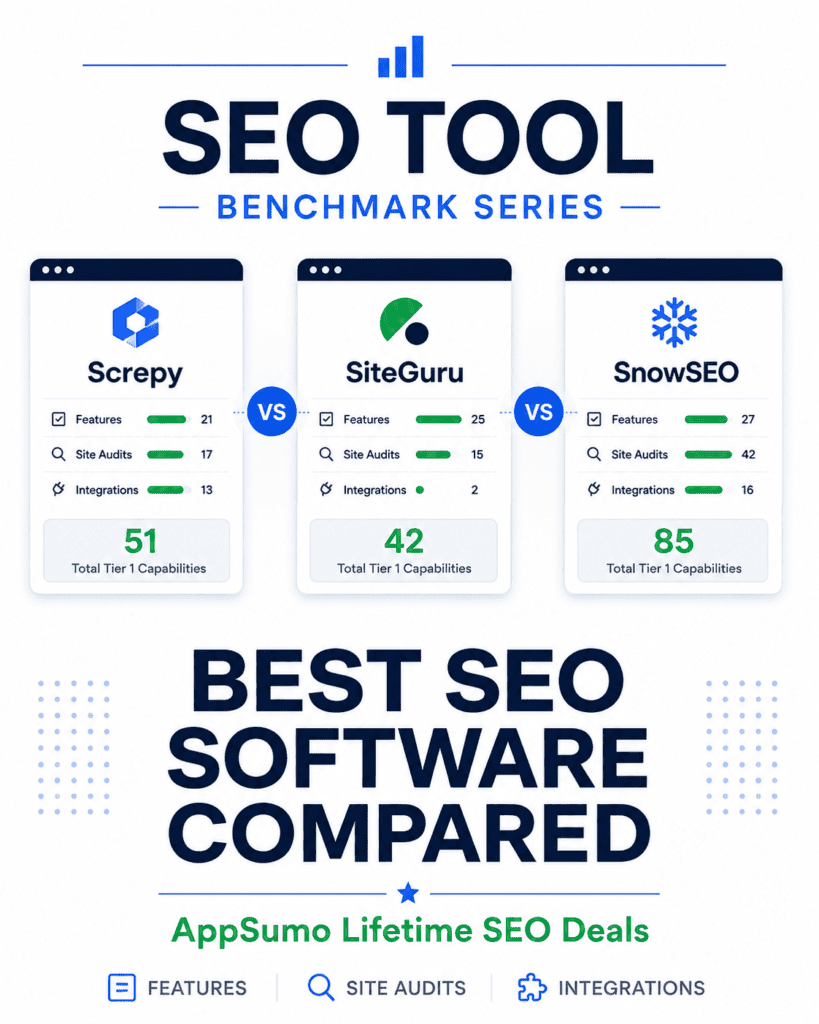
This page is the hub for my SEO Tool Benchmark Series, where I compare SEO software I have personally purchased and tested through AppSumo.
Feature lists rarely tell the full story. Two tools can both advertise site audits, keyword tracking, AI visibility, or integrations while offering very different depth and limits underneath. Rather than relying on marketing claims or an arbitrary overall score, these benchmarks compare what each platform actually includes.
Explore the SEO Tool Benchmarks
Feature Benchmark Compares the capabilities most likely to influence a buying decision: traditional SEO, AI search, content and workflow tools, reporting, and platform limits. Compare SEO tools features ->
Site Audit Benchmark Compares what each platform can inspect: technical SEO, content and links, PageSpeed, mobile usability, security, social metadata, structured data, and international SEO. Compare site-audit capabilities ->
Integration Benchmark Compares connections to core SEO data, AI assistants, development tools, publishing systems, APIs, and Model Context Protocol. Compare SEO tool integrations ->
How the SEO Tool Benchmark Works
Each benchmark compares the capabilities available in the AppSumo Tier 1 plan. This gives a consistent baseline and answers a practical question: what do you actually get when you buy the entry level lifetime deal?
Capabilities that require a higher tier are noted on the detailed comparison pages but excluded from the Tier 1 totals shown here. Numeric allowances, such as tracked keywords, users, crawl limits, or searches, count as included when they are available at Tier 1.
Affiliate disclosure: If you purchase through my link, I may earn a small commission at no additional cost to you. I only recommend tools I have personally purchased or tested.
SEO Software Benchmark Results
A platform with more verified capabilities is not automatically the best choice. One specialized capability can be more valuable to you than ten features you will never use. The totals below measure breadth, not quality.
Capability totals reflect the current benchmark and may change as features are added, removed, or further verified. Higher tier capabilities are not included.
What Each SEO Platform Does Best
Screpy
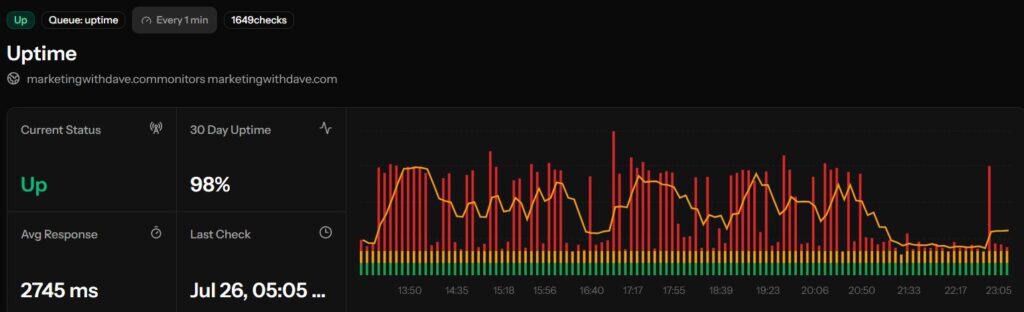
Screpy is strongest in traditional SEO monitoring, SERP research, and developer-oriented access. Its Tier 1 plan includes 5,000 crawled pages, 150 tracked keywords, SERP analysis, Google Map rank tracking, configurable uptime monitoring, a Chrome extension, API access, and integrations with Codex, Cursor, and GitHub Copilot.
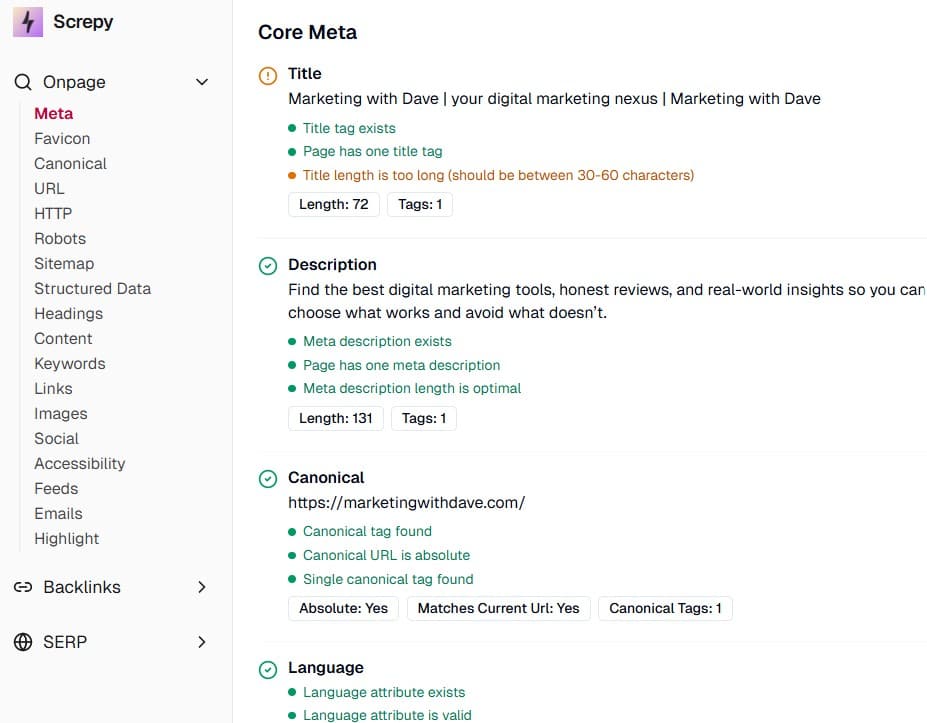
Its site audit covers 17 verified capabilities, slightly more than SiteGuru but substantially fewer than SnowSEO’s 42. Screpy covers important fundamentals such as titles, headings, canonical tags, image optimization, thin content, security headers, and Core Web Vitals, but it does not currently match SnowSEO’s depth in broken links, redirects, indexing, security, and detailed PageSpeed checks.
Several backlink and competitor features require a higher AppSumo tier and are therefore excluded from the Tier 1 total.
SiteGuru is strongest in actionable SEO guidance, reporting, and team-friendly workflow features. Its Tier 1 plan includes keyword cannibalization, striking-distance keywords, prioritized tasks, site-change tracking, scheduled reports, click-through reporting, and unlimited users.
Its main limitation is integration breadth. SiteGuru has only two verified Tier 1 integrations, Google Analytics and Google Search Console, compared with 13 for Screpy and 16 for SnowSEO. Connections to ChatGPT, Claude, Cursor, and MCP require an upgrade. That may not matter to someone primarily looking for clear recommendations and reporting, but it makes SiteGuru less suitable for integration-heavy or AI-assisted workflows.
SiteGuru is no longer available as an active AppSumo deal, but it remains a useful benchmark for existing owners and for evaluating newer platforms.
SnowSEO has the broadest Tier 1 capability coverage in this comparison, with 85 verified capabilities across features, site audits, and integrations. It leads the audit benchmark with 42 verified checks and provides especially broad coverage of performance, security, mobile usability, redirects, indexing, and international SEO.
SnowSEO also has the most developed AI-search offering in this comparison. It is the only platform currently credited with AI Brand Mentions, AI Citation Analysis, AI Prompt Management, and AI Sentiment Analysis, while also supporting AI Search Visibility.
Its biggest differentiation is that it goes beyond identifying problems. SnowSEO can create content, update existing articles, publish through WordPress or SnowCMS, and attempt automated fixes. Those changes still need careful review, as my meta-description test demonstrated. Its most obvious Tier 1 constraint is the single-user limit, compared with SiteGuru’s unlimited users.
Start with the capabilities that would meaningfully change how you work, not the tool with the highest total.
Choose Screpy when traditional rank tracking, SERP research, monitoring, crawl capacity, or developer integrations matter most.
Choose SiteGuru when actionable recommendations, reporting, and multi-user access matter more than integrations or AI-search depth.
Choose SnowSEO when audit breadth, AI-search visibility, content workflows, and automated remediation are the priorities.
These are directional strengths, not universal recommendations. Tier limits and the specific capabilities you need should drive the final decision.
SEO Tool Benchmark Methodology
This benchmark is based on hands-on use, platform documentation, AppSumo plan details, and capabilities I have personally verified. It is intentionally selective rather than an exhaustive inventory of every menu item or setting.
Each comparison page explains its own legend and how related capabilities are grouped. The benchmark will continue to evolve as products change and new tools become available.
Screpy combines technical SEO auditing, rank tracking, and uptime monitoring with something I haven’t seen in competing tools: built-in MCP integrations that connect directly with ChatGPT, Claude, Gemini, and other AI assistants. I bought Screpy back in August 2022, and it’s remained a solid SEO platform that I’ve continued using. When Screpy shipped a major platform rebuild earlier this month, I wanted to see what had changed and if I would still recommend it today.
The timing also lines up with another interesting development. SiteGuru recently wrapped up a remarkable five-year run on AppSumo. With SiteGuru gone, Screpy becomes one of the first SEO lifetime deals I would evaluate. The two tools overlap heavily in technical SEO, but each has noticeably different strengths. If you already own Screpy, this review will help you decide whether the rebuild is worth another look. If you’re considering buying it for the first time, I’ll walk through what impressed me most, where it still falls short, and whether it’s the right SEO platform for your workflow.
If you’re also evaluating other AppSumo SEO tools, see my independent SEO Tool Benchmark Series comparing SnowSEO, Screpy, and SiteGuru across verified features, site audits, and integrations.
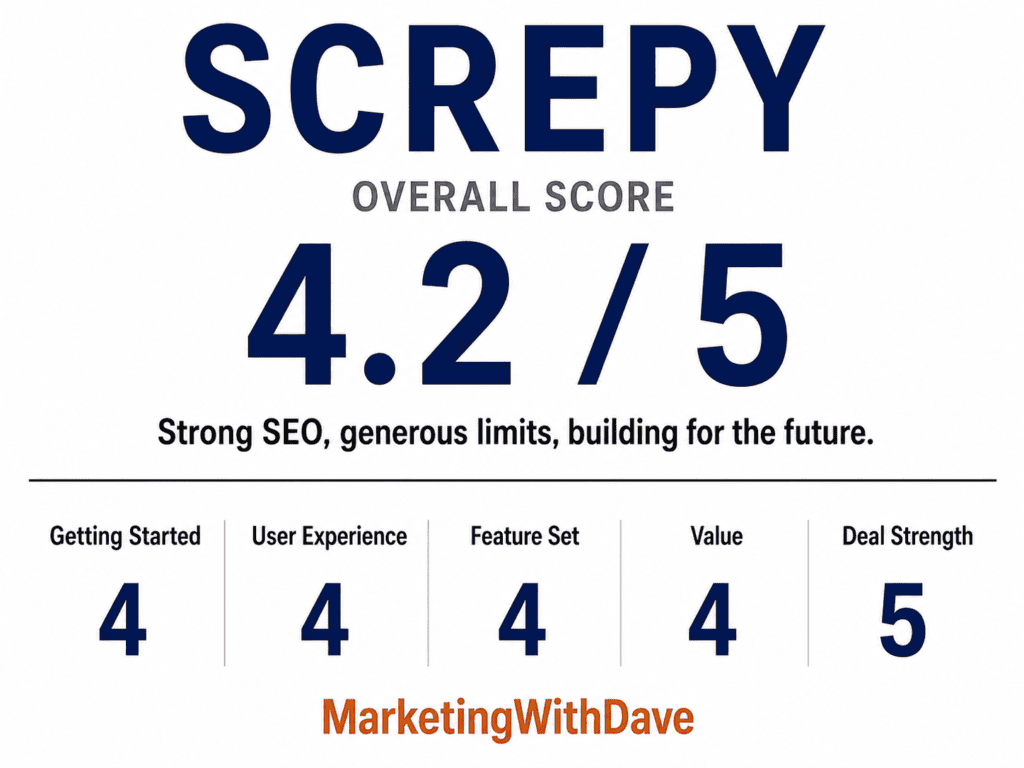
Overall Score
Why 4.2/5: Strong SEO fundamentals, generous limits, and an ambitious roadmap, held back by shallow rank tracking and missing AI Search Visibility.
Affiliate disclosure: If you purchase through my link, I may earn a small commission at no additional cost to you. I only share tools I have used myself.
The 30-Second Decision
Buy Screpy if: You want one dashboard covering technical SEO audits, rank tracking, Google Map ranking, PageSpeed monitoring, and uptime alerts, with generous crawl and keyword allowances and native AI assistant integrations through MCP.
Skip it if: You need dedicated backlink analysis, competitor comparison, or scheduled client reporting today, or you’re expecting a full AI Search Visibility feature with prompt and citation tracking.
What Stood Out: What I Liked and What I Didn’t
Before the full walkthrough, here is the short version of what separates Screpy from other tools I have tested, and what held it back.
What I Liked
Native AI assistant integrations. Screpy connects directly to ChatGPT, Claude, Gemini, Cursor, and GitHub Copilot through its API and MCP support. I have not seen this built into a similarly priced SEO tool.
Chrome extension. Quickly view SEO insights for the page you’re visiting without opening the Screpy dashboard. It’s a small convenience that makes checking pages much faster during day-to-day work.
Keyword and Rank Tracking. Monitor keyword rankings over time with historical trends and visibility into how your target terms are performing. While the tracker currently focuses on the top 10 Google results, it’s still a useful way to monitor your most important keywords.
5,000 crawled pages per project. Significantly higher than most tools at this price point, including SiteGuru’s 500-page limit.
150 tracked keywords per project. A solid allowance for small business sites and solopreneur portfolios.
Google Map Ranking tracking. Rarely included in comparable SEO tools, and a real advantage for anyone running or supporting a local business.
A visibility metric column in the keyword data. A small addition, but one I have not seen in most other platforms, and it adds useful context to raw ranking numbers.
What I Didn’t Like
Rank Tracker only shows the first 10 Google results. This was my single biggest disappointment with the tool. Screpy has explained that Google restricts reliable access to deeper result pages, and points users toward Search Console and Organic Keywords for broader visibility with richer data. That’s a fair explanation, but tracking only page one of Google is a meaningful limitation if you’re trying to watch movement out of page two or three.
AI Search Visibility is referenced in parts of the marketing, but the functionality isn’t available today. Screpy’s marketing references AI-driven insights, but there is currently no feature that tracks how your brand shows up in ChatGPT, Perplexity, or other AI answer engines. The team confirmed it’s on the roadmap, so I hope to revisit this section in a future update.
Several features require connecting through Cloudflare. This means changing your domain’s nameservers, which is a real step, not a checkbox. Cloudflare’s free plan covers what Screpy needs, so there’s no added cost, but it’s worth knowing this isn’t a five-minute setup for everyone.
You can’t sort most columns by clicking the header. A small thing, but it slows down scanning larger data tables.
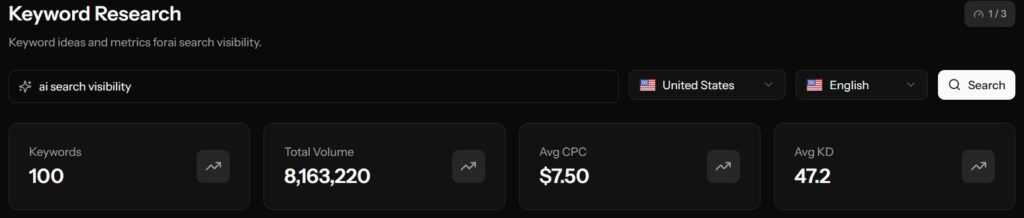
Keyword Research results disappeared once I navigated away from the screen during testing, though the team told me a fix was already in progress and expected within a day or two.
No backlink analysis, competitor comparison, or scheduled reports. Backlink data sits behind an upgrade, and there’s no way to automatically send white-label reports on a schedule.
Would I buy Screpy again today? Yes, but with clear expectations. For most small businesses, freelancers, agencies, and website owners, Screpy offers an impressive amount of functionality for the price. It’s one of the more compelling SEO lifetime deals available today, particularly for buyers who value generous limits and active product development.
Pros and Cons
Pros
Cons
5,000 crawled pages per project, well above comparable tools
150 tracked keywords per project
Native AI assistant integrations with ChatGPT, Claude, Gemini, Cursor, and GitHub Copilot via MCP
Google Map Ranking tracking, rare at this price point
Visibility metric column adds useful context to keyword data
37-point site audit covering technical, content quality, security, and social tag issues
Responsive team that fixed or acknowledged several issues while I was testing
Strong long-term AppSumo rating (4.6 from 900+ verified purchasers)
Rank Tracker limited to the first 10 Google results per keyword
AI Search Visibility is marketed but not yet functional
Several features require a Cloudflare nameserver change to set up
Most data tables can’t be sorted by clicking column headers
No backlink analysis, competitor comparison, or scheduled reports
What Screpy Actually Does
Screpy centers on five areas: Search Console insights, technical SEO auditing, keyword rank tracking, PageSpeed and Core Web Vitals monitoring, and uptime alerts, all rolled up into white-label reports.
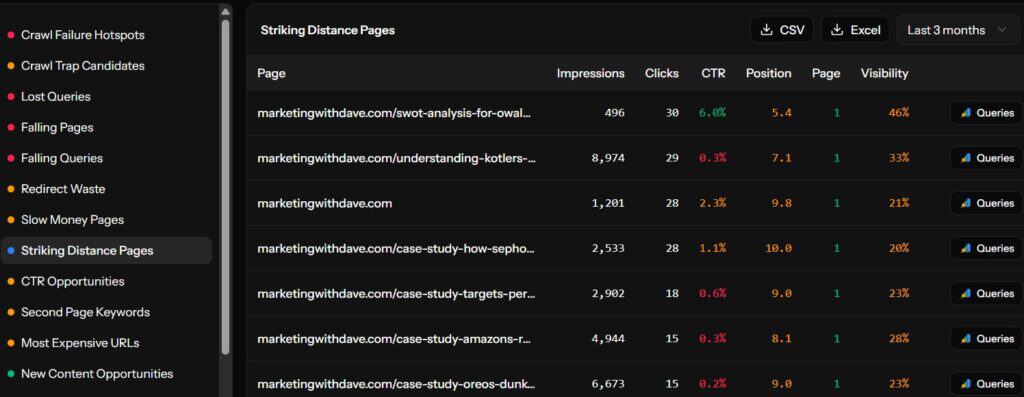
Search Console insights pull in your clicks, impressions, average position, and CTR, and let you compare date ranges to spot new keywords, lost keywords, and pages with high impressions but weak click-through rates.
Technical SEO audit crawls up to 5,000 pages per project and checks for broken links, redirect issues, crawlability problems, duplicate content, structured data issues, and more, organized into a single health score with prioritized, page-level fixes.
Keyword rank tracking covers up to 150 keywords per project across desktop and mobile, with historical position data and a Google Map Ranking feature for local search visibility.
PageSpeed and Core Web Vitals monitoring covers up to 25 URLs per project using Google Lighthouse data, tracking LCP, CLS, and INP alongside recommendations for improving load speed.
Uptime monitoring checks your site continuously and alerts you the moment it goes down, with downtime history to help spot recurring hosting problems.
I own Screpy, SiteGuru, and SnowSEO, and I’ve spent considerable time using all three. The comparison below uses each product’s AppSumo tier 1 plan so you’re comparing like for like.
Feature
Screpy
SiteGuru
SnowSEO
Pages crawled per project
5,000
500
500
Keywords tracked per project
150
100
50
Top SERP positions tracked
10
100
163+
Google Map Ranking
Yes
No
No
AI Search Visibility tracking
Coming soon
Yes
Yes
Native AI assistant / MCP integrations
Yes
Upgrade only
Yes
Backlink analysis
Upgrade only
Upgrade only
Coming soon
Scheduled reports
No
Yes
Yes
The comparison above highlights where each tool stands today. Screpy has made significant progress with its platform rebuild, generous crawl limits, and native AI assistant integration. SiteGuru still sets the standard for actionable SEO recommendations, while SnowSEO has evolved into a legitimate SEO platform with strong AI Search Visibility capabilities. Which is the best fit ultimately depends on what you’re trying to accomplish.
My Experience With Screpy
Getting Started
Basic setup is straightforward, but several of Screpy’s more advanced features require routing your domain through Cloudflare, which means changing your nameservers at your registrar. It’s a real step, not just a checkbox, so budget a little extra time for it if you’re not already using Cloudflare.
The Dashboard and Data Tables
The dashboard is clean and organizes overview metrics, crawl health, on-page SEO, and rank tracking into clearly labeled tabs. One recurring frustration during testing was that most data tables can’t be sorted by clicking the column headers, which slows down scanning a large project for the biggest issues.
Site Audit
The audit covers 37 individual checks spanning canonicals, headings, meta descriptions, page titles, images, structured data, social tags, and security headers like CSP and HSTS. That’s a broader security-focused checklist than most comparable audit tools include. Each issue is scored and tied to affected pages, which makes prioritization straightforward.
Keyword Research and Rank Tracking
Screpy tracks up to 150 keywords per project with historical position data across desktop and mobile. The standout addition is Google Map Ranking, tracked weekly, which is genuinely useful for local businesses and rarely shows up in tools at this price point.
The one significant limitation, and my single biggest disappointment with the tool, is that the Rank Tracker only shows the first 10 Google results for any tracked keyword. Screpy has been direct about why: Google restricts reliable access to deeper result pages, and the team points users toward Search Console and Organic Keywords data for a fuller picture with richer detail. That’s a reasonable explanation, but it means the Rank Tracker by itself won’t tell you where you sit beyond page one, which matters if you’re trying to track movement out of page two or three.
Keyword Research is capped at 3 searches a day, and during my testing, the results disappeared once I navigated away from the screen. Screpy’s team told me a fix was already coming within a day or two of my flagging it, which was true of several smaller issues I raised during this review. The team’s responsiveness throughout testing was consistently a bright spot.
With URL Segments you can group keywords by URL path and create custom segments to monitor how sections of your site perform over time. For example, I can create a segment for all of my software reviews or all SEO-related content instead of looking at every tracked keyword together. It’s a thoughtful feature that makes large keyword sets much easier to analyze.
SERP Analysis
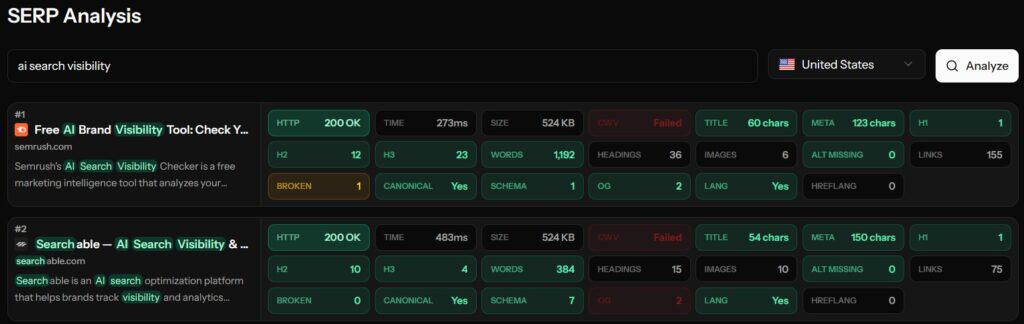
Screpy also includes a SERP Analysis tool that lets you inspect the pages currently ranking for a keyword. Instead of only seeing where your page ranks, you can quickly review the competing results and better understand what you’re up against before creating or updating content. It’s a practical addition that fits naturally into keyword research and content planning.
AI Assistant Integrations
This is where Screpy differentiates itself the most. The platform now supports API access and MCP integrations with ChatGPT, Claude, Gemini, Cursor, and GitHub Copilot, letting you pull Screpy data directly into an AI workflow or connect your own account for custom article and report generation. I haven’t seen this level of AI assistant integration in a comparable SEO tool at this price point, and it’s a meaningful forward-looking addition.
The AI Visibility Gap
Screpy’s marketing references AI-driven insights, but there is currently no feature that tracks how often your brand is cited or referenced across ChatGPT, Perplexity, Google AI Overviews, or other AI answer engines. That kind of AI Search Visibility tracking is increasingly common in newer SEO platforms, and Screpy doesn’t have it yet despite alluding to it. This was my biggest disappointment with the platform for that reason. The team confirmed AI search tracking is on the roadmap, so I hope to revisit this section in a future update.
What’s Missing
Backlink data and competitor analysis both sit behind an upgrade rather than being included, and there’s no way to schedule white-label reports to go out automatically. None of these are deal-breakers on their own, but buyers who specifically need backlink monitoring or scheduled client reporting should know those aren’t part of the current feature set.
Support
Support was a consistent strength throughout testing. Multiple smaller issues I raised, including the keyword research data disappearing, were acknowledged quickly and in some cases fixed within minutes. Throughout my testing, I also found the founder to be active in the AppSumo questions section and genuinely interested in customer feedback, which is a good sign for where the product is headed.
Where Screpy Fits
Screpy is a strong fit for: local businesses that benefit from Google Map Ranking, agencies managing multiple client sites with white-label reporting, freelancers and solopreneurs who want broad SEO coverage without juggling several tools, and anyone curious about connecting SEO data into an AI assistant workflow.
Screpy is not the right fit for: enterprise SEO teams, anyone whose work depends heavily on deep backlink analysis, large agencies needing scheduled automated reporting, or anyone looking to fully replace Ahrefs or Semrush.
What Screpy Is Not
Screpy is not Ahrefs or Semrush, and it’s not attempting to be. Those platforms have deep backlink databases and mature keyword research tooling built over many years. Screpy also isn’t currently a dedicated AI visibility or GEO platform, despite some marketing language suggesting otherwise. What Screpy is: a broad, actively developed technical SEO and monitoring dashboard with a genuinely useful set of core features, generous usage limits for the price, and a differentiated integration story through AI assistant connections.
Pricing and Plans
Screpy currently has two AppSumo offers depending on whether you’re an AppSumo Plus member, and the plan structure has been evolving alongside this month’s platform rebuild. Rather than listing pricing and limits that may change, I’d recommend checking the current deal page for the latest plans, tiers, and feature availability before buying.
Try It Risk-Free: AppSumo’s 60-Day Refund Policy
AppSumo’s 60-day refund window gives you enough time to connect your site, run a full audit, and test the rank tracker and keyword research limits before committing.
Bottom Line
I’ve owned Screpy since August 2022, and watching it evolve into this month’s rebuild has been reassuring rather than concerning. The core strengths are still there: generous crawl and keyword limits, Google Map Ranking, a 37-point site audit, PageSpeed monitoring, uptime alerts, and a genuinely novel set of AI assistant integrations through MCP. That’s a solid all-in-one package for small business owners, local businesses, and solopreneurs who don’t want to juggle four separate tools.
The honest gaps are the Rank Tracker’s 10-result limit, which is a real constraint and my single biggest disappointment with the tool, and an AI Search Visibility feature that’s referenced in the marketing but not yet built. There’s also no backlink analysis, competitor comparison, or scheduled reporting today. The team was responsive to every issue I raised during testing, which matters for a platform in the middle of a rebuild.
For most small businesses, freelancers, agencies, and website owners, Screpy offers an impressive amount of functionality for the price. It’s not perfect today, but it’s one of the most interesting SEO lifetime deals currently available, and I’m excited to see where the team takes it next.
This content is for educational purposes and reflects my hands-on experience using the product and the information publicly available at the time of writing. Always evaluate tools based on your specific business needs, goals, and workflows before making a decision.
X (Twitter) is still large enough to matter, but it’s no longer built to give free, low-friction organic marketers a clean experience. Post there when the workflow is easy, the audience fit is real, or the content is naturally conversational.
Just know three things going in:
basic analytics are gated or degraded
third-party publishing is more constrained because X’s API is expensive
advertiser trust in the platform is historically weak.
This isn’t “X is useless.” It’s “X is now a buyer-beware channel.”
The audience is still there
DataReportal reported 586 million global users reachable by ads in January 2025, and its U.S. Digital 2026 report puts X’s U.S. ad reach at 99 million in late 2025. Pew’s latest fact sheet shows 21% of U.S. adults say they use X, skewing toward younger adults, men, urban users, and higher-income households.
So the audience question is clear: it’s still there, especially for real-time news, commentary, politics, sports, finance, tech, and founder-led conversations. What’s in question is whether the free, basic-marketer experience is still good enough to justify the operational effort.
Two data points complicate the picture. DataReportal also reported shrinking potential ad reach year over year, so the scale isn’t obviously growing. And on the revenue side, EMARKETER and Reuters both project X returning to ad revenue growth in 2025 for the first time since Musk’s takeover (roughly $1.31 billion in U.S. ad revenue and $2.26 billion globally), but both note revenue still sits well below pre-acquisition levels. The platform isn’t disappearing. It just hasn’t earned back confidence.
What changed for organic marketers
Analytics went behind a paywall. Multiple current guides describe native X analytics as a paid feature tied to Premium, matching what most free users now see in-product. That leaves marketers without the simple post-level visibility (impressions, engagement) they used to take for granted.
The API got expensive. X’s official pricing now runs pay-per-use: a standard content creation request costs $0.015, but one that includes a URL costs $0.200. Analytics reads are billable too, with “owned reads” of a user’s own content priced at $0.001 per resource. That gap between plain posts and link posts explains a lot of what’s showing up in social scheduling tools.
The policy layer adds risk. X’s authenticity policy holds users responsible for any third-party app they authorize, and it prohibits automation that doesn’t comply with the Developer Policy. Normal scheduling isn’t banned, but the ecosystem has gotten less forgiving and more dependent on paid API access than most marketers realize.
Native posting and scheduling still work fine on the web. The moment you want sustainable analytics, multi-account tooling, or richer automation, costs and constraints show up fast.
Why marketers are frustrated
Trust and brand safety. Kantar’s 2024 Media Reactions research found trust in ads on X fell from 22% in 2022 to 12% in 2024, with only 4% of marketers believing X ads are brand safe. A net 26% of marketers told Kantar they planned to cut X spending in 2025, the largest pullback among major global ad platforms.
Weak organic economics for free accounts. Buffer analyzed 18.8 million posts from 71,000 accounts and found Premium accounts got roughly 10x the median reach of regular accounts, while regular accounts had a median engagement rate of 0% by 2025. Link posts were the weakest format, essentially flatlining for non-Premium accounts after March 2025. It’s one company’s dataset, not a controlled study, but it matches what marketers are reporting: if you’re not paying and you’re posting links, distribution is a tough game.
Third-party integration friction. Because links and analytics now cost real money at the API level, vendors can’t treat X the way they treat LinkedIn, Pinterest, or Facebook. Restrictions that would have sounded absurd a few years ago now make straightforward economic sense.
Constant ambiguity. Even when a feature technically still works, marketers now have to ask a second question: does this work natively only, or in the paid tools too? That ambiguity is expensive for small teams because it turns into ongoing testing and troubleshooting.
Case study: what RobinReach and Sociamonials reveal
While reviewing RobinReach and Sociamonials for my comparison of the two social media management platforms, I noticed something interesting. These aren’t isolated gripes. They’re a clean window into the broader X ecosystem.
RobinReach’s founder has stated publicly that the tool doesn’t support posts with URLs, because X’s API pricing makes them significantly more expensive than plain text, image, or video posts. RobinReach also documents daily posting limits, confirms X moved to pay-per-use API pricing in 2026, and has disabled X analytics across all its plans because read costs are too high.
Sociamonials has said the same thing in different words. Asked directly on AppSumo, its founder confirmed that X’s developer pricing made it impossible to offer link posting except on an Enterprise tier with an extra monthly charge, and that repost intervals under a day aren’t supported either.
There are exceptions. In my subsequent testing of SocialBu, I found that it does support publishing X posts containing links. My current plan allows at least two link posts per day, although I haven’t yet confirmed whether that is the maximum. That doesn’t invalidate what RobinReach and Sociamonials have said about X’s API costs. It shows that different social media platforms are making different decisions about how much of that cost and functionality they’re willing to absorb or pass along to customers.
Line those statements up against X’s own pricing ($0.200 for a post with a URL versus $0.015 without) and the broader pattern becomes clear: vendors aren’t arbitrarily limiting their X features. They’re making different product and pricing decisions around an API model that makes links and analytics considerably more expensive. Some restrict those features, while others, like SocialBu, have found ways to continue offering at least some of that functionality.
What Premium solves, and what it doesn’t
X currently bundles edit post, longer posts, longer video uploads, reply prioritization, and, at higher tiers, verification, reduced ads, monetization eligibility, and Media Studio. Pricing on the web runs roughly $3/month for Basic, $8/month for Premium, and $40/month for Premium+. (Longer posts still can’t be scheduled, a small detail that says a lot about how cleanly the feature set maps onto an actual marketing workflow.)
If your goal is on-platform reach, editing, long-form posts, or monetization, Premium helps. Buffer’s data suggests it meaningfully improves visibility. But if your goal is simple, trustworthy website attribution for ordinary organic posts, Premium doesn’t get you there. It’s not the old free-Twitter measurement experience coming back.
Worth separating from all of this: X’s Ads API is a genuinely rich environment for paid campaigns, with campaign management, scheduled creatives, click objectives, and real conversion tracking. That machinery still works well. It’s just that an ordinary organic marketer isn’t operating in that stack unless they’re paying for ads or a separate toolchain.
X in 2026 is increasingly built for paying participants or lightweight casual use. The middle ground, marketers who want decent free analytics, routine scheduling, and cheap tracking, is exactly where the experience has broken down.
A realistic playbook
Keep it lightweight. Post natively when it’s easy. Use a tool when it makes X convenient without workarounds. Don’t build elaborate tracking for a channel that isn’t already sending real traffic, especially if your Google Analytics (GA4) or referral data rarely shows meaningful x.com, t.co, or twitter.com contribution.
Favor text over links. Buffer’s data says text posts perform best, video and images are workable, and links are the weakest format for non-Premium accounts. If a link matters, consider leading with a strong native post and moving the URL to a reply.
Measure down-funnel. With on-platform analytics degraded or paywalled, ask “did this drive sessions, signups, demos, or sales?” instead of “how many impressions did this get?” Lean on GA4, Search Console, and landing-page behavior rather than X’s own dashboards.
The takeaway
None of this means marketers should abandon X. If your audience is active there, the platform can still generate meaningful conversations and referrals. The question isn’t whether X works. It’s whether the free marketing experience still justifies the operational overhead.
X is now a convenience channel, not a marketing trust channel.
X is no longer a platform I optimize for. It’s a platform I syndicate to.
If it takes two minutes to syndicate a strong thought there, do it.
If it takes paid upgrades, link workarounds, or tracking hacks just to measure basic performance, that effort is usually better spent on a channel with better attribution, better tooling, and more confidence behind it.
If you’ve compared two social media management tools lately, you’ve probably noticed something frustrating. Every feature list looks almost identical. Publish. Schedule. AI. Analytics. Calendar. After the fifth comparison page, everything starts blending together.
That’s because most tools aren’t really competing on whether they can publish to Facebook or LinkedIn anymore. Most platforms are boxed in by the same network APIs, so the core publishing layer looks nearly the same everywhere you look. They’re competing on how well they fit your workflow, how much time they save you, and whether they’ll still work for you a year from now.
The market has moved in that direction too. HubSpot’s 2026 social media research found that brand awareness is now the top goal for 59% of social teams, that 94% of marketers already use AI somewhere in their workflow, and that 77% say authenticity matters more than production value. Nearly half expect their social tool stack to grow. Nobody is shopping for “a scheduler” anymore. They’re shopping for a system that helps them publish, learn, respond, and prove value, and that still holds up as the business changes.
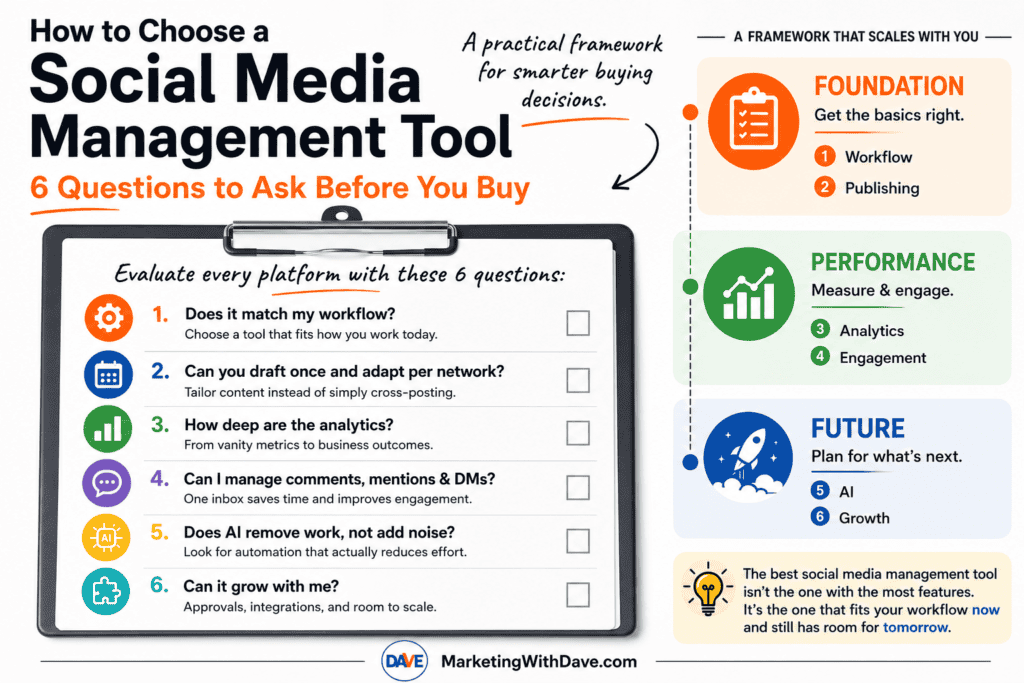
After testing dozens of marketing tools over the years, I’ve found that feature count is usually a poor predictor of how much I’ll actually enjoy using a product. Some of my favorite tools aren’t the ones with the longest list of checkboxes. They’re the ones that remove friction from the work I do every day. That’s the lens behind the six questions below. I’ll run the framework against three tools I’ve tested hands-on: RobinReach, Sociamonials, and FeedBoss. They make an especially useful comparison because the first two compete as broader social media management platforms, while FeedBoss is built entirely around LinkedIn.
Question 1: Does it match my workflow?
What to look for: The most-featured tool isn’t automatically the right one. Look for a platform whose default workflow matches how you actually work today, not the workflow of a team three times your size.
Why it matters: Enterprise-style platforms show up repeatedly in the research with governance, audit trails, role-based permissions, and multi-team approvals built in. Those are real advantages for a large team, but they’re overhead for a solo marketer or small business.
Warning sign: If you find yourself hunting through settings and navigation for the two or three things you actually use every day, the tool was built for a level of complexity you haven’t reached yet. A solo marketer who picks a simpler tool often ends up publishing more consistently, simply because the workflow doesn’t get in the way.
Question 2: Can you draft once and adapt per network?
What to look for: A platform should let you write a post, tailor it for each network’s format and audience, schedule it ahead, and see the whole calendar at a glance. If you publish a lot of blog or CMS content, auto-sharing new posts to social is worth real weight here too.
Why it matters: This is the baseline job of the category. If a tool can’t do this cleanly, everything else it offers is secondary.
Warning sign: Repurposing content across platforms, adapting one platform’s post for another, is a meaningfully different capability than simple cross-posting. Not every tool that claims to “save you time” actually does the adapting for you.
Question 3: How deep are the analytics?
What to look for: Social analytics generally show up in layers, and it’s worth knowing which layer a tool stops at before you buy.
Level 1: Vanity metrics. Follower growth, reach, likes. Every tool has this.
Level 2: Post-level performance. Which individual posts actually worked.
Level 3: Campaign attribution. UTM tracking, Google Analytics integration, performance by campaign or tag.
Level 4: Business outcomes. Revenue, CRM data, lead generation, paid-performance reporting tied back to results.
Why it matters: This is exactly how the larger enterprise platforms differentiate themselves, and it’s also where solo marketers most often get surprised after buying. A tool that only reports at Level 1 or 2 will eventually push you into a spreadsheet for anything resembling attribution.
Warning sign: Marketing copy that says “advanced analytics” without specifying whether that means post-level, campaign-level, or revenue-level reporting. Ask which level you’re actually getting.
Question 4: Can I manage comments, mentions & DMs?
What to look for: One place to see and respond to comments, mentions, and messages across networks, without switching out to each platform individually.
Why it matters: Once a brand gets any traction, social stops being a one-way broadcast channel. A real inbox is the difference between managing social media and constantly firefighting it.
Warning sign: A tool that is entirely focused on outbound publishing with no engagement layer at all is optimized for content broadcasting, not relationship-building or customer service.
Question 5: Does AI remove work, not add noise?
What to look for: AI that’s built into the core workflow (drafting, repurposing, alt text, image generation) rather than bolted on as a marketing feature.
Why it matters: Almost every tool in this category now has AI somewhere. The useful question isn’t whether AI is present, it’s whether it removes real repetitive work without flattening your brand voice.
Warning sign: AI is the headline feature propping up a thin workflow underneath. If the AI capabilities are the main selling point and everything else feels like an afterthought, that’s worth noticing.
Question 6: Can it grow with me?
What to look for: Approval workflows, campaign or contest tooling, CRM and marketing-stack integrations, and multi-client or team permissions, even if you don’t need them yet.
Why it matters: Future you will appreciate this. Even if you’re the only person creating content today, approval workflows become valuable the moment a freelancer, employee, or client joins the process. If a vendor has no path toward that, or toward deeper campaign tooling and integrations, assume you may need to replace the tool rather than grow with it.
Warning sign: No stated roadmap when you ask about a missing feature. A vague “it’s coming” from support is different from a founder who can point to something concrete in progress.
The factor no feature list will show you: reliability
Nobody talks about reliability until it burns them. Does publishing fail silently? Can you trust a scheduled post to actually go out? How does the vendor respond when something breaks? None of that shows up on a pricing page, and it’s worth digging into reviews specifically for how a company handles friction, not just what features it lists. In the RobinReach vs Sociamonials research, for example, one Sociamonials reviewer described unresolved bugs and no response from support, and the founder’s public reply flatly asserted a “zero known bugs” policy rather than addressing the specific issue. That kind of exchange tells you more about what ownership will feel like than any feature comparison does.
Running the Framework: RobinReach vs Sociamonials vs FeedBoss
Here’s how the six questions play out across three platforms I’ve tested hands-on.
RobinReach and Sociamonials are the more direct comparison because both are built to manage multiple social networks. FeedBoss is different by design: it focuses entirely on LinkedIn. That makes it a useful test of the framework itself. A platform can lose badly on feature breadth and still be the better choice if its narrower workflow matches what you actually need.
Question
RobinReach
Sociamonials
FeedBoss
1. Does it match my workflow?
Fast onboarding and one of the cleaner interfaces I’ve tested. Best fit when creating, repurposing, and publishing across multiple networks is the core job.
More powerful but more complex. The additional campaign, CRM, analytics, approval, and agency features create a steeper learning curve.
Excellent fit if LinkedIn is the workflow. Its onboarding built a surprisingly accurate profile of who I am, what I write about, and how I write. It makes far less sense if you need to manage several social networks.
2. Can you draft once and adapt per network?
Strongest of the three for multi-network repurposing. It can take content and adapt it across platforms rather than simply posting the same copy everywhere.
Strong core scheduling with a visual calendar, bulk upload, and RSS automation, but less emphasis on automatically repurposing one piece of content for different networks.
This question works differently because there is only one network. FeedBoss instead goes deeper on developing, refining, scheduling, and supporting LinkedIn content with images and carousels.
3. How deep are the analytics?
Still the weakest area in my testing. Analytics were largely profile-level, closer to Levels 1 and 2 of the framework.
The strongest traditional social analytics of the three, reaching into post and campaign performance plus Google Analytics campaign tracking.
The biggest surprise. FeedBoss turned my existing LinkedIn history into useful analysis of engagement trends, content-format performance, follower growth, and best day and time to post. It also showed the number of posts behind its conclusions so I could see when a sample was too small to trust.
4. Can I manage comments, mentions & DMs?
Lets you reply to comments from inside the platform, giving it a useful day-to-day engagement layer.
Approaches engagement more through Social CRM and workflow tools than a simple consolidated inbox.
LinkedIn engagement is built into the platform, including tracking posts and contacts and helping draft comments, but this is not a multi-network social inbox and it should not be evaluated as one.
5. Does AI remove work, not add noise?
One of RobinReach’s strengths. AI supports content creation, repurposing, image generation, and its MCP connection lets tools such as ChatGPT, Claude, and Codex work directly with the social workflow.
AI exists, but it is less central to the workflow. Sociamonials’ differentiation comes more from campaigns, analytics, automation, and marketing integrations.
This is where FeedBoss impressed me most. It did more than generate a LinkedIn post and walk away. It analyzed my writing history, built a detailed persona, recognized when a draft lacked the kind of first-hand example I normally use, asked me for one rather than inventing it, and continued refining the post after I responded.
6. Can it grow with me?
Growth comes through additional brands, members, integrations, automation, API access, and MCP workflows. Some of the more advanced capabilities require higher tiers.
Strongest traditional growth path for agencies and larger teams, with approvals, Social CRM, campaign tools, agency management, client workspaces, and a broad integration ecosystem.
There is room to grow, but Tier 1 exposes an important limitation. Video Studio, Lead Magnets, Authority Map, API access, and post-approval workflows require higher tiers. That matters much more once multiple people are involved in the LinkedIn workflow.
If you want the deeper feature-by-feature comparison of the two multi-network platforms, see my RobinReach vs Sociamonials comparison. I also published a separate hands-on FeedBoss review covering its LinkedIn analytics, profile audit, writing workflow, carousel generation, Tier 1 limits, and the issues I encountered while testing it.
The Factor No Feature List Will Show You: Reliability
Nobody talks about reliability until it burns them. Does publishing fail silently? Can you trust a scheduled post to actually go out? What happens when something breaks? And perhaps just as important, how does the company respond after you tell them?
This is why I pay attention to support interactions as much as feature lists.
During my RobinReach vs Sociamonials research, one Sociamonials reviewer described unresolved bugs and no response from support. The founder’s public reply asserted a “zero known bugs” policy instead of addressing the specific experience. Whatever the underlying facts, that exchange gave me information I could never get from the pricing page.
My FeedBoss experience went the other direction. Trending Topics research failed outright while I was testing it. I reported the problem, the team responded, and the feature was working within minutes. A launch-day bug is still a bug, but that is exactly how I want a young software company to respond when something breaks.
Reliability is not just uptime. It is also how quickly a vendor acknowledges problems, communicates what happened, and fixes what customers find.
How Priorities Shift as You Grow
The six questions stay the same, but their importance changes as your organization gets larger.
Capability
Solo Marketer
Growing Business
Agency
Publishing
Essential
Essential
Essential
Analytics
Basic
Advanced
Advanced / Multi-client
Inbox & Engagement
Nice to have
Important
Essential
AI
Helpful
Important
Important
Approvals
Usually unnecessary
Important
Essential
Integrations
Nice to have
Important
Essential
This is also why I would not automatically penalize a focused product for lacking features designed for an agency.
A solo marketer may get more value from a platform that makes the work fast and obvious than from one with client approvals, governance, CRM integrations, and campaign workflows they never touch. An agency evaluating the same products could reach the exact opposite conclusion.
FeedBoss makes that tradeoff especially obvious. If LinkedIn is where you are building your personal brand or generating business, its narrow focus can be an advantage. If you need one system for Facebook, Instagram, TikTok, X, Pinterest, LinkedIn, and everything else, that same focus immediately eliminates it.
The Takeaway
The best social media management tool is not the one with the longest feature list. It is the one that removes the most friction from the work you actually need to do.
RobinReach, Sociamonials, and FeedBoss make that point unusually clear because each optimizes for something different.
RobinReach is strongest when efficient multi-network content creation, repurposing, publishing, and AI-assisted workflows are the priority.
Sociamonials makes more sense when deeper analytics, promotional campaigns, approvals, CRM capabilities, and agency workflows matter more than simplicity.
FeedBoss gives up multi-network breadth entirely and concentrates on LinkedIn content, analytics, profile optimization, engagement, and personal-brand workflows.
None is objectively the best social media platform because “best” changes with the job you are hiring the software to do.
That is why I keep coming back to these six questions. Features change. Interfaces improve. AI capabilities may look completely different six months from now. Your workflow is the more durable filter.
Before buying another social media tool, ask whether it fits how you work today, helps you publish without creating more work, gives you enough measurement to make better decisions, supports the engagement you actually need, uses AI to remove work instead of adding noise, and has somewhere for you to grow.
If you are currently comparing broader social media platforms, see my complete RobinReach vs Sociamonials comparison. If LinkedIn is your primary focus, my FeedBoss review includes the screenshots, analytics, profile audit, carousel test, credit details, and launch-day issues from my hands-on evaluation.
Unless otherwise noted, feature comparisons below come from my own hands-on evaluation of both platforms, backed up by the public AppSumo listings, founder Q&A, and customer reviews for pricing and context. Both tools promise to take social media off your plate. Both schedule posts, both cover most of the major platforms, and both use AI somewhere in the product. Here’s where they actually differ.
I also evaluated both platforms using the same six-question framework I use to look beyond feature lists and assess workflow fit, publishing, analytics, engagement, AI, and how well a tool can grow with you.
RobinReach offers the cleaner, more intuitive experience, while Sociamonials provides the broader feature set.
RobinReach shines in AI-assisted publishing and content repurposing, while Sociamonials stands out with campaigns, analytics, and workflow flexibility.
RobinReach makes getting started incredibly easy, while Sociamonials rewards users who need more advanced capabilities.
RobinReach focuses on profile-level reporting, while Sociamonials provides much deeper post and campaign analytics.
If X (Twitter) is an important channel, Sociamonials has a real workflow advantage with its automatic first-comment option.
One caution before the details: Sociamonials looks broader mainly because it plugs into a long list of marketing integrations (Mailchimp, ActiveCampaign, Salesforce, Zapier, and many others) rather than because its social publishing itself is dramatically more capable. That’s genuinely useful if you already use those tools, but it’s a different kind of advantage than a stronger scheduler. On the features that are actually about running social media day to day, the gap is narrower, and Sociamonials pulls ahead mainly on analytics and campaign tooling rather than on breadth alone.
The biggest takeaway from my testing is that neither platform is objectively better. They simply optimize for different parts of the social media workflow. RobinReach prioritizes creating and publishing content efficiently, while Sociamonials prioritizes measuring, managing, and optimizing marketing performance.
Category by Category: Which Tool Wins Where
Category
Winner
Why
AI content creation
RobinReach
Both have it. RobinReach also generates AI images; Sociamonials leans on a 1 million+ stock photo library instead.
Content repurposing
RobinReach
A standout feature for adapting one platform’s content to others. Sociamonials doesn’t have an equivalent.
AI agent / MCP integration
RobinReach
Native MCP connection to Claude, ChatGPT, or Codex. A Sociamonials founder reply says AI/API improvements are coming but not yet delivered.
Analytics depth
Sociamonials
RobinReach’s analytics are mostly profile-level; Sociamonials goes deeper into post and campaign performance, including Google Analytics tracking.
Contests, giveaways, and UGC campaigns
Sociamonials
Sweepstakes, contests, a Social CRM, and an approval queue. RobinReach doesn’t touch this category.
Agency and multi-client management
Sociamonials
A dedicated Agency Dashboard with single sign-in across workspaces. RobinReach organizes by brands and members instead, scaling by tier.
eCommerce and content automation
RobinReach
Shopify, WooCommerce, Etsy, and WordPress integrations, plus RSS-to-post automation. Not present on Sociamonials.
User experience and learning curve
RobinReach
Cleaner, faster to learn, particularly around connecting profiles. A qualitative impression from initial testing, not a full usability study.
Company track record
Sociamonials
Founded 2012, 250 reviews, 14 years in market, versus RobinReach’s November 2023 founding and roughly 46 reviews.
Platform breadth
RobinReach, narrowly
Both support the same 10 core networks. RobinReach adds Telegram on top.
Entry-level pricing
RobinReach
$69 at Tier 1 versus $79 for one Sociamonials code, though the two use different licensing models (see Pricing below).
Handling of X restrictions
Sociamonials
Its “move link to first comment” option gives it a real workflow edge. See below.
Platform Support Compared
Platform
RobinReach
Sociamonials
Bluesky
✅
✅
Facebook
✅
✅
Google Business
✅
✅
Instagram
✅
✅
LinkedIn
✅
✅
Pinterest
✅
✅
Telegram
✅
❌
Threads
✅
✅
TikTok
✅
✅
WordPress CMS
✅
❌
X (Twitter)
✅
✅
YouTube
✅
✅
Platform coverage is effectively tied at 10 shared networks, with Telegram as RobinReach’s one extra. Both listings market higher platform counts in places that don’t quite match what’s actually there; treat those marketed numbers as directional.
Social Profile Limits by Plan
Plan
RobinReach
Sociamonials
Entry level
Tier 1, $69: 5 social profiles
1 Code, $79: 30 social profiles
Second level
Tier 2, $159: 15 social profiles, X accounts unlocked
2 Codes, $158: 60 social profiles
Third level
Tier 3, $359: 40 social profiles
3 Codes, $237: 90 social profiles
Fourth level
Tier 4, $699: 200 social profiles
4 Codes, $316: 120 social profiles
Maximum available
200 social profiles at Tier 4
Up to 10 codes, 300 social profiles at $790
The scaling logic differs in a way that matters. RobinReach jumps in large, uneven steps and bundles other features (brands, members, AI credits, analytics depth) into the same tier decision, so you can’t buy more profiles without also paying for capacity you may not need. Sociamonials scales in flat increments of 30 profiles per code, with the full feature set already included at every level.
What Each Tool Is Actually Built For
RobinReach: An AI-First Workflow
What struck me first was the onboarding: connecting profiles was fast and didn’t require any guesswork, which isn’t always true of tools at this price point. From there, RobinReach pairs a clean scheduler with AI built into the core workflow rather than bolted on. Content repurposing, adapting one platform’s post for others, works well and is genuinely a step ahead of what Sociamonials offers. Connecting Claude, ChatGPT, or Codex through its native MCP integration lets an AI assistant handle scheduling and management through 40+ actions, which is a real differentiator if you actually want an AI agent running your accounts, though it’s worth weighing against how much you’d actually use that versus a normal dashboard.
Being able to reply to comments from inside the dashboard, rather than switching out to each platform, was one of the small things I appreciated most day to day. On the automation side, it auto-posts new products from Shopify, WooCommerce, and Etsy, turns WordPress content and RSS feeds into scheduled posts, and supports bulk CSV upload with Bitly and Switchy short links.
What frustrated me: there’s no contest, giveaway, or UGC campaign functionality at all, and the analytics stay at the profile level rather than breaking things down by post or campaign the way Sociamonials does. If either matters to your strategy, look elsewhere or plan to pair RobinReach with something else.
Sociamonials covers the same scheduling ground (a visual calendar, bulk delete, evergreen re-queuing, an “optimal post time” feature) but its real strength is everything built around running a promotion and measuring what happened afterward. Contest and sweepstakes templates, campaign funnels that chain one promotion into the next, an approval queue, and a built-in Social CRM all held up well in testing. Analytics are the standout: noticeably deeper than RobinReach’s, including Google Analytics campaign tracking, which I didn’t expect to find at this price.
For agencies, the Agency Dashboard is a genuine differentiator: one login, multiple client workspaces, a combined entry pool, and a free mobile app under the generic “Campaign Share” brand so agencies can hand it to clients without revealing the platform underneath. Its X workflow also includes a “move link to first comment” option, which quietly solves a problem RobinReach leaves entirely manual.
What it doesn’t do: AI content or image generation at RobinReach’s level, and no AI-agent or MCP connection yet, though the founder has confirmed that’s in progress. I also found myself hunting for things more than I expected to on RobinReach’s cleaner interface; Sociamonials packs in more, and it shows in the navigation.
Post and campaign-level, plus Google Analytics tracking
API Access & MCP
Tier 2 and above (BYOK required)
No
Who Should Buy What
If you are…
Choose
A solopreneur who wants a clean, fast-to-learn tool with strong AI content creation and repurposing
RobinReach
Someone who wants an AI assistant running posting through Claude, ChatGPT, or Codex directly
RobinReach
A marketer who runs regular giveaways, sweepstakes, or referral campaigns
Sociamonials
Someone who wants deep analytics and Google Analytics campaign tracking
Sociamonials
An agency managing several client accounts and wanting one login across workspaces
Sociamonials
A content creator with a Shopify, WooCommerce, or WordPress site who wants new products or posts to auto-publish
RobinReach
Someone whose marketing stack already runs through Mailchimp, ActiveCampaign, Salesforce, or Zapier
Sociamonials
Someone who posts to X frequently and wants links handled with less manual effort
Sociamonials
Someone who wants both AI-driven content operations and interactive campaign tools
RobinReach / Sociamonials
X (Twitter) Limitations
X’s API pricing changes have made third-party link posting expensive, and both tools are affected. RobinReach’s support team confirmed it has removed URLs from X posts, replies, and threads entirely because of those costs, with no stated way to restore them. Sociamonials handles it better: links are restricted below its Enterprise tier ($10 to $20 per month extra), but a “move link to first comment” option, confirmed in testing, gets around the restriction for free by posting the link as a follow-up comment automatically rather than leaving it to you.
Neither platform offers a “repost after X hours” option; the shortest built-in recurrence on both is the next day, so a same-day repost still means manually duplicating the post with an adjusted time. That’s a minor gap everywhere else, but noticeable if X is an active distribution channel for you. Outside of X, both platforms handle link sharing and scheduling normally.
Honest Limitations: What to Know Before You Buy
RobinReach
RobinReach is currently in an AppSumo early access window at $69 for Tier 1. Content generation and API/MCP access are both gated behind Tier 2 and above.
Sociamonials
Reviews are mixed on bug handling. One customer described unresolved bugs and no response from support; the founder’s public reply flatly asserted a “zero known bugs” policy and disputed the account rather than addressing the specific issue, which is worth knowing if you care how a vendor handles friction. The mobile app ships under separate “Campaign Share” branding, easy to miss if you’re specifically looking for Sociamonials. Fully restoring link posting on X requires the Enterprise tier, though the first-comment workaround covers most of that gap for free.
Pricing
RobinReach, AppSumo Lifetime Deal:
Tier 1: $69, 2 brands, 1 member, 5 social profiles, 5 GB media library, 200 AI text posts and 20 AI images per month, 1 RSS integration, basic analytics, no community inbox or API/MCP access.
Tier 2: $159, 5 brands, 5 members, 15 social profiles, 15 GB media library, 500 AI text posts and 50 AI images per month, community inbox and API/MCP access unlocked.
Tier 3: $359, 15 brands, 15 members, 40 social profiles, 50 GB media library, unlimited AI text posts, advanced analytics plus PDF report.
Tier 4: $699, unlimited brands and members, 200 social profiles, 100 GB media library, 500 AI images per month.
Sociamonials, AppSumo Lifetime Deal:
1 Code: $79, 1 workspace, 30 social profiles, 5,000 campaign entries per month, premium integrations, 1 million+ stock photos, and advanced analytics included from the entry code.
Additional codes stack rather than gate features: each code adds a workspace, 30 more social profiles, and 5,000 more monthly entries, up to 10 codes at $790 total. Every code includes the same feature set (branding removal, publishing approval workflow, detailed permissions, mobile app, unlimited pages and widgets, contests, video reviews).
The two products use fundamentally different licensing models: RobinReach gates features behind higher tiers, while Sociamonials includes its full feature set at every code level and simply scales workspace and volume limits.
Bottom Line
The two products are built around different jobs. RobinReach is built for efficient, AI-assisted publishing: draft it, repurpose it, automate it, and optionally hand the whole thing to an AI agent through MCP. Sociamonials is built for measuring and optimizing marketing performance: campaigns, contests, deeper analytics, and agency workflows. Both are actively developed, modern products; the difference is philosophy, not polish.
If you want the cleaner tool with stronger AI content creation and repurposing, get RobinReach. If you want deeper analytics, real campaign tooling, and a platform with 14 years behind it, get Sociamonials. If your work genuinely spans both AI-assisted content operations and promotional campaigns, there’s a fair case for running both.
Affiliate disclosure: If you purchase through my links, I may earn a small commission at no additional cost to you. I only share tools I have personally used or thoroughly researched. This content reflects my experience, review of the products, and current publicly available deal information as of June 2026. Always evaluate tools based on your specific business needs, goals, and workflows before making a decision.
Opticks is a traffic quality and click fraud prevention platform that helps marketers identify invalid traffic across paid, organic, referral, direct, and emerging AI-driven sources. I tested it on MarketingWithDave.com to see how useful the data and insights were in practice.
The short version: Opticks gave me more visibility into traffic quality than I expected. The biggest value was not simply seeing a fraud percentage. It was being able to break that traffic down by source, channel, and behavior so I could better understand where my website traffic was coming from and how much of it deserved a closer look.
Affiliate disclosure: If you purchase through my link, I may earn a small commission at no additional cost to you. I only share tools I have used myself.
The 30-Second Decision
Opticks is a strong fit for marketers, agencies, and business owners who want better visibility into traffic quality. If you are spending money on paid search or paid social, it can help you identify patterns that may be wasting budget. If you care about analytics accuracy, it can also help you understand how much questionable traffic may be influencing your reporting.
Opticks adds a traffic quality layer to your analytics and advertising data, helping you better understand which visits appear legitimate, suspicious, or potentially invalid.
My Scorecard
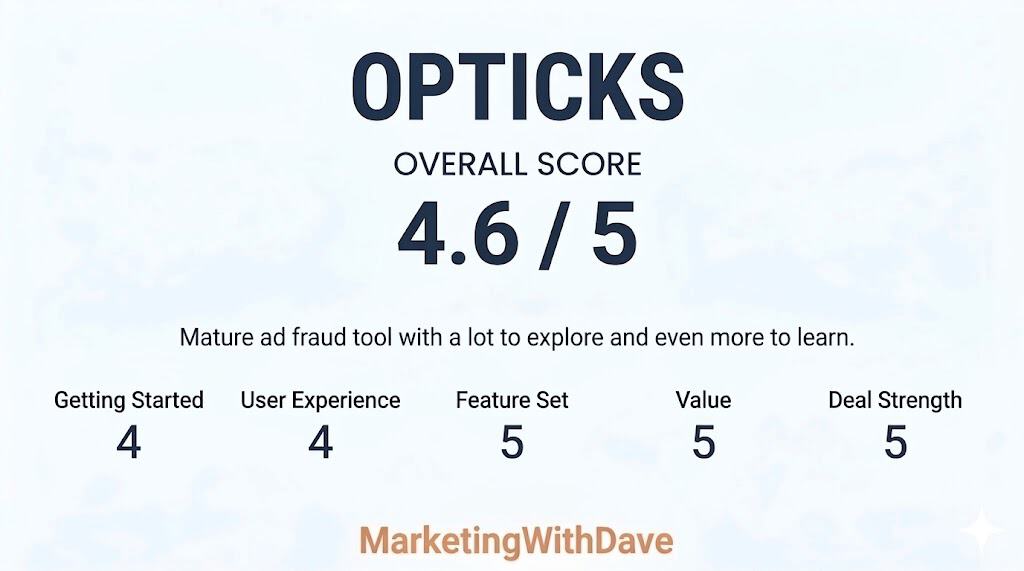
Opticks earned high marks for feature depth, value, and overall maturity. Compared to many AppSumo launches that still feel early or experimental, this felt like a substantially more developed platform with meaningful analytics and investigation capabilities already in place.
The main reason this was not a perfect score comes down to onboarding and interpretation. Some workflows, classifications, and filtering options took real effort to fully understand, and additional getting started guidance or educational resources would make the platform more approachable for new users.
I have tested fraud prevention tools before, and one of the hard questions in this category is whether the ad platforms are already handling the problem. Google, for example, has its own invalid click detection and may issue credits when it identifies invalid activity. That matters.
But that still leaves a practical gap for advertisers. Even if some invalid activity is filtered or refunded later, marketers are often left with limited visibility into what happened, which channels were affected, and whether certain traffic sources deserve closer inspection.
That is what made Opticks interesting to me. I was less interested in a scary bot story and more interested in whether the tool could help me understand my own traffic better.
My Setup Experience
Setup was straightforward. Opticks can be installed manually or through Google Tag Manager, and I used Google Tag Manager because that fits how I manage most marketing and analytics tags.
Once installed, the platform began collecting traffic data quickly. I did not feel like I had to fight the setup process before getting value from the tool. That matters because traffic quality software can easily become something people buy, install halfway, and never fully use.
Note: Screenshots were captured during different stages of testing and may represent different date ranges. They are included to illustrate platform capabilities rather than compare identical datasets.
What Surprised Me Most
The first number that caught my attention was not tied to a paid campaign. It was the overall traffic quality view. In the screenshot I captured, Opticks showed 65.73% legitimate traffic and 31% invalid traffic.
That does not automatically mean 31% of my business opportunity was fake, and it does not mean every invalid visit requires immediate action. But it does change how you think about analytics. Even on a website that is not running large paid campaigns at the moment, there can still be a meaningful amount of traffic noise.
This is where Opticks became more useful than I expected. It was not just telling me that invalid traffic exists. It was helping me see where that traffic was showing up.
My Three Favorite Opticks Features
1. Traffic source visibility
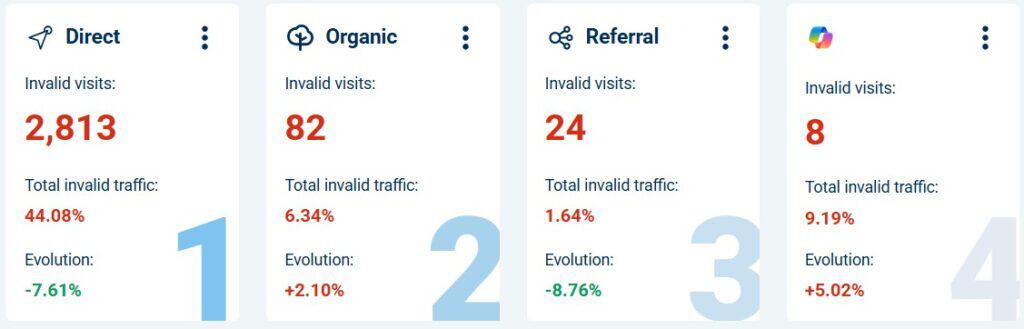
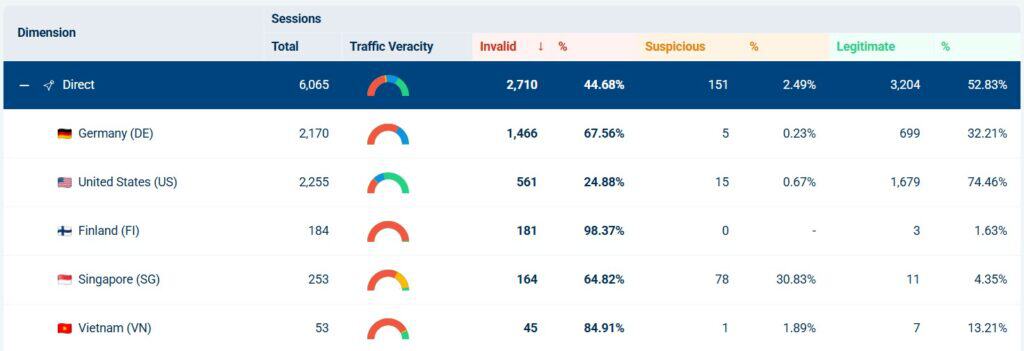
The most useful part of Opticks for me was the ability to look at invalid traffic by source and channel. In one view, I could see direct traffic, organic traffic, AI-related traffic, social sources, and other providers broken out separately.
This is also where judgment matters. A channel with one or two visits can show a dramatic percentage, but that does not mean you should immediately draw a big conclusion. A small sample size can make a number look more important than it is.
That is one of the things I appreciated about using Opticks. It gave me more visibility, but it also reminded me not to get emotional about every red number. The real value is in spotting patterns, then checking whether the volume and context support action.
2. Provider and channel filtering
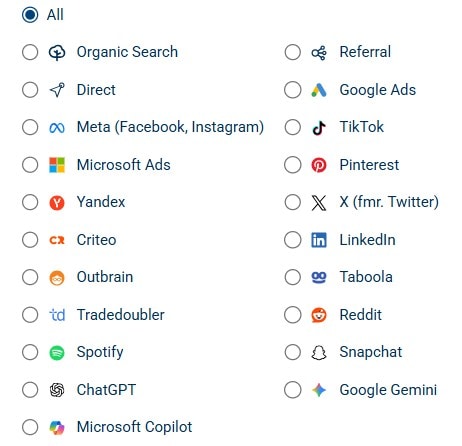
Opticks is not limited to one advertising platform. The provider filters include common paid media platforms, organic search, referral traffic, social networks, and newer AI-related sources like ChatGPT, Google Gemini, and Microsoft Copilot.
Beyond the high-level traffic summaries, Opticks also made it easy to investigate traffic patterns using a wide range of dimensions and filters. I could segment traffic by campaign, keyword, placement, traffic channel, referring source, and other variables depending on what I wanted to analyze.
That matters because traffic quality is no longer just a Google Ads problem. Marketers now get traffic from search, social, referral websites, AI tools, content platforms, and direct visits that may not be as clean as they appear in standard analytics reporting.
Seeing those sources side by side makes the platform more useful for modern traffic analysis. It helps answer a better question than “Do I have fake clicks?” The better question is, “Which sources deserve more trust, and which ones deserve a closer look?”
3. Segmentation that helps you investigate
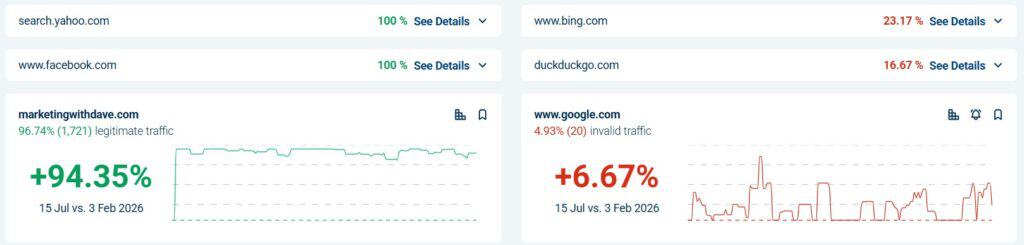
The referral breakdown was one of the clearest examples of why Opticks is useful. I could filter into referral traffic and see sessions, invalid visits, suspicious visits, legitimate visits, and web page views in the same table.
That is much more helpful than a single invalid traffic percentage. A top-level number tells you something may be happening. Segmentation helps you understand where it is happening.
For example, if a referral source consistently sends legitimate visits, that is useful to know. If another source sends mostly invalid or suspicious activity, that deserves investigation. This is where Opticks becomes practical instead of theoretical.
Opticks helped me separate traffic volume from traffic quality. Those are not the same thing.
Standard analytics tools are good at showing traffic totals, engagement, conversions, and attribution paths. But they do not always make it obvious whether part of that traffic should be trusted in the first place.
Opticks gave me another lens. Instead of only asking which channel brought traffic, I could also ask how much of that traffic appeared legitimate, suspicious, or invalid.
That may sound simple, but it changes how you evaluate marketing performance. A source that sends a lot of traffic is not automatically valuable. A source that sends less traffic but cleaner visits may be more useful than it first appears.
Where You Still Need Judgment
Opticks gives you better visibility, but it does not remove the need to interpret the data carefully.
Small sample sizes can distort percentages. A source with one or two visits can look alarming if all of them are flagged. That does not necessarily mean the channel is bad. It means you need more context before making a decision.
Bot and invalid traffic labels can also require interpretation. Some automated traffic is clearly unwanted. Other activity may come from tools, crawlers, or systems you recognize. The platform helps surface the signal, but the marketer still needs to decide what the signal means.
That is not a criticism of Opticks as much as it is a reality of this category. Traffic quality data is useful, but it should be used with context.
What Opticks Is Not
Opticks is not a Google Analytics replacement.
It is not a magic button that fixes weak campaigns.
It is not proof that every suspicious visit is costing you money.
It is not a reason to panic every time a source shows invalid traffic.
Opticks is best viewed as a traffic quality layer. It helps you identify where questionable traffic may be affecting your reporting, your paid campaigns, and your understanding of channel performance.
Who Opticks Is Best For
Opticks makes the most sense for businesses that are actively trying to understand and improve traffic quality.
It is especially relevant for advertisers running paid search, paid social, or lead generation campaigns where invalid traffic can quietly affect cost, conversion rates, and reporting confidence.
It is also useful for agencies that need a clearer way to monitor traffic quality across multiple sources. The ability to segment traffic by channel, provider, referral source, and campaign makes it easier to investigate patterns without relying only on ad platform reporting.
For a tiny website with very little traffic and no paid campaigns, Opticks may be more interesting than necessary. But for marketers spending meaningful money to acquire traffic, the visibility can be valuable quickly.
Pros and Cons
What I Liked
What to Keep in Mind
Setup through Google Tag Manager was straightforward.
The data still needs interpretation, especially with small sample sizes.
The dashboard made traffic quality easy to understand quickly.
Not every invalid or suspicious signal should trigger immediate action.
Provider and channel filters made the tool feel broader than paid search.
Some bot or source labels may require additional context before deciding what to do.
Referral and source breakdowns made the data more actionable.
This should complement your analytics and ad platform reporting, not replace it.
The product felt mature and practical rather than experimental.
The value increases as your traffic volume and paid media spend increase.
AppSumo Pricing
Opticks is currently available on AppSumo as a lifetime deal. Since AppSumo promotions are only available for a limited time and pricing or license tiers can change, I recommend checking the current listing before making a decision.
When evaluating the different license tiers, focus on your expected traffic volume, the number of websites you plan to monitor, and whether you’ll benefit from features such as lead protection, automated Google Ads IP exclusion, or advanced reporting. If you’re investing heavily in paid advertising or managing multiple websites, choosing the right tier upfront may save you from ne.eding to upgrade later.
Bottom Line
Opticks gave me a clearer view of traffic quality than I expected. The platform was easy to set up, and the dashboards were useful without being overwhelming, and the source-level breakdowns made the data feel practical.
The biggest takeaway from my testing was that invalid traffic is not only a paid search issue. Even direct, referral, organic, and newer AI-related sources can warrant a closer look. That does not mean every red number should cause panic. It means marketers need better visibility before making decisions.
For businesses spending meaningful money on traffic acquisition, Opticks is a strong addition to the marketing stack. It helps you ask better questions about your traffic, spot patterns you might otherwise miss, and understand which sources may deserve more trust.
This content is for educational purposes and reflects my experience, review of the product, and current publicly available deal information. Always evaluate tools based on your specific business needs, goals, and workflows before making a decision.