Last updated August 2026
If you’ve compared two social media management tools lately, you’ve probably noticed something frustrating. Every feature list looks almost identical. Publish. Schedule. AI. Analytics. Calendar. After the fifth comparison page, everything starts blending together.
That’s because most tools aren’t really competing on whether they can publish to Facebook or LinkedIn anymore. Most platforms are boxed in by the same network APIs, so the core publishing layer looks nearly the same everywhere you look. They’re competing on how well they fit your workflow, how much time they save you, and whether they’ll still work for you a year from now.
The market has moved in that direction too. HubSpot’s 2026 social media research found that brand awareness is now the top goal for 59% of social teams, that 94% of marketers already use AI somewhere in their workflow, and that 77% say authenticity matters more than production value. Nearly half expect their social tool stack to grow. Nobody is shopping for “a scheduler” anymore. They’re shopping for a system that helps them publish, learn, respond, and prove value, and that still holds up as the business changes.
After testing dozens of marketing tools over the years, I’ve found that feature count is usually a poor predictor of how much I’ll actually enjoy using a product. Some of my favorite tools aren’t the ones with the longest list of checkboxes. They’re the ones that remove friction from the work I do every day. That’s the lens behind the six questions below. I’ll run the framework against three tools I’ve tested hands-on: RobinReach, Sociamonials, and FeedBoss. They make an especially useful comparison because the first two compete as broader social media management platforms, while FeedBoss is built entirely around LinkedIn.
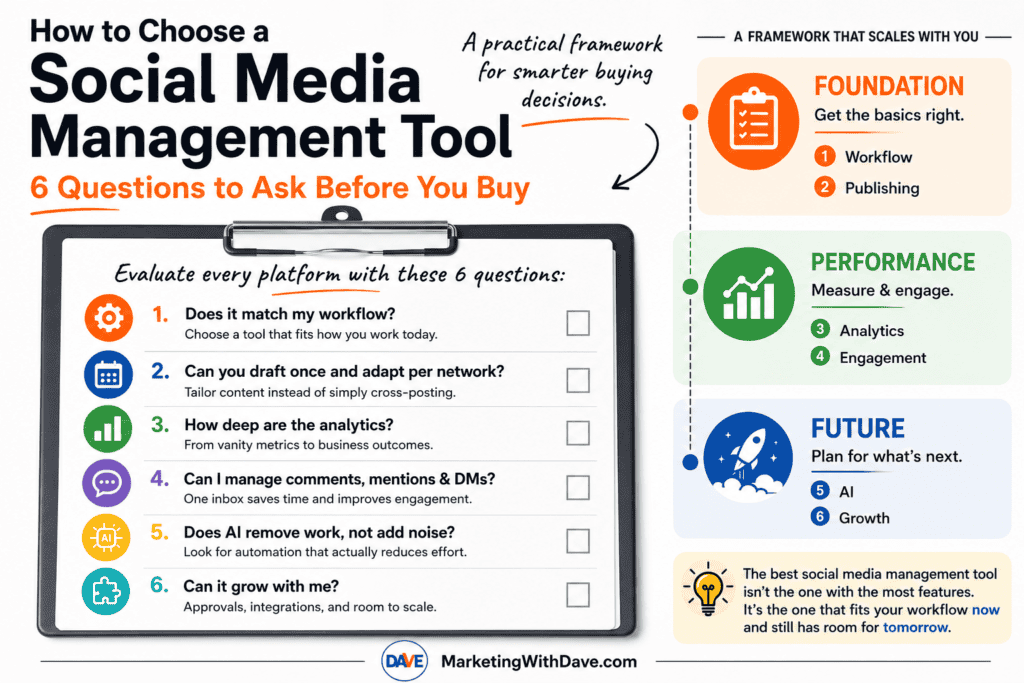
Question 1: Does it match my workflow?
What to look for: The most-featured tool isn’t automatically the right one. Look for a platform whose default workflow matches how you actually work today, not the workflow of a team three times your size.
Why it matters: Enterprise-style platforms show up repeatedly in the research with governance, audit trails, role-based permissions, and multi-team approvals built in. Those are real advantages for a large team, but they’re overhead for a solo marketer or small business.
Warning sign: If you find yourself hunting through settings and navigation for the two or three things you actually use every day, the tool was built for a level of complexity you haven’t reached yet. A solo marketer who picks a simpler tool often ends up publishing more consistently, simply because the workflow doesn’t get in the way.
Question 2: Can you draft once and adapt per network?
What to look for: A platform should let you write a post, tailor it for each network’s format and audience, schedule it ahead, and see the whole calendar at a glance. If you publish a lot of blog or CMS content, auto-sharing new posts to social is worth real weight here too.
Why it matters: This is the baseline job of the category. If a tool can’t do this cleanly, everything else it offers is secondary.
Warning sign: Repurposing content across platforms, adapting one platform’s post for another, is a meaningfully different capability than simple cross-posting. Not every tool that claims to “save you time” actually does the adapting for you.
Question 3: How deep are the analytics?
What to look for: Social analytics generally show up in layers, and it’s worth knowing which layer a tool stops at before you buy.
- Level 1: Vanity metrics. Follower growth, reach, likes. Every tool has this.
- Level 2: Post-level performance. Which individual posts actually worked.
- Level 3: Campaign attribution. UTM tracking, Google Analytics integration, performance by campaign or tag.
- Level 4: Business outcomes. Revenue, CRM data, lead generation, paid-performance reporting tied back to results.
Why it matters: This is exactly how the larger enterprise platforms differentiate themselves, and it’s also where solo marketers most often get surprised after buying. A tool that only reports at Level 1 or 2 will eventually push you into a spreadsheet for anything resembling attribution.
Warning sign: Marketing copy that says “advanced analytics” without specifying whether that means post-level, campaign-level, or revenue-level reporting. Ask which level you’re actually getting.
Question 4: Can I manage comments, mentions & DMs?
What to look for: One place to see and respond to comments, mentions, and messages across networks, without switching out to each platform individually.
Why it matters: Once a brand gets any traction, social stops being a one-way broadcast channel. A real inbox is the difference between managing social media and constantly firefighting it.
Warning sign: A tool that is entirely focused on outbound publishing with no engagement layer at all is optimized for content broadcasting, not relationship-building or customer service.
Question 5: Does AI remove work, not add noise?
What to look for: AI that’s built into the core workflow (drafting, repurposing, alt text, image generation) rather than bolted on as a marketing feature.
Why it matters: Almost every tool in this category now has AI somewhere. The useful question isn’t whether AI is present, it’s whether it removes real repetitive work without flattening your brand voice.
Warning sign: AI is the headline feature propping up a thin workflow underneath. If the AI capabilities are the main selling point and everything else feels like an afterthought, that’s worth noticing.
Question 6: Can it grow with me?
What to look for: Approval workflows, campaign or contest tooling, CRM and marketing-stack integrations, and multi-client or team permissions, even if you don’t need them yet.
Why it matters: Future you will appreciate this. Even if you’re the only person creating content today, approval workflows become valuable the moment a freelancer, employee, or client joins the process. If a vendor has no path toward that, or toward deeper campaign tooling and integrations, assume you may need to replace the tool rather than grow with it.
Warning sign: No stated roadmap when you ask about a missing feature. A vague “it’s coming” from support is different from a founder who can point to something concrete in progress.
The factor no feature list will show you: reliability
Nobody talks about reliability until it burns them. Does publishing fail silently? Can you trust a scheduled post to actually go out? How does the vendor respond when something breaks? None of that shows up on a pricing page, and it’s worth digging into reviews specifically for how a company handles friction, not just what features it lists. In the RobinReach vs Sociamonials research, for example, one Sociamonials reviewer described unresolved bugs and no response from support, and the founder’s public reply flatly asserted a “zero known bugs” policy rather than addressing the specific issue. That kind of exchange tells you more about what ownership will feel like than any feature comparison does.
Running the Framework: RobinReach vs Sociamonials vs FeedBoss
Here’s how the six questions play out across three platforms I’ve tested hands-on.
RobinReach and Sociamonials are the more direct comparison because both are built to manage multiple social networks. FeedBoss is different by design: it focuses entirely on LinkedIn. That makes it a useful test of the framework itself. A platform can lose badly on feature breadth and still be the better choice if its narrower workflow matches what you actually need.
| Question | RobinReach | Sociamonials | FeedBoss |
|---|---|---|---|
| 1. Does it match my workflow? | Fast onboarding and one of the cleaner interfaces I’ve tested. Best fit when creating, repurposing, and publishing across multiple networks is the core job. | More powerful but more complex. The additional campaign, CRM, analytics, approval, and agency features create a steeper learning curve. | Excellent fit if LinkedIn is the workflow. Its onboarding built a surprisingly accurate profile of who I am, what I write about, and how I write. It makes far less sense if you need to manage several social networks. |
| 2. Can you draft once and adapt per network? | Strongest of the three for multi-network repurposing. It can take content and adapt it across platforms rather than simply posting the same copy everywhere. | Strong core scheduling with a visual calendar, bulk upload, and RSS automation, but less emphasis on automatically repurposing one piece of content for different networks. | This question works differently because there is only one network. FeedBoss instead goes deeper on developing, refining, scheduling, and supporting LinkedIn content with images and carousels. |
| 3. How deep are the analytics? | Still the weakest area in my testing. Analytics were largely profile-level, closer to Levels 1 and 2 of the framework. | The strongest traditional social analytics of the three, reaching into post and campaign performance plus Google Analytics campaign tracking. | The biggest surprise. FeedBoss turned my existing LinkedIn history into useful analysis of engagement trends, content-format performance, follower growth, and best day and time to post. It also showed the number of posts behind its conclusions so I could see when a sample was too small to trust. |
| 4. Can I manage comments, mentions & DMs? | Lets you reply to comments from inside the platform, giving it a useful day-to-day engagement layer. | Approaches engagement more through Social CRM and workflow tools than a simple consolidated inbox. | LinkedIn engagement is built into the platform, including tracking posts and contacts and helping draft comments, but this is not a multi-network social inbox and it should not be evaluated as one. |
| 5. Does AI remove work, not add noise? | One of RobinReach’s strengths. AI supports content creation, repurposing, image generation, and its MCP connection lets tools such as ChatGPT, Claude, and Codex work directly with the social workflow. | AI exists, but it is less central to the workflow. Sociamonials’ differentiation comes more from campaigns, analytics, automation, and marketing integrations. | This is where FeedBoss impressed me most. It did more than generate a LinkedIn post and walk away. It analyzed my writing history, built a detailed persona, recognized when a draft lacked the kind of first-hand example I normally use, asked me for one rather than inventing it, and continued refining the post after I responded. |
| 6. Can it grow with me? | Growth comes through additional brands, members, integrations, automation, API access, and MCP workflows. Some of the more advanced capabilities require higher tiers. | Strongest traditional growth path for agencies and larger teams, with approvals, Social CRM, campaign tools, agency management, client workspaces, and a broad integration ecosystem. | There is room to grow, but Tier 1 exposes an important limitation. Video Studio, Lead Magnets, Authority Map, API access, and post-approval workflows require higher tiers. That matters much more once multiple people are involved in the LinkedIn workflow. |
If you want the deeper feature-by-feature comparison of the two multi-network platforms, see my RobinReach vs Sociamonials comparison. I also published a separate hands-on FeedBoss review covering its LinkedIn analytics, profile audit, writing workflow, carousel generation, Tier 1 limits, and the issues I encountered while testing it.
The Factor No Feature List Will Show You: Reliability
Nobody talks about reliability until it burns them. Does publishing fail silently? Can you trust a scheduled post to actually go out? What happens when something breaks? And perhaps just as important, how does the company respond after you tell them?
This is why I pay attention to support interactions as much as feature lists.
During my RobinReach vs Sociamonials research, one Sociamonials reviewer described unresolved bugs and no response from support. The founder’s public reply asserted a “zero known bugs” policy instead of addressing the specific experience. Whatever the underlying facts, that exchange gave me information I could never get from the pricing page.
My FeedBoss experience went the other direction. Trending Topics research failed outright while I was testing it. I reported the problem, the team responded, and the feature was working within minutes. A launch-day bug is still a bug, but that is exactly how I want a young software company to respond when something breaks.
Reliability is not just uptime. It is also how quickly a vendor acknowledges problems, communicates what happened, and fixes what customers find.
How Priorities Shift as You Grow
The six questions stay the same, but their importance changes as your organization gets larger.
| Capability | Solo Marketer | Growing Business | Agency |
|---|---|---|---|
| Publishing | Essential | Essential | Essential |
| Analytics | Basic | Advanced | Advanced / Multi-client |
| Inbox & Engagement | Nice to have | Important | Essential |
| AI | Helpful | Important | Important |
| Approvals | Usually unnecessary | Important | Essential |
| Integrations | Nice to have | Important | Essential |
This is also why I would not automatically penalize a focused product for lacking features designed for an agency.
A solo marketer may get more value from a platform that makes the work fast and obvious than from one with client approvals, governance, CRM integrations, and campaign workflows they never touch. An agency evaluating the same products could reach the exact opposite conclusion.
FeedBoss makes that tradeoff especially obvious. If LinkedIn is where you are building your personal brand or generating business, its narrow focus can be an advantage. If you need one system for Facebook, Instagram, TikTok, X, Pinterest, LinkedIn, and everything else, that same focus immediately eliminates it.
The Takeaway
The best social media management tool is not the one with the longest feature list. It is the one that removes the most friction from the work you actually need to do.
RobinReach, Sociamonials, and FeedBoss make that point unusually clear because each optimizes for something different.
- RobinReach is strongest when efficient multi-network content creation, repurposing, publishing, and AI-assisted workflows are the priority.
- Sociamonials makes more sense when deeper analytics, promotional campaigns, approvals, CRM capabilities, and agency workflows matter more than simplicity.
- FeedBoss gives up multi-network breadth entirely and concentrates on LinkedIn content, analytics, profile optimization, engagement, and personal-brand workflows.
None is objectively the best social media platform because “best” changes with the job you are hiring the software to do.
That is why I keep coming back to these six questions. Features change. Interfaces improve. AI capabilities may look completely different six months from now. Your workflow is the more durable filter.
Before buying another social media tool, ask whether it fits how you work today, helps you publish without creating more work, gives you enough measurement to make better decisions, supports the engagement you actually need, uses AI to remove work instead of adding noise, and has somewhere for you to grow.
If you are currently comparing broader social media platforms, see my complete RobinReach vs Sociamonials comparison. If LinkedIn is your primary focus, my FeedBoss review includes the screenshots, analytics, profile audit, carousel test, credit details, and launch-day issues from my hands-on evaluation.