Last updated June 2026
Your visitors are telling you exactly what they want every time they use your site search. The question is whether you have a tool that can actually capture and use that signal. Default WordPress search is not that tool, and getting the right data out of GA4 requires more custom configuration than most site owners ever bother with. SearchIQ is built specifically for this problem: better search results for your visitors and better analytics for you.
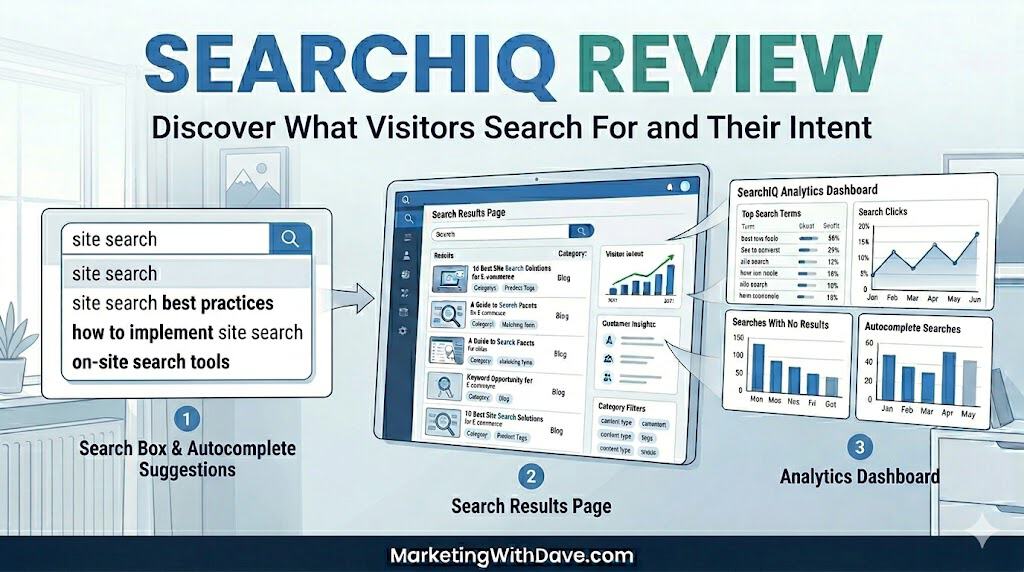
I bought SearchIQ on AppSumo in December 2025 and have been running it on MarketingWithDave.com since. This review covers what works well, what genuinely falls short, and what you need to know before deciding whether the $39 lifetime deal is right for your website.
See the current AppSumo deal for SearchIQ
Affiliate disclosure: If you purchase through my link, I may earn a small commission at no additional cost to you. I only share tools I have used myself.
The 30-Second Decision
SearchIQ is a cloud-based site search platform that replaces WordPress’s built-in search with lightning-fast autocomplete, faceted filtering, and a real-time analytics dashboard. The AppSumo lifetime deal is $39 for 5,000 documents and one month of analytics history. For most small business sites, blogs, and content-heavy WordPress installs, that is more than enough horsepower.
The short version: the search experience it delivers to your visitors is genuinely excellent. The analytics side has real limitations you need to know about before you buy, and there are signs that active development has slowed down significantly. Read on for the full picture.
Why Site Search Data Matters
Site search is one of the most underrated data sources in digital marketing. When a visitor types a query into your search bar, they are handing you something rare: intent in their own words, at the exact moment they need something. They are not searching on Google where you have to guess what brought them to your page. They are on your site, telling you directly what they want.
The data you want from site search goes well beyond just knowing what people searched. You want to know:
- What search terms were used, and how often
- Which page did the search happen from (context matters)
- Which searches returned zero results (a content gap hiding in plain sight)
- What brought that visitor to your site in the first place (referral source)
- Click-through rate from search results to content
Is SearchIQ Right for You?
SearchIQ works well across a wider range of sites than you might expect. The engine is built to handle millions of documents in sub-seconds, so it scales beyond small blogs into serious WooCommerce and eCommerce catalogs. SKU search is supported, product autocomplete is a core use case, and the AppSumo deal includes unlimited domains, faceted filtering, and cross-domain search, which are features that matter for stores with real inventory depth.
That said, the 5,000 document limit on the AppSumo plan is a real ceiling. A large catalog with tens of thousands of SKUs will outgrow it. And regardless of site size, anyone who needs more than 30 days of analytics history without a manual export routine will find the plan limiting.
The tool calls out marketers, marketing agencies, and product managers as its target audience. In practice it fits content-heavy WordPress sites and WooCommerce stores well, as long as you go in with clear eyes about the analytics constraints.
What SearchIQ Actually Does
SearchIQ is a cloud-hosted search engine that replaces WordPress’s native search. It indexes your content off-site and serves results through a customizable front end with search-as-you-type autocomplete, faceted filtering, typo tolerance, and a real-time analytics dashboard. Cross-domain search, PDF indexing, multilingual support, and mobile optimization are all included in the AppSumo plan.
What are facets? Facets are filters that appear alongside search results, letting visitors narrow down what they are looking for. On a recipe site, facets might be “cuisine type,” “prep time,” or “dietary restrictions.” On a marketing blog like mine, they could be tool category, topic, or content type. SearchIQ builds facets automatically from your existing content taxonomy.
My Experience With SearchIQ: What Works and What Needs Work
Setup and Installation: Genuinely Easy
SearchIQ has a dedicated WordPress plugin, and installation is as straightforward as any plugin I have set up. Connect your account, run the initial sync, and your content is indexed. The search experience on the front end was noticeably better than WordPress default search within minutes of setup.
One note worth flagging: as of this writing, the SearchIQ WordPress plugin shows it was last updated nine months ago and has not been tested with WordPress 7.0, which released on May 20, 2026. That is not automatically a dealbreaker since many plugins run fine without an explicit compatibility flag, but it is worth keeping an eye on, especially after a major version jump. I have not experienced any compatibility issues on my site, but your mileage may vary.
Managing Settings: Two Interfaces, Easy to Confuse
This is a usability quirk worth calling out. SearchIQ settings live in two places: the WordPress plugin and the SearchIQ web app. They overlap in ways that are easy to forget when you are troubleshooting something.
The plugin has tabs for Configuration, Options, Results Page, Autocomplete, Mobile, and Facets. The web app has its own tabs for General, Autocomplete, Result Page, Mobile, Installation, and WP Installation. Similar enough that it is genuinely easy to forget where to go to control what. Once you know this, it is manageable. But it will trip you up the first few times.
Internal Traffic Filtering: A Meaningful Gap
This one bothers me more than anything else about the product. There is no way to filter out your own traffic from the analytics. For a small personal site like mine, my internal testing and browsing noise is not enormous, but there is no good reason a modern analytics tool should not support IP exclusion or user role filtering. I flagged this to the SearchIQ team shortly after purchasing.
Analytics: Useful Starting Point, Real Limitations
The analytics dashboard is clean and intuitive. You can see what your visitors are searching for and intent signals. That data is legitimately valuable. For a content site, even 30 days of search data can surface content gaps you did not know existed.
The limitation is the window: the AppSumo plan only retains 30 days of analytics history. For any kind of meaningful trend analysis or month-over-month comparison, that is not enough. There is no rolling view that automatically builds over time.
The practical workaround is to export your data manually each month. SearchIQ exports nine separate CSV files, which is comprehensive but not exactly elegant. There is also no date or time stamp included in the exported data, making historical reporting more cumbersome than it should be.
More importantly, the reporting data exists in silos. You can view top searches, no-result searches, countries, devices, and other metrics independently, but you cannot combine those dimensions to perform deeper analysis. For example, there is no way to see which no-result search terms are most common within a particular country.
The biggest analytics gap, however, is the lack of page-level search context. SearchIQ can tell you what users searched for, but not where they were when they initiated that search. From a content optimization perspective, this is often the most valuable piece of information. If users repeatedly search for “pricing,” “refund policy,” or “API documentation,” knowing which page triggered that search can reveal where your content is failing to answer questions or guide visitors effectively. Without that context, search analytics become significantly less actionable than they could be.
Heads up on analytics history: The AppSumo lifetime deal includes one month of analytics retention. If you want to do real trend analysis, set a monthly calendar reminder to export your data before it rolls off. SearchIQ has indicated they plan to extend the analytics window, but there is no confirmed timeline.
See the current AppSumo deal for SearchIQ
Pros and Cons
| Pros | Cons |
|---|---|
|
|
Pricing and Plans
One plan, non-stackable. Here is what you get:
| Plan | Price | Documents | Analytics | Domains |
|---|---|---|---|---|
| SearchIQ Startup (AppSumo LTD) | $39 one-time | 5,000 | 30 days history | Unlimited |
The plan includes white-label delivery (no SearchIQ branding), facet filters, CDN for thumbnail images, cross-domain search, and mobile optimization. For most small business sites, blogs, and solopreneur content hubs, 5,000 documents is well above what you will need for years.
SearchIQ vs. Native WordPress Search and GA4 Site Search Tracking
| Capability | Default WP Search | GA4 Site Search (via GTM) | SearchIQ |
|---|---|---|---|
| Search-as-you-type autocomplete | ❌ | ❌ | ✅ |
| Typo tolerance | ❌ | ❌ | ✅ |
| Faceted filtering | ❌ | ❌ | ✅ |
| Keywords searched | ❌ | ⚠️ With setup | ✅ |
| Zero-result searches | ❌ | ⚠️ Custom setup required | ✅ |
| Page where search occurred | ❌ | ⚠️ With setup | ✅ |
| Click-through rate on results | ❌ | ⚠️ Custom setup required | ✅ |
| Internal traffic filtering | — | ✅ | ❌ |
| Analytics history | ❌ None | ✅ 14 months | ⚠️ 30 days |
| Setup complexity | ✅ None | ⚠️ Moderate setup | ✅ Low setup |
| PDF indexing | ❌ | ❌ | ✅ |
| Cross-domain search | ❌ | ❌ | ✅ |
| Mobile search optimization | ❌ | ❌ | ✅ |
Common Questions From the AppSumo Community
Can I use SearchIQ across multiple domains?
Yes, the AppSumo lifetime deal supports unlimited domains and includes cross-domain search, which lets you surface results from multiple sites in a single search experience.
How is “document” count calculated?
A document is any post, page, or product on your site. The 5,000 document limit on the AppSumo plan applies to total indexed content, not monthly queries. For most sites under 5,000 pages this is a non-issue.
Can I get more than 30 days of analytics?
Not on the AppSumo plan. Export manually each month before the data rolls off — nine CSV files, none of them date-stamped. SearchIQ has said they plan to extend the window but has not given a timeline.
Is there a GA4 integration for saving search data automatically?
No, not currently. Manual export is the only option. Worth submitting as a feature request if this matters to your workflow.
Does SearchIQ work with shortcodes or dynamically generated content?
SearchIQ indexes standard WordPress content. Content generated via shortcodes or table plugins that do not render content in the standard WordPress post structure may not be indexed correctly. This is worth testing during your trial period if your site relies heavily on shortcode-rendered tables or content.
What about Shopify?
SearchIQ has indicated they are not planning to re-support Shopify at this time. This is a WordPress-focused product.
A Note on Active Development
I want to be transparent about this because it matters for a lifetime deal purchase. Two data points concern me:
- The WordPress plugin has not been updated in approximately nine months and has not been tested against WordPress 7.0 (released May 20, 2026)
- A feature I requested six months ago (internal traffic filtering) has not been implemented
I am not saying SearchIQ is abandoned. The product works well day-to-day and the team was genuinely helpful when I was getting started. But for a lifetime deal, what you are evaluating is whether the product will continue to evolve. Based on what I have seen over six months of use, I would characterize the pace of development as slow rather than active. That is a real consideration.
If you are buying SearchIQ primarily for the search experience it delivers to your visitors, it delivers well today. If you are expecting a product roadmap full of new features, the evidence is not there to support that expectation.
Bottom Line
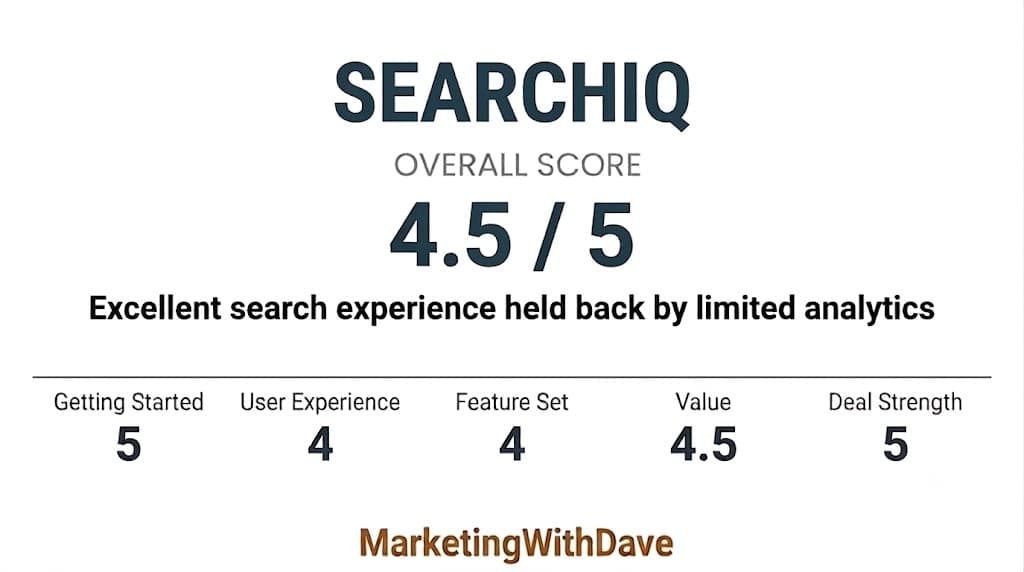
SearchIQ does the core job well. It replaces WordPress’s pedestrian default search with fast, accurate, autocomplete-powered search that your visitors will notice immediately. The analytics dashboard gives you real signal on what your audience is looking for, even if the 30-day window forces a manual export habit to make it useful over time.
At $39 lifetime, the value is strong if you accept the limitations. You need to be comfortable with manually exporting data each month, accepting that internal traffic will show up in your analytics, and understanding that development velocity appears to have slowed. Those are not small caveats, but they do not sink the deal for a site under 5,000 pages that wants a better search experience without a monthly subscription.
For most content-focused WordPress sites, blogs, and small business owners running on AppSumo tools, this is a buy.
See the current AppSumo deal for SearchIQ
This content is for educational purposes and reflects my experience, review of the product, and current publicly available deal information. Always evaluate tools based on your specific business needs, goals, and workflows before making a decision.
Looking for more marketing software reviews? See my full list of marketing tools and software I recommend.