
Last updated September 2026
Views, clicks, and clickthrough rate (CTR) describe what happened after a promotion displayed. They say nothing about the page loads where nothing displayed, or why. Ad Reach tracks the delivery process, from page load to click, and reports a reason when SiteSqueeze has enough evidence to identify why a promotion didn’t make it through.
Ad Reach isn’t a score to maximize. Many “misses” are settings doing exactly what you configured them to do, protecting the visitor experience. Treat it as a diagnostic: how much of your traffic actually sees your promotions, where opportunities are lost or intentionally suppressed, and what deserves a closer look.
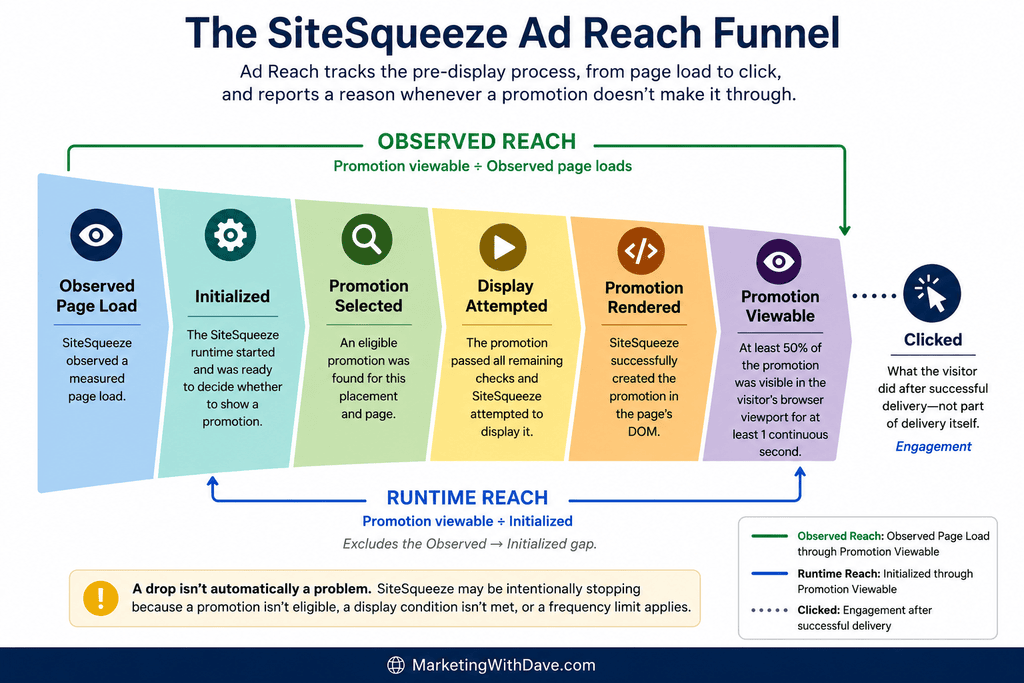
Table of Contents
The Funnel
Observed page load → Initialized → Promotion selected → Display attempted → Promotion rendered → Promotion viewable → Clicked
Each percentage compares a stage to the one before it, so drop-off is visible stage by stage. A decrease isn’t automatically a problem. SiteSqueeze may be intentionally stopping because a promotion isn’t eligible, a display condition isn’t met, or a frequency limit applies.
Observed page load — SiteSqueeze received a beacon (lightweight browser signal) confirming a measured page loaded. This does not mean SiteSqueeze initialized, selected, or displayed anything, and it isn’t meant to match Google Analytics (GA4) or other analytics. Browser privacy protections, JavaScript behavior, consent controls, content blocking, caching, and navigation timing all affect what’s observed. It’s the funnel’s starting point, not a page view count.
Initialized — the SiteSqueeze runtime started and was ready to decide whether to show a promotion. A gap here, such as 1,000 observed → 920 initialized, shows that 80 loads didn’t initialize, not necessarily why. Possible causes include privacy protections, JavaScript failures, timing, or blocking, but SiteSqueeze won’t name a cause it can’t support with evidence.
Promotion selected — an eligible promotion was found, which requires resolving the right placement and confirming it can supply something eligible. Status, scheduling, licensing, and assignment all factor in. Initialized means SiteSqueeze was ready to decide. Selected means it found something to proceed with.
Display attempted — the promotion passed remaining conditions to begin display. A selected promotion may never reach this stage because of a frequency limit, an unmet minimum-time-on-page requirement, or an exit-intent trigger that never fired. That’s intentional suppression, not failure.
Promotion rendered — SiteSqueeze successfully created the promotion on the page. This is a technical milestone, not proof the visitor could see it.
Promotion viewable — the promotion was verified as viewable in the visitor’s viewport. A meaningful Rendered → Viewable gap is worth investigating. Viewable, not Rendered, feeds the Reach calculations.
Clicked — what the visitor did after successful delivery, not part of delivery itself. A low Viewable → Clicked rate isn’t a delivery failure. It’s a question about the offer, creative, message, CTA, or relevance.
Reading drop-offs:
- Observed → Initialized: a gap between these measurements may indicate that initialization wasn’t observed for some measured loads; the specific cause may be unidentifiable.
- Initialized → Selected: no eligible promotion was found; check placement and eligibility diagnostics.
- Selected → Attempted: check frequency limits, minimum time, and triggers.
- Attempted → Rendered: a rendering problem; worth investigating.
- Rendered → Viewable: worth investigating if the gap is significant.
- Viewable → Clicked: a promotion-performance question, not a reach problem.
Two Reach Metrics
Observed Reach = Promotion viewable ÷ Observed page loads. This is the broadest measure: of everything SiteSqueeze observed, how much resulted in a viewable promotion? It includes losses from failed initialization plus everything downstream.
Runtime Reach = Promotion viewable ÷ Initialized. This is narrower: of loads where the SiteSqueeze runtime actually started, how many resulted in a viewable promotion? It excludes the Observed → Initialized gap.
Example: 1,000 observed, 900 initialized, 400 viewable → Observed Reach 40%, Runtime Reach 44.4%.
Comparing both helps prevent wrong conclusions. Low Observed Reach, such as 8%, combined with a meaningfully higher Runtime Reach, such as 16%, suggests the initialization gap may be a major source of lost observed reach rather than eligibility, frequency limits, or rendering. If both are low and close together, initialization is less likely to be the main issue; look farther down the funnel.
Neither number is a target score. A 50% Runtime Reach might simply mean a frequency cap is doing its job. The useful question isn’t “How high is my reach?” but “Why is it this number, and does that match my intent?”
Why Promotions Don’t Display
No Promotion Available
- No matching placement — no placement applies to this page. This may be intentional. If it’s unexpectedly high, check your Placements.
- Matched placement has no assigned promotion — a placement applied, but nothing was assigned.
- Assigned promotion could not be found — the placement points to a promotion that no longer exists. This is worth investigating because it’s a configuration reference issue, not a display rule.
- Assigned promotion is disabled — the promotion was found but isn’t enabled.
- Assigned promotion has not started yet — the promotion is scheduled for the future.
- Assigned promotion has ended — the scheduled end has passed.
- Assigned promotion is inactive — the promotion was found and enabled, but required promotion content is missing, so it cannot be displayed.
- Assigned promotion is license-limited — the promotion exists, but it exceeds the number of active promotions allowed by the current SiteSqueeze license.
- Matched placement has no eligible promotion — something is assigned, but scheduling, status, licensing, or another eligibility condition prevents it from being selected.
- All Other Content fallback — if a specific placement matches but can’t supply an eligible promotion, SiteSqueeze can fall back to a promotion assigned to All Other Content. Placement Resolution shows what was ultimately used.
- Latest Category Article — Not applicable to this page — the feature doesn’t apply in this context.
- Latest Category Article — No eligible article found — the feature applies, but no qualifying article was available.
Display Rules Suppressing an Otherwise-Eligible Promotion
Frequency limited — the visitor saw the promotion recently enough that showing it again would breach your configured frequency setting. This is intentional. A very high count may indicate the setting is restrictive, while a very low count may mean repeat exposure isn’t a significant issue.
Frequency limits rely on browser-side storage that the visitor and browser ultimately control. Private browsing, cleared data, consent changes, or browser storage restrictions can erase that history. A frequency limit therefore means SiteSqueeze will avoid showing the promotion more often than it can determine from the available browser history. It isn’t an absolute guarantee.
Trigger not reached — a required trigger, such as exit-intent behavior, never occurred. This isn’t a failed promotion; the display condition simply wasn’t met. Triggered promotions may naturally have lower reach.
Minimum time not reached — the visitor didn’t remain on the page long enough to satisfy the configured minimum time. This is intentional, but a high count may indicate that the delay doesn’t fit how visitors actually use the site.
Things That May Indicate a Real Problem
Context failed — SiteSqueeze couldn’t obtain information needed about the page or promotion context. Occasional occurrences may happen, but recurring or high counts warrant investigation.
Asset failed — a required promotion asset failed to load. An image promotion was selected for display, but its image could not be loaded successfully.
Render not viewable — the promotion rendered but wasn’t confirmed as viewable. A persistent gap deserves attention.
Display tracking failed — the promotion reached the display stage, but recording that display failed. This should be investigated rather than treated as intentional suppression because it affects measurement reliability.
Unknown — SiteSqueeze doesn’t have enough evidence to confidently identify the cause. Rather than guessing, it reports the outcome as Unknown. A small number may occur naturally; a large or sudden increase deserves investigation.
Runtime not observed = Observed page loads − Initialized. SiteSqueeze knows initialization wasn’t observed but, without specific evidence, doesn’t assume why. For example, it won’t automatically attribute the gap to an ad blocker.
Automation Signal (Bots)
Modern browsers can expose navigator.webdriver, which can indicate that the browser is under automated control. When SiteSqueeze detects that signal, it records an Automation Signal.
This is not a complete bot count. Reliably classifying all automation isn’t realistic. Some automation won’t expose the signal, while sophisticated bots may behave like normal visitors.
SiteSqueeze reports only the evidence it actually observes and does not remove Automation Signal traffic from the funnel. The page load happened, so it remains in the data.
Think of Automation Signal as a minimum indication of identifiable automated activity, not an estimate of total bot traffic.
For example, 250 Automation Signals out of 10,000 observed loads means 250 loads exposed the indicator. It does not mean the other 9,750 were definitely human.
Automated traffic can also affect funnel patterns. It may not remain on a page long enough to meet timing thresholds, trigger exit intent, or execute JavaScript the same way a normal visitor would. Treat Automation Signal as one piece of evidence, not a mechanism for blaming unusual results on bots.
Ad Blockers and Privacy Tools
Ad blockers, privacy protections, script blockers, consent tools, and other browser technologies can affect what SiteSqueeze can load, execute, store, or measure.
However, a gap between Observed page load and Initialized doesn’t identify the cause. It could result from a blocker, JavaScript error, navigation timing, another script, or some other interruption.
SiteSqueeze reports only what it knows: the page load was observed, but initialization wasn’t. It doesn’t automatically label this as “Ad Blocked.”
Browser privacy also affects frequency-cap reliability because SiteSqueeze relies on browser storage to remember previous promotion views. That storage isn’t guaranteed to persist, especially over longer frequency windows.
Underlying principle: measure first, infer carefully. SiteSqueeze reports an automation signal without claiming to have found every bot, reports missing initialization without blaming ad blockers, enforces a frequency limit without assuming permanent storage, and reports Unknown instead of inventing a cause.
Breakdown Reports
All Ad Reach breakdown reports use the same core measurements — Observed → Initialized → Selected → Attempted → Rendered → Viewable → Clicked — along with Observed Reach and Runtime Reach. The difference is how that traffic is grouped.
Page Context
Groups Ad Reach results by content type. Look for unexpected differences rather than expecting identical numbers across every type of content.
Placement Resolution
Groups results according to which placement actually supplied the promotion. This is different from Page Context, which describes the type of page being viewed.
Placement Resolution also makes the All Other Content fallback visible and can help troubleshoot an unexpected or missing promotion.
Browser
Compare funnel behavior across browsers. One browser with an unusually large Observed → Initialized or Rendered → Viewable gap could point toward a compatibility issue. Patterns matter more than isolated occurrences.
Device
Device type can affect viewport size, visitor behavior, timing, and interaction-based triggers. This breakdown helps reveal whether promotion delivery behaves differently across device categories.
Operating System
Operating System is often most useful when combined with Browser and Device. Together, the breakdowns can help narrow a compatibility issue to a particular combination.
Promotion Type
Standard Promotions, A/B Tests, and Latest Category Article promotions don’t necessarily share identical selection and delivery logic. Comparing Promotion Types can help determine whether an unusual pattern is happening across SiteSqueeze or is concentrated in one type.
A/B Variants
The A/B Variants breakdown compares Control (A) and Variation (B) throughout the delivery funnel, not just by clicks or conversions.
This can expose situations where both variants are selected at similar rates but one experiences an unusual Rendered → Viewable drop. That’s a delivery difference, not simply a promotion-performance difference.
A/B New Assignments
A/B New Assignments tracks only new Control and Variation assignments rather than repeatedly counting page loads from visitors who have already been assigned to a variant.
This provides a cleaner way to evaluate whether the intended approximately 50/50 random allocation is holding. Small samples can appear uneven; the proportions should become more representative as additional assignments accumulate.
Frequency-Cap Suppression Timing
This report groups frequency-limited suppressions according to the elapsed time since the visitor’s previous promotion view.
Suppression concentrated among visitors returning quickly may indicate the cap is doing exactly what you intended. Suppression occurring much later may lead you to consider whether the current frequency is more restrictive than necessary.
There isn’t one universally correct frequency. It depends on the promotion, website, visitor behavior, and how intrusive repetition would feel. The report provides evidence for evaluating the setting rather than forcing you to rely entirely on intuition.
As with other frequency measurements, the data reflects only the browser history SiteSqueeze was able to observe.
Date Filtering and Export
Ad Reach can be viewed across all dates or filtered to a specific date.
A daily view can help correlate unusual SiteSqueeze behavior with patterns in another analytics platform or isolate a specific period rather than allowing it to disappear inside weeks or months of accumulated data.
When comparing SiteSqueeze with another analytics platform, don’t expect totals to match exactly. The systems may define and observe traffic differently. Comparing patterns is often more useful than trying to reconcile every page load.
Ad Reach data can also be exported as a CSV file.
The export includes funnel measurements, reach calculations, diagnostic reasons, and Automation Signal data. This can be useful for cross-referencing another analytics source, tracking changes over time, or performing analysis that isn’t available directly inside the SiteSqueeze interface.
The export isn’t intended to turn SiteSqueeze into a replacement for a dedicated analytics platform. It provides access to the underlying promotion-delivery measurements when you need deeper analysis.
How to Analyze Your Ad Reach Data
- Find the biggest unexpected drop. Match the stage to the likely area of investigation: initialization, eligibility, display rules, rendering, or viewability.
- Ask whether the lost reach was intentional. Frequency limits, minimum-time requirements, and exit-intent triggers can reduce reach because your settings are working exactly as configured. The question is whether those rules create the visitor experience you intended.
- Look for patterns rather than one-offs. Watch for a sudden rise in Runtime Not Observed, recurring Context or Asset failures, a persistent Rendered → Viewable gap, repeated Display Tracking failures, a growing Unknown count, or differences concentrated in one browser, device, operating system, page context, placement, or promotion type.
Don’t optimize Ad Reach in isolation.
Higher reach isn’t automatically better. Cutting a minimum display time from 15 seconds to 5 seconds might increase reach while hurting clicks, increasing dismissals, or creating a worse visitor experience.
The goal isn’t to show a promotion as often as technically possible. It’s to give the right promotion a reasonable opportunity to be seen without unnecessarily disrupting visitors.
What Ad Reach Can’t Tell You
- Automation Signal isn’t a complete bot count. It represents only loads where SiteSqueeze detected the automation indicator.
- Runtime Not Observed doesn’t prove an ad blocker was responsible.
- Frequency limits aren’t permanent visitor identity. They rely on browser history that can be deleted or restricted.
- Unknown doesn’t secretly mean failure. It means SiteSqueeze doesn’t have enough evidence to confidently identify the cause.
- Observed page loads aren’t a replacement for GA4 or another analytics platform. The systems serve different purposes and may report different totals.
Bottom line: Ad Reach turns “Why didn’t my promotion get more views?” into more answerable questions: where opportunities are lost, which losses were intentional, whether your display settings match your intent, whether a technical pattern needs investigation, and, once visitors do see the promotion, whether the promotion itself works.
SiteSqueeze is coming soon.
I’m building a WordPress plugin designed to help marketers promote their own content, measure what works, and run practical A/B tests without pretending every website has enterprise-level traffic.
Join the list to know when SiteSqueeze launches.

