
Last updated September 2026
A new article doesn’t announce itself. Someone landing on an older post from search, social, or email may never see something you published last week on the same topic.
Latest Category Article fixes that. When a visitor reads eligible content, SiteSqueeze finds the relevant category and promotes the newest eligible article in it, skipping whatever the visitor is already reading.
Example: your Analytics category has Google Analytics (GA4) Reporting Tips (Sep 1), Understanding Attribution Models (Aug 20), and Marketing Dashboard Mistakes (Jul 30). A visitor on the July post gets promoted the September one. A visitor already on the September post gets the August one instead.
That’s the key difference from a Standard Promotion: with Standard Promotion, you pick the destination. With Latest Category Article, SiteSqueeze does — and the destination shifts as you publish. A promotion set up once can point to a different article three months later without you touching it.
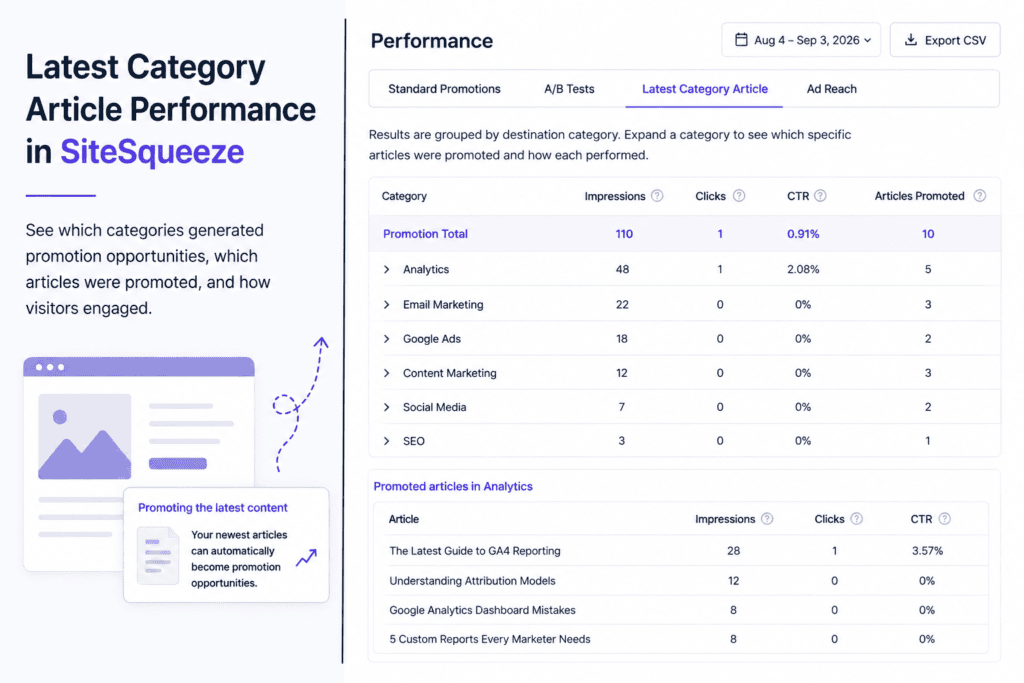
The Latest Category Article Performance report shows which categories generated promotion opportunities, which articles actually got promoted, and whether visitors clicked.
Reading the Report
Results are grouped by destination category. For each category:
- Impressions — times an article from that category was promoted
- Clicks — times visitors clicked
- CTR — clicks ÷ impressions
- Articles Promoted — count of distinct articles promoted from that category in the period
That last number matters because it’s not the same as impressions. A category with 100 impressions and 3 Articles Promoted means three different articles split that total between them — because the “newest eligible article” changed as you published, and because SiteSqueeze won’t promote the article a visitor is already on.
Individual Articles
Expand a category to see which specific articles got promoted and how each performed. This is where you can trace the path: an older article pulling in traffic while Latest Category Article routes those visitors to something newer.
Interpreting the Numbers
There’s no benchmark CTR — traffic, library size, publishing frequency, and placement all move the baseline. Look for patterns instead: a category receiving plenty of impressions but relatively few clicks is worth inspecting article-by-article; one article that keeps getting clicks whenever it’s promoted is a signal that topic resonates with readers already in that content area.
Two cautions:
- Small samples can mislead. One click out of ten impressions is a 10% CTR — that doesn’t necessarily outperform an article with 500 impressions and a 6% CTR.
- CTR measures the click, not the content. It tells you whether the promotion got clicked, not whether the destination article was any good once they got there. And because promotions are dynamic, different articles in the same slot weren’t necessarily competing under the same conditions — different times, different source content, different opportunity counts.
Use the report to spot what’s worth investigating, not to declare winners.
Date Filtering and Export
Set the report’s date range to the period you care about, and export the data if you want to analyze it outside the plugin.
SiteSqueeze is coming soon.
I’m building a WordPress plugin designed to help marketers promote their own content, measure what works, and run practical A/B tests without pretending every website has enterprise-level traffic.
Join the list to know when SiteSqueeze launches.

