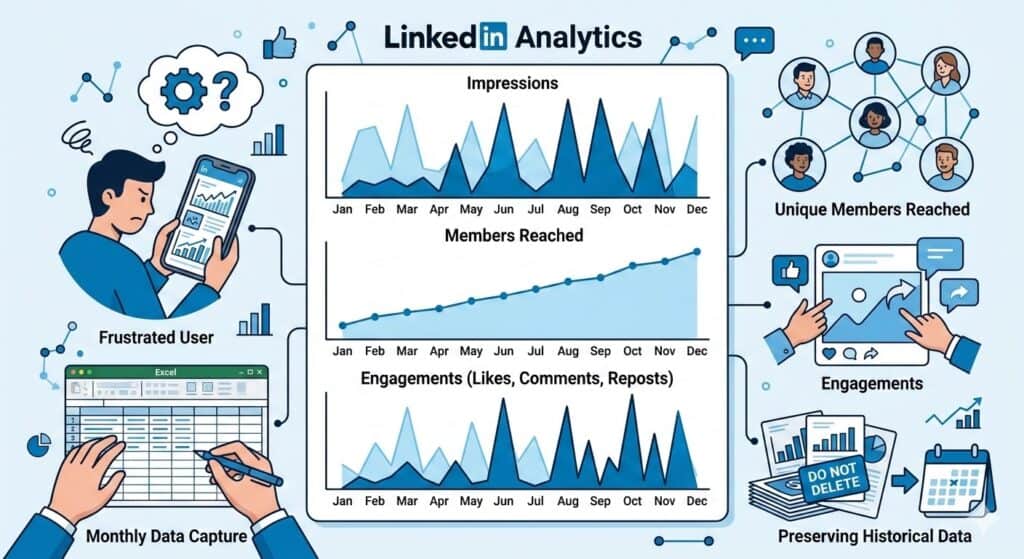
linkedin analytics impressions members reached engagements

LinkedIn Analytics Explained: Impressions, Members Reached, and Engagement Trends

Reading Time: 4 minutes

Why You Rarely See LinkedIn Analytics Shared

I have never seen anyone publicly share their LinkedIn analytics.

I suspect there are two main reasons.

First, the data is surprisingly difficult to gather. LinkedIn only surfaces analytics through the mobile app. If you want monthly trends, you have to manually set the start and end date for each month and record the numbers yourself. For a platform likely worth well over $100 billion, the analytics experience feels incredibly primitive.

Second, LinkedIn is personal. The metrics can feel like a public scoreboard of how good someone is at networking, influence, or business. Most people would rather talk about success than show the full data behind it.

I have never pretended to be a great networker. I do not love the social side of business. What interests me more is the data and the insights we can learn from it.

The Three Metrics LinkedIn Actually Provides

So, I decided to track my LinkedIn analytics manually and share the results.

The platform essentially gives you three core metrics:

  1. impressions
  2. members reached
  3. engagements

That is not a lot to work with. Impressions in particular are often considered a vanity metric, but when that is one of the only signals available, you end up clinging to it anyway.

Limitations of LinkedIn Analytics

Before looking at the charts, there are two additional limitations worth mentioning about LinkedIn’s analytics.

First, LinkedIn only provides data for the most recent 12 months. If you want to track longer term trends, you need to capture the numbers yourself. Once the window moves forward, older data simply disappears. Even if you are not planning to analyze it immediately, it is worth recording the numbers each month so you have the history available later.

Second, LinkedIn’s built in analytics leave out several metrics that are useful for understanding growth. Because of that, I have been experimenting with tracking additional signals outside the platform.

For example, I wrote about a method for tracking monthly LinkedIn follower growth using Excel formulas. Follower growth is one of the few ways to measure whether your audience is actually expanding over time.

Another metric that may relate to these trends is LinkedIn’s Social Selling Index (SSI), which attempts to measure how effectively you build relationships, share insights, and engage with your network.

I suspect there may be interesting relationships between SSI scores, follower growth, impressions, and engagement trends, although LinkedIn does not provide an easy way to analyze them together.

With that context in mind, here are the metrics LinkedIn currently provides.
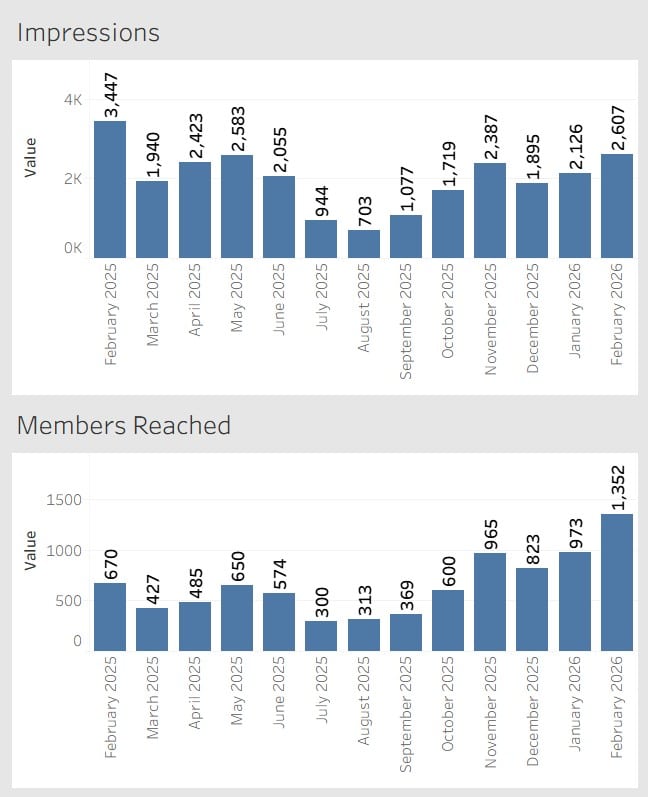
Observations From the Data

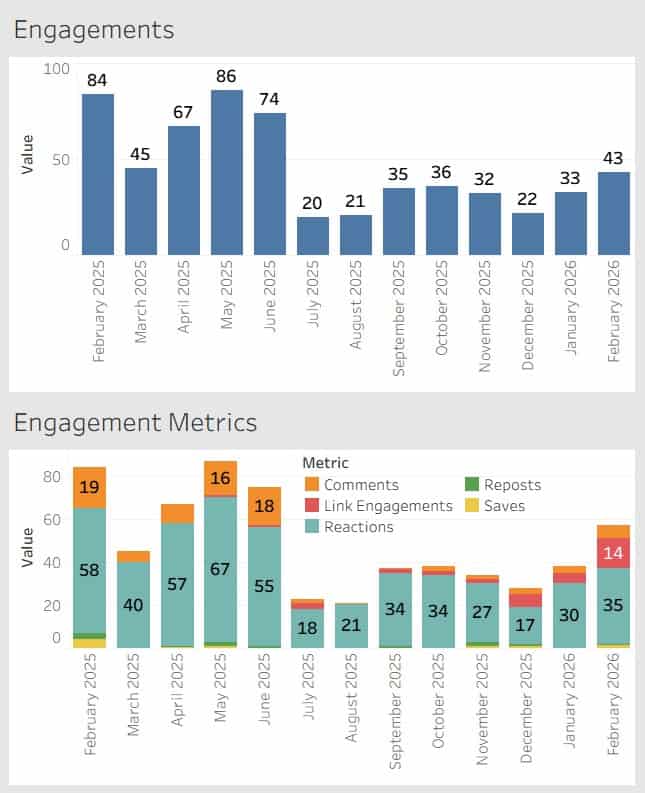
Looking at these charts, a few patterns stand out.

First, impressions are volatile. The numbers fluctuate significantly from month to month without an obvious pattern. Some months see more than triple the impressions of others.

Second, members reached shows a much steadier upward trend. While there are some fluctuations, the overall direction appears to be gradual growth over time.

Third, engagements tend to follow impressions more closely than members reached. When impressions spike, engagement usually rises with it.

One other note for transparency. A portion of the repost activity counted in these numbers comes from my own reposts.

What This Data Does and Does Not Tell Us

With only three primary metrics available, it is difficult to draw strong conclusions.

Impressions tell us how many times content appeared in feeds, but they do not tell us whether people actually consumed the content.

Members reached provides a slightly better signal because it reflects the number of unique individuals exposed to the content.

Engagements provide the most meaningful signal of the three, but even here the data is limited. LinkedIn groups together different types of engagement without providing deeper context around why certain posts perform better than others.

In other words, the data hints at patterns but does not fully explain them.

What This Data Actually Helps You See

Trending these metrics over time does reveal some patterns, but it also highlights how limited LinkedIn analytics really are.

You can see visibility trends through impressions.
You can see how many unique people are exposed to your content through members reached.
You can see whether people interact through engagements.

What you cannot easily see is why.

LinkedIn does not tell you which topics consistently perform better, how your audience is evolving, or how your content strategy influences long-term growth. Even something as basic as exporting and trending this data requires manual work.

So while these metrics provide some direction, they rarely provide clear answers.

Why Trending the Data Still Matters

Despite those limitations, there is still value in tracking these numbers.

Most LinkedIn users never see their analytics over time. The platform shows short windows of performance, but trends only become visible when the data is captured month after month.

Over time you begin to notice patterns such as seasonal changes in activity, how impressions fluctuate, and whether your network is gradually expanding.

Even if the insights are imperfect, trending the data provides far more context than looking at a single post in isolation.

A Simple Recommendation

If you take one action from this article, it should be this.

Once a month, capture your LinkedIn metrics.

Record impressions, members reached, engagements, and follower growth in a simple spreadsheet. LinkedIn only provides a rolling twelve-month window, so historical data disappears unless you save it yourself.

You may not analyze it right away, but future you will be glad the data exists.

LinkedIn Analytics Explained: Impressions, Members Reached, and Engagement Trends Read More »
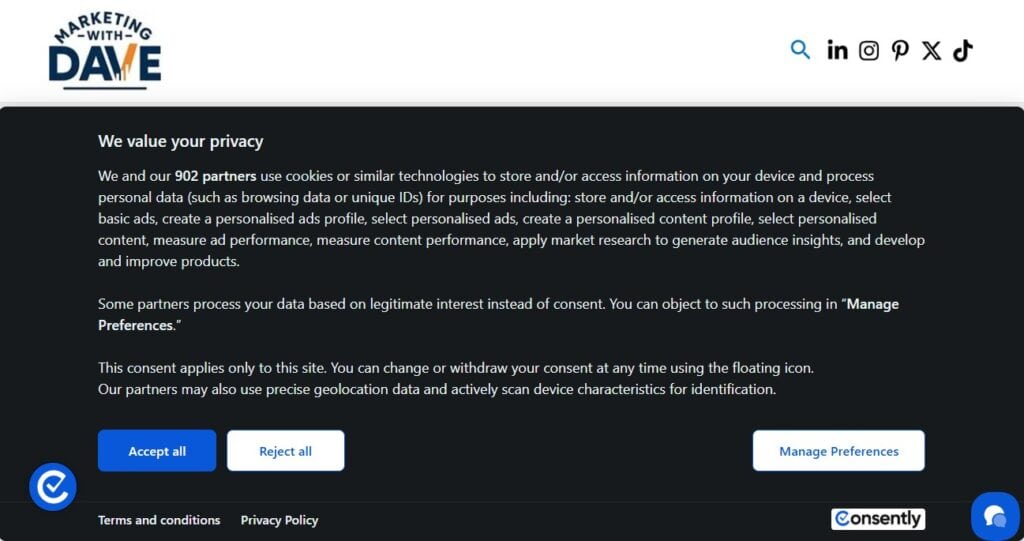
Cookie consent banner for privacy compliance on a website, featuring accept, reject, and manage preferences options.

Cookie Consent Management and Privacy Compliance Platform

Reading Time: 5 minutes

Most websites are running more trackers than their owners realize.

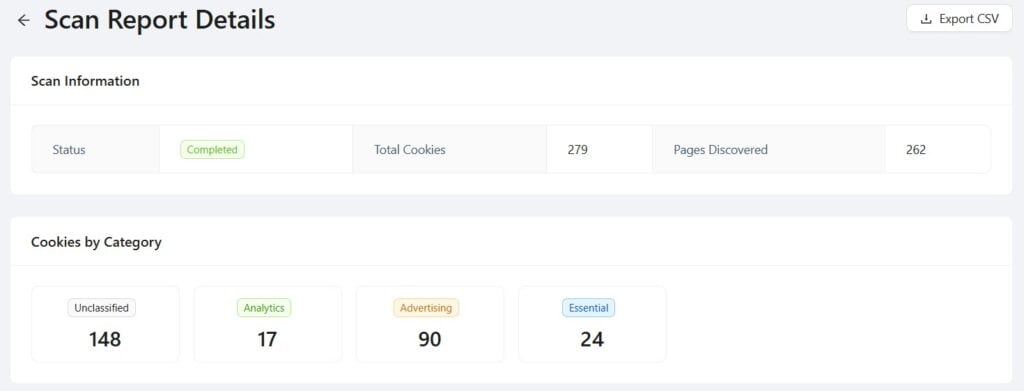
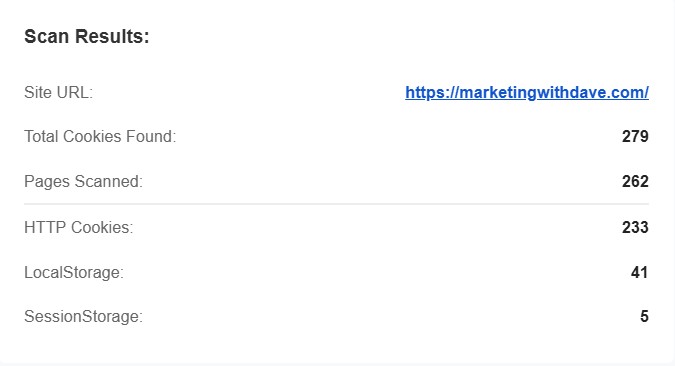
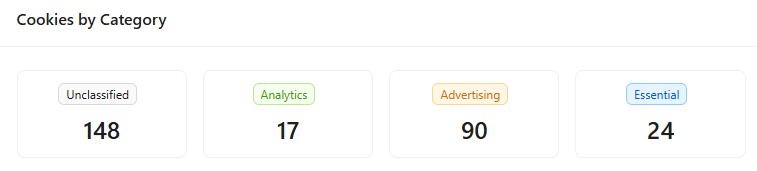
I scanned my own website and found 279 cookies across 262 pages, including 148 unclassified.

If you do not know what is running on your website, you are not actually managing it.

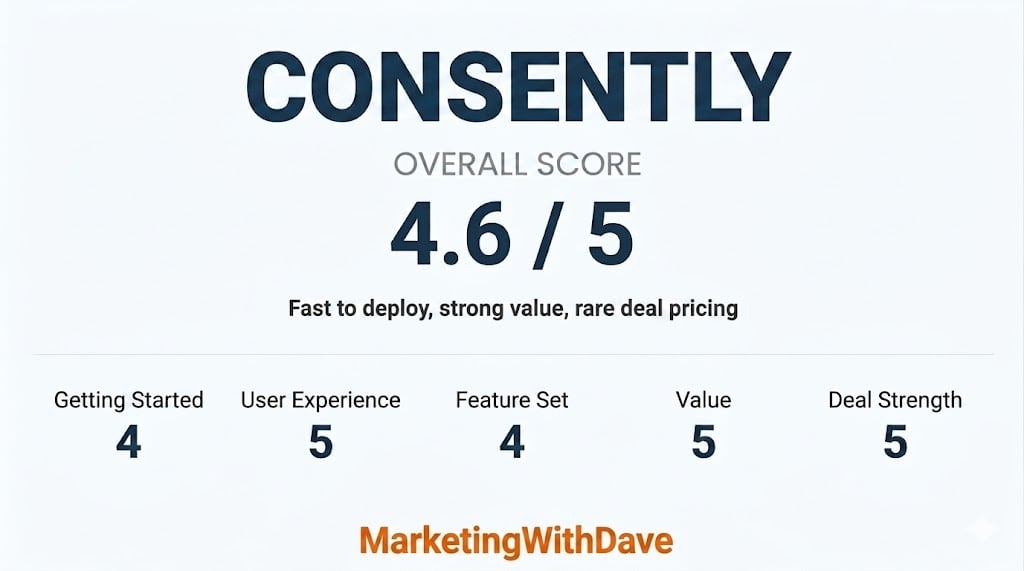
See how this score is calculated

Here’s how to interpret this score:

The overall score reflects both product quality and how compelling the current deal is.

A score in the high 4 range reflects a strong product with clear value and only minor limitations.

See the AppSumo Deal

Affiliate disclosure: If you buy through my AppSumo link, I may earn a small commission at no additional cost to you. I only share tools I believe are worth your time and consideration.

Real Results From My Implementation

These are the results from my own website after implementing Consently, not a demo or sample environment.

Full scan results: Total cookies, pages analyzed, and category breakdown from my website.
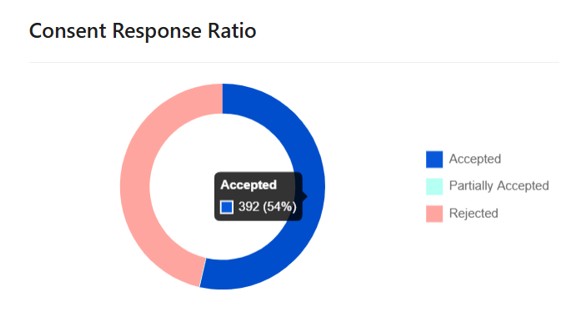
Consent rate: How users actually respond to the cookie banner after implementation.
Live banner experience: What users see when they visit the website.

The 30-Second Decision

Best for: websites that want full consent coverage without turning compliance into a project

Not ideal for: enterprise teams with complex, multi-region compliance requirements at scale

Entry price: $39 lifetime for 1 domain and 100,000 monthly page views

Risk window: 60-day refund through AppSumo, versus a 14-day trial on Consently’s own website

My take: a practical “get compliant fast” tool for most websites and lean teams. Not an enterprise privacy platform, and that is exactly why it fits.

What I Found When I Scanned My Website

Here’s what Consently surfaced on my own website, and it was more than I expected.

The 148 unclassified cookies meant there was real work ahead to properly categorize them.

Consently helps close that gap with scanning, consent control, consent logging, and policy generation in one place.

This is exactly the kind of visibility most websites are missing.

See the AppSumo Deal Before It Ends

What Consently Actually Does

Consently takes you from “I do not know what is running on my website” to visibility and control.

It scans your website for cookies and third-party scripts, blocks non-essential cookies until visitors give consent, logs consent decisions in an audit-ready dashboard, and generates privacy, cookie, and terms policy pages.

It also connects with Google Analytics 4 and ad platforms so opt-outs are actually respected.

Most consent tools stop at displaying a banner. Consently lets you define which cookies are essential and which require consent, including analytics, advertising, performance, and social. That is a governance decision, not a design choice.

Consently is not just a banner tool. It is visibility into what is actually happening on your website.

Doesn’t Google Analytics 4 Already Handle This?

Not really.

Google Analytics 4 and Google Tag Manager can help configure how Google tags behave after consent is given through Consent Mode. That is useful, but it is not a consent management system.

Google Analytics 4 and Google Tag Manager Consently
Consent Mode configuration only Full consent management system
No automatic cookie scanning Automatic cookie scanning
No cookie categorization dashboard Category-level cookie classification and control
No built-in policy generator Built-in policy generation
No centralized consent log dashboard Audit-ready consent logs
Manual configuration across tools Scanning, blocking, logging, and policy generation in one dashboard

Google Analytics measures what happened. Consently controls what is allowed to happen.

Setup in Minutes

Add your website name and URL, customize your banner and preference center, then drop a single script into your website header. I deployed mine through Google Tag Manager. After that, Consently scans, logs, and generates your policy pages automatically.

Why I Would Recommend This

  1. Compliance is based on data collection, not traffic size. If you collect data, you are responsible for it. At a lifetime price, this is inexpensive risk reduction.
  2. Tracking drift is real. Expired tags linger. Short-term tests become permanent. Third-party tools introduce cookies you did not explicitly plan for. On my own website, Consently surfaced 148 unclassified cookies. That is exactly the kind of thing that accumulates without you realizing it. Regular scanning restores visibility and control.
  3. It compresses complexity for lean teams. You could try to manage consent through multiple tools and manual processes. Most teams do not. Consently centralizes scanning, consent control, logging, and policy generation into one operational layer.

What Works Well

  • Live in under 30 minutes with minimal setup
  • Automatically scans your entire website for cookies across all pages
  • Control exactly which cookies are allowed and when
  • Audit-ready consent log dashboard
  • Built-in policy page generation
  • Google Analytics 4 and ad platform compatibility
  • 60-day AppSumo refund window

Watch Out For

No CSV export for your cookie list. This is the one thing I would change and have recommended to the team. With 148 unclassified cookies, being able to export, sort, and bulk classify in a spreadsheet would save real time. Right now you are doing it one by one inside the dashboard, which becomes tedious fast at scale. That is the gap between a 4-star and 5-star tool for me.

Validate PageSpeed and overall performance impact if your website is performance-sensitive.

Some manual review is still required as your tech stack evolves.

Not built for complex, multi-region enterprise compliance.

Plans and Pricing

Tier 1 starts at $39 lifetime for 1 domain and 100,000 monthly page views. Higher tiers add more domains and more page view capacity for teams managing multiple websites.

The AppSumo 60-day refund window gives you more runway than Consently’s standard 14-day trial to test it on your own website before committing.

Check Current Pricing and Tiers

Bottom Line

Privacy compliance is rarely urgent until it is.

For a $39 lifetime starting tier, Consently is a fast, centralized way to get cookie banners, scanning, consent logs, and policy pages in place without turning it into a legal or engineering project.

The one gap, no CSV export for bulk cookie classification, is a real friction point if your website has a lot of unclassified cookies. But at this price point, and with the core functionality it delivers, it is still the right tool for most websites and small teams.

If you want full visibility and control over what’s running on your website without turning compliance into a project, this is one of the easier decisions you’ll make.

Get Consently Lifetime Access

Disclaimer: I am not a lawyer. This content is for educational purposes and reflects my experience and research. Always validate privacy and compliance requirements based on your specific business and jurisdictions.

Looking for more marketing software reviews? See my full list of marketing tools and software I recommend.

Cookie Consent Management and Privacy Compliance Platform Read More »

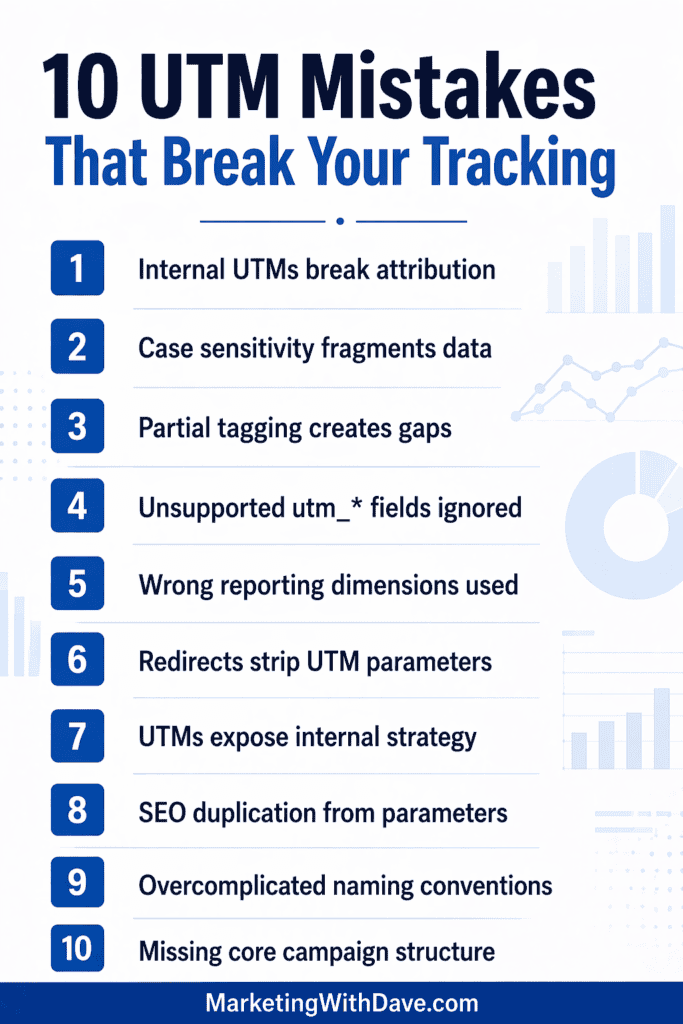
Infographic listing 10 common UTM tracking mistakes including attribution issues, data sensitivity, and strategy errors for digital marketing optimization.

10 UTM Tracking Mistakes Most Marketers Don’t Notice

Reading Time: 4 minutes

Most marketers can build a UTM link, but far fewer remember what UTM even stands for, or why we are still so dependent on them. UTM is commonly expanded as Urchin Tracking Module, a naming holdover from the Urchin era that helped shape early Google Analytics.

And even though analytics tooling has evolved, UTMs remain the default campaign labeling system because they are simple, portable, and widely supported.

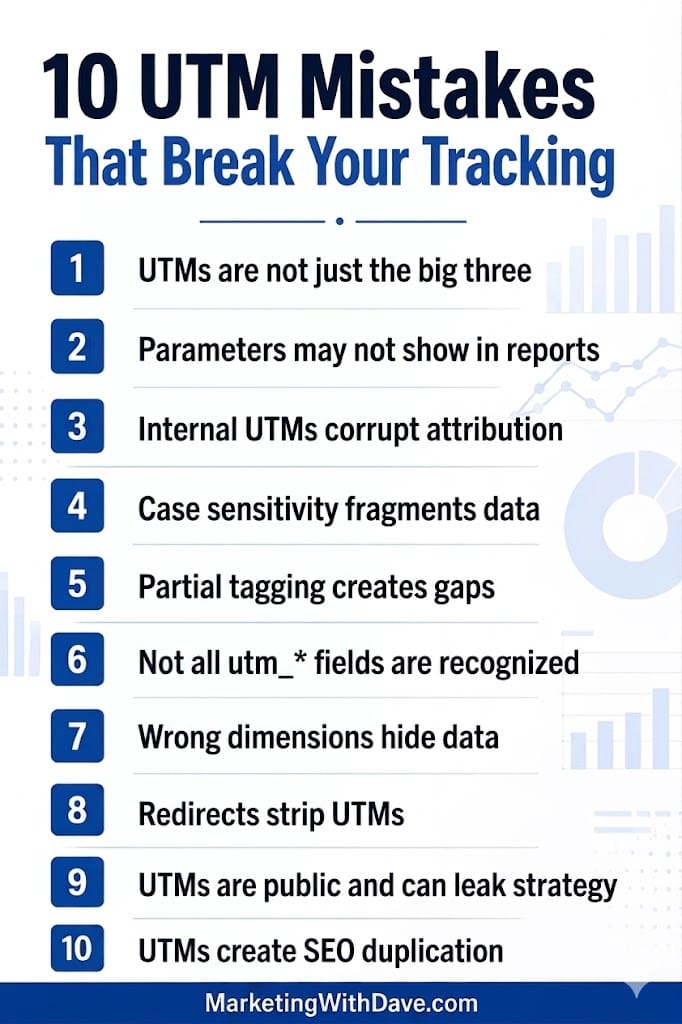
The problem is that the modern UTM landscape is broader than the classic three fields, and the common ways teams use UTMs can quietly damage attribution, fragment reporting, and create data governance debt. Here are 10 realities that are easy to miss until they hurt.

Infographic listing 10 common UTM tracking mistakes including misinterpretation, report issues, and SEO duplication for marketers.

1. UTMs are not just the big three anymore

Most teams think of UTMs as just utm_source, utm_medium, and utm_campaign, with utm_content and utm_term as optional add-ons. Those five were the traditional core. However, modern implementations also support additional campaign fields such as utm_id (a unique campaign identifier), utm_source_platform (the advertising or marketing platform), utm_creative_format (the format of the creative, such as video or display), and utm_marketing_tactic (the tactic or approach being used). These expanded parameters allow for more structured taxonomy, better cross-platform consistency, and stable campaign joins across analytics tools, ad platforms, and data warehouses. If your team is still only using the original three or five, you may be leaving valuable campaign context on the table.

2. Some parameters can exist in links but not show up where you expect

A common failure mode is assuming that every parameter you append will be visible in your standard reports. Even when data is collected, reporting surfaces, default dimensions, and export paths do not always make every field obvious.

3. Internal UTMs can corrupt attribution

UTMs were designed to describe how a person arrived from an external campaign. When you add UTMs to internal links (navigation, home page promos, in-app banners, footer links), you risk overwriting or contaminating acquisition data.

In Google Analytics 4 (GA4) specifically, you can also create confusing splits where session-scoped acquisition does one thing, while event-level campaign values reflect something else. The outcome is often “clean looking” reports that are quietly wrong.

4. Case sensitivity can silently fragment your reporting

UTM values are case sensitive in many analytics workflows. That means Facebook and facebook can become separate rows, breaking rollups, dashboards, and year-over-year comparisons.

5. Partial tagging creates “not set” and messy channel classification

If you tag one field but leave others blank, you can end up with incomplete campaign rows and inconsistent grouping. The worst part is that the tracking still “works,” so teams do not notice the damage until they try to reconcile results across channels.

6. Not every utm_* key is recognized automatically

A persistent myth is that any parameter that starts with utm_ will be treated like a standard UTM. In reality, platforms tend to recognize a defined set of fields. If your team invents custom utm-style keys, you should plan to capture them intentionally (for example, through your tag manager into custom dimensions) instead of expecting automatic mapping.

7. You might be looking in the wrong dimension and think UTMs disappeared

Teams often troubleshoot the wrong place in GA4 or exports and conclude UTMs are not being captured. Sometimes the data is present but not exposed in the exact report, dimension, or UI view you are using. This is especially common when people rely on “query string” style dimensions and expect UTMs to show there.

8. Redirects and URL rewrites can strip UTMs before analytics fires

If a tagged link lands on a URL that immediately redirects (server-side or JavaScript) to a clean URL, the analytics tag may fire after the redirect and never see the original UTM parameters. This is one of the most common reasons UTMs “do not work,” even when the link was built correctly.

9. UTMs are public, persistent, and easy to leak

UTMs live in the URL, which means they can be copied, forwarded, bookmarked, logged, screenshotted, scraped, and shared. They are not hidden tracking variables. They are completely visible to anyone who clicks the link.

That is why UTMs should never contain personally identifiable information. Beyond compliance and privacy concerns, they can also unintentionally expose internal strategy.

If you embed details like internal campaign naming conventions, budget tiers, audience segments, funnel stages, product codes, partner identifiers, or experimental labels directly into UTM values, you are effectively publishing your marketing playbook in plain text. Competitors can reverse engineer campaign structure, targeting logic, promotional cadence, and even creative testing strategies simply by inspecting your links.

UTMs should describe campaigns clearly enough for reporting, but never reveal sensitive operational intelligence. Treat every UTM value as public-facing metadata, because that is exactly what it is.

10. UTMs can create SEO duplication noise if they get crawled

If UTM-tagged URLs become discoverable to search engines (especially via external links), you can end up with many parameter variations of the same web page. The fix is usually not “stop using UTMs,” it is making sure your website has a clear canonical strategy so crawlers consolidate variants correctly.

Where Adobe Analytics fits into the story

Many enterprise organizations use Adobe Analytics, which uses a different tracking structure than UTMs (for example, eVars and props, plus processing rules and classifications). Even so, it is common to see teams pass UTM values into Adobe via custom variables because UTM-style naming has become deeply entrenched across marketing teams and vendor workflows.

A concise set of UTM governance rules you can adopt

1. Use UTMs only for external inbound campaigns, not internal navigation or internal promos.

2. Standardize casing (for example, all lowercase) and enforce it in every campaign workflow.

3. Require a minimum set for every campaign link: utm_source, utm_medium, and utm_campaign.

4. Use stable IDs when needed (for example, a campaign ID field) so you can join data across platforms even if names change.

5. Treat any custom utm-style keys as custom parameters and plan explicit capture and reporting.

6. QA redirects, short links, and landing web pages to ensure UTMs survive until the analytics tag runs.

7. Never include personally identifiable information in any campaign parameters.

Closing thought

UTMs are still the building blocks of campaign labeling, but they work best as the bottom layer of a measurement stack, not the whole stack. When you pair clean UTMs with consistent taxonomy, strong QA, and platform integrations where available, you get attribution you can actually trust.

10 UTM Tracking Mistakes Most Marketers Don’t Notice Read More »

february 2026 digital marketing roundup

February 2026 Digital Marketing Roundup: What Changed and Why It Matters

Reading Time: 3 minutes

1. Google released a Discover-only core update

What happened: Google launched the February 2026 Discover core update, a broad change to the systems that surface articles in Discover, separate from traditional Search-wide core updates.

Key players: Google

Why it matters: Discover is a major top-of-funnel traffic source, and system-level changes can materially reprice content investment and distribution strategy.

Implications:

  • Marketers: Treat Discover as its own distribution system with distinct volatility, testing, and content packaging requirements.
  • Investors: Content-led business models may show revenue sensitivity to Discover shifts that are not visible in standard SEO reports.
  • Researchers: Separate Discover-driven outcomes from Search-driven performance when diagnosing traffic changes.

2. EU antitrust pressure increased on Meta through a court adviser’s opinion

What happened: A European court adviser supported EU regulators in a dispute over Meta’s refusal to comply with information requests tied to antitrust investigations.

Key players: Meta

Why it matters: Enforcement intensity affects platform operating models, compliance costs, and data access that shape targeting and measurement reliability.

Implications:

  • Marketers: Plan for continued policy-driven constraints that may reduce deterministic signals.
  • Policymakers: The case reflects stronger information-rights enforcement in platform oversight.
  • Investors: Regulatory exposure remains a material variable in platform stability and long-term ad yield.

3. OpenAI began testing ads inside ChatGPT

What happened: OpenAI began a limited US test that shows clearly labeled ads for logged-in adult users on Free and Go tiers, while higher tiers remain ad-free during the test.

Key players: OpenAI

Why it matters: It introduces paid distribution inside answer-first interfaces, shifting how brands compete for intent when fewer users reach traditional search results web pages.

Implications:

  • Marketers: Treat this as a new channel with different creative constraints and governance requirements than search and social.
  • Startup operators: Discovery may become more pay-to-play in conversational interfaces, increasing pressure on owned audience strategies.
  • Researchers: Monitor behavioral changes when sponsored units appear alongside generated answers.

4. Amazon Ads opened an MCP Server to connect AI agents to its API

What happened: Amazon Ads announced its MCP Server open beta, enabling AI agents to convert natural-language prompts into structured Amazon Ads API actions.

Key players: Amazon

Why it matters: It lowers operational friction in retail media, shifting advantage toward strategic inputs rather than manual execution speed.

Implications:

  • Marketers: Faster iteration requires tighter permission controls and audit processes.
  • Startup operators: Tooling opportunity moves toward governance, QA, and insight layers above agent-driven execution.
  • Researchers: Evaluate efficiency gains versus risk of rapid, unvalidated campaign changes.

5. TikTok Shop updated fulfillment SLAs tied to Fast Dispatch Rate

What happened: TikTok Shop updated order fulfillment SLAs connected to Fast Dispatch Rate, raising operational requirements that influence seller visibility and distribution.

Key players: TikTok

Why it matters: Commerce platforms increasingly treat logistics quality as a distribution input, directly affecting reach and conversion efficiency.

Implications:

  • Marketers: Media performance is now directly tied to operational execution.
  • Startup operators: Fulfillment systems and 3PL partnerships become performance-critical infrastructure.
  • Researchers: Separate demand shifts from logistics gating effects in performance analysis.

6. EU declined to designate Apple Ads and Apple Maps under the DMA

What happened: The European Commission concluded that Apple Ads and Apple Maps should not be designated under the Digital Markets Act based on usage and market impact thresholds.

Key players: European Commission

Why it matters: DMA designation affects competitive obligations and reporting requirements that can shape ad product constraints in the EU.

Implications:

  • Marketers: Regulatory decisions shape how platforms structure targeting and reporting.
  • Policymakers: The ruling clarifies service-level interpretation of DMA thresholds.
  • Investors: Regulatory scope decisions influence platform risk profiles.

7. Google Analytics added “Generated insights” to the Home experience

What happened: Google added Generated insights to the Google Analytics Home web page, summarizing key data changes since a user’s last visit, including anomalies and seasonal patterns.

Key players: Google

Why it matters: Measurement tooling is shifting from reporting toward interpretation, influencing budget allocation speed and diagnostic workflows.

Implications:

  • Marketers: Faster anomaly detection shortens optimization cycles.
  • Researchers: Automated summaries require validation against controlled analysis.
  • Startup operators: Analytics UX improvements raise expectations for insight automation tools.

8. Google Ads rolled out expanded in-account certification applications

What happened: Google updated its certification process so select advertisers can apply for certain policy certifications directly inside Google Ads.

Key players: Google

Why it matters: Compliance workflow efficiency directly affects campaign launch speed and scaling in regulated categories.

Implications:

  • Marketers: Build certification lead times into campaign planning.
  • Startup operators: Policy readiness becomes a competitive differentiator in restricted verticals.
  • Policymakers: Enforcement systems are increasingly embedded inside ad account workflows.

February 2026 Digital Marketing Roundup: What Changed and Why It Matters Read More »

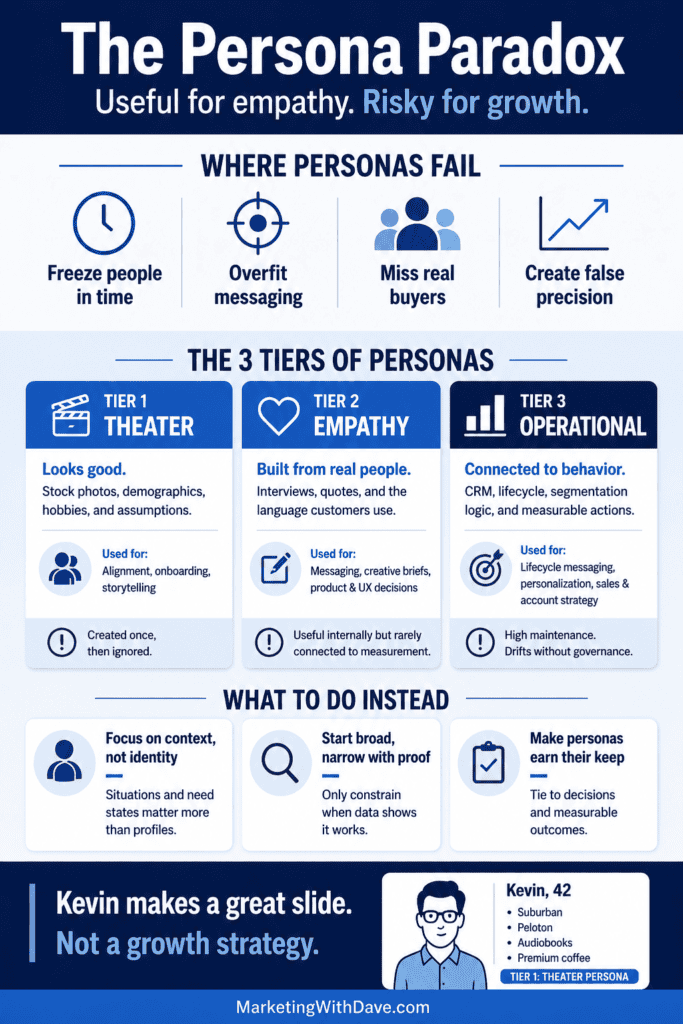
Improve your understanding of the Persona Paradox with this detailed infographic. Learn how to balance empathy and operational needs for better marketing growth.

The Persona Paradox: Useful for Empathy, Risky for Growth

Reading Time: 4 minutes

Meet Kevin.

Kevin is 42. He lives in the suburbs. He owns a Peloton, listens to business audiobooks at 1.5x speed, prefers single-origin coffee, and drives a Volvo because it “balances safety and engineering.” He values innovation, wants brands to feel authentic, and responds best to messaging that blends aspiration with reassurance.

Kevin appears in slide decks across marketing departments everywhere. He guides targeting decisions, creative briefs, and sometimes entire media plans.

The problem is not that Kevin exists.

The problem is that markets do not behave like Kevin.

Personas can help teams align and build empathy. But when a static profile becomes the foundation of growth strategy, it can introduce more false precision than clarity. That is the persona paradox: useful for understanding people, risky when treated as the operating system for how markets work.

This is not an anti-persona argument. Personas are not dead. They are not useless. They are often overpromised, underused, and left to decay. The real issue is not that personas exist. The issue is what we expect them to do.

What personas are actually good for

At their best, personas help teams build shared language and empathy.

They can improve messaging, creative direction, and product decisions by making the customer feel less abstract. They can also help new team members ramp faster by explaining who the organization thinks it serves and why.

Used this way, personas are helpful. They clarify. They align. They inspire.

Where personas break down

Personas tend to fail when they are treated like precision instruments for targeting, budget allocation, and growth planning.

They often focus too heavily on identity traits, while purchase behavior is frequently driven by context, situation, and timing. A 25-year-old tech worker and a 65-year-old retiree can share the same need state on the same day. The context matters more than the profile.

Personas also freeze people in time. Customers change roles, budgets, life stages, and priorities. Markets shift faster than decks get updated. Without maintenance, personas decay into historical fiction.

And in many organizations, personas become stakeholder theater. They look polished, feel reassuring, and make uncertainty feel manageable, even when they never meaningfully influence decisions.

Improve your understanding of the Persona Paradox with this detailed infographic. Learn how to balance empathy and operational needs for better marketing growth.

The three tiers of personas

Not all personas are created equal. Most frustration comes from Tier 1. Most value appears in Tier 2. Most teams say they want Tier 3, but very few operationalize it.

TierWhat it looks likeWhere it helpsCommon failureHow to improve it
Tier 1: The Theater PersonaStock photo, demographics, hobbies, a catchy name, and a few assumptionsExecutive alignment, onboarding, storytellingCreated once, then ignored. Becomes a slide, not a toolReplace fluff with actual quotes, real objections, and evidence. Tie it to real decisions
Tier 2: The Empathy PersonaBuilt from interviews, qualitative research, and real language customers useMessaging, creative briefs, product positioning, UXUseful internally but never connected to measurement or segmentationAdd triggers, contexts, and category entry points. Define what would change your mind
Tier 3: The Operational PersonaConnected to CRM, lifecycle, segmentation logic, and measurable behaviorsLifecycle messaging, personalization, sales enablement, account strategyHigh maintenance burden. Drifts quickly if not governedAssign ownership, update cadence, and success metrics. Treat it like a living system

Why growth strategy often punishes persona thinking

One of the most consistent lessons from marketing effectiveness research is that growth often comes from reaching more category buyers, including light and ultra-light buyers who do not fit neatly into tight profiles.

When teams over-commit to personas as targeting boundaries, they can unintentionally narrow reach, miss unexpected audiences, and overfit messaging to a small slice of the market.

That is why persona work should be treated cautiously when it becomes a gatekeeper for spend and scale.

A better way to use personas without letting them run the business

1. Use contexts, not caricatures

Instead of leading with identity, lead with situations and need states. Map the moments that bring people into your category. These are often more predictive than demographic labels.

2. Default to broad, narrow with evidence

Start wider than your instincts. Narrow only when you have repeatable, measurable proof that focusing improves outcomes without harming growth potential.

3. Make personas earn their keep

If a persona exists, it should influence something real. A creative decision. A messaging choice. A lifecycle path. A sales enablement asset. If nothing changes because the persona exists, it is probably theater.

4. Add a maintenance plan or do not build them

A persona without an update cadence is a future liability. Decide who owns it, how it is refreshed, what inputs update it, and what triggers a rethink.

5. Treat personas as inputs, not answers

Personas can be hypotheses about audiences. Testing determines whether those hypotheses hold. The goal is not to defend the persona. The goal is to discover what actually works.

A practical persona sanity check

Before investing in personas, ask:

1. What decision will this change?

2. What evidence will build it, and what evidence would invalidate it?

3. Who will own updates, and how often?

4. Are we using this for empathy and messaging, or as a substitute for strategy?

5. Are we narrowing reach before we have proof?

Where Personas Absolutely Make Sense

Personas are not inherently flawed. In certain contexts, they are not just helpful — they are necessary.

In niche B2B markets with a limited total addressable audience, clearly defined buyer roles can improve efficiency and reduce wasted outreach. When a small group of decision-makers controls purchasing, structured personas can sharpen messaging and sales enablement.

In product-led environments, personas built from qualitative research can guide UX decisions, feature prioritization, and onboarding flows. When grounded in real customer interviews and behavioral data, they can prevent generic product design.

Lifecycle marketing also benefits from persona thinking when it reflects real stage-based behaviors. Messaging to a first-time user, a repeat customer, and a dormant account should not be identical. Structured audience definitions can clarify those distinctions.

The key distinction is this: personas work best when they inform communication and experience design. They become risky when they dictate who the market is allowed to be.

The bottom line

Kevin makes for a great slide.

He does not make for a growth strategy.

Personas can align teams and inspire creative work. But markets are driven by situations, reach, and mental availability — not solely by perfectly described fictional profiles.

Use personas as a tool. Do not let them become your operating system.

References

The Sleeping Barber Podcast. “Personas, We Have a Problem.” Episode Summary

Ehrenberg-Bass Institute. “The Law of Brand User Profiles.” Read Article

Marketing Science / Ehrenberg-Bass. “The Value of the Bottom 80%.” Read Article

MI-3 Australia. “How Ex-P&G US Marketer Ditched Cohorts, Personas and Restrictive Segmentation.” Read Article

Adobe Business Blog. “The Customer Persona Is Dead? Long Live the Customer Profile.” Read Article

The Persona Paradox: Useful for Empathy, Risky for Growth Read More »

whos who in marketing technology martech leaders

Who’s Who in Marketing Technology: Martech Leaders

Reading Time: 3 minutes

This is a curated, growing list of leaders in marketing technology, often called Martech. It helps marketers quickly identify the people who shaped the discipline, built foundational platforms, and continue influencing how Martech stacks are designed and used today.

This is a living reference list. Leaders are selected based on ecosystem influence, category creation, platform leadership, research, and education. If someone is not currently active, birth and death dates will be included to provide historical context.

Martech Leaders

Role: Martech analyst and author

Status: Active

Location: United States

Known For: Creating the Marketing Technology Landscape and publishing chiefmartec. His work helped marketers understand the Martech ecosystem and how platforms, categories, and stacks evolve over time.

Follow:

https://chiefmartec.com/

https://www.linkedin.com/in/sjbrinker/

Role: Founder, Real Story Group

Status: Active

Location: United States

Known For: Independent vendor research and enterprise platform evaluation. His work helps marketers choose Martech tools based on capabilities, architecture, and long-term fit rather than hype.

Follow:

https://www.realstorygroup.com/

https://www.linkedin.com/in/tonybyrne1/

Role: Martech journalist and editor

Status: Active

Location: United States

Known For: Translating Martech platform changes and category shifts into practical coverage for working marketers, helping teams understand what is changing and what matters.

Follow:

https://martech.org/author/kim-davis/

https://www.linkedin.com/in/kimdavisnyc/

Role: Positioning consultant and author

Status: Active

Location: Canada

Known For: Practical positioning frameworks used widely by B2B software and Martech companies to clarify differentiation, category context, and buyer-relevant value.

Follow:

https://www.aprildunford.com/

https://www.linkedin.com/in/aprildunford/

Role: Founder, Humans of Martech

Status: Active

Location: Canada

Known For: Practitioner-focused interviews and education that make modern Martech stacks and roles easier to understand, especially how tools connect and how teams work across platforms.

Follow:

https://humansofmartech.com/

https://www.linkedin.com/in/gamacp/

Role: Martech and GTM systems advisor

Status: Active

Location: United States

Known For: Systems thinking about modern stacks, including integration, data flow, and platform decisions. His guidance helps marketers design simpler and more reliable Martech architectures.

Follow:

https://www.linkedin.com/in/austinahay/

Role: Industry analyst

Status: Active

Location: United States

Known For: Ecosystem and partnership analysis that explains how platforms grow through integrations and partner networks, which is central to how Martech categories scale.

Follow:

https://www.linkedin.com/in/jaymcbain/

Role: Marketing technology entrepreneur and advisor

Status: Active

Location: United States

Known For: Co-founding Marketo and helping shape modern marketing automation in B2B. His work is foundational for understanding how automation became a core Martech layer.

Follow:

https://www.jonmiller.com/

https://www.linkedin.com/in/jonmiller2/

Role: Research analyst

Status: Active

Location: United States

Known For: Research connecting marketing technology decisions to enterprise strategy, customer engagement, and trust, helping leaders frame Martech as business infrastructure, not just tools.

Follow:

https://www.constellationr.com/user/liz-miller

https://www.linkedin.com/in/lizkmiller/

Role: Customer data platform leader and author

Status: Active

Location: United States

Known For: Explaining customer data platforms and identity foundations in marketer-friendly terms, with practical guidance for unifying and activating customer data responsibly.

Follow:

https://chrisohara.com/

https://www.linkedin.com/in/christopherohara/

Role: Founder, CDP Institute

Status: Active

Location: United States

Known For: Naming and defining the customer data platform category and building an education hub that helps marketers understand CDPs and how they fit into modern stacks.

Follow:

https://www.cdpinstitute.org/

https://www.linkedin.com/in/david-raab-22146b/

Role: Martech researcher and advisor

Status: Active

Location: Europe

Known For: Martech mapping and stack benchmarking that helps marketers evaluate complexity, maturity, and category fit as stacks scale and evolve.

Follow:

https://martechmap.com/about

https://www.linkedin.com/in/fransriemersma/

Role: Platform founder and product leader

Status: Active

Location: United States

Known For: Co-founding HubSpot and influencing modern all-in-one marketing platforms, while continuing to publish practical insights on product thinking and AI.

Follow:

https://dharmesh.com/

https://www.linkedin.com/in/dharmesh/

Role: Author and innovation strategist

Status: Active

Location: United States

Known For: Connecting technology shifts to digital transformation and customer experience strategy, helping marketers frame Martech decisions within broader organizational change.

Follow:

https://briansolis.com/

https://www.linkedin.com/in/briansolis/

Role: Go-to-market leader and category builder

Status: Active

Location: United States

Known For: Helping popularize account-based marketing as a strategy and technology category, influencing how B2B platforms and go-to-market stacks are designed.

Follow:

https://www.sangramvajre.com/

https://www.linkedin.com/in/sangramvajre/

Suggestions and updates

This is a living list. If you believe someone belongs in this Martech Who’s Who, recommendations are welcome. Please include the person’s name, why they belong, and one link that best represents their work today.

Who’s Who in Marketing Technology: Martech Leaders Read More »