Last updated September 2026
The Standard Promotions tab in SiteSqueeze Performance shows how your regular promotions are performing across your WordPress site.
It focuses on the essentials: impressions, clicks, click-through rate, daily performance, and the pages where each promotion appeared.
Standard Promotions reporting covers two types of promotions:
- Promote Existing Content promotions, created from an existing WordPress post or page.
- Custom Promotions, created with your own image, message, call to action, and destination URL.
Other SiteSqueeze promotion types have their own reporting. A/B Tests, Latest Category Article, and Ad Reach each get a separate Performance tab so they can report on what’s specific to how that feature works.
Understanding Standard Promotion performance
Each promotion includes a summary for the date range currently selected in Performance.
The primary metrics are:
- Impressions: the number of times SiteSqueeze recorded the promotion as displayed.
- Clicks: the number of displayed clicks, meaning tracked clicks plus any manual adjustment (more on that below).
- CTR: click-through rate, calculated by dividing clicks by impressions.
You can change the reporting period using the date selector at the top of Performance, with options including Today, Yesterday, This Month, Last Month, Last 30 Days, Custom, and Lifetime. The selected date range applies to the performance figures shown in the report.
Review performance by day
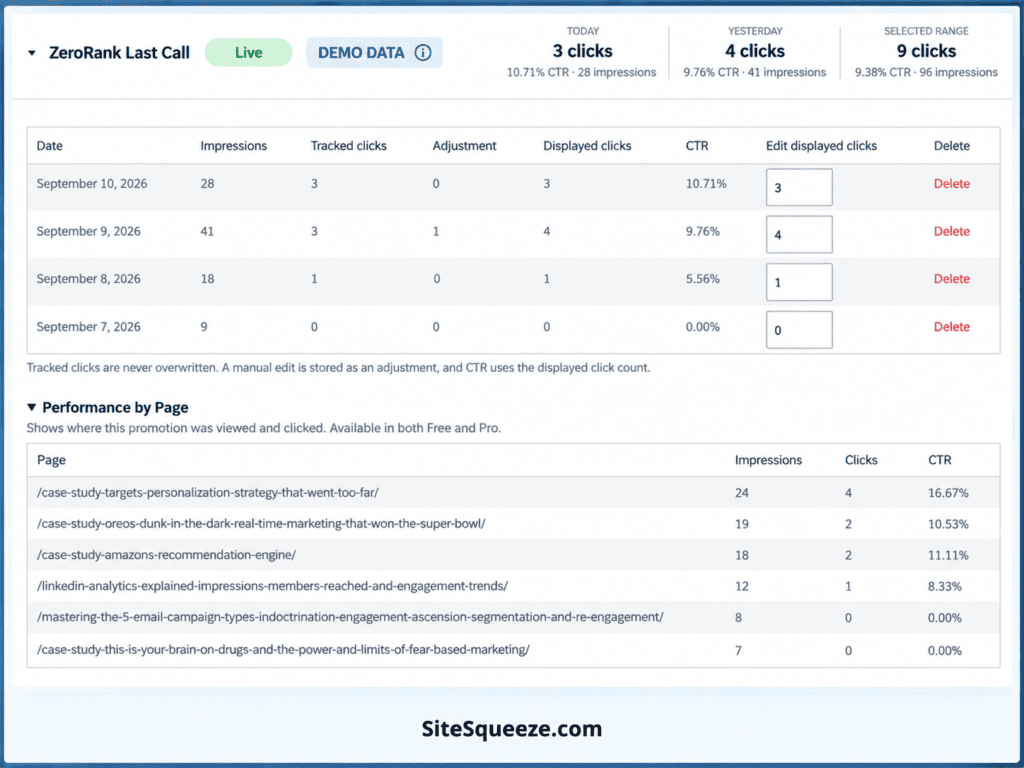
Expand a promotion to see its results broken down by day. Daily reporting separates three figures:
- Tracked Clicks: clicks recorded directly by SiteSqueeze.
- Adjustments: any manual correction you’ve added.
- Displayed Clicks: tracked clicks plus adjustments. This is the same figure used as “Clicks” in the summary above, and it’s what the CTR calculation uses.
If you have a reason to correct a click total, SiteSqueeze preserves the original tracked figure rather than overwriting it and records your correction as a separate adjustment. For example, if SiteSqueeze tracked 10 clicks and you added an adjustment of 2, the report would show 12 Displayed Clicks while still keeping the original 10 tracked clicks visible in the breakdown.
See where a promotion performed
The Performance by Page section shows the WordPress pages where a promotion generated impressions and clicks.
This is useful alongside the overall CTR, not instead of it. It can help answer questions like:
- Which pages are generating the most exposure for this promotion?
- Where are visitors actually clicking it?
- Does the promotion perform differently depending on the surrounding content?
What to look for
Start with impressions, clicks, and CTR.
A promotion getting plenty of impressions but few clicks may be worth revisiting. The image, message, offer, or call to action may be worth testing or revisiting.
A promotion getting very few impressions is a different problem, and not necessarily a sign the promotion itself is underperforming. Placement, eligibility rules, frequency limits, and visitor behavior can all affect how often visitors even have a chance to see it. That’s a question for the Ad Reach tab, which reports on what happens before a promotion is displayed rather than how it performs once it is.
Standard Promotions and Ad Reach answer different questions: Standard Promotions tells you how a promotion performed when it was shown. Ad Reach helps show how much of your traffic progressed far enough for a promotion to have an opportunity to display and where that opportunity was lost.
Exporting your data
SiteSqueeze includes a CSV export of Performance data for analysis outside WordPress, scoped to whatever date range you currently have selected.
SiteSqueeze is coming soon. I’m building a WordPress plugin to help marketers promote their own content, offers, and important pages more effectively, with clearer visibility into what visitors actually have the opportunity to see.