Marketing with Dave: Marketing Stack Audit checklist with tools, job, owner, cost, and decision sections for SEO and marketing optimization.

The Marketing Stack Audit: Keep, Replace, Consolidate, or Cancel

Reading Time: 12 minutes

If you’re reading this, you probably already know your marketing stack has become more complicated than it needs to be. You’re paying for tools you barely use, you’ve forgotten what some subscriptions even do, and new AI products seem to appear every week promising to replace everything that came before. Some tools overlap, others don’t integrate, and you’re not completely sure which ones are actually earning their place.

I’ve been there.

After evaluating more than 50 marketing tools over the past year through hands-on reviews and beta testing, I’ve learned something that surprised me. Finding good software isn’t the hard part. Deciding what deserves a permanent place in your business is.

That’s why I regularly audit my marketing stack. Not because I want fewer tools, but because I want the right tools. This is the same framework I use to decide what to keep, what to replace, and what to cancel.
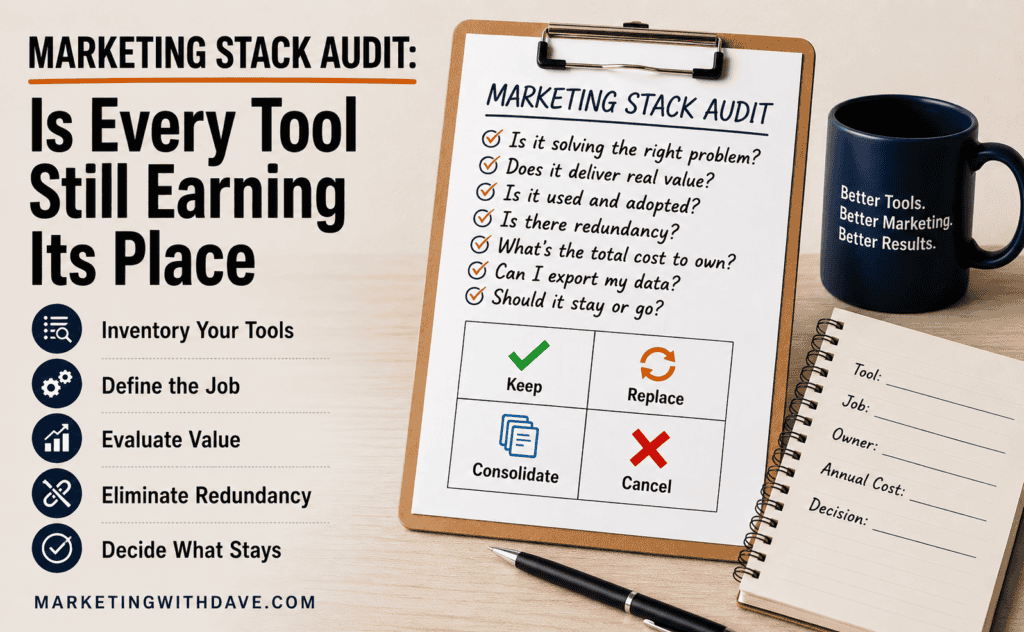
Marketing with Dave: Marketing Stack Audit checklist with tools, job, owner, cost, and decision sections for SEO and marketing optimization.

The Marketing Stack Audit Framework

Before we start inventorying software, I want to share one mindset shift that completely changed how I evaluate marketing tools.

When I first started buying marketing software, I usually asked one question: Can this tool do what I need? The answer was almost always yes. Most marketing platforms solve a real problem, which is exactly why it’s so easy to accumulate subscriptions over time.

Today I ask a different question:

Does this tool deserve a permanent place in my business?

That’s a much harder question to answer, and it’s the question that drives every decision in this article.

A tool doesn’t earn its place because it has hundreds of features or because everyone on LinkedIn is recommending it. It earns its place because it consistently performs the job you hired it to do, integrates well with the rest of your marketing stack, and delivers enough value to justify the cost and complexity it adds. Whether you use one feature or one hundred is largely irrelevant if it continues to solve the problem you bought it to solve.

That’s the framework we’ll use throughout this audit.

1. Inventory Every Marketing Tool You Own

You can’t make good decisions if you don’t know what you actually own.

Start by creating a complete inventory of every marketing tool your business uses. Don’t stop at the obvious subscriptions like your CRM or SEO platform. Include AI tools, browser extensions, WordPress plugins, reporting dashboards, design software, accessibility tools, form builders, social media platforms, screenshot tools, and anything else that supports your marketing efforts.

For each tool, capture the information you’ll actually need to make a decision later:

  • Monthly or annual cost
  • Renewal date
  • Contract length
  • Primary owner
  • Number of users
  • Primary job it was hired to do
  • Key integrations
  • Export options or API availability

Don’t ignore free tools. They often create the same challenges as paid software by introducing another place where data lives, another workflow to manage, or another process that depends on a single person knowing how it works.

By the time you’ve finished this inventory, you’ll probably notice two things. First, your marketing stack is larger than you thought. Second, you’ll already start spotting subscriptions that deserve a closer look.

2. Define the Job You Hired Each Tool to Do

Once your inventory is complete, resist the temptation to compare feature lists.

Instead, define the specific job you hired each tool to do.

This is one of the biggest mindset shifts I’ve made over the past few years. I don’t care whether a platform has 20 features or 200. I care whether it consistently solves the problem I bought it to solve.

For example, I might use one SEO platform almost exclusively for rank tracking, another for technical audits, and an AI tool primarily for brainstorming article ideas. Am I using every feature they offer? Not even close. But each one performs an important job well enough that it continues to earn its place.

That’s a much healthier way to evaluate software than asking whether you’re getting your money’s worth by using every feature. Most businesses never become power users of every platform they own, and they don’t need to. The goal isn’t to maximize feature usage. It’s to maximize business value.

The software is the tool. You should not become its tool.

If you find yourself changing your strategy simply because a platform encourages you to use more of its features, it’s worth asking whether you’re still directing the software or whether the software has started directing you.

3. Evaluate Value Before You Evaluate Usage

One of the biggest mistakes I see during software audits is assuming that heavily used software must be valuable and rarely used software must be expendable.

That’s not always true.

Some marketing tools only need to do one thing exceptionally well to justify their cost. Your analytics platform may only be reviewed during monthly reporting. An accessibility scanner might only be used before publishing new content. Backup software hopefully spends most of its life doing nothing at all.

Frequency of use doesn’t always equal business value.

Instead, evaluate each tool by asking a few simple questions:

  • Does it solve an important problem?
  • Does it save meaningful time?
  • Does it improve marketing performance or decision-making?
  • Does it replace another tool or manual process?
  • Would the business be noticeably worse without it?

If the answer to several of those questions is yes, the software is probably earning its place, regardless of how often someone logs into it.

On the other hand, be careful not to confuse potential value with actual value.

Almost every software platform promises to save time, improve productivity, or automate repetitive work. Those benefits only matter if your team consistently uses them. Buying software doesn’t create value. Using it effectively does.

One question has become my favorite litmus test during software audits:

If I didn’t already own this software, would I buy it again today?

That question eliminates sunk-cost bias surprisingly quickly.

You’re no longer defending a purchase you made six months ago. You’re evaluating whether that software still deserves your investment based on what you know today.

4. Look for Redundancy, Not Similarity

Once you’ve identified the value each tool provides, the next step is looking for overlap.

Notice I didn’t say similarity.

Most marketing stacks contain software with overlapping features. That’s perfectly normal.

For example, many SEO platforms include site audits, keyword research, rank tracking, backlink analysis, and AI writing features. Most AI assistants can brainstorm ideas, summarize content, and help draft copy.

Feature overlap isn’t the problem.

Redundant outcomes are.

If two tools consistently perform the same job equally well, you probably don’t need both. If each one contributes unique insights or capabilities that improve your marketing, keeping both may be the right decision.

This is where defining the “job” for each tool becomes so valuable. You’re no longer comparing feature lists. You’re comparing outcomes.

One tool might be responsible for technical SEO audits. Another might be your trusted source for competitive research. A third might excel at AI visibility reporting. On paper they overlap. In practice they perform very different jobs.

Don’t ask whether two tools are similar.

Ask whether they’re both earning their place.

That’s a much more useful question.

5. Decide What Stays and What Goes

By this point, you’ve inventoried your marketing stack, defined the job each tool performs, evaluated the value it creates, and identified areas of unnecessary overlap.

Now it’s time to make decisions.

I like to place every tool into one of four categories.

Keep

These are the easy decisions.

The tool performs an important job, consistently creates value, integrates well with the rest of your stack, and continues to justify its cost. Don’t overthink these. Every healthy marketing stack should include software that’s proven its value over time.

Replace

Sometimes a tool still solves an important problem, but a better solution has become available.

Maybe another platform has matured, pricing has changed, or one product now combines features that previously required two separate subscriptions. Replacing software isn’t about chasing the newest shiny object. It’s about recognizing when a better long-term option exists.

Before making the switch, make sure you understand how you’ll migrate your data, update your workflows, and train anyone who depends on the platform.

Consolidate

Consolidation is different from replacement.

Instead of swapping one tool for another, you’re reducing unnecessary complexity by allowing one platform to perform work that currently requires two or three.

For example, if your SEO platform now includes AI visibility tracking that previously required a separate subscription, consolidating those capabilities might reduce costs while simplifying your workflow.

The goal isn’t to own fewer tools.

The goal is to eliminate unnecessary complexity.

Cancel

This is usually the smallest category.

A tool belongs here when it no longer solves an important problem, duplicates capabilities you already have, or simply isn’t delivering enough value to justify the ongoing investment.

Before canceling anything, confirm that you’ve exported any data you want to keep, documented important workflows, and identified any downstream processes that depend on that software.

One of the most expensive mistakes you can make is canceling a subscription only to discover six months later that it contained historical data you can no longer recover.

Protect Your Data Before You Cancel Anything

One lesson I’ve learned over the years is that most buyers spend far more time thinking about how to get data into a new platform than how to get it back out.

Every software company makes importing data look easy. That’s part of the onboarding experience.

Exporting your data is often a very different story.

Before canceling any marketing tool, make sure you understand:

  • What data can be exported.
  • Whether exports are complete or limited.
  • If an API is available.
  • Which integrations stop working after cancellation.
  • Whether historical data remains accessible.

I’ve become much more cautious about software that treats my business data as if it belongs to them instead of me.

Never let your marketing data become a hostage to someone else’s software.

A good marketing platform should make it easy to join.

It should also make it possible to leave.

Don’t wait until you’ve decided to cancel before testing an export. Verify that your data is complete, usable, and in a format you can actually migrate. An export feature that produces unusable data isn’t much of an exit strategy.

6. Before You Buy Another Marketing Tool

A marketing stack audit shouldn’t be something you do only when budgets get tight or subscriptions become overwhelming. The real value is changing how you evaluate software before it ever becomes part of your stack.

When I’m considering a new marketing tool, these are the questions I ask before I decide to buy.

  • What specific problem am I trying to solve?
  • What job am I hiring this software to do?
  • Does something I already own solve that problem well enough?
  • Will this replace an existing tool or simply add another subscription?
  • Will it integrate with the rest of my marketing stack?
  • Can I export my data if I decide to leave?
  • Does it offer an API or other integration options if my needs grow?
  • Who else will this affect? Will sales, finance, IT, or another team eventually need to support, integrate with, or use this platform?
  • What’s the real cost of ownership? Consider implementation, training, maintenance, data migration, and the time required for your team to become proficient, not just the monthly subscription.
  • Would I still buy this tool a year from now if I knew what I know today?

No checklist will guarantee you’ll make the right decision every time, but asking better questions dramatically improves the odds.

I’ve also become much more skeptical of feature checklists. Most software companies compete by adding capabilities, but more features don’t automatically create more value. In many cases, they simply create more complexity.

Every new tool should either replace an existing tool or solve a problem nothing in your current stack can solve. If it doesn’t do one of those two things, it’s probably adding more complexity than value.

The Hidden Costs of Marketing Software

The subscription is only one part of the investment. The time, complexity, and organizational change required to successfully use the software are often much more significant.

One mistake I see businesses make is comparing software based almost entirely on subscription price. That’s certainly part of the equation, but it’s rarely the biggest cost.

Every new platform comes with hidden costs that don’t appear on the pricing page. Someone has to evaluate the software, implement it, migrate data, learn how it works, document new processes, train the rest of the team, maintain integrations, and support it over time. As organizations grow, those costs multiply with every additional person who needs to become proficient with the platform.

I’ve seen organizations where software adoption looked like a success because everyone was using the tool. In reality, the software encouraged teams to bypass established processes, create duplicate content, or work outside existing governance. High usage isn’t always a sign that a tool is creating value. Sometimes it’s simply creating a different kind of problem.

That’s why I try to evaluate the total cost of owning a piece of software, not just the monthly subscription. A tool that costs twice as much may actually be the less expensive option if it replaces multiple platforms, reduces manual work, and requires less ongoing maintenance. Likewise, an inexpensive tool can become surprisingly expensive if it creates extra work or never gains meaningful adoption.

When you’re evaluating software, don’t just ask what it costs.

The subscription tells you what the software costs. Your team tells you what it costs to own.

The subscription is only one part of the investment. The time, complexity, training, and organizational change required to successfully use the software are often much more significant.

Building a Better Marketing Stack

Completing a marketing stack audit isn’t the finish line. It’s an opportunity to rethink how you evaluate software going forward. Every new tool you buy either strengthens your marketing stack or makes the next audit more difficult.

Over the years, I’ve settled on a handful of principles that help me make better software decisions.

Solve problems, not curiosity. It’s easy to get excited about a new platform because it has innovative features or glowing reviews. Before you buy anything, identify the specific problem you’re trying to solve. If you can’t clearly define the problem, you’re probably buying software because it’s interesting rather than necessary.

Choose software that works well with the rest of your stack. The best product isn’t always the one with the longest feature list. It’s often the one that fits naturally into your existing workflow. Good integrations reduce manual work, improve data quality, and make your entire stack more valuable.

Think beyond today’s requirements. When evaluating software, consider where your business will be in two or three years. Will the platform still meet your needs? Can you export your data? Does it provide an API if you need one? Can it grow with your business without forcing you into an expensive migration?

Review your stack before renewal dates. Annual renewals have a way of sneaking up on you. Schedule time to evaluate your software a month or two before major renewals so you can make thoughtful decisions instead of rushed ones.

Ultimately, a great marketing stack isn’t measured by the number of tools you own or the number of features you use. It’s measured by how effectively those tools help you accomplish your marketing goals. The best software quietly supports your strategy, integrates with the rest of your business, and stays out of your way. If you find yourself spending more time managing software than marketing, it’s probably time for another audit.

One mistake I see businesses make is comparing software based almost entirely on subscription price. That’s certainly part of the equation, but it’s rarely the biggest cost.

Every new platform comes with hidden costs that don’t appear on the pricing page. Someone has to evaluate the software, implement it, migrate data, learn how it works, document new processes, train the rest of the team, maintain integrations, and support it over time. As organizations grow, those costs multiply with every additional person who needs to become proficient with the platform.

Those costs often extend well beyond the marketing team. A new platform may require IT to review security, finance to approve the budget, procurement to negotiate contracts, or sales to change existing workflows. The more people a tool touches, the more important it becomes to involve those stakeholders early in the evaluation process rather than after the purchase has already been made.

That’s why I try to evaluate the total cost of owning a piece of software, not just the monthly subscription. A tool that costs twice as much may actually be the less expensive option if it replaces multiple platforms, reduces manual work, and requires less ongoing maintenance. Likewise, an inexpensive tool can become surprisingly costly if it creates additional work, never gains meaningful adoption, or simply shifts the burden somewhere else in the business.

I typically review my marketing stack at least once a year and again before any significant renewal dates. That small investment of time has saved me far more than it takes to complete the audit.

Marketing Stack Audit FAQs

How often should I audit my marketing stack?

I recommend auditing your marketing stack at least once a year and again before major software renewals. If you are actively adding new AI tools or marketing software throughout the year, consider reviewing it quarterly to identify overlap before it becomes expensive.

How do I know whether two marketing tools are truly redundant?

Do not compare feature lists. Compare outcomes.

Two platforms can offer similar features while solving completely different business problems. If each tool consistently performs a unique job that creates measurable value, keeping both may be justified. If they produce the same outcome, it is probably time to consolidate.

Why are APIs and data export options important when evaluating marketing software?

APIs and export options determine how easily a tool fits into your marketing stack today and how easily you can leave it tomorrow. Many buyers focus on getting data into a platform but never ask how they will get it back out.

Before committing to any marketing tool, make sure you understand what data can be exported, whether the export is complete and usable, whether an API is available, and how difficult migration will be if your needs change.

Should I cancel software I do not use often?

Not necessarily.

Some of the most valuable marketing tools are only used periodically, such as analytics platforms, accessibility testing software, or backup systems. Instead of measuring usage frequency, evaluate whether the software performs an important job that would be difficult or costly to replace.

Should free tools be included in a marketing stack audit?

Yes. Free tools can still create workflows, store business data, introduce security considerations, and create reporting silos. Every tool deserves evaluation, whether you pay for it or not.

What should I check before canceling a marketing tool?

Before canceling any software, confirm that you can export your data, understand what historical information will be lost, identify any integrations that will stop working, and verify that another tool or process can perform the same job.

What should I look for before buying another marketing tool?

Start by asking what specific problem you are trying to solve. Then determine whether something you already own can solve that problem, whether the new software integrates with your existing stack, whether your data can be exported, and what the total cost of ownership will be over time.

Is owning fewer marketing tools always better?

No. The goal is not to own the fewest tools possible. It is to own the right tools. A specialized platform that consistently performs an important job may be far more valuable than replacing it with an all-in-one solution that does everything adequately but nothing exceptionally well.

The Marketing Stack Audit: Keep, Replace, Consolidate, or Cancel Read More »
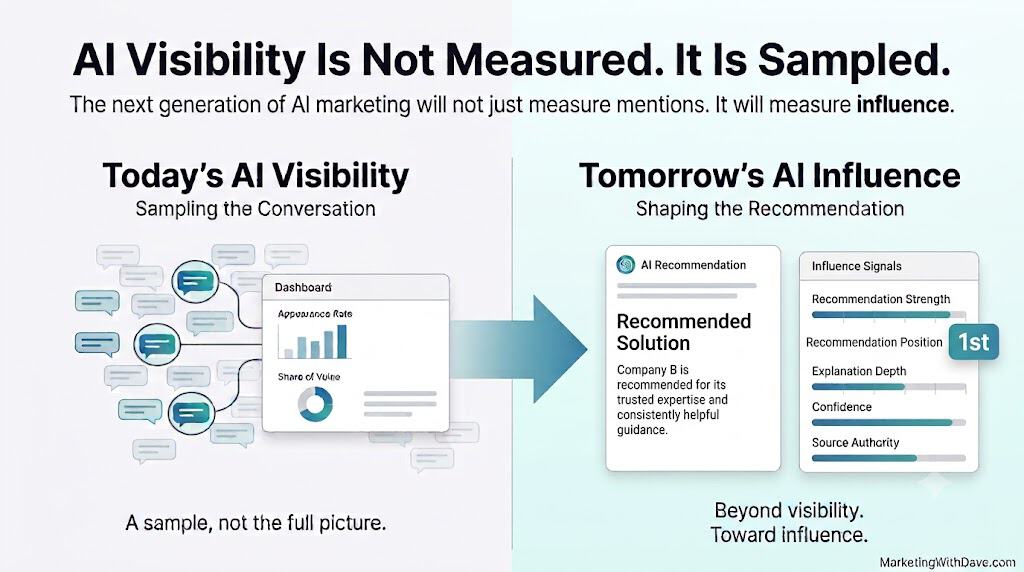
Diagram illustrating AI visibility sampling and influence, showing current AI conversation metrics and future AI influence shaping recommendations for marketing.

AI Visibility Is Not Measured. It Is Sampled.

Reading Time: 8 minutes

Most AI visibility dashboards tell you whether your brand appeared. That is not the same as knowing whether your brand influenced the answer.

Diagram illustrating AI visibility sampling and influence, showing current AI conversation metrics and future AI influence shaping recommendations for marketing.

The Real Problem with AI Visibility Measurement

For years, SEO professionals obsessed over rankings.

Eventually, we realized rankings were not the goal. Rankings were a proxy for something that mattered more: traffic, leads, revenue, trust, and market demand.

I think AI visibility is now going through a similar phase.

Marketers are asking a very understandable question:

Is my brand being mentioned or recommended by AI?

That question matters. If ChatGPT, Gemini, Claude, Perplexity, Grok, or Google AI Overviews are shaping how buyers compare solutions, brands need to know whether they are showing up.

But after spending time with AI visibility tools, I keep coming back to a more important question:

Are we measuring the right thing? There is a meaningful gap between knowing your brand appeared in an AI response and knowing whether your brand actually influenced the recommendation.

That distinction matters.

A brand can be mentioned without being recommended. A brand can be listed without being trusted. A brand can appear in a response without shaping the final decision.

Visibility is useful. But visibility is only the starting point.

What Today’s AI Visibility Tools Measure Well

The current generation of AI visibility platforms has made real progress.

Tools like Visby, ZeroRank, SnowSEO, Profound, Peec AI, Semrush’s AI visibility tools, Ahrefs Brand Radar, and others are helping marketers answer questions that were difficult or impossible to answer just a short time ago.

Depending on the platform, you can often measure:

  • Appearance rate: how often your brand appears
  • Share of voice: how often you appear compared to competitors
  • Prompt-level visibility: which prompts mention your brand
  • Citation sources: which pages or domains AI appears to reference
  • Brand accuracy: whether AI describes your product correctly
  • Competitive visibility: who appears beside you or instead of you
  • Historical trends: whether visibility is improving or declining

Those are useful metrics.

Before these tools existed, marketers were mostly guessing. Now we can at least observe patterns across a chosen set of AI prompts.

That is not a small thing.

But it is also not the full picture.

Why AI Visibility Is Sampled, Not Measured

Every AI visibility platform depends on the prompts being tracked.

That sounds obvious, but it is one of the most important limitations in this entire category.

Imagine your potential customers could ask AI 400 different questions before buying your product.

Your dashboard tracks 30 of them.

If your visibility score looks excellent, what do you actually know?

You know your brand performs well for those 30 prompts.

You do not know how your brand performs across every possible conversation your buyers might have.

AI visibility is not measured. It is sampled. Every dashboard represents a selected sample of conversations, not the full universe of questions your market may ask.

This is not a flaw in Visby, SnowSEO, ZeroRank, or any other specific tool.

It is the nature of conversational AI.

Traditional SEO tools can crawl keywords, rankings, backlinks, pages, and search volume. AI visibility tools cannot crawl every possible conversation because the number of possible prompts is effectively unlimited.

That means the quality of your AI visibility data depends heavily on the quality of the prompts you choose to monitor.

If you track the wrong prompts, your dashboard can look clean while your market reality is messy.

If you track only obvious prompts, you may miss the deeper buying questions where real decisions happen.

If you track only high-level category prompts, you may miss niche use cases where your brand has a better chance to win.

That changes how we should interpret every AI visibility report.

A visibility score is not a complete market measurement.

It is a directional signal based on the conversations you decided were worth observing.

The Questions We Still Need to Answer

The more I work with AI visibility tools, the more I find myself asking questions that current dashboards only partially answer.

Was I recommended or just mentioned?

There is a major difference between these two responses:

“This is the best option for small businesses that need AI visibility tracking.”

and

“Other tools in this category include…”

Both may count as appearances.

They should not carry the same weight.

Was I the first recommendation?

If AI lists five products, position matters.

Being the first recommendation likely carries more influence than being listed fourth or fifth.

Most AI visibility reporting still has room to improve here.

How strong was the recommendation?

“You may want to consider this tool” is not the same as “this is the tool I would recommend.”

Both are positive.

Only one sounds like a confident endorsement.

How much explanation did my brand receive?

Was your brand mentioned once in a list?

Or did AI spend several sentences explaining what makes your product useful?

Depth matters.

A brief mention may create awareness. A detailed explanation may create trust.

Did I appear immediately or only after follow-up prompts?

AI conversations are not always one-and-done searches.

A user may start broad, then narrow by budget, industry, use case, company size, or pain point.

A brand that appears on the first prompt has a different visibility profile than a brand that appears only after three follow-up questions.

Today, most dashboards are still much better at tracking individual prompts than full conversational journeys.

Which source actually influenced the answer?

AI may cite your website.

But it may also pull from YouTube, Reddit, LinkedIn, reviews, documentation, third-party comparisons, podcasts, or industry publications.

Knowing which sources are cited is useful.

Knowing which sources actually influenced the recommendation is much harder.

Can AI recommend me through content I do not own?

Yes, and this is one of the biggest mindset shifts.

Traditional SEO trained marketers to think visibility lived primarily on their own websites.

AI search changes that.

Your brand can be shaped by:

  • Your website
  • Review platforms
  • YouTube videos
  • Reddit threads
  • LinkedIn posts
  • Customer discussions
  • Third-party comparisons
  • Industry publications

In other words, your AI reputation may be built across the entire public web, not just on pages you control.

Visibility vs. Influence

This is the distinction I think the AI visibility industry needs to make more clearly.

Visibility asks: Was my brand mentioned?

Influence asks: Did my brand shape the recommendation?

Company ACompany B
Appears in 90% of tracked AI responsesAppears in 40% of tracked AI responses
Usually listed fourth or fifthOften recommended first
Mentioned brieflyExplained with confidence
High visibilityLower visibility, stronger influence

Which company is in a better position?

A basic appearance-rate dashboard favors Company A.

But commercially, Company B may be far more powerful.

That is why AI visibility alone is not enough.

Eventually, marketers will care less about whether they were mentioned and more about how they were framed.

  1. Were they trusted?
  2. Were they recommended?
  3. Were they explained?
  4. Were they positioned as the obvious choice for a specific buyer?

Those questions get us closer to influence.

What Could AI Influence Be Made Of?

While today’s tools focus primarily on visibility, I expect future platforms measuring influence through several dimensions:

  • Recommendation Strength — Was your brand merely mentioned or actively recommended?
  • Recommendation Position — Were you the first recommendation or the fifth?
  • Explanation Depth — How much context did AI provide about your brand?
  • Confidence — Did AI sound certain or tentative?
  • Source Authority — Which trusted sources contributed to the recommendation?

These metrics don’t fully exist today, but they illustrate how the conversation may evolve beyond simple appearance rates.

Some of the current gaps feel solvable in the near future.

I expect AI visibility platforms to improve around:

  • Recommendation order
  • Recommendation strength
  • Explanation depth
  • Sentiment and confidence scoring
  • Prompt clustering by intent
  • Multi-turn conversation tracking
  • Better source and citation analysis

These are difficult, but they are not impossible. The evidence often exists in the response itself. The challenge is turning that evidence into consistent, useful reporting.

Other questions are much harder.

  • Why did one brand earn the recommendation instead of another?
  • How much influence came from your website versus third-party sources?
  • Would AI still recommend your brand if your website disappeared tomorrow?
  • Can we separate model training influence from real-time retrieval influence?
  • Can we accurately connect AI exposure to revenue when no click happens?

Those questions may take years to answer well.

Some may never be fully measurable from the outside.

That does not make AI visibility tools less valuable.

It means we need to understand what they can and cannot tell us.

The Bigger Picture

AI visibility tools are not failing because they cannot answer every question.

They are valuable because they finally give marketers a way to observe part of the AI discovery process.

But we should be careful not to confuse what is measurable with what matters most.

Right now, the industry is counting mentions because mentions are trackable.

That is where SEO started too.

Rankings were easy to understand, so marketers obsessed over rankings.

Then we matured.

We learned to care about traffic quality, conversion, attribution, revenue, brand demand, and customer intent.

I think AI visibility will follow a similar path.

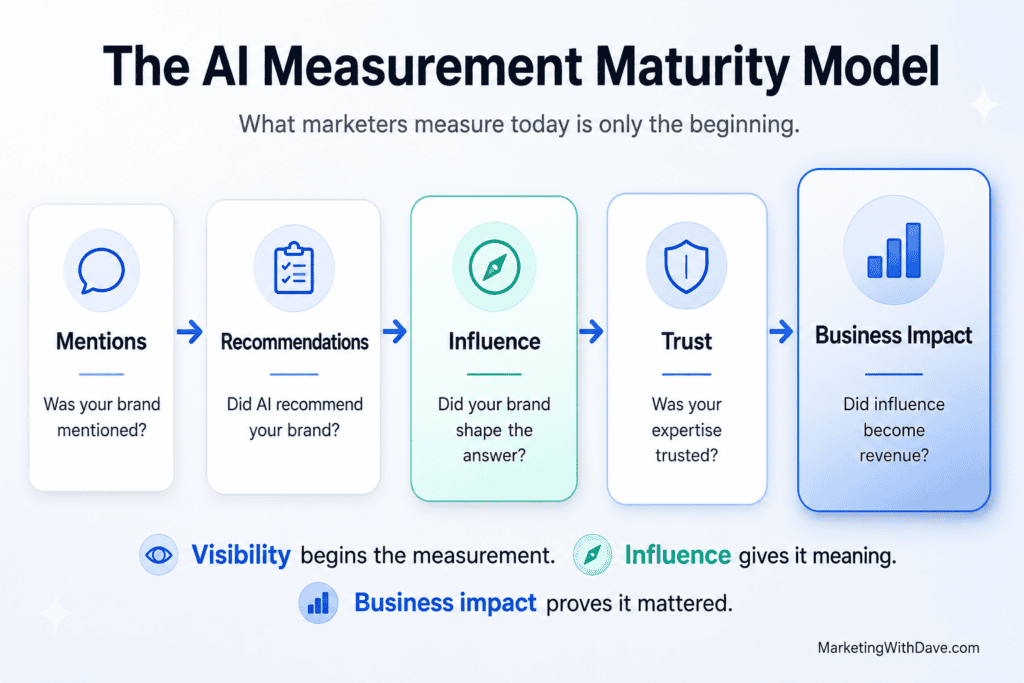
The progression may look something like this:

Diagram of the AI Measurement Maturity Model showing Mentions, Recommendations, Influence, Trust, and Business Impact stages with icons and descriptions.

Mentions are only the first step.

The real question is whether your brand is becoming part of how AI understands the category.

Are you associated with the right problems?

Are you connected to the right use cases?

Are you trusted by the sources AI relies on?

Are you recommended when the buyer’s question becomes specific?

That is the next layer of AI visibility.

Not just whether AI mentioned you.

Whether you shaped the answer.

Visibility tells you whether AI mentioned you. Influence tells you whether AI chose you.

Frequently Asked Questions

What is AI visibility?

AI visibility refers to how often your brand, product, website, or content appears in AI-generated answers from tools like ChatGPT, Gemini, Claude, Perplexity, Grok, and Google AI Overviews.

What is the difference between AI visibility and GEO?

AI visibility is the measurement of whether your brand appears in AI-generated answers. GEO, or Generative Engine Optimization, is the practice of improving your chances of being included, cited, or recommended in those answers.

Can AI visibility tools track every possible prompt?

No. AI visibility tools track a selected set of prompts. Because AI conversations can take nearly unlimited forms, every visibility report is based on a sample of prompts, not every possible question a customer might ask.

Does being mentioned by AI mean my brand was recommended?

Not always. A brand can be mentioned in passing, listed as one of several options, or strongly recommended as the best choice. These are different levels of visibility, and they should not be treated as equal.

Why is AI visibility difficult to measure?

AI visibility is difficult to measure because users ask questions in many different ways, AI responses can change, and the systems may rely on many sources across the web. Unlike traditional keyword rankings, AI visibility is based on conversations, not fixed search queries.

Can AI recommend my brand through content I do not own?

Yes. AI can mention or recommend your brand based on your website, but it can also rely on third-party reviews, Reddit discussions, YouTube videos, LinkedIn posts, podcasts, and industry publications.

What is the difference between AI visibility and AI influence?

AI visibility asks whether your brand appeared. AI influence asks whether your brand shaped the recommendation. Influence includes factors like recommendation order, confidence, explanation depth, source authority, and whether the AI positioned your brand as the best fit for a specific need.

What should marketers track beyond AI mentions?

Marketers should look beyond basic mention rate and track recommendation strength, share of voice, competitor comparisons, citation sources, brand accuracy, prompt intent, and whether AI describes the brand in a way that matches its actual positioning.

Dave Nelson is a digital marketing practitioner with more than 25 years of experience in SEO, analytics, content strategy, and marketing technology. He reviews software tools and writes about digital marketing strategy at MarketingWithDave.com.

AI Visibility Is Not Measured. It Is Sampled. Read More »

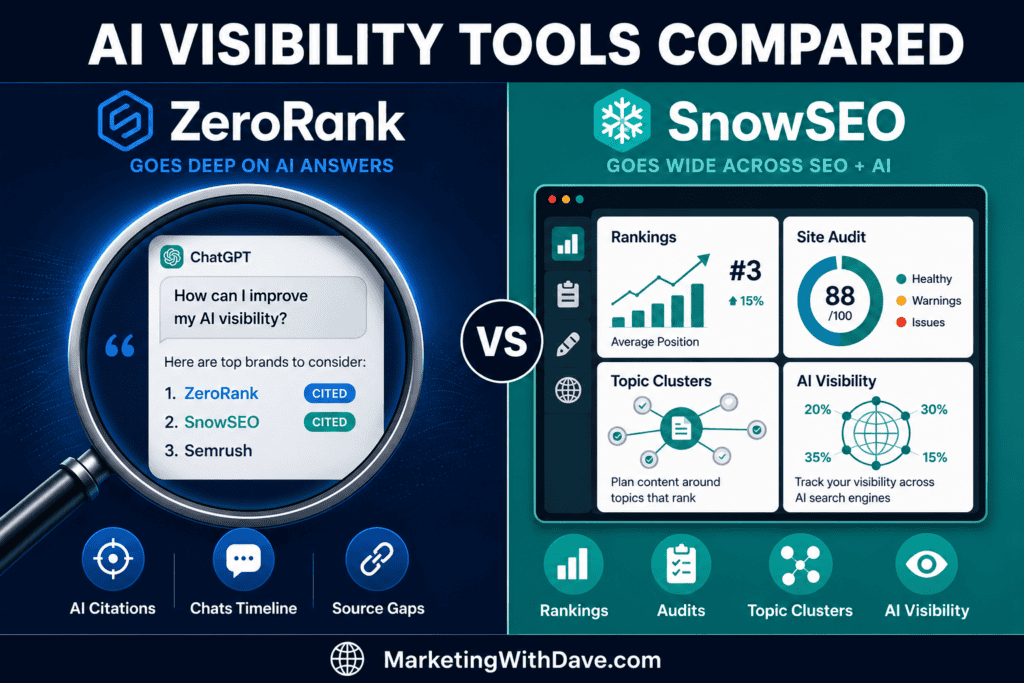
Comparison of ZeroRank and SnowSEO AI visibility tools highlighting features, rankings, site audit scores, and AI visibility metrics for SEO optimization.

ZeroRank vs SnowSEO: Which AI Visibility Deal Is Worth Buying?

Reading Time: 8 minutes

Read my in-depth ZeroRank review and SnowSEO review for hands-on testing of each platform. If you’re still evaluating multiple AI visibility tools, see my Best AI Search Software Compared guide.

Both tools are live on AppSumo, and at first glance they look like direct competitors: both track brand citations across AI engines, both produce recommendations, and both show which competitors are winning prompts you are not. That overlap is real.

But after testing both on MarketingWithDave.com, I do not think they are competing for the same buyer. They share one feature area but solve different problems at different levels of depth. ZeroRank focuses on turning AI visibility into action, while SnowSEO combines AI visibility with a broader SEO platform. The sections below walk through where they align and where the comparison breaks down.

Choose ZeroRank if your primary goal is understanding how AI models answer questions in your category: which brands they recommend, which sources they cite, and what specific actions may earn you more citations.

Choose SnowSEO if you want a broader SEO platform that also tracks AI visibility alongside traditional rank tracking, site audits, topical authority planning, and content generation.

Choose both if you are replacing several SEO subscriptions and want deep AI citation intelligence that SnowSEO’s AI layer alone does not provide. At Tier 1 pricing, that’s $148 lifetime for both.

Category by Category: Which Tool Wins Where

CategoryWinnerWhy
AI prompt tracking depthZeroRankUser-defined prompts, Chats Timeline showing full AI responses side by side, sentiment and rank per prompt across six engines
Traditional SEO (rankings, audits, keywords)SnowSEOZeroRank does not touch traditional SEO. SnowSEO tracks keyword positions, runs site audits, and integrates PageSpeed Insights.
AI source intelligenceZeroRankShows which specific domains AI engines pull from in your category, at what frequency, and where your domain is absent entirely
Content generationSnowSEOBrand-voice-trained blog post generation with direct publish to WordPress. ZeroRank includes content credits only at Tier 3 and above.
Topical authority planningSnowSEOTopic clusters connect keywords and AI prompts in a single framework. ZeroRank has no equivalent.
Off-page recommendationsZeroRankSurfaces specific subreddits, roundups, and editorial placements ranked by impact. SnowSEO does not have this.
Competitive auto-detectionZeroRankAutomatically identified 111 competitor brands against MarketingWithDave.com with no manual setup. No cap on how many you track.
Site audit qualitySnowSEORuns across Technical, Content Quality, and GEO dimensions with affected pages, severity ratings, and copy-paste AI fix prompts per issue
Onboarding experienceSnowSEOStep-by-step guided setup. ZeroRank had an AppSumo license recognition issue on first login that required a support ticket to resolve.
Reporting and dashboardsCloseBoth produce solid dashboards above the typical AppSumo-stage standard. SnowSEO offers branded PDF exports (had testing issues). ZeroRank is more drill-down at the prompt level.
Entry priceZeroRank$69 at Tier 1 vs $79 for SnowSEO. ZeroRank’s regular price of $89/month makes the lifetime deal math favorable quickly.
Overall AI monitoringZeroRankMore focused, more granular. AI visibility is the entire product, not one section of a broader platform.

What Each Tool Is Actually Built For

ZeroRank: AI Visibility Intelligence

ZeroRank is built around one focused problem: understanding how AI search engines respond to prompts relevant to your brand. You define the topics and specific questions you want tracked. ZeroRank queries those prompts across ChatGPT, Perplexity, Google AI Overviews, Gemini, Grok, and Bing Copilot and returns citation data, sentiment scores, competitive rank, and source intelligence.

The Chats Timeline shows the actual full-text AI response for each tracked prompt, across all engines, side by side. That is not a summary or an aggregated score—it is the raw output of the AI’s answer, along with which brands were mentioned and which sources were cited. Testing on MarketingWithDave.com revealed that appsumo.com was the most-cited source in my category at 129.2% usage (appearing in more than one citation per answer on average), followed by youtube.com at 104.2% and reddit.com at 68.8%. MarketingWithDave.com did not appear at all. That gap would have been invisible without this tool.

What ZeroRank does not do: traditional keyword rank tracking, site audits against crawl errors, or content generation at the lower tiers. It is an AI visibility monitoring and recommendation tool.

Try ZeroRank on AppSumo

SnowSEO: Broad SEO and GEO Platform

SnowSEO covers more ground. It tracks keyword rankings across traditional search, runs technical and content quality audits with copy-paste AI fix prompts per issue, builds topical authority frameworks around topic clusters, monitors AI citations across ChatGPT, Claude, Gemini, Perplexity, and Copilot, and generates SEO-optimized content that can publish directly to WordPress, Ghost, or Framer.

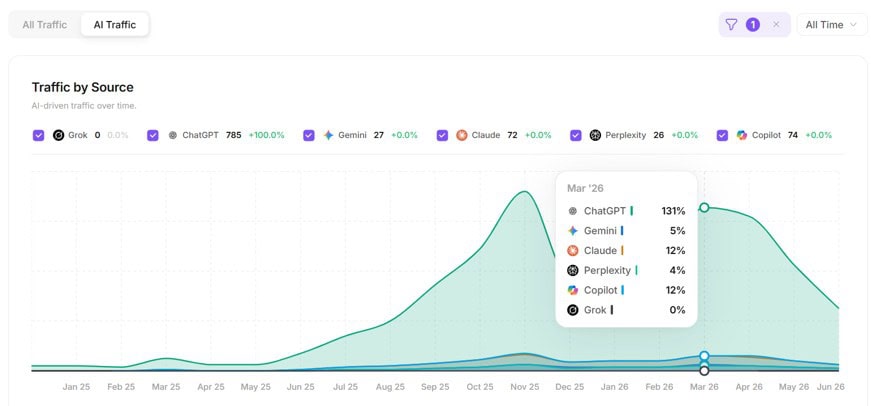
The AI visibility layer is substantive. Testing on MarketingWithDave.com showed brand visibility at 3% with established SEO software vendors in the 40% to 50% range for the same prompts. The dashboard gave me a meaningful benchmark I did not have before: most of my AI citations were coming from homepage mentions rather than editorial content, which points directly at where to focus. SnowSEO also tracks which AI platforms are sending traffic to your site over time—in my case ChatGPT accounting for the largest share, with Claude, Copilot, Gemini, and Perplexity contributing smaller portions. That traffic-by-source view does not exist in ZeroRank.

Where SnowSEO does not match ZeroRank is in the depth of AI-specific intelligence: the prompt-level source breakdown, off-page recommendation specificity, and the Chats Timeline view of full AI responses.

Try SnowSEO on AppSumo

Full Feature Comparison

ZeroRank Strengths

  • User-defined prompts and topics—you control what gets tracked
  • Chats Timeline: full AI response per prompt, side by side across engines
  • Source gap analysis: which domains AI cites in your category at what frequency
  • Auto-detected 111 competitors, no manual setup, no cap on brands
  • Off-page recommendations: specific subreddits, roundups, editorial placements
  • Technical AI readiness score with specific schema gaps in plain language
  • Done/Decline/Todo recommendation queue

SnowSEO Strengths

  • Traditional keyword rank tracking with position bracket trends over time
  • Full site audit: Technical, Content Quality, and GEO with AI fix prompts per issue
  • Topic clusters connect keyword and AI prompt tracking in one framework
  • AI content generation trained on brand voice, publishable to WordPress
  • Autopilot content publishing on a schedule
  • AI traffic breakdown by platform over time (ChatGPT vs Claude vs Gemini, etc.)
  • Reporting dashboards above typical AppSumo-stage quality
FeatureZeroRankSnowSEO
AI Visibility
Tracks AI citations (ChatGPT, Perplexity, Gemini, Grok, Copilot)✅✅
Claude (Anthropic) tracking❌✅
User-defined prompts and topics✅ Core feature✅ Via topic clusters
Chats Timeline (full AI response per prompt, side by side)✅❌
Source gap analysis (which domains AI cites in your category)✅ Detailed with usage %Limited
AI sentiment scoring per brand per prompt✅✅
AI traffic breakdown by platform over time❌✅
Competitive Intelligence
Automatic competitor detection✅ 111 found automatically✅
Cap on competitor brands tracked✅ NoneVaries by tier
Competitive share of voice in AI search✅✅
Traditional SEO
Keyword rank tracking❌✅
Keyword research❌✅ Treat as directional
Full site audit (Technical, Content Quality, GEO)❌✅
Technical AI readiness score with schema gap detail✅ GranularGEO score included; less granular on schema
PageSpeed Insights integration❌✅ Requires your own API key
Topic cluster / topical authority framework❌✅
Content
AI content generationCredits required; not in Tier 1 or 2✅ Brand-voice trained
Direct publish to WordPress / Ghost / Framer❌✅
Autopilot publishing on a schedule❌✅
Recommendations
On-page recommendations✅✅ With AI fix prompts per issue
Off-page recommendations (Reddit, roundups, editorial placements)✅ Ranked by impact❌
Done/Decline/Todo recommendation queue✅❌
Reporting and Workflow
Branded PDF reports❌Yes, had issues during testing
Workflow automation❌ Enterprise only ($499/mo)✅ Autopilot included
WordPress plugin / direct integration❌Works via plugin; Application Passwords method had issues

Who Should Buy What

If you are…Choose
An SEO or content marketer who needs to know exactly which prompts your brand appears in and which ones competitors are winningZeroRank
A site owner who wants one platform covering traditional SEO plus AI visibility in a single subscriptionSnowSEO
An agency tracking multiple client brands against competitors with no per-brand capZeroRank
Someone building topical authority across both Google and AI search simultaneouslySnowSEO
A practitioner who wants the deepest AI citation intelligence: sources, Chats Timeline, off-page recommendationsZeroRank
A site owner who also needs AI-generated, brand-voice-trained content publishing directly to WordPressSnowSEO
Someone who wants to replace several SEO subscriptions and get deep AI intelligence in one stackZeroRank/SnowSEO

Honest Limitations: What to Know Before You Buy

ZeroRank

Content generation credits are not included at Tier 1 or Tier 2 ($5 per generation, $2 per optimization if purchased separately, or bundled at Tier 3 and above). Workflows automation is enterprise-only at $499/month and is not available in any AppSumo tier. Topic creation auto-generates prompts based on what the platform infers about your site; if your focus is specific, those auto-generated prompts may miss the mark and require manual cleanup. ZeroRank has confirmed a manual-only topic creation option is on the roadmap. The first login after an AppSumo purchase may not recognize the license and will prompt you to upgrade; support resolves it, but it is a rough start. At Tier 1, three AI models can be active simultaneously—you choose which three.

SnowSEO

Several features are labeled “coming soon,” which is normal for a newer AppSumo launch but worth factoring in. WordPress connection via Application Passwords did not work during testing; the plugin method resolved it. PDF audit export had issues during testing, though the on-screen version is clean and actionable. Keyword volume figures come from DataforSEO and will differ from Ahrefs or Semrush; treat them as directional. The GEO scoring model may not yet distinguish between a good and an exceptional AI-ready implementation—two different sites I tested both returned 100/100, which raises questions about scoring calibration. SnowSEO is not Ahrefs or Semrush and is not trying to be; it is a broad platform that covers both worlds at an early stage of development.

Worth verifying before purchase ZeroRank’s data refresh cadence was daily during testing, but the exact rate per tier is worth confirming directly with ZeroRank if real-time monitoring is critical to your workflow. SnowSEO’s tier structure was being updated during testing—check the current AppSumo listing for the most accurate breakdown of limits per tier.

Pricing

ZeroRank — AppSumo Lifetime Deal

Tier 1: $69 — Full monitoring, recommendations, and source intelligence. All AI models available; three active simultaneously. No content generation credits.

Tiers 2–6: Up to $1,199. Main differences: brands tracked, prompts, models active at once. Content credits bundled at Tier 3+.

Regular pricing: $89/month. Tier 1 pays for itself in under a month against list price.

Not in any AppSumo tier: Workflows automation ($499/mo enterprise only).

SnowSEO — AppSumo Lifetime Deal

Tier 1: $79 — 1 brand workspace, 100 keyword research initiations/month, full access to AI visibility tracking, audit, rank tracking, and content generation.

Tiers 2–6: Adds brand workspaces, keyword limits, and content capacity. Tier structure was being updated during testing—verify the current listing.

AppSumo refund window: 60 days. Given how long this platform takes to fully evaluate, that window matters.

The Case for Using Both

SnowSEO handles SEO infrastructure: rank tracking, site auditing, topical authority planning, and content production. ZeroRank handles the deeper AI visibility work: which specific prompts your brand appears in, which sources AI engines are citing in your category and at what frequency, and which off-page moves are most likely to shift that.

At Tier 1 pricing for both, you are looking at $148 lifetime for two platforms that together cover traditional SEO, AI search monitoring, content planning, content generation, source intelligence, and competitor benchmarking. ZeroRank alone runs $89/month at regular pricing. The math on a combined lifetime purchase is straightforward if both tools serve your workflow.

If budget requires choosing one: ZeroRank if AI visibility monitoring is your primary goal; SnowSEO if you need a broader SEO platform and AI visibility is one requirement among several.

Bottom Line

ZeroRank is the sharper tool for understanding how AI engines respond to prompts in your category: who they recommend, what sources they cite, and what specific changes may improve your standing. The source gap analysis and Chats Timeline give you visibility into AI behavior that no standard SEO tool provides. Its gap is that it does not touch traditional SEO at all.

SnowSEO is the broader platform—SEO and GEO in one place, with content generation, topic cluster planning, and reporting dashboards that hold up at launch. The AI visibility layer is real and useful, not just a feature label. Its gap compared to ZeroRank is in the depth of the AI-specific intelligence.

These tools overlap just enough to make the buying decision confusing. After testing both, I do not think they are substitutes. They are solving different problems. Buy the one that matches yours.

Try ZeroRank on AppSumo

Try SnowSEO on AppSumo

Read my full ZeroRank review and SnowSEO review for hands-on detail from testing both on MarketingWithDave.com.

Affiliate disclosure: If you purchase through my links, I may earn a small commission at no additional cost to you. I only share tools I have personally used or thoroughly researched. This content reflects my experience, review of the products, and current publicly available deal information as of June 2026. Always evaluate tools based on your specific business needs, goals, and workflows before making a decision.

ZeroRank vs SnowSEO: Which AI Visibility Deal Is Worth Buying? Read More »

Secure digital safe with labeled folders 'Saved,' 'Organized,' 'Reusable,' and 'Easy to Find' representing AI prompt management, with AI-themed background and promotional text.

Prompt Builder Review: Build, Optimize, and Reuse AI Prompts Across Every Model

Reading Time: 11 minutes

If you work with AI tools regularly, you know the drill. You write a prompt, paste it into your favorite AI tool, tweak it, wonder why it is not landing, open three more tabs, lose track of what version actually worked, and start over tomorrow. The problem is not always the prompt. It is that most people do not have a good place to do prompt work properly.

Prompt Builder is built to solve that problem. It gives you one workspace for creating, refining, optimizing, testing, and reusing AI prompts across major models including GPT, Claude, Gemini, Grok, and more.

The pitch is not just that Prompt Builder helps you write better prompts. The bigger value is that it helps you stop losing the good ones.

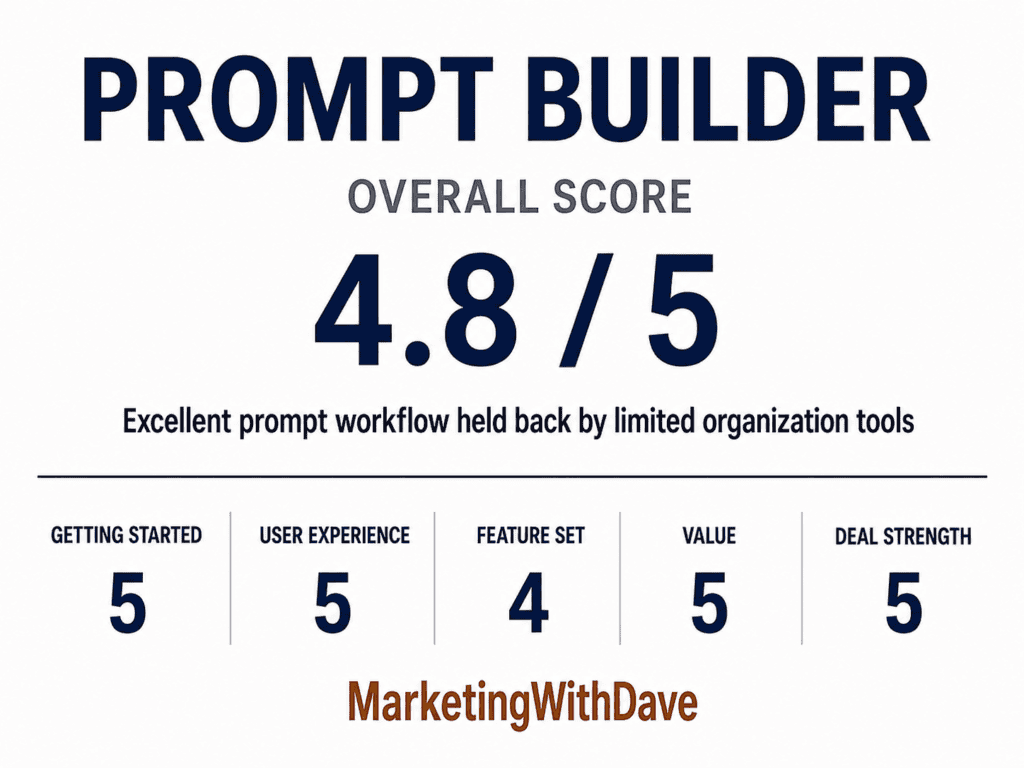
Prompt Builder review scorecard showing 4.8 out of 5, with categories like getting started, user experience, feature set, value, and deal strength, from Marketing with Dave.

See the current AppSumo deal for Prompt Builder

Affiliate disclosure: If you purchase through my link, I may earn a small commission at no additional cost to you. I only share tools I have used myself.

See how I rate software tools

The 30-Second Decision

Buy Prompt Builder if: You regularly work with AI tools and keep rebuilding, rewriting, or losing prompts that worked before. The core value is having one place to generate, optimize, test, save, and reuse prompts across multiple models.

Skip it if: You only use AI casually, already have a prompt management system that works, or need advanced team collaboration and deep library organization today.

AppSumo pricing at time of review: Lifetime deal starting at $39.

Pros and Cons

ProsCons
Generates model-optimized prompts for GPT, Claude, Gemini, Grok, and moreCommunity prompt titles often fail to communicate what a prompt actually does
Prompt Optimizer turns messy prompts into cleaner, more structured versionsNo custom categories for your personal library; custom tags would help (folders implemented July 2)
Built-in assistant lets you run and iterate on prompts without leaving the toolThe Save to Library link after optimization is small and easy to miss
Optimization history helps preserve refinementsKeyboard behavior is inconsistent between Generator, Optimizer, and Prompt Tester
Community prompt library provides inspiration and reusable starting pointsNo community upvotes, usage counts, or quality signals to surface the best prompts
Reusable AI Instructions help keep outputs consistent without rewriting the same rulesCommunity prompt count is not displayed, making library depth hard to assess

Why I Bought Prompt Builder

The problem is familiar if you use AI tools regularly. You find a prompt structure that works well, get a clean output, and then close the tab. The next time you need something similar, you start from scratch because you have no record of what you did, how you framed it, or which version produced the best output.

The bigger issue is model variation. A prompt structure that gets strong output from one model does not always translate cleanly to another. Each model responds differently to tone, structure, constraint framing, examples, and output format instructions. Managing that across multiple tools becomes tedious when you have no central place to track what works.

Prompt Builder positioned itself as a solution to both problems: generate prompts tuned to each model, and keep a library of the ones worth reusing.

Why Use a Dedicated Prompt Workspace Instead of Your Favorite AI Tool?

This is the biggest buying question for Prompt Builder.

Why pay for a prompt builder when you can open your favorite AI tool, ask it to improve a prompt, and store the result in Notion, Google Docs, Obsidian, Apple Notes, or wherever else you already keep your work?

That is a fair objection. If you only use AI occasionally, a notes app may be enough.

But the more you use AI, the more prompts become reusable assets instead of one-time instructions. You start developing prompts for sales outreach, blog briefs, research workflows, product reviews, image generation, social posts, SEO audits, data analysis, and repeatable client work. Those prompts improve over time. They also become easy to lose.

A general AI tool is where you execute a prompt. Prompt Builder is where you manage the prompt workflow around it: creating the prompt, optimizing it, testing it, saving it, organizing it, and reusing it later.

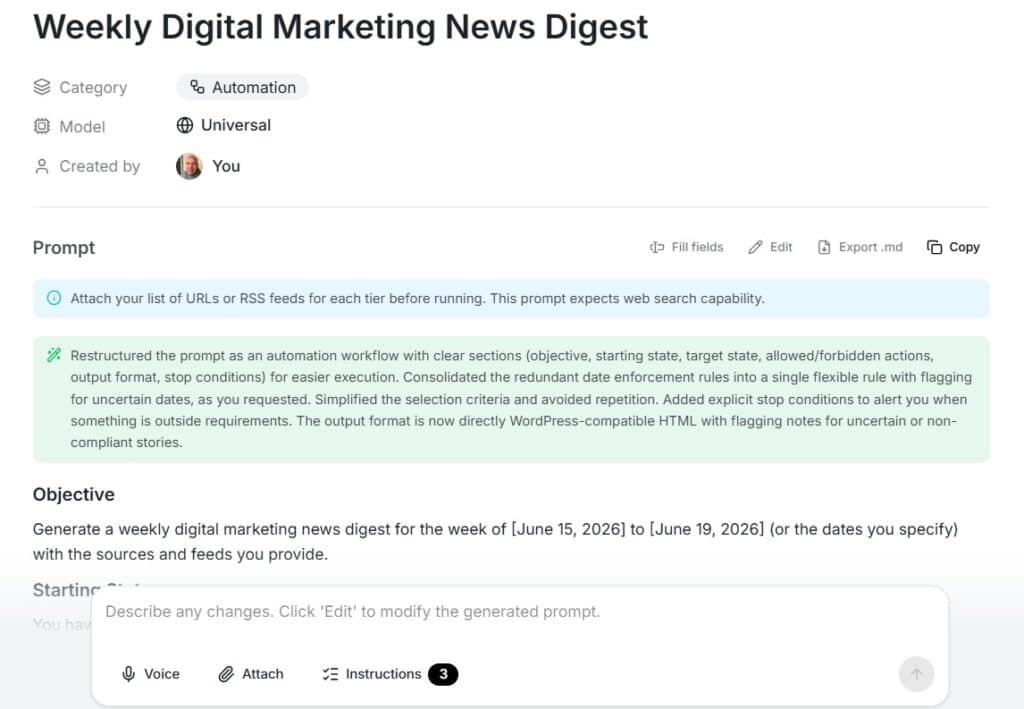
Weekly digital marketing news digest with categories, models, and creator info, featuring a prompt for RSS feeds and workflow details for SEO optimization.

The value is not that Prompt Builder does something impossible to recreate manually. The value is that it puts the whole workflow in one place. You do not have to bounce between an AI chat window, a prompt document, a spreadsheet of versions, a notes app, and a browser full of half-finished experiments.

The community prompt library also gives you starting points that you would not have if you were only working from your own prompt archive. The reusable AI Instructions layer makes it easier to apply consistent preferences without rewriting the same rules every time. Version history and prompt testing add another layer of structure.

That is the real case for Prompt Builder. It is not replacing your favorite AI model. It is solving the messy layer around how prompts are built, improved, stored, and reused.

Most people still treat prompts as disposable. They write one, get an answer, and move on.

But strong prompts become assets over time. The outreach prompt that consistently produces better first drafts. The content brief that creates stronger article structures. The research workflow that saves an hour every time you use it.

Prompt Builder makes the most sense when you view prompts that way. It is less compelling if you see prompts as one-off messages and much more compelling if you see them as reusable workflow assets.

Those are not throwaway instructions. They are reusable workflow assets.

At some point during my testing, I noticed a change in my own workflow. If I needed to create, edit, optimize, or reuse a prompt, I naturally opened Prompt Builder first. It quietly became the home for my prompt workflow, while ChatGPT, Claude, Gemini, and other AI tools remained the places where I executed those prompts.

Prompt Builder makes the most sense when you stop thinking of prompts as one-off messages and start thinking of them as reusable assets that deserve a permanent home.

What Prompt Builder Actually Does

Prompt Builder is organized around several core sections: Generator, Optimizer, Library, Prompt Tester, and AI Instructions. Each handles a different part of the prompt workflow.

Generator

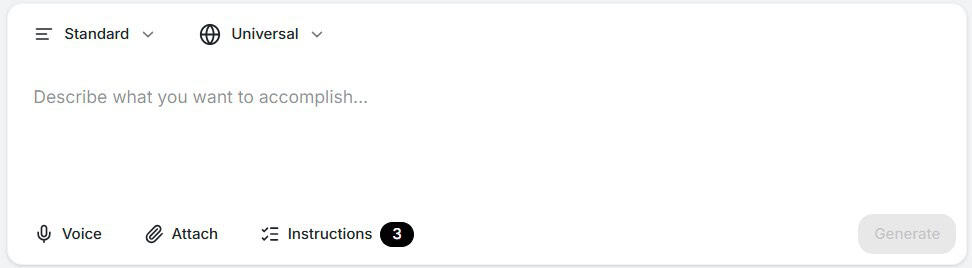
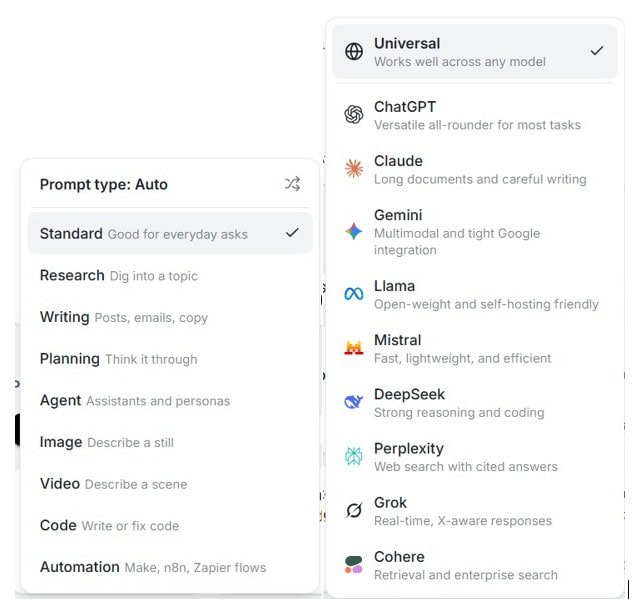
You describe what you want to accomplish in plain language, select the target model, and Prompt Builder produces a structured prompt. The model selector includes GPT, Claude, Gemini, Grok, and others. The goal is to adjust the prompt structure, constraints, and output format based on the model you plan to use.

Screenshot of AI prompt builder interface showing prompt types, standards, and AI models like ChatGPT, Claude, Gemini, Llama, Mistral, DeepSeek, Perplexity, Grok, and Cohere.

That model-specific angle is important because what works well in one AI model does not always perform the same way in another. Prompt Builder gives you a more structured starting point than a blank chat window.

From there, you can refine through chat. You can ask it to change tone, add constraints, request JSON output, make the prompt more concise, or create follow-up prompts that go deeper into the topic.

One minor note on keyboard behavior: pressing Enter in the Generator submits the request. In the Optimizer and Prompt Tester, Enter creates a new line and Ctrl+Enter submits. It is not a major issue, but the inconsistency is noticeable.

Optimizer

The Optimizer is one of the most satisfying parts of the product. Paste in a prompt that is vague, disorganized, or not performing well, and Prompt Builder rewrites it into a cleaner structure with a clearer role, better context, stronger constraints, and a defined output format.

This is especially useful if you have accumulated prompts from old AI sessions, swipe files, webinars, courses, or social posts. A lot of prompts people save are more like rough notes than polished assets. The Optimizer turns those messy prompts into something easier to use, maintain, and improve going forward.

This was also the feature where the product clicked for me. Watching a rough prompt turn into something clean, structured, and easier to reuse is genuinely useful.

The primary workflow issue is that saving optimized prompts to the library should be more obvious. Since the library is central to the product’s value, the Save to Library action deserves more visual weight than a small text link at the bottom of the screen.

Library

The Library has two main tabs: My Prompts and Community Prompts.

Screenshot of Prompt Builder interface showing options to create, save, and manage AI prompts for various models on Marketing with Dave website.

My Prompts is where your saved prompts live. You can pin favorites, edit prompts, and run prompts directly from the library. This is the part of the product that turns prompt work from scattered experiments into something reusable.

Community Prompts is a browsable library of prompts from other users. You can filter by category or model and add prompts directly to your own collection. There appears to be a healthy collection of community prompts available, which is promising.

The challenge is discovery. Many community prompt titles do not make it clear what the prompt actually does, who it is for, or why you would use it. The library would be more useful with upvotes, usage counts, popularity filters, editor picks, or some other signal showing which prompts have been battle-tested by the community.

I would also like to see a visible count of how many community prompts are available. If part of the value proposition is the community library, showing the size of that library would make the feature easier to evaluate.

For personal prompt organization, the current system is workable but not ideal. If you only save a handful of prompts, this is not a major issue. If you build a serious library over time, custom categories or custom tags become much more important.

The challenge is not creating prompts. Prompt Builder does that well. The challenge is managing them once your library starts growing. As your collection expands, custom categories, tags, collections, folders, or other organizational tools become increasingly valuable. The stronger Prompt Builder becomes at managing large prompt libraries, the more difficult it becomes to replace.

AI Instructions

AI Instructions may be one of the more underrated parts of Prompt Builder.

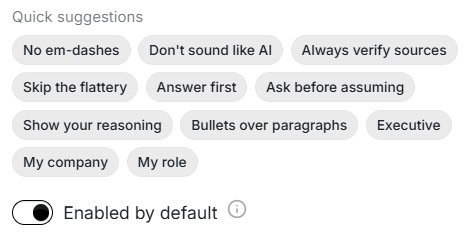
Instead of rewriting the same instructions into every prompt, you can create reusable rules and turn them on or off as needed. In my own testing, I created instructions such as “Say Thank You instead of Thanks,” “Prefer and instead of &,” and standardizing how eCommerce is written. These are small preferences individually, but they become tedious to repeat in every prompt. Instructions provide a simple way to apply those preferences consistently.

Screenshot of AI prompt builder interface showing options for optimizing prompts and managing AI responses for marketing content.

This matters because many prompt failures come from missing preference instructions rather than a bad core prompt. You may want the same prompt to follow your writing style, avoid certain phrasing, ask clarifying questions, use a specific tone, or produce output in a predictable structure. Reusable instructions give you a way to manage those preferences separately from the prompt itself.

In practical terms, this creates a lightweight brand voice and workflow layer. For marketers, writers, consultants, and content creators, that could be just as valuable as the prompt generator.

Prompt Assistant / Prompt Tester

The built-in assistant lets you run prompts without switching tools. You can execute a saved prompt, review the output, continue iterating, and save anything useful back to your library.

One feature I ended up using more than expected is the browser extension. It gives me quick access to Prompt Builder from any browser tab through a right-side panel, so I can create a new prompt, optimize an existing one, or pull something from my library without interrupting what I’m already working on. It sounds like a small convenience, but it removes a surprising amount of friction from the entire prompt workflow.

This is not meant to replace your full AI workflow in every situation. The benefit is removing the constant copy-paste loop between your prompt library and a separate AI chat interface.

See the current AppSumo deal for Prompt Builder

My Experience With Prompt Builder

Getting Started

Getting started is straightforward. Nothing needs to be integrated, installed, or connected in order to use the product. The interface is clean, the sections are easy to understand, and you can create or optimize a prompt within a few minutes.

That simplicity matters because this is not a product that should require a heavy onboarding curve. The value is speed and organization. Prompt Builder largely gets that right.

What I Liked and What Needs Work

What I LikedWhat Needs Work
Model-specific prompt generation across GPT, Claude, Gemini, Grok, and moreSave to Library link in the Optimizer is too easy to miss
Optimizer transforms messy prompts into clean, structured versions quicklyCommunity prompts lack quality signals like upvotes, saves, or usage counts
Built-in assistant keeps prompt testing inside the same workspaceNo custom categories or custom tags for personal prompt organization
Reusable AI Instructions help maintain consistent output preferencesKeyboard shortcut behavior is inconsistent across sections
Community Prompts can provide inspiration and reusable starting pointsCommunity prompt count is not visible

What Prompt Builder Is Not

Prompt Builder is not a replacement for your favorite AI model. It is not trying to be the place where every AI task begins and ends.

It is also not a full team knowledge base, enterprise prompt governance platform, or advanced collaboration suite. The higher tiers include additional team members, but the product currently feels most natural for individual practitioners or small teams rather than large organizations with complex approval workflows.

What Prompt Builder is: a focused prompt workspace for people who want a better way to build, improve, test, save, and reuse prompts across multiple AI tools.

Pricing and Plans

Prompt Builder is available as a lifetime deal on AppSumo across four tiers. All tiers include the Prompt Generator, Prompt Assistant, Prompt Optimizer, Prompt Library, and all prompt templates.

FeatureTier 1
$39
Tier 2
$79
Tier 3
$199
Tier 4
$349
Credits per month1,0003,00012,00030,000
Team members141020
Prompt GeneratorYesYesYesYes
Prompt AssistantYesYesYesYes
Prompt OptimizerYesYesYesYes
Prompt LibraryYesYesYesYes
All prompt templatesYesYesYesYes

For a solo practitioner, Tier 1 is the obvious starting point. You get the full feature set with 1,000 credits per month and one team member for $39 lifetime.

The higher tiers are mainly about scale: more credits and more team members. Tier 2 increases the monthly credits to 3,000 and team members to four. Tier 3 moves to 12,000 monthly credits and 10 team members. Tier 4 provides 30,000 monthly credits and 20 team members.

Unless you are planning to use this heavily across a team, Tier 1 is enough to evaluate the product properly.

Try It Risk-Free: AppSumo’s 60-Day Refund Policy

Prompt Builder is a practical tool to evaluate quickly. You do not need months of data to know whether it fits your workflow.

Run the Generator across a few real tasks. Put the Optimizer to work on prompts you already use. Save your best versions to the library. Try the AI Instructions layer. Browse Community Prompts. Test a few saved prompts in the assistant.

That should be enough to know whether Prompt Builder solves a real problem for you.

AppSumo’s 60-day refund policy gives you plenty of time to make that call. For a $39 lifetime deal, the risk is low and the upside is meaningful if you use AI tools regularly.

Bottom Line

Prompt Builder solves a real problem that every regular AI user eventually runs into: prompt chaos.

You write prompts in one tool, improve them in another, save a few in a notes app, forget which version worked, and then rebuild the same thing later. Prompt Builder gives that workflow a dedicated home.

The Generator and Optimizer are the strongest parts of the platform. The Generator provides a structured starting point, while the Optimizer transforms rough prompts into cleaner, more reusable assets. The Library and Instructions features become increasingly valuable as your prompt collection grows.

The biggest opportunity for improvement is organization. Community Prompts need better curation, and larger prompt libraries would benefit from custom categories, tags, or collections. Fortunately, these are refinement opportunities rather than core product flaws.

Prompt Builder is not trying to replace your favorite AI model. It solves the layer above it: creating prompts, improving prompts, organizing prompts, testing prompts, and reusing prompts.

If you regularly work across multiple AI tools and find yourself rebuilding the same prompts repeatedly, Prompt Builder offers a focused and surprisingly useful workflow for a very modest one-time price. At $39 lifetime for Tier 1, it is easy to recommend for serious AI users, marketers, content creators, and anyone who sees prompts as reusable work assets rather than disposable chat messages.

See the current AppSumo deal for Prompt Builder

This content is for educational purposes and reflects my experience, review of the product, and current publicly available deal information. Always evaluate tools based on your specific business needs, goals, and workflows before making a decision.

Looking for more marketing software reviews? See my full list of marketing tools and software I recommend.

Prompt Builder Review: Build, Optimize, and Reuse AI Prompts Across Every Model Read More »

SnowSEO platform interface showcasing SEO and AI tools for search visibility, with features like keyword research, project management, and AI-driven insights, emphasizing SEO and AI integration.

SnowSEO Review: The SEO + AI Visibility Platform That Actually Tells You What to Do

Reading Time: 13 minutes

AI search has become a core part of SEO. Alongside this hands-on SnowSEO review, I’ve also published my Best AI Search Software Compared guide, where I compare SnowSEO, iGEO, and ZeroRank and explain how their plans, credit systems, and core capabilities differ. If you’re evaluating SnowSEO as a broader SEO platform, you may also find my Best SEO Software Compared: Hands-On Reviews useful, where I compare it against other AppSumo SEO tools. If you’ve already decided SnowSEO is the platform you want to explore, this review walks through everything I tested on MarketingWithDave.com.

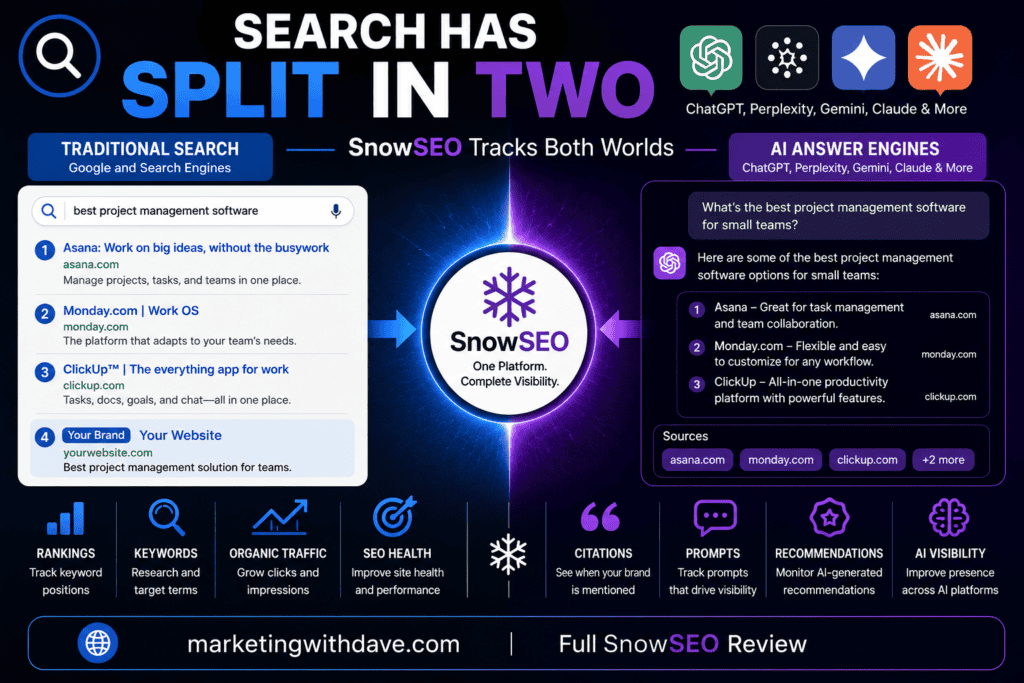
People are not just Googling things anymore. They are asking ChatGPT, Perplexity, and other AI tools. If your brand is not showing up in those answers, you are invisible to a growing chunk of your audience. SnowSEO was designed with AI visibility as a first-class feature rather than treating it as a secondary add-on.

SnowSEO platform interface showcasing SEO and AI tools for search visibility, with features like keyword research, project management, and AI-driven insights, emphasizing SEO and AI integration.

SnowSEO is built for this new reality. It is a platform that lets you monitor, analyze, and improve your visibility across both AI platforms and traditional search engines from a single dashboard. You get your overall health score, audit score, AI visibility score, and a snapshot of your search engine performance including clicks, impressions, keyword rankings, and top traffic countries. Alongside that you can compare your share of voice against key competitors, see which AI platforms are citing them, and track the sentiment around your brand.

What separates SnowSEO from a standard rank tracker is what happens after the data comes in. Most tools tell you where you rank. SnowSEO helps you do something about it. The audit section identifies what is holding back your rankings and gives you a single score to work toward. For many issues, SnowSEO provides a pre-written prompt that explains the problem, identifies affected pages, and offers guidance on how to investigate or fix the issue.

The planning side is built around topical authority: you add the topics you want to rank for, and SnowSEO maps out the content needed to establish expertise in each one. From there, it can generate SEO-optimized blog posts trained on your brand voice and publish them directly to WordPress, Framer, Ghost, and other platforms.

Many platforms focus primarily on traditional SEO while others focus primarily on GEO and AI visibility. SnowSEO attempts to bridge both by combining rankings, audits, topic planning, AI visibility tracking, prompt tracking, and content workflows in a single platform. That scope is what makes it worth evaluating carefully.

If you’re also evaluating other AppSumo SEO tools, see my independent SEO Tool Benchmark Series comparing SnowSEO, Screpy, and SiteGuru across verified features, site audits, and integrations.

Trying to decide between SnowSEO and ZeroRank?

I’ve also compared these two AI visibility platforms side by side, including where each one shines, the differences in workflow, and which type of marketer each is best suited for.

→ Read my ZeroRank vs SnowSEO comparison

Here is what the platform delivered when tested on marketingwithdave.com.

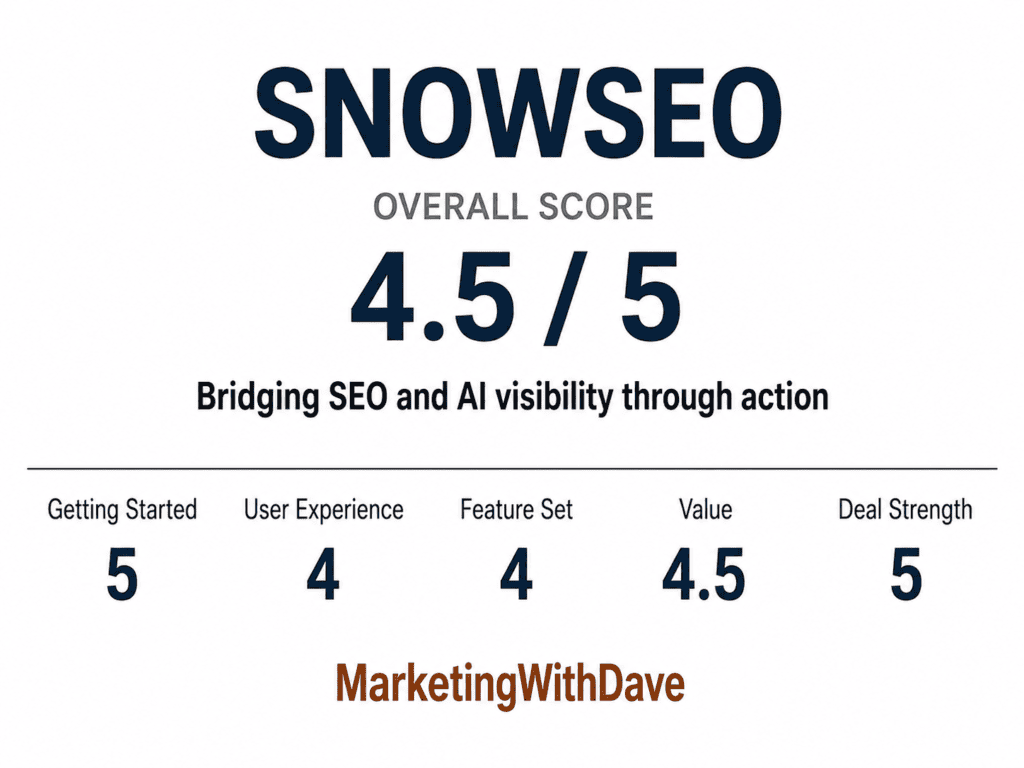
SnowSEO review scorecard showing 4.5 out of 5, highlighting SEO and AI visibility features from Marketing with Dave.

See the current AppSumo deal for SnowSEO

Affiliate disclosure: If you purchase through my link, I may earn a small commission at no additional cost to you. I only share tools I have used myself.

See how I rate software tools

The 30-Second Decision

Buy SnowSEO if: You want a single platform that tracks your brand’s visibility in both traditional search and AI tools like ChatGPT and Perplexity, and you want actionable fixes rather than just dashboards.

Skip it if: You need a battle-tested tool with no rough edges. Several integrations are labeled “coming soon” and a few functions had errors during my testing.

AppSumo pricing (at time of review): Lifetime deal starting at $79. 

Pros and Cons

ProsCons


  • Tracks AI visibility (ChatGPT, Perplexity, Gemini, Claude, Copilot) alongside traditional SEO

  • Topic cluster planning connects keywords and AI prompts in a single topical authority framework

  • Site audit includes affected pages, severity ratings, and copy-paste AI fix prompts

  • PageSpeed Insights API integration included

  • Reporting and dashboard quality well above most established marketing software

  • Step-by-step onboarding makes a complex platform approachable

  • Branded PDF audit reports suitable for client sharing

  • Responsive, engaged customer support team

  • AI-assisted fixes can move directly from recommendation to implementation


  • Several features and integrations labeled “coming soon”
  • WordPress connection via Application Passwords did not work; plugin method required
  • PDF audit export had issues during testing
  • Keyword volume data differs from Ahrefs/Semrush; treat as directional
  • GEO scoring may not yet distinguish between good and exceptional implementations
  • New product with limited third-party review base
  • Published AI changes require careful review and stronger approval controls

Why I Bought SnowSEO

AI search is no longer a trend to watch. Tools like ChatGPT, Perplexity, Google AI Overviews, and others are answering questions that used to drive organic traffic. If your brand is not appearing in those answers, you are missing a channel that is growing in relevance.

SnowSEO was designed with AI visibility as a core capability alongside traditional SEO tracking. That combination is what prompted the purchase. The question going in was whether the AI visibility angle was substantive or primarily a marketing positioning claim.

What SnowSEO Actually Does

SnowSEO is an all-in-one SEO and AI visibility platform. It is built around five core functions that feed into each other: monitoring where you stand, auditing what is holding you back, planning the content that will move you forward, generating that content, and tracking whether any of it worked.

AI Visibility tracking monitors how often your brand appears across AI platforms and compares your presence to competitors. You can see which prompts trigger your competitors but not you, and SnowSEO surfaces suggested strategies to close those gaps.

Site audit scans your pages and scores them across Technical, Content Quality, and GEO categories. For each issue, SnowSEO provides a pre-written prompt that explains the problem, identifies affected pages, and offers guidance on how to investigate or address it.

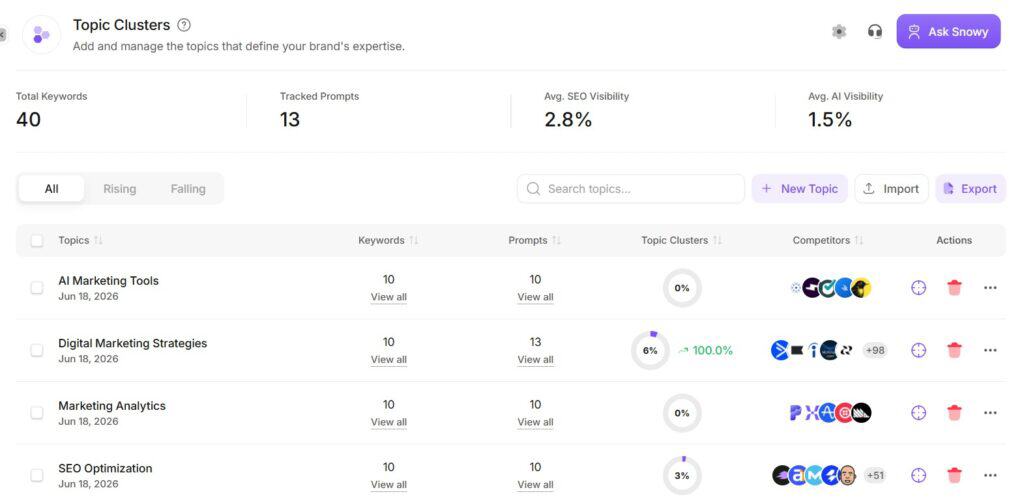
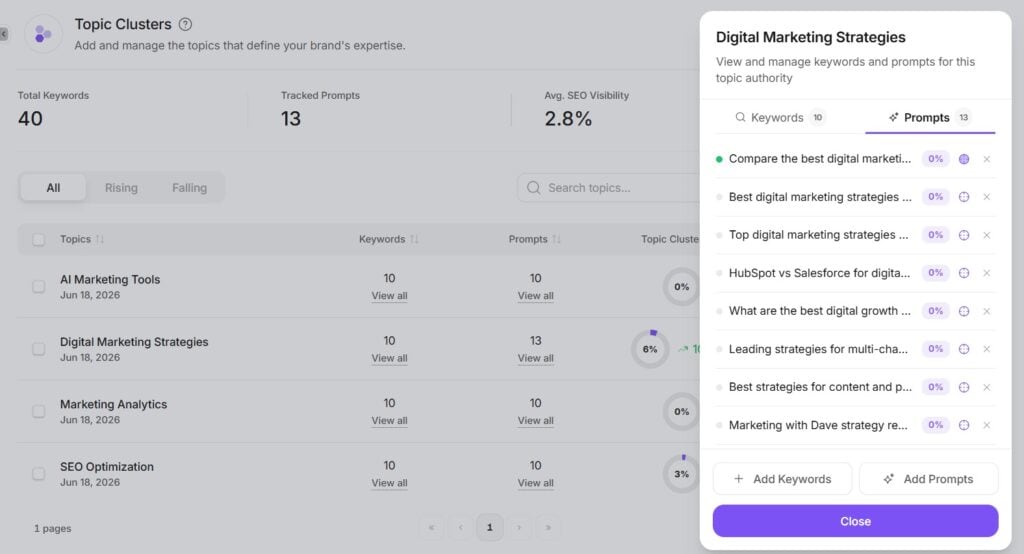
Topic clusters are built around topical authority. You define the topics you want to own, add target keywords and AI prompts to each, and SnowSEO tracks both your SEO visibility and AI visibility at the topic level. It is a structured way to build expertise signals over time rather than publishing content with no connective tissue.

Content generation produces SEO-optimized blog posts that are trained on your brand voice and writing style. Each article includes a built-in editor so you can review and adjust before publishing. When you are ready, you can push directly to WordPress, Ghost, Framer, and other platforms without copy-pasting.

Autopilot goes fully hands-off: set your publishing frequency and destination and SnowSEO handles the rest.

My Experience With SnowSEO

Getting Started

The onboarding is genuinely well done. SnowSEO walks you through setup step by step, which matters for a platform this feature-rich. Without that guidance, the number of moving parts could be overwhelming. Getting my site connected and pulling data was straightforward.

The Dashboard

The main dashboard gives you an at-a-glance picture of where you stand: overall health score, audit score, AI visibility score, search engine performance (clicks, impressions, keyword rankings, top traffic countries), and a share of voice comparison against competitors. The reporting widgets work together well and cover audits, AI performance, competitor visibility, citations, sentiment, keyword rankings, and traffic. For a feature still labeled beta, the dashboard feels more polished and complete than is typical for AppSumo products at launch.

The following PDF showcases SnowSEO’s Report Builder using data from MarketingWithDave.com so you can see the available reports, dashboards, and insights in action.

AI Visibility

This is where SnowSEO earns its differentiation. The AI Visibility section tracks how often your brand is cited across AI platforms, which competitors are dominating the leaderboard, and which AI-generated responses are leaving you out entirely. I set up 13 tracked prompts across topics relevant to marketingwithdave.com and SnowSEO pulled 22 responses.

My brand visibility came in at 3%, with established SEO software vendors like Semrush, Ahrefs, and Moz Pro showing 40% to 50% visibility for the same prompts. That comparison needs context: those are mature software companies operating in the SEO industry, not personal marketing websites. The value here was not discovering that I trail Semrush in AI citations. It was having a real benchmark and seeing exactly which brands dominate AI responses for the prompts I care about. That data informs what I write about and how I position content going forward. The Share of Voice section and citation breakdown by page type and domain type add further context. One caution with any AI visibility score: I would treat the number as directional rather than absolute.

I tested the same prompt across six AI Search tools, including SnowSEO, and the reported visibility scores varied dramatically between platforms. That experiment changed how much weight I put on any single visibility score. I can see that most of my AI citations come from home page mentions rather than editorial content, which points directly at where to focus.

The AI traffic by source chart breaks down AI-driven traffic by platform over time. ChatGPT accounts for the largest share, with Claude, Copilot, Gemini, and Perplexity contributing smaller portions. Having all of this in one view alongside traditional search data is one of the more practical aspects of the platform.

Graph showing AI traffic sources including ChatGPT, Gemini, Claude, Perplexity, Copilot, and Grok, with ChatGPT leading at 131% in March 2026.

Topic Clusters

Topic Clusters is one of the more distinctive capabilities in the platform and deserves more explanation than a standard audit or rank tracking feature would require.

The concept is straightforward but the execution is more ambitious than it looks. You define a topic area that represents your brand’s expertise, then add the keywords and AI prompts associated with that topic. SnowSEO then tracks SEO visibility, AI visibility, competitors, prompt coverage, and keyword coverage all within the same framework. Many SEO tools track keywords. Many GEO tools track prompts. SnowSEO connects both into a single workflow, which is genuinely useful for anyone trying to build topical authority in a world where search happens across multiple platforms.

I set up four clusters around my core areas: AI Marketing Tools, Digital Marketing Strategies, Marketing Analytics, and SEO Optimization. Each cluster holds up to 10 keywords and multiple tracked prompts. The detail view shows exactly which prompts are active and what percentage visibility each is pulling. The structure keeps content strategy organized around expertise areas rather than disconnected keywords, which is how topical authority actually compounds over time.

Screenshot of Topic Clusters dashboard showing AI marketing tools, digital strategies, analytics, and SEO optimization topics with keywords and performance metrics.
Screenshot of Digital Marketing Strategies dashboard showing keywords, prompts, and SEO visibility metrics for marketing strategies.

See the current AppSumo deal for SnowSEO

Site Audit

The audit runs across Technical, Content Quality, and GEO dimensions. Running the audit on the home page marketingwithdave.com gave me an overall score of 81/100 (Technical: 71, Content Quality: 80, GEO: 100) with one error and ten warnings. The reports are detailed, visually appealing, and actionable. Each issue shows affected pages, severity level, an explanation of the problem, and an AI prompt you can copy to resolve it. That combination makes the audit more useful than a typical crawl report where you get a list of issues and no clear path to fixing them.

One note on the GEO score specifically: my homepage scored 100/100, and a second site I tested also came back at 100/100. GEO is still an emerging discipline and I am not fully convinced the scoring model yet distinguishes between good, great, and exceptional implementations. A perfect score may indicate solid fundamentals rather than a truly optimized AI-ready page. This is not a criticism of the platform so much as an honest observation that GEO scoring across the industry is still being figured out. Worth keeping in mind when interpreting that number.

Connecting Google PageSpeed Insights via your own API key allows SnowSEO to pull performance data directly into the auditing workflow, so load speed sits alongside your other page-level metrics in one place. The audit report can also be exported as a PDF with SnowSEO’s branding, making it easy to share with clients or collaborators. I ran into issues getting the PDF download to function during my testing, though the on-screen version is clean and readable.

AI Recommendations Still Need Human Review

During additional testing, I discovered that SnowSEO can go beyond identifying issues and suggesting solutions. Some changes can be published directly to the connected website. I tested this with what seemed like a relatively safe change: improving a meta description.

The original meta description was:

Explore a detailed SWOT analysis of the Owala water bottle, generated using Once AI. Discover its strengths, weaknesses, opportunities, and threats in the competitive water bottle market.

SnowSEO proposed and published:

Explore a SWOT analysis for Owala water bottles using the Once AI tool compared to manual research. Find key strengths, weaknesses & opportunities.

The replacement was shorter, but it also introduced problems. It removed “threats” from the SWOT analysis, changed the subject from a single water bottle to multiple water bottles, and used an ampersand instead of “and.” I did not initially realize the recommendation had already been published, so I went into WordPress and replaced it.

My revised version was:

Explore a SWOT analysis of the Owala water bottle using Once AI and compare it to manual research. Discover key strengths, weaknesses, opportunities, and threats.

This is both one of SnowSEO’s most promising capabilities and one of the areas where it needs stronger safeguards. The ability to move from identifying a problem to implementing a solution could separate SnowSEO from tools that only generate audit reports. However, I would prefer a clear review-and-approval step before any AI-generated change is published. For now, these recommendations should be treated as drafts that require human review rather than changes to accept automatically.

Rank Tracking

The rank tracking view shows keyword performance across position brackets (Top 3, 4-10, 11-25, 26-50, 50-100, 100+) over time. The visual is clean and the trend lines are easy to read. For my site, the data showed 606 tracked keywords with strong growth in the 4-10 and Top 3 brackets from March onward.

Graph showing SEO keyword rankings and visibility trends over time, highlighting improvements in top 3 and 11-25 positions for SnowSEO platform.

WordPress Connection

Connecting WordPress was the most time-consuming part of setup. I was unable to successfully connect through Application Passwords on my WordPress installation and ultimately connected successfully using the SnowSEO plugin, which worked immediately. The root cause of the Application Passwords issue is not clear, but the plugin method resolves it.

Content Generation

SnowSEO includes AI content generation, publishing workflows, and an autopilot mode that can publish on a schedule to WordPress, Ghost, Framer, and other platforms. These features exist and work, but content generation was not the primary reason I evaluated this platform, and I already have established content creation workflows. The capability is there for buyers who want it. The review focuses on what I spent the most time with: audits, AI visibility, reporting, and topic clusters.

Coming Soon Features

Several sections of the platform are labeled “coming soon,” which is normal for a new AppSumo launch. What stood out here is that some of the upcoming functionality looks genuinely compelling, including backlink outreach capabilities, the Ask Snowy AI assistant, and the Actions section in the Overview dashboard. Buy SnowSEO for what it does today. The roadmap is promising, but the current feature set is what you are purchasing.

Support

Customer support deserves recognition. I ran into real friction during setup, and the SnowSEO team was consistently responsive and engaged throughout the process. Rather than generic replies, they actively worked through issues and seemed genuinely invested in getting things resolved. That level of responsiveness matters for a platform that spans multiple technical disciplines, and it is not something every AppSumo product delivers.

Keyword Data

Some reviews have commented on the discrepancies between SnowSEO’s keyword volume estimates and what Ahrefs and Semrush show. The founder confirmed the data comes from DataforSEO, a legitimate data provider, and acknowledged that differences exist as should be expected. Treat keyword volume figures as directional rather than authoritative.

What I Liked and What Needs Work

What I LikedWhat Needs Work
  • AI visibility tracking across ChatGPT, Claude, Gemini, Perplexity, Copilot
  • Topic clusters connect keyword and AI prompt tracking in a single framework
  • Moves beyond identifying issues by suggesting and implementing website fixes
  • Dashboard and reporting quality well above typical AppSumo product
  • Step-by-step onboarding makes a complex platform approachable
  • PageSpeed Insights integrated into the audit workflow
  • Branded PDF audit reports suitable for client sharing
  • Responsive, engaged customer support


  • Multiple features and integrations labeled “coming soon”

  • WordPress connection via Application Passwords did not work; plugin method required

  • PDF audit export had issues during testing

  • GEO scoring model may not yet distinguish between good and exceptional implementation

  • AI-generated website changes need a clearer review-and-approval step before publishing


What SnowSEO Is Not

Before getting into pricing, it is worth being direct about how to categorize this product.

SnowSEO is not Ahrefs. It is not Semrush. Those are mature enterprise platforms built over many years with deep backlink databases, extensive keyword research tooling, and large research teams behind them. SnowSEO is not attempting to replace them feature-for-feature.

SnowSEO is also not a dedicated GEO-only platform, and it is not a content-generation-first tool. Content generation is available, but it is one component of a broader system rather than the core product.

What SnowSEO is: a broad SEO and GEO platform that combines traditional search rankings, site audits, AI visibility tracking, prompt tracking, topic planning, and content workflows in a single experience. That scope is the product’s defining characteristic, and it is what distinguishes it from tools that do one of those things well but not all of them together.

Pricing and Plans

SnowSEO is currently available as a lifetime deal on AppSumo across multiple tiers. Tier 1 starts at $79 and provides 1 brand workspace, 100 keyword research initiations per month, and core access to AI visibility tracking, audit, and rank tracking features. Higher tiers add workspaces, keyword limits, and content generation capacity.

You can start at Tier 1 and upgrade to any higher tier through your AppSumo account. Tier 1 shows 5 keywords in keyword research results due to a bug that has since been resolved, per the founder. All keyword result viewing is unlimited regardless of tier; the monthly limit applies only to initiating new searches.

New plans were in the process of being submitted to AppSumo during my testing. Check the current AppSumo listing for the latest tier structure.

Try It Risk-Free: AppSumo’s 60-Day Refund Policy

SnowSEO is a feature-rich platform that takes time to fully evaluate, not something you can evaluate in a single afternoon. Between audits, reporting, AI visibility tracking, topic clusters, rankings, and content workflows, it is difficult to form a complete opinion in a single session.

Fortunately, AppSumo’s 60-day refund policy gives buyers ample time to connect their website, run audits, track prompts, and determine whether the platform fits their workflow before making a final decision. That window is well suited to a product at this stage of development.

Bottom Line

SnowSEO is one of the more ambitious SEO and GEO platforms I have tested on AppSumo. It combines traditional rank tracking and site audits with AI visibility monitoring, prompt tracking, topic clusters, reporting dashboards, content generation, existing-content optimization, and automated publishing workflows. That breadth is unusual for a product at this stage and is the main reason I consider SnowSEO one of the strongest SEO solutions currently available through AppSumo.

Its most important differentiator may be what happens after it identifies a problem. Most SEO tools produce another report and leave implementation to the user. SnowSEO is beginning to bridge the gap between finding an issue, recommending a solution, and making the change. That is where I believe SEO software is heading.

The meta description test also demonstrated why this capability still requires caution. SnowSEO published a shorter description, but the revision removed part of the SWOT analysis and changed the meaning in smaller ways. I would like to see a much clearer review-and-approval process before AI-generated changes are allowed to go live. Automated optimization has enormous potential, but users need control and visibility over exactly what will change.

There are other real limitations. The GEO scoring model may not yet distinguish clearly between good and exceptional optimization, keyword volume figures should be treated as directional, and connecting WordPress through Application Passwords did not work on my installation. The plugin method did. I also encountered issues with the PDF audit export, and parts of the platform remain labeled “coming soon.”

Even with those rough edges, SnowSEO already delivers a strong reporting layer, useful AI visibility benchmarks, responsive support, and a topic cluster framework that connects traditional keywords with AI prompts. It also extends beyond monitoring by helping create new content, update existing content, and automate parts of the publishing and optimization process.

SnowSEO is not as mature or deep as Ahrefs or Semrush, and it should not be evaluated as a feature-for-feature replacement. It is a broader and more forward-looking platform for website owners and marketers who need to compete in both traditional search results and AI-generated answers. At its current AppSumo price, it is well worth evaluating, but I recommend using the 60-day refund window to test the workflows carefully and keeping human review firmly in the process.

See the current AppSumo deal for SnowSEO

This content is for educational purposes and reflects my experience, review of the product, and current publicly available deal information. Always evaluate tools based on your specific business needs, goals, and workflows before making a decision.

Looking for more marketing software reviews? See my full list of marketing tools and software I recommend.

SnowSEO Review: The SEO + AI Visibility Platform That Actually Tells You What to Do Read More »

Business meeting with diverse professionals analyzing transportation and infrastructure plans in a modern conference room.

Marketing Myopia Revisited: Modern Examples & How to Apply It

Reading Time: 9 minutes

In 1960, Theodore Levitt asked a question that is still uncomfortable to answer honestly: what business are you really in? His Harvard Business Review article, Marketing Myopia, won the McKinsey Award and has been required reading in business schools ever since. The core claim is simple to state and hard to live by: companies decline not because their market dries up, but because they define themselves by what they make instead of what their customers actually need.

Business meeting with diverse professionals analyzing transportation and infrastructure plans in a modern conference room.

Sixty five years later, the railroad example still gets quoted in nearly every marketing class. But the article holds up better as a strategy piece than as a how to guide. Levitt is brilliant at diagnosing the failure. He is much thinner on how realistic it actually was for a company to fix it. That second part is where I want to spend most of this post, because it is the part that actually matters if you run a business today.

The Question That Started It All

Levitt’s opening example is the American railroads. He argued they stopped growing not because people stopped needing to move people and freight, that demand kept growing, but because railroad executives saw themselves as being in the railroad business rather than the transportation business. They were product oriented instead of customer oriented, so when cars, trucks, and airplanes showed up, the railroads watched competitors take customers they should have kept.

He makes the same case with Hollywood (which thought it was in the movie business when it was really in the entertainment business and nearly got buried by television) and with the buggy whip industry (which had no chance once it defined itself by the product instead of the need for personal transportation).

The thesis, in one line: “What business are you really in?”

The Four Myths That Keep Companies Product Bound

Levitt outlines four beliefs that quietly trap companies in product thinking. Each one feels reasonable in the moment and dangerous in hindsight.

  • Myth 1: An expanding, more affluent population guarantees our growth. When the market is growing on its own, nobody has to think hard. Companies improve efficiency instead of value, and innovation slows because there is no pressure forcing it. Levitt’s example: the oil industry got fat on population driven demand for kerosene lighting, then nearly got wiped out overnight when Edison’s incandescent bulb made the product irrelevant. The need for light never went away. The need for kerosene did.
  • Myth 2: There is no competitive substitute for our core product. Believing your product is irreplaceable is exactly what makes you blind to the replacement showing up. Levitt points to the oil industry again, watching outsiders develop natural gas, fuel cells, and electric power systems while the industry stayed narrowly focused on crude oil.
  • Myth 3: Mass production and falling unit costs will protect us. This is where Levitt draws the line between selling and marketing. Selling is about converting your product into cash. Marketing is about understanding and satisfying what the customer actually needs, and letting the product follow from that. He uses Detroit as the case study: automakers spent heavily on consumer research yet kept missing what buyers wanted because they were only testing preferences among options they had already decided to build.
  • Myth 4: Technical R&D will keep us growing. A breakthrough product can create the illusion that selling itself is unnecessary, which pulls a company’s whole orientation toward engineering and away from the customer. This is the buggy whip trap in its purest form: if you define your product as the business instead of the need it serves, no amount of product improvement saves you when the need gets met a different way.

Selling vs. Marketing

This distinction is the most practically useful part of the article for a small business owner. Selling focuses on the seller’s need to move product. Marketing focuses on the buyer’s need to be satisfied, and treats the product as one part of a larger bundle that includes how it is delivered, supported, priced, and experienced. Levitt’s line on this is worth sitting with: the marketing effort is usually treated as something that happens after the product is built, when it should be the thing that determines what gets built in the first place.

Five Companies That Actually Made the Shift

Levitt’s own examples (DuPont and Corning Glass staying customer oriented even with strong technical roots) are useful but dated. Here are five more recent companies that redefined the need they serve instead of clinging to the original product.

  • Netflix started as a DVD by mail company but never defined itself as one. It treated itself as being in the business of getting people the entertainment they want with the least friction, which is why it moved into streaming and then into producing its own content rather than protecting the mail order model.
  • Adobe moved Creative Cloud from boxed software you bought once to a subscription you use continuously. The underlying need never changed: creative professionals wanting current tools and easy collaboration. What changed was the wrapper, from a product you own to a service you stay inside of.
  • IBM went through a wrenching transition from being a hardware manufacturer to being a business services and consulting company. The shift, led by Lou Gerstner in the 1990s, meant treating customers’ operational problems as the business rather than the boxes IBM happened to build.
  • Amazon never defined itself as an online bookstore even when books were the only thing it sold. It defined itself around removing friction from getting customers what they need, which is the same orientation that later produced AWS, a business with almost nothing to do with retail.
  • Apple stopped thinking of itself as a personal computer manufacturer once it saw the broader need it could serve: making technology approachable for ordinary people. That reframing is what made the iPod, iPhone, and App Store possible instead of leaving Apple boxed into the PC category it started in.

Why This Is So Hard in Practice

Knowing you should be customer oriented and actually becoming customer oriented are very different problems, and the gap between them is mostly about capability and leadership, not insight.

Core strength becomes core rigidity

There is a useful concept in strategy research, usually attributed to Dorothy Leonard-Barton, that the same capabilities that make a company excellent in one era become the rigidities that block it in the next. A railroad’s expertise in track, rolling stock, scheduling, and rate setting was a genuine competitive advantage. None of that expertise transfers cleanly to building an airline or a trucking fleet. The skills, the capital structure, the workforce, the regulatory relationships, all of it is built around rail specifically. Telling a railroad executive to “be in the transportation business” is true at the level of strategy and nearly useless at the level of execution, because almost nothing in the organization is built to do anything but run trains.

This is also where Fujifilm is worth a second look, and a more honest one than the standard “they reinvented themselves” version of the story. Fujifilm didn’t follow its photography customer into whatever replaced film for that customer, which was smartphone cameras and cloud photo storage, things Fujifilm had no claim on. What it actually did was take a reusable internal capability, the thin-film and collagen chemistry built for film emulsion, and go find an entirely different customer willing to pay for it: skincare buyers, hospitals, pharmaceutical partners. That’s not Levitt’s move. It’s closer to what strategy researcher David Teece calls a dynamic capability, the ability to sense an opportunity, seize it, and reconfigure existing assets to chase it, even when that means walking away from the original customer rather than following them. Both moves can work. They are just not the same diagnosis, and a company that only asks Levitt’s question (what does my customer need) without also asking Teece’s question (what can I actually reconfigure and deploy) may conclude correctly and still have nothing to execute with.

Is there such a thing as a CEO for all seasons?

Mostly, no. There is real evidence in organizational research, going back to Larry Greiner’s classic work on how companies evolve through growth stages, that the leadership skill set needed to build something is rarely the same skill set needed to scale it, and neither is the same skill set needed to defend it once a disruptor shows up. A founder who is brilliant at building a product from nothing is often the wrong person to manage a mature, process heavy organization, and a operator who is excellent at running a mature business is often the wrong person to lead a turnaround that requires destroying the thing that made the company successful in the first place. That last one is the railroad’s exact problem. The people running the business were selected and rewarded for running railroads well, not for deciding to cannibalize the railroad. Asking them to do that is asking them to act against the incentives and the skills that put them in the job.

The railroad reality check

The railroads’ situation was genuinely harder than “what business are you really in” makes it sound, for a few concrete reasons:

  • Regulation actually kept the modes separate. Railroads were regulated by the Interstate Commerce Commission, and when trucking grew into a real competitor, the ICC extended its authority to cover trucking too, under the 1935 Motor Carrier Act. Notably, the railroads themselves lobbied for that regulation rather than racing to build trucking fleets of their own. That is Levitt’s point in action, a defensive posture instead of an offensive one, but it also shows the industries were not simply sitting there waiting to be entered. Airlines were regulated by an entirely separate federal body. A railroad executive in 1955 who wanted to build an airline was not just making a strategic choice, he was crossing into a different regulatory world with different rules, different capital requirements, and no transferable operating authority.
  • The assets were not portable. Track, depots, and rolling stock are sunk, specific, immobile capital. None of it can be repurposed into trucks or airplanes. Compare that to DuPont, whose actual asset was chemical research capability, something genuinely portable across product lines. The railroads’ core asset was the opposite of portable.
  • The workforce and culture were built for one mode. Decades of hiring, training, union agreements, and operating practice were built around running trains. Telling that organization to become an airline is not a strategy memo, it is closer to building an entirely new company inside the shell of the old one.

None of that excuses the railroads from blame. Levitt’s deeper point still holds: they spent their energy protecting the existing business instead of asking what their customers actually needed next, and that defensiveness is what cost them the natural gas business, the trucking business, and eventually most of the long haul freight business. But the lesson for a modern reader should probably be narrower than “become a totally different kind of company.” It is closer to: ask the question early enough, while you still have capital, time, and the credibility to act on the answer, because the further a company drifts into a single, specific way of operating, the more expensive and unlikely the pivot becomes.

A More Practical Version of Levitt’s Question

For a small business or solopreneur, “what business are you really in” is the right question but too abstract to act on directly. Here is a more granular version you can actually run against your own business.

  • Name the job, not the product. Write down what your product or service actually gets done for the customer, in their words, not yours. A copywriting service is “words on a page.” The job it does might be “make me sound credible enough that a stranger trusts me with their money.” Those lead to very different roadmaps. This is the same move researcher Anthony Ulwick formalized as jobs-to-be-done: customers don’t buy products, they hire them to make progress on something, and naming that progress is the actual starting point for a roadmap.
  • Find your revenue concentration risk. List what share of your revenue depends on one product, one feature, or one delivery method that a competitor or a new technology could make obsolete. That is your railroad track. It is fine to have it. It is not fine to be unaware of it.
  • Separate what is portable from what is sunk. List your real capabilities (customer relationships, domain expertise, distribution, a process you have refined) separately from your sunk assets (a specific tool, a specific format, a specific platform). The portable list is what you can actually pivot on. The sunk list is what tends to keep people defending a shrinking business past the point it makes sense.
  • Look one layer past your current customer’s request. Customers usually ask for a slightly better version of what already exists, because that is the only thing they know to ask for. Levitt’s point about Detroit applies here: researching preferences among the options you already planned to build is not the same as understanding the underlying need.
  • Audit whether your own skill set matches the next phase, not just the current one. This is the leadership question turned inward. If you are a solopreneur, ask honestly whether the thing you are good at (building, selling, operating, fixing) is the thing your business needs most right now, or whether you are doing what you are good at because it is comfortable.

Marketing Myopia earned its reputation because the core insight is true and durable: businesses fail more often from neglecting customer needs than from a shrinking market. But the article’s real value today is not the railroad metaphor, it is the discipline of asking the question before circumstances force the answer on you. The railroads did not lack the imagination to see the transportation business. They lacked the assets, the regulatory freedom, and arguably the leadership bench to act on it once they saw it. For most small businesses, none of those three barriers is anywhere near as fixed. That is the actual opportunity in revisiting a 65 year old article: you almost certainly have more room to pivot than the railroads ever did. The harder part is deciding to look.

One last caveat worth keeping in mind: customer focus itself can become a new kind of myopia if it’s the only thing you’re optimizing for. Employees, partners, and the people affected by how you operate all have a stake in the business too, and a strategy built entirely around the current customer’s voice can miss all of them.

Marketing Myopia Revisited: Modern Examples & How to Apply It Read More »