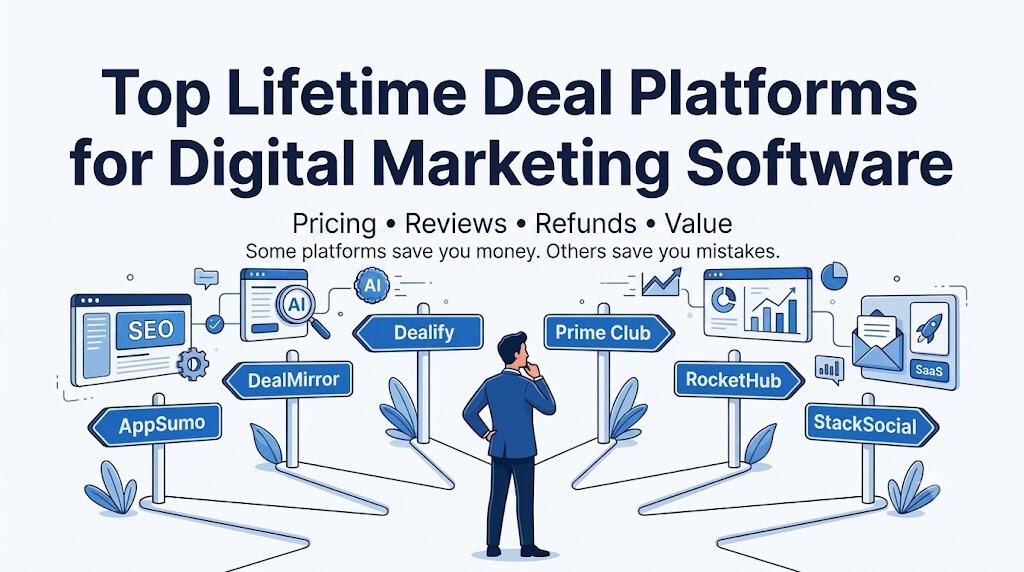
Illustration of top lifetime deal platforms for digital marketing software, featuring logos of AppSumo, DealMirror, Dealify, Prime Club, RocketHub, StackSocial, with a person analyzing the options.

Top Lifetime Deal Platforms for Digital Marketing Software Compared

Reading Time: 10 minutes

What This Comparison Covers

AppSumo Plus is a buyer-membership model: pay an annual fee, earn it back through discounts, credits, and member perks. The competitors worth comparing are platforms that can match it on membership economics, marketer-focused inventory, review quality, buyer protection, and affiliate/partner opportunities. The five strongest comparables are DealMirror, Dealify, Prime Club, RocketHub, and StackSocial.

This guide is written for three audiences with different needs: buyers evaluating where to find and purchase lifetime software deals, affiliate marketers deciding which platforms are worth promoting, and software founders exploring where to launch. The platform profiles cover all three angles. The comparison tables and recommendation framework at the end will get you to a decision faster if you already know your role.

Full disclosure: I am currently an AppSumo Plus member and have previously written about its value in my AppSumo Plus review. While researching alternative lifetime deal platforms, I realized I couldn’t find a comprehensive comparison that looked at pricing, memberships, review quality, buyer protections, affiliate opportunities, and overall value in one place. So I decided to create it myself.

Before You Compare Platforms: The Real Case for Lifetime Deals

If you are new to a software category, just starting a business, or working with a tight budget, lifetime deal platforms may be one of the smartest places to begin — and not just because of the price.

When you spend $49 or $79 on a lifetime deal for an SEO tool, an email platform, or a CRM you have never used before, you are not just buying software. You are buying a low-risk education in what that category of tool actually does, what features matter to your workflow, and what you can live without. That knowledge is worth real money the next time you are shopping — when your business is bigger, the stakes are higher, and you are spending accordingly on a proven platform.

Here is the honest reality: most of the tools on these platforms are early-stage, indie, or challenger products. Some of them will grow with you, and that is a genuine home run. Most of them probably won’t reach the scale or reliability of an established martech platform. But for under $100 you get hands-on experience in a category, and you come out the other side a more educated buyer. That is money well spent almost regardless of whether the tool itself becomes a long-term part of your stack.

A note on where LTD platforms fit in the broader martech picture

Researchers like Scott Brinker track thousands of martech products across a mature, enterprise-oriented landscape. The tools on AppSumo and its competitors occupy a different tier — earlier stage, more experimental, priced for individual operators and small teams rather than organizations with IT departments and procurement processes. That is not a knock. It is simply useful context. These platforms are a starting point and a proving ground, not a replacement for deliberate martech selection once your business has real revenue, a team depending on the tools, or customers directly touching them.

The signal that you have outgrown the LTD approach: when a tool becomes genuinely load-bearing for your business — meaning revenue depends on it, a team relies on it daily, or customers interact with it — that is when you want an established vendor with proper support, a documented SLA, and a business model that does not depend on one-time sales. That is where the Brinker-tier conversation begins. Until then, these platforms are a legitimate and underrated place to learn.
Platform Comparison at a Glance

Background and Community

PlatformFoundedHQCustomers / CommunityPlus MembersDeals Run
AppSumo2010Austin, TX2M+ customers25,000 Plus membersNot disclosed
DealMirror2016/2018*Middletown, DENot disclosedNot disclosed2,200+ promotions
Dealify2018Eindhoven, NL50,000+ customersNot disclosed~130 active
Prime Club2022Dover, DE8,000+ membersNo paid tierSelective / not disclosed
RocketHub2021New York, NY50,000+ communityNot disclosedNot disclosed
StackSocial2011Venice, CANot disclosedNo membershipNot disclosed

DealMirror’s own content references 2016; third-party sources cite 2018.

Membership and Buyer Economics

PlatformMembership CostMember DiscountQuarterly CreditRefund: MemberRefund: Standard
AppSumo$99/year10% off$25 every 90 days60 days60 days
DealMirror$49/yr · $149/5yr · $199/10yr10% offNot disclosed60 days30 days
Dealify$99/year10% off$25 every quarter60 days30 days
Prime ClubFreeNoneNone30 days30 days
RocketHub$99 one-time (Startup Perks)†NoneNone30 days30 days
StackSocialNoneNoneNoneN/A30 days (unredeemed only)‡

†RocketHub’s Startup Perks membership is a one-time lifetime fee that unlocks discounts on major established tools (HubSpot, Canva, etc.), not lifetime deals on indie SaaS. Structurally different from the others.
‡StackSocial does not issue refunds once a license key has been redeemed.

Review Density and Trust Signal

PlatformTypical Review Count (per deal)Trust Mechanism
AppSumo14 to 900+ (marketing tools)Community reviews, Q&A threads, five-taco rating system
DealMirror0 to 4Platform curation, refund window
Dealify0 to 1Platform curation, refund window
Prime ClubNot the primary signalAudit reports: ARR, team size, funding, G2 ratings, founder context
RocketHub0 to 5Community discussion threads
StackSocialDozens to thousandsVerified purchaser reviews (general consumer audience, not marketer-specific)

Affiliate Program Comparison

PlatformCommissionCookiePayoutNotes
AppSumoNot publicly listedNot listedNot listedVia Impact; verify at signup
DealMirror15%30 daysNot listedOlder pages showed 20-50%; 15% is current official rate
Dealify20%7 daysNot listedHighest rate; shortest cookie in the group
Prime ClubNot publicly listedNot listedNot listedApply via affiliates.primeclub.co
RocketHub10% (new) / 5% (existing)*14 daysQuarterly via PayPal$100 minimum threshold; selective approval
StackSocialVia StackCommerce publisher programNot listedNot listedMedia/commerce partnership model, not a standard affiliate program

*RocketHub’s existing-customer commission may change per their affiliate FAQ.

Platform Profiles

AppSumo

The benchmark. Founded in 2010 by Noah Kagan in Austin, TX, AppSumo is the largest and most established lifetime deal marketplace for entrepreneurs. It claims 2 million+ customers, 1.5 million active entrepreneurs in its ecosystem, and 25,000 Plus members.

Membership: $99/year for Plus. Benefits include 10% off all purchases, a $25 coupon every 90 days, early and exclusive access to featured products, access to The Sauce community, and free access to select AppSumo Originals during membership.

Inventory: Broadest catalog in this space for marketers — email, SEO, lead gen, CRM, social, content, AI tools, and more. AppSumo Originals are tools built or co-developed by AppSumo itself, often available to Plus members free.

Review density: The strongest in the category. Sampled active marketing deals show review counts from 14 to 900+. The community Q&A threads add additional signal that lowers purchase risk.

Affiliate program: Free to join via Impact. AppSumo has paid $113M+ directly to software partners and maintains 20,000+ affiliates and ambassadors. Commission rates for affiliates promoting AppSumo itself are not publicly listed on the Impact page — verify current terms at signup.

Best for: Marketers who buy software repeatedly and want the richest community signal before purchasing. Also the most mature platform if you are a software founder who wants to launch.

DealMirror

The price-aggressive membership alternative. Founded around 2016-2018, based in Middletown, Delaware.

Membership: Prime Membership at $49/year, $149 for 5 years, or $199 for 10 years — meaningfully cheaper than AppSumo on a long-horizon basis. Benefits include 10% off sitewide, early access to deals, and the refund window expansion from 30 to 60 days. The multi-year options are a genuine differentiator if you plan to buy deals regularly over time.

Inventory: Over 2,200 promotions run to date. Heavy emphasis on growth categories: AI marketing, SEO, lead gen, email, social, CRM, and WhatsApp marketing. Broad enough for most marketers.

Review density: Noticeably thinner than AppSumo. Sampled deal pages commonly show 0-4 reviews. Buyers rely more on the platform’s curation and the refund window than on crowd-sourced social proof.

Affiliate program: 15% commission per referral (per current official affiliate page). Older promotional pages reference 20-50%, which appear to reflect a launch-period rate. Cookie duration: 30 days.

Best for: Budget-conscious buyers who want a real membership with decent category coverage and are comfortable doing more independent due diligence.

Dealify

The growth-hacker-focused alternative. Founded 2018, headquartered in Eindhoven, Netherlands. Claims 50,000+ customers.

Membership: Dealify+ is $99/year (or ~$9/month). Benefits mirror AppSumo Plus almost exactly: 10% off every purchase (auto-applied at checkout), $25 in quarterly credits, exclusive member-only sales with up to 30% off, and a 60-day refund window (vs. 30 days for non-members).

Inventory: Narrower than AppSumo but intentionally curated for growth hackers, founders, and marketers. Categories include AI, SEO, social media management, analytics, content marketing, productivity, and eCommerce. New deals launch twice per week. Current catalog shows around 130 active products.

Review density: Light. Sampled marketing deal pages showed 0-1 reviews, which is a real limitation for buyers who depend on community validation.

Affiliate program: 20% commission after the refund period. Cookie: 7 days (one of the shorter windows in this group).

Best for: Marketers who want a growth-specific catalog and are comfortable validating tools independently. The Plus membership economics are nearly identical to AppSumo’s, so the decision often comes down to inventory breadth.

Prime Club

The curation-first alternative. Founded 2022, operated by Marketive Labs LLC in Dover, Delaware. Claims 8,000+ members.

Membership: Free. Prime Club explicitly states it does not offer paid premium tiers. Membership is the community itself.

Inventory: Deliberately small and selective. Prime Club openly says it is “not a Walmart of lifetime deals” and claims to feature only the top 7% of SaaS tools that pass its vetting process. Deal categories skew toward lead gen, email marketing, CRM, form builders, and integration software — all useful for digital marketers and agency owners.

Review density: Native review counts are not the trust mechanism here. Instead, Prime Club provides audit-style diligence on each deal: ARR, team size, funding status, G2 and other third-party ratings, and founder context. The private community discussion threads serve a similar function to AppSumo’s Q&A.

Affiliate program: Prime Club operates an affiliate program (via Rewardful/Partnero). Commission rate is not publicly listed — apply through affiliates.primeclub.co to get current terms.

Refund policy: Generally 30 days unless a specific deal page states otherwise. No refunds if a partner company shuts down.

Best for: Marketers and agency owners who prioritize deal quality and due diligence over catalog volume. Not a fit if you want broad weekly discovery or rely on community review counts.

RocketHub

The founder-first, startup-perks platform. Founded 2021, based in New York, NY. Founder: Charlie Patel. Claims a community of 50,000+.

Membership: The main buyer-facing membership is Startup Perks — a $99 one-time lifetime payment (not annual) for access to $3M+ in startup discounts and perks from tools like HubSpot, DigitalOcean, Canva, and others. This is structurally different from the other platforms: it bundles negotiated perks on major established tools rather than lifetime deals on emerging SaaS.

The deal marketplace itself does not appear to have a recurring buyer membership analogous to AppSumo Plus. Memberships for deal access start at $99/year per the newsletter/perks page.

Inventory: Smaller deal catalog focused on SaaS tools and plugins for entrepreneurs. Marketing automation, SEO, social, and content categories are represented but the breadth is narrower than AppSumo or DealMirror.

Review density: Light. Sample deal pages show 5 or fewer reviews, though the community discussion component adds some signal.

Affiliate program: 10% commission for both new and existing customer referrals (note: the existing-customer rate may reduce to 5% in a future platform update per RocketHub’s own affiliate FAQ). Cookie: 14 days. Quarterly PayPal payouts. Minimum $100 payout threshold. The program is selective — requires a verifiable identity and a traffic source.

Best for: Founders wanting a hands-on launch experience with ad support and campaign help. Also useful if the Startup Perks bundle aligns with your tool stack.

StackSocial / StackCommerce

The high-volume generalist. StackCommerce (parent company) was founded in 2011 and is based in Venice, California. StackSocial is its consumer-facing deal marketplace.

Membership: No buyer membership program. The platform is deal-led, not club-led.

Inventory: Very broad — software, security, productivity, learning, and licenses across many categories. Much more general-purpose than the other platforms. Less focused on startup-stage martech specifically.

Review density: The strongest verified-purchaser review volume outside of AppSumo. Active software deal pages commonly show dozens to hundreds of reviews, and some categories run into the thousands. The catch: reviews reflect a general consumer-software buyer, not a founder or marketer community, so the context is different.

Refund policy: Returns accepted for store credit within 30 days — but only for unredeemed digital items. Once a license key is redeemed, refunds are generally not available. This is the most restrictive buyer protection of the group.

Publisher/brand opportunities: StackCommerce offers white-labeled branded shops, publisher affiliate inventory, StackMedia advertising, and sponsored content solutions. If you are evaluating a commerce-content partnership rather than just an affiliate link, StackCommerce is more structurally capable than the LTD-native platforms.

Best for: Buyers who want high verified-purchaser review volume across broad software categories. Publishers and media brands exploring white-label commerce. Not the go-to for startup-martech discovery or community-driven deal validation.

How They Stack Up: Key Takeaways

The four tables above capture the numbers. Here is what they mean in practice.

Membership value: AppSumo Plus and Dealify+ are nearly identical on paper. DealMirror Prime wins on long-horizon price. Prime Club is free. RocketHub’s Startup Perks is a one-time fee for a different purpose entirely. StackSocial has no membership.

Review depth: AppSumo is the clear leader for marketers. StackSocial has high raw volume but a general consumer audience. DealMirror, Dealify, and RocketHub all run thin. Prime Club trades native reviews for structured due diligence.

Buyer protection: AppSumo, Dealify+, and DealMirror Prime all reach 60 days. Most standard windows are 30 days. StackSocial’s no-refund-after-redemption policy is the most restrictive.

Marketer inventory fit: Dealify is the most tightly focused on growth marketers. AppSumo has the deepest catalog overall. DealMirror covers most marketing categories well. RocketHub and StackSocial are broader and less martech-specific.

Practical Recommendation Framework

For Buyers

New to a software category or starting out on a tight budget? Any of these platforms is a reasonable starting point. AppSumo has the most inventory and the best community validation to help you evaluate before you buy. The goal is to learn what you need from a category, not necessarily find your forever tool.

Buy deals regularly and want the best community signal? AppSumo Plus is still the default choice — deepest review depth, largest audience, strongest buyer protection.

Want a cheaper annual membership with similar perks? DealMirror Prime ($49/year) is the closest alternative. Accept thinner review depth.

Want AppSumo-equivalent perks but prefer a tighter growth-marketing catalog? Dealify+ matches AppSumo Plus almost feature-for-feature at the same price with a narrower, more focused inventory.

Care more about deal quality than deal volume? Prime Club’s free membership and audit-driven diligence process are the differentiator. Inventory is small but vetted aggressively, and the community discussion threads add real signal.

For Affiliate Marketers

A few things matter beyond commission rate: conversion likelihood, audience fit, and your credibility risk if a promoted tool shuts down.

AppSumo converts well for marketing audiences because the brand is recognized, the review community reduces buyer hesitation, and the 60-day refund window reduces purchase anxiety. The commission rate is not publicly listed — verify it at signup via Impact before building a campaign around it.

Dealify’s 20% commission is the highest confirmed rate in this group, but the 7-day cookie is the shortest. If your audience tends to research before buying, that window works against you.

DealMirror’s 15% with a 30-day cookie is a reasonable middle ground, particularly if your audience skews toward budget-conscious buyers or longer-horizon deal hunters.

RocketHub’s 10% with a 14-day cookie and quarterly payouts is workable but not the most competitive. Worth promoting if you have a founder-oriented audience.

One practical consideration regardless of platform: be selective about what you personally review and recommend. The tools on these platforms carry real shutdown risk. Your credibility takes a hit if you promoted something that goes dark six months later. Platforms like Prime Club that do financial vetting before listing can help reduce that exposure.

For Software Founders Considering a Launch

AppSumo is the most mature go-to-market machine by a significant margin — $113M+ paid to partners, 20,000+ affiliates, 1.5 million active entrepreneurs in the audience. If you want scale and distribution, it is the default.

RocketHub offers a more hands-on launch experience with ad support and campaign help, which suits founders who want more direct involvement and a smaller but more focused community.

Prime Club is selective — most submissions are not accepted — but if you get in, the audience is high-quality and the diligence process can actually strengthen trust in your product.

DealMirror and Dealify both accept product submissions and have meaningful marketing-focused audiences, making them worth considering as secondary launch platforms or for a follow-on deal after an AppSumo run.

For Publishers and Media Brands

StackCommerce is the only platform here with a white-label branded shop, publisher inventory, and a full media partnership model via StackMedia. If you are evaluating a commerce-content operation rather than a simple affiliate relationship, it is in a different category from the others.

All data sourced from official platform pages and verified third-party references as of June 2026. Membership pricing, affiliate commissions, and refund terms change — confirm current details before citing in marketing copy or reviews.

Top Lifetime Deal Platforms for Digital Marketing Software Compared Read More »

A razor shattering boxes of shaving products with a $1 price tag, symbolizing disruption in the razor industry through innovative marketing and challenger branding.

Case Study: Dollar Shave Club Disrupted the Razor Aisle With Humor, Convenience, and Challenger Branding

Reading Time: 5 minutes

Brief Summary

Dollar Shave Club launched in March 2012 with a simple promise: high-quality razors for a few bucks a month, delivered directly to your door.

What made the brand famous was not just the subscription model, but the way it packaged that model in a low-budget video starring co-founder Michael Dubin, whose deadpan delivery, category mockery, and plain-language value proposition made the ad feel more like a cultural jab than a sales pitch.

A razor shattering boxes of shaving products with a $1 price tag, symbolizing disruption in the razor industry through innovative marketing and challenger branding.

The result was immediate demand, a crashed website, and 12,000 orders in 48 hours. Over the next few years, Dollar Shave Club layered humor, social media engagement, customer support, product line expansion, in-house creative, and eventually omni-channel retail on top of that launch. Unilever bought the business for about $1 billion in 2016, later admitted the economics of direct-to-consumer had changed, and sold control in 2023. That full arc is what makes the case so valuable today: it shows both how challenger brands break into mature categories and how hard it is to preserve that edge as channels, costs, and ownership change.

Company Involved

Dollar Shave Club is the company at the center of this case. The brand launched in 2011 and built its early identity around affordable razors shipped directly to consumers. Today, it sells a broader grooming assortment across razors and shave, skin and body, hair, electrics, and women’s products. As of 2026, control sits with Nexus Capital Management, while Unilever retains a 35 percent minority stake.

Marketing Topic

  • Branding
  • Advertising
  • Customer Experience

Public Reaction or Consequences

The public reaction was overwhelmingly strong at launch because the campaign solved a real frustration in a way that felt funny, fast, and shareable. The launch video overloaded the site, generated 12,000 orders in two days, and helped frame Dollar Shave Club as the irreverent outsider taking on legacy razor brands. That tone carried into later campaigns, industry awards, and social media work that was recognized for platform-specific storytelling and highly responsive member support.

The later consequence was more complicated. Dollar Shave Club became one of the defining direct-to-consumer success stories of the 2010s and was acquired by Unilever in 2016. But years later, Unilever said the business had not delivered as expected and that the economics of direct-to-consumer had changed. In 2023, Unilever sold control to Nexus Capital while keeping a minority stake.

Why It Matters Today

  • The case still matters because it anticipated founder-led branding, first-party customer relationships, recurring revenue, owned content, and omni-channel growth.
  • It also matters because it shows the limits of direct-to-consumer economics when customer acquisition costs rise and cross-sell does not scale quickly enough.
  • Its recent campaigns show how an older challenger brand can refresh itself with channel-specific creative, including both filmed storytelling and AI-generated work.

Three Takeaways

  1. Use humor only when it carries strategy, not just attention.
  2. Build the brand voice into support, packaging, and follow-up channels.
  3. Do not mistake a winning launch channel for a permanent growth engine.

Notable Quotes and Data

  • Michael Dubin said the launch spot was shot in one day for $4,500 and that within 48 hours the company received 12,000 orders.
  • Dubin later said, “Great storytelling is why we’ve been able to grow so fast.”
  • Reuters reported that Unilever expected Dollar Shave Club’s turnover to grow to more than $200 million in 2016 from $152 million in 2015, while Harvard Business Review noted the company had quickly grown to 3.2 million subscribers by the time of the acquisition.

Full Case Narrative

Dollar Shave Club entered a category that looked stable from the outside but was full of consumer resentment. The traditional razor aisle had become synonymous with high prices, locked display cases, confusing product ladders, and a sense that major brands kept adding features to justify margin. Dollar Shave Club reframed that frustration into a cleaner story: people did not need a futuristic shaving ritual, they needed a straightforward product, a fair price, and one less errand. The company did not just sell blades. It sold relief from category nonsense.

The launch video made that argument unforgettable. Dubin used a direct-to-camera style, warehouse staging, visual gags, and a script that moved from joke to benefit without friction. It felt personally authored, which mattered. Consumers were not just hearing a claim from an ad. They were hearing a founder puncture a stale market with wit.

Dollar Shave Club did not treat virality as the whole strategy. It expanded into adjacent products such as shave butter, wipes, shower, hair, and skin care. It invested in internal creative capabilities rather than outsourcing its brand brain. It also built marketing around service, using social channels for customer support and community engagement as well as promotion.

Another important layer was content. Dollar Shave Club tried to become more than a subscription box by funding MEL Magazine and by continuing to maintain owned educational and lifestyle content on its current site through Club Chronicles. That showed an effort to build audience relevance around the broader world of grooming, lifestyle, and identity, not just the transaction itself.

The Unilever chapter adds the cautionary half of the case. In 2016, Unilever bought Dollar Shave Club for about $1 billion, with the deal framed as a strategic response to e-commerce disruption, men’s grooming growth, and the value of direct customer relationships. Yet several years later, Unilever said Dollar Shave Club had not delivered as expected and that the economics of the direct-to-consumer model had changed. In 2023, Unilever sold control to Nexus while keeping a 35 percent stake.

Since then, the brand has leaned back into its roots. In 2025 it launched a national campaign designed to put the brand back on the map after the Unilever split. In 2026 it extended its irreverent disruptor posture into a women’s line, combining traditional filmed ads with AI-generated creative and testing which executions work best on different channels. The current site still emphasizes honest prices, simple shopping, and blunt anti-category messaging.

Timeline

  • 2011: Dollar Shave Club launches with a direct-to-consumer razor proposition.
  • March 2012: The launch video goes live, the site crashes, and 12,000 orders arrive within 48 hours.
  • 2013 to 2014: The brand expands into adjacent products and earns recognition for social and digital work.
  • 2016: Unilever acquires Dollar Shave Club for about $1 billion.
  • 2020 to 2021: The brand redesigns and pushes into omni-channel retail with a major campaign.
  • October 2023: Unilever announces the sale of Dollar Shave Club to Nexus Capital Management and keeps a 35 percent stake.
  • 2025 to 2026: The brand returns to more disruptive humor and expands into women’s grooming with mixed-format creative.

What Happened Next?

Dollar Shave Club evolved from a subscription disruptor into a broader grooming brand with retail distribution, more product categories, and a renewed emphasis on challenger messaging. Its marketing today still draws heavily from the original formula: blunt value communication, category criticism, founder-style directness, and a willingness to test new creative formats while protecting its irreverent voice.

One Sentence Takeaway

Dollar Shave Club won by turning a boring, overpriced category into a story people wanted to repeat, and its later ownership twists prove that memorable branding is powerful, but business model discipline still decides how long the advantage lasts.

Sources and Citations

Inc.: How a $4,500 YouTube Video Turned Into a $1 Billion Company

Reuters: Unilever sharpens P and G rivalry by buying Dollar Shave Club

Harvard Business Review: Unilever’s Big Strategic Bet on the Dollar Shave Club

Unilever: Unilever announces the sale of Dollar Shave Club

Marketing Dive: Dollar Shave Club swipes at competition in first women’s grooming push

Case Study: Dollar Shave Club Disrupted the Razor Aisle With Humor, Convenience, and Challenger Branding Read More »

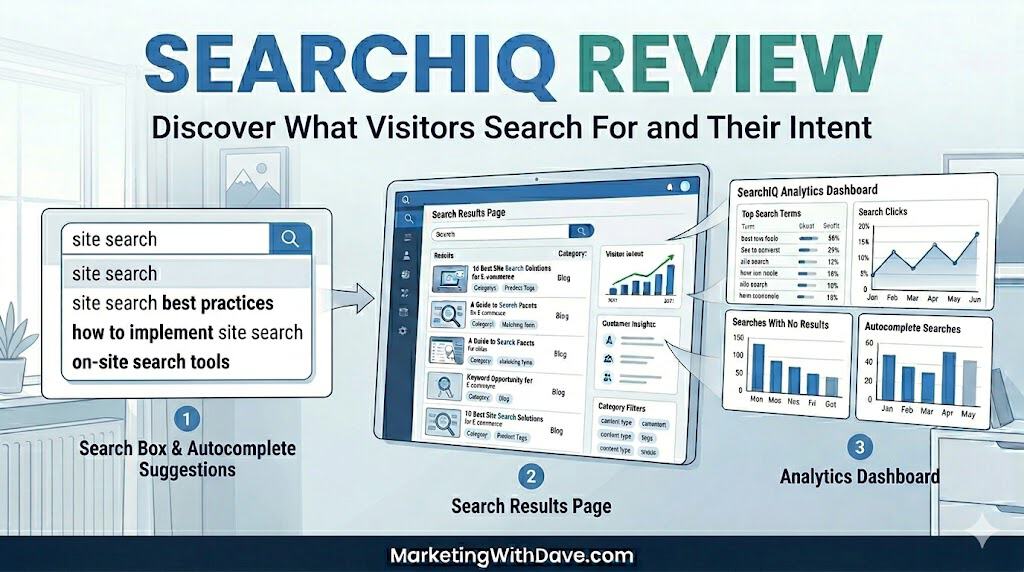
Screenshot of SearchIQ review showcasing search features, analytics dashboard, and autocomplete suggestions for improved website search optimization.

SearchIQ Review: Site Search Analytics and Visitor Insights

Reading Time: 8 minutes

Your visitors are telling you exactly what they want every time they use your site search. The question is whether you have a tool that can actually capture and use that signal. Default WordPress search is not that tool, and getting the right data out of GA4 requires more custom configuration than most site owners ever bother with. SearchIQ is built specifically for this problem: better search results for your visitors and better analytics for you.

Screenshot of SearchIQ review showcasing search features, analytics dashboard, and autocomplete suggestions for improved website search optimization.

I bought SearchIQ on AppSumo in December 2025 and have been running it on MarketingWithDave.com since. This review covers what works well, what genuinely falls short, and what you need to know before deciding whether the $39 lifetime deal is right for your website.

See the current AppSumo deal for SearchIQ

Affiliate disclosure: If you purchase through my link, I may earn a small commission at no additional cost to you. I only share tools I have used myself.

See how I rate software tools

The 30-Second Decision

SearchIQ is a cloud-based site search platform that replaces WordPress’s built-in search with lightning-fast autocomplete, faceted filtering, and a real-time analytics dashboard. The AppSumo lifetime deal is $39 for 5,000 documents and one month of analytics history. For most small business sites, blogs, and content-heavy WordPress installs, that is more than enough horsepower.

The short version: the search experience it delivers to your visitors is genuinely excellent. The analytics side has real limitations you need to know about before you buy, and there are signs that active development has slowed down significantly. Read on for the full picture.

Why Site Search Data Matters

Site search is one of the most underrated data sources in digital marketing. When a visitor types a query into your search bar, they are handing you something rare: intent in their own words, at the exact moment they need something. They are not searching on Google where you have to guess what brought them to your page. They are on your site, telling you directly what they want.

The data you want from site search goes well beyond just knowing what people searched. You want to know:

  • What search terms were used, and how often
  • Which page did the search happen from (context matters)
  • Which searches returned zero results (a content gap hiding in plain sight)
  • What brought that visitor to your site in the first place (referral source)
  • Click-through rate from search results to content

Is SearchIQ Right for You?

SearchIQ works well across a wider range of sites than you might expect. The engine is built to handle millions of documents in sub-seconds, so it scales beyond small blogs into serious WooCommerce and eCommerce catalogs. SKU search is supported, product autocomplete is a core use case, and the AppSumo deal includes unlimited domains, faceted filtering, and cross-domain search, which are features that matter for stores with real inventory depth.

That said, the 5,000 document limit on the AppSumo plan is a real ceiling. A large catalog with tens of thousands of SKUs will outgrow it. And regardless of site size, anyone who needs more than 30 days of analytics history without a manual export routine will find the plan limiting.

The tool calls out marketers, marketing agencies, and product managers as its target audience. In practice it fits content-heavy WordPress sites and WooCommerce stores well, as long as you go in with clear eyes about the analytics constraints.

What SearchIQ Actually Does

SearchIQ is a cloud-hosted search engine that replaces WordPress’s native search. It indexes your content off-site and serves results through a customizable front end with search-as-you-type autocomplete, faceted filtering, typo tolerance, and a real-time analytics dashboard. Cross-domain search, PDF indexing, multilingual support, and mobile optimization are all included in the AppSumo plan.

What are facets? Facets are filters that appear alongside search results, letting visitors narrow down what they are looking for. On a recipe site, facets might be “cuisine type,” “prep time,” or “dietary restrictions.” On a marketing blog like mine, they could be tool category, topic, or content type. SearchIQ builds facets automatically from your existing content taxonomy.

My Experience With SearchIQ: What Works and What Needs Work

Setup and Installation: Genuinely Easy

SearchIQ has a dedicated WordPress plugin, and installation is as straightforward as any plugin I have set up. Connect your account, run the initial sync, and your content is indexed. The search experience on the front end was noticeably better than WordPress default search within minutes of setup.

One note worth flagging: as of this writing, the SearchIQ WordPress plugin shows it was last updated nine months ago and has not been tested with WordPress 7.0, which released on May 20, 2026. That is not automatically a dealbreaker since many plugins run fine without an explicit compatibility flag, but it is worth keeping an eye on, especially after a major version jump. I have not experienced any compatibility issues on my site, but your mileage may vary.

Managing Settings: Two Interfaces, Easy to Confuse

This is a usability quirk worth calling out. SearchIQ settings live in two places: the WordPress plugin and the SearchIQ web app. They overlap in ways that are easy to forget when you are troubleshooting something.

The plugin has tabs for Configuration, Options, Results Page, Autocomplete, Mobile, and Facets. The web app has its own tabs for General, Autocomplete, Result Page, Mobile, Installation, and WP Installation. Similar enough that it is genuinely easy to forget where to go to control what. Once you know this, it is manageable. But it will trip you up the first few times.

Internal Traffic Filtering: A Meaningful Gap

This one bothers me more than anything else about the product. There is no way to filter out your own traffic from the analytics. For a small personal site like mine, my internal testing and browsing noise is not enormous, but there is no good reason a modern analytics tool should not support IP exclusion or user role filtering. I flagged this to the SearchIQ team shortly after purchasing.

Analytics: Useful Starting Point, Real Limitations

The analytics dashboard is clean and intuitive. You can see what your visitors are searching for and intent signals. That data is legitimately valuable. For a content site, even 30 days of search data can surface content gaps you did not know existed.

The limitation is the window: the AppSumo plan only retains 30 days of analytics history. For any kind of meaningful trend analysis or month-over-month comparison, that is not enough. There is no rolling view that automatically builds over time.

The practical workaround is to export your data manually each month. SearchIQ exports nine separate CSV files, which is comprehensive but not exactly elegant. There is also no date or time stamp included in the exported data, making historical reporting more cumbersome than it should be.

More importantly, the reporting data exists in silos. You can view top searches, no-result searches, countries, devices, and other metrics independently, but you cannot combine those dimensions to perform deeper analysis. For example, there is no way to see which no-result search terms are most common within a particular country.

The biggest analytics gap, however, is the lack of page-level search context. SearchIQ can tell you what users searched for, but not where they were when they initiated that search. From a content optimization perspective, this is often the most valuable piece of information. If users repeatedly search for “pricing,” “refund policy,” or “API documentation,” knowing which page triggered that search can reveal where your content is failing to answer questions or guide visitors effectively. Without that context, search analytics become significantly less actionable than they could be.

Heads up on analytics history: The AppSumo lifetime deal includes one month of analytics retention. If you want to do real trend analysis, set a monthly calendar reminder to export your data before it rolls off. SearchIQ has indicated they plan to extend the analytics window, but there is no confirmed timeline.

See the current AppSumo deal for SearchIQ

Pros and Cons

Pros Cons
  • WordPress plugin makes setup fast and easy
  • Clean, fast autocomplete with typo tolerance
  • Faceted search adds serious UX value
  • Analytics dashboard surfaces real content insights
  • Cross-domain support included
  • PDF indexing supported
  • Customizable UI to match your brand
  • Strong lifetime deal value for what you get
  • Responsive team when I contacted support
  • Analytics limited to 30 days with no historical trend view
  • No internal traffic filtering or IP exclusion
  • CSV exports have no date/time stamps
  • Settings are split across the plugin and web app
  • WordPress plugin has not been updated recently
  • Pace of product development appears to have slowed
  • Nine separate export files with no unified export option

Pricing and Plans

One plan, non-stackable. Here is what you get:

PlanPriceDocumentsAnalyticsDomains
SearchIQ Startup (AppSumo LTD)$39 one-time5,00030 days historyUnlimited

The plan includes white-label delivery (no SearchIQ branding), facet filters, CDN for thumbnail images, cross-domain search, and mobile optimization. For most small business sites, blogs, and solopreneur content hubs, 5,000 documents is well above what you will need for years.

SearchIQ vs. Native WordPress Search and GA4 Site Search Tracking

Capability Default WP Search GA4 Site Search (via GTM) SearchIQ
Search-as-you-type autocomplete ❌ ❌ ✅
Typo tolerance ❌ ❌ ✅
Faceted filtering ❌ ❌ ✅
Keywords searched ❌ ⚠️ With setup ✅
Zero-result searches ❌ ⚠️ Custom setup required ✅
Page where search occurred ❌ ⚠️ With setup ✅
Click-through rate on results ❌ ⚠️ Custom setup required ✅
Internal traffic filtering — ✅ ❌
Analytics history ❌ None ✅ 14 months ⚠️ 30 days
Setup complexity ✅ None ⚠️ Moderate setup ✅ Low setup
PDF indexing ❌ ❌ ✅
Cross-domain search ❌ ❌ ✅
Mobile search optimization ❌ ❌ ✅

Common Questions From the AppSumo Community

Can I use SearchIQ across multiple domains?

Yes, the AppSumo lifetime deal supports unlimited domains and includes cross-domain search, which lets you surface results from multiple sites in a single search experience.

How is “document” count calculated?

A document is any post, page, or product on your site. The 5,000 document limit on the AppSumo plan applies to total indexed content, not monthly queries. For most sites under 5,000 pages this is a non-issue.

Can I get more than 30 days of analytics?

Not on the AppSumo plan. Export manually each month before the data rolls off — nine CSV files, none of them date-stamped. SearchIQ has said they plan to extend the window but has not given a timeline.

Is there a GA4 integration for saving search data automatically?

No, not currently. Manual export is the only option. Worth submitting as a feature request if this matters to your workflow.

Does SearchIQ work with shortcodes or dynamically generated content?

SearchIQ indexes standard WordPress content. Content generated via shortcodes or table plugins that do not render content in the standard WordPress post structure may not be indexed correctly. This is worth testing during your trial period if your site relies heavily on shortcode-rendered tables or content.

What about Shopify?

SearchIQ has indicated they are not planning to re-support Shopify at this time. This is a WordPress-focused product.

A Note on Active Development

I want to be transparent about this because it matters for a lifetime deal purchase. Two data points concern me:

  • The WordPress plugin has not been updated in approximately nine months and has not been tested against WordPress 7.0 (released May 20, 2026)
  • A feature I requested six months ago (internal traffic filtering) has not been implemented

I am not saying SearchIQ is abandoned. The product works well day-to-day and the team was genuinely helpful when I was getting started. But for a lifetime deal, what you are evaluating is whether the product will continue to evolve. Based on what I have seen over six months of use, I would characterize the pace of development as slow rather than active. That is a real consideration.

If you are buying SearchIQ primarily for the search experience it delivers to your visitors, it delivers well today. If you are expecting a product roadmap full of new features, the evidence is not there to support that expectation.

Bottom Line

SearchIQ does the core job well. It replaces WordPress’s pedestrian default search with fast, accurate, autocomplete-powered search that your visitors will notice immediately. The analytics dashboard gives you real signal on what your audience is looking for, even if the 30-day window forces a manual export habit to make it useful over time.

At $39 lifetime, the value is strong if you accept the limitations. You need to be comfortable with manually exporting data each month, accepting that internal traffic will show up in your analytics, and understanding that development velocity appears to have slowed. Those are not small caveats, but they do not sink the deal for a site under 5,000 pages that wants a better search experience without a monthly subscription.

For most content-focused WordPress sites, blogs, and small business owners running on AppSumo tools, this is a buy.

See the current AppSumo deal for SearchIQ

This content is for educational purposes and reflects my experience, review of the product, and current publicly available deal information. Always evaluate tools based on your specific business needs, goals, and workflows before making a decision.

Looking for more marketing software reviews? See my full list of marketing tools and software I recommend.

SearchIQ Review: Site Search Analytics and Visitor Insights Read More »

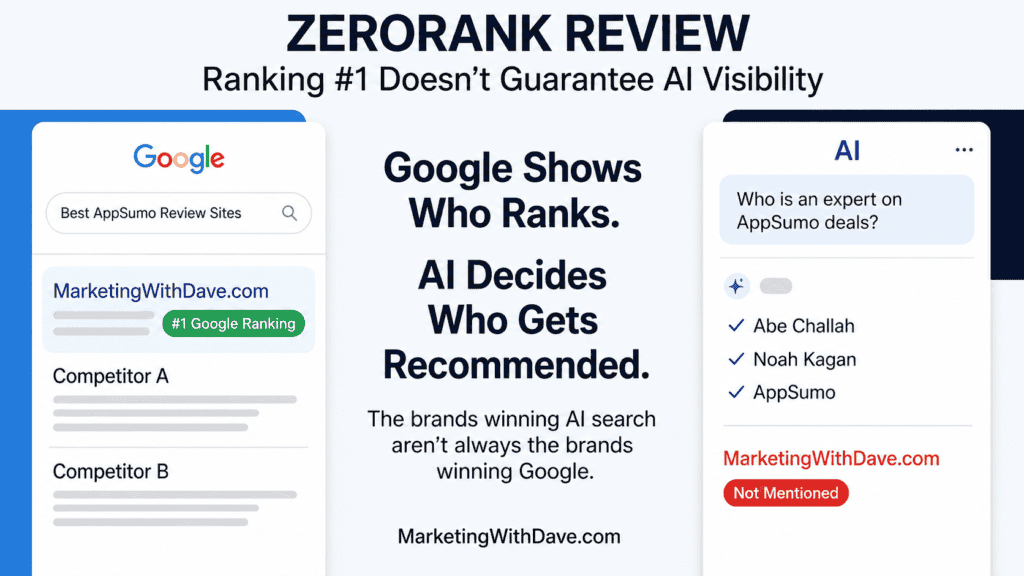
Screenshot of a review article titled 'ZeroRank Review' showing Google search rankings, AI decision-making, and a mobile AI chat, emphasizing AI search visibility tracking.

ZeroRank Review: Find Out Why AI Recommends Your Competitors

Reading Time: 9 minutes

This review covers ZeroRank in isolation. If you’re deciding between AI Search platforms, see my Best AI Search Software Compared guide. It compares the leading AppSumo options, explains how plan limits and credit systems work in practice, and evaluates each platform using the same nine questions I believe matter most when choosing AI Search software.

AI search is no longer a side experiment. ChatGPT, Perplexity, Google AI Overviews, and Gemini are actively answering buyer questions in your category right now, citing sources and recommending brands. If yours isn’t showing up, you’re invisible to a growing segment of your audience.

ZeroRank is an AI search visibility platform that tracks where your brand gets cited across the major AI engines, benchmarks you against competitors, and delivers prioritized recommendations to close the gap. I picked it up on AppSumo and ran it against MarketingWithDave.com.

Trying to decide between ZeroRank and SnowSEO?

I’ve also compared these two AI visibility platforms side by side, including where each one shines, the differences in workflow, and which type of marketer each is best suited for.

→ Read my ZeroRank vs SnowSEO comparison

Here’s what I found.

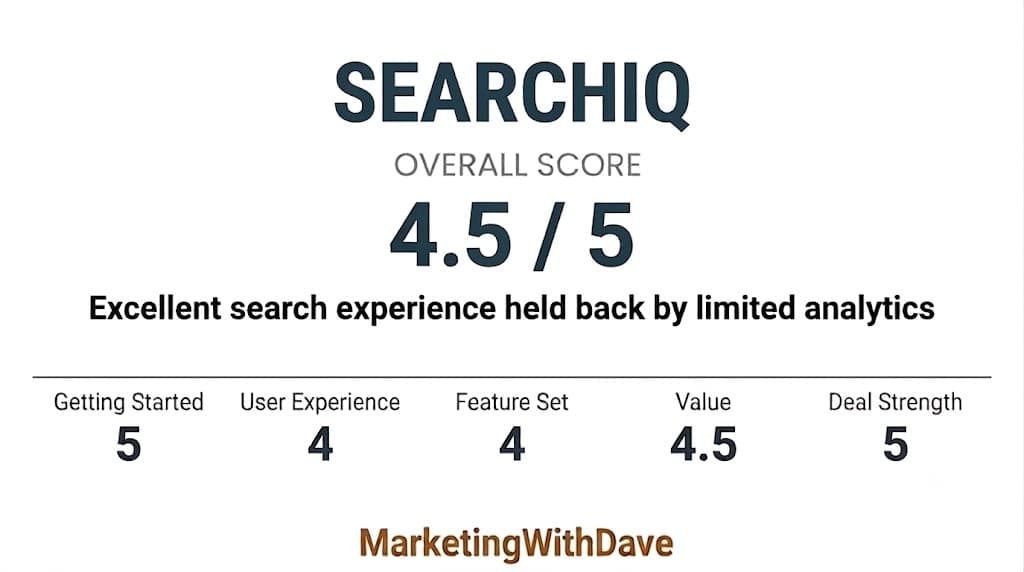
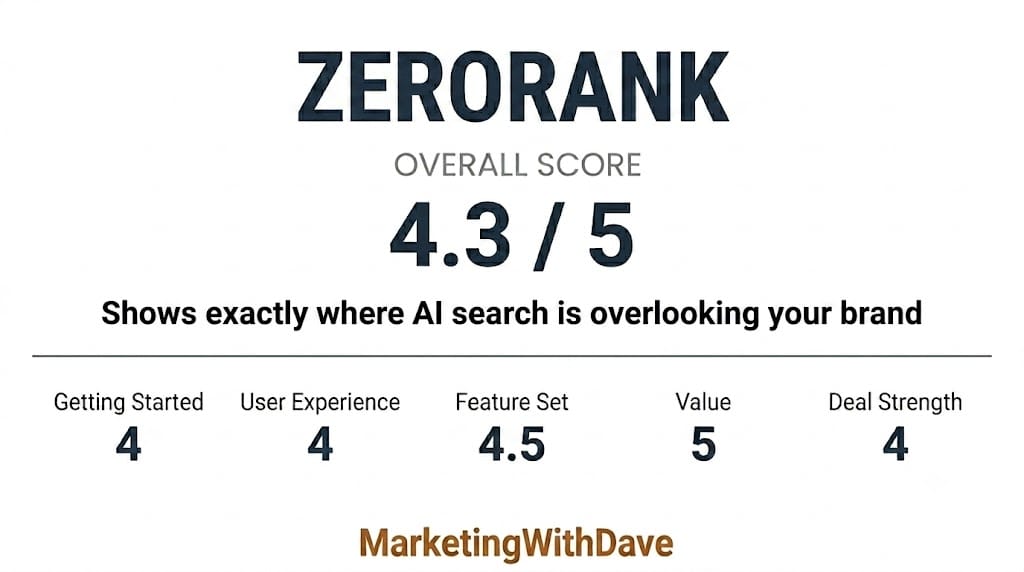
ZeroRank AI search visibility scorecard showing overall score of 4.3 out of 5, with categories like Getting Started, User Experience, Feature Set, Value, and Deal Strength, from Marketing with Dave.

See the current AppSumo deal for ZeroRank

Affiliate disclosure: If you purchase through my link, I may earn a small commission at no additional cost to you. I only share tools I have used myself.

See how I rate software tools

The 30-Second Decision

ZeroRank is worth serious consideration if you’re an SEO, content marketer, or agency that needs visibility into how AI engines are covering your brand or your clients’ brands. The topics and prompts system gives you precise control over what queries you’re tracking, and the recommendations are genuinely actionable. But go in with clear eyes: content generation credits are not included at Tier 1 or Tier 2, Workflows are an enterprise-only feature not covered by the AppSumo deal, and the onboarding has a few rough edges ZeroRank is actively working to fix.

Is ZeroRank Right for You?

You’ll like it if…You might skip it if…
You want precise control over which prompts and queries you track across AI enginesYou need content generation and optimization built in at the base tier
Tracking brand citations and share of voice in AI search matters to your strategyYou’re looking for a fully integrated content creation suite
You want structured on-page, off-page, and technical recommendations for AI visibilityYou want Workflows automation (that’s enterprise-only at $499/month)
You’re monitoring multiple brands or client properties against competitorsYou want a plug-and-play experience right out of the box

Why I Bought ZeroRank

I’ve been producing practitioner-grade content at MarketingWithDave.com for years, and the question of AI visibility has become impossible to ignore. Traditional SEO rankings tell me where I land in Google’s blue links. They say nothing about whether ChatGPT recommends me when someone asks “who personally tests AppSumo products?” or “where can I find honest software reviews before buying?”

I wanted a tool that would give me an honest picture of where I stood in AI search, not just a general SEO score with an AI tab bolted on. ZeroRank’s AppSumo listing positioned it as exactly that, so I bought Tier 1 to test it.

What ZeroRank Actually Does

ZeroRank is built around four core functions:

Topics and prompt tracking. You define topics and the specific prompts you want tracked across AI engines. This is the feature I got the most out of: rather than letting a tool decide what questions matter, you control exactly what you want to be found for and watch your visibility, sentiment, and rank move over time as you make changes. It’s a focused, intentional approach to GEO/AEO that generic rank trackers can’t replicate.

One reason I wouldn’t rely on any AI visibility score by itself: I tested the same prompt across six AI Search tools, including ZeroRank, and found surprisingly large differences in how they measure and report visibility.

Brand monitoring across AI platforms. ZeroRank tracks citations, mentions, sentiment, and position across ChatGPT, Perplexity, Google AI Overviews, Gemini, Grok, and Bing Copilot. Results update daily and are organized by prompt, so you can see exactly which questions you’re appearing in and which ones competitors are winning instead.

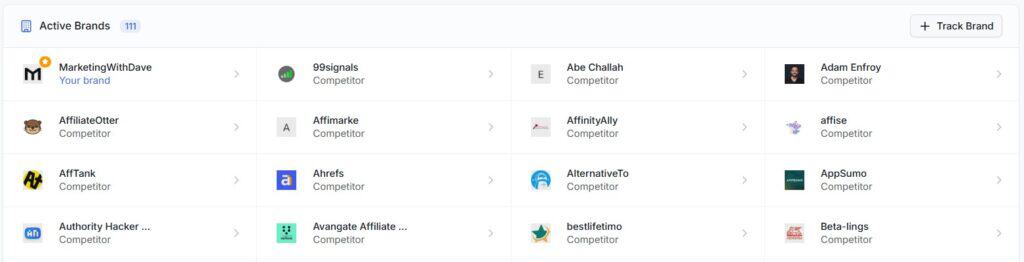
Competitive benchmarking. ZeroRank automatically identified and began tracking over 100 competitor brands against MarketingWithDave.com with no manual setup required. The coverage was accurate, it flags potential duplicate brand entries so you can merge them, and you can add additional competitors manually with no cap on how many you track.

Actionable recommendations. The recommendations dashboard breaks down opportunities into three categories: on-page (article formats, content types, and structures that AI engines cite), off-page (specific engagement opportunities across Reddit, YouTube, review platforms, social networks, communities, and other sources AI engines rely on). Each card includes Done/Decline/Todo controls so you can manage your queue.

Source intelligence. The Sources view shows which domains AI engines are pulling citations from in your category, how frequently they’re used, and how your domain compares. This gap analysis feeds directly into outreach and content strategy decisions.

ZeroRank In One Sentence

ZeroRank tracks the AI prompts that matter to your business, shows which brands are being recommended, and helps identify why your brand isn’t part of the answer.

My Experience With ZeroRank

Let me give you the full picture, friction and all.

Topics and prompts are the standout feature. Once I got past setup, the ability to define exactly which prompts to track was the most valuable thing in the platform. Rather than letting ZeroRank decide what’s relevant, I could dial in on the specific questions I want to rank for in AI search and get a clear read on how I’m doing. Seeing those prompts tracked across multiple AI engines with sentiment and rank data attached makes this genuinely useful for building a real GEO strategy.

Onboarding hiccup. When I first logged in after purchasing through AppSumo, the platform didn’t recognize my AppSumo purchase and presented subscription upgrade prompts instead of taking me to the dashboard. I had to contact support to get it sorted. ZeroRank has acknowledged this and is working to smooth it out, but it’s a frustrating start when you’re eager to dig in.

Topic creation needs a manual option. When you add a topic, ZeroRank auto-generates prompts based on what it infers about your site. In my case, it didn’t have the cleanest read on MarketingWithDave.com’s focus, so I ended up with generated prompts I didn’t want and had to delete them manually. I’d much rather have the option to create a topic without auto-generating so I can define my own prompts from scratch. ZeroRank says this is on the roadmap.

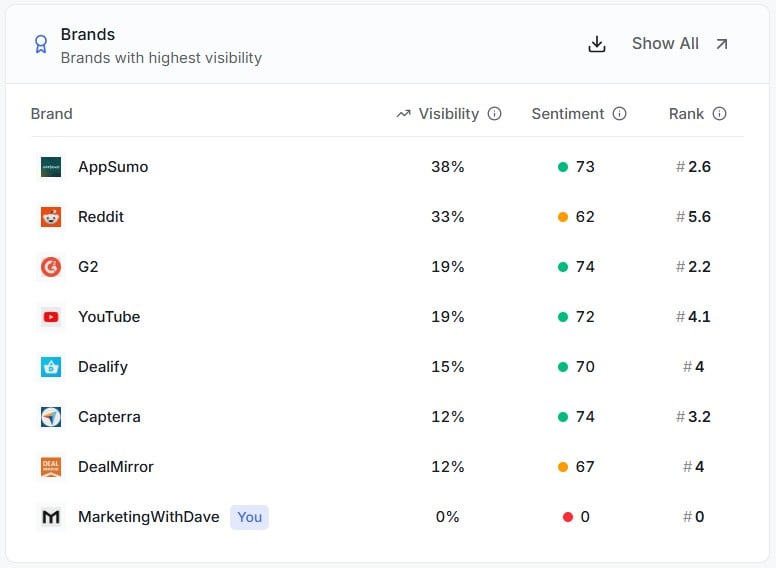
Starting from zero is humbling. The Brands overview showed MarketingWithDave.com at 0% visibility, 0 sentiment, and rank #0 across all tracked prompts. AppSumo led the category at 38% visibility, followed by Reddit at 33% and G2 at 19%. This is a new pursuit for me so not shocking but still, you never want to see zero results. It confirmed exactly why I need a tool like this.

Marketing with Dave logo displayed on a digital screen, emphasizing digital marketing expertise and online branding strategies.

Competitor auto-tracking is accurate and hands-off. 111 active brands were tracked automatically, including competitors in the affiliate marketing and software review space that I would have added myself. The merge suggestions for potential duplicate entries were a nice quality-of-life touch, and there’s no limit on how many brands you add manually.

Screenshot of the 'Active Brands' dashboard showing various competitor brands and their status in marketing analytics.

AI model access at Tier 1. The ZeroRank website lists Gemini, Grok, and Bing Copilot as requiring an upgrade, which caused confusion since the AppSumo listing includes all models. Here’s the clarification from ZeroRank directly: AppSumo buyers do have access to all AI models, but Tier 1 limits you to three active simultaneously. The website messaging reflects their old pricing before a recent change. You choose which three you want active, so you’re not stuck with only the basic engines. That’s an important distinction and one I wish had been clearer upfront.

Content generation is not included at Tier 1 or Tier 2. If you want AI-assisted content creation and optimization, those require credits not bundled at the lower tiers. You can purchase them separately ($5 per content generation, $2 per optimization), or they come as a one-time credit bundle at Tier 3 and above. ZeroRank’s position is that this is stated in the AppSumo tier breakdown, and technically that’s accurate. It’s still something to factor into your buying decision.

Workflows are enterprise-only. The Workflows section is visible in the dashboard but locked, requiring an enterprise plan starting at $499/month. This is not included in any AppSumo tier. ZeroRank is exploring per-credit access for AppSumo users, but there’s no ETA.

See the current AppSumo deal for ZeroRank

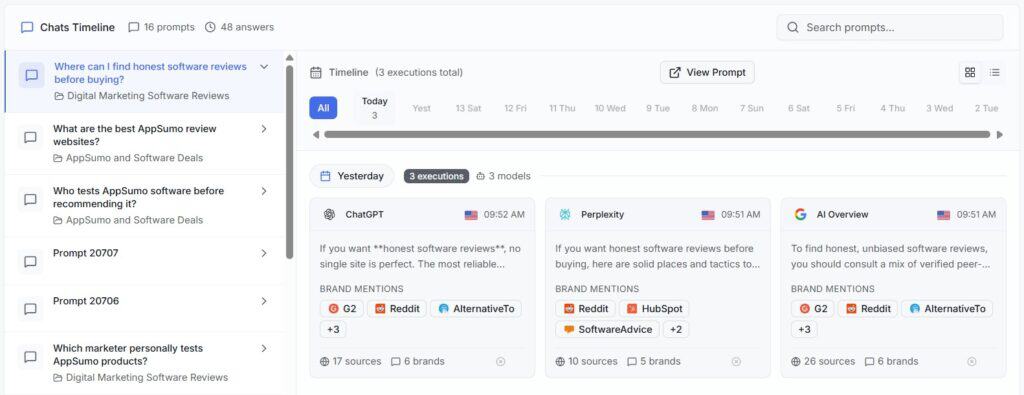
The Chats Timeline

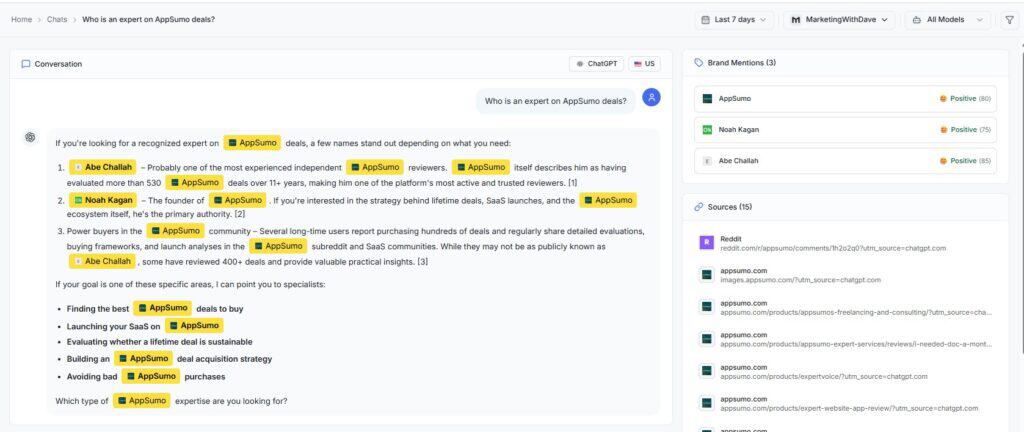
The Chats Timeline shows how AI engines actually responded to your tracked prompts over time. You can see the full answer from ChatGPT, Perplexity, and AI Overviews side by side, along with which brands were mentioned in each response. This gives you a real audit of the AI search landscape in your category rather than just an aggregated score, and it’s useful for understanding the framing and language AI uses when covering your topic area.

Screenshot of a chat conversation with multiple AI and user prompts discussing software reviews, recommendations, and SEO strategies.

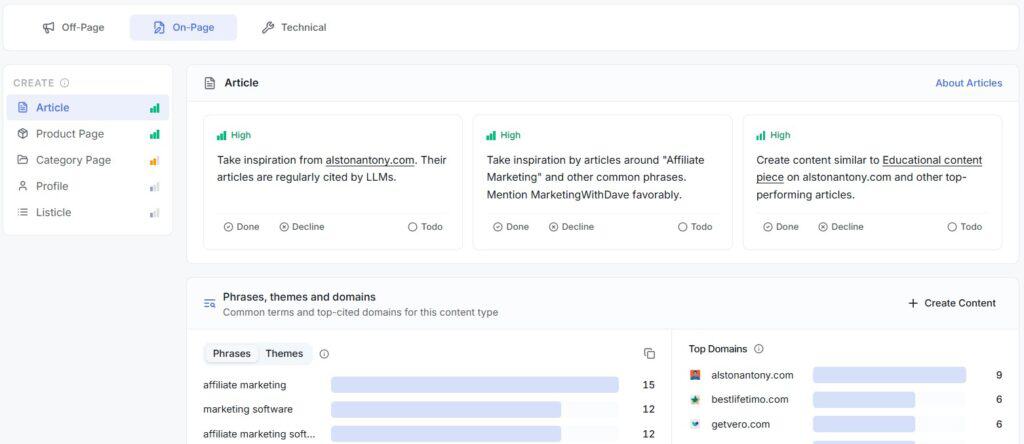
The Recommendations Are Specific

The on-page tab surfaces article types and content formats that AI engines in your category are actively citing, including specific competitor domains to draw inspiration from.

Marketing with Dave logo displayed on a website homepage, emphasizing digital marketing expertise and SEO strategies for online success.

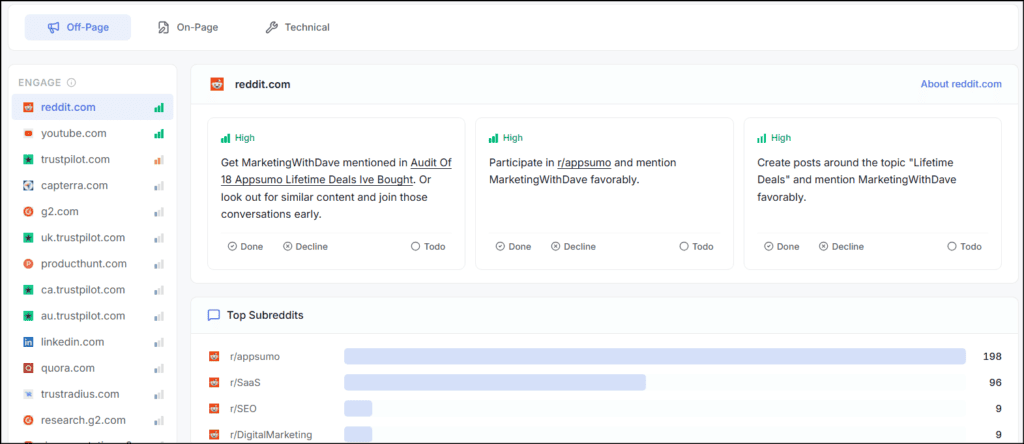
The off-page recommendations may be ZeroRank’s most actionable feature. Rather than simply telling me to build backlinks or improve my brand presence, ZeroRank identifies specific third-party platforms where engagement may improve AI visibility. For MarketingWithDave, that includes Reddit, YouTube, Trustpilot, Capterra, G2, Product Hunt, LinkedIn, Quora, TrustRadius, and others.

Each platform includes specific recommendations. On Reddit, for example, ZeroRank identified relevant existing discussions, subreddits worth participating in, and topics where MarketingWithDave could become part of the conversation. Recommendations are prioritized by potential impact and can be marked Done, Declined, or Todo.

This turns off-page AI optimization from “build your brand in more places” into an actual work queue.

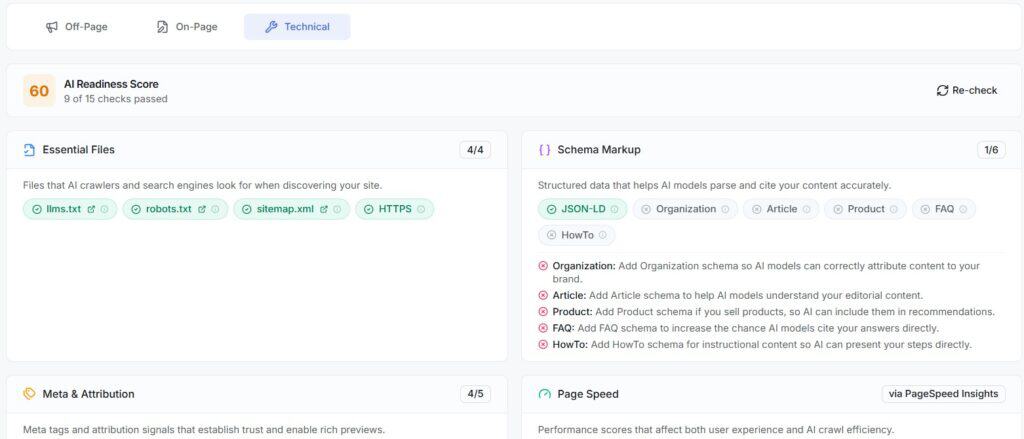
Technical AI Readiness Score

MarketingWithDave.com scored 60 on ZeroRank’s AI Readiness Score (9 of 15 checks passed). The good news: essential files are covered, including llms.txt, robots.txt, sitemap.xml, and HTTPS. The gaps are in schema markup: Organization, Article, Product, FAQ, and HowTo are all missing. Each gap includes a plain-language explanation of why it matters for AI citation accuracy, which makes this more actionable than a generic audit score.

Marketing with Dave logo displayed on a website header, emphasizing digital marketing expertise and online branding services.

Source Gap Analysis

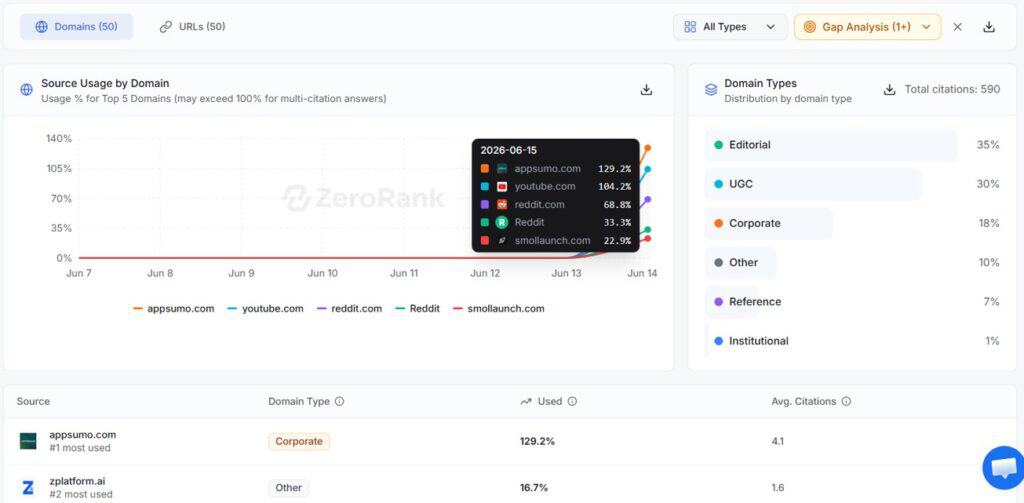
The Sources view is one of the more strategically useful parts of the platform. It shows which domains AI engines are pulling from in your category, usage percentages, and average citations per answer. For my topic area, appsumo.com was the most-cited source at 129.2% usage (meaning it appears in more than one citation per answer on average), followed by youtube.com at 104.2% and reddit.com at 68.8%. MarketingWithDave.com didn’t appear at all. That’s a clear signal about where to focus outreach and content placement efforts.

Marketing with Dave logo on a website header, featuring a professional design with a focus on digital marketing and SEO strategies.

What I Liked and What Needs Work

What WorkedWhat Needs Work
Full control over topics and prompts you want to trackOnboarding didn’t recognize AppSumo purchase on first login
Chats Timeline showing actual AI responses side by side per promptNo option to create a topic without auto-generating prompts first
Automatic competitor tracking with brand merge suggestions, no cap on brandsContent generation credits not included at Tier 1 or Tier 2
On-page, off-page, and technical recommendations with clear priority levelsWorkflows locked to enterprise ($499/month, no AppSumo tier includes it)
Technical AI readiness score with specific, actionable schema gapsWebsite model access messaging doesn’t match AppSumo tier inclusions
Source gap analysis showing exactly which domains AI is citing in your categoryThree-model limit at Tier 1 requires choosing which engines to track

Pricing and Plans

ZeroRank is available on AppSumo as a lifetime deal across six tiers, priced from $69 to $1,199. The main differences across tiers are the number of brands and prompts you can track, how many AI models you can run simultaneously, and whether content generation credits are included (Tier 3 and above come with a one-time credit bundle).

Tier 1 at $69 covers the full monitoring, recommendations, and source intelligence features with access to all AI models (three active at once). Content generation and Workflows are not part of any AppSumo tier.

ZeroRank’s regular monthly pricing starts at $89/month, which means Tier 1 pays for itself in under a month against list price. If you’re an agency tracking multiple client brands, the higher tiers scale accordingly.

Bottom Line

Most AI visibility tools tell you whether your brand appears in AI-generated answers. ZeroRank goes a step further by showing which brands are being recommended instead, where your visibility gaps exist, and what actions may help improve your presence.

The biggest challenge with ZeroRank is not learning the interface but learning how to think about prompts and topics. Once that clicks, the platform becomes much easier to understand and significantly more valuable. The ability to monitor specific questions, see the brands and entities being mentioned, review supporting sources, and identify competitive gaps makes the insights far more actionable than many AI visibility tools I have tested.

If your goal is simply to track rankings, there are plenty of SEO tools that already do that. If you want to understand how AI platforms are answering questions in your industry, who they are recommending, and why your brand may be missing from those conversations, ZeroRank offers a compelling approach.

See the current AppSumo deal for ZeroRank

This content is for educational purposes and reflects my experience, review of the product, and current publicly available deal information. Always evaluate tools based on your specific business needs, goals, and workflows before making a decision.

Looking for more marketing software reviews? See my full list of marketing tools and software I recommend.

ZeroRank Review: Find Out Why AI Recommends Your Competitors Read More »

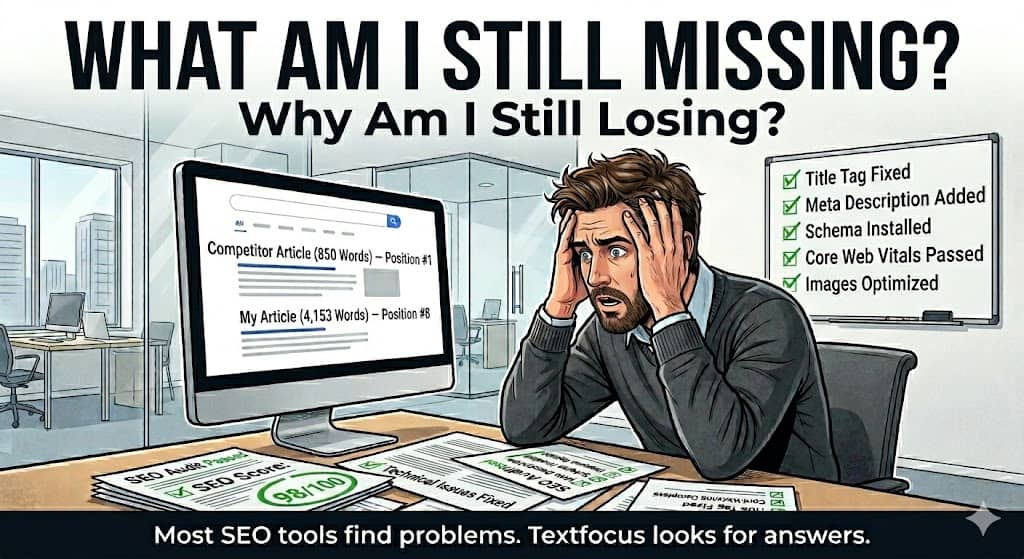
A frustrated man sitting at a desk with SEO and content analysis papers, looking at a computer screen displaying article metrics, with a checklist of SEO fixes on a whiteboard behind him.

Textfocus Review: Semantic SEO, EEAT, and GEO Analysis Tool

Reading Time: 9 minutes

Most SEO tools answer the wrong question.

A frustrated man sitting at a desk with SEO and content analysis papers, looking at a computer screen displaying article metrics, with a checklist of SEO fixes on a whiteboard behind him.

They tell me my title tag is too long, my meta description is missing, or my page speed needs work. All true. None of it explains why a thinner page with weaker writing is sitting above mine in the search results, or what I would need to change to close that gap.

Textfocus has a different approach. Rather than running down a technical checklist, it analyzes a page through three lenses that most on-page tools ignore entirely: semantic relevance (how well your word choices match what ranking competitors are actually using), EEAT signals (the Experience, Expertise, Authoritativeness, and Trustworthiness factors Google uses to evaluate content quality), and GEO readiness (how well AI search engines and LLMs can parse and cite your page). That combination provides a perspective on content quality and AI visibility that traditional crawl reports simply cannot offer.

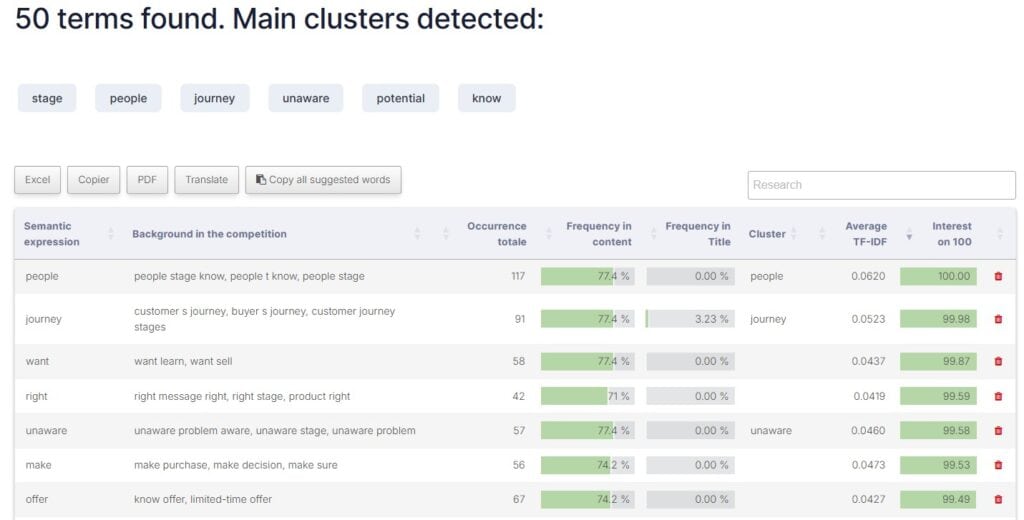
To find out whether the reports were genuinely useful or just impressive-looking dashboards, I put my 5 marketing awareness stages blog post through every major tool in the platform. Some of what came back confirmed things I already suspected. A few findings stopped me cold, including one about my table of contents that I will get to shortly.

Here is an honest account of what I found.

Affiliate disclosure: If you purchase through my link, I may earn a small commission at no additional cost to you. I only share tools I have used myself.

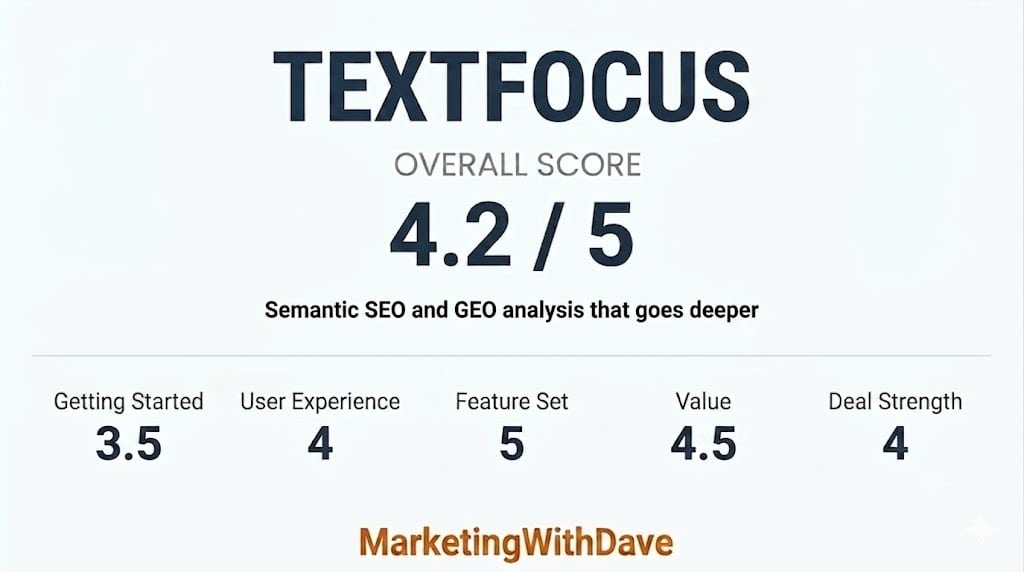
Getting Started 3.5 User Experience 4 Feature Set 5 Value 4.5 Deal Strength 4 MarketingWithDave.

See how I rate software tools

Start Using Textfocus Today

The 30-Second Decision

If you create content for SEO and want a tool that does more than tell you to “add your keyword to the title,” Textfocus is worth your attention. It runs a full semantic analysis of any individual published page against real competitors in Google, scores your content for EEAT and GEO/AI readiness, and gives you specific word-level gaps to close. It is genuinely more thorough than most on-page tools I have used at any price.

The catch is that the interface takes some getting used to and the onboarding experience is thin. Once you are past that learning curve, though, the reports are dense with signal that you can act on right away.

What impressed me most: Semantic Analysis

Biggest weakness: Workflow and navigation

Is Textfocus Right for You?

You will likely love it if…You might struggle if…
You publish long-form SEO content and want to close semantic gaps vs. ranking competitorsYou are looking for a simple set-and-forget grading tool with a clean checklist
You care about GEO / AI search optimization and want a score you can track over timeYou need project folders, team workflows, or whole-site crawling out of the box
You want EEAT diagnostics broken into Experience, Expertise, Authority, and TrustworthinessYou are a non-technical user who finds report-heavy tools overwhelming
You need fully localized English labels and date formatting out of the box

Why I Bought Textfocus

I have been writing about content marketing and SEO at MarketingWithDave.com for years, and I am always looking for tools that help me diagnose what is actually wrong with a page rather than just confirming what I already know. Most on-page SEO tools tell you to optimize your title tag and add your keyword to the first paragraph. Textfocus promises to go deeper: semantic coverage analysis using TF-IDF and competitive benchmarking, EEAT scoring, and a separate GEO/AI readiness score that matters more every month as AI search grows.

I recognize a tool with genuine diagnostic depth when I see one. Textfocus looked like the real thing, so I picked it up.

What Textfocus Actually Does

A professional marketing consultant working on a laptop with digital marketing charts and analytics on the screen, representing digital marketing strategy and SEO analysis.

Textfocus is a page-level SEO and GEO analysis tool built by Christophe Hilmoine, a solo bootstrapped developer based in France who has been refining this product since 2016. You submit a single URL with a target keyword and it returns a layered set of reports. You can also load a CSV file to submit multiple URLs in a batch, though this still produces individual per-page analyses rather than a site-wide crawl. The tool is built around depth on one page at a time, not breadth across an entire domain.

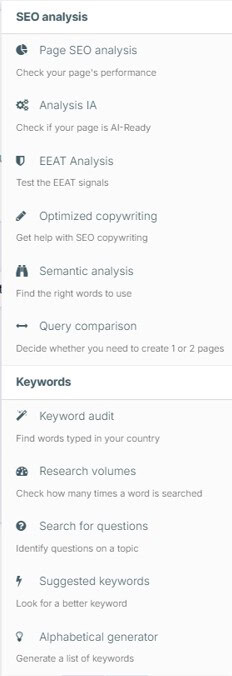
The main tools available from the navigation menu are:

  • Page SEO Analysis — the core on-page audit covering technical and content factors
  • Analysis IA — the GEO/AI Readiness report that evaluates how well AI crawlers and LLMs can parse your page
  • EEAT Analysis — a dedicated report scoring Experience, Expertise, Authoritativeness, and Trustworthiness
  • Optimized Copywriting — a writing assistant that generates content direction based on your target keyword
  • Semantic Analysis — finds the right words to use based on competitor benchmarking
  • Query Comparison — helps you decide whether a topic warrants one page or two, useful for avoiding keyword cannibalization
  • Keyword Audit, Research Volumes, Search for Questions, Suggested Keywords, Alphabetical Generator — a set of keyword research utilities

The analysis engine is the star of the show. The keyword research utilities are useful supplements.

My Experience With Textfocus

To put this review on solid ground, I ran a single page through every major Textfocus tool. The target keyword was “five awareness stages.” It is a 4,153-word post with 32 unique internal links (most of those are in the header and footer), a well-organized heading hierarchy, and valid JSON-LD structured data. A solid page to stress-test a diagnostic tool against.

Here is what the reports actually surfaced.

The Page SEO Analysis: Thorough and Mostly Right

The SEO Page Analysis report came in at 53%, which sounds low until you look at what is being measured. The tool flagged my meta title at 99 characters and correctly called it too long, with an AI-suggested alternative of “5 Awareness Stages Explained – Marketing Guide” that I may actually use. It flagged my meta description at 171 characters and suggested trimming it under 170. It noted that 13 H2 tags is more than the recommended maximum of 10, and flagged that my page has too few first-person pronouns for content claiming hands-on experience.

Marketing with Dave logo on a website header, representing digital marketing expertise, branding, and online growth strategies for businesses.

What makes the SEO report more useful than most is the competitive context it provides alongside the score. My page scored 53/100 against a competitor average of 42/100 for the same keyword. My relevant word count was 2,604 against a competitor average of 746. In other words, 53% is not a disaster — it reflects that I am competing against thinner content and my main gaps are fixable technical items, not content depth.

The Semantic Analysis: Where Textfocus Earns Its Price

The Semantic analysis report that genuinely separates Textfocus from most on-page tools. Rather than checking keyword density, it benchmarks every significant term on your page against the range of occurrences across competitors who are actually ranking.

For my page, it found that the word “journey” appeared only once but competitors use it 3 to 38 times in the ideal range. “Potential” appeared zero times against a benchmark of 4 to 15. “Content” appeared 72 times, which is nearly double the maximum competitor occurrence of 38. These are specific, actionable gaps and excesses that I can address in a content refresh without guessing at what to change.

A professional digital marketing consultant analyzing a marketing performance dashboard with key metrics and data clusters for optimizing marketing strategies.

The semantic score came in at 67% with an interest score of 89/100 in the competitive benchmarking. That combination tells me the content signals are strong overall — the remaining gaps are specific terms to weave in, not a wholesale rewrite.

The EEAT Analysis: Honest and a Little Uncomfortable

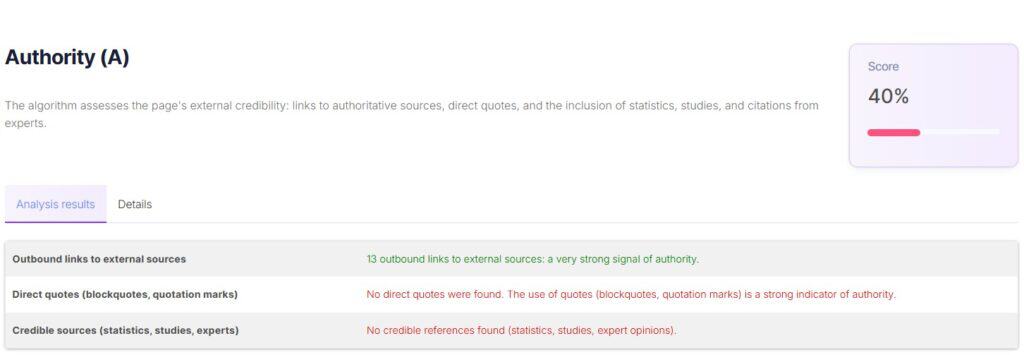
The EEAT analysis report broke down as follows: Experience 70%, Expertise 79%, Authoritativeness 40%, Trustworthiness 90%. The authoritativeness score is the weak point, and the tool is specific about why: no direct quotes or blockquotes detected, no statistics or expert citations found, and no structured data linking to an author profile page.

A professional digital marketing consultant working on a laptop with marketing analytics charts, representing digital marketing strategy, SEO, and online advertising expertise.

Those are real gaps for any content site trying to build topical authority, and that level of specificity is useful. The trustworthiness score of 90% reflects HTTPS, no keyword stuffing, clean sentence length averaging 16 words, and legal pages in place — the baseline trust signals Google looks for.

The Analysis IA (GEO / AI Readiness): The Report I Did Not Expect to Find This Useful

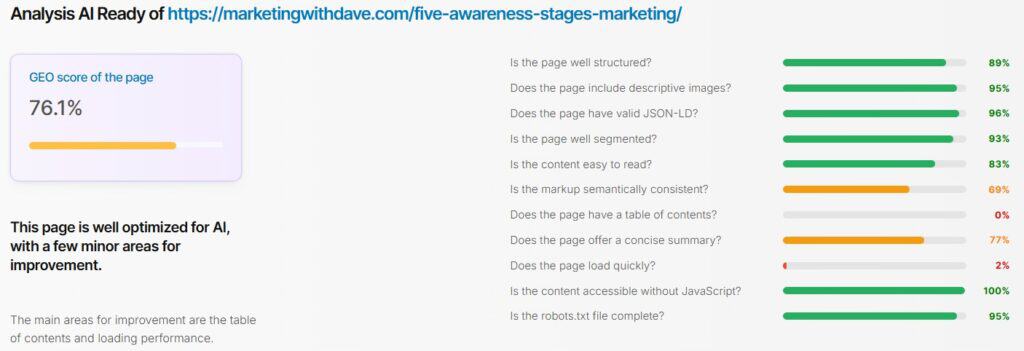
In the AI readiness analysis, the overall GEO score was 76.1%, with strong marks across valid JSON-LD (96%), descriptive image alt text (95%), page segmentation (93%), page structure (89%), and robot accessibility (100%). The two major problem areas were page load performance (2% — slow server response time and blocking JavaScript) and the table of contents (0%).

That table of contents finding is the single most valuable thing Textfocus surfaced for me. My TOC is generated by a JavaScript plugin, which means it is invisible in the raw HTML. AI crawlers and LLMs parse the static source, not the rendered output. They cannot see my TOC at all. The fix is either switching to a server-side rendered TOC or tagging the existing one with a recognizable aria-label or id attribute that bots can identify.

That is the kind of insight I would not have found in any traditional SEO tool, and it has a direct bearing on how AI search engines like Perplexity and ChatGPT Search choose to cite and structure answers from pages like mine.

Start Using Textfocus Today

What Needs Work

Textfocus has real rough edges that are worth knowing about before you buy.

The navigation is the biggest friction point. The Tools menu and the Account / My Analysis area both show your saved analyses, which is confusing initially. Running a new analysis requires going through the Tools menu, not the account area — and this is not obvious at first. Once you are inside a specific tool, the navigation bar is no longer anchored to the top of the page, so getting to another tool requires scrolling back up or clicking away. At standard laptop resolution, the last two items in the Tools menu — Suggested Keywords and Alphabetical Generator — are cut off.

There are occasional untranslated French labels and non-localized date formats scattered through the reports and interface. Given that this is a bootstrapped solo product built in France, it is understandable context rather than a red flag, but English-speaking users will notice it.

The keyword input has some quirks. Pasting a list of keywords from an external tool can import invisible characters that register as separate entries, requiring manual cleanup. The field behavior is also inconsistent — sometimes tabbing confirms your entry, sometimes it drops it, and you need to press Enter. Small things individually, but they add up when you are trying to build a repeatable workflow.

There is no project or campaign layer. Each report lives in its own area and you re-find past analyses through separate tabs for each tool. Running a full diagnostic on one page means opening each tool to run the analyses, and tracking the results yourself. A project wrapper that could kick off all reports for a given URL at once and present the results together would make this feel like a significantly more complete platform.

Two additional polish issues: the Performance score box in the main dashboard took several times before it finally loaded during my testing, and PDF exports are given generic file names that become difficult to tell apart once you have exported two or three reports. Neither is a deal-breaker, but both are the kind of thing you notice in day-to-day use.

The Optimized Copywriting tool accepts only your target keyword, a word count target, and a language selection. It generates a content direction or brief rather than actually drafting the article. That is useful but more limited than the tool name implies.

Textfocus Inside Your AI Assistant

One capability worth calling out separately: Textfocus now supports MCP (Model Context Protocol), which means you can connect it directly to Claude, ChatGPT, or other AI assistants that support MCP integrations. In practice this means you can ask your AI assistant to run a Textfocus page analysis, look up related keywords, or check an SEO score without leaving the chat interface. For anyone building AI-assisted content workflows, that is a meaningful time saver. Plan 1 includes 30 MCP API calls per day, with higher tiers adding more.

Bottom Line

Textfocus does something most SEO tools do not: it treats a published page as a system with multiple diagnostic layers and benchmarks each one against what is actually ranking for your keyword. The semantic gap analysis is specific enough to act on immediately. The EEAT breakdown tells you exactly which signals are missing and why. The GEO/AI Readiness report surfaces problems — like a JavaScript-rendered table of contents being invisible to AI crawlers — that traditional SEO tools do not even look for. And the MCP integration means you can pull these insights directly into an AI assistant workflow without switching tabs.

The interface friction and lack of a project layer will slow down anyone trying to build a systematic audit workflow. These feel like the natural constraints of a bootstrapped product that has prioritized analytical depth over UX polish — a trade-off I can live with at this price point.

If you write content for search and want diagnostic depth that goes well beyond keyword density checks and title tag advice.

Start Using Textfocus Today

This content is for educational purposes and reflects my experience, review of the product, and current publicly available product information. Always evaluate tools based on your specific business needs, goals, and workflows before making a decision.

Looking for more marketing software reviews? See my full list of marketing tools and software I recommend.

Textfocus Review: Semantic SEO, EEAT, and GEO Analysis Tool Read More »

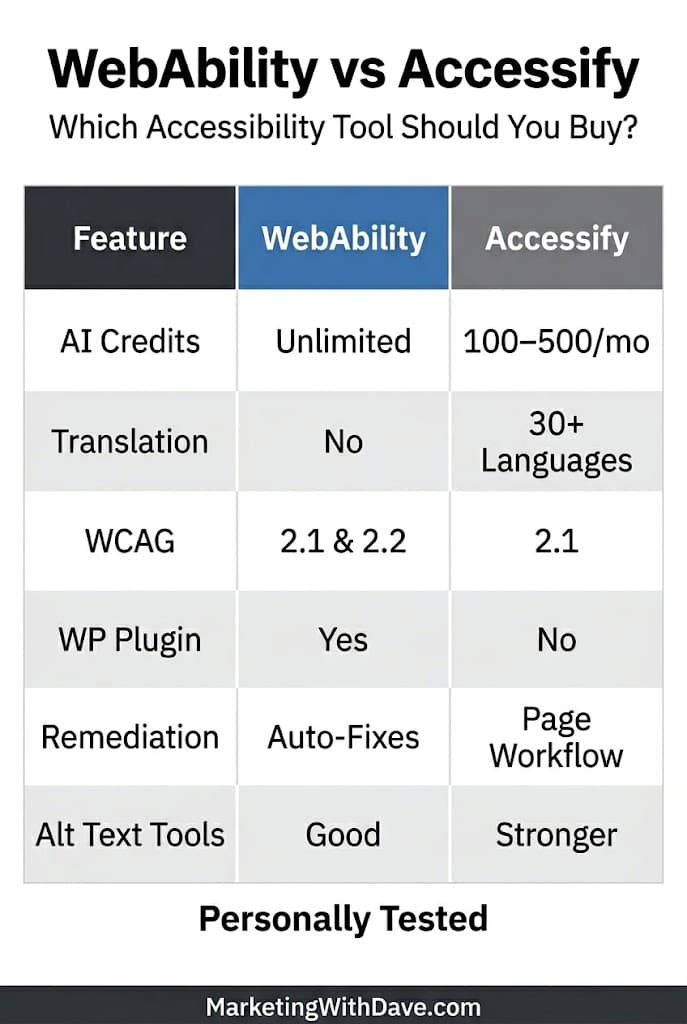
AI Credits, translation, WCAG, WP plugin, remediation, and alt text tools comparison chart for WebAccessibility vs Accessibility.

WebAbility vs Accessify: Which Accessibility Tool Should You Buy?

Reading Time: 7 minutes

Two web accessibility tools are live on AppSumo right now, and if you have been looking for a way to get your website closer to WCAG and ADA compliance without paying enterprise-level monthly fees, both deserve a look. But they are very different products at very different stages of development.

WebAbility.io is a tool I have already purchased and tested on this site. You can read my full WebAbility review. Accessify is a less mature entrant offering similar territory but with a noticeably narrower feature set and an AI credit model that limits how much automated work you can do per month.

This comparison is for website owners who are weighing these two tools side by side and want a practical, practitioner-level read on where they differ.

WebAbility offers broader accessibility coverage, automatic remediation, and fewer usage restrictions, while Accessify’s strengths are alt text management and built-in translation.

If you are…Choose
A solo site owner wanting a full-featured accessibility stackWebAbility
A WordPress, Shopify, or Wix user on a tight budgetWebAbility
A developer wanting source-level fix guidanceWebAbility
An eCommerce site owner wanting better image alt text managementConsider Accessify
Running multiple sites and need more domains per dollarCompare tiers carefully
An agency wanting white-label reportsWebAbility

The Quick Version

WebAbility is the more mature, feature-rich product. Its biggest practical advantage is automatic remediation of certain accessibility issues, allowing some problems to be addressed without manual intervention.

Accessify is newer with no AppSumo reviews yet after being out for a week. Its standout feature is AI-powered image alt text generation and management, which it handles well. But most functions run on a monthly AI credit allowance, and the platform is more limited overall. The audit report it generates is functional but sparse compared to what WebAbility produces.

What Each Tool Actually Does

WebAbility.io is built around a scanning and enhancement engine that detects accessibility barriers across content, navigation, forms, and media. It auto-fixes issues that are safely automatable, including alt text, ARIA labels, contrast, and focus order, then flags everything else for human review rather than silently claiming to fix it. The widget runs in a Shadow DOM so it does not conflict with your site’s existing scripts or styles. Fixes persist even if the widget is hidden.

The platform also includes an MCP chatbot that connects directly to Cursor, Claude Code, or your IDE to walk through source-level fixes. That is not something most small-site accessibility tools offer at any price.

Accessify positions itself around WCAG 2.1 scanning and AI-assisted remediation. Its strongest feature is image alt text: you can manage, generate, and bulk-apply AI-written alt text for site images directly from the dashboard. It also includes a no-code widget, real-time page scanning, accessibility profiles for visitors with different needs, and translation into 30+ languages. However, almost every AI-powered action consumes monthly credits, which resets each month within the limits of your tier.

Setup Experience

One area where the difference between these tools became obvious was installation.

WebAbility offers a native WordPress plugin. I had it installed, connected, and scanning in just a few minutes.

Accessify does not currently offer a WordPress plugin. During my testing, I initially attempted to deploy it through Google Tag Manager, but verification failed because the platform could not detect the installation correctly. I ultimately got it working by adding the code directly through the WPCode plugin.

This is not a deal-breaker, but it does create more friction for non-technical site owners. If ease of implementation matters to you, WebAbility currently has the advantage.

Accessibility Report Comparison

Both tools generate accessibility reports. The quality difference is meaningful.

WebAbility’s audit report identifies issues by page, categorize them by severity, show what has been auto-fixed versus what needs human attention, and include a compliance score. The reports are designed to be actionable and shareable.

I ran Accessify’s audit report against the MarketingWithDave.com posts index page. The report found 213 total issues: 104 critical, 2 medium, 66 low, and 41 informational. The issue breakdown is essentially one long table with truncated descriptions. Nearly all 104 critical issues were color contrast failures (both standard and enhanced), along with link contrast and one missing link name. The report format is clean enough but does not provide fix-level guidance or distinguish between what is automatable and what requires human judgment.

For a first-pass audit, Accessify’s report is useful. For understanding what to do next, WebAbility’s reporting is more actionable.

One workflow difference I noticed during testing is that Accessify encourages a more page-centric approach. While it supports bulk operations, remediation actions are generally performed against specific pages, and bulk processing is limited to batches of up to 20 pages at a time. Given the platform’s monthly AI credit limits, this approach may be intentional to help users manage credit consumption.

WebAbility is not entirely different in that many accessibility issues still require page-level review. However, its site-wide scanning, broader reporting, and automatic remediation capabilities create a workflow that feels less dependent on manually working through pages one by one.

Pricing Comparison

This is where the structural differences become most visible. WebAbility’s AppSumo deal scales by number of websites. Accessify’s deal scales by websites, AI credits, and monthly widget impressions, which creates meaningful limitations at lower tiers.

FeatureWebAbility (Plan 1)WebAbility (Plan 2)Accessify (Tier 1)Accessify (Tier 2)Accessify (Tier 3)
AppSumo price$59$118$49$139$239
Websites included24136
AI credits per monthUnlimitedUnlimited100250500
Monthly widget impressions per siteUnlimitedUnlimited25,00075,000200,000
Compliance standards coveredADA, WCAG 2.1 & 2.2, Section 508, AODA, EN 301 549, IS 5568SameWCAG 2.1SameSame
Accessibility statementIncludedIncludedIncludedIncludedIncluded
AI-generated alt textIncludedIncludedIncluded (uses credits)SameSame
Advanced dashboard analyticsIncludedIncludedTier 2 and aboveIncludedIncluded
Full customizationIncludedIncludedTier 3 onlyNot includedIncluded
Stacking codesUp to 5Up to 5N/A (tier-based)N/AN/A

The credit model in Accessify is worth pausing on. At Tier 1, 100 AI credits per month limits how many AI-assisted fixes or alt text generations you can run in a billing cycle. WebAbility does not have this constraint. For websites with a lot of images or frequent content updates, that matters.

The impression cap is also a real consideration. At 25,000 monthly widget impressions per site on the Tier 1 plan, a modest blog with consistent traffic could bump against that ceiling. WebAbility places no impression limits on its widget.

Feature-by-Feature Comparison

FeatureWebAbilityAccessify
Real-time WCAG scanningYesYes (WCAG 2.1)
WCAG 2.2 coverageYesNo
Automatic remediation of qualifying issuesYesNo
AI-generated accessibility fixesYesYes (uses credits)
AI-generated image alt textYesYes (primary feature, uses credits)
Bulk alt text management dashboardYesYes
Accessibility widgetYesYes
Widget can be hidden (fixes still active)YesNo
Accessibility profiles (low vision, ADHD, etc.)YesYes
Voice navigationYesYes
30+ language translationNoYes
Accessibility statement generatorYesYes
Audit reportYes (detailed, actionable)Yes (summary-level)
Fix/advisory/needs-review triageYesNo
Monthly impression limitsNoneYes (tier-based)
Monthly AI credit limitsNoneYes (100/250/500 per tier)
Browser extensionYesNo
Developer MCP chatbot (IDE integration)YesNo
WordPress plugin (native)YesYes
Shopify, Webflow, Wix supportYesYes
GoHighLevel integrationNoYes
Squarespace, WooCommerce, MagentoYesYes
White-label PDF reportsYes (agency add-on)Branded PDF included
Advanced dashboard analyticsYesTier 2 and above
Full customizationYesTier 3 only
GDPR compliant / DPA availableYesNot confirmed
No AI training on your dataConfirmedNot confirmed
Source code accessNoNo
Real AppSumo reviews240 (new listing)
Compliance: ADA, WCAG, Section 508, AODAYesWCAG 2.1 only listed

Where Accessify Has an Edge

Image alt text workflow. Accessify built a dedicated dashboard for managing alt text across your entire site. You can view all images, filter by status, generate AI alt text in bulk, and apply it from one place. This is genuinely well-implemented and slightly more refined than WebAbility’s alt text approach.

Digital graphic promoting Dave's marketing strategies with icons of books, calculators, and NPS framework, emphasizing marketing tools, book summaries, and customer satisfaction metrics.

Translation. Accessify translates your site into 30+ languages through the widget. WebAbility does not currently offer built-in translation.

Tier 3 pricing for multi-site. At $239 for six domains, Accessify’s Tier 3 offers a competitive per-site cost if you manage multiple properties and can work within the credit and impression limits.

Where WebAbility Has a Clear Advantage

No usage caps. WebAbility does not throttle your AI credits or cap monthly widget impressions. Run as many scans, generate as many fixes, and serve as many visitors as your site attracts.

More compliance standards. WebAbility covers ADA, WCAG 2.1 and 2.2, Section 508, AODA, EN 301 549, and IS 5568. Accessify lists WCAG 2.1 as its standard.

Fix triage. WebAbility distinguishes what it has auto-patched from what is advisory and what still needs human review. Every issue is bucketed so you know exactly where you stand. Accessify does not offer this level of transparency in its reporting.

Developer tools. The MCP chatbot that integrates with Cursor and Claude Code is a meaningful differentiator for anyone who wants to fix issues in source rather than just overlaying them.

Browser extension. WebAbility includes a browser extension. Accessify does not.

Proven user base. WebAbility has been on AppSumo long enough to collect 24 reviews and respond publicly to detailed technical questions about GDPR, screen reader compatibility, widget architecture, and overlay concerns. That Q&A thread is genuinely useful reading before you buy either tool.

Widget architecture. WebAbility’s widget runs in a Shadow DOM, preventing it from conflicting with your site’s existing styles, scripts, or extensions. If a visitor is already using JAWS, NVDA, or VoiceOver, WebAbility detects it and backs off rather than interfering.

GDPR clarity. WebAbility has published detailed answers on data handling, subprocessors, server locations, and AI training policies. All core data is stored on servers in Germany, IP addresses are discarded on arrival, and AI processing runs through zero-data-retention endpoints. Accessify has not addressed these questions publicly.

The Honest Take on Overlays

Both tools use a widget-based approach, which puts them in the same category that has drawn scrutiny from accessibility advocates pointing to products like AccessiBe and UserWay. This is worth understanding before you buy either one.

WebAbility has addressed this directly and at length in their AppSumo Q&A. They are transparent about what their tool fixes automatically versus what it flags for human review. They explicitly state that no widget alone equals EAA or ADA compliance. The honest framing is: accessible underlying code, plus automated fixes for what is safely automatable, plus manual audit for what is not, plus a VPAT when needed. Their tool is designed to be a foundation and a bridge, not a magic compliance badge.

Neither tool replaces a manual accessibility audit for sites that face real compliance risk. Both are useful starting points for small business website owners who want to improve accessibility without hiring specialists.

The biggest difference I noticed was not compliance coverage or reporting. It was how much manual work each platform expects from the site owner after issues are identified.

My Recommendation

If you are choosing between these two tools today, WebAbility is the clearer recommendation for most website owners. It is more mature, more transparent, covers more compliance standards, imposes no usage caps, includes developer tools, and has a real track record on AppSumo.

Accessify has genuine promise, especially around image alt text management and multi-language translation. If those features are your top priority and you are comfortable buying a tool with no user reviews yet, Tier 3 could make sense for a multi-site portfolio.

For my website, I currently use WebAbility. I wrote a full hands-on WebAbility review if you want more depth on what the real-world experience looks like before you buy.

See the current AppSumo deal for WebAbility

See the current AppSumo deal for Accessify

Affiliate disclosure: If you purchase through my links, I may earn a small commission at no additional cost to you. I only share tools I have personally used or thoroughly researched.

This content is for educational purposes and reflects my experience, review of the product, and current publicly available deal information. Always evaluate tools based on your specific business needs, goals, and workflows before making a decision.

Looking for more marketing software reviews? See my full list of marketing tools and software I recommend.

WebAbility vs Accessify: Which Accessibility Tool Should You Buy? Read More »